

Best Email and Phone Number Finder Tools in 2026 (Verified Picks)
Most "email and phone number finder" tools look great right up until you run them at 500-1000 emails/day. Then the ugly stuff shows up: catch-all domains, stale records, and credit systems that charge you for dead ends.
We wrote this for operators who care about two things: staying under 5% hard bounce and keeping cost per usable contact predictable.
Look, if your tool choice makes you guess, you're already losing.
If you're:
- running outbound at 500-1000 emails/day
- trying to keep hard bounces under 5%
- and you need direct dials without paying ZoomInfo-style contracts
...your decision comes down to data freshness, catch-all behavior, and whether pricing punishes you for scale.
Hot take: if your average deal size is in the low five figures (or less), you don't need an "all-in-one GTM suite." You need clean contact data, predictable credits, and a workflow that helps you find emails and phone numbers without wrecking your domains.
Our picks (TL;DR) for an email and phone number finder
If you only trial three tools, trial these - in this order:

- Prospeo - accuracy-first contact data (email + mobile)
- Use this if: you want the most reliable path to <5% bounce plus mobile fallback when email is risky (catch-all, role changes, list decay).
- Best fit: as the data layer alongside your CRM + sequencer. If you also want a ZoomInfo-style "suite," keep your stack and just fix the data problem.
- Avoid surprises note: the free tier's genuinely usable (75 emails + 100 extension credits/month), and the unit economics stay clean as you scale (about ~$0.01/email, 10 credits/mobile, 7-day refresh).
- SignalHire - best value when you have a team
- Use this if: you've got multiple reps/researchers and you refuse to pay a per-seat tax. SignalHire does unlimited users with shared credits.
- Avoid surprises note: the "unlimited" package still has a fair-usage ceiling, so budget it like a real plan, not a magic wand.
- Hunter - best email-first + verification economics
- Use this if: you treat the finder as an email engine and you want verification baked into the same credit pool.
- Avoid surprises note: if your motion is "phones first," Hunter isn't the hammer - use it for email sourcing + verification, and get mobiles elsewhere.
One rule that saves money every time: ignore database-size headlines. Pick based on cost per usable contact (deliverable + verified) and how the tool behaves on catch-all domains.
Side-by-side email and phone number finder comparison (pricing, credits, phones, caps)
Most teams overspend because they compare tools like Netflix plans. The right comparison is: what counts as a credit, when you get charged, and what phone limits look like--especially if you're trying to find emails and phone numbers at scale.
Table 1 - Pricing mechanics (mobile-friendly)
| Tool | Starting price (monthly) | Free tier | Charged on success? | Users |
|---|---|---|---|---|
| SignalHire | $139/mo (Emails & Phones) | 5 credits (10 w/ ext) | Yes | Unlimited users |
| Hunter | $49/mo | 50 credits/mo | Mixed (by action) | Unlimited users |
| RocketReach | $119/mo | 5 lookups/mo | No (lookup-based) | Seat-based |
| GetProspect | $49/mo | 50 valid + 100 verif | Yes (valid only) | Unlimited users (workspace) |
| ContactOut | $79/user/mo | 40 emails + 3 phones | Varies by plan | Seat-based |
| Salesforge | $40/mo | Free extension install | N/A (outreach-first) | Unlimited users |
Table 2 - Data + phone model (mobile-friendly)
| Tool | Email credits model | Phone/mobile model | Refresh cadence | Caps / transparency |
|---|---|---|---|---|
| SignalHire | 1 credit when any result returns | Included in plan | 7-10 days | Fair-usage policy limits spending to 5k credits/month |
| Hunter | Search consumes credits on successful finds; Verify = 0.5 credit | Secondary/limited | Not a focus | Clear pricing |
| RocketReach | Lookup consumes even if mediocre | Phones in higher tiers | Not public | Lookup-based |
| GetProspect | Charged when saving valid email | Starter includes 5 phones/mo | Not public | Rollover + "not found" free |
| ContactOut | Annual allowances | Annual allowances | Not public | "Talk to sales" + fair-use |
| Salesforge | Bonus finder (est. ~25-100 reveals/mo) | Bonus finder (est.) | Not public | Treat as add-on |
Enterprise suites (context, not reviewed)
| Tool | Typical buying motion | Why it's different |
|---|---|---|
| ZoomInfo | Annual contract; typically five figures/year | Full GTM suite + governance + strong US depth |
| Cognism / Lusha | Annual contract; typically five figures/year | Enterprise workflows; strong compliance positioning |
| Apollo | Self-serve + per-seat expansion | All-in-one SMB suite; per-seat costs rise fast |
A few sharp edges worth calling out:
- ContactOut's pricing opacity is a budgeting tax. Their pricing flow pushes you to "Talk to us" and references fair use. Public plan breakdowns show $79/user/mo with annualized allowances (often framed around 6,000 emails/year and 600 phones/year). That's fine for light usage, but it isn't built for heavy list-building at 500-1000/day.
- SignalHire's "unlimited" is still a plan with a ceiling. The fair-usage policy limits spending to 5k credits/month. That's plenty for many teams - just don't pretend it's infinite.
- RocketReach charges by lookup. If you hate paying for dead ends, you'll feel that model immediately.

You just read how catch-all domains and stale records wreck deliverability at 500-1000/day. Prospeo's 7-day refresh cycle and 5-step verification keep you under 5% bounce - with 98% email accuracy and 125M+ verified mobiles as your fallback when email is risky.
Get clean emails and direct dials for ~$0.01/contact. No contracts.
How to choose an email and phone number finder (and stay under 5% bounce at 500-1000/day)
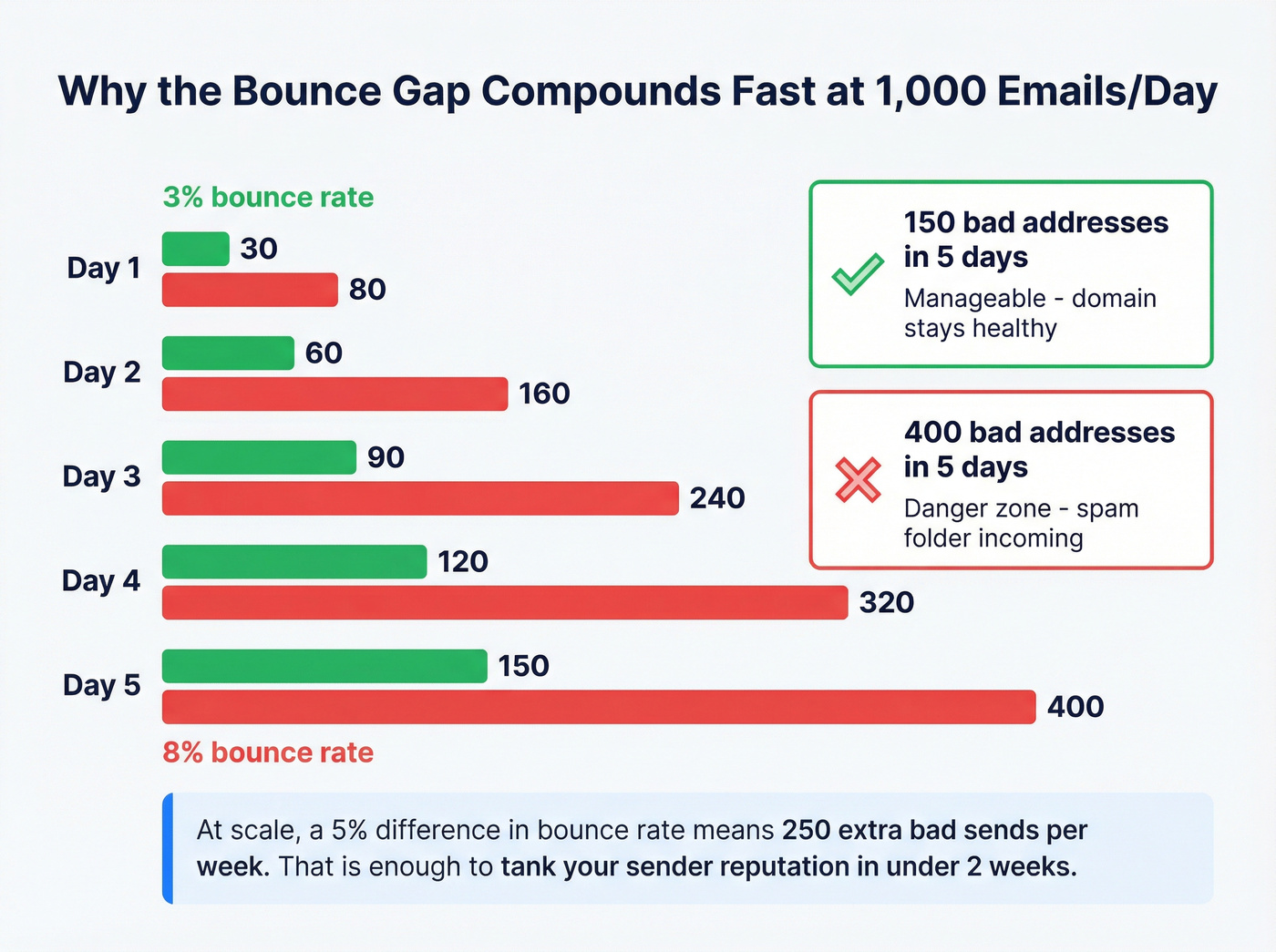
At 1,000/day, deliverability isn't vibes. It's compounding math.
What breaks first at scale
- Domain reputation compounds fast At 1,000/day, the difference between 3% and 8% hard bounce is 30 bad addresses/day vs 80, and that gap adds up fast enough that you'll end up troubleshooting spam placement instead of shipping pipeline.
List decay turns "good lists" into liabilities People change roles. Companies change patterns. Catch-all policies change. If your provider refreshes slowly, you email ghosts and pay for it twice: wasted credits and damaged sender reputation. (More on the mechanics in our B2B contact data decay breakdown.)
"Verified" labels aren't standardized One tool's "verified" is another tool's "risky." Catch-all domains are where this gets painful.
Mini-math: cost per usable contact (not cost per lookup)
Use this formula:

Cost per usable contact = total spend / (# deliverable contacts you're willing to send to)
If you buy 1,000 "found" emails but only 920 are deliverable under your policy, your real cost per usable contact is ~9% higher than the pricing page implies. And if you need phones for 15-30% of records (because email is catch-all/risky), phone pricing becomes the hidden line item that blows up your CAC model.
When to use waterfall enrichment (and when not to)
Waterfall enrichment ("try provider A, then B, then C") is great when your priority is match rate and you're cleaning up a messy list.
It's also a fast way to lose accountability.
I've seen teams run a waterfall for "daily sourcing," then spend two weeks arguing about which vendor caused the bounce spike because everything got blended together in one CSV export and nobody kept a clean audit trail.
We like waterfall enrichment for one-off list rescue (old CRM, event lists, stale CSVs). We don't like it as the default for daily outbound because it makes budgeting and deliverability ownership harder. If you're comparing vendors for this approach, see our waterfall enrichment alternatives.
A simple checklist that works
- Refresh cadence: weekly beats monthly. A 7-day refresh keeps your list from rotting between campaigns.
- Catch-all handling: you want more than "unknown." You want scoring + policy controls so catch-all doesn't quietly become 20% of your sends.
- Charging model: "charged on success" only matters if "success" means "usable."
- Seat model: if you've got 5 researchers, per-seat pricing becomes a tax.
If your workflow is "build lists -> verify -> push into Smartlead/Instantly/Lemlist -> monitor bounces daily," you'll feel data quality problems within a week. Pick the tool that makes that workflow boring. (If you want the deliverability side, start with email deliverability and email pacing and sending limits.)

Deliverability reality: catch-all domains, "verified" labels, and bounce math
Catch-all domains are the reason "verified" emails still bounce.

Dropcontact ran a benchmark across 20,000 tests and found 15%-28% of B2B domains are catch-all. That's a huge chunk of the market, not an edge case.
What catch-all means in practice
- The domain accepts mail for any address (or pretends to), so SMTP checks can't confirm a mailbox exists.
- Tools either mark it risky, guess, or use additional signals to score it.
- Your sending policy decides whether catch-all becomes a controlled risk - or a slow-motion domain burn.
In that same benchmark, hard bounce rates varied sharply:
- Hunter: 4.7% hard bounce
- GetProspect: 9.5% hard bounce
That gap's exactly why you can't treat "verified" as a universal standard.
A concrete catch-all workflow (the one that actually keeps you under 5%)
Use a two-lane policy:

Lane A - Safe sends (your main volume)
- Status: verified / high-confidence
- Send volume: normal (500-1000/day)
- Rule: if hard bounce rises above 5%, pause and re-verify the last 48-72 hours of new adds
Lane B - Catch-all / risky (controlled exposure)
- Status: catch-all / unknown / medium-confidence
- Send volume: 10-25% of your normal daily volume
- Rule: send slower, watch bounces daily, and prioritize phone/social touches for this lane
Then do one thing most teams skip: re-verify anything older than 14-21 days before it enters Lane A. (If you need a repeatable SOP, use an email verification list workflow.)
List decay doesn't care about your calendar.
Do / don't for staying under 5%
Do:
- Verify before you send, even if the tool "found" the email.
- Segment catch-all into its own lane with lower volume.
- Use phones as a fallback when email is risky, instead of forcing volume through a risky lane.
Don't:
- Don't blast catch-all results at full volume.
- Don't assume last month's list is safe this month.
- Don't let one vendor's "verified" label decide your sender reputation.
The best email and phone number finder tools (reviews)
Prospeo (Tier 1)
Best for: teams that want the most predictable path to <5% bounce plus direct dials, without contracts.
1-line verdict: If you care about accuracy, freshness, and clean unit economics, this is the easiest "yes" in the category.
Prospeo ("The B2B data platform built for accuracy") is built around data quality instead of feature bloat: 300M+ professional profiles, 143M+ verified emails, and 125M+ verified mobile numbers, refreshed every 7 days (industry average: 6 weeks). Email accuracy is 98%, mobile pickup rate is 30%, and enrichment is strong enough to run as a real RevOps workflow (92% API match rate, 83% enrichment match rate, 50+ data points returned). (If you're also evaluating vendors broadly, compare against our list of B2B data providers.)
Here's the part that actually matters: we've tested tools that look fine on a pricing page, then quietly drift as soon as you run weekly list pulls. A 7-day refresh fixes a lot of that pain because you're not sending to last month's org chart.
Best workflow (what we'd do):
- Build lists in the B2B database (30+ filters): https://prospeo.io/b2b-leads-database
- Run targeted lookups via Email Finder: https://prospeo.io/email-finder
- For catch-all/risky segments, pull direct dials via Mobile Finder: https://prospeo.io/lead-mobile-finder
- Prospect from any website/CRM with the Chrome Extension: https://prospeo.io/contact-finder-extension
- Push into your sequencer via integrations: https://prospeo.io/integrations
Pricing snapshot: Free includes 75 emails + 100 extension credits/month. Paid stays predictable: about ~$0.01/email, and 10 credits per mobile (only when found). Self-serve, cancel anytime, no contracts.
Right around the screenshot below, you'll see what makes it feel operator-built: the extension shows email status labels (so you can separate safe vs risky), a mobile reveal option with the credit cost, and an export flow that doesn't turn your day into spreadsheet cleanup.
SignalHire (Tier 1)
Best for: teams that need emails + phones with shared credits and no seat tax.
Why it wins: SignalHire's commercial model is the headline: unlimited users share credits in one workspace. For agencies and SDR teams with rotating contractors, that's a real advantage. The Emails & Phones plan is $139/mo, and the core mechanic is simple: 1 credit is charged only when at least one email or phone is returned.
Watch-outs (real-world):
- The "unlimited" package has a fair-usage policy that limits spending to 5k credits/month. That's still a lot - just plan for it.
- Teams that run very high volume usually want tighter transparency on refresh and data provenance; you'll feel that once you're doing daily list pulls.
Pricing snapshot: Free includes 5 credits (or 10/month with the extension). Paid starts at $69/mo (emails), $49/mo (phones), or $139/mo (both).
Hunter (Tier 1)
Best for: email-first prospecting where verification economics matter more than phones.
Why it wins: Hunter's still the cleanest "email finder + verifier" combo for SMB workflows. It behaves like a verification layer as much as a sourcing tool, which is exactly how outbound teams operate when they care about bounce rate. (If you're benchmarking options, see our full list of email verifier websites.)
Best workflow: find -> verify -> only send "good" statuses; keep catch-all in a separate lane.
Pricing snapshot: Free includes 50 credits/month. Starter is $49/mo for 2,000 credits, with higher tiers for volume. Verification uses the same pool: Verify = 0.5 credit, and searches consume credits on successful finds (unsuccessful searches are free).
Right around the screenshot below, Hunter's pricing UI makes that unified-credit math explicit (including the Verify = 0.5 detail), which is why it's easy to budget.
RocketReach (Tier 1)
Best for: straightforward lookup workflows where reps want speed and a familiar UI.
1-line verdict: Great for "I need contacts now," less great for "I need predictable cost per usable contact."
Why it wins: RocketReach is the classic fast lookup tool. Pricing is simple: Pro is $119/mo for 250 lookups, and Ultimate is $209/mo for 500, plus a small free tier (5 lookups/month). If your reps hate complexity, they'll like RocketReach.
Skip this if: you're doing heavy research with lots of dead ends. Lookup-based pricing stings when you're exploring niche ICPs.
Watch-outs: A specific review from May 2026 flags that personal Gmail matching became less reliable around March 2026 (valid Gmail addresses, wrong person). If you target founders and rely on personal emails, test this in your niche before you scale.
Pricing snapshot: Because it's lookup-based, you can pay even when the result's mediocre. That's the trade.
GetProspect (Tier 2)
Best for: budget-conscious teams that want to pay only for valid emails and roll credits over.
Why it wins: GetProspect's mechanics are operator-friendly. Starter is $49/mo for 1,000 valid emails and 2,000 verifications, and it includes 5 phone numbers. You're not charged for "not found," and unused credits roll over.
Watch-outs: Phones are limited on lower tiers, so it isn't a phone-first engine. If you need mobiles as a consistent fallback, you'll outgrow the phone allowance quickly.
Pricing snapshot: The "valid emails" model is the headline: you spend credits when you save a valid email, not when you search.
ContactOut (Tier 2)
Best for: extension-driven workflows where individual users need quick reveals.
Why it wins: ContactOut can feel frictionless for reps who live in profile pages and want "give me email + phone" without thinking too hard.
Watch-outs (what users complain about most):
- Budgeting's annoying because pricing is often routed through sales + fair-use language.
- "Unlimited" marketing tends to collide with real caps once teams scale.
- Outdated contacts show up more often than you want when you're sending daily volume.
Pricing snapshot: Public pricing breakdowns show $79/user/mo with annualized allowances (often framed around 6,000 emails/year and 600 phones/year). Treat it like a per-seat tool with yearly limits, not a scale list-building engine.
Salesforge (Tier 3)
Salesforge is an outreach platform first and a contact finder second.
Best for: teams that want an outreach tool and like having a lightweight finder inside the same UI. (For more options, compare cold email outreach tools.)
What to expect: The platform starts at $40/mo (Pro) or $80/mo (Growth). For the finder, expect extension-style reveal caps - often ~25-100 reveals/month unless your account shows otherwise. Treat the finder as a convenience feature, not your core contact engine.
Pricing reality check (credits, seats, "charged on success," and fair-use caps)
Teams don't overspend because they picked the wrong tool. They overspend because they didn't model pricing mechanics against their workflow.
Credit systems: what actually counts?
- Charged on success is the best model for researchers who hit dead ends. SignalHire's "1 credit only when a result returns" is the cleanest version of this.
- Unified credits make verification affordable. Hunter's Verify = 0.5 is why it stays popular with email-first teams.
- Predictable unit economics beat clever bundles. When you can do napkin math, you can scale without surprises.
Seats vs shared workspaces (the hidden multiplier)
Per-seat pricing is how "$79/mo" becomes "why are we spending $1,200/mo?"
If you've got multiple researchers, shared-credit workspaces are usually the better deal.
Fair-use caps: the fine print that kills scale
Fair-use isn't evil. It's just a cap with nicer branding.
If you're sending 500-1000/day, treat fair-use ceilings as hard constraints in your model.
Worked budgeting example (credits -> usable contacts -> phone fallback)
Let's model a real month:
- Sends: 800/day x 20 workdays = 16,000 sends/month
- Deliverability policy: you only send to contacts you consider deliverable
- If your sourcing yields 92% usable contacts, you need: 16,000 / 0.92 ~= 17,400 found to net 16,000 usable
- Phone fallback: if 20% of your list is catch-all/risky, you'll want mobiles for: 16,000 x 0.20 = 3,200 mobiles
Now compare models:
- Lookup-based pricing: you can burn lookups while hunting, then still pay again to verify elsewhere.
- Credit-based + pay-on-valid: you pay closer to usable output, and you can budget phones as a known add-on instead of a surprise bill.
This is why "cheap per month" is meaningless. The only number that matters is cost per usable contact at your send volume.
We've run bake-offs where the "cheapest" tool lost because it forced so much re-verification and list cleaning that the real cost doubled.

Every finder tool on this list charges differently. Prospeo keeps it simple: ~$0.01/email, 10 credits/mobile, and you only pay for verified results. 15,000+ companies already ditched the guesswork - teams book 26% more meetings vs ZoomInfo and 35% more vs Apollo.
Fix the data layer. The rest of your stack will thank you.
FAQ
What's the difference between an email finder and an email verifier?
An email finder generates likely addresses from names/domains, while an email verifier checks deliverability risk using signals like syntax, domain health, mailbox checks, and catch-all behavior. For outbound at 500-1000/day, you typically need both: sourcing without verification spikes bounces, and verification alone doesn't create net-new leads.
How often do "verified" emails still bounce, and why do catch-all domains matter?
Verified emails still bounce because catch-all domains accept mail for any address, which blocks many mailbox-level checks. In a 20,000-test benchmark, 15%-28% of B2B domains were catch-all, and hard bounce rates varied widely (Hunter 4.7% vs GetProspect 9.5%). A practical rule: keep catch-all to 10-25% of daily volume.
Do email and phone number finders charge credits when nothing is found?
Some tools charge only when a result is returned, while others charge per lookup even if the data is weak. As a rule, "charged on success" models reduce wasted spend for research-heavy workflows, and "pay for valid" models are best for list-building bursts. If you're doing niche ICP exploration, avoid pure lookup-based pricing.
What's a good free alternative for finding verified emails and mobile numbers?
For a usable free plan, Prospeo includes 75 email credits + 100 Chrome extension credits per month, with 98% email accuracy and a 7-day refresh, which is enough to run real tests. Hunter's free tier is 50 credits/month and is strong for email-first workflows. SignalHire also has a small free allowance (5 credits, or 10 with the extension) for quick trials.
What's the best email and phone number finder for scale in 2026?
For most outbound teams scaling volume, Prospeo is the best email and phone number finder because it combines 98% verified email accuracy, 125M+ verified mobile numbers, and a 7-day refresh with self-serve, transparent pricing. If you need shared credits across many users, SignalHire's a strong second option; for email-first + verification economics, Hunter's the cleanest pick.
Summary: picking the right email and phone number finder
If you're sending 500-1000 emails/day, the "best" tool isn't the one with the biggest database. It's the one that keeps bounces under control with predictable costs.
Start with Prospeo for accuracy + weekly refresh + mobile fallback, consider SignalHire for shared credits across a team, and use Hunter when your workflow's email-first with verification baked in.