The Best CRM Software for Small Businesses (Honest Picks for 2026)
You're staring at a spreadsheet with 847 rows. Somewhere around row 312, a follow-up slipped through the cracks three weeks ago - a $12,000 deal that went cold because nobody remembered to send the proposal. That's not a productivity problem. That's a systems problem. And it's exactly why CRM software for small businesses exists.
About 30% of B2B contact data decays every year. People change jobs, companies rebrand, emails bounce. A spreadsheet doesn't tell you any of that - it just sits there, quietly rotting.
The global CRM market has surpassed $57 billion, and there are hundreds of options. Most are built for enterprises with dedicated admins. A handful are actually built for small businesses - teams of 3 to 50 who need something that works out of the box without a six-month implementation project. The right CRM isn't the one with the most features. It's the one your team will actually use.
Our Picks (TL;DR)
| Scenario | Pick | Starting Price |
|---|---|---|
| Best overall value | Zoho CRM | $14/user/mo |
| Best free starting point | HubSpot CRM | Free (up to 5 users) |
| Simplest, zero learning curve | Less Annoying CRM | $15/user/mo |
| Best for sales-driven teams | Pipedrive | $14/user/mo |
| Best for scaling past 50 | Salesforce Starter | $25/user/mo |

For budget-conscious teams, Zoho and Pipedrive both start at $14/user/mo - that's $70/month for a five-person team. HubSpot's free tier is useful if you're just getting started and don't mind feature limits.
What CRM Software Actually Does (And When You Need It)
Customer relationship management software centralizes every customer interaction - emails, calls, deals, notes - into one system your whole team can access. At its core, it replaces scattered spreadsheets with proper customer database software that gives small teams shared visibility. Instead of five reps tracking leads in five different spreadsheets (or worse, their heads), everyone works from the same source of truth.

The payoff is real. CRM adoption can increase conversions by up to 300% when implemented properly. That's not magic - it's the compounding effect of never missing a follow-up, knowing exactly where every deal stands, and having data that tells you what's working.
Modern CRMs also pack AI capabilities that were enterprise-only two years ago: lead scoring that tells you which prospects are worth your time, conversational AI that drafts follow-ups, and automated workflows that handle the busywork. Several tools on this list offer these features under $15/user/mo.
But not every business needs a CRM right now. Here are 8 signals you've hit the tipping point:
- You've lost a deal because someone forgot to follow up
- You're managing more than 20 active leads at once
- Multiple people on your team talk to the same customers
- You can't answer "how many deals are in our pipeline?" in under 30 seconds
- Your spreadsheet has duplicate entries you keep discovering
- You're copy-pasting contact info between email, calendar, and notes
- A rep left and took their "system" (read: memory) with them
- You're spending more time organizing data than selling
If three or more of those hit home, you need a CRM. Five or more? You needed one six months ago.

A CRM without accurate data is just an expensive spreadsheet. 30% of B2B contacts decay every year - so the moment you set up your new CRM, the clock starts ticking. Prospeo enriches your HubSpot or Salesforce contacts with 50+ fresh data points on a 7-day refresh cycle, at $0.01 per email.
Stop filling your shiny new CRM with stale data.
The 7 Best Small Business CRM Options in 2026
Zoho CRM - Best Overall Value
Verdict: The best balance of features, price, and flexibility for small businesses that want room to grow.
Pricing: Free for up to 3 users. Standard plan at $14/user/mo. Professional at $23/user/mo. Enterprise at $40/user/mo.
Use this if: You want a full-featured CRM without paying HubSpot or Salesforce prices. Budget-conscious small businesses consistently recommend Zoho on Reddit - and for good reason. The free tier is functional enough to validate whether a CRM works for your team before spending a dollar.
Skip this if: You need the absolute simplest interface. Zoho's flexibility comes with complexity - there are a lot of settings, modules, and customization options that can overwhelm a 3-person team that just wants to track deals.
Key strengths:
- Workflow automation included even on lower tiers
- 800+ integrations through the Zoho ecosystem (Zoho Books, Zoho Desk, Zoho Campaigns)
- AI assistant (Zia) for lead scoring and anomaly detection on Professional+
The trade-off: The UI feels dated compared to Pipedrive or HubSpot. It works - it just doesn't feel modern. G2 rating: 4.1/5.
HubSpot CRM - Best Free Starting Point (With a Catch)
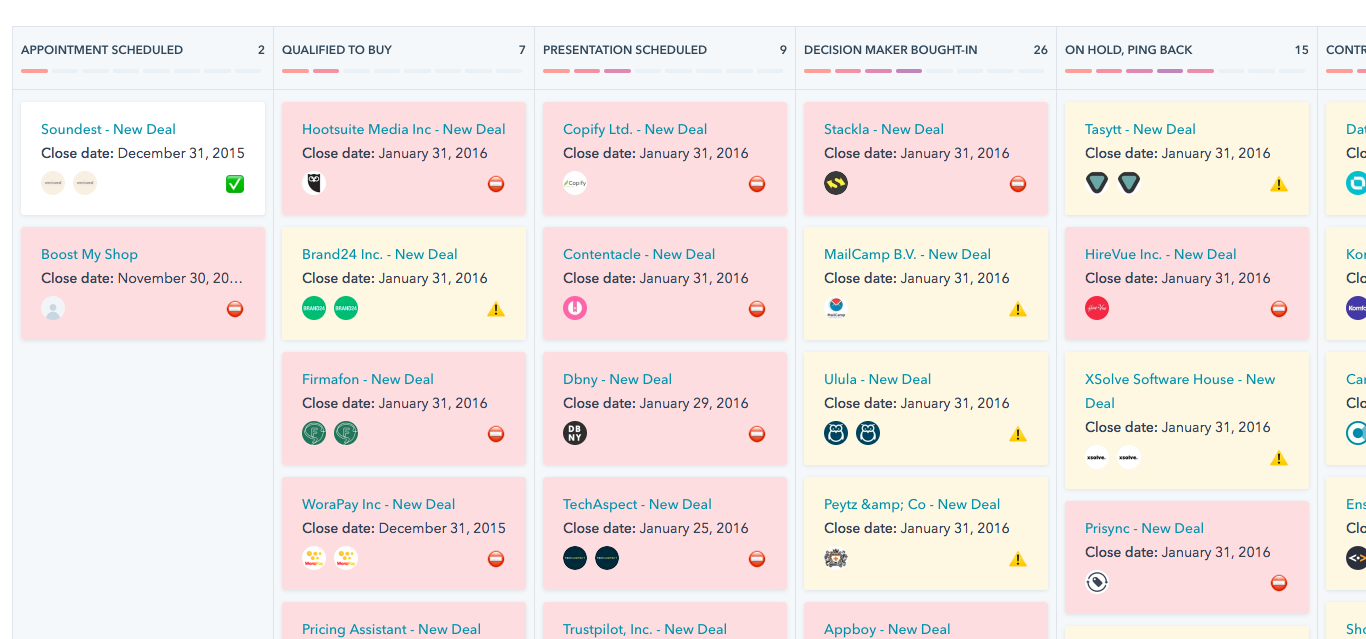
Here's the HubSpot story every small business lives through: you sign up for the free CRM, your team loves it, and six months later you hit the wall. The free tier is legitimately good - not a crippled trial, but a real product with contact management, deal pipelines, basic reporting, and email tracking. The problem is what comes next.

Pricing: Free for up to 5 users. Starter at $20/user/mo. Professional at $100/user/mo. Enterprise at $150+/user/mo.
The jump from free to Starter is manageable. The jump from Starter to Professional - $100/user/mo - is where small businesses choke. That's $500/month for a 5-person team, and suddenly you're in enterprise territory.
Key strengths:
- Best onboarding experience in the category - intuitive from minute one
- Native marketing tools (email, forms, landing pages) even on free tier
- Massive integration ecosystem (1,500+ apps)
The trade-off: The upgrade pressure is real. HubSpot's free tier is a funnel, and the pricing tiers above it escalate fast. G2 rating: 4.4/5.
Less Annoying CRM - The 4.9-Star Outlier
A 4.9/5 on G2. That's the highest rating on this list, and it's not close.
How does a family-owned CRM with no AI and no enterprise tier pull that off? By doing less - deliberately.
Pricing: $15/user/mo. One plan. No tiers, no contracts, no upsells.
Less Annoying CRM is for small teams (under 10 people) that tried other CRMs and found them overwhelming. The entire product can be learned in an afternoon. There's no enterprise tier because they don't want enterprise customers.
What you get:
- Zero learning curve - your least technical team member can use it day one
- Transparent pricing with no hidden costs or annual contracts
- Responsive, human customer support (no chatbots, no ticket queues)
What you don't get: Marketing automation, advanced reporting, AI features, or a large integration library. LACRM is a contact and pipeline manager - full stop. That's the point, and it's also the boundary.
Pipedrive - Best Sales Software for Small Business Teams
Verdict: The best visual pipeline management for teams where closing deals is the primary job.
Pricing: Essential at $14/user/mo. Advanced at $29/user/mo. Professional at $49/user/mo. Power at $64/user/mo.
Use this if: Your team lives and dies by the pipeline. Pipedrive was built by salespeople, and it shows. The drag-and-drop pipeline view is the best in the category - you can see every deal, every stage, and every next action at a glance. It's opinionated sales software built for small teams: it assumes you're selling, and it optimizes everything around that assumption.
Skip this if: You need marketing automation or customer support features. Pipedrive is a sales tool, not an all-in-one platform. If you need campaigns, forms, and landing pages alongside your CRM, HubSpot or Zoho will serve you better.

Key strengths:
- Best-in-class visual pipeline - intuitive, fast, satisfying to use
- AI-powered sales assistant that suggests next actions
- Strong email integration with tracking and templates
The trade-off: Reporting is decent but not deep. If you need custom dashboards or multi-touch attribution, you'll outgrow it. G2 rating: 4.3/5.
Salesforce Starter Suite - Best for Scaling (If You're Sure)
Verdict: The right choice if you're planning to scale past 50 people. Overkill for 90% of small businesses under 20.
Pricing: $25/user/mo for Starter Suite. Pro Suite at $100/user/mo. Anything above Starter is a maze of add-ons, modules, and "talk to sales" gates. Budget for implementation costs too - even Starter needs configuration time.
I've seen teams of 8 people buy Salesforce because they thought they'd be 80 within a year. Two years later, they're still 12 people, still paying for a CRM that's more powerful than they need, and still annoyed by the admin overhead. Be honest about your growth timeline before committing.
Use this if: You're a 15-50 person company with a clear growth trajectory and you don't want to migrate CRMs in 18 months. Salesforce's ecosystem is unmatched - AppExchange has thousands of integrations, and every sales tool on the planet connects to it.
Skip this if: You're under 10 people and just need to track deals. G2 rating: 4.4/5.
Freshsales - Best AI Features on a Budget
Verdict: The most AI capability you'll get under $10/user/mo.
Pricing: Free tier available (up to 3 users). Growth plan at $9/user/mo. Pro at $39/user/mo. Enterprise at $59/user/mo.
Freshsales' Freddy AI scores leads based on engagement signals and suggests which deals need attention. At $9/user/mo on Growth, that's remarkable value. The catch: Freshsales works best within the Freshworks suite (Freshdesk, Freshmarketer). Outside that ecosystem, integrations are more limited than HubSpot or Zoho. G2 rating: 4.5/5.
Monday CRM - Best for Project-Heavy Teams
Monday CRM makes the most sense if your team already lives in Monday.com for project management. It brings CRM functionality into a familiar interface - visual boards, automations, and dashboards. Basic plan starts at $12/seat/mo with a 3-seat minimum ($36/mo floor).
Skip it if you don't already use Monday for other workflows.
Bigin by Zoho - Best Ultra-Lightweight Option
Bigin is Zoho's answer for solopreneurs and micro-teams who find even Zoho CRM too heavy. Free for 1 user, Express plan at $7/user/mo. It's a pipeline manager with phone integration and nothing else. Perfect if you're a one-person operation that needs structure without complexity.
CRM Pricing Comparison Table
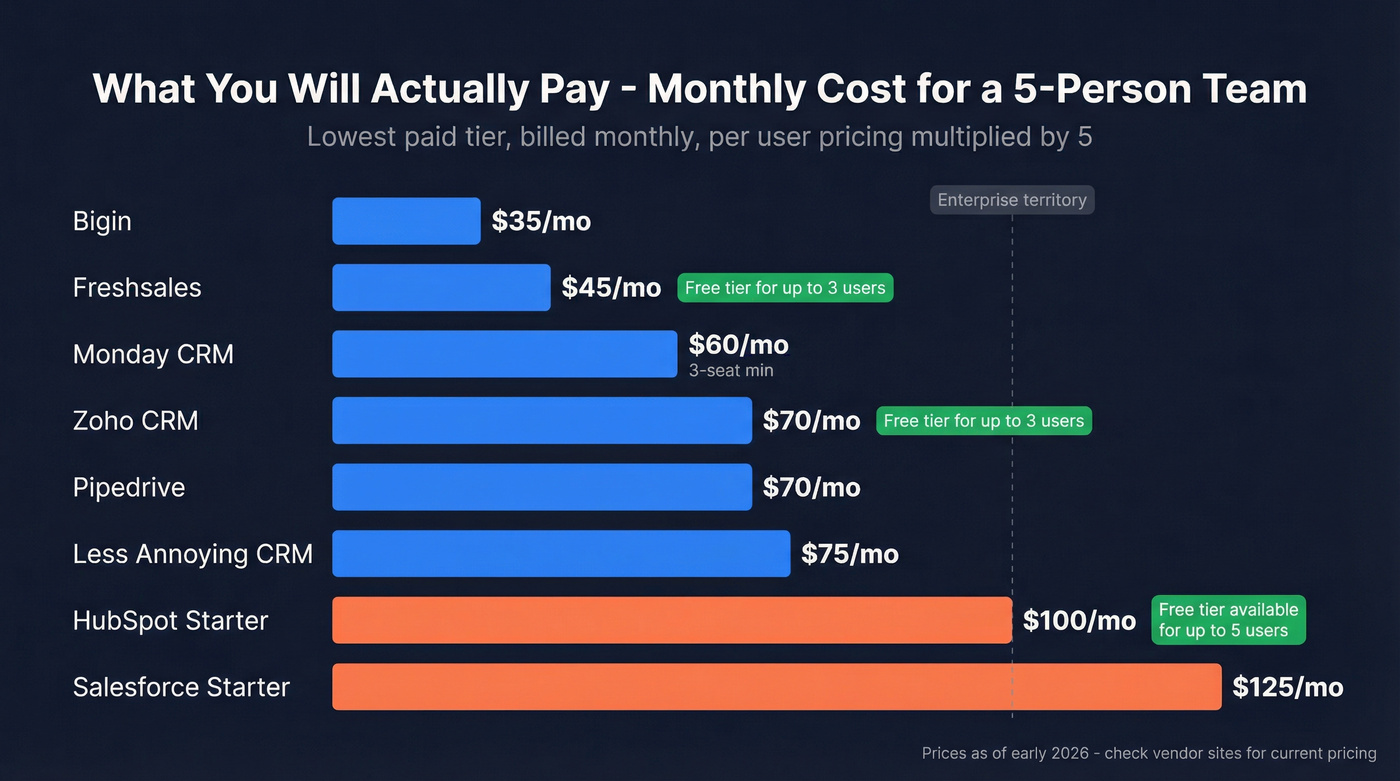
Understanding the true cost is the #1 question for small business buyers. Pay attention to the "Hidden Costs" column - that's where teams get surprised.
| CRM | Paid Price (per user/mo) | Free Tier | Hidden Costs | Best For |
|---|---|---|---|---|
| Zoho CRM | $14 | 3 users | Add-ons for advanced AI | Overall value |
| HubSpot CRM | $20 | 5 users | Steep tier jumps | Free start |
| Less Annoying | $15 | No | None - one plan | Simplicity |
| Pipedrive | $14 | No (14-day trial) | Email add-on extra | Sales teams |
| Salesforce | $25 | No (30-day trial) | Implementation time | Scaling teams |
| Freshsales | $9 | 3 users | Limited outside Freshworks | AI on a budget |
| Monday CRM | $12 | No | 3-seat minimum | Project teams |
| Bigin | $7 | 1 user | Very limited features | Solopreneurs |
For a 5-person team on paid plans, you're looking at $45/mo (Freshsales) to $125/mo (Salesforce). That's the realistic range.
Here's the thing: the sticker price is almost never the full cost. HubSpot's free-to-Professional jump can add $400/mo overnight. Salesforce's "Starter" plan is cheap until you need a consultant to configure it. Monday's 3-seat minimum means you're paying for seats you don't use. Factor these in before you commit.
How to Choose the Right CRM for Your Small Business
Don't pick a CRM based on feature lists. Pick it based on three things: your team size, your budget, and what you actually need it to do.
By Team Size
Solo or 2-3 people: Bigin ($7/user/mo) or Less Annoying CRM ($15/user/mo). You don't need workflow automation or AI scoring. You need a place to track contacts and deals that isn't a spreadsheet.
4-10 people: The sweet spot for Zoho CRM, Pipedrive, or HubSpot Free. Your team is big enough that shared visibility matters but small enough that you don't need an admin.
11-50 people: Zoho Professional, HubSpot Starter, or Pipedrive Advanced. You'll need automation, custom fields, and reporting. If you're confident you'll pass 50, start evaluating Salesforce Starter now.
50+: Salesforce. Not because it's the best product, but because the ecosystem, integrations, and scalability are unmatched at this size.
By Budget
$0/month: HubSpot Free (5 users) or Zoho Free (3 users). Both are functional.
$50-150/month (5-person team): Freshsales Growth, Pipedrive Essential, or Zoho Standard. This is where most small businesses land.
$150+/month: HubSpot Starter, Salesforce Starter, or Pipedrive Advanced. You're paying for automation and deeper reporting.
By Primary Use Case
Pure sales pipeline: Pipedrive. Purpose-built for this.
Marketing + sales: HubSpot. The marketing tools are native, not bolted on.
Customer support + sales: Freshsales (pairs with Freshdesk) or Zoho (pairs with Zoho Desk).
All-in-one ecosystem: Zoho CRM. Covers invoicing, support, marketing, and project management.
We've tested a lot of these tools with small sales teams, and here's our honest take: if your average deal size is under $15k and your team is under 10 people, you probably don't need anything beyond Pipedrive Essential or Zoho Standard. The CRM industry wants you to believe you need AI scoring, multi-touch attribution, and conversational intelligence. You need a place to track deals and a reminder to follow up. Start simple, upgrade when the pain is real.
The Step Most Guides Skip - Keeping Your CRM Data Clean
Here's the contrarian take that every CRM buying guide ignores: your CRM is only as useful as the data inside it.
You can pick the perfect CRM, configure it beautifully, train your team, and still watch adoption crater within six months. Why? Because the data went stale. About 30% of B2B contact data decays annually - people change jobs, companies get acquired, emails bounce. Even the best contact management system becomes a liability when it's full of dead records. Reps stop trusting the system, go back to their spreadsheets, and six months of CRM investment evaporates.
The fix isn't manual data entry or quarterly "clean-up sprints" that nobody actually does. It's automated data enrichment.
Prospeo plugs directly into your CRM and keeps records fresh automatically. Connect your HubSpot or Salesforce instance, map your fields, and it refreshes your records on a 7-day cycle - drawing from 300M+ professional profiles and returning 50+ data points per contact with an 83% enrichment match rate. Emails, direct dials, job titles, company data, and technographics stay current without anyone on your team lifting a finger.

The results are tangible. GreyScout - a small sales team that doubled from 2 to 5 reps - saw their bounce rate drop from 38% to under 4% after implementing automated enrichment. Pipeline jumped 140%, and rep ramp time was cut from 8-10 weeks to 4 weeks. That wasn't a CRM problem they fixed. It was a data problem.
You can spend weeks picking the right CRM software for small businesses. But if you don't invest in keeping the data clean, you'll be shopping for a replacement in a year - not because the CRM failed, but because the data did. If you want a step-by-step process, follow our framework on keeping your CRM data clean.
You picked a CRM to stop losing deals. Now make sure every contact in it actually reaches a real person. Prospeo delivers 98% email accuracy and 125M+ verified mobile numbers - so your small team spends time selling, not chasing bounces.
Every follow-up lands when the data is right.
FAQ
What's the best free CRM for small businesses?
HubSpot CRM offers the most capable free tier - up to 5 users with contact management, deal tracking, and basic email tools at no cost. Zoho CRM's free plan (3 users) and Freshsales' free tier are also strong. Expect to upgrade within 6-12 months as you need automation or custom reporting.
How much does CRM software typically cost a small business?
Most small business CRMs cost $9-25 per user per month on paid plans. Budget $50-150/month for a 5-person team. Free tiers exist (HubSpot, Zoho, Freshsales) but cap features. The real cost often includes add-ons and tier upgrades - check the pricing comparison table above for the full breakdown.
Do I really need a CRM if I have fewer than 10 customers?
A spreadsheet works fine for under 10 active contacts. Once you're juggling 20+ leads, missing follow-ups, or losing track of conversations across email and phone, a CRM pays for itself in recovered deals. The tipping point is usually when a second person starts talking to your customers.
How do I keep my CRM data from going stale?
Can I switch CRMs without losing my data?
Yes, but plan for 2-4 weeks of migration work. Export contacts as CSV, clean duplicates, and import into the new system. Most platforms (HubSpot, Zoho, Pipedrive) offer free import tools and migration guides. The bigger cost is retraining your team and rebuilding automations - budget time for that, not just the technical move.