Video Cold Email: How to 3-4x Reply Rates in 2026
Your SDR spent an hour recording 12 personalized Looms yesterday. Three bounced. Two landed in spam. Four went to prospects who left the company last quarter. One got a reply - "wrong person."
That's not a video problem. That's a data problem dressed up as a content strategy.
What You Need (Quick Version)
Video cold email works. Benchmarks and case studies consistently show teams using personalized video landing 10-16% reply rates versus a 4.1% cold email average. But most guides skip step zero: don't record a single video until your list is verified. If 10-15% of your list bounces, that's hours of recording time thrown away every week, and even smaller bounce problems can wreck deliverability. A good rule is keeping bounce rate at 1% or below.
Three things to get right: start with Loom (free, universally recognized thumbnails), use the permission-first strategy so you're only recording for warm replies, and verify every email before you hit record. The rest of this playbook covers how to do all three.
Does Video in Cold Emails Actually Work?
The average cold email reply rate sits at 4.1%. That's across all industries, all list sizes, all levels of effort. It's the baseline you're trying to beat.
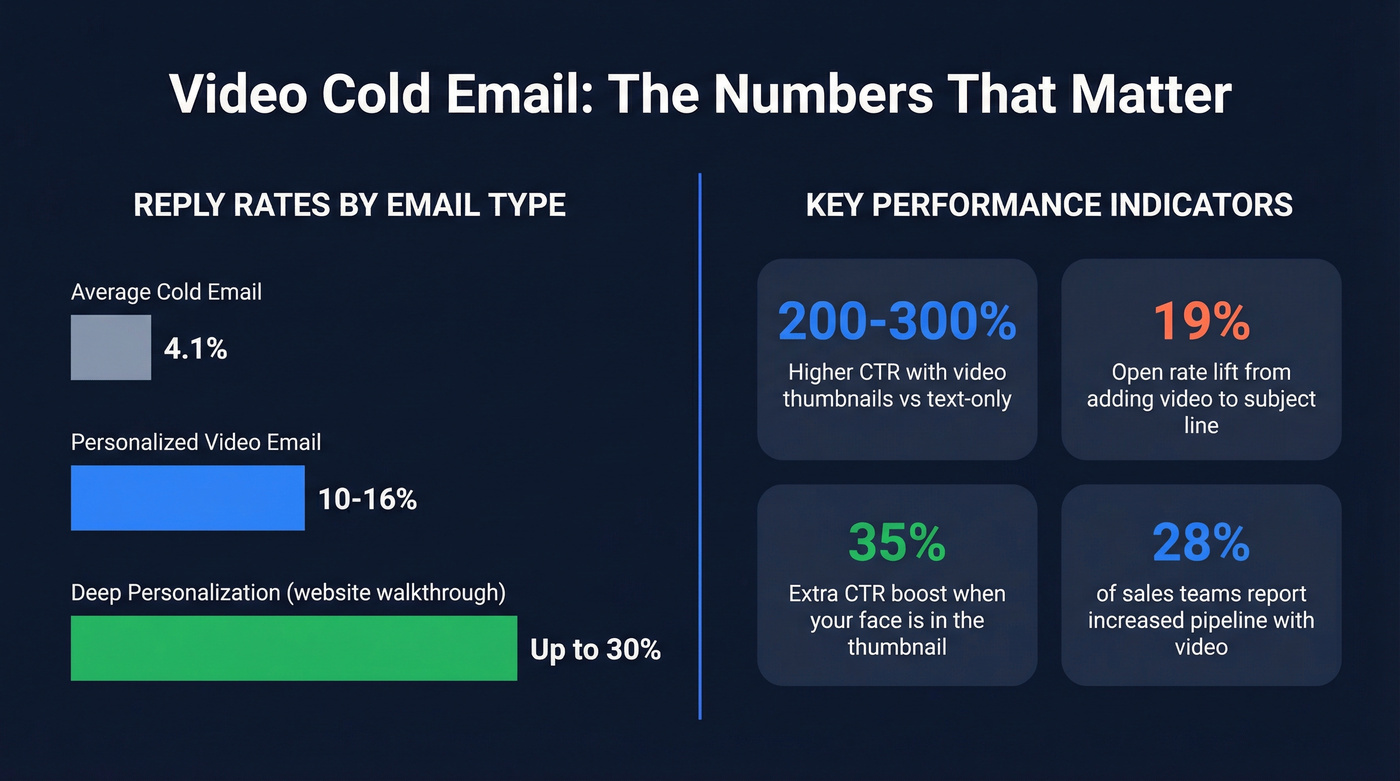
Personalized video shifts those numbers hard. Teams running video outreach consistently report reply rates between 10-16%, and deeply personalized videos - where you're walking through a prospect's actual website or product - can push toward 30%. One practitioner reported 607 positive replies over 13 months using personalized Loom videos in cold outreach. Just using the word "video" in your subject line lifts open rates by about 19%.
The thumbnail does most of the heavy lifting. Video thumbnails increase click-through rates by 200-300% compared to text-only emails, and adding your face to the thumbnail boosts CTR by another 35%. Prospects click because the thumbnail breaks the pattern of every other cold email in their inbox.
Beyond engagement, the downstream impact is real: 28% of sales teams using video in outreach report increased pipeline, and 27% report shorter deal cycles. These numbers only hold if the email actually reaches someone. A bounced video email doesn't just waste a send - it wastes the 3-5 minutes you spent recording.
Two Strategies That Scale
The Cold Touch (30-60 Seconds)
Use this for high-value ABM targets where the deal size justifies the time investment. Record a 30-60 second video for each prospect - open on their website, mention one specific thing you noticed, and close with a tight CTA.
This works when you're targeting 20-50 accounts per week, not 500. The data backs it up: campaigns targeting 50 or fewer recipients see a 5.8% response rate, while campaigns blasting 1,000+ drop to 2.1%. Seniority matters too - C-level executives respond 23% more often than average, so the cold touch earns its time investment when aimed at the right people.
The Permission-First Strategy
Most advice tells you to record a personalized video for every prospect. That's terrible advice at scale.
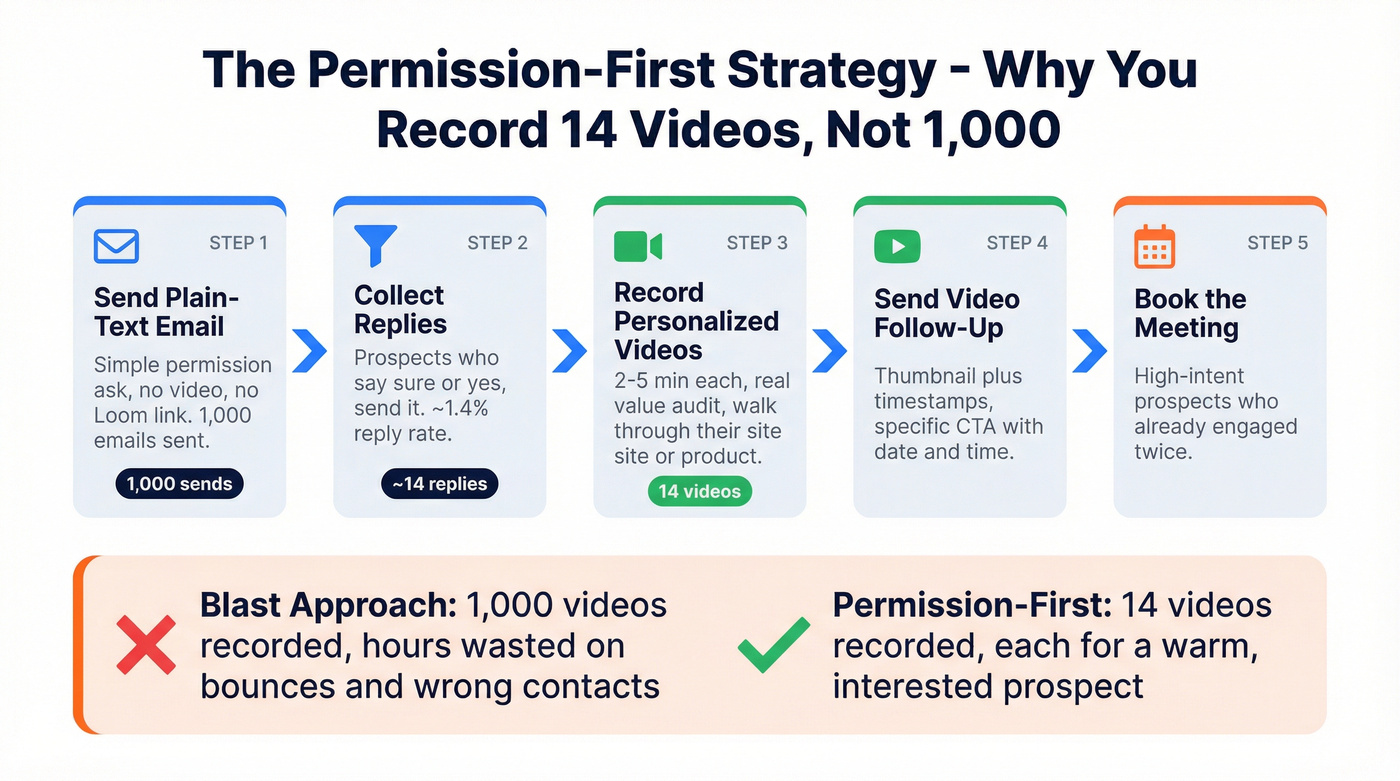
The permission-first approach flips the workflow. You send a plain-text cold email with a simple ask: "Mind if I share a quick video walkthrough of how we'd approach [specific problem] for [company name]?" No video attached. No Loom link. Just a question.
Here's the thing: the math makes this sustainable. Send 1,000 permission-ask emails, get 14 replies, and record 14 videos. Each video can be 2-5 minutes - a real value audit rather than a rushed pitch - because you're only making them for people who raised their hand. You've turned a 1,000-video problem into a 14-video problem.
We've tested both approaches across multiple campaigns, and the permission-first method consistently outperforms blast-and-pray outreach. Don't pitch pricing in the video. Save that for the call. The video's job is to demonstrate competence and earn the meeting.
If your average deal size is under $10k, skip personalized video entirely. The ROI on recording time doesn't pencil out. Use the permission-first text approach and save video for the follow-up after someone replies.

Every personalized video you record for a bad email is 3-5 minutes you'll never get back. Prospeo's 5-step verification delivers 98% email accuracy - so your Loom thumbnails land in real inboxes, not bounce logs. At $0.01 per verified email, cleaning a 1,000-contact list costs less than a coffee.
Verify your list before you hit record. Your hours of recording deserve real inboxes.
How to Send Video in Cold Emails
Never embed or attach a video file. Gmail caps attachments at 25MB, Outlook at 20MB, and "true" HTML5 video playback only works in a handful of email clients - mainly Apple Mail and iOS Mail. Your prospect won't see it.
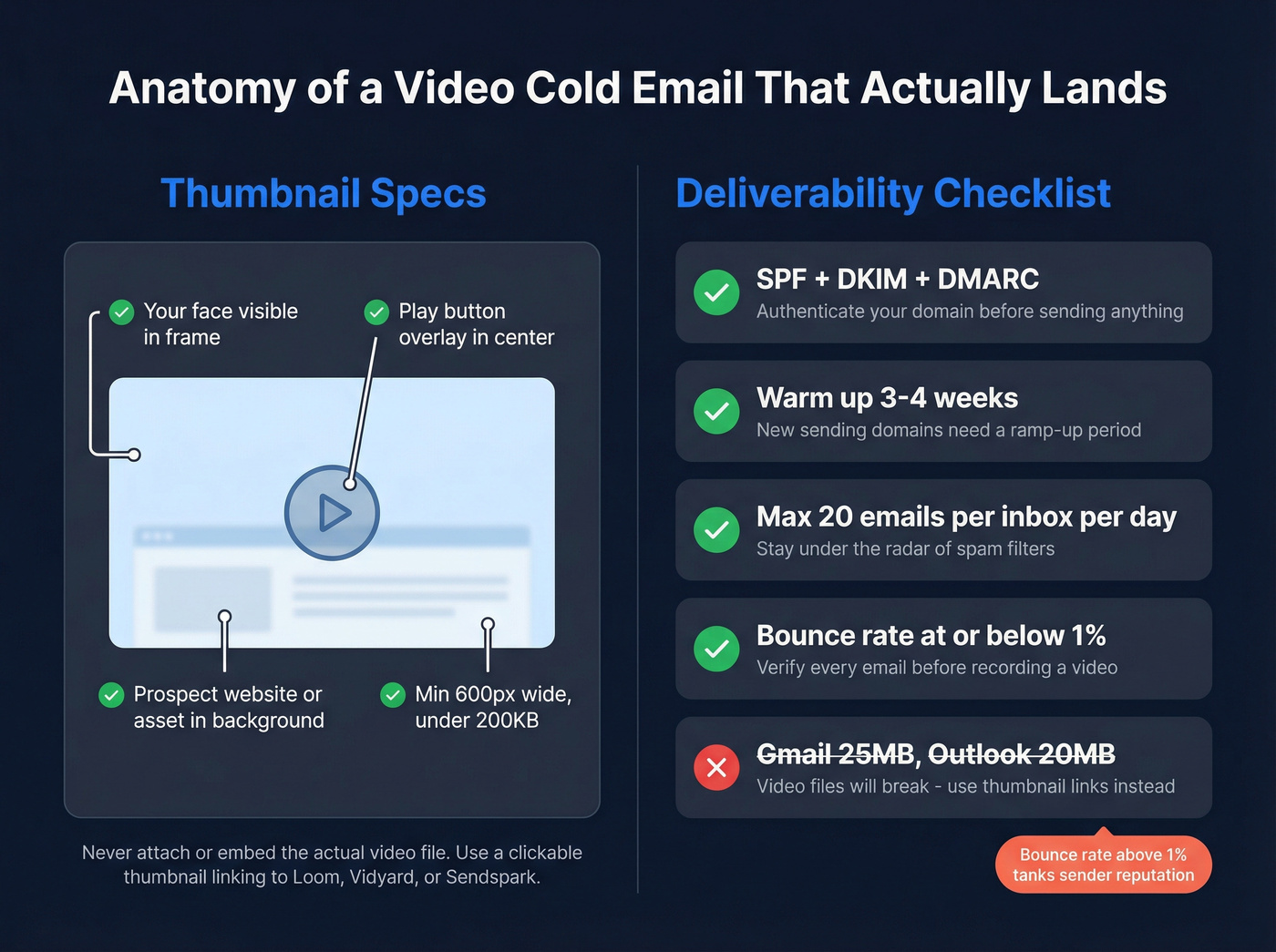
The universal method: a clickable thumbnail image that links to your hosted video on Loom, Vidyard, or Sendspark. It works in every email client and looks intentional rather than broken.
Thumbnail specs that matter:
- Minimum 600px wide for clean mobile rendering
- Keep file size under 200KB
- Include your face plus a play button overlay
- Show the prospect's website or asset in the background if possible
Deliverability checklist:
- Authenticate your domain with SPF, DKIM, and DMARC before sending anything
- Warm up new sending domains for 3-4 weeks (use an automated email warmup workflow)
- Cap volume at roughly 20 emails per inbox per day (see cold email volume best practices)
- Keep bounce rate at or below 1% - anything higher tanks your sender reputation
Scripts + Templates That Convert
Video Script Framework
Open the video on the prospect's website or a relevant asset - their pricing page, a recent blog post, their product. This signals immediately that the video isn't a mass blast.
Give three actionable recommendations. Not vague observations like "your site looks great" but specific, useful takes: "your pricing page buries the CTA below the fold - moving it above the hero image would likely lift conversions." End with a specific CTA: "Would tomorrow or Thursday at 2pm ET work for a quick call?"
Add timestamps in the email body pointing to key moments. Use a GIF thumbnail if your tool supports it - the motion catches the eye in a static inbox. Keep subject lines short and include "video." That's where the 19% open rate lift comes from.
Email Templates
Template 1: Permission Ask
Subject: Quick idea for {{company_name}}
Hi {{first_name}},
I looked at how {{company_name}} handles {{specific process}} and had a few ideas that might help.
Mind if I send you a quick video walkthrough? It's easier to show than explain in text.
Best, {{your_name}}
Template 2: Video Follow-Up (after they reply "sure")
Subject: Your walkthrough, {{first_name}}
Hi {{first_name}},
Here's the video I mentioned - 3 minutes, no fluff:
[THUMBNAIL IMAGE LINKING TO VIDEO]
Quick timestamps:
- 0:15 - The gap I noticed in {{specific area}}
- 1:30 - How {{similar company}} solved it
- 2:45 - What I'd recommend as a first step
Would Thursday at 2pm ET work for a quick call?
{{your_name}}
Verify Your List Before You Record
Every personalized video takes 3-5 minutes to record. If 10-15% of your list bounces, you're throwing away hours of work every week on emails that never reach an inbox.
Upload your prospect CSV to Prospeo, run it through 5-step email verification, and export a clean list with 98% accuracy. The platform covers 143M+ verified emails on a 7-day refresh cycle, so you're not sending to stale addresses (see benchmarks on B2B contact data decay). At roughly $0.01 per email - with a free tier covering 75 emails per month plus 100 Chrome extension credits - it's cheaper than the coffee you drink while recording.

Verify first, record second. That's the order. Every video prospecting workflow starts here.
The permission-first strategy only works if your initial plain-text email reaches the right person at the right company. Prospeo refreshes 300M+ profiles every 7 days - so you're not emailing prospects who left last quarter. Layer in 30+ filters to target the C-level buyers who respond 23% more often.
Stop recording videos for people who already changed jobs. Start with fresh data.
Best Tools for Video Cold Email in 2026
| Tool | Best For | Free Plan | Paid From | G2 Rating |
|---|---|---|---|---|
| Loom | Getting started | 25 videos, 5-min cap | $15/user/mo | 4.7/5 |
| Sendspark | Sales personalization | 30 videos | $39/seat/mo | 4.8/5 |
| Vidyard | Enterprise analytics | 5 videos/mo | $59/user/mo | 4.5/5 |
| HeyGen | AI avatars at scale | 3 videos/mo (watermarked) | $24/mo | - |
| BombBomb | Budget teams | - | $36/mo | - |
| Hippo Video | Mid-market | - | $20/user/mo | 4.5/5 |
| Covideo | Templates + ease | - | $69/mo | - |
| Tavus | AI personalization | - | $275/mo | - |
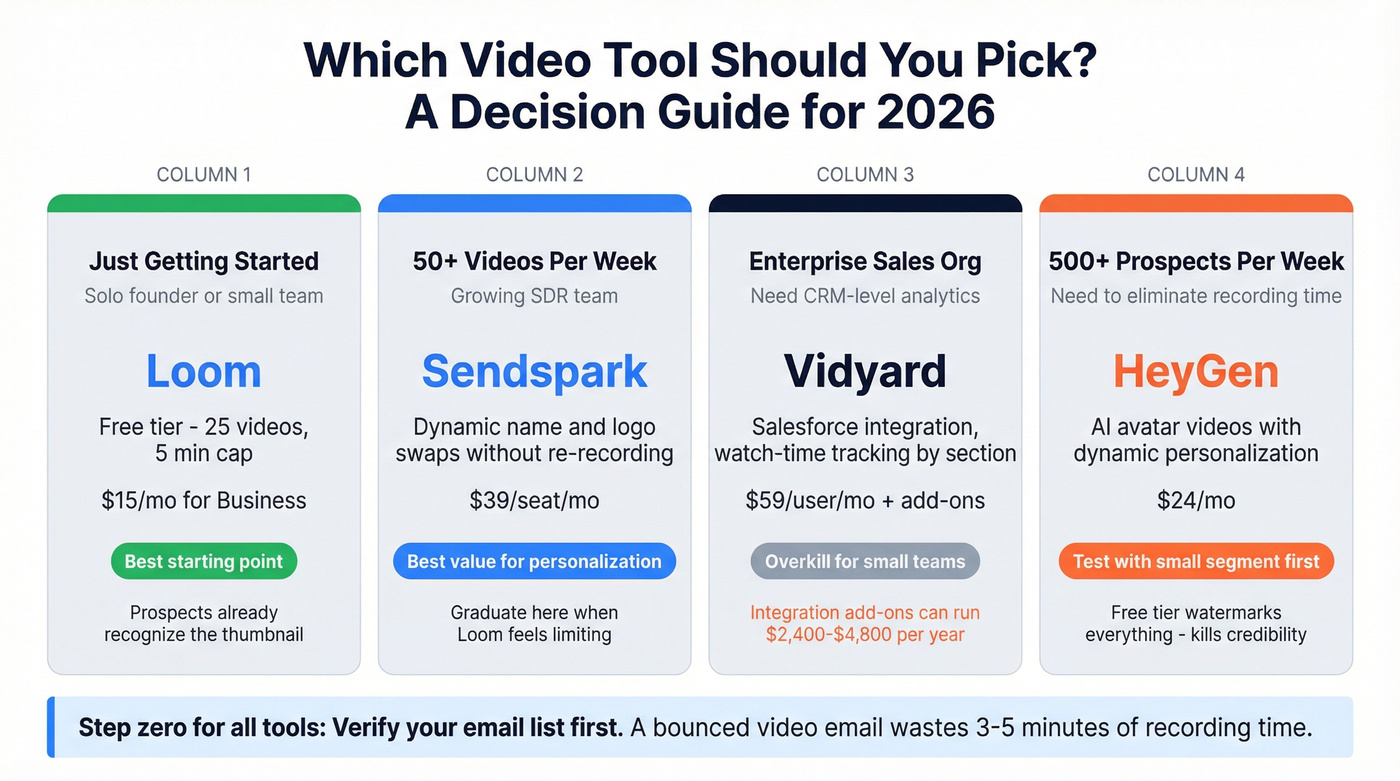
Our pick: Loom if you're just starting. Sendspark if you need sales personalization features. Vidyard only if your CRM reporting demands justify the spend.

Loom is the starting point for most teams, and honestly, it's where many should stay. The free tier gives you 25 videos with a 5-minute cap - more than enough for a permission-first workflow. Your prospects already recognize the Loom thumbnail, which removes friction. The $15/mo Business plan lifts the limits and adds engagement analytics. I'd recommend starting here unless you have a specific reason not to.
Sendspark does what Loom can't - dynamic name and logo swaps without re-recording. At $39/mo it's the best value for teams sending personalized video at scale who need features beyond basic recording. If you're sending more than 50 personalized videos per week, this is where you graduate to.
Skip Vidyard unless you need Salesforce-level reporting. The $59/user/mo sticker is just the start; integration add-ons can run $2,400-$4,800 annually. Worth it for enterprise teams tracking who watched, how long, and which sections. Overkill for a 3-person SDR team.
For teams running 500+ prospects per week, HeyGen at $24/mo eliminates the recording bottleneck with AI avatar videos and dynamic personalization. The free tier watermarks everything, which kills credibility in outreach. The consensus on r/sales is that AI-generated videos still get mixed reactions - test with a small segment before committing your entire sequence. If the avatar feels uncanny, prospects will notice.
FAQ
How long should a video cold email be?
For a cold first touch where the prospect hasn't asked for anything, keep it to 30-60 seconds - just enough to show you did your homework and earn a click. For a post-permission value video where someone's already replied, go 2-5 minutes with a real walkthrough or audit. Never exceed 5 minutes regardless of context.
Does sending video hurt email deliverability?
Only if you embed or attach the file directly. Use a clickable thumbnail linking to a hosted video on Loom, Vidyard, or Sendspark and deliverability stays clean. Keep thumbnails under 200KB, authenticate your domain with SPF, DKIM, and DMARC, and warm up for 3-4 weeks before scaling volume.
Can AI generate personalized videos at scale?
Yes - HeyGen and Tavus create AI avatar videos with dynamic personalization fields. The quality gap is closing fast, and for high-volume outbound it eliminates the recording bottleneck entirely. Run a small A/B test before committing your entire sequence. Gartner's research on AI in sales suggests adoption is accelerating, but buyer trust in AI-generated content still varies by industry.