

Email Opening Best Practices: The 5-Layer System That Actually Moves Open Rates
392.5 billion emails will be sent today. Tomorrow, the same. The average professional wakes up to 121 emails, and yours needs to survive a 0.3-second thumb-scroll decision on a phone screen. Email still returns $42 for every $1 spent, which means the difference between a good email opening and a bad one isn't academic. It's revenue.
Here's the problem with most email opening best practices guides: they start at the opening line. That's like optimizing your landing page copy when your site is down. The opening line is layer five of a five-layer system. If layers one through four are broken, nobody ever sees layer five.
What follows is the full stack - from the infrastructure that gets your email delivered, to the sender name that earns the open, to the first sentence that earns the reply.
What You Need (Quick Version)
The email opening stack, ranked by impact:

- Deliverability - authenticate your domain (SPF, DKIM, DMARC), keep bounce rates under 2%
- Sender name - 94.5% of recipients say it's the top factor in deciding to open
- Subject line - under 10 words, front-load value in the first 40 characters
- Preview text - set it intentionally (40-50 chars), don't let it auto-fill
- Opening line - lead with relevance, not pleasantries
- Timing - test send times; evening sends (8 PM) outperform mornings in recent data
- Measurement - stop trusting open rates blindly; track clicks and replies instead
Most guides start at #5 and ignore #1-4. That's backwards.
A perfectly crafted opening line means nothing if your email lands in spam, comes from a sender nobody recognizes, has a subject line that gets scrolled past, and wastes preview text on "View this email in your browser."
Hot take: If your average deal size is under five figures and your list is under 5,000 contacts, fixing layers 1-3 alone will move the needle more than any copywriting course. Most teams are over-investing in words and under-investing in infrastructure.
Step Zero - Make Sure Your Email Actually Arrives
70% of emails show at least one spam-related issue. And 50.9% of email marketers confuse delivery (the server accepted it) with deliverability (it actually hit the inbox). Your email can be "delivered" and still rot in a spam folder where nobody will ever see it.
Gmail and Yahoo's 2024 enforcement changes made the rules non-optional. Two years later, senders who haven't caught up are getting throttled - or blocked entirely. Bulk senders must implement all three authentication protocols, provide one-click unsubscribe, and keep spam complaint rates below 0.3%.
The authentication stack, simplified:
- SPF (Sender Policy Framework) - tells receiving servers which IPs are authorized to send on behalf of your domain. Think of it as a guest list.
- DKIM (DomainKeys Identified Mail) - adds a cryptographic signature proving your emails haven't been tampered with in transit. It's a wax seal.
- DMARC (Domain-based Message Authentication, Reporting & Conformance) - tells servers what to do when SPF or DKIM fails. Without it, you're leaving the decision to Gmail's algorithm.
DMARC adoption jumped from 42.5% to 53.8% between 2023 and 2024 - an 11% increase driven almost entirely by enforcement. If you haven't set yours up yet, you're already behind half the senders in your recipients' inboxes. (If you need a step-by-step, see our SPF, DKIM, and DMARC setup guide.)
Beyond authentication, your bounce rate is the silent killer. Hard bounces (invalid addresses) directly damage your sender reputation. The threshold: keep hard bounces under 2%. Ideally under 1%. If you're seeing rejection errors, start with 550 Recipient Rejected.
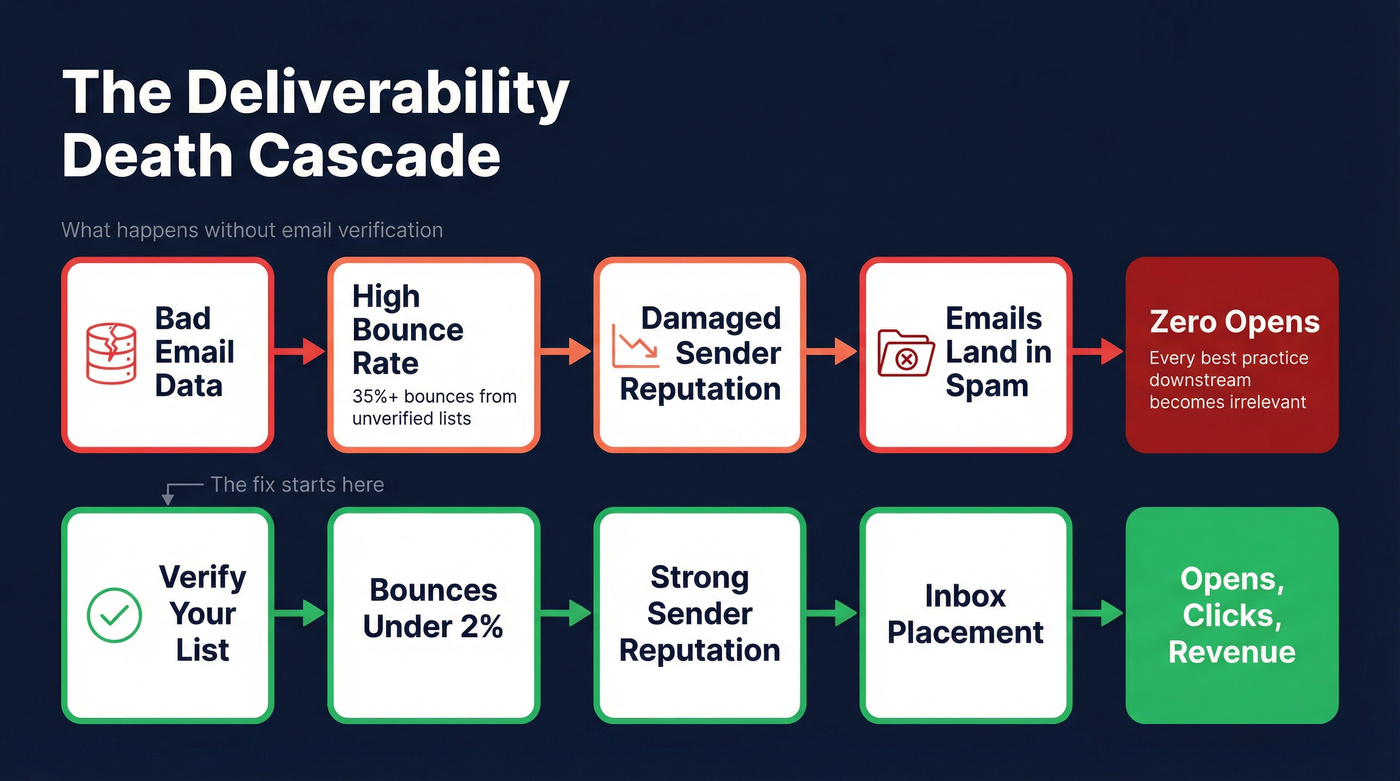
The cascade works like this: bad email data causes bounces, bounces damage sender reputation, damaged reputation means future emails land in spam, and spam folder means zero opens. Every best practice downstream becomes irrelevant.

This is where data quality becomes a deliverability issue, not just a sales efficiency issue. Before you send any campaign, verify your list. We've watched teams go from 35% bounce rates to under 4% in a single week just by cleaning their data before hitting send. If you're warming a new domain or protecting one that's already taken hits, clean data is the fastest fix.
The #1 Factor in Email Opens (It's Not the Subject Line)
A Mailjet/Sinch survey of 2,000+ consumers found that 94.5% said recognizing the sender or brand name was somewhat or very important when deciding whether to open an email. In a separate poll, 78% said they open based on sender name. Only 22% said the subject line was the primary factor.
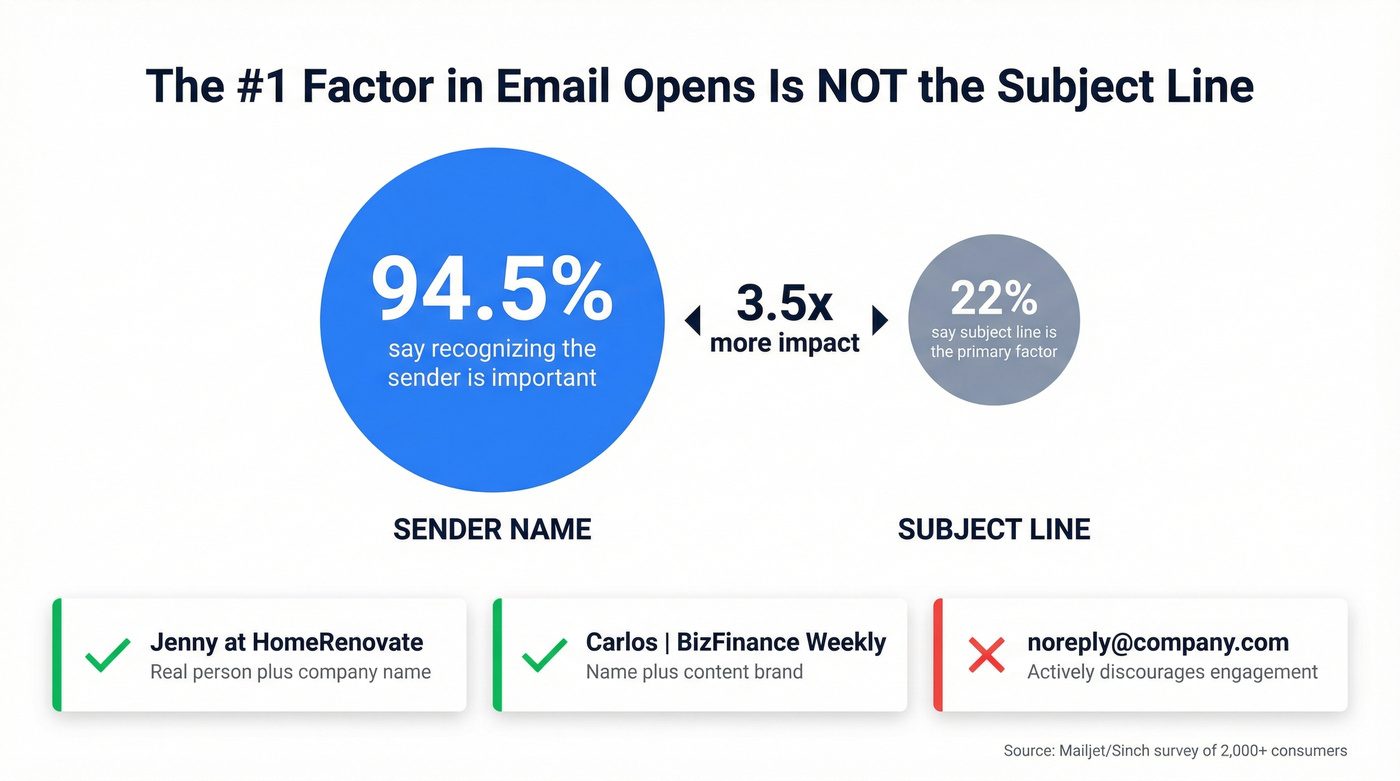
The sender name matters roughly 3.5x more than the subject line.
Yet most teams spend hours A/B testing subject lines and never once test their sender name format. Here's the kicker: 49.2% of consumers only open a few brand emails per day, and 8% open none at all. Your sender name is the filter they use to decide which few make the cut.
Sender name formats that work:
- "Jenny at HomeRenovate" - real person + company. Signals a human wrote this.
- "Carlos | BizFinance Weekly" - name + content brand. Good for newsletters.
- [email protected] - branded, personal, trustworthy.
Sender name formats that don't:
- [email protected] - feels disposable and spammy.
- [email protected] - actively discourages engagement. You're telling recipients their reply doesn't matter.
- Switching names every campaign - confuses recipients and kills recognition.
One more lever most teams ignore: BIMI (Brand Indicators for Message Identification). It lets verified brands display their logo next to the sender name in supported inboxes. It requires SPF, DKIM, and DMARC to be in place, plus an SVG logo file. Gmail specifically requires a Verified Mark Certificate (VMC). It's not trivial to set up, but the visual recognition boost in crowded inboxes is real.
If you're only going to test one thing this quarter, test your sender name format. Run "Company Support" against "Emily from Company" for two weeks. I've seen teams get 15-20% open rate lifts from this single change - more than any subject line test ever delivered.

You just read it: bounce rates are the silent killer of email opens. Teams using bad data see 35%+ bounces, wrecked sender reputation, and every downstream best practice becomes pointless. Prospeo's 5-step email verification drops bounce rates under 4% - with 98% accuracy across 143M+ verified emails.
Fix Layer 1 before you rewrite a single subject line.
How to Write Subject Lines That Earn the Click
What the Data Says
Once your sender name earns the glance, the subject line has to earn the click.
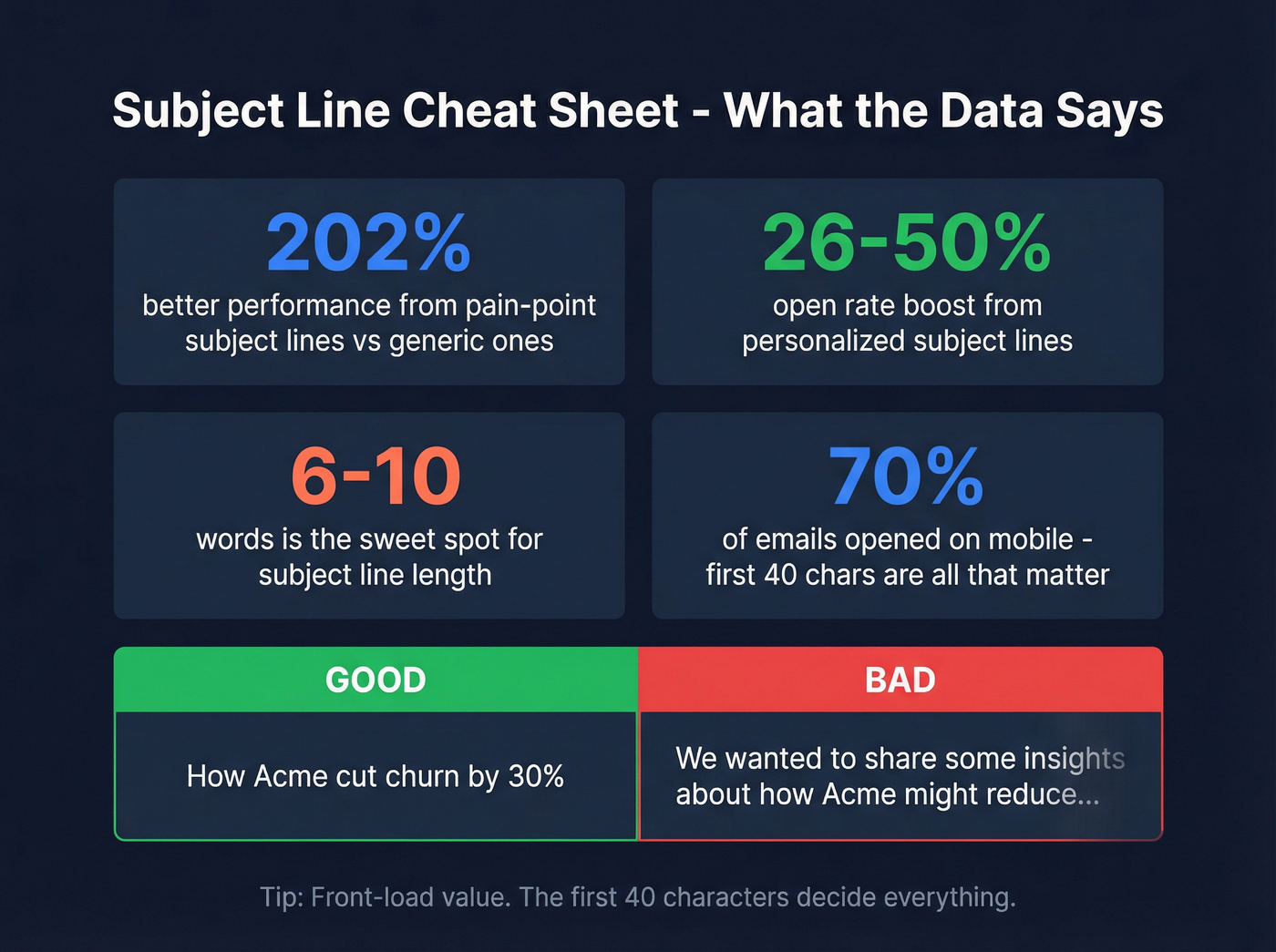
The sweet spot is 6-10 words. An analysis of 2,500+ subject lines across 12 industries confirms this range consistently outperforms. Beyond length, the data is clear:
- Personalized subject lines boost open rates by 26-50%.
- Subject lines addressing pain points perform 202% better than generic alternatives.
- Lines under 30 characters see 35% higher opens than longer versions.
- 70% of emails are opened on mobile, so the first 40-50 characters are all that matter.
Front-load your value. "How [Company] cut churn by 30%" beats "We wanted to share some insights about how [Company] might reduce churn." The first version fits in a mobile preview. The second gets cut off at "We wanted to share some ins--"
One counterintuitive finding: 80+ character subject lines can outperform shorter ones when the first half contains the full hook. Length isn't the enemy - burying the value is. If you want swipeable ideas, pull from these cold email subject lines or use a dedicated reminder email subject line list when you're nudging.
The Psychology of the 0.3-Second Decision
Sybill's research on cold email subject lines surfaces an uncomfortable truth: subject lines have a shelf life. What worked six months ago is stale today because your competitors copied the pattern. "Quick question" is dead. "Thoughts on [something]" is overused. The inbox develops antibodies.
Relevance beats cleverness every time. The subject line's only job is to make the recipient think "this is relevant to me" in 0.3 seconds. Not to be witty. Not to be mysterious. Relevant.
Here's the real personalization test: could you send this subject line to 100 people by just changing the name? If yes, it's not personalized. It's a mail merge. Real personalization references something specific - a recent hire, a product launch, a conference talk.
Subject Lines to Avoid
- "Newsletter" in the subject line - one of the worst performers across the board
- ALL CAPS + excessive punctuation - "HUGE SAVINGS!!!" reads as aggressive and unprofessional
- Generic promotional language - "Exclusive offer inside" triggers both spam filters and mental spam filters
- Overly clever or cryptic lines - if the recipient can't tell what the email is about, they won't open it to find out
- More than one emoji - a single emoji can lift open rates up to 10%. Two or more hurts performance.
- Urgency without specificity - "Don't miss out!" means nothing. "48 hours left: [specific thing]" works because the urgency is tied to something concrete.
The Most Underused Lever - Preview Text
Preview text is the "second subject line" - the snippet that appears next to or below the subject line in every major inbox. If you don't set it, email clients pull from the first lines of your email body. That's how you end up with "View this email in your browser" as your preview.
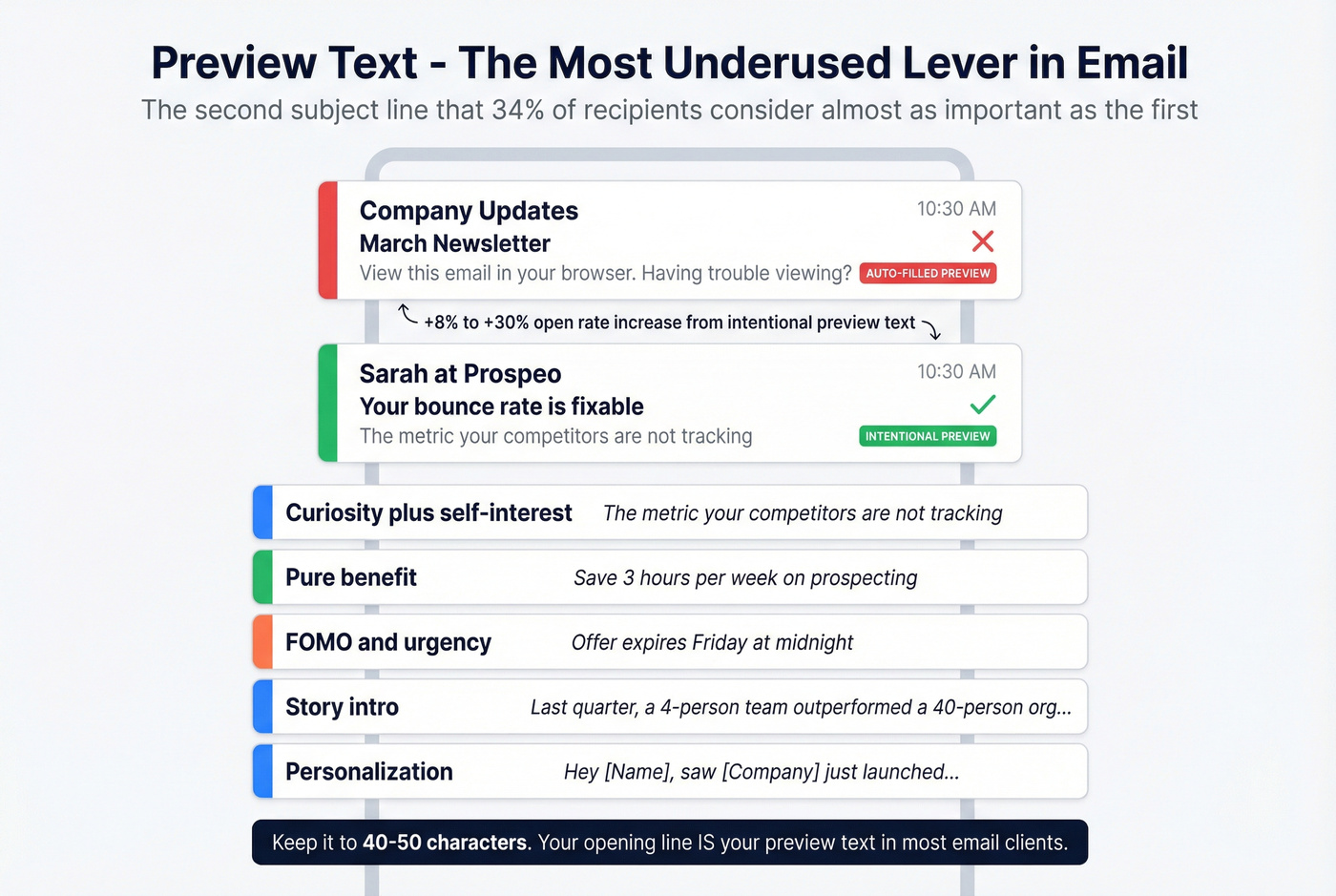
It's the email equivalent of leaving your storefront window empty.
Autoplicity saw an 8% increase in open rates when they started setting preview text intentionally. WeddingWire saw a 30% increase in click-through rates from testing preview text variations. And 34% of email recipients consider preview text almost as important as the subject line itself. Emails with personalized preview text see a 29.3% higher open rate.
Keep it to 40-50 characters. That's the range that displays reliably across devices and clients.
Five preheader strategies that work:
- Curiosity + self-interest - "The metric your competitors aren't tracking"
- Pure benefit - "Save 3 hours/week on prospecting"
- FOMO/urgency - "Offer expires Friday at midnight"
- Story intro - "Last quarter, a 4-person team outperformed a 40-person org..."
- Personalization - Use the recipient's name or company. It's the cocktail party effect - your name cuts through noise in a crowded room. Works the same way in a crowded inbox.
Here's what most teams miss: your opening line IS your preview text. In most email clients, the first sentence of your email body gets pulled into the preview if you haven't set a separate preheader. That means your opening line is doing double duty - it's the conversation starter once opened AND the preview text that earns the open. Write it accordingly.
What to Avoid in Email Openings (and Lines That Actually Work)
The Mental Spam Filter
Every professional has an unconscious pattern-recognition system that dismisses emails before the brain finishes reading the first line. These lines trigger it:
- "I hope this email finds you well" - overused to the point of being invisible. Some spam filters flag it too.
- "Dear Sir or Madam" - addresses nobody. Signals you didn't bother to learn who you're writing to.
- "Sorry to bother you" - undermines your authority before you've said anything of value.
- "We're a leading SaaS platform that..." - nobody cares about your company yet. They care about their problem.
- "As per my last email" - passive-aggressive. The recipient knows they didn't reply.
- "Did you get my last email?" - guilt-tripping follow-ups make recipients defensive, not responsive.
- Misspelling the recipient's name - one-way ticket to the trash.
Each of these patterns signals to the reader - consciously or not - that the email wasn't written for them. And an email that feels generic gets treated like spam, even if it technically isn't.
Opening Lines by Scenario
Cold outreach: The average cold email response rate sits at 1-5%. Highly personalized opening lines push that to 17%, based on Woodpecker's analysis of 20M+ emails. That's not a marginal improvement - it's a different category of results.
Examples that work:
- "Noticed you're hiring 3 SDRs this quarter - usually means outbound is working but pipeline needs to scale faster."
- "Your team's [specific product launch] caught my attention. Most companies at that stage hit [specific problem]."
- "Saw [mutual connection]'s post about your Series B. Congrats - and here's the pipeline problem that usually follows."
The four types of value you can lead with: insight (something they didn't know), recognition (something specific about them), problem awareness (naming their pain), or connection (shared context). Pick one. For more plug-and-play options, use these email opener examples.
Personalization only works if you're emailing the right person at the right address. Stale databases mean personalized emails that never arrive. Prospeo refreshes 300M+ profiles every 7 days, so the data you're personalizing against is current, not six months old.
Keep the entire cold email under 150 words. One link max in the first email. And follow up - 2-4 follow-ups spaced days apart. Most replies don't come from the first email. If you want a proven structure, start with a B2B cold email sequence.
Follow-ups: Don't restart the conversation. Reference the previous email and add new value.
- "Floating this back up - I also noticed [new development at their company]."
- "Quick follow-up. Since my last note, [relevant industry change] happened. Thought it might shift your priorities."
(If you're tuning cadence, use this follow up email sequence strategy.)
Marketing/newsletters: B2C emails lean on emotional triggers - excitement, belonging, urgency. B2B emails lead with problem-solving. In both cases, the opening line should deliver on the promise the subject line made. If your subject line says "3 ways to cut churn," your opening line better be about churn.
Welcome emails: Confirm what they signed up for and set expectations. "You're in. Here's what you'll get every Tuesday" beats "Thank you so much for subscribing to our newsletter!"
Professional correspondence: "Hello, [First Name]" works for nearly every context. Skip the full name - "Hello, Jennifer Martinez" reads like a form letter. "Hi Jennifer" reads like a colleague.
B2B vs. B2C - Different Playbooks
The tactics diverge sharply:
| B2B | B2C | |
|---|---|---|
| Opening angle | Lead with their problem | Lead with emotion |
| Segmentation | Role-based (CFO = ROI, CTO = integration) | Behavior-based (cart abandoners, repeat buyers) |
| Nurture content | Case studies, white papers | Urgency, social proof, belonging |
| Personalization | Company + role + trigger | Name + purchase history + preferences |
Personalization in B2C emails generates 6x higher transaction rates. In B2B, the lift shows up in reply rates and pipeline velocity rather than immediate transactions. Both are converging on the same principle: authentic personalization, conversational tone, and trust through compliance (BIMI, DMARC).
One universal rule: a single CTA boosts clicks by 371% compared to multiple competing CTAs. Whether you're selling enterprise software or running shoes, don't make the reader choose. Tell them the one thing you want them to do. (If you need examples, see our sales CTA framework.)
When to Hit Send
HubSpot's 2025 survey of US marketers found Tuesday is the highest-engagement day (27%), followed by Monday (19%) and Thursday (17%). The old "avoid Mondays" advice doesn't hold up in the data. But the real surprise is in the time data: open rates peak at 8 PM (59%), with 2 PM at 45% and 11 PM at 40%. Evening sends outperform the traditional "Tuesday at 10 AM" advice that's been recycled for a decade.
| Industry | Best Day(s) | Best Time |
|---|---|---|
| Ecommerce | Tue/Thu | 10 AM |
| SaaS | Tue/Thu | 2-3 PM |
| B2B Professional | Mon/Tue | 8-10 AM |
| Marketing Services | Wed | 4 PM |
| Nonprofits | Tue/Thu | 3-4 PM |
A few timing rules that don't get enough attention:
Send at odd minutes. Hit send at 7, 21, or 36 past the hour instead of on the hour or half-hour. Most scheduled sends fire at :00 or :30, creating ISP traffic jams. Odd-minute sends slip through the congestion.
Triggered emails have their own rules. Welcome emails should send immediately - the subscriber's attention is at its peak. Abandoned cart emails perform best 1-4 hours after abandonment. Don't batch these.
B2C weekends can work. B2B weekends don't. If you're selling to consumers, Saturday morning emails perform surprisingly well. If you're selling to VPs of Engineering, your Saturday email is getting buried under Monday's avalanche.
Testing found up to a 10% open rate difference between the best and worst send times for the same audience. On a 10,000-person list, that's the difference between 3,500 and 4,500 opens. If you're operationalizing this, use an AI send time optimization workflow.
Why Your Open Rate Is Lying to You (and What to Measure Instead)
The Apple MPP Problem
Apple Mail Privacy Protection launched in September 2021 with iOS 15. It pre-opens emails through Apple's proxy servers, firing tracking pixels even when the subscriber never reads the email. The result: inflated open rates that tell you nothing about actual engagement.
Look - one newsletter I tracked that consistently sat at 28% open rate hit 55% overnight after MPP rolled out. Nothing changed about the content, the audience, or the send time. Apple's proxy servers just started "opening" every email on behalf of users.
While MPP requires opt-in, adoption is near-universal - roughly 96% of Apple Mail users have it enabled. With Apple Mail commanding a dominant share of email opens, the distortion is massive.
iOS 18 made it worse, and this is the part most 2026 guides still haven't caught up to. AI-generated previews, new inbox categories (Primary, Updates, Promotions), branded sender icons, and Link Tracking Protection that strips UTM parameters from links in Mail and Safari. Your attribution data is getting eaten alongside your open rate data. If you're relying on UTM-based attribution for email campaigns routed through Apple devices, you're flying blind.
Industry Benchmarks (With a Grain of Salt)
| Industry | Avg Open Rate | Avg CTR | Notes |
|---|---|---|---|
| All Users | 35.63% | 2.62% | Cross-industry baseline |
| Business & Finance | 31.35% | 2.72% | Below average opens |
| Nonprofits | 40.04% | 3.26% | Highest engagement |
| Education | 35.64% | 3.44% | Strong CTR |
| E-Commerce | 29.81% | 1.74% | Lowest CTR |
| Advertising & Marketing | 25.48% | 1.84% | Most competitive |
Mailchimp data (Dec 2023). All open rates inflated by Apple MPP.
The replacement metrics that actually matter (tracked best with an email outreach analytics stack):
- Click-through rate - clicks are intentional actions. MPP can't fake them.
- Reply rate - especially for cold outreach and B2B. This is the metric that correlates with pipeline.
- Conversions - sign-ups, demos booked, purchases. The only metric your CFO cares about.
If you're still reporting open rates as your primary email KPI in 2026, you're reporting fiction. Use open rates as a directional signal for deliverability, not as a measure of content quality.
How to Test Your Way to Better Opens
CodeCrew's work with Shop Home Med tells the story: after systematic A/B testing of subject lines, send times, and content structure, they achieved a 114% open rate increase, 186% click rate increase, and a 306% revenue-per-recipient bump. That's not incremental optimization. That's a different business.
Specific findings from extensive testing:
- Emojis in subject lines increased open rates by up to 10%, especially for promotional emails. MailerLite found their audience initially didn't respond to emojis (2020), but by 2025 emoji versions consistently outperformed. Audience preferences shift - keep testing.
- Best-performing send times get up to 10% more opens than worst times for the same list.
- NOT mentioning the brand name in the subject line can increase opens 1-4% - counterintuitive, but the data is consistent.
- Systematic A/B testing increases email CTR by up to 127%.
The practical framework:
- Sample size: 100-200+ recipients per variant minimum. Anything less and you're reading noise, not signal.
- Test duration: Allow at least 1-2 hours before selecting a winner. If you call the test at 9 AM, you're missing half the data.
- One variable at a time. Test subject line OR send time OR sender name. Never all three at once.
- Document everything. The test you ran in March is useless if nobody remembers the results in September. For a full testing system, use this A/B testing framework.
In my experience, the sender name test is the single highest-ROI change most teams can make. It's also the test almost nobody runs.
Make Your Emails Accessible to Everyone
By 2027, there'll be 4.89 billion email users worldwide. Roughly 2-4% use assistive technology to read email. That's 100-200 million people. The ADA and European Accessibility Act both apply to email communications - skip this at your own risk.
WCAG's POUR principles in one line each:
- Perceivable - content must be presentable in ways all users can perceive (alt text, sufficient contrast, readable fonts)
- Operable - interface must be navigable by keyboard and assistive devices
- Understandable - content and operation must be clear and predictable
- Robust - content must work across different assistive technologies
The accessibility checklist for every email:
- Add alt text to every meaningful image. Bad alt text: "image1.png." Good alt text: "Bar chart showing 35% open rate for Q1 2026 campaigns."
- Logos always need alt text - they're never decorative.
- Mark decorative images as decorative so screen readers skip them. Without alt text, screen readers read the file name instead - "IMG_4392.jpg" isn't helpful to anyone.
- Use semantic HTML: proper heading hierarchy, table headers, link text that makes sense out of context.
- Test with a screen reader at least once. You'll find problems you never expected.
Hard bounces destroy sender reputation. Damaged reputation means spam folder. Spam folder means zero opens - no matter how good your opening line is. Prospeo refreshes 300M+ contacts every 7 days (not the 6-week industry average), so your list stays clean between campaigns.
Stop optimizing copy on top of broken data.
FAQ
What are the most important email opening best practices?
The five layers, ranked by impact: (1) deliverability - authenticate with SPF, DKIM, and DMARC, (2) sender name - 94.5% of recipients call it the top factor, (3) subject line - 6-10 words, value front-loaded, (4) preview text - 40-50 characters set intentionally, (5) opening line - lead with relevance, not pleasantries. Most teams skip to layer 5 and wonder why nothing improves.
What's a good email open rate in 2026?
Mailchimp's cross-industry average is 35.63%, ranging from ~25% (marketing) to ~40% (nonprofits). These figures are inflated by Apple Mail Privacy Protection, which pre-opens emails via proxy. Click-through rate is more reliable - aim for 2.5%+ CTR as your primary engagement benchmark instead.
How long should a cold email opening line be?
Keep the full cold email under 150 words. The opening line should be one sentence - specific enough to prove research, short enough to double as preview text (40-50 characters).
Does the sender name really matter more than the subject line?
Yes - by roughly 3.5x. A Mailjet/Sinch survey of 2,000+ consumers found 94.5% say recognizing the sender is important when deciding to open, versus only 22% who cite the subject line as the primary factor. Test "Company Support" vs. "Emily from Company" before spending another hour on subject line A/B tests.
What should I use instead of "I hope this email finds you well"?
Lead with something specific: a relevant observation about their business, a shared connection, or the problem you solve. "Noticed you're scaling your SDR team - most companies at that stage hit [specific problem]" beats any generic pleasantry. It proves homework and earns the next sentence.