

The Best Sales Scheduling Tools in 2026 (Plus Routing, Cost & Ops Reality)
A demo request hits your site at 10:02. By 10:32 it's either booked with the wrong rep, stuck in a queue, or it's a fake submission that wastes an AE's best hour.
Sales scheduling tools aren't just booking links. They're speed-to-lead systems with routing rules, spam controls, and CRM ownership logic - built for scheduling meetings for sales reps at scale.
The speed-to-lead math is brutal: responding within 1 minute can lift conversions by 391%, and teams are 21x more likely to qualify and 100x more likely to connect when they respond within 5 minutes vs 30 minutes (per Kixie's benchmark roundup). If your scheduling flow can't route and book fast, you're bleeding pipeline. (If you want to operationalize this, start with speed-to-lead metrics.)
And here's the part most teams miss: routing only works if the lead identity's real. If the email's disposable emails or the company data's wrong, you'll "win" the routing battle and still lose the meeting.

Our picks (TL;DR)
- Chili Piper - pick it if inbound routing is mission-critical (forms → qualify → route → book) and you need serious logic (account matching, multi round-robin, weighted rules). Skip it if you hate platform fees or don't have an ops owner; platform fees are the real price driver for inbound routing.
- Calendly (Teams) - pick it if you want the cleanest "default" scheduler that sales teams actually adopt, with round-robin + lead qualification/routing starting at the Teams tier. Skip it if you'll immediately need advanced routing edge cases; you'll feel the feature gating.
- Prospeo - pick it if you want a verified contact data layer so booked meetings are real (and follow-up outreach actually lands). Skip it only if you're not doing outbound or inbound follow-up at all - which, realistically, you are.
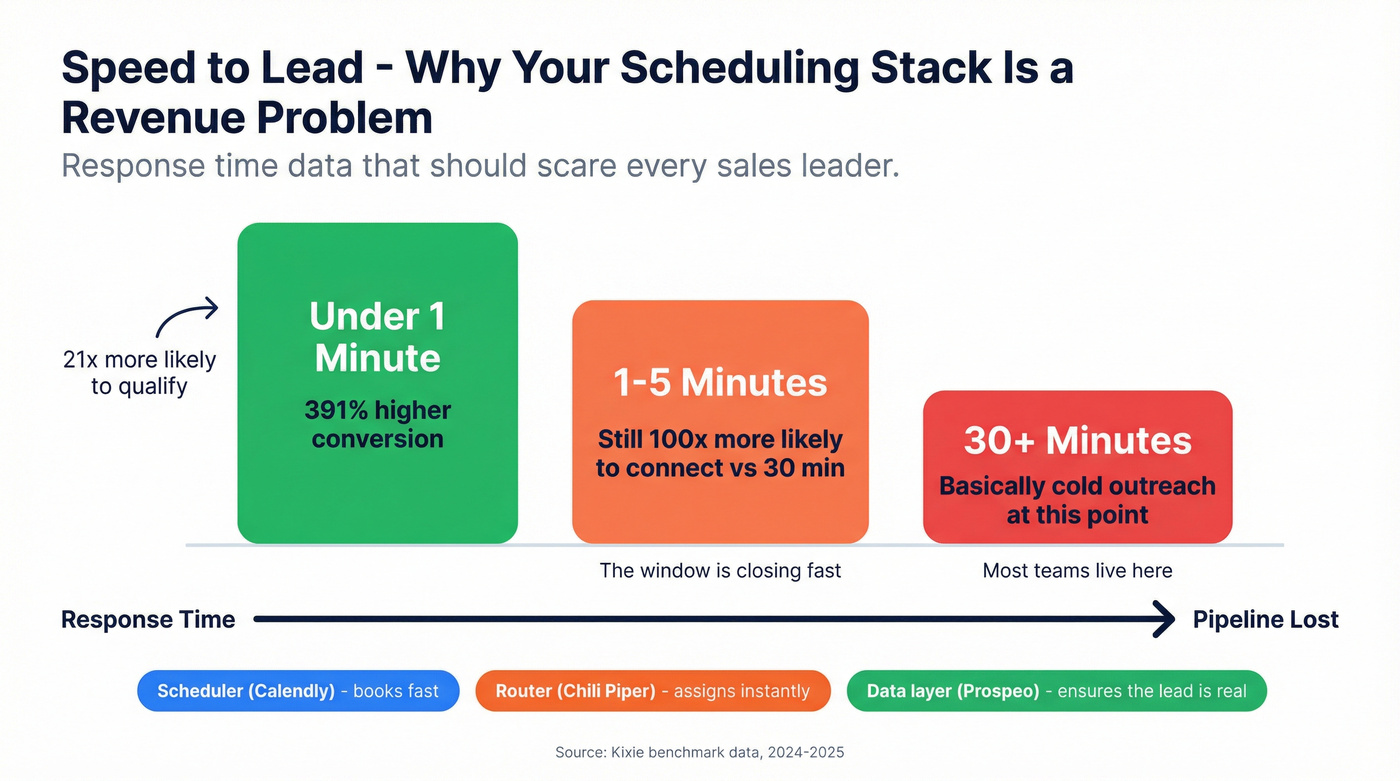
Here's the clean mental model: a meeting scheduler (booking UX) + a router (assignment logic) + a data quality layer (verification/enrichment). Most teams only need one tool in each lane - anything more turns into calendar theater. (If you’re mapping your whole stack, see B2B sales stack.)
If you're inbound-heavy, jump to the comparison tables + Chili Piper/RevenueHero. If you're outbound-heavy (or your show rate's fine but connect rate's trash), pay extra attention to the data quality + follow-up sections.
If you're Microsoft 365-first, Microsoft Bookings is the fastest path to "approved by IT."
What a "sales scheduling tool" actually includes (the 3-layer stack)
Most SERP lists treat scheduling like it's a UI problem: "Nice booking page, time zones, reminders." That's layer one. Real sales scheduling is a stack, and the stack determines whether meetings turn into pipeline.

Layer 1: Scheduling UX (the booking experience)
This is the link, the availability rules, buffers, time zones, rescheduling, reminders, and the "it just works" factor.
What it looks like in the real world:
- An AE sends a link that auto-detects time zone, prevents double-booking, and adds a video link without anyone thinking about it.
- A team uses meeting types ("Discovery 30," "Demo 45," "Exec alignment 25") with different buffers and rules so calendars don't implode.
- The scheduler handles the awkward stuff: reschedules, cancellations, and reminders - without the rep chasing.
Calendly and SavvyCal win on recipient experience. Microsoft Bookings wins when IT/security wants everything inside Microsoft 365.
Layer 2: Routing + assignment engine (who gets the meeting)
This is where sales ops lives: round-robin, weighted rotations, territory rules, account owner routing, lead-to-account matching, SLAs, and "book now with the right rep." (For the ops side, align this with your lead qualification process.)
What it looks like in Salesforce/HubSpot:
- A lead submits a demo form → router checks domain → account match → routes to account owner if it exists → otherwise routes by region + segment → then books instantly.
- If the owner's OOO, the router falls back to a coverage queue (and it should do that automatically, not via Slack chaos).
- Weighted routing gives ramping reps fewer meetings without starving them completely.
Chili Piper is the heavyweight. RevenueHero is the cost-predictable alternative. HubSpot Meetings can do rotations, but it's tightly coupled to HubSpot ownership and calendar hygiene.
Layer 3: Data quality + spam prevention (whether the meeting's real)
This layer decides if your routing logic even matters.
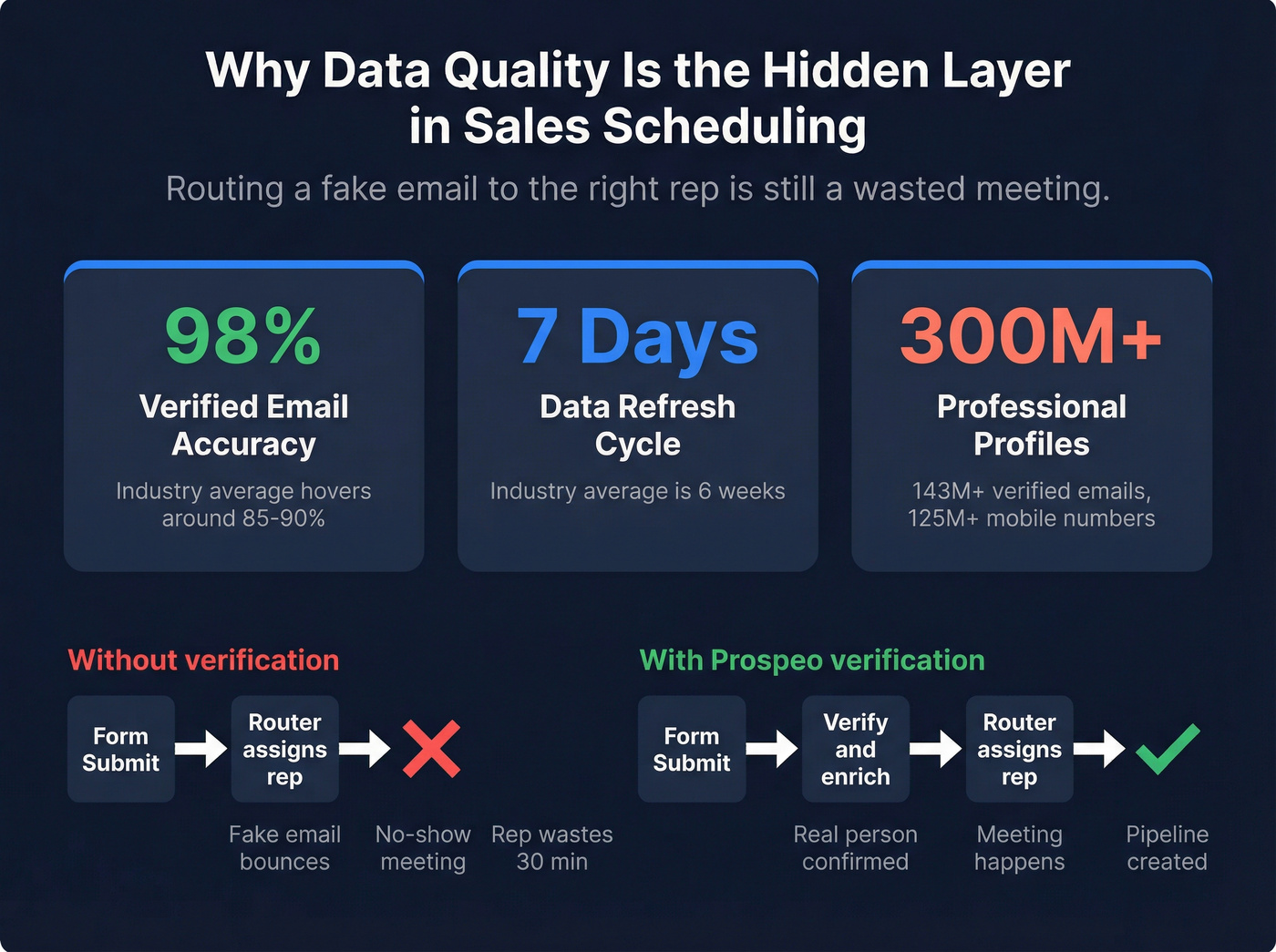
If you're routing junk - fake names, disposable emails, wrong company domains - you'll book "meetings" that don't show, don't qualify, or can't be followed up. The practical impact shows up as higher no-show rates, higher bounce rates on confirmation/follow-up, reps burning time on "who is this?" research, and the worst one: good leads getting slowed down because the system's clogged.
A good data layer does two jobs:
- Block obvious garbage (disposable emails, spam traps, suspicious patterns).
- Enrich real leads (company, title, size, tech stack, phone) so routing rules are correct and follow-up actually connects. (If you want the KPI view, see data quality.)
In our experience, this is where teams either get serious or keep arguing about "lead quality" forever.
Prospeo fits here as the data quality layer: 98% verified email accuracy and a 7-day refresh cycle (industry average: 6 weeks) means you're not routing stale identity data and hoping for the best. It also brings a real database behind it--300M+ professional profiles, 143M+ verified emails, and 125M+ verified mobile numbers--so you can verify, enrich, and actually reach people. (If you’re comparing vendors, start with best email verifier websites and lead enrichment tools.)
Comparison table: sales meeting scheduling tools (features + true cost model)
Two things drive outcomes: (1) routing depth and (2) the pricing model behind it. Seat pricing's predictable. Platform fees are where budgets get surprise-punched.
To keep this readable on mobile, it's split into two tables: capabilities + cost model, then ops reality.
Table A - routing capabilities + pricing model
| Tool | Routing (owner/territory/weighted) | Round-robin | Forms→book flow | Pricing model |
|---|---|---|---|---|
| Chili Piper | Yes / Yes / Yes | Yes | Yes (strong) | Seat + platform fee (volume) |
| Calendly Teams | Yes / Limited / No | Yes | Yes (basic) | Seat |
| Prospeo | N/A (data layer) | N/A | N/A | Credits (pay-per-verified) |
| RevenueHero | Yes / Yes / Yes | Yes | Yes (strong) | Seat + small platform fee |
| Microsoft Bookings | No / Limited / No | Limited | No | Included in M365 seat |
| HubSpot Meetings | Owner-first (HubSpot) / Limited / No | Yes | Limited (HubSpot forms) | HubSpot paid seats |
| SavvyCal | No / No / No | Team scheduling (not routing) | No | Seat |
| Doodle | No / No / No | No | No | Seat |
| OnceHub | Limited / Limited / Limited | Yes (basic) | Yes (good) | Seat + usage tiers |
| Cal.com | Yes (dev-built) | Yes (configurable) | Yes (embedded) | Seat or self-host |
| Square Appointments | No / No / No | Staff assignment (basic) | No | Flat + add-ons |
| Acuity | No / No / No | No | No | Flat monthly |
| Setmore | No / No / No | No | No | Seat |
| SimplyBook.me | No / No / No | No | No | Tiered (bookings/features) |
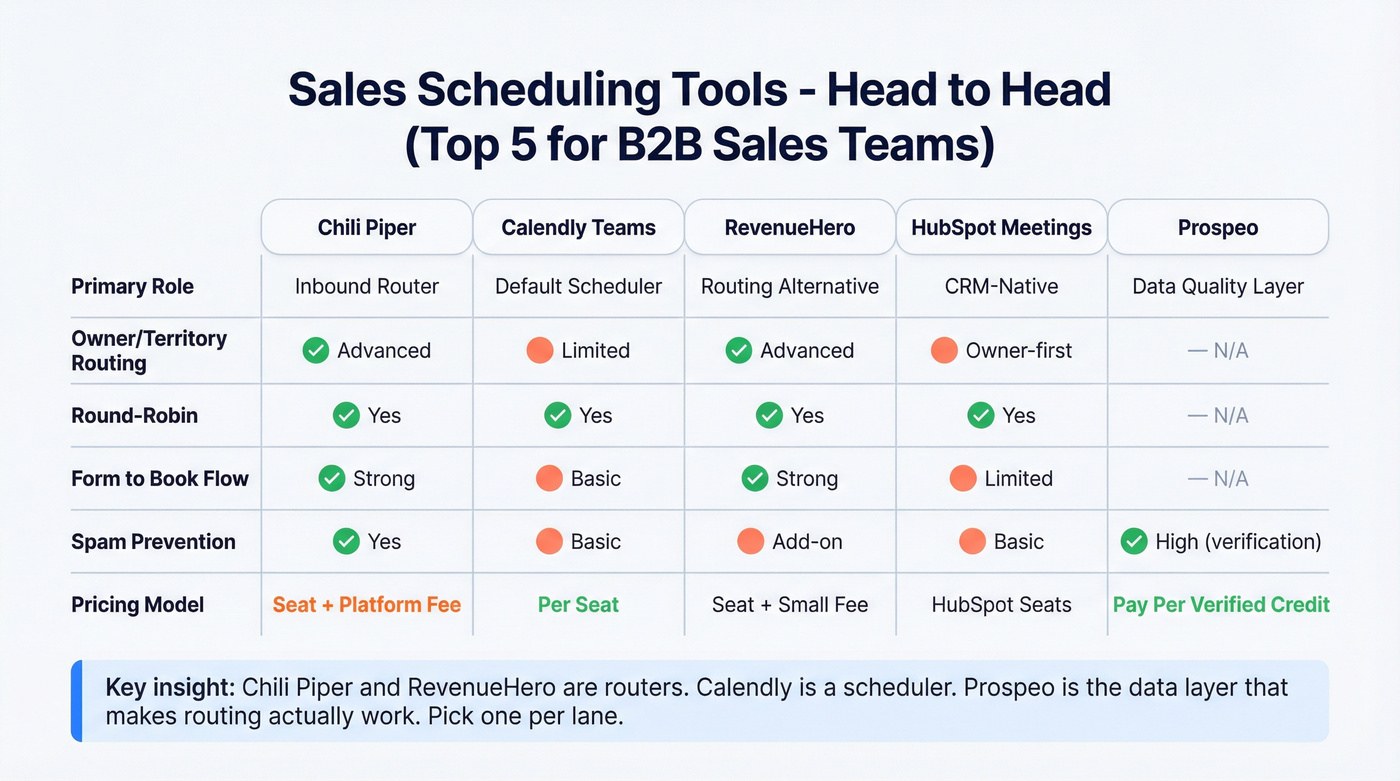
Table B - spam, CRM depth, admin burden, best fit
| Tool | Spam prevention | CRM depth | Admin burden | Best for |
|---|---|---|---|---|
| Chili Piper | Yes | Deep | High | Inbound routing |
| Calendly Teams | Basic | Good | Low-Med | Default scheduler |
| Prospeo | High (verification) | Deep (enrich/API) | Low | Verified identity |
| RevenueHero | Add-on | Deep | Med | Predictable routing |
| Microsoft Bookings | Basic | M365-native | Low | M365 compliance |
| HubSpot Meetings | Basic | HubSpot-native | Med | HubSpot stack |
| SavvyCal | Basic | Light | Low | Recipient UX |
| Doodle | Basic | Light | Low | Poll scheduling |
| OnceHub | Basic | Medium | Med | Form-to-meeting |
| Cal.com | Custom | Custom | Med-High | Embedded control |
| Square Appointments | Basic | Light | Low | Service scheduling |
| Acuity | Basic | Light | Low | Solo/SMB |
| Setmore | Basic | Light | Low | Budget teams |
| SimplyBook.me | Basic | Light | Low | SMB bookings |
How to interpret this (the part most buyers get wrong):
- If you need account owner + territory + weighted routing and you want prospects to book instantly from a form, you're in Chili Piper vs RevenueHero territory. Everything else is a scheduler with a rotation feature.
- If your biggest problem's adoption (reps still emailing "what times work?"), start with Calendly Teams. It's the cleanest default and the fastest to roll out.
- If your biggest problem's fake demos / unreachable leads / bounces, the "best scheduler" won't save you. You need a verification + enrichment layer so your routing rules and follow-up sequences run on real identity data. (If you’re diagnosing decay, see B2B contact data decay.)
- Hot take: if your average deal size is relatively small and inbound volume isn't huge, a full routing platform's usually overkill. Buy a scheduler that reps love, keep routing simple, and spend your ops budget on data quality + fast follow-up.

Routing a fake email to the right rep is still a wasted meeting. Prospeo's 98% verified email accuracy and 300M+ enriched profiles ensure every booked demo is a real person at a real company - before your scheduler even fires.
Stop routing junk. Start booking meetings that actually show up.
Best sales scheduling tools: mini-reviews (Tier 1-3)
Chili Piper (Tier 1)
Best for: inbound demo requests where "right rep, right now" is revenue-critical - especially when you need meeting scheduling for sales teams with real territory and ownership complexity.
What it nails: Chili Piper's routing is the real deal: lead-to-account matching (exact + fuzzy), assign-to-account-owner, and multi round-robin across teams and roles. It's the fastest path from "form submit" to "calendar booked" when you've got real routing complexity and you can't afford misroutes.
G2 has it at 4.6/5 (702 reviews), and the praise is consistent: it "routes as expected." One review calls out cutting routing/booking from 10+ minutes to <30 seconds--and that's exactly what good routing automation feels like when it's configured well.
Watch-outs: The admin dependency's real. I've watched teams lose entire Fridays to territory tweaks, exception handling, and "why did this route there?" debugging. Chili Piper's a routing engine, not a set-and-forget scheduler.
Pricing: Concierge is $30/user/mo plus a platform fee tiered by inbound lead volume: $150/mo (≤100 leads), $400/mo (101-1000), $1,000/mo (1000+). On annual billing, Chili Piper shows higher platform-fee equivalents (for example, $225 / $600 / $1,500). The key is the model: seat + platform fee tied to inbound volume.
Compared to ZoomInfo: ZoomInfo helps you find contacts; Chili Piper helps you convert the ones already raising their hand. ZoomInfo wins on database breadth. Chili Piper wins on speed-to-lead mechanics.
Calendly (Teams) (Tier 1)
Best for: sales teams that want a scheduler everyone adopts, plus round-robin and basic lead qualification/routing without buying a full routing platform.
What it nails: Calendly's UX is why it's everywhere. Time zones, calendar sync, and "send link, get meeting" is frictionless. G2 has it at 4.7/5 (2,543 reviews) and the praise themes are predictable: ease of use, calendar integration, time zone detection. If you want a tool that reps won't fight, this is the safest pick.
Watch-outs: Advanced features are gated. Sales teams outgrow Standard fast, then get annoyed that the stuff they assumed was "basic" (round-robin, routing) lives in Teams or Enterprise. Calendly can do light qualification and routing, but it won't replace a full inbound router when you need deeper account matching and exception logic.
Pricing: Standard is $10/seat/mo billed yearly and Teams is $16/seat/mo billed yearly. Enterprise starts at $15k/year (SSO/SAML, SCIM, audit logs, etc.). Teams has published volume discounts (down to $12/seat at 301+ seats).

Prospeo - The B2B data platform built for accuracy (Tier 1)
Best for: making scheduling convert by ensuring the lead identity's real, reachable, and enriched before you route or follow up.
What it nails: Prospeo isn't a scheduler. It's the data quality layer that stops you from booking garbage and chasing ghosts. You get real-time email/mobile verification, 98% verified email accuracy, and a 7-day data refresh cycle (industry average: 6 weeks). (If you’re evaluating tools, compare email lookup tools and read the workflow in how to verify an email address.)
Look, if your inbound form's public, you don't have a "scheduling" problem. You've got an intake problem.
Prospeo also gives you the depth most teams end up needing anyway:
- 300M+ professional profiles with 143M+ verified emails and 125M+ verified mobile numbers
- CRM and CSV enrichment returning 50+ data points per contact with a 92% API match rate
- Intent data across 15,000 topics (powered by Bombora) if you want to prioritize in-market accounts
A scenario we've seen more than once: marketing runs a "Request a demo" campaign, the form gets hit by bots for 48 hours, AEs get calendar spammed, and then the CRO asks why show rate fell off a cliff. The fix isn't another reminder email. It's verifying identity before you hand an expensive calendar slot to a stranger.
Where it fits in a scheduling stack:
- Before routing: enrich inbound leads so your rules can route correctly (company size, title, region, account match). Prospeo delivers an 83% enrichment match rate, which is what you want when you're trying to avoid "unknown company" leads hitting a generic queue.
- After booking: add verified email + mobile so follow-up lands. Prospeo's mobile data delivers a 30% pickup rate across regions, which helps when you're trying to rescue no-shows or confirm attendance.
Proof point that matters for scheduling ops: Meritt cut bounce rate from 35% to under 4% and increased connect rate 3x (to 20-25%). That's what "verified identity" looks like in metrics, not marketing.
Pricing: Free tier includes 75 emails + 100 Chrome extension credits/month. Paid is credit-based and transparent: ~$0.01 per verified email (varies by plan), and mobile numbers cost 10 credits when found. No contracts; self-serve.
RevenueHero (Tier 1)
Best for: inbound routing with predictable pricing and fewer "surprise" costs than Chili Piper - especially if you're standardizing on scheduling software for sales teams and want clean governance.
What it nails: RevenueHero's packaging is unusually straightforward: you pay a small platform fee plus per-user, and there are no admin licenses. You also get unlimited form submissions, which matters when marketing volume spikes and you don't want routing to become a tax on demand gen.
Routing-wise, it covers what most teams actually need: qualify on form, route via round-robin or custom logic, and match based on domain. It's not as deep as Chili Piper at the weird edges, but it's deep enough for most orgs that want "right rep, right now" without hiring a routing engineer.
Watch-outs: Spam prevention's an add-on, and you'll want it if inbound's public-facing. If you have complex multi-team rotations with lots of exceptions, Chili Piper still has the richer toolbox.
Pricing: Platform fee $79-99/mo plus $25-45/user/mo, with a spam prevention add-on at $30/mo. The whole point is predictability.
Microsoft Bookings (Tier 1)
Best for: Microsoft 365-native scheduling where compliance and admin control matter more than fancy routing - plus simple calendar scheduling for sales teams that don't need heavy lead-to-account logic.
What it nails: Bookings is the default for IT-led orgs because data stays inside Microsoft. Bookings data's stored in Microsoft 365 and Exchange Online shared mailboxes, so your existing compliance policies apply. If your security team flinches at yet another SaaS scheduler, Bookings is the path of least resistance, and that matters more than prettier booking pages.
Watch-outs: Routing depth's limited compared to Chili Piper/RevenueHero, and the UX isn't as polished as Calendly. It works. It won't win design awards.
Pricing: Included in many Microsoft 365 plans. Use Microsoft's business plan pricing as your proxy: $6 / $12.50 / $22 per user/mo (yearly) for Business Basic/Standard/Premium.
HubSpot Meetings (Tier 2)
Best for: HubSpot-first teams that want meeting links + rotations without introducing another scheduling vendor.
What it nails: HubSpot's meeting types are genuinely useful once you learn the rules. Group meetings only show times when everyone's available; round robin shows times when at least one person's available and then assigns a host. The assignment behavior's practical too: if multiple users are available and "prioritize contact owner" is off, HubSpot assigns the rep who's gone the longest without a meeting - simple, and it prevents one rep from getting flooded.
Watch-outs: Two things bite teams in production. First, it requires Sales Hub Starter+ or Service Hub Starter+ (paid seats); free CRM alone won't give you the rotation features most sales teams want. Second, calendar connection hygiene matters: if someone's calendar's disconnected, HubSpot can treat them as available and prospects can book times that never land anywhere. HubSpot's "prioritize contact owner" toggle also confuses teams constantly - turn it on and you're no longer running a pure rotation.
Pricing: Included with paid HubSpot hubs (Starter+). As a practical budgeting range, expect low-to-mid double-digit $/seat/month on Starter and higher on Pro/Enterprise depending on your bundle and seat count.
SavvyCal (Tier 2)
Best for: high-consideration buyers (execs, multi-stakeholder deals) where the recipient experience is the difference between "booked" and "ghosted."
What it nails: SavvyCal's overlay UX is best in class. It feels like you're collaborating on time instead of forcing someone into your grid. For sales, that matters most when you're dealing with busy operators and execs who hate friction. Team scheduling's strong too: you can coordinate hosts, meeting types, and availability rules without turning it into a spreadsheet exercise.
Watch-outs: It's not a routing engine. If you need territory logic, account matching, or form-to-book automation, SavvyCal won't replace a router. It's a "get the meeting booked" tool, not a "decide who owns the meeting" tool.
Pricing: $12/user/mo (Basic) and $20/user/mo (Premium).
Doodle (Tier 2)
Best for: poll-first scheduling when you've got multiple stakeholders and nobody wants to commit to a single slot.
What it nails: Doodle is great when the scheduler link model breaks - committees, partner calls, late-stage deal rooms with four calendars, or internal alignment calls that must happen this week. The poll format's familiar, fast, and doesn't require everyone to adopt your scheduling tool. For sales teams, it's a clutch option for multi-party scheduling when you don't control the other calendars.
Watch-outs: Doodle doesn't do sales routing. It won't match accounts, enforce territories, or run weighted rotations. Treat it as a coordination tool, not a revenue ops system.
Pricing: Seat-based SaaS pricing. Budget ~$8-20 per user/month depending on plan and billing, with higher tiers for admin controls and branding.
OnceHub (Tier 2)
Best for: form-to-meeting flows where you want to capture inbound intent and push people into a booking step without buying a full routing platform.
What it nails: OnceHub sits nicely between simple scheduler and full routing platform. It's good for inbound capture patterns: embed a form, qualify a bit, then offer scheduling. If your process is "ask 3-6 questions, then book," OnceHub is built for that. It's also a solid fit when you need multiple booking experiences across teams (SDR vs AE vs CS) without turning your website into a maze.
Watch-outs: Routing is routing-lite compared to Chili Piper/RevenueHero. If you need true lead-to-account matching, complex exception handling, or multi-layer territory logic, you'll hit limits and end up bolting on more tooling.
Pricing: Typically sold as a subscription with tiers/modules. Budget ~$10-80 per user/month depending on the package and usage.
Cal.com (Tier 2)
Best for: teams that need control - embedded scheduling, custom workflows, or dev-owned scheduling inside a product.
What it nails: Cal.com is the "make it yours" option. If you want scheduling to feel native inside your app, portal, or onboarding flow, it belongs on your shortlist. This is especially useful for product-led motions where scheduling is part of activation (book onboarding, book implementation, book a specialist) and you want it to match your UI and permissions model.
Watch-outs: You're trading vendor polish for flexibility. Admin burden shifts to your team, and you'll need someone technical to manage integrations, edge cases, and ongoing maintenance. If you don't have dev cycles, you'll feel the drag.
Pricing: Hosted plans are commonly budgeted at ~$15-35 per user/month; self-hosted/enterprise typically lands higher once you factor support, security, and internal engineering time.
Square Appointments (Tier 3)
Square Appointments is service/retail leaning more than sales-routing-first. It's a good fit if you already run payments, invoicing, or customer comms in Square and you just need booking plus reminders.
What it nails: Fast setup, simple staff scheduling, and tight alignment with Square's operational tooling.
Watch-outs: Not built for B2B lead routing, account matching, or CRM-first workflows.
Pricing: Often packaged as a freemium/flat monthly product with add-ons. Budget free to ~$30-90/month depending on staff count and features.
Acuity Scheduling (Tier 3)
Acuity is a straightforward scheduler that's been around forever. It's not built for territory routing or inbound-to-AE assignment, but it's dependable for simple booking and basic client intake.
Pricing: Expect ~$16-60/month depending on tier and add-ons.
Setmore (Tier 3)
Setmore is a budget-friendly scheduler for small teams. It works for basic booking pages and reminders, and it's often chosen because it's easy to justify financially.
Watch-outs: You won't get serious routing logic here.
Pricing: Commonly priced as freemium + paid seat tiers. Budget ~$5-15 per user/month for paid plans, with a free option for very small setups.
SimplyBook.me (Tier 3)
SimplyBook.me is more services booking than RevOps. If you need categories, classes, service menus, and SMB booking flows, it's useful. For sales routing, it's not the point.
Pricing: Tiered pricing based on bookings/features. Budget ~$9.90-59/month for most small teams, with higher tiers for larger booking volumes and advanced features.
True cost in 2026 (seat pricing vs platform fees) + 10-rep math
Teams obsess over per-seat price and ignore the platform fee until procurement asks why the invoice doubled.
The formulas (the only part that matters)
- Chili Piper (Concierge): (users × $30/mo) + platform fee Platform fee tiers (monthly): $150 (≤100 inbound leads/mo), $400 (101-1000), $1,000 (1000+) Annual billing shows higher platform-fee equivalents (for example, $225 / $600 / $1,500).
- RevenueHero (Inbound): platform fee ($79-99/mo) + (users × $25-45/mo) + optional spam add-on $30/mo
- Calendly Teams: users × $16/mo (billed yearly) Enterprise starts $15k/yr for SSO/SCIM/audit logs.
- Microsoft Bookings: Included with Microsoft 365, but your real cost's the M365 seat: $6 / $12.50 / $22 per user/mo (yearly).
Worked example: 10 reps, two inbound volumes
Assume 10 AEs need access.
Chili Piper @ 100 inbound leads/mo: (10 × $30) + $150 = $450/mo
Chili Piper @ 1,000+ inbound leads/mo: (10 × $30) + $1,000 = $1,300/mo Same seats. Nearly 3x cost. That's the platform-fee reality.
RevenueHero (typical): $79-99 + (10 × $25-45) + $30 spam = $359-579/mo Predictable, and the platform fee doesn't explode with lead volume.
Calendly Teams: 10 × $16 = $160/mo (billed yearly) But you're not getting Chili Piper-level inbound routing.
The hidden cost nobody budgets for: wasted AE time. If your team books even 10 junk meetings/month and each one burns 30 minutes between prep, waiting, and logging, that's 5 hours/month of senior selling time gone. (If you’re quantifying this, see manual data entry problems.)
That drives me nuts, because it's optional.
Routing patterns that actually work (with examples)
Most routing setups fail because they try to be "fair" instead of "correct." These patterns hold up.
Account owner routing
Use this if: you've got existing accounts, renewals, expansions, or named-account ownership. Route to the owner first, then fall back to a queue if they're unavailable.
Example:
- Match lead domain → existing account in CRM
- If account has an owner → offer owner's calendar
- If owner's OOO → route to "Account Coverage" rotation
Skip this if: your CRM ownership's messy. If account owners are wrong, you'll route wrong with confidence.
Territory routing (geo, segment, industry)
Use this if: you sell across regions or segments and need clean coverage. Keep rules simple: one primary key (geo) plus one secondary (segment).
Example:
- Country/region → EMEA vs AMER
- Company size → SMB vs Mid-market vs Enterprise
- Then route to the right team's rotation
Skip this if: you're constantly changing territories without updating the router. That's how you end up with "why did EMEA go to the US team?" fire drills.
Weighted round robin
Use this if: you've got ramping reps, part-time coverage, or you want to bias toward top performers without starving new hires. Weighted rotations are the grown-up version of fairness.
Example:
- New AE weight = 0.5
- Tenured AE weight = 1.0
- Top performer weight = 1.2 Then review monthly so it doesn't drift.
Skip this if: you don't monitor it. I've run bake-offs where weighted routing quietly drifted and one rep got 2x the meetings for a month.
Intent/SLA fast-lane (forms → qualify → assign → book)
Use this if: you've got high-intent sources (pricing page, demo page, partner referrals) and you want a book-now path with strict SLA.
Example:
- Source = pricing page OR "request demo"
- Verify email + enrich firmographics
- If ICP match → instant booking
- If not ICP → route to SDR qualification queue
Skip this if: you can't verify identity quickly. Enrich firmographics/role and verify email before assignment so you're not fast-laning spam.
What breaks in production (and how to prevent it)
This is the unsexy part. It's also where scheduling projects go to die.
1) Disconnected calendars (especially in rotations)
In round robin, a disconnected calendar can look "always available," so meetings get requested but don't land on a real calendar. The rep finds out when the prospect shows up...and nobody's there.
Fix: make calendar connection a launch gate. Then audit weekly and alert on disconnected status. If you can't enforce it, don't run round robin.
2) Ownership logic that silently overrides your rotation
"Prioritize contact owner" sounds harmless. In practice, it changes who's eligible and when. Teams think they're running round robin, but they're actually running owner-first with weird fallbacks.
Fix: document the rule in plain English and test 10 scenarios (owned/unowned, owner in/out of rotation, owner available/unavailable). If you can't explain it to a new SDR in 60 seconds, it's too complex.
3) Admin dependency (routing engines)
Routing's powerful, but territory tweaks and edge cases can become an ops bottleneck. The worst pattern is "every exception becomes a new rule," and suddenly nobody trusts the router.
Fix: create a routing change request form, batch changes weekly, and keep a sandbox router for testing. Treat routing rules like code: version them, review them, and stop hotfixing in production.
4) Rotations drift over time
People go OOO, new hires join, segments change, and suddenly fair isn't fair. Drift's inevitable; ignoring it isn't.
Fix: monitor rotations like you monitor lead sources - weekly checks, monthly deep review. Track meetings assigned per rep vs expected weight.
5) Spam/fake demos clog the pipe
Your router's doing its job... on junk. That's how you end up with "we respond fast" and still miss quota.
Fix: treat spam prevention as first-class. Block disposable/catch-all emails, rate-limit suspicious patterns, and verify identity before you assign expensive calendar time.
Implementation checklist: launch a scheduling stack in 7 days
This is the fastest path I've seen to a rollout that doesn't collapse in week two.
Day 1 - Define the one metric that matters
Pick one: speed-to-lead, show rate, or qualified meeting rate. If you don't pick, you'll argue about vibes.
Day 2 - Calendar + availability hygiene
- Enforce calendar connection for every rep in rotation
- Standardize working hours, buffers, and minimum notice
- Decide who owns meeting types (ops vs managers)
Day 3 - CRM ownership cleanup
- Audit account owners and lead owners
- Define fallback behavior (owner unavailable → coverage queue)
- Normalize key fields (country, state, segment, employee band)
Day 4 - Form field normalization
- Make sure your form captures what routing needs (region, company, role)
- Standardize domain capture (no "gmail.com" pretending to be a company)
- Decide which sources get fast-laned (pricing/demo/partner)
Day 5 - Spam + identity rules
- Block disposable/catch-all patterns
- Add verification/enrichment before routing for public-facing forms
- Decide what happens to suspicious leads (hold, SDR review, or alternate flow)
Day 6 - Routing test cases (don't skip this) Create a test sheet with at least 15 rows: different regions, segments, owned accounts, unowned accounts, OOO reps, and edge cases. Run every row through the router and confirm the expected rep + meeting type.
Day 7 - Reporting + alerts
- Report show rate by source and by routing path
- Alert on disconnected calendars
- Track "time to first meeting booked" for inbound hand-raisers
If you do nothing else, do the test cases.
Routing bugs don't announce themselves - they just quietly reroute revenue.
No-shows + fake demos playbook (reminders, lead time, verification)
No-shows aren't just a sales problem. They're a systems problem.
MGMA's Aug 2025 poll (n=265) found 73% reported no-shows stayed the same or decreased; the most-cited lever was consistent digital reminders, and they also called out lead time as a driver - longer time between booking and appointment increases no-shows. Sales isn't healthcare, but humans are humans: the mechanics transfer.
Here's the sales version that works:
Shorten lead time by default Don't offer "next Thursday" as the first option. Offer the next 1-3 business days first, then expand. If a prospect has to wait a week, you're giving them time to lose urgency (or get pulled into another priority).
Use multi-touch reminders (email + SMS if you can) One reminder isn't enough. Send confirmation instantly, then reminders at 24 hours and 1 hour. Keep them short and include a reschedule link. If you want better copy, steal from reminder email subject lines.
Add friction for suspicious submissions If the email's disposable, catch-all, or looks like a spam trap, don't send it straight to an AE calendar. Route it to an SDR review step, require a work email, or gate with a lightweight question that bots hate (not a 12-field form - just enough to break automation).
Verify and enrich before confirmation + follow-up Verification protects two metrics immediately: bounce rate (deliverability) and connect rate (reaching a human). Enrichment protects routing correctness (segment/territory/owner) and improves pre-call prep so reps don't waste the first 5 minutes playing detective, which is a bigger deal than it sounds when you're running back-to-back meetings all day.
Track show rate by source and by router path If partner leads show at 80% and paid search shows at 35%, your routing logic isn't the problem - your intake quality is. Fix the source, tighten the gate, or change the flow for that channel.
Your scheduling stack handles the booking. But if the lead's email bounces or the company data is stale, your follow-up dies. Prospeo refreshes data every 7 days - not every 6 weeks - so confirmation emails land and reps reach real buyers.
Fix your data layer and watch your show rate climb.
Decision recap: pick your stack in 60 seconds
If you only do three things, do these:
- Inbound-heavy (forms drive pipeline): start with Chili Piper if you need deep account matching and complex rules; choose RevenueHero if you want strong routing with predictable costs. Pair either with a verification/enrichment step so you're not fast-laning spam.
- Outbound-heavy (booking's fine; connecting's the issue): use Calendly Teams (or SavvyCal for exec-heavy deals) and invest in verified identity + mobile so follow-up actually reaches buyers.
- IT/compliance-first (Microsoft 365 standardization): use Microsoft Bookings for scheduling, keep routing simple, and focus on calendar hygiene + clean CRM ownership so the basics don't break.
The best sales scheduling tools are the ones that (1) get booked fast, (2) assign correctly, and (3) run on real identity data - so the meeting actually happens and the follow-up reaches a human.
FAQ
What's the difference between round-robin scheduling and lead routing?
Round-robin scheduling rotates meetings among available reps, while lead routing assigns a lead using rules like territory, account ownership, segment, or intent before the meeting's booked. If you're doing inbound at scale, routing usually beats fair rotation because it protects account ownership and reduces misroutes.
Why do Chili Piper and RevenueHero have platform fees (and when are they worth it)?
Platform fees pay for the routing engine behind the booking flow: form handling, lead-to-account matching, complex rules, and spam controls. They're worth it when inbound volume's high enough that misroutes cost real pipeline; for simple links and basic rotations, a seat-only scheduler's usually enough.
Is Microsoft Bookings really free if we already pay for Microsoft 365?
Microsoft Bookings is included with many Microsoft 365 plans, so there's no separate scheduler invoice, but you're still paying for the M365 seats (often $6-$22 per user/month on annual business plans). If you're already standardized on M365 for email and compliance, it's the lowest-friction option to roll out.
What's a good free option for verifying leads before meetings (so reps don't chase ghosts)?
Prospeo's free tier includes 75 emails plus 100 Chrome extension credits per month, which is enough to verify and enrich a meaningful slice of inbound leads before routing or follow-up. If you're seeing bounces or fake demos, start by verifying work emails and enriching firmographics so your router isn't assigning junk to AEs.