The Lead Qualification Process (2026): A Practical, Implementable System
$15k in pipeline "created" doesn't mean anything if it's the wrong people, the wrong timing, or the wrong contact data. Most teams don't have a lead problem - they've got a lead qualification process problem. And the cost shows up as ghosted follow-ups, angry SDRs, and a CRM full of "MQLs" nobody trusts.
Hot take: if you're selling a lower-priced product, you don't need a perfect framework. You need ruthless routing, clean data, and an SLA that actually gets enforced.
Most teams do the opposite.
Definition: what lead qualification is (and where it fits)
Lead qualification is the process of deciding whether a lead is worth sales attention based on fit + intent/readiness (including affordability). Fit is "are they the kind of company/person we can win?" Intent/readiness is "do they have the need, urgency, and path to purchase - and can they afford it?"
It sits between lead capture (forms, events, outbound, product signups) and sales execution (calls, sequences, meetings). If you don't define it, your funnel becomes vibes-based: marketing optimizes for volume, sales cherry-picks, and RevOps spends their life cleaning up the mess. This is also the connective tissue between how to develop leads in sales (generation + capture) and what happens next in the lead conversion process (handoff, meetings, pipeline).
Salesforce's State of Sales numbers explain why this matters: reps spend 28% of their week actually selling, and 69% say the job's harder now. When selling time's that scarce, "maybe" leads are a tax on the whole org.
Common failure modes (the stuff that quietly breaks revenue)
These show up in almost every audit I've done:
- Inconsistent questioning: two reps qualify the same lead differently because discovery isn't standardized.
- Confusing interest with qualification: a webinar attendee gets treated like a buyer.
- Failure to disqualify early: teams avoid "hard" questions (budget, authority, timeline) and pay for it later.
- Subjective stage movement: "SQL" becomes "I had a good feeling on the call."
- No closed-loop feedback: Sales rejects leads, but Marketing never changes targeting, forms, or scoring.
Here's the mini-checklist I use to sanity-check a qualification system:
- Can you explain, in one sentence, what makes a lead qualified?
- Do MQL/SQL/PQL have exit criteria (not just definitions)?
- Do you score fit separately from intent?
- Does Sales have to accept/reject within 24 hours with reason codes?
- Do you have routing fallbacks so leads can't die silently?
If you can't answer those cleanly, you don't have a system.
You have a lead pile.
The 7 steps (quick version)
This is the 7-step system that works in real life - not in a slide deck.

- Define ICP + disqualification rules (start with reason codes)
- Validate the lead record (data hygiene gate)
- Score in 2 dimensions: fit vs intent
- Route with fallbacks + explicit ownership
- Execute the SLA follow-up (speed + touches)
- Convert to SQL (meeting) or recycle (nurture path)
- Audit weekly + recalibrate (dashboards, thresholds, routing)
Non-negotiables:
- 2D scoring (fit vs intent) so high-intent bad-fit leads don't hijack your SDRs
- Marketing-to-Sales SLA: accept/reject in <=24h with mandatory reason codes
- Routing fallbacks + stuck-lead audit dashboard so nothing sits unowned
Ops targets that keep teams honest:
- Hot leads: first touch in <=15 minutes
- Standard leads: first touch in <=2 business hours
- Follow-up: 5-8 touches over 7-10 days

Lifecycle stages and exit criteria (Lead -> MQL -> SQL -> PQL/SAL)
Most "lead stages" fail because they're labels, not contracts. You want stages with exit criteria that force a decision and drive automation.
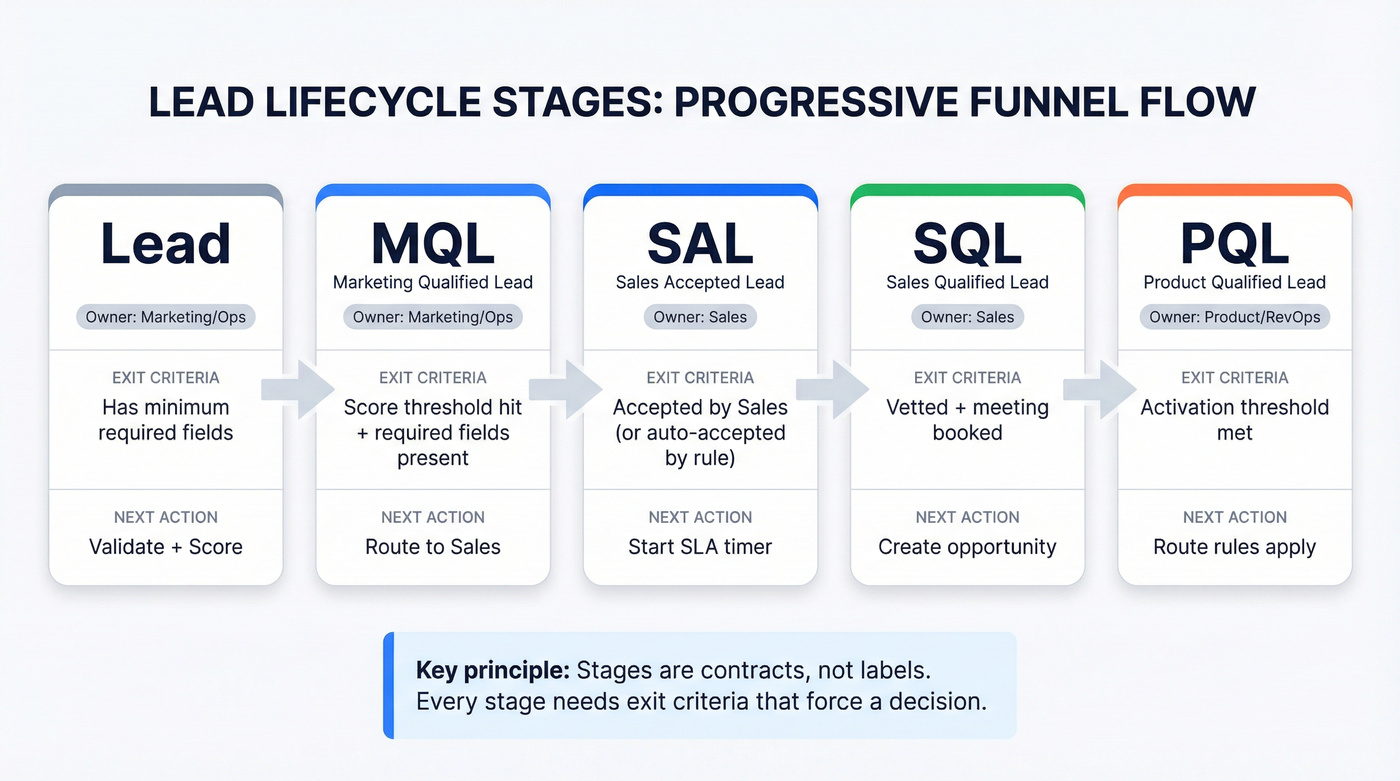
First Page Sage's definitions are unusually operational, so we use them as a baseline:
- MQL: purchase intent indicated (for example, a contact form/email) and able to afford
- SQL: meets MQL criteria, moved to sales, vetted as good fit, and met or booked a meeting with a salesperson
Salesforce's framing is also useful: a lead's qualified when the product fits needs and they can afford it. Simple, but it keeps teams from overcomplicating.
Here's a lifecycle table you can copy into your RevOps doc:
| Stage | Owner | Exit criteria | Next action |
|---|---|---|---|
| Lead | Mktg/Ops | Has minimum fields | Validate + score |
| MQL | Mktg/Ops | Score threshold hit + required fields | Route to Sales |
| SAL | Sales | Accepted by Sales (or auto-accepted by rule) | Start SLA timer |
| SQL | Sales | Vetted + meeting set | Create opp / stage |
| PQL | Product/RevOps | Activation threshold met | Route rules apply |
A quick note on PQLs: ownership varies by motion. In PLG, Product/CS might own early usage, then Sales engages when usage signals buying intent. Decide that ownership up front so PQLs don't become "everyone's job," which means nobody's job.
Helpful reference if you want the exact baseline definitions and benchmarks:
Benchmarks to sanity-check your funnel (2026 baselines)
Benchmarks don't tell you what to do. They tell you when you're lying to yourself.
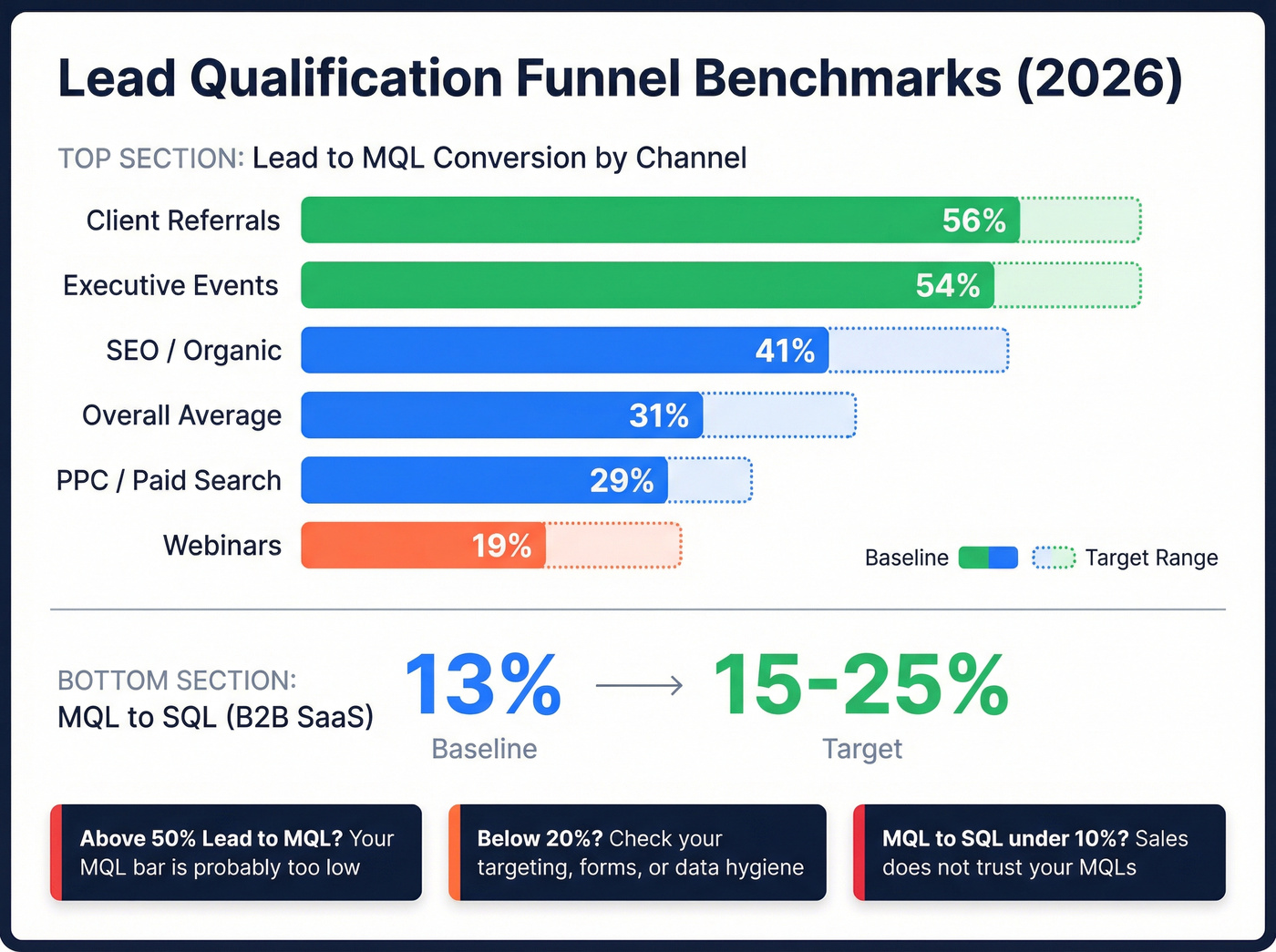
First Page Sage's dataset (client data from 2019-2026) is one of the cleaner benchmark sets because it breaks out channels/page types, and it publishes explicit MQL/SQL definitions on its MQL-to-SQL benchmark page.
Funnel benchmarks (sanity-check)
| Metric | Baseline | Recommended target | Notes |
|---|---|---|---|
| Lead -> MQL (overall avg) | 31% | 35-45% | "Too high" can mean your bar's low |
| Lead -> MQL (SEO) | 41% | 40-55% | Usually higher intent + better fit |
| Lead -> MQL (PPC) | 29% | 25-35% | Great for volume; quality varies by keyword |
| Lead -> MQL (Webinars) | 19% | 20-30% | Strong for mid-funnel; weak for urgency |
| Lead -> MQL (Executive events) | 54% | 45-65% | High-touch channel; definitions matter |
| Lead -> MQL (Client referrals) | 56% | 45-65% | High trust, but routing edge cases are common |
| MQL -> SQL (B2B SaaS) | 13% | 15-25% | SQL = meeting booked |
Interpretation that actually helps:
- If your Lead->MQL is way above 50%, your MQL bar's probably too low (you're relabeling leads).
- If your Lead->MQL is under 20%, your targeting/forms are off - or your data hygiene is failing and you can't match leads to accounts.
- If your MQL->SQL is under 10% in B2B SaaS, Sales doesn't trust MQLs, routing's broken, or your "intent" signals are mostly noise.
Channel reality check (what teams forget)
- PPC converts when the keyword's honest. "Best X software" behaves nothing like "what is X."
- Events create duplicates. If you don't dedupe before routing, you'll spam the same account from three different reps.
- Webinars create false urgency. Attendance is interest; qualification still needs a buying path.
- Referrals are high-fit but weirdly routed. Partner-sourced leads often need named-account overrides and special SLAs.
Use benchmarks as guardrails, not goals. The goal is: "Are we creating meetings and pipeline efficiently without burning reps?"

Step 2 of your qualification process - the data hygiene gate - breaks everything downstream when contact records are stale or wrong. Prospeo refreshes 300M+ profiles every 7 days (not 6 weeks) and delivers 98% email accuracy. Bad data is the #1 reason MQLs die before Sales even touches them.
Stop qualifying leads you can never actually reach.
Qualification frameworks (use them, but don't start here)
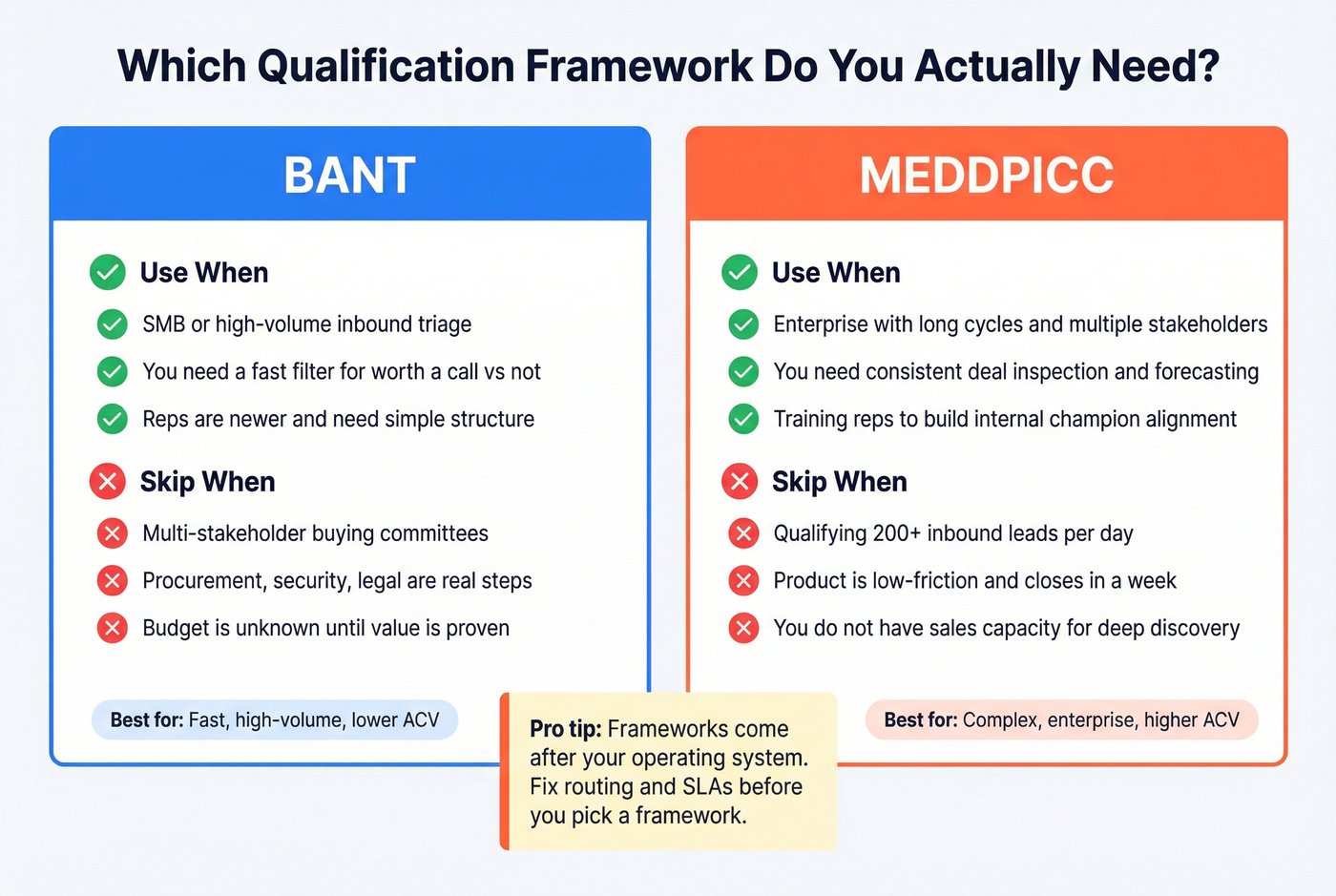
Frameworks are helpful - after you've built the operating system. If you start with MEDDPICC before you've fixed routing and SLAs, you're polishing a car with no engine.
Here's the practical "use this / skip this" view:
Use BANT when...
- You're doing SMB or high-volume inbound triage
- You need a fast filter for "worth a call vs not"
- Your reps are newer and need structure
Skip BANT when...
- You sell into multi-stakeholder buying committees
- Procurement/security/legal are real steps
- "Budget" is unknown until value's proven
Use MEDDIC / MEDDPICC when...
- You're in enterprise with long cycles and multiple stakeholders
- You need consistent deal inspection and forecasting hygiene
- You're training reps to build internal alignment, not just run demos
Skip MEDDIC when...
- You're trying to qualify 200 inbound leads a day
- Your product's low-friction and closes in a week
- You don't have the sales capacity to do deep discovery anyway
The champion test (worth stealing)
A "real champion" isn't someone who likes your product. It's someone who'll spend political capital internally to get you over the line.
If your qualification doesn't test for that, you're confusing enthusiasm with purchase momentum.
The 7-step lead qualification process (end-to-end)
Salesforce's four steps (research -> contact/evaluate -> confirm point of contact -> schedule follow-up) are directionally right. The problem is they don't cover the operational stuff that breaks in production: data hygiene, scoring thresholds, routing fallbacks, and SLA enforcement.
What breaks most often is boring: ignored MQLs (because Sales doesn't trust them) and routing failures that strand leads unowned. Fix those two, and your "lead quality" complaints drop fast.
1) Define ICP + disqualification rules (reason codes first)
Start with disqualification, not qualification. It forces clarity and it gives you the feedback loop you need to improve upstream.

Create standard reason codes that Sales must use on rejects:
- Not ICP (industry/size)
- Wrong persona / no access to buyer
- No use case / low urgency
- Duplicate / already in pipeline
- Bad data (email/phone invalid)
- Competitor lock-in (recycle)
- Student/consultant/vendor
Then define what happens next. "Not now" shouldn't mean "dead forever." It should mean "nurture for 90 days" or "re-score on an intent spike."
Reason code -> recycle path table (copy/paste)
| Reject reason code | What it usually means | What you do next | Re-check trigger |
|---|---|---|---|
| Not ICP (industry/size) | You can't win here | Close out | None (permanent) |
| Wrong persona | You reached a user, not a buyer | Enrich for buyer contact + re-route | New contact found |
| No use case / low urgency | Nice-to-have | Nurture | New intent spike or 90 days |
| Duplicate / already in pipeline | Already being worked | Merge + attach activity | Immediate |
| Bad data | Can't reach them | Enrich/verify + retry | Data fixed |
| Competitor lock-in | Contracted | Nurture "switch" track | Renewal window |
| Student/consultant/vendor | Not a buyer | Close out | None |
Opinion: reason codes are the single best "stop arguing" mechanism between Sales and Marketing. Once you have them, you stop debating quality and start fixing patterns.
To make the feedback loop usable, map these to standardized lead rejection reasons in your CRM so "Bad data" isn't 12 different free-text variations and you can report on it cleanly.
2) Validate the lead record (the data hygiene gate)
Before you score or route anything, validate the record. Bad inputs create fake outputs: false positives (junk looks hot) and false negatives (good leads get ignored).
At minimum, validate:
- Email deliverability (not just format) - see how to verify an email address
- Company domain normalization (no free domains for B2B accounts unless you explicitly allow it)
- Duplicate detection (same person, same company)
- Required routing fields (country/region, employee range, lead source)
- Existing account/opportunity match (don't create parallel outreach)
Here's the thing: this step is where most funnels quietly die. I've seen teams spend weeks debating MQL definitions, while 20-30% of inbound leads never got a real first touch because the record couldn't be routed, bounced on the first email, or duplicated into three owners.
3) Score in 2 dimensions: fit vs intent + set thresholds
Scoring's prioritization math. The mistake is collapsing everything into one number and calling it "lead score." That's how high-intent bad-fit leads hijack your SDR day.
Keep two scores:
- Fit: firmographics + persona alignment
- Intent: behaviors that indicate buying motion
Then set thresholds that match capacity. If Sales can only work 50 leads/day, your MQL threshold should produce about 50/day. Qualification's capacity management as much as it's quality control, and if you ignore that, you'll end up with a "perfect" scoring model that creates 400 MQLs a day and a Sales team that ignores all of them.
Micro-personas: 3 fields to add to your ICP (and why it changes scoring)
Most ICPs stop at "industry + headcount." That's not enough. Add these three fields and your fit score becomes usable:
- Job function (RevOps, IT, Finance, Security)
- Seniority band (Manager / Director / VP+ - pick what actually buys)
- Trigger responsibility (what they own that maps to your value: "owns pipeline reporting," "owns security reviews," "owns onboarding time-to-value")
How it changes scoring: you stop giving full "buyer role" points to anyone with a fancy title. A VP of Marketing who doesn't own the workflow you sell into isn't a buyer; they're a stakeholder at best. Micro-personas make your fit score reflect reality, not org charts.
4) Route with fallbacks + explicit ownership
Routing's where good leads get lost. The fix isn't "more rules." It's rules + fallbacks + monitoring.
Every routing design needs:
- A primary owner rule (territory/segment/account ownership)
- A fallback path (catch-all queue or default owner)
- A validation checkpoint (don't route if required fields are blank)
- A timer that escalates if untouched (Slack/email + reassignment)
If you can't explain routing in plain English, it's too complex. Complexity doesn't make it smarter. It makes it fragile.
Routing edge-cases checklist (print this for RevOps)
These are the cases that break routing in production:
- Missing country/region: route to "Needs Enrichment," not a rep
- Multi-geo companies: route by billing HQ unless you sell by office location
- Named account exists: override territory rules every time
- Existing open opportunity: route to the opportunity owner (or their SDR), not round-robin
- Duplicate lead + new activity: merge and preserve the newest activity timestamp
- Partner-sourced/referral: route to partner owner first, then to sales owner
- Meeting booked without qualification: route to "Meeting Triage" (see gating rules below)
- Competitor/customer domains: route to a special queue (customer expansion or competitive intel), not inbound SDR
5) Execute the SLA follow-up (speed + touches)
Speed-to-lead is a cheat code, but only if you enforce it. The fastest team with a mediocre scoring model will beat the slow team with a beautiful model.
Your SLA should define:
- Response time by lead temperature (hot vs standard)
- Minimum touch pattern (5-8 touches / 7-10 days)
- What counts as a touch (call, email, social, voicemail)
- When to recycle (and who owns the recycle)
Real talk: if you don't track SLA breaches publicly, you don't have an SLA. You've got a suggestion.
6) Convert to SQL (meeting) or recycle (with a next action)
SQL shouldn't mean "Sales looked at it." It should mean Sales vetted it and a meeting's booked (or you have a clearly defined "meeting attempted" rule for your motion).
When it's not converting, recycle with a reason code and a next review date:
- Recycle in 30 days if intent was high but timing was wrong
- Recycle in 90 days if fit's strong but there's no response
- Disqualify permanently only when it's truly not ICP
This keeps your CRM clean without throwing away future pipeline.
7) Audit weekly + recalibrate (so the funnel doesn't drift)
Qualification drifts. Markets change, campaigns change, and reps find loopholes. Weekly audits are how you keep the system honest.
Weekly audit agenda (30 minutes, same time every week):
- Leads stuck >24h by stage/queue
- SLA breaches by rep/team
- MQL accept rate trend
- Top reject reason codes (and which ones Marketing can fix upstream)
- Threshold adjustments (open/close the tap based on capacity)
- One routing postmortem (pick a stranded lead and trace the failure)
If you don't audit weekly, you're not managing a process.
You're hoping.
Where AI helps (and where it hurts) in qualification (2026 reality)
AI's useful in qualification when it reduces rep prep time and standardizes decisions. It's harmful when it becomes a substitute for clean data and clear rules.
Three places AI genuinely helps:
- First-call brief: summarize form fields + page views + product usage into a 6-bullet "why now / what to ask" note for the rep.
- Discovery question generation: create a short question set per segment (SMB vs enterprise) and per micro-persona (RevOps vs IT).
- Auto-classify reject reason codes: read call notes and suggest the right reason code so your feedback loop stays complete.
Hard line: AI doesn't fix bad data, broken routing, or missing SLAs. If ownership's unclear, the best AI summary in the world still sits in an unworked queue.
Build a 2D scoring model (fit vs intent) + filled example matrix
Fit should be the gatekeeper. High intent from a bad-fit account is usually a distraction, not an opportunity.
Build a 100-point model with two dimensions:
- 60 points fit
- 40 points intent
Then set thresholds that force both to matter.
Threshold rules (copy/paste)
- MQL: total score >= 60 and fit >= 35
- SQL: total score >= 75 and intent >= 25 and meeting booked
- Intent decay: reduce intent score by 50% after 14 days of no new activity
That decay rule matters. Without it, a lead that downloaded a guide two months ago stays "hot" forever and clogs your queue.
Example 2D scoring matrix (worked)
| Dimension | Signal | Points | Notes |
|---|---|---|---|
| Fit | Company size in ICP | +15 | e.g., 50-500 |
| Fit | Industry in ICP | +10 | target verticals |
| Fit | Geo supported | +5 | sellable regions |
| Fit | Tech stack match | +5 | if relevant |
| Fit | Buyer micro-persona match | +15 | function + seniority + responsibility |
| Fit | Non-buyer role | -10 | student, etc. |
| Intent | Demo/contact form | +20 | conversion event |
| Intent | Pricing page visit | +10 | high intent |
| Intent | Product page depth | +5 | cap this |
| Intent | Webinar attended | +8 | mid intent |
| Intent | Email click | +3 | cap this |
| Intent | Unsubscribed | -15 | strong negative |
Rules that prevent score gaming:
- Cap awareness events (blog views, generic pageviews). They're easy to inflate.
- Weight conversion events (demo, pricing, trial start, reply) heavily.
- Subtract points for negative signals (unsubscribes, bounces, competitors).
If you want a blank matrix template to start from, Meegle has a free Lead Qualification Matrix Template you can adapt.
Using third-party intent without wrecking your queue
Account-level intent is powerful when you treat it like a multiplier, not a replacement for fit. Prospeo tracks intent across 15,000 topics powered by Bombora. Use it at the account level to bump intent score only when the account's already ICP-fit; otherwise it stays in nurture. https://prospeo.io/intent-data
If you're a HubSpot shop, mirror this as separate Fit and Engagement scores, then use a combined score only for routing convenience.
Marketing -> Sales SLA (copy/paste) + enforcement + reason codes
An SLA's the part everyone agrees with... until it's enforced. Without it, Marketing ships leads into a black hole and Sales complains about quality forever.
Pedowitz's SLA targets are the most usable defaults we've seen:
- Speed-to-lead: hot <=15 minutes; standard <=2 business hours
- Accept/reject window: <=24 hours with mandatory reason codes
- Follow-up attempts: 5-8 touches over 7-10 days
- Meeting booking: within 7 days or recycle
- Disposition completeness: 100% reason codes/notes on rejects
Copy/paste SLA template
Marketing responsibilities
- Deliver MQLs that meet agreed scoring thresholds and required fields
- Stamp lead source + campaign + first-touch channel
- Provide context fields (last conversion, key pages, intent topics if available)
Sales responsibilities
- Accept or reject every MQL within 24 hours
- If rejected, select a reason code + add one sentence of context
- Attempt 5-8 touches over 7-10 days for accepted leads
- Convert to SQL only when vetted + meeting booked (or recycle)
Shared definitions
- MQL = threshold met (fit + intent) + required fields present
- SQL = vetted + meeting booked
One-page SLA scorecard (make it enforceable)
| Metric | Target | Owner | Review cadence |
|---|---|---|---|
| Hot speed-to-lead | <=15 min | Sales | Weekly |
| Standard speed-to-lead | <=2 biz hours | Sales | Weekly |
| Accept/reject SLA | <=24 hours | Sales | Weekly |
| Disposition completeness | 100% | Sales | Weekly |
| MQL accept rate | 70-90% | Shared | Weekly |
| Meeting rate (accepted MQL -> meeting) | 30-60% | Sales | Weekly |
| Top 3 reject reasons | Trend down | Marketing | Weekly |
I've watched teams turn around pipeline quality just by enforcing accept/reject reason codes. One client had a standing fight about "lead quality" until we made rejects pick a reason code; two weeks later, it was obvious 40% of rejects were "Duplicate / already in pipeline," which was a routing and dedupe problem, not a targeting problem.
Routing & governance (so leads don't die in queues)
Routing is RevOps' quiet superpower. It's also where "we'll fix it later" becomes a quarter of lost pipeline.
If you're on Salesforce, Sweep's breakdown is a clean mental model:
- Assignment Rules: simple, fast, brittle at scale
- Queues: transparent, but hot leads can sit
- Flows: modern standard for complex routing and validation
- Workflow Rules / Process Builder: legacy and retiring (don't build new logic here)
- Apex: flexible, expensive, and often opaque
Implementation blueprint (mini-flowchart)
- Step 1: Validate required fields
- If missing: route to "Needs Enrichment" queue + alert Ops
- Step 2: Determine segment
- SMB / Mid-market / Enterprise (employee range, revenue, etc.)
- Step 3: Determine territory
- Geo + named accounts override
- Step 4: Assign owner
- If owner found: assign + start SLA timer
- If not: fallback queue (catch-all) + escalation timer
- Step 5: Monitor
- Dashboard: leads stuck >24h, reassignment rate, SLA breaches
Routing fails silently. A single blank field can strand a lead forever unless you build validation checkpoints and fallbacks.
Meeting request form gating rules (so "book a demo" doesn't wreck your calendar)
Calendly links and "book a demo" buttons create a gap: people will book meetings who shouldn't. Fix it with simple gates.
Use these rules on your meeting request flow:
- Require company email (or route free-email domains to a triage queue)
- Require company name + country/region (routing depends on it)
- Ask one qualifying question tied to your ICP (employee range, tech stack, or use case)
- If not ICP-fit: route to nurture or a short "resource consult" slot, not an AE demo
- If enterprise-fit: route directly to AE (skip SDR) only if intent's high (pricing/demo)
- If SMB-fit: route to SDR first, then AE after a quick qualification call
This protects AE calendars without being rude. You're not blocking people; you're routing them to the right path.
Implement scoring + automation in your tools (without score gaming)
Tooling should enforce your model, not invent it.
HubSpot's lead scoring mechanics are good enough for most teams:
- Use an overall score cap so one behavior can't inflate forever
- Use group caps to limit awareness events (pageviews, email clicks)
- Use decimals when you need nuance (for example, +2.5 vs +5)
- Add and subtract points (negative scoring's underrated)
Practical weighting guidance:
- Cap awareness at about 10-15 intent points total.
- Put the weight on conversion events (demo, pricing, trial, reply).
- Add decay outside HubSpot if needed (workflow or ops job), or approximate it by subtracting points after inactivity windows.
PLG path: turning product usage into PQLs (and when to route to sales)
PQLs are qualification using product telemetry instead of form fills. The trap is routing every signup to Sales and calling it "PLG." That's not PLG. It's spam with a login screen.
Use a decision tree:
Is the product simple? If >7 of the last 10 sign-ups self-serve to first value, it's simple. Let usage drive qualification.
What's the opportunity size? Bigger deals justify earlier human involvement, but you still need thresholds.
Accoil's activation thresholds are a clean starting point:
- Small: route to Sales at about 75% activation
- Mid: route at 60-80% activation
- Large: route at 25-50% activation (don't chase "heartbreaker" signups too early)
Simple PQL routing rule (copy/paste)
- If activation >= threshold AND account fit score >= fit threshold -> create PQL and route to Sales
- If activation high but fit low -> keep in product-led nurture (in-app + lifecycle emails)
- If fit high but activation low -> route to CS/PLG assist motion (not full sales cycle)
Tiny example (so it's not abstract)
If "activation" for your product is "3 teammates invited + 1 integration connected":
- A 2,000-employee ICP-fit account that hits activation in 48 hours should go to Sales fast (PQL).
- A 10-person non-ICP account that hits activation can stay self-serve (great user, not a sales lead).
- A 500-employee ICP-fit account that stalls at "1 teammate invited" should get a PLG assist (in-app prompts + a helpful email), not an AE demo.
KPIs to prove your lead qualification process is working
If you can't measure it weekly, it's not a process. It's a story.
KPIs that matter (and don't get gamed easily):
- Leads stuck >24h (by queue, owner, stage)
- SLA breach rate (hot + standard)
- MQL accept rate (target 70-90%) - track it as sales accepted lead rate
- Meeting rate (by segment; target 30-60%)
- Recycle rate (and recycle->SQL later)
- Conversion vs benchmarks:
- Lead->MQL baseline 31% (SEO 41%)
- MQL->SQL baseline 13% for B2B SaaS
Dashboard spec (keep it simple):
- One view for Marketing (volume, MQL rate, reject reasons)
- One view for Sales leaders (speed-to-lead, touches, meetings)
- One view for RevOps (routing success %, stuck leads, data quality flags)
What reps actually hate about MQLs (and how to fix it)
This is the real "user sentiment" you'll hear from SDRs and AEs:
- "I can't tell why this is an MQL." Fix: add a required "MQL reason" field (top intent signal + top fit signal).
- "Half of these bounce." Fix: put verification/enrichment before routing, not after.
- "I'm getting leads for accounts we already work." Fix: enforce account/opportunity matching and owner overrides.
- "I'm chasing people who just wanted a template." Fix: cap awareness events and require a conversion event for MQL in some segments.
- "I have no idea what to do with 'not now.'" Fix: recycle paths with re-check triggers, not dead ends.
If your reps stop complaining about MQLs, your qualification system's finally doing its job.
Your SLA says 15-minute follow-up on hot leads. But reps waste that window hunting for verified emails and direct dials. Prospeo gives you 143M+ verified emails and 125M+ mobile numbers - enriched in your CRM automatically, so routing actually works.
Hit your SLA every time with contact data that's already verified.
If you do only three things this week:
- Add reject reason codes + recycle paths (and make them mandatory).
- Build a stuck-lead dashboard (anything unowned >24h is a fire).
- Split scoring into fit vs intent (and force both to matter).
FAQ
What's the difference between lead scoring and lead qualification?
Lead scoring assigns points to prioritize leads (typically 0-100 based on fit and intent), while lead qualification is the decision workflow that uses those scores plus rules to accept, reject, convert to a meeting (SQL), or recycle. If your stages don't have exit criteria, scoring won't save you.
What are good MQL and SQL definitions to standardize across teams?
A practical standard is: MQL = purchase intent indicated (like a contact form) plus required fields and basic affordability; SQL = Sales vetted the lead as fit and a meeting's booked. In most B2B SaaS teams, adding "meeting booked" as SQL criteria is the single best anti-gaming rule.
What should a speed-to-lead SLA be in 2026?
A workable 2026 SLA is: hot leads get a first touch within 15 minutes, standard leads within 2 business hours, and every MQL's accepted or rejected within 24 hours with a required reason code. Pair it with 5-8 touches over 7-10 days so "no response" doesn't become "no effort."
How do you disqualify leads without losing future pipeline?
Disqualify with reason codes and a recycle path, not a dead-end: "Not ICP" closes permanently, but "not now" or "no response" should recycle into nurture with a 30-90 day review date or an intent-based trigger. Teams that do this well keep CRM hygiene high without deleting future-ready accounts.
What's a good free tool for fixing bad lead data before routing?
For most teams, the best free starting point is Prospeo's free tier (75 emails + 100 Chrome extension credits/month) because it verifies emails at 98% accuracy and refreshes records every 7 days. Pair it with your CRM's duplicate rules so you verify, dedupe, and enrich before scoring and assignment.
Summary: make the system boring (and it'll print pipeline)
A lead qualification process that works isn't fancy. It's enforceable: clean data before scoring, fit and intent separated, routing with fallbacks, and an SLA with public accountability. Do that, and your MQLs stop being a debate topic and start being a reliable input to meetings and pipeline.