B2B Lead Capture: The 2026 Ops Playbook (Benchmarks + Workflow)
A "Request pricing" lead comes in at 4:58pm. It lands in a shared inbox, gets routed the next morning, and the rep follows up after lunch.
That's not a marketing problem. That's an ops problem.
B2B lead capture is the mechanical system that turns intent into a sales conversation: capture, data quality, routing, SLAs, and measurement. Get it right and pipeline feels easier. Get it wrong and you'll spend all quarter arguing about "lead quality" while your best prospects buy from someone faster.
Here's the thing: most teams don't need another channel. They need a lead capture system that behaves like a machine instead of a suggestion.
What you need (quick version)
Here's the checklist I use when I'm sanity-checking a lead capture setup.
Three levers first (do these before you buy more tools):
- Reduce friction without losing intent: fewer fields, better copy, and a clear "what happens next."
- Route in minutes, not hours: demo/pricing leads touched in <5 minutes; SAL accepted/rejected in 2 business days.
- Verify + enrich immediately after capture: stop sequences from bouncing and stop reps from chasing dead ends.
Benchmarks to anchor on (so you don't gaslight yourself):
- Across 100M+ data points, the baseline is 2.9% qualified-lead conversion and 1.7% form rate.
- If you're below those numbers, don't blame traffic first. Fix capture mechanics and routing first.
Ops targets that actually move pipeline:
- <5 minutes: first touch for demo/pricing.
- 2 business days: sales accepts/rejects SAL (with a reason code).
- Weekly audit: routing accuracy + median time-to-first-touch.
Hot take: if you're selling a lower-priced product, you probably don't need a monster all-in-one GTM platform. You need fast routing, clean data, and ruthless follow-up discipline. Most teams buy complexity to avoid fixing basics, especially in lead capture for small business and early-stage teams where speed beats sophistication.

What is lead capture in B2B (and how it differs from lead gen)
Lead capture is the plumbing that collects contact details and turns them into a usable lead record. It's forms, meeting requests, webinar registrations, newsletter signups, and chat conversations that end in a name + email + context.
Lead generation is broader. Demand generation creates awareness and trust before someone's ready to raise their hand. Lead generation converts that interest into a contactable prospect and nurtures the relationship until it converts.
Most teams obsess over channels (SEO vs paid vs events) and ignore lead capture mechanics. Then they wonder why "high intent" leads don't turn into meetings.
Definitions (copy/paste)
- Demand generation: activities that build awareness and trust before someone's ready to talk.
- Lead generation: activities that convert interest into a contactable prospect (forms, webinar reg, demo requests, newsletter signups).
- Lead capture ops: the operational layer inside lead gen that (1) collects data, (2) validates it, (3) routes it, and (4) enforces follow-up.
Clean mental model: lead capture is a system, not a tactic. It's the part that either makes your funnel feel responsive, or makes it feel broken.
The B2B lead capture workflow (capture → enrich → score → route → SLA → measure)
Enterprise GTM teams struggle with lead experience and timely engagement for one simple reason: the chain breaks. Leads come in, but the system doesn't convert them into conversations.

I've watched teams buy more "top of funnel" while their capture-to-SQL path leaked value in three places at once: the form asked for too much, enrichment happened days later (or never), and routing depended on a human noticing a notification, which meant the fastest lead in the world still got a next-day reply.
Fix the leaks first.
Capture events (form submit, meeting booked, webinar reg, chat qualified)
Your capture events should be explicit and standardized, not "whatever marketing feels like this month."
Common capture events:
- High-intent: demo request, pricing request, "talk to sales," meeting booked.
- Mid-intent: webinar registration, event registration, product newsletter signup.
- Low-intent: gated content download, template download.
Operational rule: every capture event needs a lead type (demo/pricing/webinar/etc.) and a source taxonomy (channel + campaign + offer). If you can't answer "what did they do?" and "where did they come from?" you can't route or measure.
Failure mode: "All leads are the same." That's how a pricing request ends up in the same nurture queue as an ebook download.
Enrichment + verification (where bad data kills speed-to-lead)
Speed-to-lead doesn't matter if the lead record's incomplete, duplicated, or wrong.
Right after capture, you want to:
- Verify email (deliverable vs risky vs invalid)
- Enrich (company, role, size, location, tech, intent signals)
- Dedupe (same person submits twice; same company submits via multiple paths)
- Normalize (country/state, job title, domain, phone formatting)
This is where a data quality layer pays for itself. In our experience, the cleanest setup is "capture, then immediately verify and enrich, then route" so the rep's first action is a real outreach attempt, not detective work.
Useful links when you're wiring this up:
Failure mode: fast follow-up on bad data. That's how you burn domains, annoy prospects, and still miss meetings.
Scoring + routing (intent + fit)
Scoring isn't a single number. It's a decision: who should work this, and how fast?
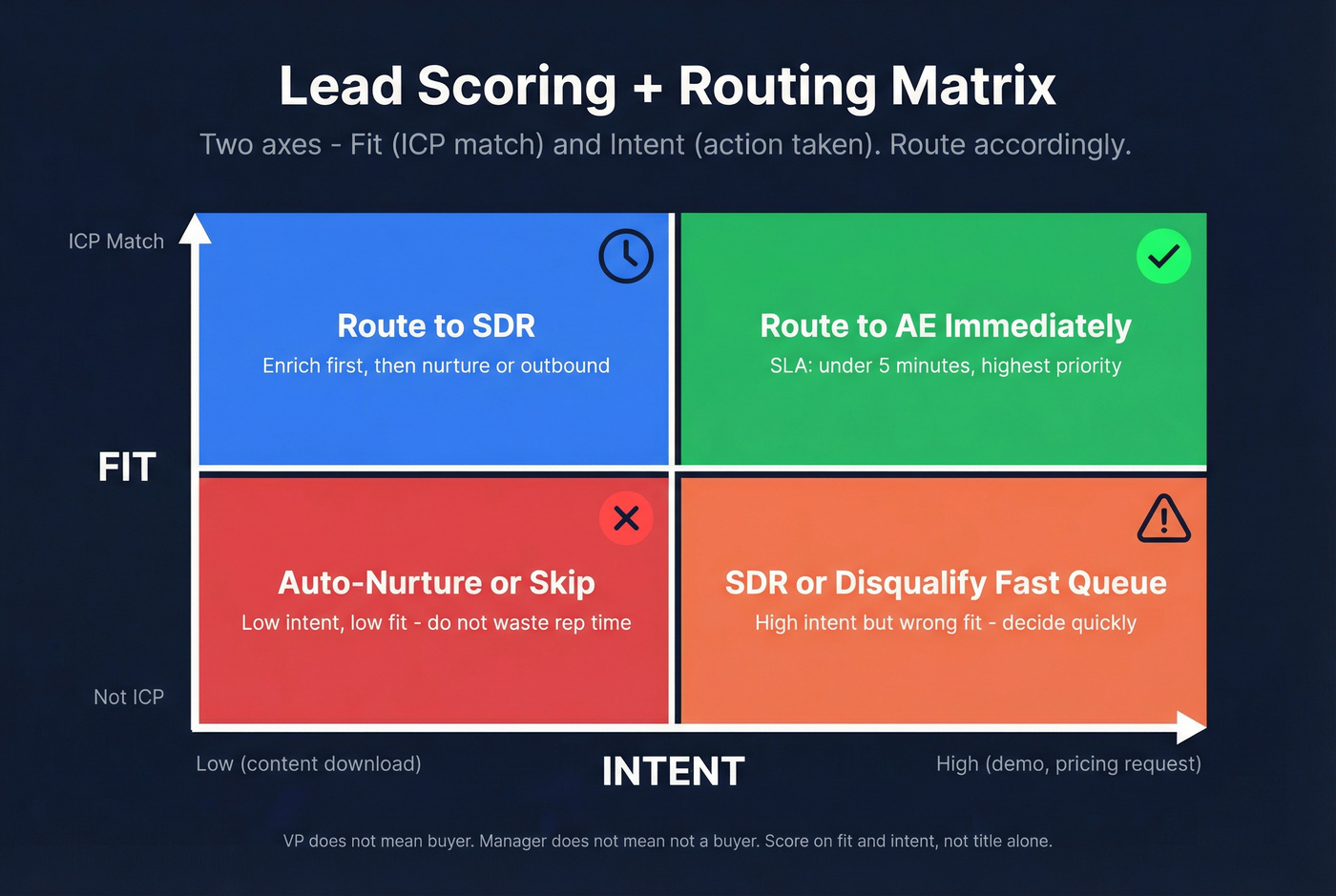
A practical scoring model uses two axes:
- Fit: ICP match (industry, size, region, tech stack, role)
- Intent: what they did (pricing vs webinar), plus behavioral signals (repeat visits, key pages)
Routing rules should be boring and deterministic:
- If demo/pricing AND ICP-fit, route to AE immediately.
- If demo/pricing AND not ICP-fit, route to SDR or a "disqualify fast" queue.
- If webinar AND ICP-fit, route to SDR within SLA.
- If content AND unknown fit, enrich first, then decide.
Failure mode: routing by job title only. "VP" doesn't mean "buyer," and "Manager" doesn't mean "not a buyer."
SLA + follow-up (automation + accountability)
Two SLAs matter more than anything:
- Demo/pricing touch time: under 5 minutes.
- SAL accept/reject: within 2 business days.
That second one is where alignment lives. If sales can't accept or reject quickly (with a reason), marketing can't improve targeting, and RevOps can't fix routing.
I've watched teams argue about lead quality for months because they never enforced a SAL clock. The clock ends the debate.
Failure mode: "We'll get to it." Leads decay fast. Your competitor's rep is already in their inbox.
Measurement + attribution (pipeline, not CPL)
Capture measurement should follow the lead through:
- captured → qualified → SAL → meeting booked → meeting held → pipeline created → revenue
If you stop at CPL, you'll optimize for cheap leads that don't convert. If you stop at MQL volume, you'll optimize for form fills that sales ignores, which looks great in dashboards and awful in pipeline.
B2B lead capture benchmarks: what "good" looks like in 2026
Across 100M+ data points, two numbers keep teams honest: 2.9% average qualified-lead conversion and 1.7% average form rate.
Use these as baselines. Then layer in operational benchmarks that reflect execution.
Copyable scorecard (tight table)
| Metric | Good (2026) |
|---|---|
| Form rate | 1.7%+ |
| Qualified-lead conv. | 2.9%+ |
| Speed-to-lead (median) | <5 min |
| SAL accept/reject | ≤2 biz days |
| Email bounce rate | <5% |

How to use the ranges (no hand-waving):
- Demo/pricing completion is low: you've got a friction problem (too many fields, unclear value, bad mobile UX).
- Speed-to-lead is slow on demo/pricing: you've got a routing/staffing problem, not a "lead quality" problem.
- Bounce rate >5%: your "lead volume" is fake. Fix verification before you scale spend.
- Duplicates are high: your CRM's rotting (bad matching rules, inconsistent domains, multiple capture paths).
One strong opinion: if your speed-to-lead is slow, nothing else matters yet.

You just read why enrichment + verification right after capture is the difference between fast follow-up that works and fast follow-up that burns your domain. Prospeo's 5-step verification delivers 98% email accuracy, enriches every lead with 50+ data points, and refreshes records every 7 days - so your reps act on real data, not stale guesses.
Stop routing leads to reps who have to play detective first.
Capture methods map (and when to use each)
Different capture methods create different kinds of leads. Treat them the same and you'll under-follow-up on high intent or over-follow-up on low intent.
Visitor identification is capture-adjacent: it doesn't capture a person, but it turns anonymous traffic into an account list you can route to outbound.
Methods comparison (tight table)
| Method | Best for | Downside | Data | Risk | Follow-up |
|---|---|---|---|---|---|
| Landing form | High intent | Lower vol | Strong | Low | <5 min |
| Multi-step | Qual + UX | Build time | Strong | Low | By answers |
| Chat | Fast qual | Needs tuning | Med+ | Med | Book mtg |
| Scheduler | Speed | Less context | Med | Low | Pre-call |
| Webinar reg | Vol + intent | No-shows | Strong | Low | Remind |
| Instant forms | Cheap vol | More noise | Weak | Med+ | Call fast |
| Visitor ID | Account lists | No contacts | Med | Low | ABM |

Instant forms reality: teams often see 30-60% more leads from instant forms than landing pages. The tradeoff's predictable: weaker attribution, more low-intent submissions, and more compliance hygiene work. Run them only if you're measuring meeting held rate and pipeline, not CPL.
Visitor ID hygiene (the part people skip):
- Turn on bot filtering.
- Exclude your own IPs, agencies, and known data centers/ISPs.
- Maintain an exclusion list (customers, partners, recruiters) so outbound doesn't get weird.
Form mechanics that increase completion (without killing lead quality)
Most form advice is either "ask for nothing" (you'll get junk) or "ask for everything" (you'll get nobody). The right answer's simple: ask for the minimum you need to route correctly, then enrich the rest.
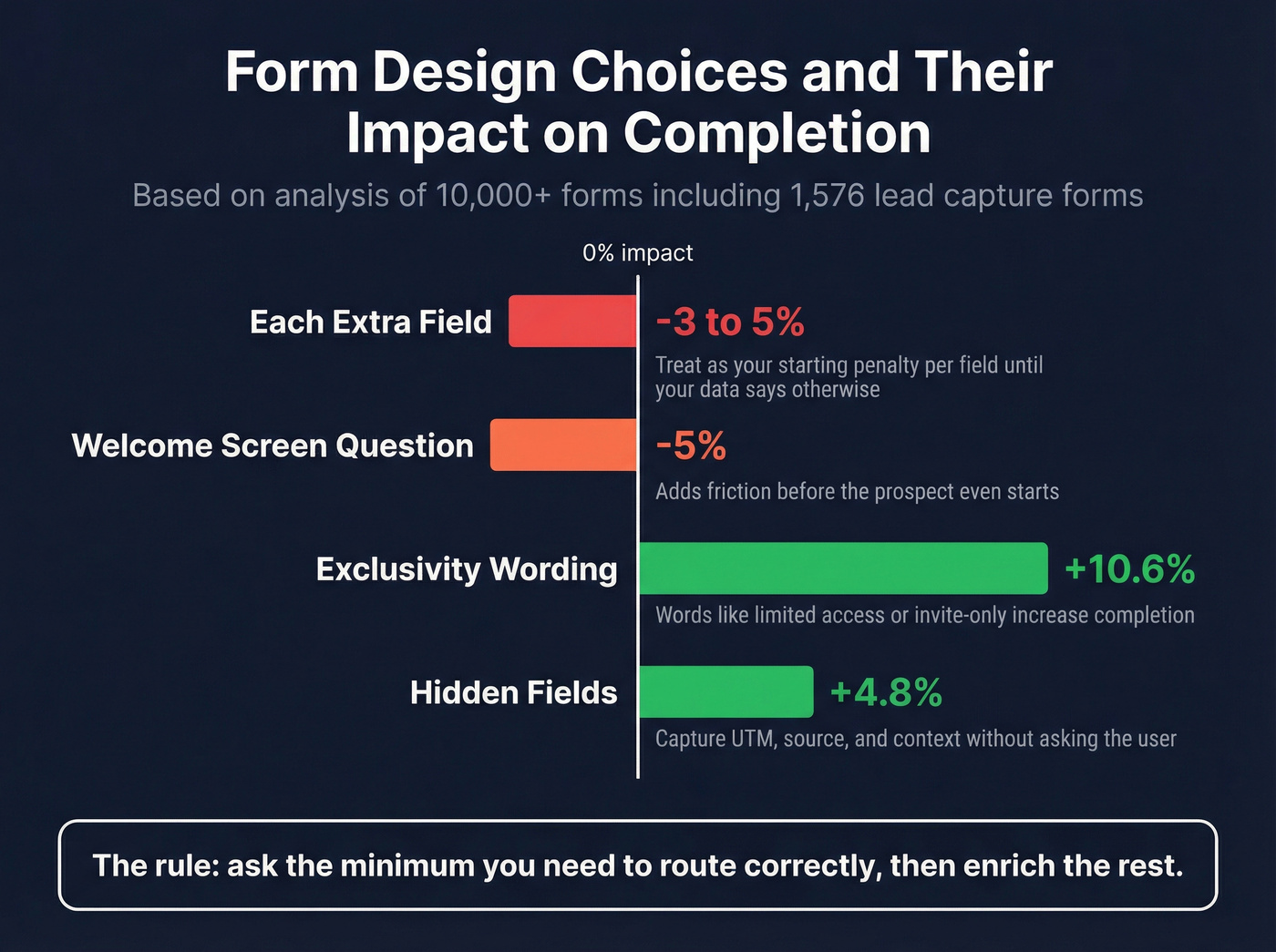
A large analysis of 10,000 forms (including 1,576 lead-capture forms) gives three deltas worth using in 2026:
- A welcome-screen question correlates with -5% completion
- Exclusivity wording correlates with +10.6% completion
- Hidden fields correlate with +4.8% completion
Operating assumption for audits: each extra field costs 3-5% completion. Treat that as your starting penalty until your own data proves otherwise.
Field strategy (minimal viable vs qualification)
A practical "minimal viable" set for high-intent pages:
- Work email
- Name
- Company
- One qualifier that affects routing (team size, use case, region)
For lower-intent offers (newsletter, webinar):
- Optional: company (or infer via enrichment later)
Do this / don't do this (real operator rules):
- Do ask one routing question ("What are you trying to solve?").
- Don't ask for phone on first touch unless your motion truly requires it; if you do, make it optional and explain why.
- Do use dropdowns for routing fields (region, use case).
- Don't use free-text for anything you plan to route on.
Progressive profiling + hidden fields (why it lifts completion)
Hidden fields are the quiet hero of lead capture. They lift completion because the user doesn't feel the friction, but you still get routing context.
Good hidden fields:
- UTM parameters (source/medium/campaign)
- Landing page path
- Product interest (based on page category)
- Geo (country/region)
- Known account ID (if you've got it)
Hidden fields correlate with +4.8% completion. Take the win.
Placement rules (repeat on long pages)
Form placement is a conversion lever teams underuse because it feels "too simple."
On long pages, repeating the form roughly every ~350 words and placing one at the bottom works because people decide at different scroll depths. Forcing them to hunt for the form is self-sabotage.
Copy that signals value/exclusivity (examples aligned to +10.6%)
Exclusivity works because it reduces anxiety: "This is for people like me, and it'll be worth my time."
Copy snippets you can steal:
- "Get a tailored benchmark for teams like yours (2-3 minutes)."
- "We only run 12 implementation slots per month - request yours."
- "See the exact workflow we'd deploy for your stack."
Routing + SLAs: the part that actually creates pipeline
If you want one more hot take: most "lead quality" complaints are really routing and SLA failures wearing a disguise.
Non-negotiables (print this)
- Demo/pricing first touch: <5 minutes
- SAL accept/reject: ≤2 business days (with reason code)
- Routing rules: based on intent + fit, not titles
- Weekly audit: routing accuracy + median time-to-first-touch
Routing ownership model (who owns what)
Lead capture fails when "everyone" owns it. Make it explicit:
- Marketing Ops owns: forms, UTMs, capture events, hidden fields, consent language, and conversion tracking.
- RevOps owns: lead/contact/account schema, dedupe rules, routing logic, lifecycle stages, SLA dashboards, and automation reliability.
- Sales Ops / SDR Manager owns: notification channels, rep coverage schedules, queue management, and enforcement of SAL reason codes.
- Sales leadership owns: the SLA commitment (staffing and behavior). If reps can't respond in 5 minutes, it's a resourcing decision, not a tooling issue.
- Legal/Privacy owns: approved disclosure templates, DSAR process, DPAs with vendors, and retention policy.
If you can't name an owner for each bullet, your system will drift.
Routing checklist
- Define lead types: demo, pricing, contact sales, webinar, content, chat-qualified
- Define intent tiers: high (demo/pricing), medium (webinar), low (content)
- Define ICP fit rules: company size, region, industry, tech, role
- Add reason codes for reject: student, competitor, too small, wrong region, spam, partner
Routing logic (pseudo-rules you can implement)
- IF lead_type in (pricing, demo) AND fit = true → assign AE + notify instantly
- IF lead_type in (pricing, demo) AND fit = false → assign SDR "disqualify fast"
- IF lead_type = webinar AND fit = true → SDR follow-up within 1 business day
- IF lead_type = content AND fit = unknown → enrich → score → route/nurture
- IF duplicate = true → merge + keep latest intent event
Real talk: routing that depends on a human checking Slack isn't routing. It's hope.
Worked examples (demo vs webinar vs instant form)
These are three flows that cover most real-world lead capture.
Example 1: Demo / pricing request (high intent)
Goal: meeting booked fast, with clean data and the right owner.
Workflow
- Capture: demo request form with 4 fields (email, name, company, use case).
- Validate: require work email; block common personal domains if your ICP's strictly B2B.
- Verify/enrich + dedupe: run immediately; merge duplicates; normalize domain/company name.
- Route: ICP-fit → AE; not-fit → SDR "disqualify fast."
- SLA: AE/SDR first touch in <5 minutes.
- Measure: meeting booked, meeting held, pipeline created.
What I'd do if this kept failing: add a "fast-response" rotation (one rep on point per hour block) and stop pretending automation fixes staffing.
Example 2: Webinar registration (mid intent)
Goal: maximize show-up, then convert attendees into conversations without spamming no-shows.
Workflow
- Capture: webinar reg (email + optional company).
- Enrich: fill company/role; tag topic + persona.
- Route: ICP-fit → SDR follow-up after attendance; non-fit → nurture.
- SLA: you don't need 5-minute response; you need tight reminders and post-webinar timing.
- Measure: attendance rate, meeting rate from attendees, pipeline from attendees.
A simple 5-touch webinar follow-up sequence (steal this)
- Email 1 (same day, 1-2 hours after): "Recording + 3 bullets you'll care about"
- Email 2 (next day): "Quick question: are you solving X this quarter?"
- Email 3 (day 3): "Two customer examples (1 paragraph each)"
- Email 4 (day 6): "Worth a 15-min teardown of your current workflow?"
- Email 5 (day 10): "Close the loop: should I stop reaching out?"
Routing rule that works: attendees get SDR outreach; no-shows get the recording + one check-in, then nurture. Don't punish no-shows with a 12-step sequence.
Example 3: Instant forms (high volume, mixed intent)
Goal: harvest demand efficiently without drowning sales.
Workflow
- Capture: instant form with minimal fields.
- Immediate hygiene: verify email, dedupe, and tag as "instant form" for reporting.
- Fast triage: call/SMS only for ICP-fit + high-intent offer; everyone else goes to a short nurture.
- Compliance: tighten disclosure text; make opt-out easy.
- Measure: meeting held rate and pipeline per lead, not CPL.
Rule of thumb: if instant-form leads produce ugly meeting-held rates, stop scaling them until you fix targeting and follow-up.
How to prevent info@ and role-inbox junk (before it hits sales)
This is the most common "why are our leads trash?" root cause: you're capturing role inboxes and unreachable addresses.
Do these four things:
- Require work email on high-intent forms (demo/pricing).
- Blocklist role inbox patterns: info@, sales@, support@, admin@, hello@, contact@, billing@.
- Conditional field: if email matches a role pattern, show "Please use your work email so we can route your request correctly."
- Auto-quarantine: if verification flags risky/invalid, route to a cleanup queue, not to an AE.
This one change reduces SLA misses because reps stop wasting their first-touch window on dead addresses.
Reply sentiment routing (so inbox chaos becomes a system)
Outbound and post-capture follow-up generate replies. If you don't categorize them, you lose signal and you annoy people.
Use four sentiment tags and make them operational:
- Positive ("yes / interested / send times") → route to owner, create task, stop sequences.
- Rejection ("not now / no budget / not a fit") → set next-step date, tag reason, suppress for 60-90 days.
- Referral ("talk to Alex / wrong person") → create new contact, transfer context, update account map.
- Unsubscribe/complaint → suppress immediately, log channel, and review copy/compliance.
This is how you turn "reply handling" into pipeline instead of chaos.
Lead capture compliance (GDPR/CCPA) at the point of capture
B2B doesn't get a free pass. GDPR and CCPA apply to business contacts, and the CCPA B2B exemption ended Jan 1, 2023, so business contacts have access/delete/correct/opt-out rights.
Teams get sloppy when they treat compliance like a privacy policy page instead of a capture-system requirement.
Controller vs processor (practical, not legalese)
- When you capture leads for your own sales and marketing, you're typically the controller (you decide why and how the data's used).
- Your lead capture vendors (forms, chat, enrichment, CRM, automation) are typically processors (they process data on your behalf).
Operational takeaway: every processor needs a DPA, and your privacy disclosures should reflect the categories of processors you use (analytics, enrichment, CRM, messaging).
Point-of-capture disclosure templates (copy/paste)
Template A - Demo / pricing (legitimate interest expectation) "By submitting, you agree we may contact you about your request. See our Privacy Policy for details and your rights."
Template B - Newsletter (consent checkbox)
[ ] I agree to receive marketing emails. I can unsubscribe anytime. Privacy Policy.
Keep it short, visible, and consistent across forms and chat.
What to disclose on forms/chat (minimum viable checklist)
At the point of capture (form or chat), disclose:
- Data categories collected
- Purpose (respond to request, marketing updates, etc.)
- Legal basis (consent or legitimate interest)
- Retention period (or criteria)
- Rights (access, delete, correct, opt-out)
- Sharing categories (processors: CRM, analytics, enrichment)
- Contact method for privacy requests
Consent vs legitimate interest (operational rule)
- Use consent when it's optional/promotional (newsletter, product updates).
- Use legitimate interest when the user clearly expects follow-up tied to the action (demo request → you follow up about the demo).
Make the expectation obvious in plain language. Don't make people guess.
Mini DSAR workflow (what actually happens when someone asks)
A DSAR process that works in a B2B org:
- Intake: request arrives via form/email; log it as a ticket with timestamp.
- Verify identity: confirm the requester controls the email address (reply-from requirement).
- Locate data: search CRM + marketing automation + support/chat + enrichment logs.
- Action:
- Access: export fields and activity history you store.
- Delete: delete/anonymize where required; suppress from re-import.
- Correct: update the record and propagate to downstream tools.
- Opt-out: add to global suppression list.
- Confirm: respond with what you did and when.
- Prevent re-entry: keep a hashed suppression identifier so deleted/opted-out contacts don't get re-added from imports.
Implementation timeline (realistic)
A realistic timeline for getting this right across a B2B SaaS org:
- Assessment: 30-60 days (data mapping, vendors, lawful bases)
- Implementation: 90-180 days (policies, DPAs, consent flows, DSAR process)
- Testing: 30-60 days (audit, edge cases, monitoring)
- Then ongoing monitoring
If you're trying to "fix compliance" in a week, you're writing a doc, not building a system.
Tool stack (with pricing): build a capture system, not a pile of widgets
Most stacks fail because they're assembled like a junk drawer: a form tool, a chat tool, a CRM, and a bunch of zaps. Nobody owns the system end-to-end, and the handoffs rot.
Build it as layers. Then pick one tool per layer unless you've got a real reason.
If you're shopping, think in lead capture software categories (forms, chat, enrichment/verification, routing/automation) rather than chasing "best lead capture tools 2026" listicles that mix totally different layers.
Stack map (copy this)
| Layer | What it does | Example tools | Typical cost |
|---|---|---|---|
| Forms/funnels | Capture + qualify | Heyflow, Typeform | $30-$300/mo |
| Chat | Qual + book | Intercom, Drift | $29-$132/seat; Drift starts at $2,500/mo |
| Visitor ID | ID accounts | Leadfeeder | $0-$200+/mo |
| Enrich/verify | Data quality | Prospeo | ~$0.01/email; mobiles 10 credits |
| CRM | Record of truth | HubSpot, Salesforce | $50-$300/user/mo |
| Automation | Workflows | Zapier, Make | $20-$200/mo |
| Attribution | Source→pipeline | Ruler Analytics | $200-$1,000/mo |
| Webinar | Reg + signals | ON24 | $1,000-$5,000/mo |
Prospeo (Tier 1): the data quality layer (accuracy + freshness)
If your problem is "we captured the lead, but we can't contact them reliably and we can't route fast," fix this layer first.
Prospeo is built for accuracy and operational speed: 300M+ professional profiles, 143M+ verified emails, and 125M+ verified mobile numbers, used by 15,000+ companies and 40,000+ Chrome extension users. Enrichment returns 50+ data points per contact, and it runs cleanly in automated workflows with a 92% API match rate and 83% enrichment match rate.
Pricing's self-serve and credit-based: free tier includes 75 emails + 100 extension credits/month, verified emails run about ~$0.01 per email, and mobiles cost 10 credits per number.
Heyflow (Tier 1): multi-step funnels that qualify without tanking completion
Best for: high-intent pages where you need one or two qualifiers but don't want a long, ugly form. Skip if: you only need a basic embedded form and you've already got a strong CMS form setup.
Pricing: Starter EUR49/mo, Growth EUR89/mo, Scale EUR239/mo, Enterprise EUR1,100+/mo (with response overages starting around EUR0.15 per extra response). Scale includes native A/B testing, which is where it starts paying for itself.
Operator note: Heyflow shines when you use conditional logic to keep the form short for most people and only ask extra questions when routing truly depends on it.
Intercom (Tier 1): "capture → qualify → route" in one place (quick setup)
Intercom wins when chat is part of qualification and routing/assignment needs to be first-class.
Pricing (annual billing): $29 / $85 / $132 per seat/month, plus $0.99 per resolution for the AI agent.
Quick setup:
- Create 2 inbound paths: Sales (demo/pricing pages) and Support (help/docs).
- Add 3 qualifying questions for Sales path (use case, company size band, timeline).
- Turn on round robin for AEs/SDRs.
- Add an after-hours rule: book meeting + promise next-business-day follow-up.
- Pipe conversation tags into CRM fields (lead type + intent tier).
If your site gets meaningful product questions, Intercom can turn curious traffic into booked meetings without adding form friction.
Leadfeeder (Tier 2): visitor identification that turns traffic into account lists
Leadfeeder's a pragmatic visitor ID option when you want to know which companies are on your site and route that to outbound.
Pricing: free plan is $0 and shows the last 7 days with up to 100 identified companies; paid starts at $99/mo (annual) and scales by identified companies/month.
Use it well:
- Exclude your own traffic and known noise.
- Route "high-fit accounts visiting high-intent pages" into an outbound task queue.
Drift (Tier 2): powerful, pricey, and heavier to run
Drift is the enterprise conversational layer. It can book meetings, do advanced routing, and integrate deeply, but it's not lightweight.
Expect $2,500/month and up in many real deployments. The common failure mode is buying Drift without staffing and ownership; then it becomes expensive shelfware.
My recommendation: choose Drift when chat's a strategic channel with a dedicated owner and clear coverage. Otherwise, pick a lighter chat tool and win on execution.
Tier 3 plumbing (where each fits)
- Typeform ($30-$100/mo): quick forms and experiments; great for testing copy and flow before you harden it in your main funnel.
- Ruler Analytics ($200-$1,000/mo): attribution that ties capture source to pipeline/revenue; use it to kill channels that look good on CPL but fail downstream.
- Zapier / Make ($20-$200/mo): workflow glue; keep zaps documented and monitored or they'll silently break.
- HubSpot / Salesforce ($50-$300/user/mo): system of record; the cost isn't the license, it's the discipline to keep fields and stages clean.
- ON24 ($1,000-$5,000/mo): webinar engine with strong attendance signals; best when webinars are a repeatable pipeline motion, not a one-off event.
Implementation notes: HubSpot + Salesforce (fields, validation, lifecycle)
This is the part most "lead capture guides" skip, and it's why implementations fail.
Minimum fields to route correctly (the non-negotiables)
Create these fields in your CRM (Lead and/or Contact), and keep them consistent across tools:
- Lead Type (picklist): demo, pricing, contact sales, webinar, content, chat-qualified, partner, other
- Intent Tier (picklist): high, medium, low
- Primary Use Case (picklist): 6-10 options max
- ICP Fit (boolean or picklist): fit / not fit / unknown
- Routing Region (picklist): NA, EMEA, APAC, LATAM (or your model)
- Source + Campaign (UTM-backed where possible)
- SAL Status (picklist): accepted, rejected
- SAL Reject Reason (picklist): spam, student, competitor, too small, wrong region, partner, other
- First Touch Timestamp (datetime) + First Touch Channel (picklist)
Validation rules that prevent garbage
- Work email required for demo/pricing (or at least block common personal domains if your ICP demands it).
- Lead Type required on creation (default from form/chat; never let it be blank).
- If SAL Status = rejected, then SAL Reject Reason is required.
- If Lead Type = webinar, then Webinar Topic is required (or campaign maps to topic).
Lifecycle stages (keep it boring)
Pick one lifecycle model and enforce it:
- Lead captured → Qualified lead → SAL → Meeting booked → Meeting held → Opportunity → Customer
Don't invent 14 stages to feel sophisticated. You'll just create reporting chaos.
SLA reporting (how to make it visible)
- Create a dashboard tile for median speed-to-lead (demo/pricing only).
- Create a tile for % touched under 5 minutes.
- Create a tile for SAL accept/reject within 2 business days.
- Review weekly. If it's not reviewed, it's not real.
Measurement: stop optimizing CPL - optimize meeting rate and pipeline
The benchmark that matters defines conversion as a qualified lead, not a raw form submit. That's the right north star.
Your measurement stack should answer:
- Which capture methods create meetings held?
- Which ones create pipeline?
- Which ones create revenue?
KPI checklist (what to track weekly)
- Form rate and completion rate (by page + device)
- Qualified lead conversion (by capture method)
- Median speed-to-lead (demo/pricing separately)
- Sales Accepted Lead accept/reject rate + reason codes
- Meeting booked rate and show-up rate
- Pipeline created per lead source (not just volume)
- Bounce rate and invalid rate (protect deliverability)
Instant forms are the classic trap: more leads, weaker attribution, and often lower downstream quality. If you run them, measure meeting held and pipeline, not CPL.
Speed-to-lead under 5 minutes means nothing if the email bounces or the phone number is dead. Prospeo gives your capture workflow 143M+ verified emails and 125M+ verified mobiles - at $0.01 per email. Plug it into HubSpot, Salesforce, or your API pipeline and enrich the moment a form fires.
Clean data in, real conversations out. That's the entire ops playbook.
FAQ
What's the difference between B2B lead capture and lead generation?
B2B lead capture is the ops layer that turns a form/chat/webinar signup into a usable record (validated data, dedupe, routing, and SLAs), while lead generation is the broader set of tactics that create and convert interest. If sales isn't touching demo/pricing leads in under 5 minutes, your issue's capture ops, not channels.
What's a good B2B website conversion rate for qualified leads in 2026?
A solid baseline is 2.9% qualified-lead conversion and 1.7% form rate across 100M+ data points. If you're below that, fix form friction (each extra field can cost 3-5% completion), then fix routing and speed-to-lead before you blame traffic quality.
How fast should sales respond to demo or pricing leads?
Sales should respond in under 5 minutes for demo/pricing requests, and you should track the median plus the percent touched under 5 minutes. If you can't staff it, run a fast-response rotation and enforce a ≤2 business day SAL accept/reject clock with reason codes.
What's a good free tool to verify and enrich captured leads?
Prospeo's free tier (75 emails + 100 extension credits/month) is a practical starting point to verify deliverability and enrich records before outreach. Aim for <5% bounce rate; if you're above that, slow down sending and fix verification/enrichment before scaling any channel.
Do GDPR/CCPA rules apply to B2B leads?
Yes. GDPR and CCPA apply to business contacts, and the CCPA B2B exemption ended Jan 1, 2023, which means access/delete/correct/opt-out rights apply. At capture, disclose purpose, legal basis, retention, rights, and processor categories; then run a DSAR workflow that can actually execute across your CRM and marketing tools.
Closing: what to do on Monday
Do three things and your B2B lead capture system improves immediately. First, audit speed-to-lead for demo/pricing and fix coverage until your median's under five minutes. Second, add verification + enrichment right after capture so reps stop wasting their first-touch window on bad data and duplicates (use an email verifier and a lead enrichment workflow). Third, run the scorecard weekly - form rate, bounce, SAL clock, meeting held, and pipeline per source - so you're optimizing for revenue, not vanity volume.
If you do nothing else, enforce the SAL accept/reject clock.