


BombBomb alternatives (2026): top picks for video email, SMS & tracking
BombBomb's popular for a reason: it's rated 4.7/5 on G2 (583 reviews) and it's built for reps who want to record, send, and track without thinking too hard. But if you're comparing BombBomb alternatives, it's usually because once you add seats, devices, templates, and compliance needs, the cracks show up fast: slow moments, email weirdness, and the classic "why didn't that send?"
G2 benchmarks peg BombBomb at about a month to implement and about 15 months to ROI. That's fine when you're standardizing video across a team. It's brutal when you just need faster recording, better SMS follow-up, or cleaner analytics without paying for features nobody touches.
BombBomb's reviewer base skews small business, with a heavy concentration in Real Estate and Financial Services - industries where trust, speed-to-response, and compliance language matter.
Who should stay? If you rely on governance - brand controls, admin oversight, role-based permissions, and SSO - BombBomb can still be the safest choice.
Everyone else has better, cheaper options in 2026.
Our picks (TL;DR)
Loom - Best overall
- Best for: fastest "record -> share -> track" loop (screen + webcam)
- Use if: reps need speed and adoption more than a full video-email suite
- Skip if: your workflow's SMS-first or you need built-in video landing pages with CTAs
- Pricing signal: Free; $18-$24/user/mo

Prospeo - Best "make any video tool work" option
- Best for: protecting deliverability by fixing list quality first (verified emails + mobiles + enrichment)
- Use if: bounce rate's creeping above 1% and inbox placement's sliding
- Skip if: you only send internal videos (no outbound)
- Pricing signal: Free; about $0.01 per verified email (credits model)
Sendspark - Best for personalization at scale
- Best for: dynamic personalization (names, logos, pages) without recording 1,000 one-offs
- Use if: you run volume outbound and want "personal" that still scales
- Skip if: you hate usage meters (dynamic minutes) or need a long free evaluation
- Pricing signal: $49-$699/mo (bundles; Team includes 10 seats)
Quickpage - Best for SMS-first follow-up + instant alerts
- Best for: texting workflows, fast follow-up, real-time engagement notifications
- Use if: your reps live in SMS and want alerts the moment someone engages
- Skip if: stakeholders expect "inline video in a text" (SMS always sends a link)
- Pricing signal: $33-$83/mo (annual-billed monthly equivalents; add seats)

Why teams replace BombBomb (the 5 switch triggers)
Use this as a quick checklist. If you're paying for 10+ seats and mostly using "record + send," you're overpaying, and switching's usually the cleanest fix.
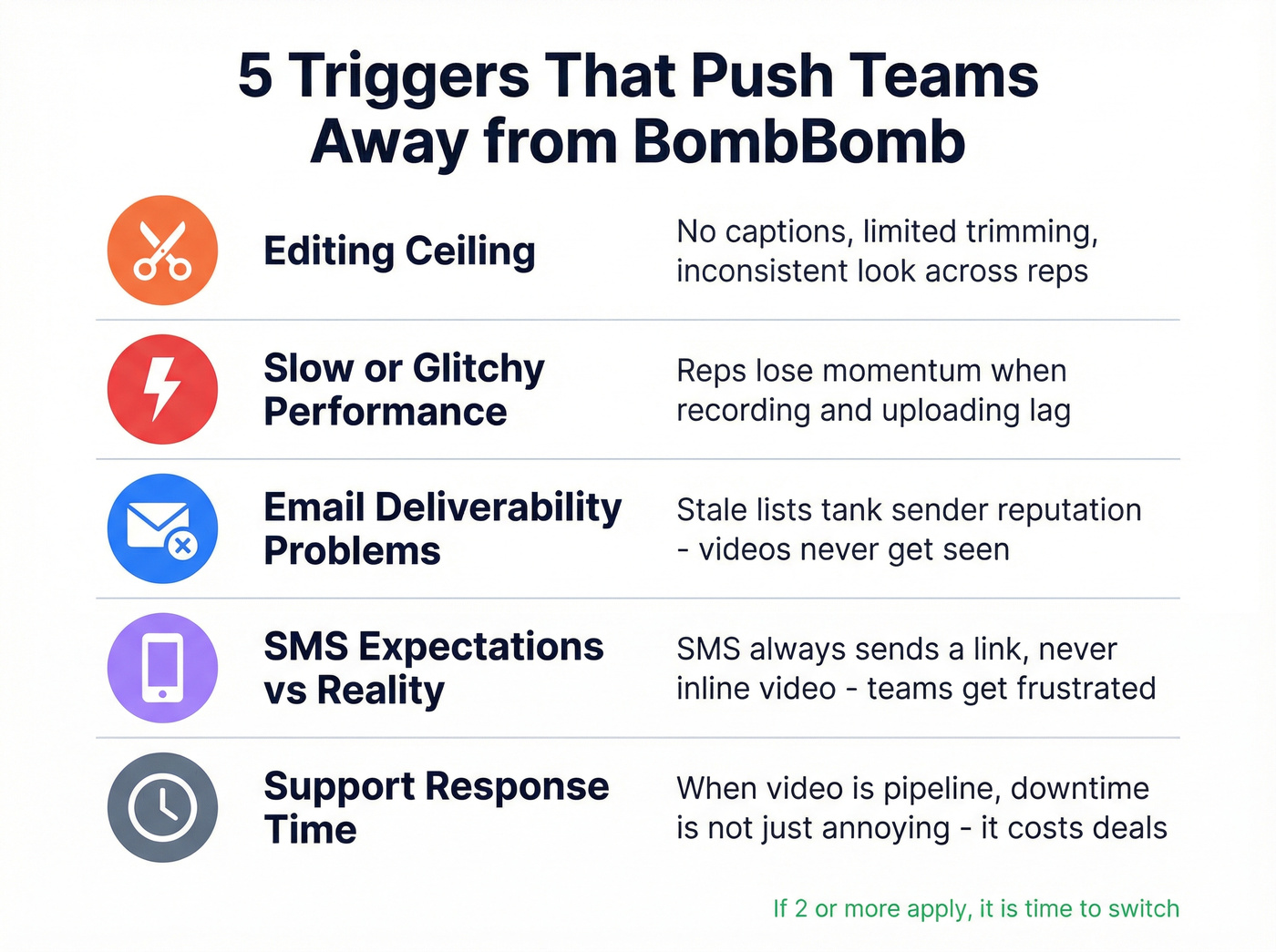
You hit the editing ceiling BombBomb's common "cons" themes flag limited editing. That's fine for quick "hey John" videos. It falls apart when you need captions, tighter cuts, reusable snippets, or anything that looks consistent across reps. Look for: trim/stitch, captions, branded pages, reusable templates.
Performance feels slow or glitchy Reviewers call out slow performance, and practitioners say it more bluntly: BombBomb can feel glitchy when reps are moving fast. Video only works when it's frictionless. Look for: instant recording, fast upload, a player that loads quickly on mobile.
Email issues are costing you replies "Email issues" comes up a lot, and teams often blame the video tool when the real culprit is deliverability. If your list is stale, your sender reputation takes the hit, and your videos never get seen. Look for: thumbnail-based sending, reliable tracking, and a workflow that doesn't tempt reps to attach files.
SMS expectations don't match reality (link vs inline) A common complaint from loan officers and agents: "I texted the video... why didn't it play in the message?" Because SMS doesn't embed video the way people imagine. Every tool sends a link to a page. If your team's SMS-first, pick a tool that embraces that reality with fast pages and instant alerts. Look for: mobile-first landing pages, click/play alerts, simple follow-up loops.
Support response time suddenly matters Once video becomes part of outbound, downtime isn't "annoying"--it's pipeline. Reviewers ding BombBomb on support response time. Look for: simpler workflows with fewer moving parts, or a vendor built for your team size.
How video email actually works (and why deliverability beats features)
"Video email" almost never means a video file embedded in the email.

In practice, video email = thumbnail/GIF + hosted landing page. The email shows a preview image, and the click opens a page where the video plays (often with a CTA, calendar link, or form). That's not a compromise; it's the only scalable way to do video outreach, and it's the difference between "this loads instantly on my phone" and "I'll watch it later" (which means never).
Why you shouldn't attach video files
Email providers punish big attachments. Common limits are Gmail 25MB and Outlook 20MB. Even under the limit, attachments slow load times and increase spam risk.
Do
- Send a thumbnail/GIF that links to a hosted page
- Keep copy short and human
- Track clicks/plays (not "sent")
Don't
- Attach MP4s
- Use huge GIFs that bloat the email
- Blast unverified lists and hope for the best
The deliverability rule that actually matters
Keep bounce rate <= 1%. Above that, you're not just losing sends; you're training inboxes to distrust your domain, and once that happens your "great video" turns into a quiet, expensive hobby.
Operational step (do this today): Track bounces in your sequencer and in Google Postmaster Tools. If you're above 1%, pause new sends, verify the list, and only resume once bounces drop.
We've seen teams spend weeks arguing about thumbnails, CTAs, and subject lines while their bounce rate sits at 3-5%. Fix the list first, then argue about creative.

No BombBomb alternative fixes a 3-5% bounce rate. If your video emails aren't getting seen, the problem isn't your thumbnail - it's your list. Prospeo verifies emails at 98% accuracy with a 5-step process, so your sender reputation stays clean and your videos actually reach inboxes.
Fix the list first, then pick your video tool.
Comparison table: BombBomb alternatives (pricing + features)
Legend: Analytics = Basic / Strong / Best-in-class. Admin = SMB / Team / Enterprise (SSO/SCIM, RBAC, retention, audit).

| Tool | Best for | SMS | Analytics | Admin | Pricing (starting) |
|---|---|---|---|---|---|
| BombBomb | video email + governance | Yes | Strong | Team | Core: $42/user/mo |
| Loom | fastest recording + sharing | No | Basic | Enterprise (SSO/SCIM) | Free; $18/user/mo |
| Prospeo | verified contacts + enrichment | N/A | N/A | N/A | Free; ~$0.01/email |
| Sendspark | personalization at scale | No | Strong | Team | $49/mo |
| Quickpage | SMS follow-up + instant alerts | Yes | Strong | Team | $33/mo (annual) |
| Vidyard | CTAs + sales video analytics | No | Best-in-class | Enterprise | Free; ~$59/user/mo |
| Hippo Video | value video messaging | No | Strong | Team | Free; $30/user/mo (or $20/user/mo annual) |
| Wistia | hosting + marketing analytics | No | Best-in-class | Enterprise | Free; $79/mo |
| Dubb | teleprompter + campaigns | Yes | Strong | Team | Free; $42/user/mo |
Best BombBomb alternatives by use case (hard calls)
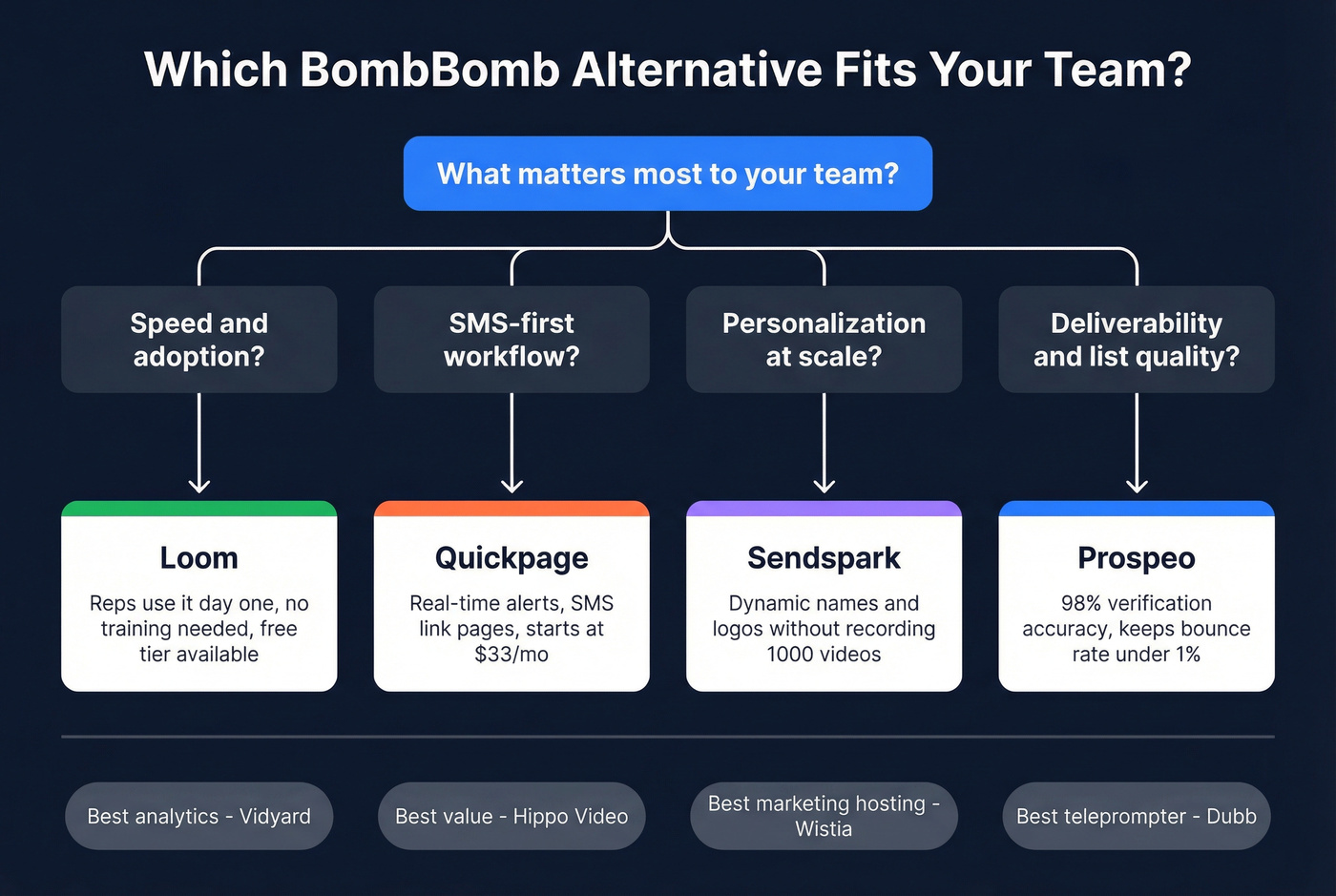
- Fastest adoption (reps actually use it): Loom
- Best SMS-first workflow: Quickpage
- Best personalization without hand-recording: Sendspark
- Best deliverability + list quality lever: Prospeo
- Best "teleprompter + outbound machine" feel: Dubb
- Best analytics + CTAs for sales pages: Vidyard
- Best value all-rounder: Hippo Video
- Best for marketing-owned video libraries: Wistia
Look, if your average deal size is in the low five figures and you're not in a regulated workflow, you probably don't need a "video email suite." You need a fast recorder, a clean landing page, and a deliverability-safe list.
Spend accordingly.
The best BombBomb alternatives (mini-reviews)
Loom
Pros
- Fastest path to "record something useful and send it." The recorder's instant, the share flow's clean, and reps don't need training.
- Transparent pricing: Free / $18 / $24 per user/month.
- Enterprise controls are real: SSO (SAML) + SCIM, admin insights, retention policies.
Cons
- Not SMS-first.
- Not a full video-email suite; you'll pair it with your sequencer and templates.
Best for: screen-recording-first teams (product demos, technical sales, CS) who want speed. Avoid if: you need SMS-first workflows or built-in video landing pages with CTAs.
Loom is SOC 2 Type 2 compliant and aligned with GDPR/CCPA.

Prospeo ("The B2B data platform built for accuracy")
Prospeo isn't a video tool. It's the thing that keeps video outreach from failing before it starts, because the contact data's wrong.
Here's a real scenario we've watched play out: a team rolls out video, reps do the work, leadership sees "sent" numbers climb, and replies drop anyway. Two weeks later someone checks the bounce report and it's a mess. Half the videos never had a chance.
Prospeo fixes that upstream problem with 300M+ professional profiles, 143M+ verified emails, and 125M+ verified mobile numbers, on a 7-day data refresh cycle (the industry average is 6 weeks). Email verification runs at 98% accuracy, and enrichment returns contact data for 83% of leads, with 50+ data points per contact. If you're running workflows, the API match rate is 92%.
Use it in 3 scenarios
- Outbound video sequences: verify emails first so bounces stay <= 1% and inbox placement holds.
- SMS follow-up: pull verified mobiles, then text the people who actually pick up (Prospeo's mobile pickup rate is 30%).
- CRM cleanup: enrich contacts so reps stop recording videos for people who left the company.
Pricing's self-serve: a free tier includes 75 emails + 100 Chrome extension credits/month, then it's about $0.01 per verified email (and 10 credits per mobile). No contracts.
Links: Pricing, Email Finder, Chrome Extension, Integrations
Sendspark
Pros
- Best "personalization at scale" pick: dynamic elements (names, logos, pages) let you scale without fake-sounding templates.
- Strong head-to-head usability: Ease of Use 9.6 vs 9.1, Setup 9.6 vs 8.8, Admin 9.5 vs 9.1, Support 9.6 vs 9.3 versus BombBomb.
- Bundle pricing is team-friendly: $49 / $99 / $299 / $699. Team includes 10 seats.
Cons
- No free trial. That's annoying when you want a quick proof.
- Dynamic minutes are a real meter; high-volume personalization can spike costs.
Best for: outbound teams doing high-volume personalization with strong email outreach analytics needs. Avoid if: you want a long evaluation period or you hate usage meters.
Quickpage
Quickpage wins when your reps live in texting and you want a tight follow-up loop.
Workflow fit
- Record -> send link via SMS -> get instant alert -> follow up immediately. That's the whole game.
- Pages load fast on mobile, and alerts are the feature, not an afterthought.
- It's extremely well-reviewed: 4.8/5 (553) on G2.
Reality check: SMS always sends a link. If someone's demanding "inline video in a text," fix that expectation before you buy anything.
Pricing: $33 / $49 / $83 (annual-billed monthly equivalents). Pro + Team includes 2 members, then add seats.
Dubb
Dubb's for reps who want structure: teleprompter, landing pages, and campaigns in one place. If Loom feels like a camera, Dubb feels like a mini studio.
- Best feature: the teleprompter (it single-handedly cuts rambling videos).
- Good for: outbound sequences where you want consistent intros, CTAs, and follow-ups.
- Pricing: Free; $42/user/mo (Pro, annual $499/user) and $90/user/mo (Pro Plus, annual $1080/user).
Skip it if you only need lightweight recording. Dubb's intentionally "more."
Vidyard
Pick Vidyard when video pages are mini landing pages. CTAs + analytics are the point.
- Pricing signal: Free tier; about $59/user/mo (Starter) and about $99/user/mo (Teams).
- Gotchas: per-seat costs climb quickly at 10-25 seats; make sure the CRM integration you need is in your plan.
- Best for: teams that want reporting discipline (who watched what, and what happened next).
Hippo Video
Hippo Video's the value pick when you want a featureful video messaging tool without premium pricing.
- Pricing: Free; $30/mo (Pro monthly) or $20/mo (annual). Teams $75/mo (monthly) or $60/mo (annual). Enterprise $80/user/month billed annually with a 10-seat minimum.
- Gotchas: that enterprise minimum can force a bigger rollout than you planned.
- Best for: teams that want solid analytics + integrations at a reasonable cost.
Wistia
Wistia's hosting-first. That's either perfect or pointless.
- Choose Wistia if: marketing owns the library and you care about heatmaps, forms, and conversion tracking across a site.
- Don't choose it if: reps need "record a quick video and drop it into outreach" as the main workflow.
- Pricing: Free; $79/mo (Pro, billed annually), $319/mo (Advanced, billed annually). Extra users $20/user/mo. Premium is enterprise/custom.
Bonjoro
Bonjoro's lightweight and great for customer moments: onboarding thank-yous, renewal nudges, post-demo follow-ups. It's not built for heavy outbound sequencing; it's built for "make the customer feel seen." Pricing: $0 / $15 / $29 / $79.
Covideo
Covideo's built for vendor-led deployments: CRM-heavy rollouts, vertical teams, and organizations that want a guided implementation. Pricing signal: quote-only; expect roughly $100-$300/user/month depending on package and seat count.
Zight
Zight's the "quick clips" tool: capture, annotate, share. It's great for internal comms, support, and async explanations, but it's not a video-email workflow tool. Pricing signal: low-cost per-seat plans plus team options.
What you lose when you leave BombBomb (don't ignore this)
BombBomb's biggest advantage isn't the recorder. It's the governance layer that matters in Real Estate and Financial Services.
If you leave, you can lose:
- Pre-approved templates that keep reps from freelancing risky language
- Brand controls (consistent intros/outros, signatures, compliance text)
- Admin oversight and permissions (who can publish what, and where it can be used)
- Retention/archiving expectations for regulated teams
- Auditability when compliance asks "who sent what to whom?"
If any of that sounds like your world, don't buy an alternative until you confirm: SSO/SCIM, role-based permissions, default privacy settings, retention policies, and audit logs. Otherwise security/compliance will block rollout after you've already trained the team.
Pricing reality check (5-seat / 10-seat math + scaling traps)
Most teams don't leave BombBomb because video "doesn't work." They leave because the seat math stops matching how they actually use the tool.
Assumes monthly billing unless noted. Quickpage shown at annual-billed monthly rate.
| Tool | 5 seats | 10 seats | Scaling trap |
|---|---|---|---|
| BombBomb Core + Copilot ($70/user/mo) | $350 | $700 | per-seat tax |
| Loom Business | $90 | $180 | none (simple) |
| Sendspark Team | $299 | $299 | dynamic minutes |
| Quickpage Pro + Team | $170 | $315 | add'l members |
| Covideo | $500-1,500 | $1,000-3,000 | quote cycles |
Pricing gotchas (the ones that bite in month 2)
- Per-seat tools: great at 3-5 reps, painful at 25+ if usage is inconsistent.
- Bundles: look cheap until you hit a usage meter (personalization minutes, storage, or sends).
- Quote-only: burns weeks, then lands at enterprise pricing anyway. If you need procurement, fine. If you don't, avoid it.
And yes, data quality's a cost line item. If your bounce rate's 3-5%, you're paying for video seats to send messages that never land.
Switching video tools won't help if you're blasting stale contacts. Prospeo gives you 143M+ verified emails and 125M+ verified mobiles - refreshed every 7 days - so every video you send lands with a real buyer, not a bounced address killing your domain.
Stop training inboxes to distrust you. Start with clean data.
A 15-minute trial test (do this before any demo)
If you want to pick a tool quickly, run this exact test with your top 2 options:
- Record speed: can you start recording in under 5 seconds?
- Edit speed: can you trim the first/last 3 seconds without hunting menus?
- Mobile playback: open the page on your phone - does it load instantly on LTE?
- Tracking clarity: can you see "opened / clicked / played" without exporting?
- CTA path: can the viewer book a meeting in 1 click (or reply) from the page?
- Admin reality: can you lock down sharing, set defaults, and control retention if needed?
If a tool fails #1 or #3, don't buy it.
Reps won't use it.
How to choose BombBomb alternatives (decision framework by workflow)
Pick based on how your reps actually work, not what the vendor demo looks like.
Email-first (sequencer-first)
- Pick Sendspark (personalization) or Vidyard (CTAs + analytics) when video pages drive replies.
- Keep your sending clean: track bounces and fix list quality before scaling volume.
Landing-page-first (conversion-first)
- Pick Vidyard for sales CTAs and team analytics.
- Pick Wistia if marketing owns the library and you care about heatmaps + lead capture.
Screen-recording-first (speed-first)
- Pick Loom for the simplest adoption curve.
- If you're regulated, validate enterprise controls (SSO/SCIM, retention, audit).
SMS-first (follow-up-first)
- Pick Quickpage for alerts + fast follow-up loops.
- Set expectations internally: SMS delivers a link to a page, not inline video.
Governance/compliance check (don't skip this) If you need pre-approved templates, archiving, and admin oversight, BombBomb might still be the best fit. If you switch, confirm: retention policies, audit logs, SSO/SCIM, role-based permissions, and default privacy settings.
This is where "cheap and easy" tools get rejected after security review.
FAQ
What's the best BombBomb alternative for simple screen recordings?
Loom's the best pick for simple screen recordings because it's fast to start (seconds), easy to share, and has clear pricing (Free, $18/user, $24/user). For most reps, it's the quickest "record -> send link -> track views" workflow.
If you need SMS-first follow-up, Loom isn't the right fit.
Which BombBomb alternative is best for SMS follow-up and instant alerts?
Quickpage's the best option for SMS follow-up because it's built around texting workflows and real-time engagement alerts, not just recording. Expect a "send link -> get notified -> follow up immediately" loop that reps actually use.
Pricing starts around $33/month (annual-billed monthly equivalent).
Does "video email" actually embed video in Gmail/Outlook?
No. Video email is almost always a thumbnail or GIF that links to a hosted page, because attachments are limited (Gmail 25MB, Outlook 20MB) and increase spam risk.
If you're attaching MP4s, you're making deliverability worse.
What's a good free option to improve deliverability before sending more videos?
Prospeo's a strong free starting point because it includes 75 email credits plus 100 Chrome extension credits per month, and it verifies emails at 98% accuracy. Keeping bounce rate at or below 1% is the fastest way to protect inbox placement and get your videos seen.
Once you scale, pricing's about $0.01 per verified email.
Summary: the right BombBomb alternatives depend on your workflow
If you want the least friction, pick Loom. If your team lives in texting, Quickpage's the cleanest SMS-first follow-up loop. If you need personalization at scale, Sendspark's the practical "looks personal without recording forever" option.
And if replies are dropping because your list quality's slipping, Prospeo's the fastest lever: verify and enrich first, then let any video tool perform.