Copper vs Insightly: Which CRM Should You Choose in 2026?
Most "Copper vs Insightly" debates miss the point.
This isn't a features shootout. It's a choice between behavior change (Copper) and governance plus suite economics (Insightly).
If your reps won't log anything, Copper's the fastest path to a CRM people actually use. If you need auditability, HIPAA coverage, and a system that can expand into marketing/service with a real integration layer, Insightly's the safer bet.
Here's the thing: if your average deal size is modest and you don't have a dedicated admin, Insightly's suite power can turn into drag. Copper gets you to "working CRM" sooner, and sooner matters.
30-second verdict (who wins + skip both if)
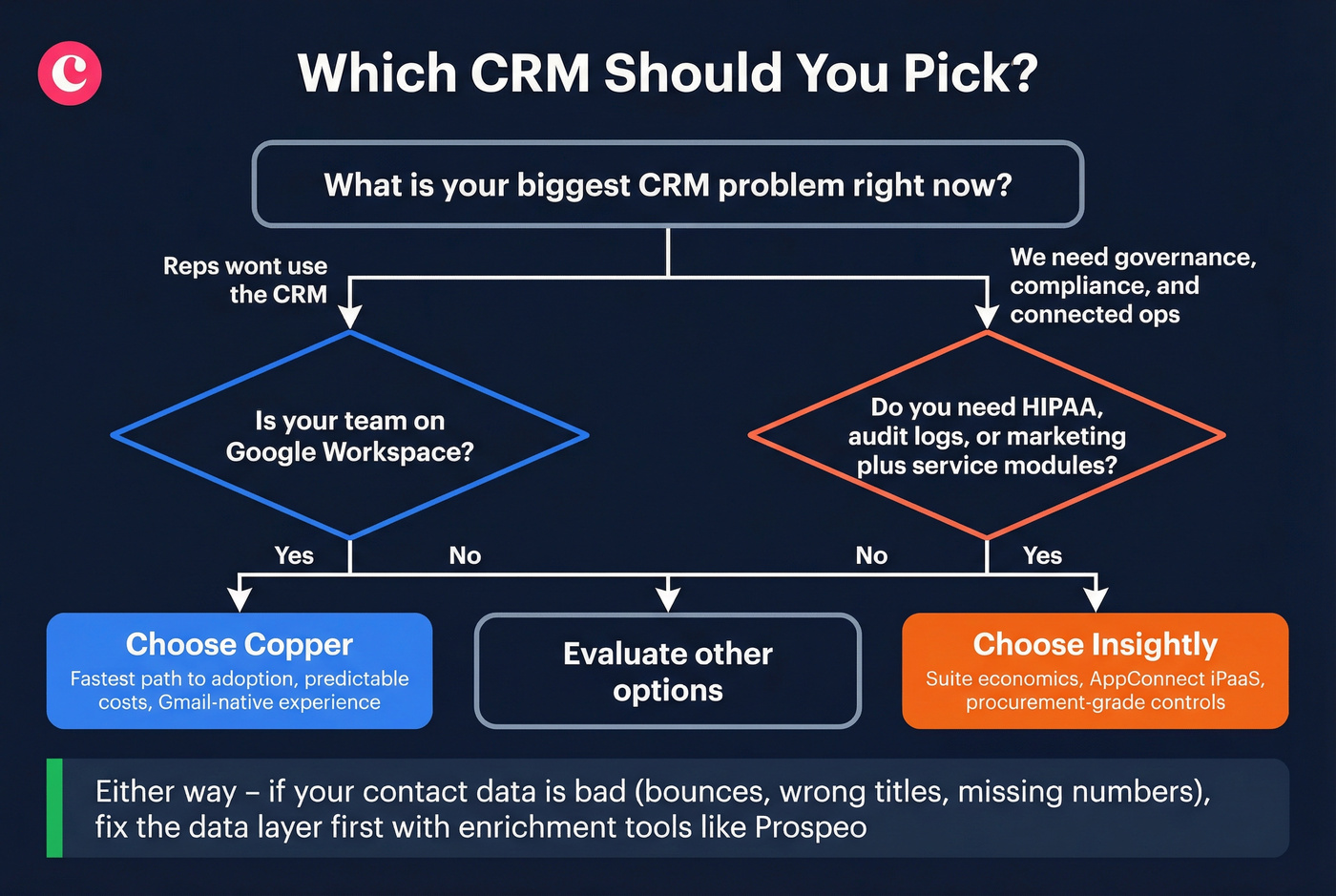
Choose Copper if... your team is Google Workspace-first and CRM adoption is your #1 problem. Copper's Gmail-native experience is the shortest path from "we bought a CRM" to "reps actually use it."
Choose Insightly if... you need tighter governance and a more modular suite (CRM + marketing + service + integration layer). It's the better pick when compliance, auditability, and admin controls are non-negotiable.
Skip both if... your pipeline problem is bad contact data (bounces, wrong titles, missing mobiles) more than CRM UI. Add a verified enrichment layer like Prospeo so whichever CRM you pick stays clean and usable. (If you want the full hygiene SOP, see keep CRM data clean.)

Copper vs Insightly at a glance (winners table)
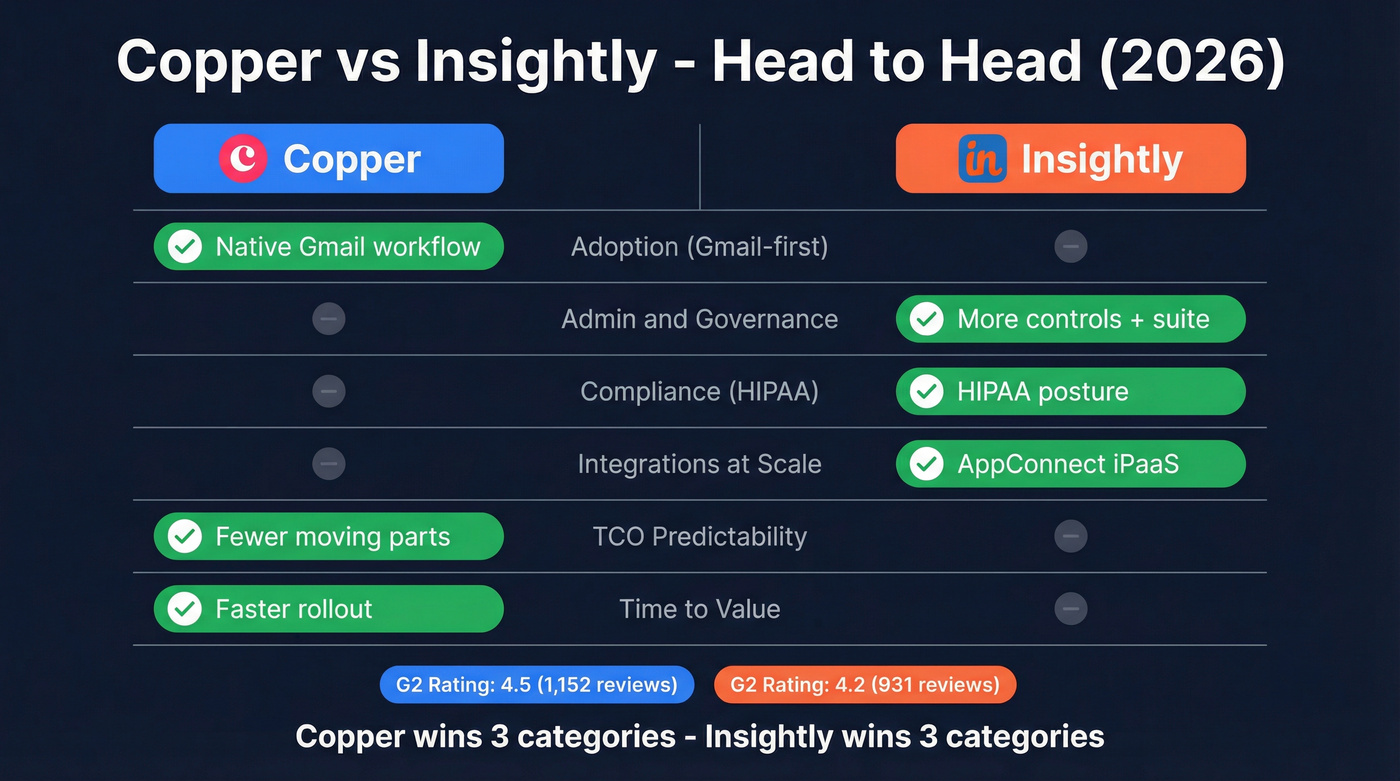
Copper's user sentiment advantage shows up clearly in G2's head-to-head: Copper 4.5 (1,152) vs Insightly 4.2 (931). Both products skew SMB on G2 (Copper 79.2% small-business reviewers vs Insightly 73.0%), so these ratings reflect smaller-team realities, not Fortune 500 bureaucracy.
| Category | Winner | Why (<=30 chars) |
|---|---|---|
| Adoption (Gmail-first) | Copper | Native Gmail workflow |
| Admin & governance | Insightly | More controls + suite |
| Compliance (HIPAA) | Insightly | HIPAA posture |
| Integrations at scale | Insightly | AppConnect iPaaS |
| TCO predictability | Copper | Fewer moving parts |
| Time-to-value | Copper | Faster rollout |
The real story isn't "features." It's how much process you're willing to run (Insightly) versus how quickly you need behavior change (Copper).
Copper vs Insightly pricing & true TCO (the real monthly bill)
Copper's pricing is straightforward and easy to trial. Insightly's modular by design, and that modularity is exactly where budgets drift. If you're comparing CRM budgets across vendors, it's also worth sanity-checking against CRM software for small businesses to see what "normal" looks like in 2026.
Copper pricing (annual vs monthly) + the seat-minimum reality
Copper lists both ways to pay:
- Paid annually (annual plan shown as monthly equivalent): Starter $9/seat/mo, Basic $23, Professional $59, Business $99
- Monthly billing: Starter $12/seat/mo, Basic $29, Professional $69, Business $134
- Free trial: Copper offers a free trial (no credit card required).
Copper's main "gotchas" are seat minimums and plan limits. Copper says seat minimums apply, but it doesn't publish the number. In our experience, SMB CRMs often enforce 5-10 seats on paid plans, so assume that range until checkout or a sales quote confirms it.
Copper plan limits that force earlier upgrades:
- Contacts: Starter 1,000; Basic 2,500; Professional 15,000; Business unlimited
- Custom fields: Starter 10; Basic 25; Professional 50; Business unlimited
- Feature gating: task automation at Basic, workflow automation at Professional, custom reports at Business, email series at Business
That Business jump is real. If you need custom reports or email series, your "simple CRM" can become premium-priced overnight.
Insightly pricing (CRM + modules) + the AppConnect bill that sneaks up
Insightly's CRM seat pricing is clean at first glance: $29 / $49 / $99 per user/month (annual) for Plus / Professional / Enterprise.
But Insightly's built as a suite, and the suite has real line items:
- Marketing: $99 / $499 / $999 per account/month
- Service: $29 / $49 / $99 per user/month
- AppConnect (iPaaS): $249 / $799 / $1,899 per account/month based on tasks
- Required technical setup for AppConnect: $3,000 one-time
This is the sentence that saves teams money: "$29 vs $29" is a distraction once AppConnect tasks and setup enter the picture. If you need integration automation beyond a couple of native connectors, AppConnect becomes baseline spend. (Related: if you're building a modern stack, see CRM integration for sales automation.)
Mini-math scenario #1: "simple CRM" (25 users)
| Stack item | Copper | Insightly |
|---|---|---|
| CRM seats | 25 x $29 = $725/mo | 25 x $29 = $725/mo |
| Integrations | $0 (native only) | $0 (native only) |
| Real takeaway | Seats dominate | Seats dominate |
If you truly keep it simple, the two can cost the same on seats. The difference is what happens next.
Mini-math scenario #2: "real ops" (25 users + integrations that run daily)
Copper teams usually land in one of these integration patterns:
- Native-only: $0/mo (best-case, limited scope)
- Zapier/Make automation: typically $30-$200+/mo depending on volume and premium apps
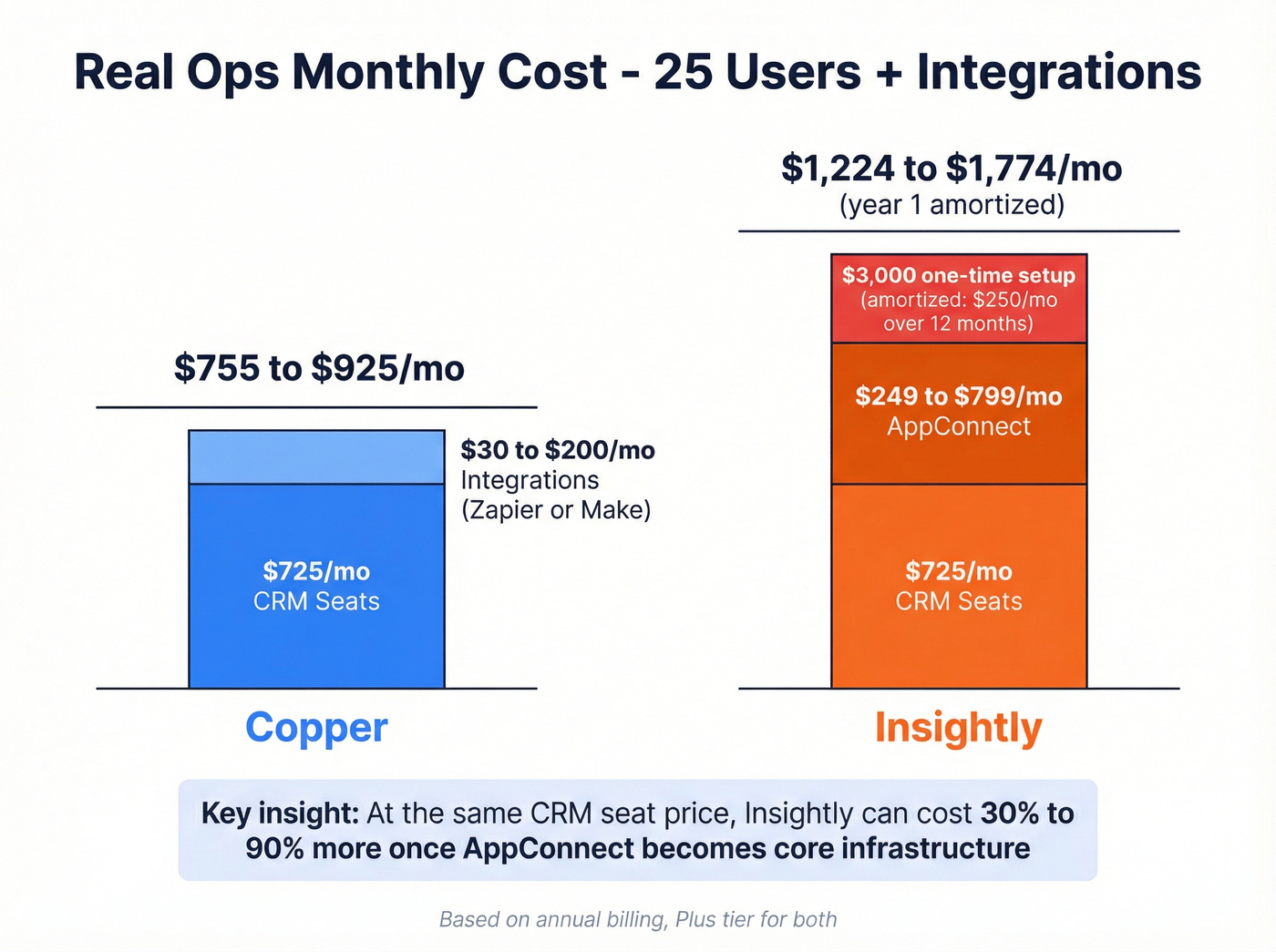
Insightly teams that automate across apps land in AppConnect quickly:
- AppConnect starts at $249/mo (25k tasks) and climbs to $799/mo (100k tasks) when workflows get busy
- plus the $3,000 required setup
Here's a realistic "busy but normal" integration picture: lead routing + enrichment + dedupe + two-way sync + retries/backfills. That can push you into 100k tasks/month faster than you'd expect, because every retry, fan-out step, and backfill run counts as tasks, not "work you already paid for."
| Stack item | Copper | Insightly |
|---|---|---|
| CRM seats | 25 x $29 = $725/mo | 25 x $29 = $725/mo |
| Integration layer | $30-$200+/mo | $249-$799/mo |
| One-time setup | $0 | $3,000 |
| Real takeaway | Predictable | Metered + setup |
My recommendation: if you're buying Insightly, decide up front whether AppConnect is "core" or "never." If it's core, budget it like rent, not like a nice-to-have.

Neither Copper nor Insightly can fix bad contact data. If your reps are bouncing emails and dialing dead numbers, the CRM isn't the problem - your data is. Prospeo enriches your CRM with 98% verified emails and 125M+ direct dials, refreshed every 7 days.
Stop paying for a CRM full of garbage contacts. Fix the data layer.
Feature depth that matters day-to-day (automation, reporting, customization)
Copper's philosophy is simple: keep selling inside Gmail. That's why it wins on adoption. Insightly's philosophy is system-first: build the governed workflow. That's why it wins when ops and compliance drive the purchase.
A matrix that sticks to the stuff that changes outcomes
| Capability | Copper | Insightly |
|---|---|---|
| Workflow automation | Professional+ | Professional+ |
| Marketing automation | Not part of core CRM | Marketing module |
| Service/help desk | Not part of core CRM | Service module |
| AI features | Not highlighted on pricing | AI Copilot (Professional) |
| SSO (SAML) | Supported | Enterprise tier |
| Automated provisioning | Not clearly stated on pricing | Supported via Microsoft Entra |
| Audit logging | Not clearly stated on pricing | Enterprise (comprehensive audit logging) |
Insightly Professional includes AI Copilot per its pricing grid. It's handy for summaries and speed, but don't buy a CRM suite for AI alone. Buy it because you want one system of record with clear ownership and controls.
Copper vs Insightly in plain English (use-case format)
Pick Copper when:
- You need reps logging activity next week, not next quarter.
- Your process is lightweight: pipeline, tasks, basic automation, clean contact records.
- You want fewer modules, fewer meters, fewer "why is this broken?" tickets. (If admin time is your constraint, see manual data entry.)
Pick Insightly when:
- You run sales + marketing + service as connected operations.
- You need procurement-grade controls and a system that survives audits.
- You already know integrations will be a first-class requirement (not a weekend Zapier project).
Google Workspace & Chrome extension reality
Copper's edge is obvious: it's built to feel native for Google Workspace teams. If your reps live in Gmail and Calendar, Copper drives usage without a heavy enablement program. (If you're evaluating the "log emails automatically" promise, compare against CRM automatic email logging.)
Insightly also supports Gmail workflows via its Insightly Sidebar Chrome browser extension. Insightly positions the Sidebar as a way to access CRM while viewing your inbox, create leads/contacts, and save emails with a "Send & Save to Insightly" workflow.
The grounded reality is simple:
- Copper keeps most selling motions inside Gmail by default.
- Insightly handles core inbox actions in the sidebar, but admin work still lives in the main app (permissions, fields, workflow design, module configuration).
That's fine. Just don't expect "Chrome extension" to erase suite complexity.
Integrations & iPaaS economics (native vs connectors vs AppConnect tasks)
Insightly can be excellent here. It can also get expensive fast.
- If you only need a handful of native integrations, both CRMs work.
- If you need multi-step workflows, data transformation, retries, and monitoring, Insightly's AppConnect is built for that world.
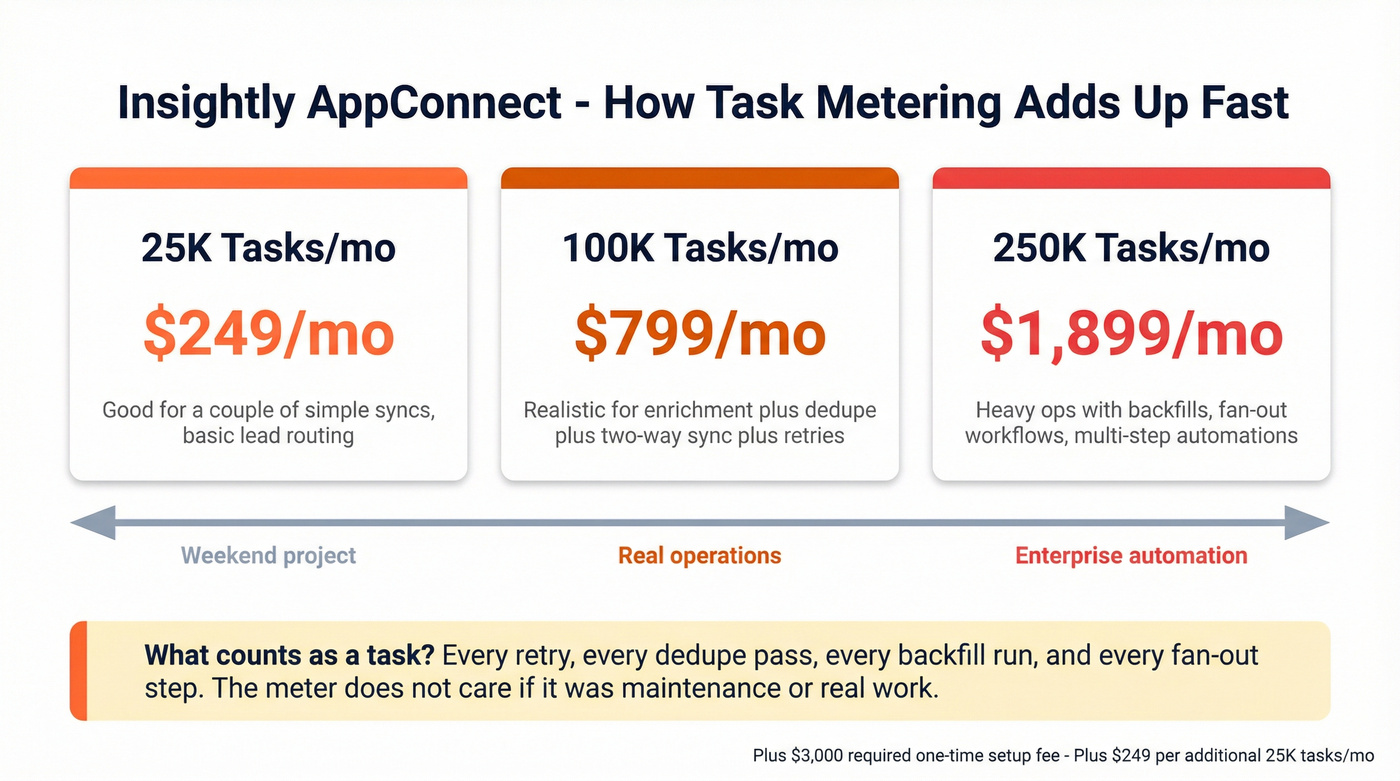
AppConnect pricing is task-metered:
- $249/account/month for 25k tasks/month
- $799 for 100k tasks/month
- $1,899 for 250k tasks/month
- +$249 per extra 25k tasks/month
- plus the required $3,000 setup
Task metering is what bites teams. Retries, dedupe passes, backfills, and "fan-out" workflows burn tasks fast, and the bill doesn't care whether those tasks were "just maintenance" or "real work," so you need to design workflows with task budgets in mind if AppConnect's part of your plan.
Copper teams usually start with native integrations and then add Zapier/Make. It's less powerful than an iPaaS, but it's easier to predict and easier to rip out if it gets messy.
Copper vs Insightly security & compliance (procurement-grade)
Security isn't a checkbox exercise. It's whether your team can run the tool without exceptions, workarounds, and policy violations.
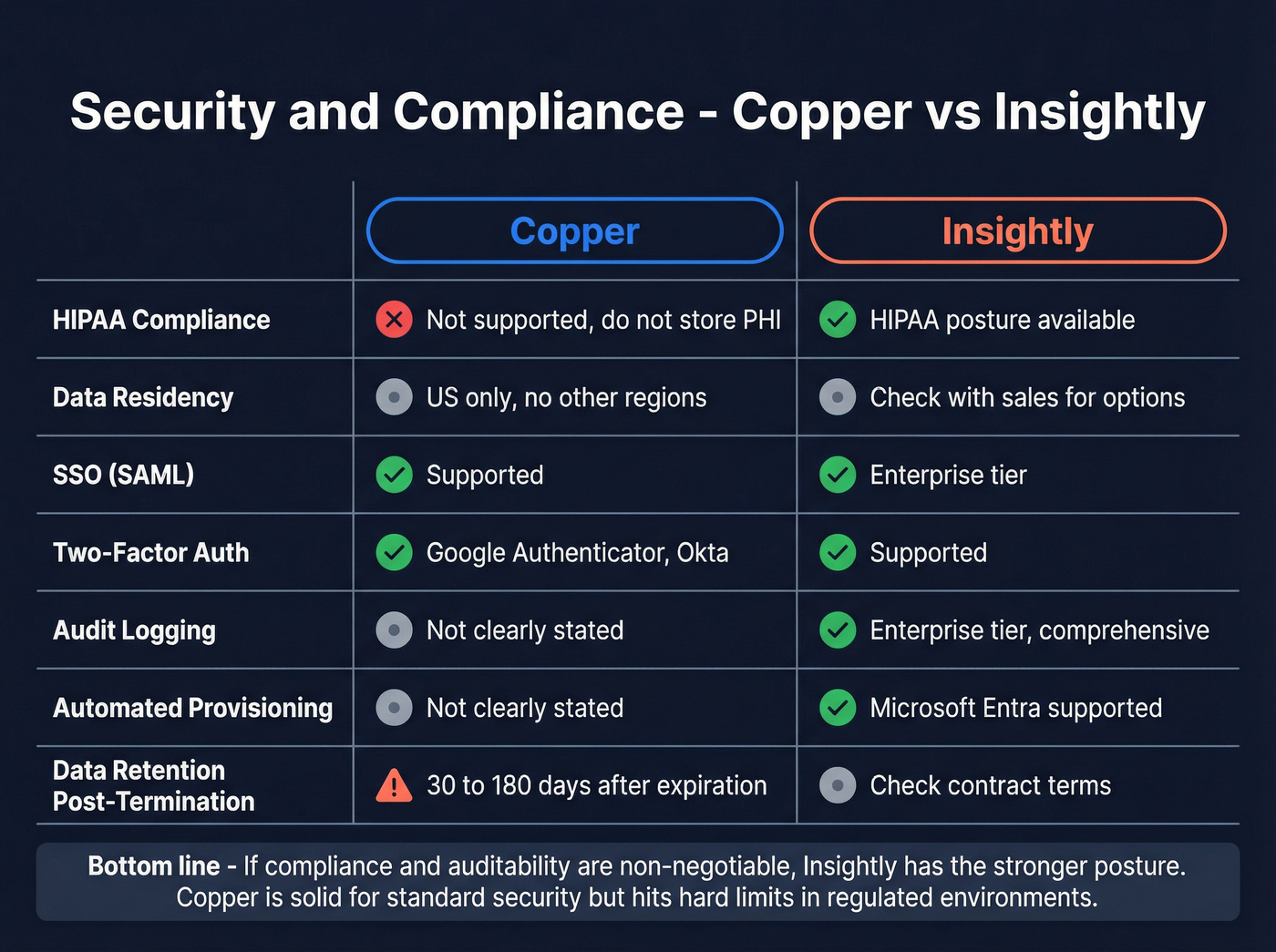
Copper: clear posture, hard limits for regulated teams
Copper is explicit about what it will and won't support in its support documentation and Trust Center:
- US-only data residency: Copper stores customer data in the United States and doesn't offer other hosting regions.
- Not HIPAA compliant: don't store PHI in Copper.
- Retention after termination: data retained at least 30 days; generally purged within 180 days after subscription expiration.
- Email content + attachments: email contents and attachments exchanged with Person records can be stored for activity/history and search. If you've got strict retention or legal hold requirements, that's a procurement conversation, not an afterthought.
- SSO/2FA: supports SAML-based SSO and supports Google Authenticator and Okta two-factor authentication.
- Trust Center lists privacy frameworks and commitments (GDPR, CPRA, EU-US Data Privacy Framework).
Hard disqualifier for Copper: HIPAA-regulated environments. It's a clean "no."
Insightly: enterprise signals (SOC 2, HIPAA, uptime, IAM)
Insightly reads like a vendor that expects security questionnaires:
- SOC 2 Type II
- HIPAA compliant as a Business Associate
- 99.95% uptime claim and a public status page at status.insightly.com
- SSO + automated provisioning via Microsoft Entra (provisioning cycles run about every 40 minutes per Microsoft's tutorial)
One question you should ask Insightly sales before you sign: data residency/hosting regions. The pages most teams read first don't make region options obvious, so get the hosting regions, subprocessor list, and DPA in writing. (If you're building governance around this, see data quality.)
Hard disqualifier for Insightly isn't compliance. It's ownership. If nobody owns admin, Insightly becomes a half-configured suite with constant sync and workflow tickets.
Implementation effort (what actually takes time)
Most CRM projects fail for boring reasons: messy data, unclear ownership, and "we'll decide later" governance. Here's the rollout reality we'd plan for. If you're migrating records, bookmark this: import leads.
Copper implementation (1-2 weeks for a clean rollout)
Copper goes fast because the product's opinionated and Gmail-first.
Week 1: foundation
- Define pipeline stages + required fields (keep it minimal).
- Import accounts/people/opportunities.
- Set dedupe rules and naming conventions.
- Connect Google Workspace and confirm email/calendar logging behavior.
Week 2: adoption
- Build 2-3 lightweight automations (task creation, stage-change reminders).
- Create 1 dashboard that sales actually checks.
- Run a 45-minute enablement and enforce "if it's not in Copper, it didn't happen."
Copper succeeds when you keep the process tight.
Don't turn it into a science project.
Insightly implementation (3-6+ weeks if you're using the suite)
Insightly takes longer because you're designing a system, not just turning on a CRM.
Weeks 1-2: governance design
- Permissions model (who can edit what, and why).
- Field architecture (standard vs custom, picklists, validation).
- Object model decisions (how you represent leads, contacts, orgs, projects, tickets).
Weeks 2-4: workflow + integrations
- Workflow automation (routing, SLAs, handoffs).
- Decide whether AppConnect is required; if yes, scope workflows and task budgets.
- Build and test integrations with real data (including retries and edge cases).
Weeks 4-6+: training + hardening
- Role-based training (sales vs marketing ops vs service).
- Reporting definitions (what counts as a qualified lead, what counts as pipeline).
- Audit readiness: access reviews, provisioning, and change control.
I've seen teams buy a suite like Insightly, skip the permissions and field design, and then spend the next six months arguing about "bad data" that was really just a missing required field and a sloppy handoff between marketing and sales.
If you don't have an admin owner, Insightly's power becomes drag. If you do have an owner, Insightly becomes a real operating system.
Ownership checklist (who owns what on day 1)
This is the part teams skip, and then they blame the CRM.
- Sales leader owns: pipeline stages, required fields, "definition of done"
- RevOps/admin owns: permissions, dedupe rules, automation, integrations
- Marketing ops (if applicable) owns: lead lifecycle definitions + handoff SLAs
- IT/security owns: SSO, provisioning, access reviews, retention requirements
- Everyone owns: data hygiene (no junk in, no junk out)
What users say in 2026 (ratings + real-world failure modes)
Start with the quantitative signal. On G2's comparison, Copper beats Insightly on the "this won't annoy my reps" metrics:
- Ease of Use: 9.1 vs 8.4
- Support: 8.6 vs 8.1
- Product Direction: 9.0 vs 8.0
Now the failure modes - the stuff that breaks in production.
Copper: common pain themes
- Billing/cancellation frustration shows up repeatedly in Capterra reviews (auto-renewal and refund rigidity comes up a lot).
- Reporting limitations show up often, which matches the Business-tier reporting gate.
- Duplicate handling is a frequent annoyance: teams want smarter matching and faster merges.
See Copper reviews on Capterra: https://www.capterra.com/p/166149/Copper/reviews/
Insightly: common pain themes
- The learning curve is the tax you pay for configurability.
- Teams complain when the system's under-admin'd: fields drift, workflows break, and adoption drops because the UI feels heavier. TrustRadius' Copper vs Insightly comparisons add useful evaluator context, including notes on Gmail integration performance and switching costs: https://www.trustradius.com/compare-products/copper-vs-insightly
For triangulation, Gartner Peer Insights shows Copper at 4.6 (57) vs Insightly at 4.2 (720). The sample sizes are wildly different, but the direction matches the story: Copper wins on love; Insightly wins on breadth. https://www.gartner.com/reviews/market/sales-force-automation-platforms/compare/product/copper-crm-vs-insightly-crm
Decision framework by scenario (pick in 5 minutes)
| Scenario | Pick | Why |
|---|---|---|
| Reps live in Gmail; adoption's failing | Copper | Gmail-native UX |
| Need CRM + marketing + service | Insightly | Modular suite |
| Regulated (HIPAA) / security review | Insightly | HIPAA + SOC 2 |
| Need deep integrations + automation | Insightly | AppConnect iPaaS |
| Want predictable spend + fast rollout | Copper | Fewer add-ons |
One nuance that matters: Copper's a better "sales behavior" tool. Insightly's a better "company system" tool. Buy the one that matches your actual problem.
If neither Copper nor Insightly fixes your pipeline, add a data layer
A new CRM won't save you if your sequences bounce and reps can't find direct dials. You need better data. If bounce rates are your pain, start with an email verifier website and a repeatable email verification list process.
We've tested this pattern across teams: once you add a verified enrichment layer, both Copper and Insightly get easier to run because reps stop wasting time on junk records and managers stop arguing about "bad leads" that were really just missing emails, wrong titles, and dead phone numbers.
Prospeo - "The B2B data platform built for accuracy" - is built for this exact job. It gives you 300M+ professional profiles, 143M+ verified emails, and 125M+ verified mobile numbers with 98% email accuracy, plus a 7-day refresh cycle (the industry average is about 6 weeks). The practical workflow is simple: enrich a CSV or CRM export, then push verified emails and mobiles back into your CRM so reps stop working stale records. (If you’re comparing vendors, see lead enrichment tools.)
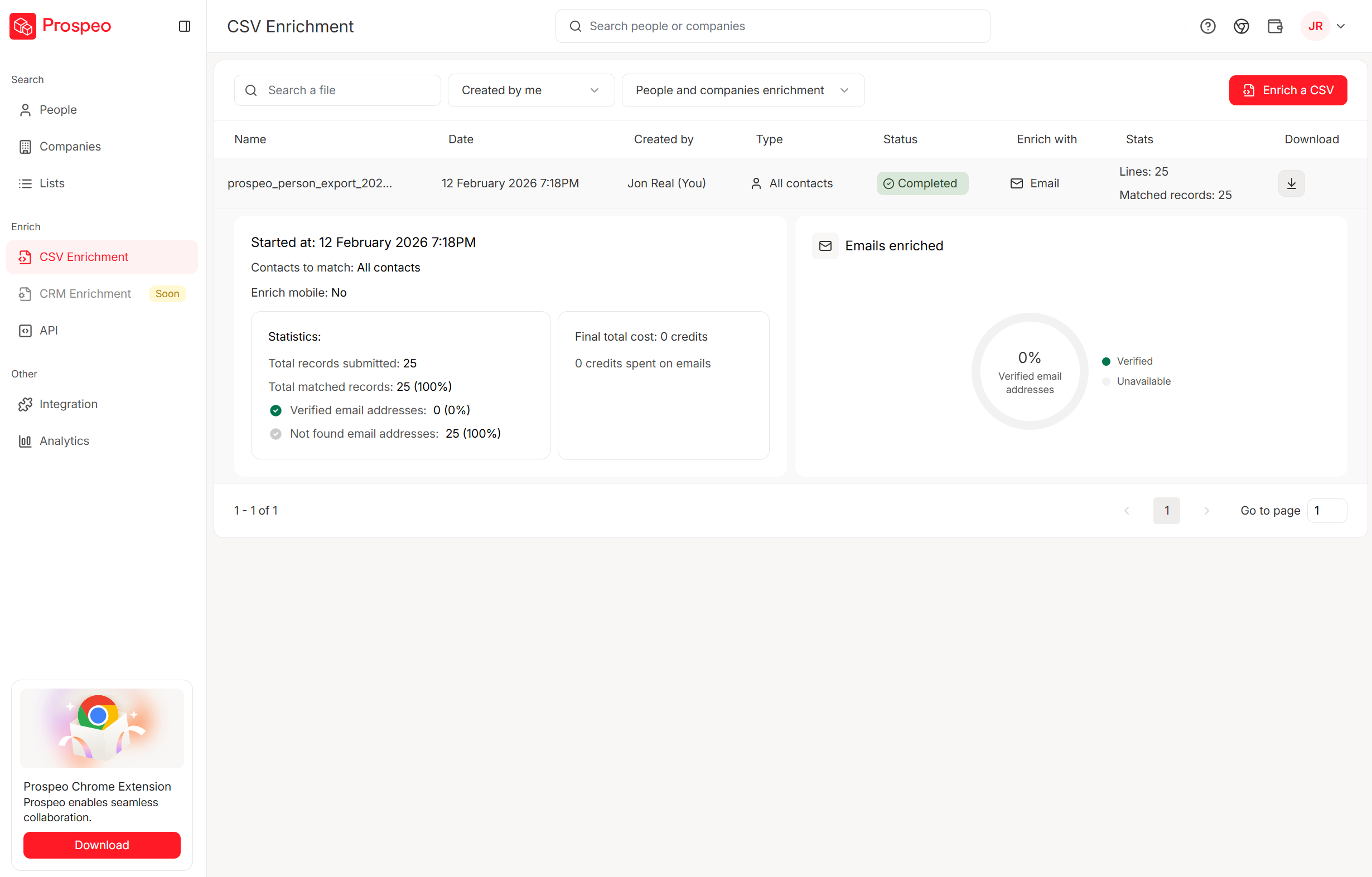
You just compared $29/seat CRM plans - but bad data costs more than any seat fee. One Prospeo enrichment returns 50+ data points per contact at $0.01/email with 92% match rates. Plug it into HubSpot or Salesforce and keep whichever CRM you pick actually usable.
Your CRM is only as good as what's inside it. Start with verified data.
FAQ
Is Copper or Insightly better for Google Workspace (Gmail-first) teams?
Copper is better for Gmail-first teams because it's designed around selling inside Google Workspace, which typically improves adoption in days, not weeks. Insightly's Gmail Sidebar Chrome extension helps with saving emails and creating records, but most configuration and governance still happens in the main app.
What's the hidden cost risk with Insightly AppConnect?
The main risk is task-based pricing plus a required $3,000 setup fee: AppConnect starts at $249/month for 25k tasks and commonly jumps to $799/month at 100k tasks once you add retries, backfills, and multi-step workflows. If integrations are core, budget AppConnect as a fixed operating cost.
Can Copper be used in HIPAA-regulated environments?
No. Copper isn't HIPAA compliant, so you shouldn't store PHI in it. If HIPAA's on your requirements list, Insightly's the safer default because it supports HIPAA obligations as a Business Associate and has stronger enterprise compliance signals like SOC 2 Type II.
Do Copper and Insightly support SSO and automated user provisioning?
Both support SAML SSO for enterprise setups, but provisioning maturity differs by vendor and tier. Insightly supports automated provisioning via Microsoft Entra (with ~40-minute provisioning cycles per Microsoft's tutorial) and positions SSO/provisioning on its highest tier; Copper supports SSO and common 2FA patterns, while automated provisioning isn't clearly stated on the pricing pages most buyers start with.
What's a good free way to keep Copper or Insightly data clean?
Prospeo's free tier includes 75 email credits plus 100 Chrome extension credits per month, which is enough to verify and enrich a small outbound list before importing it into your CRM. For ongoing hygiene, run a weekly enrichment pass so bounced emails and missing mobiles don't quietly wreck deliverability and connect rates.
Summary: choosing between Copper and Insightly
If you want the simplest path to rep adoption in a Google Workspace world, pick Copper. If you need a governed suite with stronger compliance posture and you're ready to own admin plus integrations, pick Insightly.
And if your real issue is reachability (bad emails, missing mobiles), fix that first, because in the Copper vs Insightly debate, clean data's the multiplier either way.