

The Best B2B Sales Tools for 2026 (by Stage, Budget, and Use Case)
It's not unusual to see budgets like $15k for a data platform, $20k+ for conversation intelligence, and $30k+ for "ABM" - and still watch reps copy-paste leads into sequences and pray. That's the dirty secret of b2b sales tools in 2026: tool sprawl isn't a maturity signal anymore. It's a governance failure.
You're not short on tools. You're short on decisions.
Below: quick picks, a funnel taxonomy that maps to revenue, category reviews, a comparison table (with pricing styles), and budget ranges you can plan around.
What you need (quick version): our picks for 2026
Most teams don't need 12 tools. They need 4 core tools + 2 optional layers, and they need them to share clean data. If you're evaluating a sales stack for a B2B team, this "cap it at 4 + 2" rule is the fastest way to avoid overlap.
The ugly benchmark: the average stack is 8.3-10 tools per rep, with 73% overlap and about $2,340 waste per rep per year in redundant spend (from SalesHive's 2026 stack analysis). That's not "best-in-class." That's shelfware.
Here's the lean version I'd trial first:
Top 3 to trial first (in order)
- Prospeo - your data foundation. 98% email accuracy + 7-day refresh means every downstream tool (sequencer, CRM, dialer) performs better.
- HubSpot Sales Hub or Salesforce Sales Cloud - pick one CRM and commit. Your CRM's the system of record, not a dumping ground.
- Outreach (or a lighter SMB sender) - engagement is where activity happens, so it needs to be consistent and measurable.
The "4 core + 2 optional layers" framing
Core (don't skip):
- Prospecting & data intelligence (Prospeo / ZoomInfo / Apollo)
- Sales engagement (Outreach / Salesloft / SMB sender)
- CRM & pipeline (HubSpot / Salesforce)
- Conversation intelligence (Gong)

Optional layers (add only when the core's humming):
- ABM/intent (Demandbase / 6sense) for account prioritization at scale
- Deliverability & inbox ops (Kickbox / ReachInbox / ManyReach) to protect reply rates and domains
Use this / skip this (so you don't overbuy)
Use the lean stack if:
- You're running outbound + inbound and need predictable pipeline.
- You've got RevOps coverage (even part-time) to enforce rules.
- You're tired of paying for "platforms" where reps only use search + export.
Skip the heavy platforms if:
- You can't enforce CRM hygiene.
- You don't have a clear ICP and routing rules.
- You're not willing to train reps (real talk: tools don't fix behavior).

B2B sales tools by funnel stage (the only taxonomy that matters)
Most "best tools" lists mix categories like they're interchangeable. They're not. The only framework that holds up in real audits is stage -> tool job -> measurable outcome.
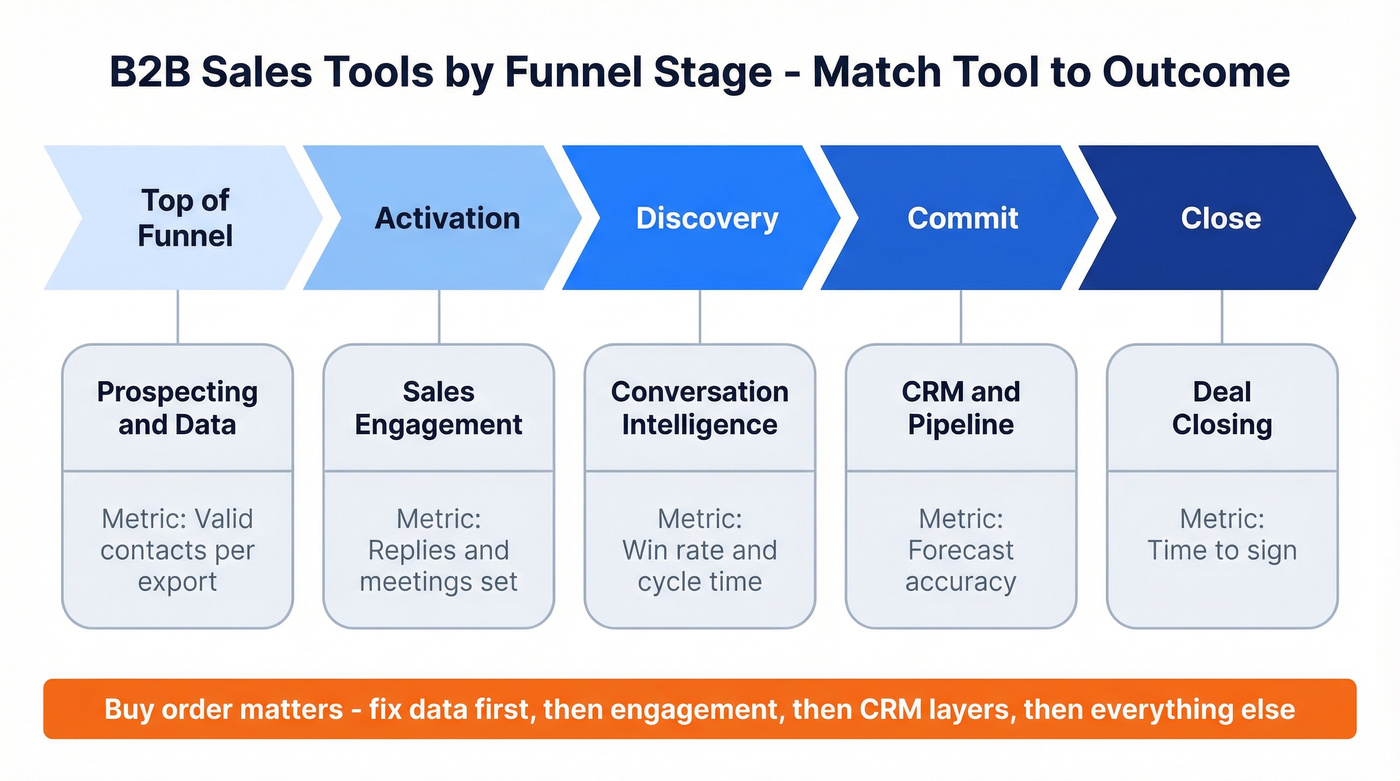
Here's the taxonomy we use because it matches how revenue actually moves:
| Funnel stage | Tool category | Outcome metric |
|---|---|---|
| Top of funnel | Prospecting & data | Valid contacts/export |
| Activation | Sales engagement | Replies/meetings set |
| Discovery | Conversation intel | Win rate, cycle time |
| Commit | CRM & pipeline | Forecast accuracy |
| Close | Deal closing | Time-to-sign |
Now the plain-English definitions (this is where teams get sloppy):
- Prospecting & data = finding and maintaining reachable people. If your emails bounce or titles are stale, everything downstream becomes expensive theater.
- Sales engagement = turning lists into conversations through sequences, tasks, calling, and activity capture.
- Conversation intelligence = turning calls into coaching and deal signals (what's working, what's risky, what objections repeat).
- CRM & pipeline = the rules of reality: stages, required fields, routing, attribution, and reporting.
- Deal closing = the last-mile utility: proposals, approvals, signatures, and audit trails.
Three buy-order rules that save budgets: 2. Pick CRM before forecasting layers. Forecast tools don't fix fantasy close dates; they just visualize them. 3. Add ABM/intent only after you can act on it. If you don't have plays, routing, and follow-up discipline, intent becomes an expensive dashboard.
Common failure mode per stage (the stuff that quietly kills pipeline):
- Prospecting/data: "Big database" thinking. Teams buy volume, then burn domains on bounces and spam traps.
- Engagement: workflow mismatch. Reps hate the UI, so they work in spreadsheets and your metrics lie.
- Conversation intelligence: call library syndrome. You record everything and coach nothing.
- CRM/pipeline: field sprawl. Forty required fields turns selling into compliance.
- Deal closing: over-implementation. If e-sign needs a six-week rollout, you bought a platform when you needed a utility.
Hot take: if your average deal's in the low five figures, you probably don't need an all-in-one "GTM platform." You need clean data, a sequencer that reps use, and a CRM that doesn't fight you.

You just read that 73% of sales stacks have overlapping tools and $2,340/rep/year in waste. The fix starts at the data layer. Prospeo delivers 98% email accuracy on a 7-day refresh cycle for ~$0.01/email - so every tool downstream (sequencer, CRM, dialer) actually performs.
Stop feeding your stack stale data. Start with the foundation.
Lean-stack blueprint for B2B sales tools (cap it at 4 + 2)
Most stacks don't fail because the tools are "bad." They fail because teams buy overlapping tools and never decide which one's the source of truth. That's true whether you call them sales tools, a sales platform, or "RevTech" - the failure mode's the same.
That overlap's measurable: 73% of teams report overlapping functionality (from SalesHive's 2026 analysis), which turns into duplicate workflows, conflicting fields, and reps doing whatever's fastest.
Core stack checklist (cap it at 4)
Pick one CRM + one engagement platform. Non-negotiable. Two CRMs or two sequencers is how you end up with two versions of reality.
CRM (HubSpot or Salesforce) Your objects, stages, required fields, and routing live here. CRM ROI is $8.71 returned per $1 invested (Nucleus Research benchmark) - but only when the team actually uses it.
Engagement (Outreach or Salesloft, or SMB sender) Sequences, tasks, calling, and activity capture. This is your rep cockpit. (If you're comparing sequencing vendors, start with our sales engagement platform alternatives.)
Data foundation (Prospeo / ZoomInfo / Apollo) This is where lists start and where enrichment keeps records current. The goal isn't "more contacts." It's more reachable contacts. (If you're evaluating data vendors, see our best B2B data providers.)
Conversation intelligence (Gong) Call recording + coaching + deal risk signals. It's the fastest path to consistent discovery and better handoffs - if managers coach from it weekly.
Optional layers (add only after adoption's proven)
ABM/intent (Demandbase / 6sense) Add this when you have enough accounts and enough traffic to make intent meaningful. Otherwise it's expensive noise. (If you're trying to do this lean, see ABM without expensive tools.)
Deliverability & inbox ops (Kickbox / ReachInbox / ManyReach) Add this when outbound volume grows and domain reputation becomes a real constraint. (If you're troubleshooting deliverability, see email deliverability.)
The consolidation rule I wish more teams followed
If two tools can do the same job, delete one unless there's a written reason it exists.
We've run bake-offs where the "best" platform lost because it created thousands of duplicates in Salesforce in the first week, and then everyone spent Friday afternoon arguing about which report was "right." The winner wasn't the one with the most features - it was the one that kept the CRM clean. (If this is a recurring issue, use a data quality scorecard.)
A simple adoption gate (stops shelfware)
Before you add a new tool, prove:
- 70%+ of reps use the current tool weekly
- the workflow's documented (screens + rules)
- RevOps can measure impact (not just activity)

If you can't do that, you're not buying anything that helps. You're buying chaos.
The best B2B sales tools (by category)
Prospecting & data intelligence
Prospeo (Tier 1)
Prospeo is the best pick for email accuracy, data freshness, and self-serve economics. It's "The B2B data platform built for accuracy": 300M+ professional profiles, 143M+ verified emails, and 125M+ verified mobile numbers, refreshed on a 7-day cycle (while the industry average is about 6 weeks).
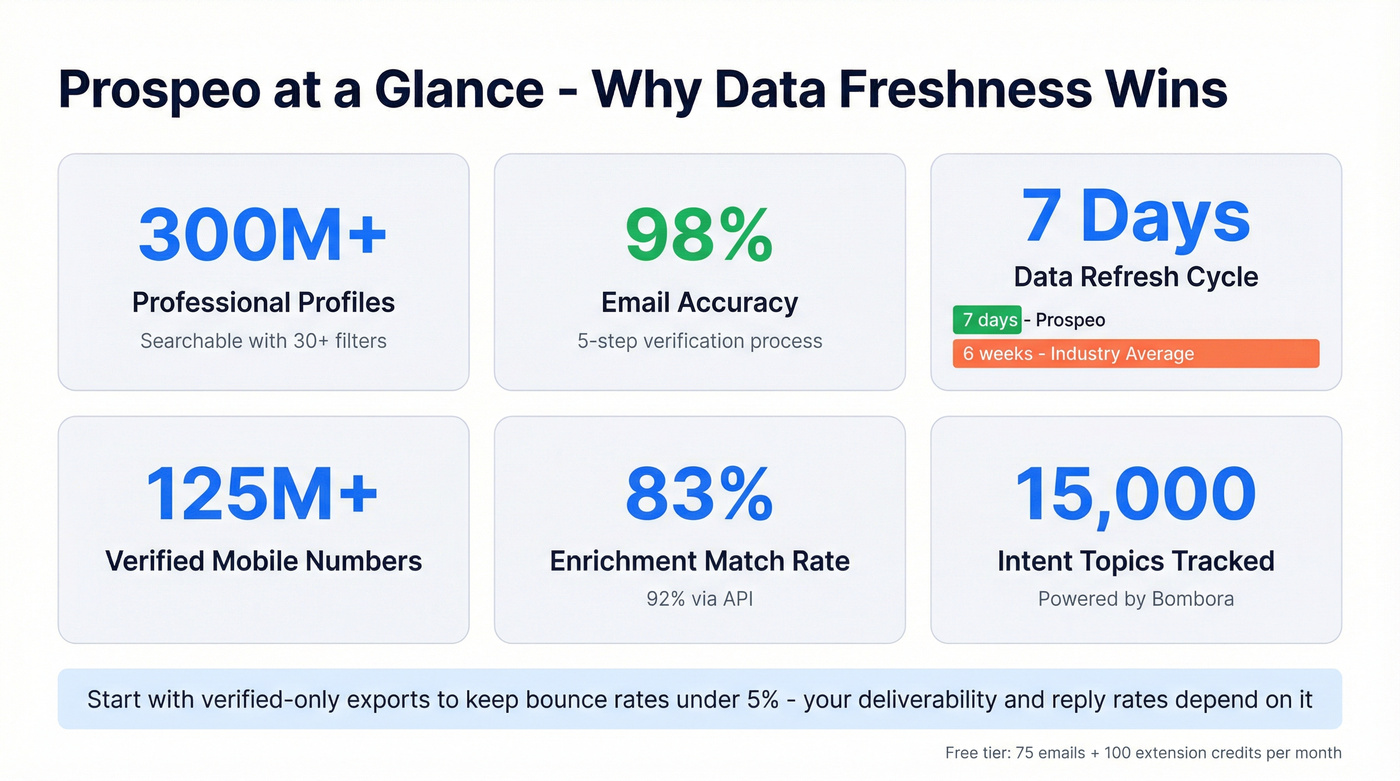
Here's why it works in the real world, not just on a slide:
- 30+ search filters (buyer intent, technographics, job changes, headcount growth, department headcount, funding, revenue) so lists match your ICP instead of "anyone with a title."
- Real-time verification with a 5-step process (catch-all handling, spam-trap removal, honeypot filtering) so you stop paying for bounces. (If you're comparing verifiers, see email verifier websites.)
- Enrichment returns 50+ data points per contact with 83% enrichment match and 92% API match - a fast way to clean a CRM without a months-long data project. (More on this workflow: how to keep CRM data clean.)
- Intent data across 15,000 topics (powered by Bombora) to prioritize accounts that are actively researching what you sell.
- Self-serve pricing, no annual contracts, cancel anytime. Transparent credits, not a packaging maze.
A concrete scenario we've seen more than once: an SDR team starts the quarter with a "fine" list from a big database, bounce rates spike into the 30% range, deliverability tanks, and suddenly everyone's debating subject lines instead of fixing the input. Switching to verified contacts and running a proper wash cycle takes bounce rates down under 5%, and the rest of the stack starts behaving again because it isn't built on dead inboxes.
Pricing signal: free tier includes 75 emails + 100 extension credits/month. Paid usage scales transparently (see pricing: https://prospeo.io/pricing).
How to use it fast: start in the database (https://prospeo.io/b2b-leads-database), filter down to your ICP, toggle to verified-only, then export to CSV or push into your CRM. If you've already got a messy CRM, run enrichment first (https://prospeo.io/b2b-data-enrichment) so sequences aren't built on stale titles and dead inboxes.

That screenshot's the workflow you want: use the filters to narrow the ICP, check verification status before you spend credits, then choose the destination (CSV, HubSpot, Salesforce, or your engagement tool). After export, run enrichment on the same segment to keep titles, company fields, and contact channels current so your sequences don't decay a month later. For integrations and destinations, start here: https://prospeo.io/integrations.
ZoomInfo (Tier 2)
Use this if you're a mid-market/enterprise org that wants a broad GTM suite and can handle packaging complexity. ZoomInfo's built for scale: lots of modules, lots of workflow surface area, lots of ways to standardize a big team - if RevOps governs it.
Skip this if you're mainly paying for contact exports. Renewal shock's real, and switching friction's the trap: once your workflows depend on it, you keep paying. (If you're pressure-testing quality, see is ZoomInfo accurate.)
Pricing reality: $14,995-$35,995/year is a common range for smaller deployments, and discounts are normal if you negotiate. The gotcha is add-ons and seat expansion: your "deal" can quietly turn into a much bigger number at renewal.
What users complain about (the consistent themes):
- Packaging sprawl: you buy one thing, then realize the feature you need is gated.
- Renewal pressure: pricing jumps when you're already operationally dependent.
- Admin overhead: more power means more governance work.
Apollo (Tier 2)
Apollo's the obvious starting point for SMB and scrappy mid-market teams because it's fast: search, build lists, sequence, go. Pricing's clear: $49-$119/user/mo (annual) or $59-$149 (monthly), with Organization requiring a 3-user minimum.
Pros: great time-to-first-list, decent coverage, and a workflow that reps adopt quickly. (If Apollo is your baseline, see Apollo.io accuracy.)
Gotchas (what bites budgets):
- Credit creep: mobiles and exports raise your effective cost fast.
- Seat minimums: teams buy it "for one power user," then get forced into a 3-seat plan.
- Security due diligence: if your org's compliance-sensitive, treat any data vendor like a system that touches regulated workflows.
Clay (Tier 2)
Clay is for building "weirdly specific lists" when normal databases can't slice your ICP cleanly. Think enrichment chains, waterfalling providers, and turning messy web signals into structured fields - like LEGO pieces for data. (If you're building a multi-provider enrichment chain, see waterfall alternatives.)
Best for: RevOps and growth operators who enjoy building systems and want custom list logic (job changes + tech stack + intent + funding + whatever).
Workflow note: it's setup-heavy. Clay doesn't solve prospecting by itself; it orchestrates other data sources and enrichment steps. If nobody owns the logic and QA, it stalls.
Pricing signal: credit-based; $150-$800/mo for smaller teams and $1,000-$5,000+/mo when you're running real enrichment volume.
Sales Navigator (Tier 2)
Sales Navigator is still the best "account map + org chart + relationship" layer, especially when you're multi-threading and need to see who moved where.
Best for: account-based prospecting, warm intros, and keeping reps focused on the right people inside target accounts.
Pricing: Core $959.88/yr, Advanced $1,679.88/yr, and Advanced Plus starts around $1,600/seat/yr (enterprise pricing varies).
Gotcha: teams buy Core, then realize they need CRM sync and team features, so they upgrade anyway.
Cognism (Tier 3)
Cognism's a strong alternative when you care about EMEA coverage and compliance posture. Pricing's quote-based; $12k-$30k/year for small teams and more with mobiles/intent.
Dealfront (Tier 3)
Dealfront's the EMEA/GDPR-leaning pick, especially if your pipeline's Europe-heavy and you want region-specific strength. $6k-$20k/year depending on seats and modules.
Lusha (Tier 3)
Lusha's a quick lookup utility, especially for phone numbers, but it's hit-or-miss by region. Pricing: $30-$80/user/mo plus credits.
LeadIQ (Tier 3)
LeadIQ's popular for list building and CRM sync when reps live in Sales Navigator and need fast capture + enrichment. $75-$150/user/mo; you'll still want a primary data source underneath for scale.
Sales engagement (sequencing + calling)
Outreach (Tier 1)
Outreach is the engagement platform we trust for complex outbound motions: multi-step sequences, task discipline, team governance, and reporting that holds up in a QBR.
Use this if you need a rep cockpit with real process control and you're willing to standardize how sequences get built and measured. Skip this if you want "set it and forget it" outbound. Outreach rewards teams that operationalize it.
Packaging reality: modules (Engage, Call, Meet, Deal, Forecast, Amplify) are powerful, and that modularity's also the budget trap. Costs expand as you adopt more modules.
Pricing signal: quote-based; $1,200-$2,500/user/year for engagement is a realistic planning range, with higher totals as you add calling, forecasting, and AI modules.

Salesloft (Tier 2)
Gotcha first: the dialer is an add-on. Teams buy Salesloft, assume calling's included, then find out they're paying extra. Even phone numbers can be a line item (LocalDial numbers are often billed per number/month).
Packaging: Advanced vs Premier, with Premier adding forecasting capability. It's a strong alternative to Outreach when you want solid engagement without as much enterprise complexity.
Pricing signal: quote-based; $1,000-$2,200/user/year plus dialer costs if calling matters.
Amplemarket (Tier 2)
Amplemarket's for teams that want signals + personalization + deliverability-aware sending in one motion. It's closer to an outbound operating system than a pure sequencer.
Best for: teams scaling outbound beyond "blast a list," with a dedicated owner to tune targeting, personalization, and sending behavior.
Skip if: you want a simple sequencer with minimal setup.
Pricing signal: $300-$900/user/mo depending on modules and volume.
Instantly (Tier 3)
Instantly's an SMB-friendly outbound sender for high-volume cold email. $37-$97/mo plus add-ons; pair it with verification and inbox ops or you'll torch deliverability.
Lemlist (Tier 3)
Lemlist is great when personalization matters (images, dynamic snippets) and you want a simple outbound workflow. $59-$99/user/mo.
Smartlead (Tier 3)
Smartlead's a popular scale sender with inbox rotation and agency-friendly workflows. $39-$94/mo; deliverability becomes your job, not the tool's.
QuickMail (Tier 3)
QuickMail's a lightweight sequencer that's been around forever and still works. Plans start at $9/month; free trial available.
Conversation intelligence
Gong (Tier 1)
Gong's expensive, but it's one of the few tools that can change how a team sells, not just how they log activity.
The pricing model matters: it's commonly $1,600/user/year plus a $5k-$50k+ platform fee, plus $7.5k-$30k+ onboarding. That's why Gong ends up as a leadership decision, not a rep tool purchase.
The gotcha's simple: you can't treat it like a call recorder. You need a coaching cadence and a few standard views (discovery scorecards, deal risk, competitor mentions) or it becomes a very expensive library.
Pricing signal: plan on $20k-$120k/year all-in depending on seats, platform fee, and onboarding.
Momentum (Tier 3)
Momentum's an automation layer that triggers workflows off call and CRM signals: routing, notes, follow-ups, and alerts. $20-$60/user/mo; it's useful once your core systems are clean.
CRM & pipeline / forecasting
HubSpot Sales Hub (Tier 1)
HubSpot's the best CRM choice for SMB through mid-market teams that want speed, usability, and fewer implementation horror stories. You can get to working pipeline + sequences + reporting quickly, and that matters more than theoretical flexibility.
Use this if you want a CRM that reps actually update and leaders can report from without a BI project. Skip this if you're a complex enterprise with heavy custom objects, intricate territory rules, or deep CPQ needs. Salesforce wins there.
Pricing signal: HubSpot's tiered + seat-based. A 10-30 seat sales org commonly lands in the $12k-$60k/year range once you include the Sales tier you actually need plus ops/admin features.
Salesforce Sales Cloud (Tier 1)
Salesforce is still the enterprise default because it can model almost anything: territories, complex account hierarchies, custom objects, and deep integrations. That flexibility's also why it gets teams into trouble.
Pros: unmatched ecosystem, customization power, enterprise controls. Cons: complexity and over-customization. Too many fields and workflows turns Salesforce into a compliance tool instead of a revenue tool.
Pricing signal: $25-$165/user/mo depending on edition, plus admin/RevOps cost. All-in, many teams land $15k-$150k+/year depending on seats and complexity.
Pipedrive (Tier 3)
Pipedrive's best for small teams that need simple pipeline hygiene without the admin overhead. $14-$99/user/mo.
Clari (Tier 2)
Clari's a forecasting layer for teams that are tired of spreadsheet rollups and gut-feel commits. It's most valuable when you have multiple teams, longer cycles, and enough pipeline volume that forecast accuracy is a real business lever.
Budgeting reality: quote-based enterprise pricing. $20k-$120k/year depending on scope and seats.
Gotcha: Clari won't fix bad CRM hygiene. If stages and close dates are fantasy, Clari just visualizes the fantasy.
Deal closing
PandaDoc (Tier 2)
PandaDoc's best when you want doc automation plus e-signature in one workflow: quotes, proposals, pricing tables, and templates that sales can actually reuse.
Pricing signal: $19/user/mo (Starter), $49/user/mo (Business), and Enterprise custom.
Gotcha: template governance. If everyone creates their own version, you lose brand and pricing control.
DocuSign (Tier 2)
DocuSign's the e-signature standard and works best as a boring, reliable closing utility.
Pricing signal: $10-$40/user/mo for lighter plans; business/enterprise often lands $300-$1,500+/mo depending on envelopes and integrations.
Use this if you want the default. Skip this if you need heavy proposal automation. PandaDoc's better there.
ABM / intent (optional layer)
Demandbase (Tier 2)
Demandbase is an ABM platform with a pricing model that catches teams off guard: platform fee + per-user fee. It's built for coordinated sales + marketing plays, not just "give SDRs intent."
Pricing signal: starts around $18,100/year, with a $65k/year median for real deployments. Six-figure contracts are common once you add data, ads, and multiple teams.
Gotcha: implementation and alignment. If sales and marketing don't agree on target accounts and plays, Demandbase becomes an expensive dashboard.
6sense (Tier 2)
6sense is the intent option that can work well when you commit to the model: you pay to unlock/export enriched records, so usage drives cost.
Implementation reality: G2's pricing insights show about 3 months implementation and about 13 months to ROI. That's normal for intent tools. Plan for it.
Pricing signal: free tier available (50 credits/month); paid plans land $20k-$120k+/year depending on credits and modules.
What users complain about:
- Time-to-value: you need plays, routing, and follow-up discipline.
- Credit economics: exports and enrichment drive spend.
- Data quality sensitivity: stale contacts make intent feel wrong fast.
Scheduling/routing + collaboration (utilities)
Chili Piper (Tier 3)
Chili Piper solves inbound routing and scheduling: getting the right meeting to the right rep fast. $30-$120/user/mo; you need clean routing rules and clear ownership between RevOps and Marketing Ops.
Calendly (Tier 3)
Calendly's the lightweight scheduling utility almost everyone uses. Pricing runs from free self-serve tiers up through enterprise; Calendly Enterprise starts at $15k/year.
Slack (Tier 3)
Slack's where sales actually collaborates: deal rooms, approvals, and fast handoffs. $7.25-$15/user/mo. Without channel hygiene, it becomes a notification firehose.
Zoom (Tier 3)
Zoom's still the default for meetings in many orgs. $15-$25/user/mo. It becomes a sales tool only when recordings and notes flow into your CRM and conversation intelligence layer.
Lavender (Tier 3)
Lavender is an email coaching assist that helps reps write better outbound faster. $29-$99/user/mo. It won't fix bad targeting, but it will fix cringe copy.
Deliverability & inbox ops (optional layer most lists ignore)
Look, if you're sending volume and you aren't treating deliverability like a system, you're going to have a bad time. This is the part everyone skips because it's not sexy, and then they act surprised when reply rates fall off a cliff.
Kickbox (Tier 3)
Kickbox is email verification that protects your domain by reducing bounces before you send. $5-$20 per 1,000 verifications depending on volume.
ReachInbox (Tier 3)
ReachInbox is part of the inbox rotation / campaign separation stack that's popular with outbound teams. $29-$99/mo depending on inbox volume.
ManyReach (Tier 3)
ManyReach blends channels and inbox management for teams that want more control over sending infrastructure. $49-$149/mo.
Comparison table: tools, best for, pricing style, and the gotcha
Here's the pattern that explains why stacks balloon: core systems are seat-based, while optional layers love platform fees and credits. If you don't model those pricing styles up front, Finance will hate your forecast by Q3.
Two quick tells:
- If a vendor says "platform fee," translate it as fixed cost that doesn't shrink with headcount.
- If a vendor says "credits," translate it as variable cost that rises with success (more outreach, more exports, more enrichment).
To keep this readable on mobile, we split it into Core and Optional/Utilities.
Core systems (the 4 you build around)
| Category | Tool | Best for | Pricing (ballpark) | Pricing style | Gotcha |
|---|---|---|---|---|---|
| Data | Prospeo | Verified contacts | ~$0.01/email | Self-serve + credits | Set credit budgets |
| Data | ZoomInfo | Suite + scale | $15k-$36k/yr | Quote | Renewal jumps |
| Data | Apollo | Fast lists | $49-$119/u/mo | Self-serve + credits | Credit creep |
| Engage | Outreach | Complex outbound | $1.2k-$2.5k/u/yr | Quote | Module sprawl |
| Engage | Salesloft | Outreach alt | $1k-$2.2k/u/yr | Quote | Dialer add-on |
| CI | Gong | Coaching + risk | $20k-$120k/yr | Quote | Onboarding fee |
| CRM | HubSpot | SMB->MM CRM | $12k-$60k/yr | Hybrid | Field sprawl |
| CRM | Salesforce | Enterprise CRM | $15k-$150k+/yr | Seat-based | Admin burden |
Optional layers + utilities (buy only with a clear trigger)
| Category | Tool | Best for | Pricing (ballpark) | Pricing style | Gotcha |
|---|---|---|---|---|---|
| Data ops | Clay | Precision lists | $150-$5k/mo | Credits | Needs an owner |
| Data | Sales Nav | Account maps | $960-$1.7k/yr | Seat-based | Tier gating |
| Forecast | Clari | Forecast layer | $20k-$120k/yr | Quote | Needs clean CRM |
| Close | PandaDoc | Docs + e-sign | $19-$49/u/mo | Self-serve | Template sprawl |
| Close | DocuSign | E-sign utility | $10-$40/u/mo | Self-serve | Envelope limits |
| ABM | Demandbase | ABM plays | $18k-$100k+/yr | Quote + platform | Platform fee |
| Intent | 6sense | Intent + exports | Free-$120k+/yr | Credits | Time-to-value |
| Routing | Chili Piper | Inbound routing | $30-$120/u/mo | Seat-based | Rules ownership |
| Engage | Instantly | Scale sending | $37-$97/mo | Self-serve | Domain risk |
| Deliverability | ReachInbox | Rotation | $29-$99/mo | Self-serve | Infra overhead |
How to use this table in real life (three concrete examples):
- Platform-fee trap (Gong / Demandbase): you can cut seats and still pay a big fixed fee. That's fine. Just treat it like infrastructure, not "per rep tooling."
- Credit creep (Apollo / Clay / 6sense): the tool looks cheap in month one. Month three, exports and enrichment spike and your unit economics change. Put credit caps in writing before rollout.
- Seat minimums (Apollo / enterprise CRMs): "We'll buy one seat to test" often isn't real. If the plan forces 3+ seats or bundles features by tier, budget for the tier you'll end up on, not the one you wish you could stay on.
Interpretation we'd actually use:
- Early-stage wins with verified data + a simple CRM + a lightweight sender; add conversation intelligence when managers coach weekly.
- Mid-market usually lands on data + engagement + CRM + conversation intelligence and then adds forecasting/intent only after adoption gates are met.
- Enterprise doesn't have a tooling problem. It has a governance problem.
Budgeting guide (SMB vs mid-market vs enterprise) + category cost ranges
Budgets blow up in three places: platform fees, credits, and seat minimums. The most frustrating part is you often can't reduce seats mid-term, so a headcount change doesn't lower spend until renewal.
Also: the cheapest place to fix outcomes is usually inputs. Bad inputs create a chain reaction:
- bounces -> domain reputation drops -> reply rates fall -> you buy "AI personalization" to compensate
- duplicates -> routing errors -> two reps hit the same account -> pipeline attribution becomes a fight
- stale titles -> wrong persona -> discovery calls start with "I'm not the right person"
Scenario budgets (realistic ranges)
SMB (5-20 sellers, lean RevOps)
- Core stack: $8k-$45k/year
- Typical build: data + HubSpot + lightweight sender; add conversation intelligence when coaching's real.
Mid-market (20-100 sellers, dedicated RevOps)
- Core stack: $60k-$250k/year
- Typical build: data + Outreach/Salesloft + Salesforce/HubSpot + Gong.
Enterprise (100+ sellers, ops teams)
- Core stack: $250k-$1M+/year
- Add ABM/intent and forecasting layers only with governance and adoption gates.
Category cost ranges (annual)
| Category | SMB | Mid-market | Enterprise |
|---|---|---|---|
| Data | $0.5k-$10k | $10k-$60k | $60k-$300k |
| Engagement | $1k-$15k | $20k-$200k | $200k-$800k |
| CRM | $1k-$20k | $20k-$150k | $150k-$600k |
| Conv. intel | $0-$15k | $20k-$120k | $120k-$500k |
| ABM/intent | $0 | $20k-$120k | $120k-$500k+ |
| Close | $0.5k-$10k | $10k-$60k | $60k-$200k |
Specific watch-outs by tool
- ZoomInfo: budget $14,995-$35,995/year and assume negotiation. The real risk is renewal + add-ons.
- Gong: don't forget the platform fee ($5k-$50k+) and onboarding ($7.5k-$30k+).
- Demandbase: starts around $18,100/year, but the median real deployment is $65k/year.
- Sales engagement tools: budget low-to-mid hundreds per user per month once you're in Outreach/Salesloft territory.
- Credit creep: Clay, Apollo, 6sense, and "AI outbound" tools can look cheap until usage ramps.

Implementation & governance (how to keep the stack working)
Buying tools is easy. Keeping them working is the job.
The simplest governance rule we've seen stick: audit your stack twice per year. Not "when you have time." Twice a year, every year.
And your CRM needs a wash cycle. A strong rule of thumb is every 3-6 months: refresh, dedupe, verify, and archive stale records. Poor data quality isn't an annoyance; it's revenue leakage. FullFunnel reports 37% of CRM users lost revenue due to poor data quality.
The SOP that keeps stacks from rotting (import gates + wash cycle)
Owner: RevOps (or the most process-minded sales leader if you don't have RevOps). Cadence: monthly light checks, quarterly wash cycle, twice-yearly full audit.
1) Import gates (stop bad data at the door)
- No uncontrolled CSV imports. If it didn't come through an approved workflow, it doesn't go in. (If you need a safe workflow, see how to import leads.)
- Require mapping + dedupe rules before any import: account match logic, contact match logic, and what happens on conflict.
- Define required fields (keep it minimal): ICP tag, lifecycle stage, owner, source, and one routing field.
- Quarantine list: any upload that creates a spike in duplicates or bounce risk goes into a staging list until it's cleaned.
2) Wash cycle (every 3-6 months)
- Verify emails (remove risky addresses before they hit sequences)
- Refresh titles + companies (stops wrong-persona outreach)
- Dedupe contacts + accounts (prevents routing errors and double-touching)
- Archive stale records (keeps reporting honest)
- Rebuild suppression lists (opt-outs, competitors, existing customers, do-not-contact)
3) What to measure (so it's not vibes)
- Bounce rate by source
- Duplicate rate by import method
- % of contacts with missing routing fields
- Reply rate by segment (not just overall)
- Stage conversion rates (if these are flat, your "AI" won't save you)
4) What to delete (yes, delete)
- Fields nobody uses in a workflow
- Integrations nobody owns
- Sequences with no replies in 60-90 days
- Nice-to-have dashboards nobody checks weekly
Enterprise readiness checklist (security + compliance)
If a tool touches customer data, prospect data, or your CRM, treat it like a real system, not a browser plugin. This is business-to-business software, and it should be governed like any other system in your environment.
Minimum bar we require for serious tools:
- SOC 2 (or a clear security program)
- GDPR + CCPA readiness (and an actual process for data subject requests)
- DPA availability and clear subprocessors
- SSO/SAML for larger orgs
- RBAC/permissions (role-based access control)
- Audit logs (who exported what, when)
- Data retention controls (how long recordings/exports persist)
- Opt-out handling that doesn't rely on reps remembering
AI/agent note: automate admin work (logging, routing, enrichment, follow-up reminders). Don't automate judgment (ICP definition, qualification, pricing strategy). When teams flip that, they scale the wrong behavior faster.
Don't do this (the fastest way to break your stack)
- Don't add 30 custom fields "for reporting."
- Don't build complex workflows before reps understand the native features.
- Don't skip training and then blame the tool.
- Don't let every team integrate whatever they want without RevOps review.
I've watched teams burn an entire quarter "implementing" while pipeline slipped, and the fix ended up being brutally unglamorous: delete fields, tighten imports, pick one system to trust, and stop rewarding reps for activity that doesn't convert.
The "4 core + 2" stack only works when your data foundation is solid. Prospeo gives you 300M+ profiles, 125M+ verified mobiles, and 30+ filters - including intent, technographics, and job changes - at 90% less than ZoomInfo. No contracts. No sales calls.
Teams using Prospeo book 26% more meetings than ZoomInfo users.
What practitioners actually pick (real-world stack callout)
A pattern from the field: teams converge into three styles: default, precision, and orchestration. The tools change, but the shape stays the same.
Default (speed-first outbound)
Pick this when: you need pipeline this month, your ICP's broad, and you don't have RevOps bandwidth.
- Apollo for quick lists + a lightweight sender
- A simple CRM setup
- Deliverability layer once volume grows Symptom that tells you it's time to evolve: bounce rates rise, reply rates fall, and reps start blaming "the market."
Precision (weirdly specific targeting)
Pick this when: your ICP's narrow, deal size is high, and one wrong persona wastes weeks.
- Clay for enrichment chains and custom list logic
- Tight routing and tagging in the CRM Symptom that tells you it's working: fewer total emails sent, more meetings with the right titles, and cleaner stage conversion.
Orchestration (signals + personalization + execution)
Pick this when: volume stopped working and you need smarter prioritization and better sending behavior.
- Amplemarket for signals, personalization, and deliverability-aware sending
- A CRM with strict definitions
- Conversation intelligence for coaching loops Symptom that tells you you're ready: you have plays, you can route fast, and managers coach weekly.
Utility picks that show up a lot:
- Lusha as the quick lookup tool (region-dependent)
- LeadIQ for list capture + CRM sync
- ReachInbox/ManyReach/Kickbox style inbox ops once outbound's serious
FAQ
What are the core B2B sales tools every team needs in 2026?
The core setup is 4 systems: a data source, an engagement tool, a CRM, and conversation intelligence, then optionally ABM/intent and deliverability. For most teams, that "4 core + 2 optional" cap cuts overlap, keeps adoption above 70%, and makes annual budgeting predictable within an $8k-$250k range depending on headcount.
How do credit-based pricing models (exports/mobiles) change your real cost?
Credit pricing makes spend scale with usage, not seats, so costs jump as reps export more contacts or unlock more mobile numbers. The fix is simple: set a monthly credit cap per team (say, 10-20% above your current run rate) and require approval for overages before you roll out to the whole org.
How often should you refresh and wash your CRM and prospect lists?
Run a wash cycle every 3-6 months: verify emails, refresh titles/companies, dedupe, and archive stale records. If you do high-volume outbound or sell into fast-moving roles, do it every 90 days because bounce-driven deliverability damage shows up fast and can take weeks to recover.
What's a good free alternative to ZoomInfo for verified contact data?
For a free starting point, Prospeo's strong because it includes 75 verified emails plus 100 extension credits per month and runs on a 7-day refresh cycle with 98% email accuracy. Apollo's free tier can work for light prospecting too, but plan for credit limits once you start exporting at scale.
Conclusion: build a lean stack, not a bloated one
The best b2b sales tools aren't the ones with the most modules. They're the ones your team actually adopts, with clean data flowing into a single CRM reality.
Start with verified contacts, standardize engagement, coach from calls, and only then add intent, forecasting, and deliverability layers once you've earned them with usage.