How to Organize Sales Leads (Without Wasting Time on Bad Data)
It's Monday morning. You open your CRM and 847 leads are sitting in various stages of neglect. Duplicates, bounced emails, people who changed jobs six months ago. Your reps are cherry-picking the ones that "look good," ignoring the rest, and nobody can tell you what your actual pipeline looks like.
That's not a lead organization problem. That's a revenue problem.
If you're figuring out how to organize sales leads, the real challenge isn't tidiness - it's making sure the right rep calls the right person at the right time, with data that's actually correct. 51% of leads never get contacted at all. The average response time to a new lead is 42 hours. The average response time to a new lead is 42 hours, and by then, your competitor already closed the deal.
Why Disorganized Leads Cost You Revenue
The numbers on speed-to-lead are brutal. Leads contacted within 5 minutes are 21x more likely to convert than those contacted at 30 minutes - and 100x more likely to qualify than those contacted even later. Wait an hour versus 24 hours? A 60x difference. Teams that respond within one minute see up to 391% higher conversions.

Over 63% of businesses don't respond to inbound leads at all. Among those who do? Average response time: over 29 hours.
78% of customers buy from the business that responds first - even if that business is more expensive. And 41% of companies say their biggest struggle is following up while leads are still interested. Every hour your leads sit unorganized, unsegmented, and unscored is money walking out the door.
The root cause is almost always the same: scattered data, no prioritization system, and reps spending 40% of their time just looking for the next person to call. That's what we're fixing.
What You Need (Quick Version)
If you've only got 60 seconds, here's the system and three tools to get started.
The 6-step system:
- Clean your data before you organize it
- Start with a spreadsheet, then know when to graduate
- Segment leads into actionable groups
- Qualify and score every lead
- Choose the right CRM
- Build a follow-up cadence that actually works
Three tool picks:
- Best free CRM: HubSpot (free tier - unlimited contacts, pipeline views, task management)
- Best for data verification: Prospeo (98% email accuracy, 7-day refresh, free tier with 75 emails/month)
- Best budget CRM for growing teams: Zoho CRM ($14/user/mo)

You just read that bad data costs businesses $12.9M per year. Prospeo's 5-step verification and 7-day refresh cycle mean every lead in your CRM is current and real - 98% email accuracy, not crowdsourced guesswork.
Organize leads that actually convert, starting at $0.01 per email.
The 6-Step System for Organizing Sales Leads
Each step builds on the last. Skip one and the whole system leaks.

Step 1 - Clean Your Data Before You Organize It
Organizing bad data is like alphabetizing garbage.

I've watched SDR teams pull 1,000 contacts from Apollo, load them into a sequencer, and start blasting. Three days later: 23% bounce rate, domain reputation tanked, and the sales manager is wondering why reply rates cratered. The contacts looked fine in the spreadsheet. They just weren't real anymore.
Bad data costs businesses an average of $12.9 million per year. Practitioners on Reddit consistently report that big databases ship outdated contacts, generic emails (info@ and marketing@ addresses), and phone numbers that are wrong 70% of the time. The data is populated by other users, not independently verified - so you're trusting crowdsourced information for your pipeline.
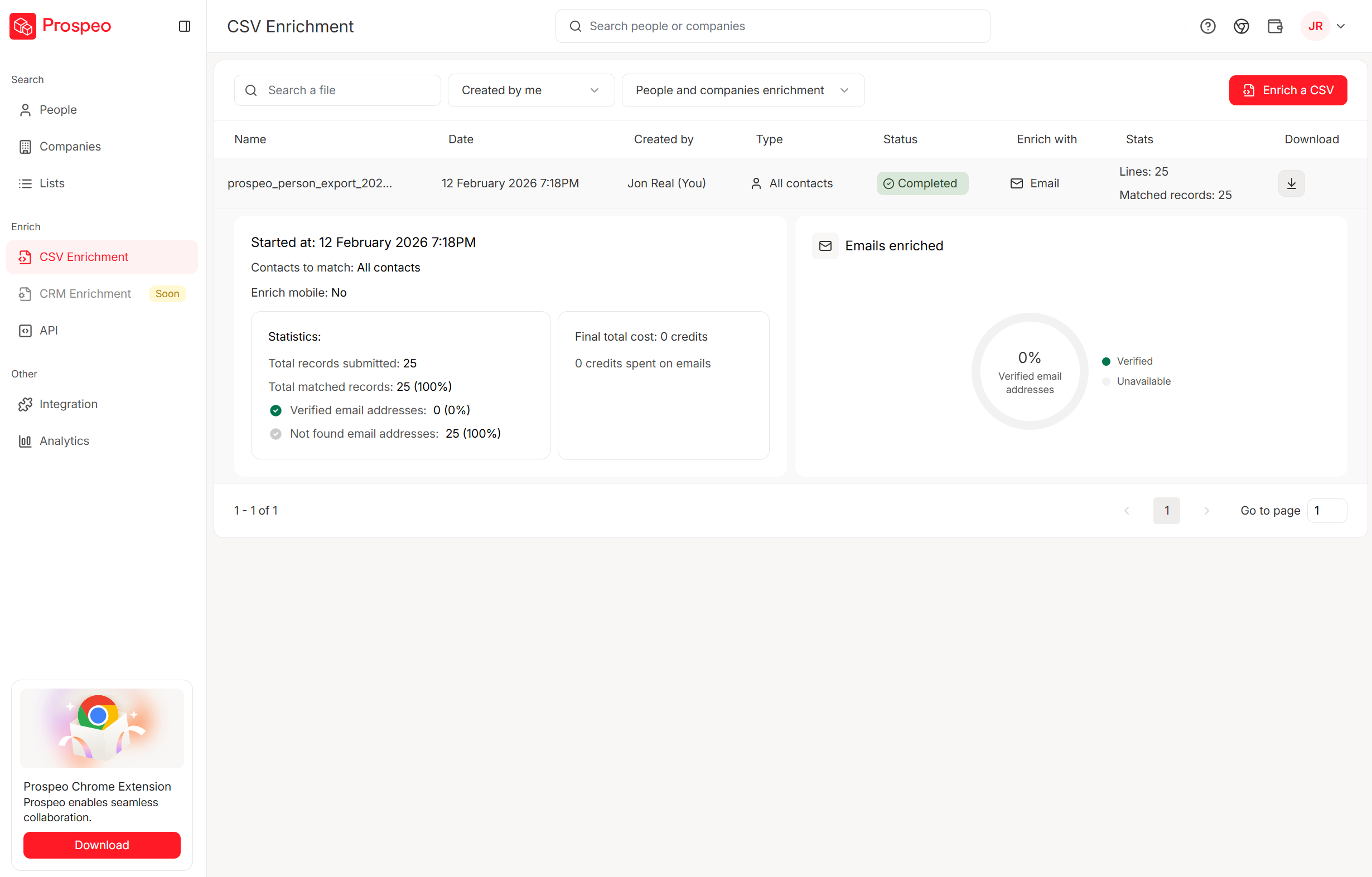
Here's the thing: practitioners recommend using at least two verifiers for any exported list. But if you're picking one, pick the one with the shortest refresh cycle. Data that was accurate six weeks ago is a coin flip today. If you want a simple SOP, follow an email verification list workflow so only clean records hit your CRM.
Step 2 - Start With a Spreadsheet (Then Know When to Graduate)
There's nothing wrong with a spreadsheet for your first 100-200 leads. Many teams start by learning to manage their pipeline in Excel or Google Sheets - both are free, flexible, and every rep already knows how to use them. The mistake is staying on spreadsheets too long.
Here's the sales lead template structure that actually works:
| Column | Purpose | Example |
|---|---|---|
| Priority | Hot / Warm / Cold | Hot |
| Contact Name | Full name | Sarah Chen |
| Company | Organization | Acme Corp |
| Verified address | sarah@acme.com | |
| Phone | Direct dial | +1-555-0142 |
| Stage | Pipeline position | Demo Scheduled |
| Est. Value | Deal size | $12,000 |
| Next Action | Specific task | Send proposal |
| Last Interaction | Most recent touch | Called 6/2 |
| Notes | Context | Needs SOC 2 docs |
A few tricks that save hours:
Color-code your follow-ups. Red = overdue. Orange = due today. Grey = future. Use conditional formatting so this updates automatically. The Priority column (Hot/Warm/Cold) tracks lead temperature; the color-coding tracks follow-up urgency. They're complementary - a "Warm" lead can still have an overdue follow-up. OnePageCRM's free template does this out of the box.
Add an apostrophe before "+" in phone numbers. Otherwise Google Sheets interprets them as formulas and breaks the formatting.
Use VLOOKUP for duplicate checking. Before adding a new contact, run a quick lookup against existing entries. Duplicates are the silent killer of spreadsheet-based systems, especially when you're tracking leads in Excel where duplicate rows pile up fast across multiple tabs.
Use conditional formatting for stage tracking. Color-code by pipeline stage so you can visually scan where leads are clustering.
When should you graduate? If you've got 200-500 active leads or 3-5 sales reps, it's time for a CRM. The signs you've waited too long are obvious - spreadsheet lag, missed follow-ups, duplicate entries, and reps working from different versions of the same file. As one founder on Reddit put it: "Once things started growing, it completely fell apart." If you're moving data over, use a clean import leads checklist so you don't migrate duplicates and junk.
Step 3 - Segment Your Leads Into Actionable Groups
73% of leads aren't ready to buy on first interaction.
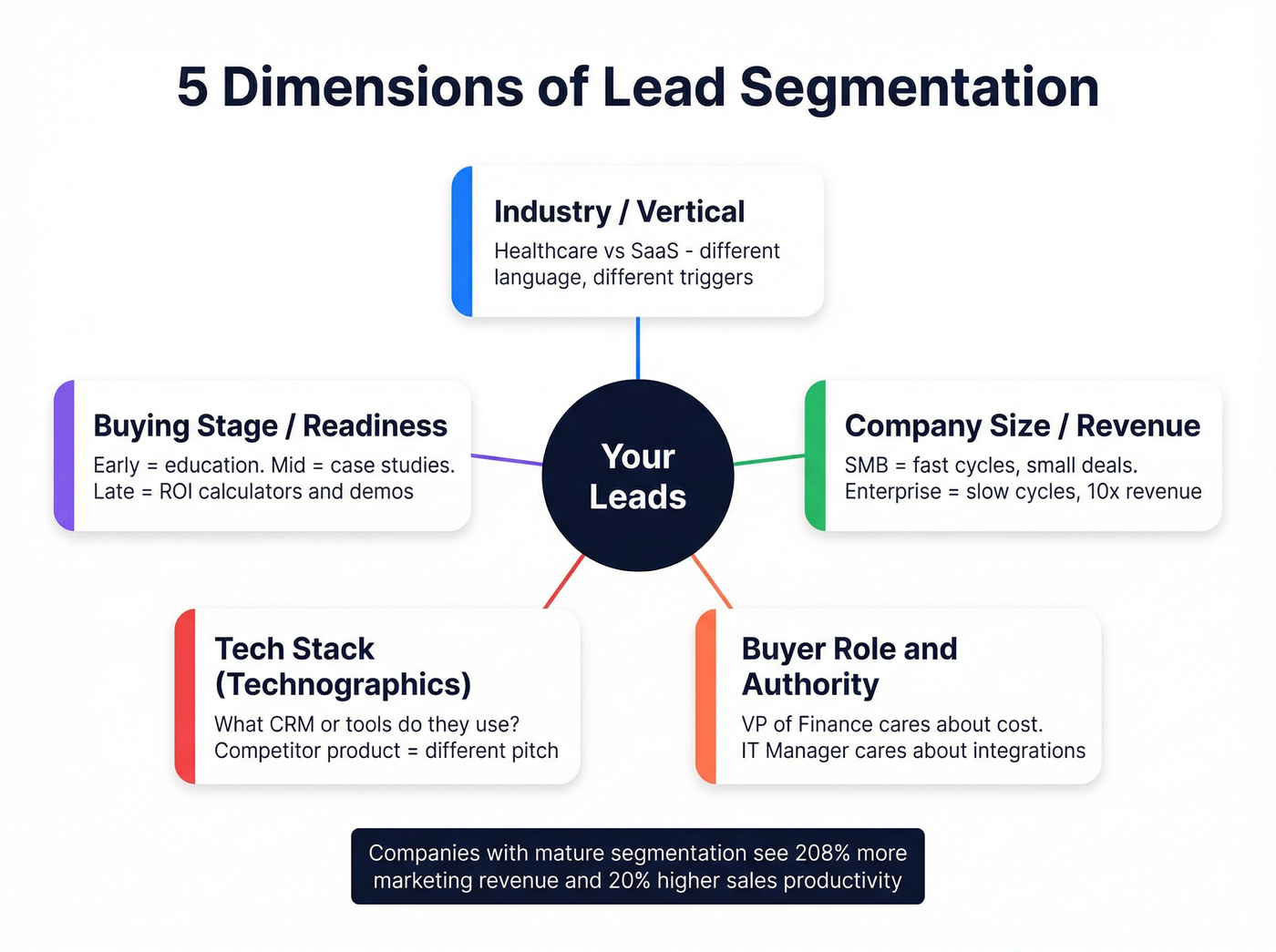
If you're treating every lead the same - same messaging, same cadence, same urgency - you're wasting effort on people who need nurturing and under-serving people who are ready to close. Companies with mature lead segmentation achieve 208% more revenue from marketing efforts and 20% higher sales productivity. Nurtured leads create 20% more sales opportunities and spend 47% more than non-nurtured leads. That's not a marginal improvement. That's a different business.

Segment across these five dimensions:
Industry/vertical. A healthcare buyer and a SaaS buyer need completely different messaging. Your value prop might be the same, but the language, compliance concerns, and buying triggers are different.
Company size/revenue. SMBs have shorter sales cycles but smaller budgets. Enterprise deals take months but pay 10x more. Your follow-up cadence should reflect this.
Buyer role and decision-making power. The VP of Finance cares about cost and risk. The IT Manager cares about integration and support. Segment by role so reps can lead with the right angle. If you need a shortcut, start from a few proven buyer persona examples.
Tech stack (technographics). What CRM, ERP, or marketing platform do they use? This reveals compatibility, switching potential, and integration pain points. If they're running a competitor's product, that's a different conversation than if they're on spreadsheets.
Buying stage / sales readiness. Early-stage leads get educational content. Mid-stage leads get case studies and comparisons. Late-stage leads get ROI calculators and demo invites. Treating a top-of-funnel lead like a bottom-of-funnel lead is how you get unsubscribes.
The modern differentiator is behavioral segmentation - website visits, content downloads, engagement patterns, and intent signals like job changes, funding rounds, and hiring surges. Static firmographic data tells you who someone is. Behavioral data tells you what they're doing right now. If you're building this layer, treat intent signals as first-class fields, not "nice-to-have" notes.
Step 4 - Qualify and Score Every Lead
67% of sales are lost due to poor lead qualification. That's not a data problem or a CRM problem - it's a framework problem.

Most teams either don't qualify at all (every lead gets the same treatment) or use a framework that doesn't match their sales motion. Here's the honest comparison:
| Framework | Created | Best For | Key Question | When to Use |
|---|---|---|---|---|
| BANT | IBM, 1950s | High-volume inbound | "Do you have budget?" | 500+ inbound leads/mo |
| CHAMP | InsightSquared | Mid-market consultative | "What's your biggest challenge?" | Complex B2B, 2-6 mo cycles |
| MEDDIC | PTC, 1990s | Enterprise, 7+ stakeholders | "Who's the economic buyer?" | $50k+ deals, long cycles |
| N.E.A.T. | Harris Consulting Group | Modern buyer-centric | "What's the economic impact?" | Complex committees, 6+ people |
Look, BANT is a 1950s framework being used in a 2026 buying environment. It was designed for an era when buyers got information exclusively from sales reps. Today, 96% of prospects research before speaking to a rep, and buying committees have 6-10 stakeholders with competing agendas. When you ask "What's your budget?" on the first call, smart buyers either lowball or say they don't have one yet.
That said, BANT still works for one thing: high-volume inbound triage. If you're getting 500+ demo requests a month, you need a fast filter. BANT is that filter.
For most mid-market B2B teams, I'd recommend CHAMP. It leads with the prospect's challenges instead of their budget, which produces better conversations and surfaces real pain. The average B2B purchase involves 7 stakeholders - CHAMP's emphasis on authority mapping handles this better than BANT. If you want a more complete rubric, use a dedicated lead qualification framework.
For enterprise deals above $50k with complex buying committees, MEDDIC is the gold standard. It demands significant training, but it reduces risk in large deals where a single missed stakeholder can kill everything at the eleventh hour.
Build a simple lead scoring model. You don't need machine learning. You need a point system:
| Criteria | Points | Example |
|---|---|---|
| ICP industry match | +20 | SaaS company, 50-500 employees |
| Director+ title | +15 | VP of Sales, CRO |
| Visited pricing page | +10 | Last 7 days |
| Downloaded content | +5 | Whitepaper, case study |
| No email engagement | -10 | 0 opens in 3 sequences |
| Generic email (info@) | -15 | info@company.com |
| Funding round (last 90 days) | +20 | Series B announced |
Leads scoring 40+ get immediate outreach. 20-39 go into nurture sequences. Below 20, they sit until a trigger event bumps them up. Companies using lead scoring see 20-30% improvement in conversion rates - not because the math is magic, but because it forces reps to prioritize instead of cherry-pick. If you're deciding between rules vs models, see AI lead scoring vs traditional lead scoring.
Step 5 - Choose the Right CRM
Don't overthink CRM selection. We've seen teams spend three months evaluating CRMs and lose pipeline momentum in the process. Pick one that fits your team size and budget, then commit.
| Tool | Free Tier | Entry Paid | Mid Tier | Best For |
|---|---|---|---|---|
| HubSpot | Yes (unlimited) | $20/user/mo | $50/user/mo | Teams under 10 reps |
| Zoho CRM | Yes (3 users) | $14/user/mo | $23/user/mo | Budget-conscious teams |
| Salesforce | No | $25/user/mo | $80/user/mo | Scaling orgs, 20+ reps |
| Pipedrive | No | $14/user/mo | $29/user/mo | Pipeline-first workflows |
HubSpot's free tier is the obvious starting point for teams under 10 reps. Unlimited contacts, pipeline views, task management, and enough reporting to get by. You'll outgrow it eventually, but "eventually" might be 12-18 months.
Zoho CRM is the sleeper pick. Near-total customizability via Canvas Builder and the Zia AI tool. At $14/user/mo for Standard, it's hard to beat on value. The learning curve is steeper than HubSpot, but the ceiling is higher.
Salesforce is Salesforce. If you're at 20+ reps and need enterprise-grade customization, it's the default. But at $25/user/mo just to start - and $80/user/mo for the features most teams actually need - it's overkill for early-stage teams.
Skip Pipedrive if you need marketing automation or complex reporting. But if your team lives and dies by pipeline visibility and you want the simplest possible interface, it's the best $14/mo you'll spend. If you're still comparing options, start with a shortlist of CRM software for small businesses.
Belkins' VP of Sales, Brian Hicks, put it well: after outgrowing spreadsheets and moving to HubSpot, "every single active deal in our pipeline has a task set for a future follow-up." That's the real value of a CRM - not the dashboards, not the AI features, but the simple discipline of never letting a deal go untouched.
Step 6 - Build a Follow-Up Cadence That Actually Works
Only 2% of sales close on first contact. 80% require 5-12 follow-ups. And yet, 44% of salespeople give up after one attempt.
This is the single biggest gap in most lead organization systems. You can have perfect data, beautiful segmentation, and a $80/seat CRM - and still lose deals because nobody followed up on Day 7.
Here's a cadence template that works for most B2B outbound:
| Day | Channel | Action | Goal |
|---|---|---|---|
| 1 | Personalized intro | Open + reply | |
| 1 | Phone | Warm call (same day) | Live conversation |
| 3 | Value-add follow-up | Engagement | |
| 5 | Social | Connect + comment | Visibility |
| 7 | Phone | Second call attempt | Live conversation |
| 14 | Case study / proof | Re-engagement | |
| 21 | Email + Phone | Break-up message | Final response |
High-growth organizations average 16 touchpoints per prospect within 2-4 weeks. That's not harassment - it's persistence across channels. The omnichannel approach matters: 78% of social sellers outperform their peers, and the first follow-up email alone increases reply rate by 50%. If you want more patterns to copy, use an SDR cadence best practices baseline.
If your average deal size is under $5k, you probably don't need a 16-touch cadence. A 7-touch sequence over 14 days will close most SMB deals. Save the marathon cadences for enterprise deals where the payoff justifies the effort. The teams I see burning out on follow-ups are usually running enterprise playbooks against SMB prospects.
"Time kills deals" isn't a cliche. It's math. Contacting a lead within 5 minutes increases conversion chances by 9x compared to waiting 30 minutes. 35-50% of sales go to the vendor that responds first. Build the cadence into your CRM as automated tasks - every lead that enters your pipeline should trigger a sequence, not sit in a list waiting for a rep to notice it.
How to Build Your Lead Management Tool Stack
Your lead organization system isn't one tool. It's four layers working together:
Layer 2: Verification. Where you clean leads before they enter your system. The practitioner-recommended approach is to always verify separately from your data source - never trust the same platform that sold you the contacts to also tell you they're accurate. If you need a refresher on the mechanics, see how to verify an email address.

Layer 3: CRM. Where you organize, segment, and score. HubSpot, Zoho, or Salesforce - pick based on team size and budget (see Step 5).
Layer 4: Sequencing. Where you execute follow-ups. Instantly (~$30-97/mo) handles email sending with inbox rotation. Lemlist (~$39-99/mo) adds multichannel. Smartlead (~$39-79/mo) is the budget pick for high-volume cold email. If you're evaluating platforms, start with these cold email outreach tools.
A common practitioner stack: Apollo for sourcing, Clay (~$149-349/mo) for enrichment and personalization, Instantly for sending. That's a solid starting point. Where I'd diverge: swap Apollo for Prospeo on the sourcing and verification layers - the 7-day refresh cycle and 98% email accuracy eliminate the need for a separate verification step.
The layer most teams miss: intent signals. Job changes, funding rounds, hiring patterns, competitor engagement - these are organizational signals, not just enrichment data. Layering intent on top of your segmentation turns a static lead list into a prioritized action queue.
Mistakes That Kill Your Lead Organization
Seven mistakes. Each one costs you pipeline.
1. Skipping data verification. Bad data costs $12.9M/year on average. If you're importing unverified lists into your CRM, you're building on sand.
2. No lead scoring system. Without scoring, reps default to gut feel and cherry-picking. Implement a simple point-based model (see Step 4).
3. Single-channel outreach. Email-only is a recipe for unpredictable performance. Build omnichannel cadences - email, phone, and social touches within the same sequence.
4. No follow-up system. 51% of leads never get contacted. 44% of reps quit after one attempt. Automated task sequences in your CRM should trigger on lead entry.
5. Overcomplicating the CRM. The fanciest CRM in the world is useless if reps don't use it. Start with the minimum viable setup and add complexity only when you've outgrown simplicity.
6. No sales-marketing alignment. Marketing blames sales for not following up. Sales blames marketing for poor-quality leads. The blame cycle continues until someone builds a shared definition of "qualified." Agree on lead scoring criteria and conversion benchmarks together.
7. Ignoring conversion benchmarks. If you don't know your conversion rate at each stage, you're making decisions on gut feel and repeating the same mistakes. Track stage-by-stage conversion and compare against industry benchmarks (see below).
Your reps spend 40% of their time hunting for the next person to call. Prospeo gives them 300M+ verified profiles with 30+ filters - segment by intent, tech stack, company size, and role before leads ever hit your CRM.
Skip the cleanup. Start with data that's already organized and accurate.
Know Your Conversion Benchmarks
You can't improve what you don't measure. Here are the B2B conversion benchmarks that matter - website visitor to known lead, by industry:
| Industry | Conversion Rate |
|---|---|
| Legal Services | 7.4% |
| HVAC Services | 3.1% |
| Staffing & Recruiting | 2.9% |
| Higher Education | 2.8% |
| Manufacturing | 2.2% |
| Financial Services | 1.9% |
| Construction | 1.9% |
| IT & Managed Services | 1.5% |
| B2B SaaS | 1.1% |
The average B2B conversion rate across 14 industries is 2.9%, based on Ruler Analytics' database of over 100M+ data points. Industries with higher-value products and longer sales cycles generally fall below that average.
If you don't know your conversion rate at each pipeline stage, you're guessing. And guessing is how teams spend three months "optimizing" the wrong part of the funnel.
FAQ
What's the best free tool to organize sales leads?
HubSpot CRM's free tier offers unlimited contacts, pipeline views, and task management at zero cost. For teams under 10 reps, it covers 80% of what you need. Pair it with a verification tool like Prospeo's free tier (75 verified emails/month) to make sure the data going in is actually accurate.
When should I switch from a spreadsheet to a CRM?
Move to a CRM once you hit 200-500 active leads or have 3+ reps working the same pipeline. Warning signs you've waited too long: spreadsheet lag, missed follow-ups, duplicate entries, and reps working from different file versions.
How many follow-ups should I send before giving up?
At least 5-8 touches across multiple channels - email, phone, and social. 80% of sales require 5-12 follow-ups, yet 44% of reps quit after one attempt. For deals under $10k, a 7-touch sequence over 14 days is usually sufficient.
What's the best lead qualification framework in 2026?
CHAMP works best for most mid-market B2B teams because it leads with the prospect's pain rather than their budget. Use BANT for high-volume inbound triage (500+ leads/month) and MEDDIC for enterprise deals with 7+ stakeholders and $50k+ contract values.
Do I need a sales lead template to get started?
A simple spreadsheet template with columns for priority, contact info, pipeline stage, deal value, and next action is enough to start tracking leads effectively. Copy the table in Step 2 directly into Google Sheets or Excel and customize it for your team - no paid tools required until you outgrow it.