How Bad Data Destroys Your Email Deliverability (And How to Fix It)
Your SDR team imports 10,000 contacts from a new vendor on Monday. By Wednesday, your bounce rate has spiked from 1% to 8%, and your ESP is firing off warning emails. By Friday, half your outbound sequences are landing in spam.
Stop blaming your ESP. Stop tweaking subject lines. The problem is the data.
Companies allocate 26.6% of their marketing spend to email, yet one in six legitimate marketing emails never reaches the inbox - 83.5% land in inbox, 6.7% hit spam, and 9.8% vanish entirely. And 64.6% of businesses say deliverability issues have directly impacted their revenue or customer retention. Email deliverability and bad data aren't separate problems. They're the same problem.
The Short Version
Contaminated contact data causes the vast majority of deliverability failures. Three things to do right now:
- Audit your bounce rate. If it's above 2%, you have a data emergency. Industry average hard bounce is 0.21% - anything significantly above that means your list is contaminated.
- Verify your entire list before your next campaign. Not next quarter. Before the next send. Use an email checker tool or a dedicated email ID validator to catch obvious failures fast.
- Stop importing contacts from any source that doesn't verify at the point of capture. Sending to unverified emails is Russian roulette with your domain reputation.
How Toxic Data Tanks Deliverability
Here's the cascade that kills your inbox placement:
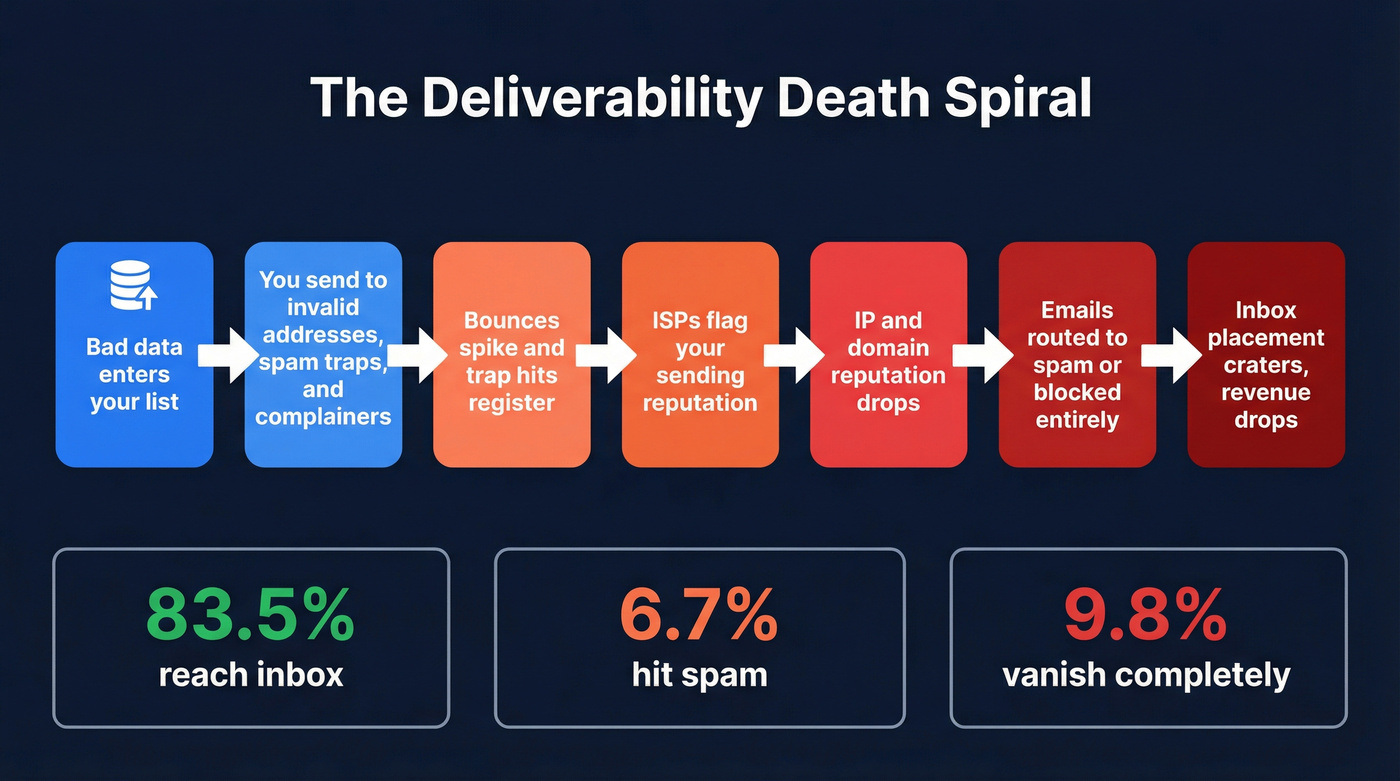
Bad data enters your list → you send to invalid addresses, spam traps, and complainers → bounces spike and trap hits register → ISPs flag your sending reputation → your IP and domain reputation drop → ISPs route your emails to spam or block them → inbox placement craters → revenue drops.
If you want the full set of levers beyond data quality, use an email deliverability checklist to audit the rest of your stack.
The Validity benchmark shows 83.5% inbox placement, 6.7% spam, and 9.8% missing - and that's the average. If your data is worse than average, your inbox rate is worse than average. Pardot enforces a 0.1% spam complaint threshold - just 1 complaint per 1,000 emails. Hit that, and your sending privileges get throttled. The margin for error is razor-thin, and dirty data eats through it fast.
Five Types of Toxic Data
Invalid Emails
Typos, defunct domains, nonexistent mailboxes. The most obvious category and the easiest to catch - yet it still drives avoidable bounces at scale. ZeroBounce prevented 10M+ bounces in a single year through typo detection alone.
If you’re seeing this pattern, start with a focused invalid emails cleanup workflow before you touch copy or cadence.
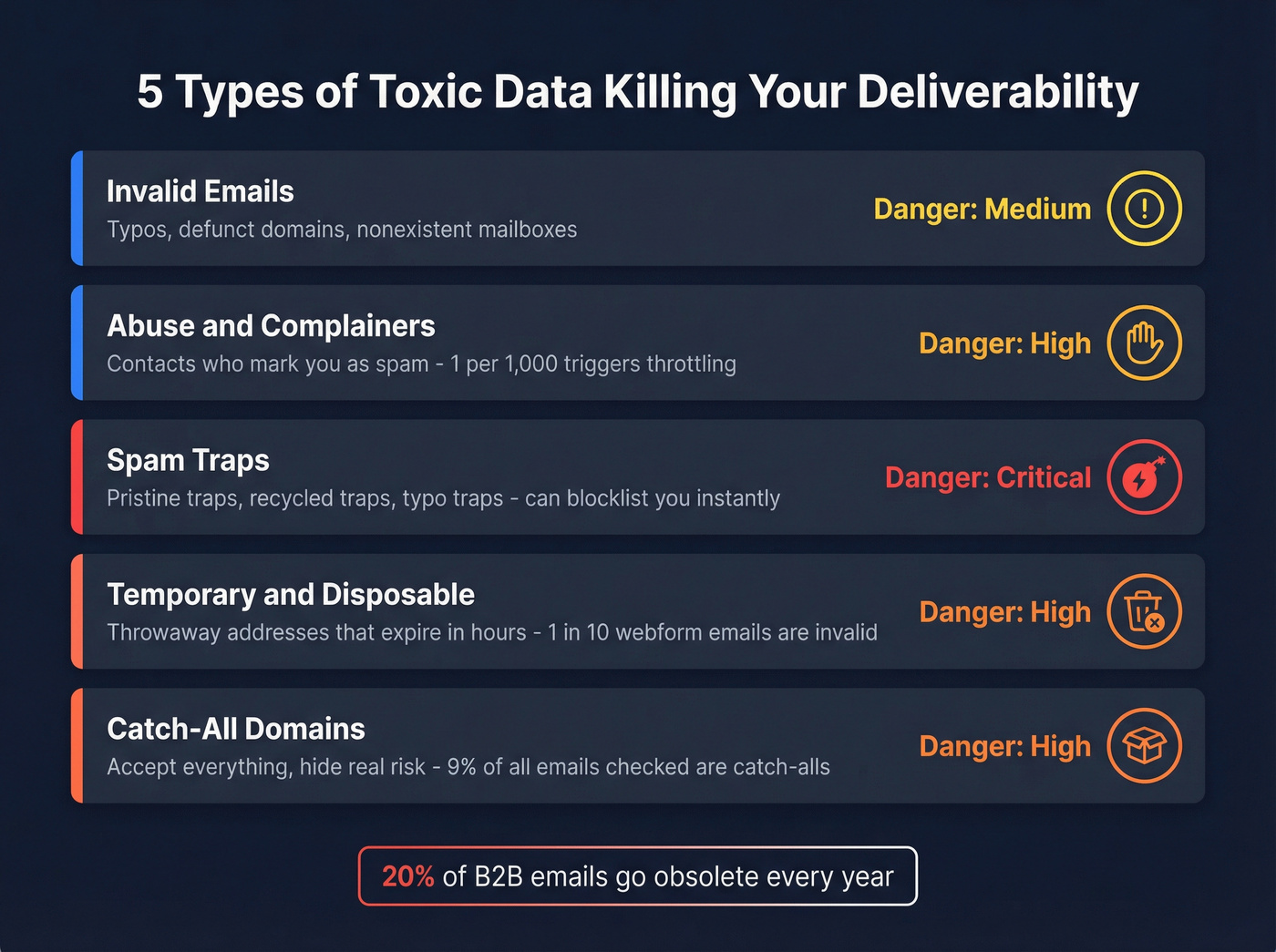
About 20% of B2B email addresses become obsolete annually as people change jobs and domains expire. If you haven't cleaned your list in six months, roughly 10% of it is already dead. (For deeper benchmarks and KPIs, see B2B contact data decay.)
Abuse and Complainers
Contacts who mark you as spam. Even if the email address is technically valid, sending to someone who's flagged you is poison. One angry recipient per thousand is all it takes to trigger automatic campaign pauses on platforms like Pardot.
Spam Traps
This is the most dangerous category by far. Pristine traps were created solely to catch spammers - hitting one can get you blocklisted instantly. Recycled traps are old addresses from ex-employees that ISPs reactivate. Typo traps catch sloppy data ("gnail.com" instead of "gmail.com").
Recycled traps are particularly insidious because they stop bouncing once converted to a trap. Your list looks clean. Your metrics look fine. Then one email to the wrong address torches your sender reputation overnight.
If you’re already in triage mode, follow a blacklist alert process so you can isolate and fix the root cause quickly.
Temporary and Disposable
People enter throwaway addresses to download your whitepaper, and those addresses expire within hours. Nearly 1 in 10 emails entered on webforms are invalid. If you're feeding webform leads directly into sequences without verification, you're importing garbage at scale.
To reduce this at the source, tighten your B2B lead capture flow and block known throwaways with a disposable email domains list.
Catch-All Domains
These domains accept everything - send to any address @company.com and it won't bounce. Verifiers can't confirm whether a specific mailbox actually exists. About 9% of all emails checked were catch-alls in recent analyses. They inflate your "valid" count while hiding real risk.

Your list decays 23% per year. Prospeo refreshes every 7 days - not every 6 weeks like competitors. With 5-step verification, catch-all handling, spam-trap removal, and honeypot filtering, bad data never reaches your sequences.
Stop sending to dead addresses. Start with 98% accuracy at $0.01 per email.
How Fast Your Data Decays
An analysis of over 11 billion email addresses found that at least 23% of an email list degrades yearly. The multi-year trend is grim: 22% in 2022, 25% in 2023, 28% in 2024, and 23% in 2025. Even in the "best" year, nearly a quarter of your list is rotting.
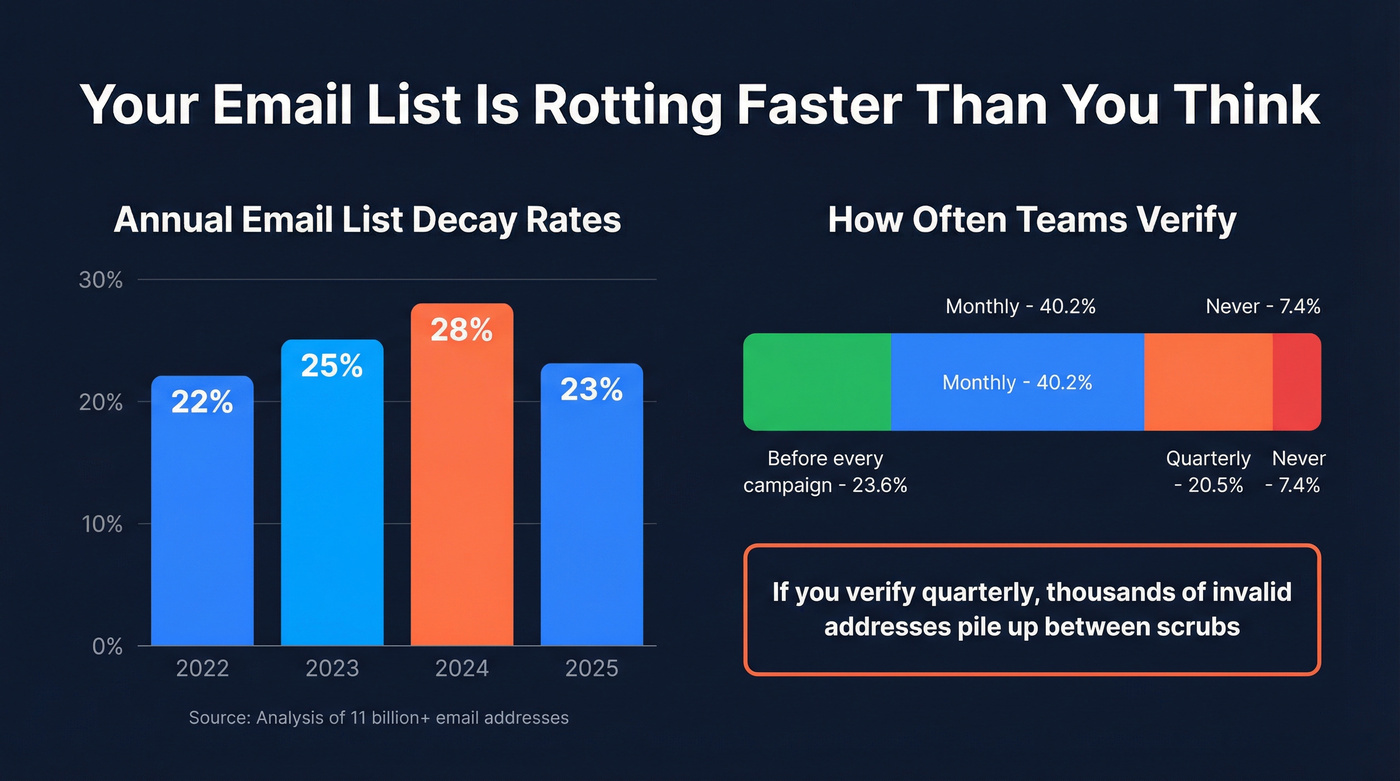
Yet only 23.6% of teams verify their lists before every campaign. 40.2% verify monthly, 20.5% only quarterly, and 7.4% never verify at all. If you're on a quarterly cleaning schedule, you're letting thousands of invalid addresses accumulate between scrubs.
Neglect compounds until a single send triggers a reputation crisis.
What a Reputation Collapse Actually Looks Like
We've seen this play out with our own customers, and Stripo published a detailed case study of their own collapse that's worth studying.
Before the incident: 99.8%-99.9% delivery rate, ~25% open rate, 1-2% bounce rate. Then they sent two campaigns to 4x their usual audience volume. Delivery dropped to ~80%. Open rates fell from 25% to 11%. Bounce and complaints peaked at roughly 20%. Both their IP and domain reputation hit "Bad" in Google Postmaster Tools. Recovery meant pausing all promotional sends, moving transactional emails to a separately warmed subdomain, and accepting 10x lower sending limits just to keep critical flows alive. Weeks of lost revenue, all because the data wasn't properly managed.
Let's be honest - nobody thinks it'll happen to them until it does.
The Recovery Playbook
If your reputation is already damaged, here's the Litmus-recommended framework:
- Isolate the problem ISP. Check Google Postmaster Tools and Validity Sender Score. Figure out where you're getting filtered - Gmail, Outlook, Yahoo - and focus there first.
- Suppress disengaged contacts. Anyone who hasn't opened or clicked in 90+ days gets removed from active sends.
- Pause risky automations. Reactivation campaigns, cold sequences to unverified lists - anything touching contacts you aren't confident about.
- Gradually ramp volume. Start with your most engaged segment. Send small batches. Build back slowly as engagement metrics improve.
Your recovery targets: 0.21% hard bounce rate and 0.70% soft bounce rate - benchmarks derived from billions of emails. Get below those numbers and stay there.
If you need a broader, step-by-step remediation plan, use our email deliverability guide and email marketing deliverability playbook.
Build a Verification Stack That Actually Works
Here's where most teams get this wrong. They see "99% accuracy" on a verification tool's landing page and assume the problem is solved.
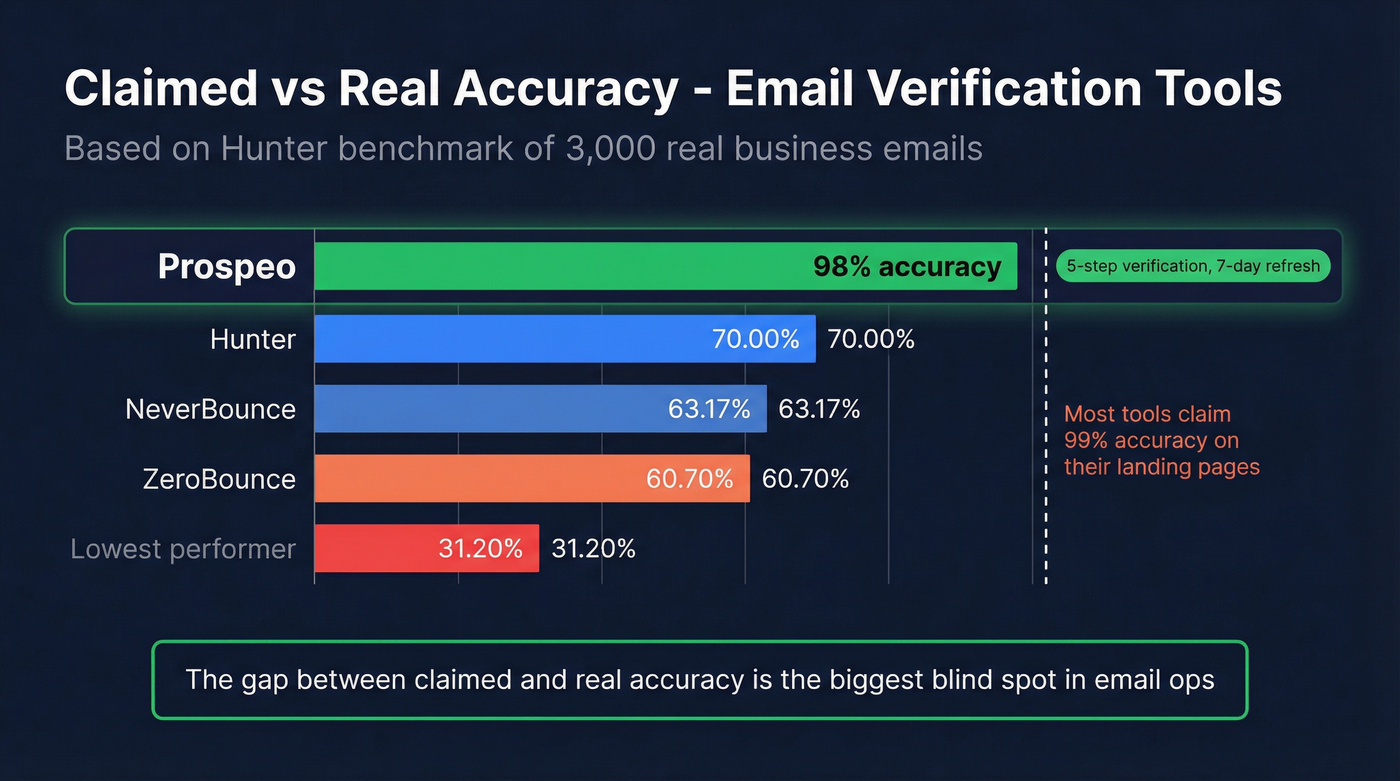
It isn't. Hunter benchmarked 15 email verification tools using 3,000 real business emails. The top performer scored 70.00%. Several tools clustered in the 60s, and the lowest performer scored 31.20%. That's not a rounding error between claimed and real accuracy - it's a fabrication on the landing page. In our experience, this gap is the single biggest blind spot in email ops, and it's the reason so many teams "do everything right" and still end up in spam.
To go deeper on methodology and tooling, see AI email verification and email verification for outreach.
Prospeo takes a different approach. Its proprietary 5-step verification process - including catch-all handling, spam-trap removal, and honeypot filtering - delivers 98% email accuracy using infrastructure that doesn't rely on third-party email providers. The 7-day data refresh cycle keeps pace with real-world churn, while the industry average sits at six weeks. Meritt went from a 35% bounce rate to under 4% after switching, and Stack Optimize maintains 94%+ deliverability with zero domain flags across all their clients.
The distinction that matters: point-of-capture verification versus batch cleaning. Batch cleaning fixes symptoms. Sourcing pre-verified data fixes the cause - and that's the only sustainable way to protect email deliverability from bad data long-term.
| Tool | Cost per 1K | Benchmark Accuracy | Best For |
|---|---|---|---|
| Prospeo | $10 | 98% | Pre-verified sourcing, 7-day refresh |
| Hunter | ~$24.50 | 70.00% | Highest independent accuracy |
| ZeroBounce | $10 | 60.70% | Established batch cleaning |
| NeverBounce | ~$8 | 63.17% | Batch cleaning on a budget |
| MillionVerifier | ~$3.70 | Not benchmarked | Lowest cost option |
Skip MillionVerifier if accuracy matters more than price - without independent benchmarks, you're flying blind on the metric that actually protects your domain.
Catch-all domains, recycled spam traps, defunct mailboxes - Prospeo's proprietary verification infrastructure catches what other tools miss. 143M+ emails verified, 15,000+ companies trust it to protect their sender reputation.
Fix the root cause of your deliverability problems in one switch.
FAQ
What bounce rate signals a data problem?
Industry average hard bounce is 0.21%. Anything above 2% signals a data quality emergency - most ESPs will throttle or flag your account at that threshold. Top cold email operators target under 1% and treat anything higher as a list hygiene crisis requiring immediate suppression and re-verification.
How often should I verify my email list?
Before every campaign is ideal, but only 23.6% of teams do this. Monthly verification is the bare minimum. With 23% annual decay, quarterly cleaning lets thousands of invalid addresses pile up - enough to tank your sender reputation in a single send.
Can I recover deliverability without changing my data source?
You can partially recover with list cleaning and IP re-warming, but if your source data is contaminated, you'll re-infect your list every time you import new contacts. Fixing symptoms alone won't break the cycle - you need pre-verified data at the source, with a refresh cadence that keeps pace with real-world churn.