

The 2026 Disposable Email Domains List (Plus How to Actually Use It)
Your SaaS just launched a free tier, and within a week, 30% of signups are from mailinator.com and guerrillamail.com. Your activation metrics are wrecked, your email sender reputation is taking hits, and your "growth" is mostly ghosts. A reliable disposable email domains list is the first line of defense - up to 30% of free-tier signups are bot or disposable-driven, and if you're not filtering them, you're building your funnel on sand.
The deliverability math is unforgiving. Industry consensus says keep total bounces below 2%, with top performers targeting hard bounces under 1%. Some deliverability experts put the danger threshold even lower, around 0.3%. A flood of disposable signups doesn't just inflate vanity metrics; it actively damages your sender domain. The bounce rate these throwaway addresses generate can snowball fast, and once your domain reputation tanks, even your real users stop getting your emails.
Here's the thing: you don't just need a list. You need a system. A blocklist is the starting point, not the solution. Let's build the whole stack.
What Are Disposable Email Domains?
Disposable email domains are temporary inbox services that let anyone create a working email address in seconds - no registration, no identity, no permanence. The big names are Mailinator, Guerrilla Mail, 10MinuteMail, YOPmail, and Temp-Mail, but thousands of smaller providers spin up new domains constantly.
People use them for legitimate reasons: privacy, avoiding spam, testing software. Developers rely on disposable emails for QA - verifying signup flows, password resets, transactional email rendering. But for SaaS companies running production signups, disposable addresses are poison. They inflate your user count with people who'll never activate, never convert, and never read a single onboarding email. Worse, sending to dead inboxes drives up your bounce rate and erodes the domain reputation you've spent months building.
The challenge isn't understanding what they are. It's keeping up with them.
What You Need (Quick Version)
Before we go deep, here's the shortcut:
- Best free blocklist: disposable-email-domains/disposable-email-domains - ~4,000 domains, 4.8k GitHub stars. Accuracy over volume.
- Best free API: UserCheck (1,000 requests/month) or TempMailChecker (100/day) - real-time detection without self-hosting.
Use a static blocklist if you're a small app with under 1,000 signups per month and low abuse risk. Switch to an API when you're seeing temporary email domains that aren't in your blocklist, or when you need sub-second validation at scale.
If you're blocking disposable emails but not verifying the rest of your list, you're solving maybe 20% of the problem.
Best Disposable Email Blocklists in 2026
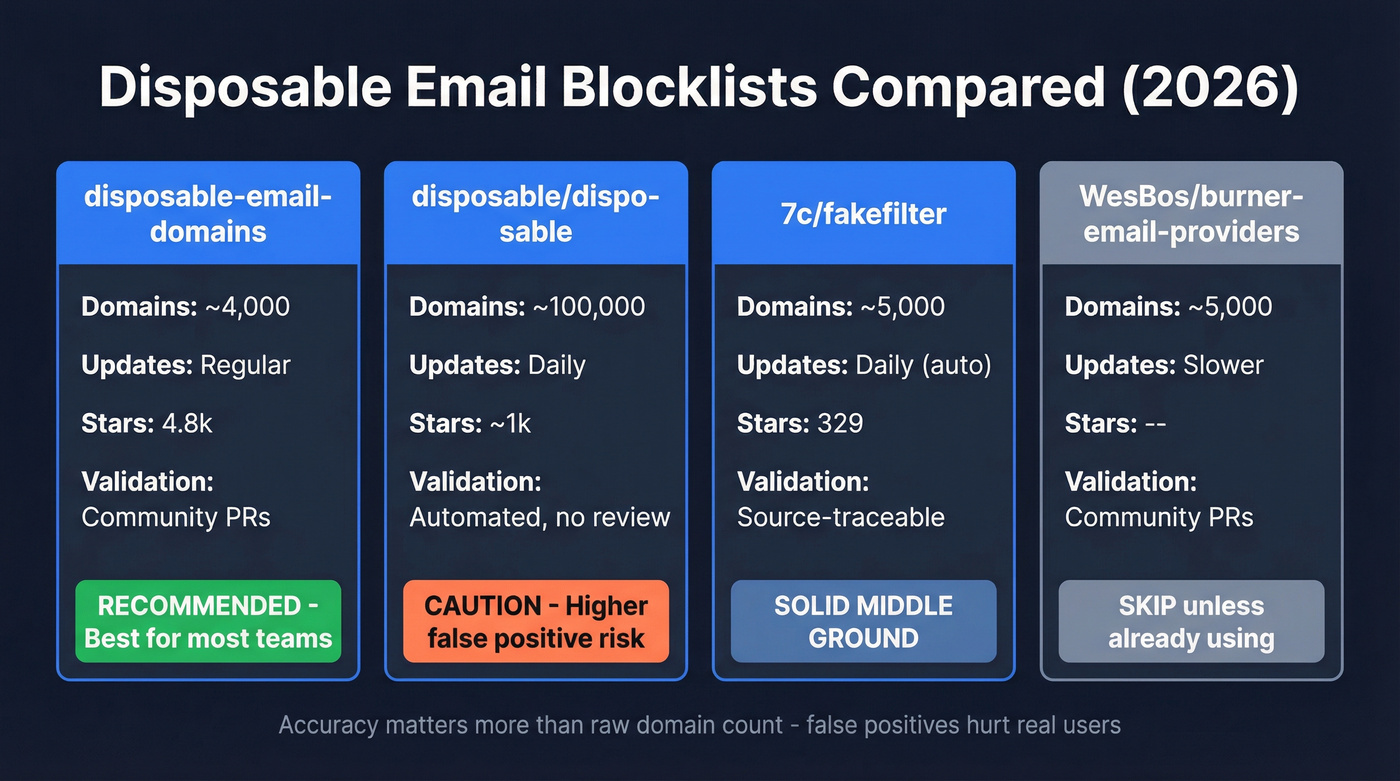
Not all GitHub blocklists are created equal. Some prioritize accuracy, others chase maximum coverage at the cost of false positives. Here's how the major repos compare:
| Repo | Domains | Updates | Stars | Validation |
|---|---|---|---|---|
| disposable-email-domains | ~4,000 | Regular | 4.8k | Community-validated PRs |
| disposable/disposable | ~100,000 | Daily | ~1k | Automated, no validation |
| 7c/fakefilter | ~5,000 | Daily (auto) | 329 | Source-traceable |
| WesBos/burner-email-providers | ~5,000 | Slower | - | Community PRs |
disposable-email-domains
This is the default recommendation for most teams. With ~4,000 domains and 4.8k stars, it's the most battle-tested blocklist in the ecosystem. The community validation approach - evidence is requested in PRs - keeps false positives low. That matters more than raw coverage. If you're only going to use one list, use this one.
disposable/disposable
The maximalist option. ~100,000 domains with daily automated updates gives you the widest net, but quality is inconsistent. We've seen this list flag domains that aren't actually disposable - just obscure or privacy-focused. Use it if you're running a high-abuse-risk platform (gaming, crypto, coupon-heavy e-commerce) and you'd rather over-block than under-block. Pair it with an allowlist for privacy relay services.
7c/fakefilter
FakeFilter sits in the sweet spot: ~5,000 domains with daily automated updates, and every domain is traceable back to its source. It's a solid middle ground between the conservative disposable-email-domains list and the aggressive disposable/disposable repo. It does miss some EmailOnDeck domains, so it's not bulletproof - but the traceability makes it easier to audit what you're blocking and why.
WesBos/burner-email-providers
Mentioned for completeness. ~5,000 domains, slower update cadence, occasional false positives. Skip this unless you're already using it and don't want to migrate.
Common Disposable Domains to Block
If you want a quick-start list to hardcode while you set up a proper system, these are the domains that show up most frequently in abuse patterns:
- mailinator.com
- guerrillamail.com
- temp-mail.org
- yopmail.com
- 10minutemail.com
- trashmail.com
- emailondeck.com
- fakeinbox.com
- maildrop.cc
- tempemail.cc
- throwaway.email
- tempail.com
- dispostable.com
- sharklasers.com
- guerrillamailblock.com
- grr.la
- mailnesia.com
- getnada.com
- mohmal.com
- tempinbox.com
Copy-paste this into your signup validation as a stopgap. But don't stop here - this covers a small fraction of temporary domains in circulation.
Why Static Lists Aren't Enough
You implement the list, feel good for a month, then support tickets roll in: "I can't sign up with my Proton Mail address." Meanwhile, someone just registered 50 accounts using domains you've never seen.
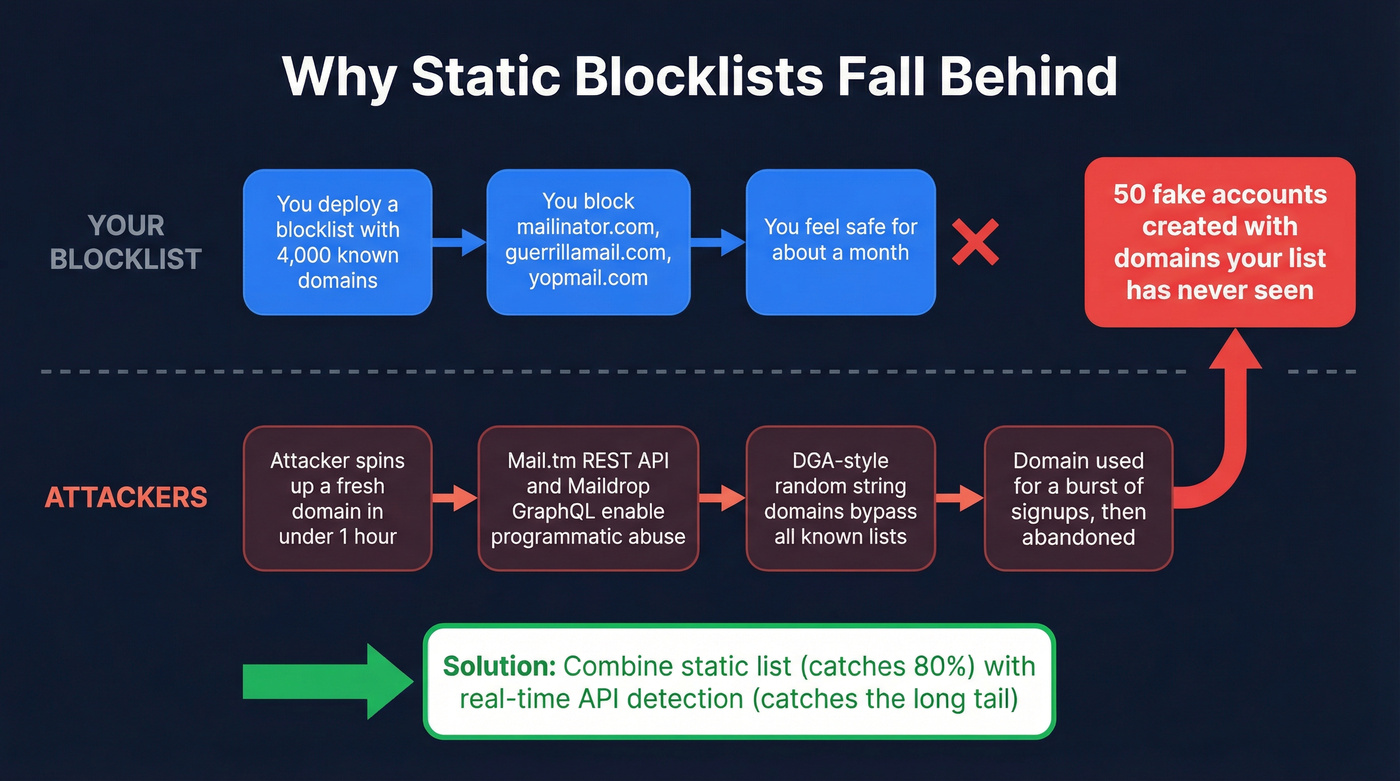
This is the fundamental tension. Static lists are always playing catch-up. Castle's monthly fraud domain tracker publishes the top 2,000 domains most actively used in fake account creation - and they explicitly warn: "This list is a signal, not a blocklist. You shouldn't ban these domains outright." Attackers use custom, single-use domains that rarely appear in public blocklists and disappear after short bursts.
The problem is accelerating. Temp mail providers like Mail.tm now offer full REST APIs with auth tokens, and Maildrop exposes a GraphQL API. These aren't just websites anymore - they're infrastructure that abuse scripts can spin up and tear down programmatically. A fresh disposable domain can go from registration to active abuse in under an hour, well before any community-maintained list catches it.
Sophisticated attackers have moved beyond the obvious providers entirely. Some use DGA-like random-string domains - algorithmically generated names that look like keyboard mash and exist solely for throwaway signups. These patterns are invisible to any static blocklist.
The disposable-email-domains repo with its ~4,000 domains catches the well-known providers. But the long tail of custom abuse domains? That requires real-time detection.
Our take: If your average deal size is under $5k and you're B2C, a well-maintained static blocklist handles 80% of your problem. The API layer matters most for platforms where a single fake account can cause real damage - marketplaces, fintech, anything with referral credits.

Blocking disposable domains is defense. But your outbound list needs offense. Prospeo's 143M+ emails are 5-step verified with spam-trap removal, honeypot filtering, and catch-all handling - so you never send to a throwaway address in the first place. 98% accuracy, $0.01/email.
Stop filtering junk. Start with data that's already clean.
API-Based Detection
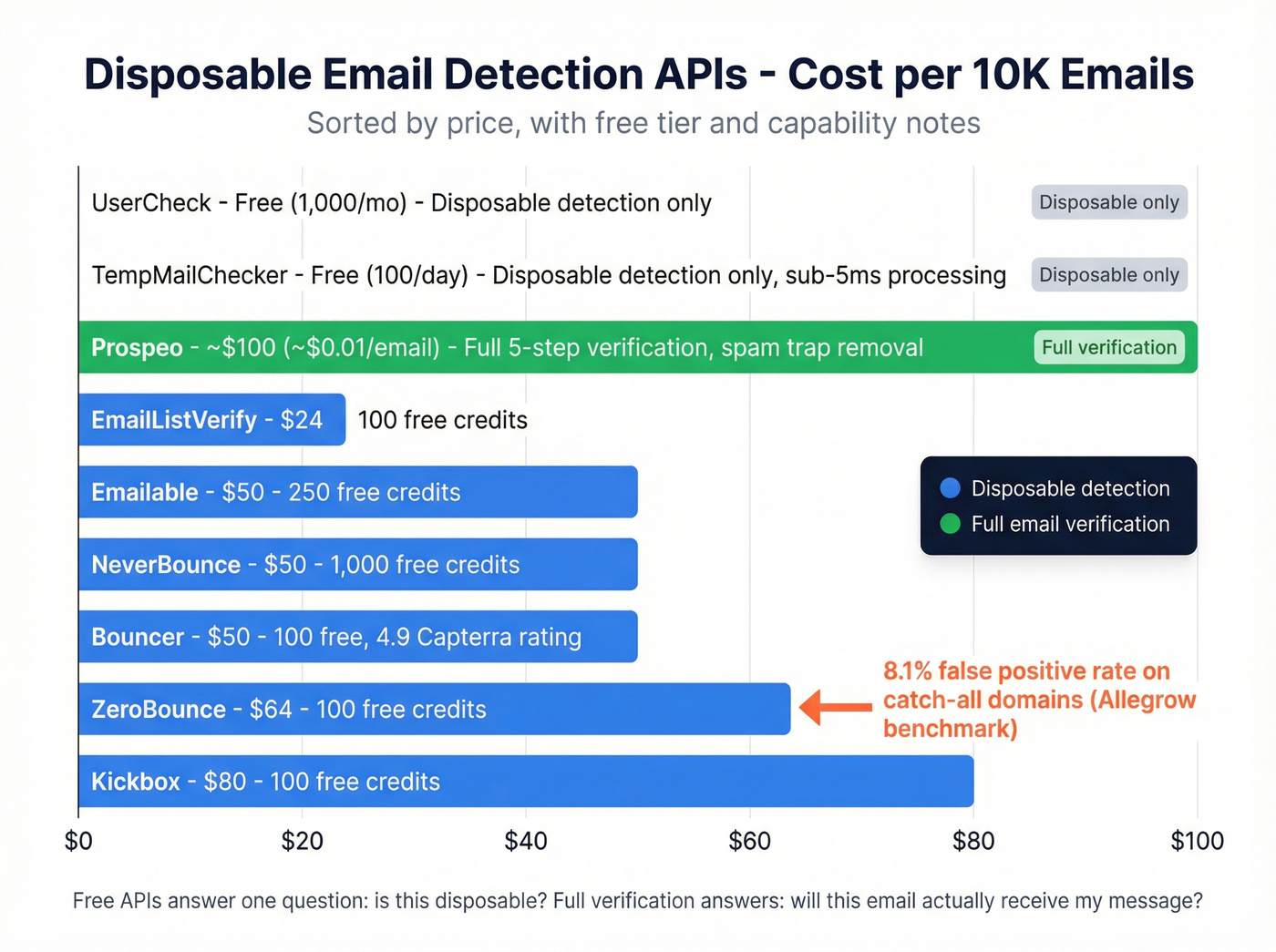
When a static list isn't enough, you need a verification layer that checks emails in real time. Here's the 2026 landscape:
| Tool | Cost / 10K | Free Tier | Notes |
|---|---|---|---|
| EmailListVerify | $24 | 100 free | Cheapest per-email |
| Emailable | $50 | 250 free | Solid mid-range |
| NeverBounce | $50 | 1,000 free | Good for bulk |
| Bouncer | $50 | 100 free | 4.9 on Capterra |
| ZeroBounce | $64 | 100 free | See benchmark below |
| Kickbox | $80 | 100 free | Higher-end pricing |
| Prospeo | ~$0.01/email | 75 emails/month | Full 5-step verification |
| UserCheck | Free | 1,000/month | Disposable-only API |
| TempMailChecker | Free | 100/day | Disposable-only API |
The free APIs (UserCheck, TempMailChecker) handle disposable-only detection well. TempMailChecker reports sub-5ms processing with ~50-80ms real-world latency, which is fast enough for inline signup validation. But they only answer one question: "Is this a disposable domain?"
If you need more than disposable detection - full verification including catch-all handling, spam-trap removal, and honeypot filtering - you need a tool that goes deeper. The difference between "is this disposable?" and "will this email actually receive my message?" is enormous. If you’re evaluating tools, start with a proper email ID validators comparison.
One benchmark worth knowing: Allegrow tested ZeroBounce against 1,222 emails on catch-all domains and found an 8.1% false positive rate, missing roughly 30% of real contacts. Catch-all domains are a blind spot for most verification tools, and they're common at mid-market and enterprise companies. Any tool you pick should handle them explicitly.
You're building blocklists to keep bad emails out. But what about the emails you're sending to? Prospeo refreshes 300M+ profiles every 7 days - not 6 weeks - so stale and disposable addresses never reach your outbound campaigns. Bounce rates under 4% aren't aspirational; they're standard.
Replace your blocklist habit with emails verified before you ever hit send.
How to Block Disposable Emails in Code
Python - Local Blocklist Check
Download the blocklist once, load it into a set, and check every signup email against it. Near-zero latency. If you also want to validate beyond disposable detection, use a full email validity check flow.
# Pull the latest blocklist (run this on a cron, not every request)
url = "https://raw.githubusercontent.com/disposable-email-domains/disposable-email-domains/refs/heads/main/disposable_email_blocklist.conf"
response = requests.get(url)
DISPOSABLE_DOMAINS = set(response.text.strip().splitlines())

def is_disposable(email: str) -> bool:
    domain = email.rsplit("@", 1)[-1].lower()
    return domain in DISPOSABLE_DOMAINS

# Usage
if is_disposable(signup_email):
    return {"error": "Please use a non-disposable email address."}
Set up a weekly cron job to refresh the blocklist file. The disposable-email-domains repo updates regularly, and you want to stay current without hammering GitHub on every signup.
Node.js - Real-Time API Check
For real-time detection that catches domains not yet in any static list, use an API call as Express middleware. This example uses TempMailChecker - other APIs like AbstractAPI return similar structures:
const express = require('express');
const axios = require('axios');
const app = express();

app.use(express.json());

app.post('/signup', async (req, res) => {
  const { email } = req.body;

  try {
    const { data } = await axios.get(
      `https://api.tempmailchecker.com/check/${email}`
    );

    if (data.temp === true) {
      return res.status(400).json({
        error: 'Disposable emails are not allowed.'
      });
    }

    // Proceed with account creation
    return res.status(200).json({ success: true });
  } catch (err) {
    // Fail open: allow signup but flag internally
    console.warn('Disposable check failed, flagging for review:', email);
    return res.status(200).json({ success: true, flagged: true });
  }
});
The "fail open but flag internally" pattern is critical. If your API call times out or errors, don't block the user - let them through and review later. A broken validation endpoint that rejects everyone is worse than letting a few disposable emails slip through.
Where to Add Checks
Don't just validate at signup. Add disposable email checks at every point where an email address enters your system:
- Signup and registration forms
- Email change flows
- Waitlist submissions
- Newsletter subscriptions
- Coupon and promo code redemptions
- Referral program entries
Always validate before account creation, not after. Cleaning up fake accounts is ten times harder than preventing them. If your team uses disposable emails for QA testing, allowlist specific domains in your staging environment so your test suite doesn't break.
False Positives and Allowlisting
Privacy-conscious users increasingly rely on email relay services that look a lot like disposable providers to automated systems. Apple Hide My Email, Firefox Relay, Proton Mail aliases, SimpleLogin, and addy.io all generate unique, forwarding email addresses - and aggressive blocklists sometimes flag them.
HackerNoon documented a case where a privacy-first domain got flagged as abusive, locking out legitimate users and creating a support nightmare. We've had support tickets from Proton Mail users who couldn't sign up because of overly aggressive blocking. This isn't theoretical - it happens, and it's embarrassing.
The fix is a layered approach. If you want a deeper system for keeping lists clean across tools, use a CRM hygiene playbook.
Log blocks before you hard-reject. Run your blocklist in "shadow mode" for a week. See what it catches. If you're flagging Apple relay addresses, you've got a problem.
Maintain an allowlist of known privacy relay domains: privaterelay.appleid.com, relay.firefox.com, protonmail.com, simplelogin.co, addy.io.
Review flagged signups weekly. A human spending 15 minutes a week on edge cases prevents the kind of false-positive disasters that generate angry Twitter threads.
Look - if your blocklist is rejecting Proton Mail users, you're not protecting your platform. You're alienating your most privacy-aware (and often highest-value) customers.
Layered Defense Architecture
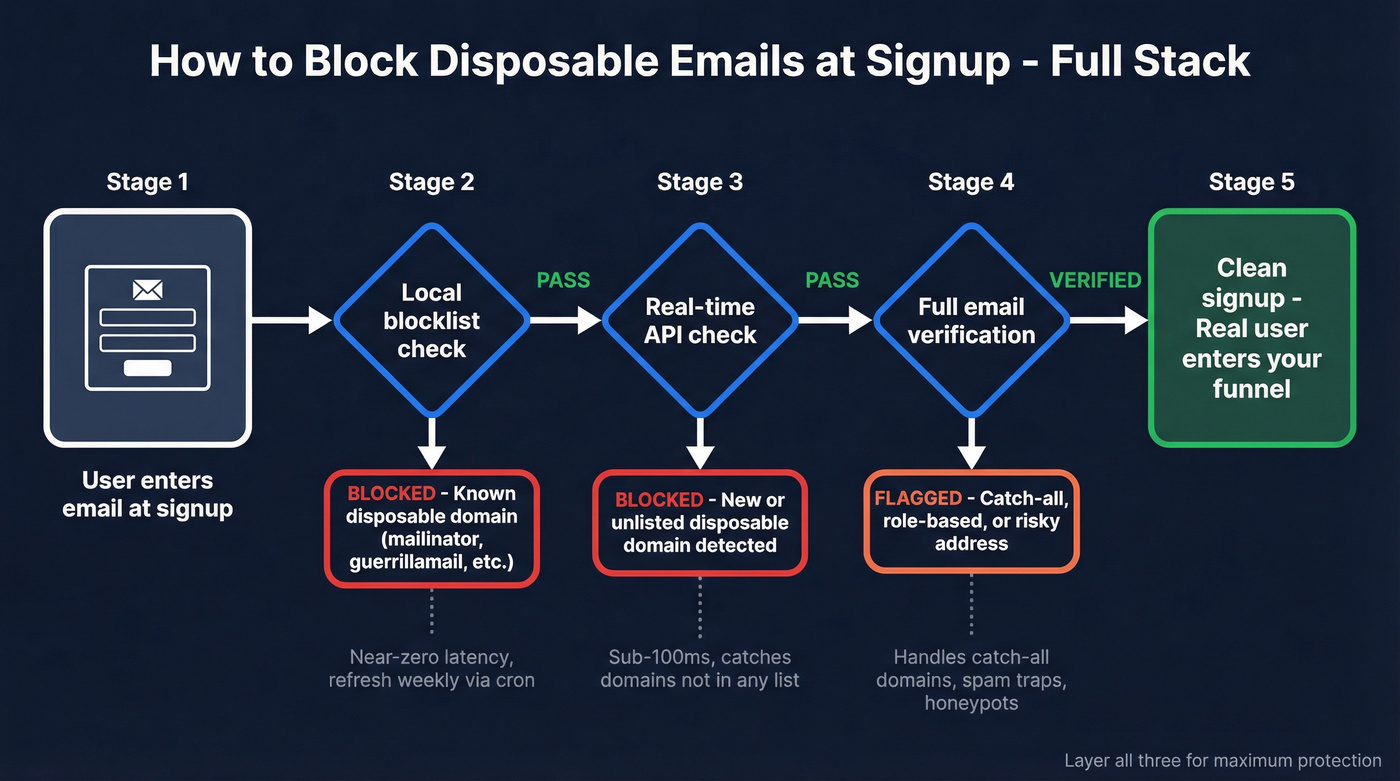
A disposable email domains list is layer one. Here's the full stack:
Layer 1 - Static blocklist at signup. Check the email domain against your cached blocklist. If it matches, reject immediately. This catches the obvious offenders with zero latency.
Layer 2 - MX record check. Verify the domain has valid mail exchange records. Domains with no MX records or MX records pointing to localhost aren't real email providers. This catches throwaway domains that attackers register but never properly configure.
Layer 3 - API verification. Run remaining emails through a verification API to catch invalid addresses, spam traps, and catch-all domain issues. This is where tools like Prospeo's 5-step verification earn their keep, handling the edge cases that static lists and MX checks miss entirely. For a broader view, see our guide to AI email verification.
Layer 4 - Behavioral signals post-signup. Monitor activation rate, feature usage, and engagement patterns. An account that signs up and never opens a single email or completes onboarding is a signal - even if the email passed all three prior checks.
The decision logic is simple. If Layer 1 catches it, reject. If Layer 3 flags it, soft-block and route to manual review. If Layer 4 shows zero engagement after 7 days, deprioritize or archive.
Impact on Outbound Deliverability
If you're running cold outreach or sales campaigns, disposable emails aren't just a signup problem - they're a pipeline problem. When throwaway addresses slip into your prospect lists through scraped data or purchased lead databases, every bounce from a dead inbox chips away at your sender score. Your carefully crafted sequences to real prospects start landing in spam folders instead of inboxes. If you’re scaling volume, follow an email deliverability checklist to avoid reputation damage.
The consensus on r/sales and r/coldemail is pretty clear: list hygiene matters more than subject lines. Sales teams should treat verification as seriously as message copywriting. Verify every prospect email before it enters your outreach sequence, and audit your lead sources for disposable domain contamination. A clean list with 500 verified contacts will outperform a dirty list of 5,000 every time - we've seen this play out across dozens of outbound campaigns. For the outreach side, pair verification with proven cold email tactics.
FAQ
How often should I update my disposable email blocklist?
Weekly at minimum. The disposable-email-domains repo updates regularly, and new providers launch constantly. Automate a cron job to pull the latest file - manual updates fall behind within days.
What's the difference between disposable and alias emails?
Disposable emails self-destruct with no real owner behind them. Aliases from Apple Hide My Email, Firefox Relay, or Proton forward to a real inbox with an engaged user. Blocking aliases locks out legitimate, often high-value customers.
Can I block all free email providers like Gmail?
No. The vast majority of B2C signups use free providers. Block temporary email domains specifically. Blocking Gmail would eliminate most of your real user base overnight.
How do I handle catch-all domains in verification?
Static lists can't help here. Catch-all domains accept mail to any address, making it impossible to distinguish real from fake without deeper verification that includes SMTP-level checks and pattern analysis.
Is there a single list that catches every disposable domain?
No, and there never will be. New domains appear daily, and attackers deliberately use domains absent from public blocklists. Combine a static disposable email domains list with a real-time API - that's the only approach that scales.