Introduction Email to New Client (2026): Framework + Templates
You just got the "signed" notification. Everyone's excited. Then the client hears... nothing. Three days later, your champion's already explaining the purchase to skeptical coworkers.
Your introduction email to new client isn't a nicety. It's the first operational step of onboarding, and it decides whether momentum compounds or leaks out.
Here's the playbook we've used across onboarding audits and client handoffs: one clear owner, one clear next step, and zero "let me know if you need anything" filler.
What you need (quick version)
Use this checklist + decision tree and you'll be ahead of 90% of teams because you'll be running onboarding like an operation, not a vibe.
Quick checklist (keep it tight)
- Send immediately after signature. Welcome emails should go out right away (event-triggered). Waiting "until tomorrow" is how deals cool off.
- One email = one action. One CTA gets done; three CTAs get ignored.
- Aim for around 120-200 words for the first touch. Your first email should fit on a phone screen without scrolling.
- Include the five non-negotiables: who you are (role), what happens next (timeline), what you need (one thing), what you'll do after, and how to reach you.
- Define Milestone 1 in one line. Example: "Milestone 1 = access granted + first report replicated." If you can't say it in one line, your plan isn't ready.
- Confirm timezone + meeting preference. "PT or ET?" and "Zoom or Google Meet?" prevents the dumbest kickoff friction.
- Confirm the preferred channel + cadence. Email only? Slack/Teams? Weekly update on Fridays? Decide now, not after the first missed message.
- Name the escalation path. "If something blocks us, email me and CC {backup}." Clients relax when they know how issues get unstuck.
- Add a preheader so mobile inboxes don't show "View in browser..." garbage.
Mini decision tree (pick the right email)
- If the goal is schedule the kickoff -> send Post-sale welcome + schedule kickoff
- If sales already booked kickoff and you're the new owner -> send Sales -> onboarding handoff
- If you can't start without systems access -> send Access + info request (security-forward)
- If you need context but don't want to overwhelm -> send Questionnaire / intake form request
- If kickoff is booked and you want attendance + prep -> send Kickoff reminder
- If kickoff just happened -> send Post-kickoff recap

When multiple scenarios apply, start with the one that unblocks everything else. If kickoff isn't booked, book it. If kickoff is booked but you can't do real work without access, ask for access next. Everything else (intake, extra stakeholders, nice-to-haves) can follow once the machine's moving.
Your intro email's real job: speed-to-value (not a pitch)
Speed-to-value is the whole game. Get the client to a real, visible win fast so there's no room for doubt, delays, or internal second-guessing.
That's why the intro email can't read like a "happy to meet you" note. It needs to behave like a handoff packet in email form.
Most onboarding chaos isn't caused by bad intentions. It's caused by missing context. Sales has it in their head, the client has it scattered across calls, and delivery has none of it in one place, so the first week turns into a slow-motion scavenger hunt that nobody enjoys.
So your first message should confirm the basics and move the next step forward, especially when you're introducing yourself to someone who doesn't yet know how your team operates.
Use this email if...
- You want to compress time from signature -> kickoff/training
- You need to set expectations without sounding controlling
- You want the client to feel, "Okay, these people have done this before"
Skip this approach if...
- You're trying to upsell in the first email (that's how you trigger buyer's remorse)
- You're about to ask for 12 things at once (that's how you stall onboarding)
Hot take: if your onboarding can't produce a meaningful first win inside 14 days, your problem isn't the email. It's the offer.
Sales handoff mini-template (so your email writes itself)
Standardize the handoff and your first message becomes mostly copy/paste. In our experience, missing "impacted departments" is the #1 reason access gets delayed because the real approver (IT, security, data) isn't looped in until week two.

I've seen this play out in the worst way: kickoff goes fine, everyone nods, and then you spend the next 10 days waiting on "someone in IT" who was never invited, never briefed, and now has to review everything from scratch while your champion starts getting side-eyed internally.
Have sales fill this out at close (or during late-stage):
Sales -> Delivery handoff (paste into CRM)
- Primary outcome (client words): "We bought this to ________."
- Top 3 goals (ranked):
- ________ 2) ________ 3) ________
- Biggest frustration with current process: "Right now we're stuck because ________."
- Milestone 1 (definition of done): "Milestone 1 = ________ by ________ (date)."
- Stakeholders (name + role + email):
- Economic buyer: ________
- Day-to-day owner: ________
- IT/security approver (if access): ________
- Data/ops (if integrations): ________
- Constraints: security rules, procurement rules, blackout dates, compliance needs
- Preferred comms: email / Slack / Teams + cadence
- Kickoff status: booked? (Y/N), date/time/timezone, meeting link, attendees
If you collect this consistently, your first email stops being "introductions" and becomes "next step + owners."

Your onboarding email framework is only as good as the contact data behind it. If you're sending introduction emails to the wrong address - or bouncing off outdated inboxes - momentum dies before kickoff. Prospeo delivers 98% email accuracy with a 7-day refresh cycle, so your first touch actually lands.
Stop crafting the perfect intro email only to send it to a dead inbox.
The 7-sentence structure (copy this)
Most intro emails fail because they're either (a) a biography or (b) a dump of onboarding tasks. Don't do either.
A practitioner tone wins: role + purpose over biography. A practical framing that works over and over is: "I'm your point of contact and internal advocate." Then you move on. Nobody needs your career timeline on day one.
The structure (about 7 sentences, around 120-200 words)
- Congrats + confirm the outcome ("We're officially live / signed")
- Who I am in one line (role, not resume)
- What happens next + timing (next 24-72 hours)
- Re-state their goal (use their words)
- One action (single CTA) - see Sales CTA
- What you'll do after they complete it (reduce uncertainty)
- How to reach you + backup path (email + meeting link or support channel)

Annotated template (copy/paste)
Subject: {2-4 word subject}
Hi {First name} - welcome to {Company}. I'm {Your name}, your {role} and your main point of contact for onboarding. Over the next {time window}, we'll {next step} so you can reach {primary outcome} quickly. Based on what {AE name} shared, the top priority is {goal in their words}.
One thing to do now: {single CTA with link}. Once that's done, I'll {what you'll do next + when they'll hear from you}. If anything feels unclear, reply here and I'll jump on it (and if I'm out, {backup contact} is your fallback).
Operational heuristic: if the buyer's engaged and you keep it to one CTA, 30-60% acknowledgment is a reasonable target. If you cram in three asks, expect silence.
Subject lines that get opened (mobile-first rules)
Subject lines for onboarding emails aren't a creative writing contest. They're a routing label.
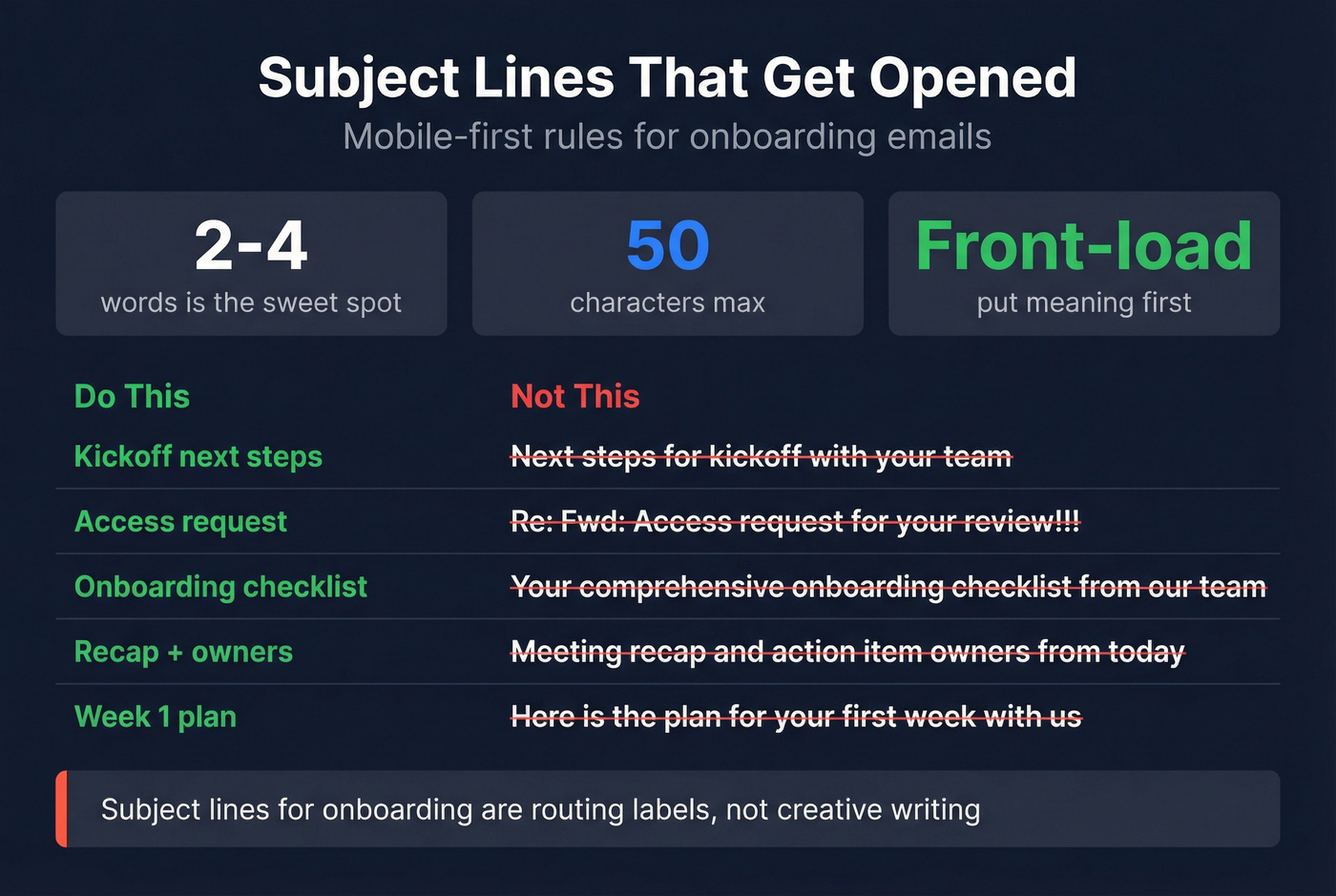
Keep them short. Two to four words is the sweet spot for post-sale operational emails.
Mobile is the constraint that matters. Aim for about 50 characters or fewer and put the important words first.
Rules (that actually hold up)
- Front-load the meaning: "Kickoff next steps" beats "Next steps for kickoff with your team"
- 2-4 words is the sweet spot for post-sale operational emails
- Avoid punctuation soup ("Re:", "Fwd:", "!!!") unless you're intentionally matching an existing thread
- Don't waste characters on your company name unless it's needed for recognition
Examples (steal these)
- "Kickoff next steps"
- "Access request"
- "Onboarding checklist"
- "Kickoff confirmed"
- "Today's agenda"
- "Recap + owners"
- "Week 1 plan"
- "Quick question"
Templates: introduction email to new client scenarios (copy/paste)
Use the table to pick the right email fast, then copy the matching template. Every template below enforces one primary action and includes a preheader suggestion.
| Scenario | Best subject | One CTA | When to send | Need from client |
|---|---|---|---|---|
| Welcome + kickoff | Kickoff next steps | Book kickoff | Immediately | 2 timeslots |
| Sales->CS handoff | Your main contact | Confirm owner | Same day | "Confirmed" reply |
| Access request | Access request | Share access | Day 0-1 | Roles + method |
| Intake form | Intake questions | Fill form | Day 1 | 5 answers |
| Kickoff reminder | Today's agenda | Bring/send items | 24h before | Docs + attendees |
| Post-kickoff recap | Recap + owners | Confirm owners | Same day | "Approved" reply |
Professional vs friendly tone (use this toggle for the top 2 emails)
You don't need 12 versions of every template. You need two tones you can deploy instantly.
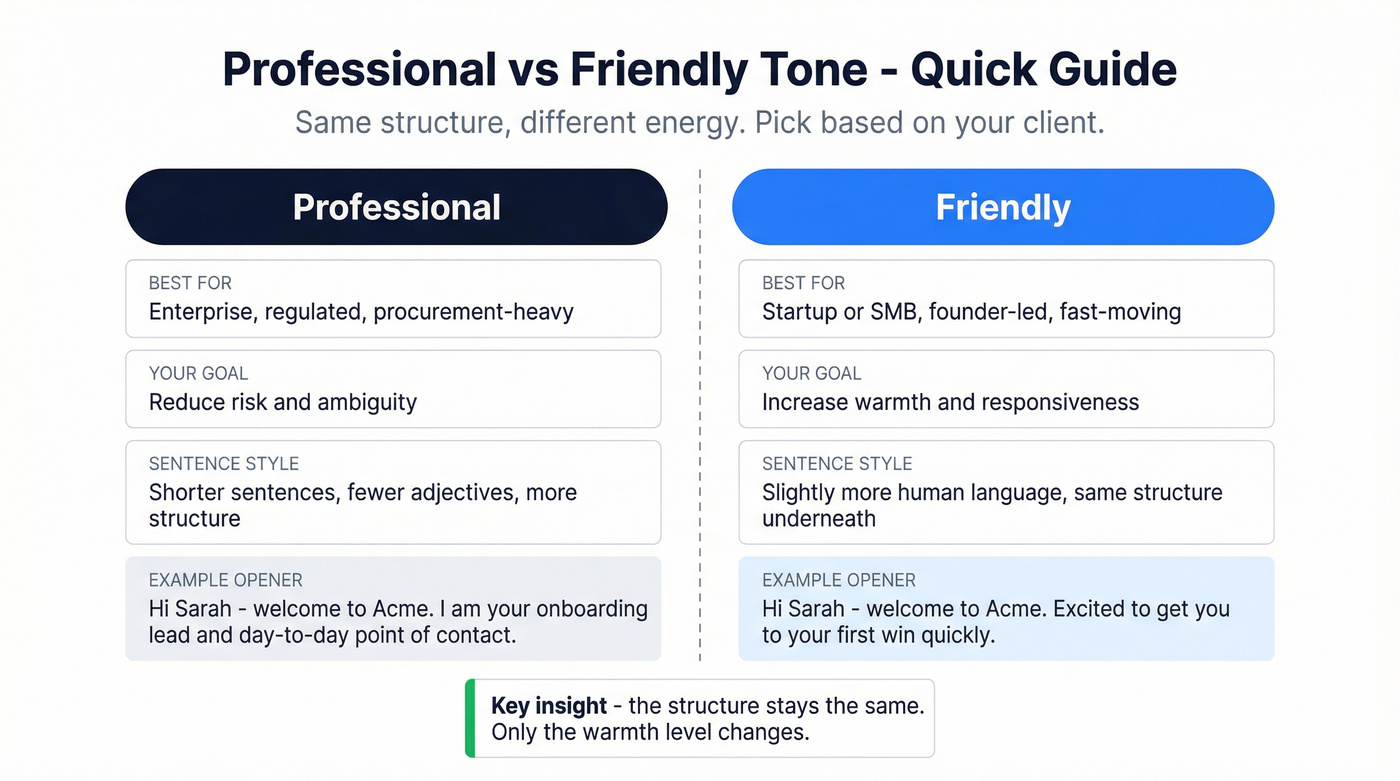
| Situation | Use "Professional" | Use "Friendly" |
|---|---|---|
| Client persona | Enterprise, regulated, procurement-heavy | Startup/SMB, founder-led, fast-moving |
| Your goal | Reduce risk + ambiguity | Increase warmth + responsiveness |
| What changes | Shorter sentences, fewer adjectives, more structure | Slightly more human language, same structure |
Below, we've included both tones for the two emails that matter most: welcome + kickoff and handoff.
Post-sale welcome + schedule kickoff (most important)
Must-do: send it immediately after signature. Waiting "until Tuesday morning" is how momentum dies.
Subject (2-4 words):
- "Kickoff next steps"
- "Schedule kickoff"
- "Week 1 plan"
Preheader (paste): "Pick a time for our kickoff so we can start delivering value this week."
Template (Professional)
Hi {First name} - welcome to {Your company}.
I'm {Your name}, your {role} and your day-to-day point of contact during onboarding.
Next step is a 30-45 min kickoff to confirm goals, access, and Milestone 1.
Action: book your kickoff here: {scheduling link}
Once it's booked, I'll send a short agenda and a "bring/send" list so the call stays efficient.
Thanks, {Signature}
Template (Friendly)
Hi {First name} - welcome to {Your company}. Excited to get you to {outcome} quickly.
I'm {Your name}, your {role} and your day-to-day point of contact during onboarding.
To keep momentum, the next step is a 30-45 min kickoff where we align on goals, access, and the first quick win.
Action: book your kickoff here: {scheduling link}
Once it's booked, I'll send a short agenda and a "bring/send" list so the call stays efficient.
Thanks, {Signature}
Why this works: it removes uncertainty ("what happens now?") and gives the client one easy win: pick a time.
Sales -> onboarding handoff (new CSM/account owner intro)
This is the "don't make it weird" email. The client doesn't need your background. They need to know who owns the relationship now, what you're accountable for, and how to get help.
Subject (2-4 words):
- "Your main contact"
- "Onboarding owner"
- "Meet your CSM"
Preheader: "I'll own onboarding and be your internal advocate from here."
Template (Professional)
Hi {First name} - I'm {Your name}, and I'll be your {role} at {Your company}.
I own onboarding, Milestone 1 delivery, and escalation on our side if anything blocks progress.
{AE name} captured three priorities: {goal 1}, {goal 2}, and {goal 3}.
Action: reply "confirmed" (or edit the goals inline) so I lock the Week 1 plan.
Once I have that, we'll move into kickoff + access.
Thanks, {Signature}
Template (Friendly)
Hi {First name} - I'm {Your name}, and I'll be your {role} at {Your company}.
My job is to make onboarding smooth, get you to your first win fast, and be your internal advocate if anything gets stuck on our side.
{AE name} shared three key points: {goal 1}, {goal 2}, and {goal 3}. If any of that's off, tell me and I'll adjust the plan.
Action: can you reply "confirmed" (or edit the goals inline) so I know we're aligned?
Once I have that, I'll send the Week 1 plan and we'll move straight into kickoff + access.
Thanks, {Signature}
Why this works: it transfers ownership without forcing the client to decode internal roles, and the "confirmed" reply gives you a clean paper trail.
Access + info request (security-forward)
If you're asking for access, you're handling risk. Act like it.
Ask for least privilege, specify secure sharing, keep an access ledger, and say the quiet part out loud: never send passwords in email or chat.
Subject (2-4 words):
- "Access request"
- "Secure access"
- "Permissions needed"
Preheader: "Least-privilege access only. Please don't send passwords in email or chat."
Template
Hi {First name} - to start {project/work} this week, we need access to {system(s)}.
We use least-privilege access: please grant the minimum role needed for {task} (we can expand later if required).
Action: share access using one of these secure methods:
- add {email} as a user with role {role}
- or share via your password manager's secure share feature
- or send an invite link via {approved method}
Please don't send passwords in email or chat. If you're unsure which role to pick, reply with a screenshot of the role options and I'll tell you the safest one.
We log access in an access ledger (who has what, when granted) and we revoke access within 24 hours of project end.
Thanks, {Signature}
What access we usually need (by system type)
Use this mini-list to avoid the two classic mistakes: asking for admin "just in case" or asking for a role that can't do the work.
- CRM (Salesforce/HubSpot): user seat + permission set for exports, field/property edits, workflow review; admin only if you're changing auth, integrations, or objects.
- Analytics (GA4/Adobe): read access + ability to create reports; edit access only if you're changing events/conversions.
- Ad platforms (Google/Meta/LinkedIn Ads): partner access or user role with reporting + campaign review; billing admin is almost never required for onboarding.
- Data warehouse (BigQuery/Snowflake): read-only to required schemas + service account if you're running scheduled jobs.
- SSO/IdP (Okta/Azure AD): IT-owned; you typically need an app assignment + SCIM settings review, not broad admin.
Questionnaire / intake form request (without overwhelming them)
Real talk: intake forms get ignored when they feel like homework.
The fix's simple: keep it to 3-5 questions, and make the "why" obvious.
Subject (2-4 words):
- "Intake questions"
- "Quick intake"
- "A few details"
Preheader: "5 minutes. We'll use this to tailor Week 1 and avoid back-and-forth."
Template
Hi {First name} - quick request so we can tailor onboarding and avoid a bunch of follow-up emails.
Action: can you fill out this short intake (5 minutes): {link}
It's only {3-5} questions and we'll use it to:
- confirm your primary goal for Week 1
- identify constraints (security, timelines, stakeholders)
- choose the right setup path for your team
Once it's submitted, I'll send a Week 1 plan with dates and owners.
Thanks, {Signature}
Don't collect data you won't use (and say what you'll do with it)
Clients notice when you ask questions and nothing changes. When that happens, trust erodes fast.
Add this two-line script right above your intake link:
- "We'll use your answers to choose Setup Path A vs Path B."
- "You'll see the result in the Week 1 plan we send on {day}."
If you can't explain how an answer changes the plan, delete the question.
Kickoff reminder email (with agenda + bring/send list)
This is where you prevent the "we showed up unprepared" kickoff that wastes everyone's time.
Subject (2-4 words):
- "Today's agenda"
- "Kickoff reminder"
- "Kickoff prep"
Preheader: "Agenda + what to bring/send so we can leave with clear next steps."
Template
Hi {First name} - reminder for our kickoff on {day}, {date} at {time} {timezone}: {meeting link}.
Agenda (30-45 min):
- confirm goals + what "success" looks like
- align scope + constraints (security, timelines)
- confirm access + owners
- agree Milestone 1 and dates
- decide comms cadence + escalation path
Action: please bring/send these before the call:
- {item 1}
- {item 2}
- {item 3}
After the meeting, we'll send a recap with action items, owners, and dates.
Thanks, {Signature}
Post-kickoff recap (momentum + action items)
This is the email that prevents buyer's remorse. When the process is invisible, clients assume nothing's happening, so you make the work visible and attach dates + owners to everything.
Subject (2-4 words):
- "Recap + owners"
- "Next steps"
- "Week 1 actions"
Preheader: "Action items with owners + dates so nothing slips."
Template
Hi {First name} - great kickoff today. Here's the recap and the Week 1 plan so everything stays visible.
What we aligned on
- Goal: {goal}
- Milestone 1 ("Done = ..."): {definition of done}
- Timeline: {date range}
Action items (owners + dates)
- {Client owner}: {task} - due {date}
- {You/your team}: {task} - due {date}
- {Other stakeholder}: {task} - due {date}
Action: reply "approved" (or edit any date/owner inline) so we can start execution today.
Thanks, {Signature}
Introducing your client to a specialist / stakeholder (connector intro)
Sometimes onboarding stalls because the real work lives with someone else: IT, security, data, finance, a solutions engineer, or a specialist on your side.
Rule: get a quick double opt-in before you connect two people cold. It takes 30 seconds and prevents "why did you loop me in?" resentment.
Subject (2-4 words):
- "Quick intro"
- "Connecting you"
- "Looping in {Name}"
Preheader: "Forwardable draft below - feel free to edit."
Forwardable draft (send to your champion first)
Hi {Champion name} - to unblock {milestone}, I'd like to connect you with {Specialist name}, our {role}.
If you're good with it, you can forward this intro (edit anything you want):
Hi {Specialist} and {Client stakeholder} - connecting you both. {Client stakeholder}, {Specialist} is our point person for {topic}. Goal: {one-line goal}. Action: can you share {one thing} (or suggest the right owner) by {date}? Thanks - {Your name}
If your client is senior/busy: the 60-word version
If the recipient's senior, your email should feel like a Slack message. Here's the ultra-short version that still works.
Subject: Kickoff next steps Body (≈60 words): Hi {First name} - welcome to {Company}. I'm {Your name}, your {role} and onboarding owner.
Goal we're driving: {goal in their words}.
Action: book a 30-min kickoff here: {link}. After you book, I'll send a tight agenda + the Week 1 plan (Milestone 1 + owners + dates).
- {Your name}
Access & security paragraph you can paste (least-privilege version)
Copy/paste this into any onboarding email where access comes up.
Paste-ready security block For access, we use a least-privilege approach: please grant the minimum role needed for the specific tasks we're doing, and we'll expand only if required. We keep an access ledger (who has what access, when it was granted) and we revoke access within 24 hours of project end. Please don't send passwords in email or chat - use a secure sharing method (user invites, password manager share, or an approved secure link). This isn't bureaucracy; it's basic risk control. IBM's 2026 Cost of a Data Breach report puts the global average at $4.4M, and sensitive info scattered across threads is how mistakes happen.
Do / Don't checklist
Do
- Request role-based access (not shared logins)
- Use secure share methods
- Maintain an access ledger
- Revoke access within 24 hours of project end
Don't
- Accept passwords over email/chat
- Ask for admin "just in case"
- Let access linger after delivery
One action per email: the simple onboarding sequence map
Shorter emails focused on one action item beat long "everything at once" emails.
Pair that with a staged workflow and you get a clean process you can run with almost any stack. And it's not "process for process' sake": even 3 hours/week of chasing status becomes 150+ hours/year per person, so a simple sequence map buys your team real time back.
6 stages (name them so your team aligns)
- Welcome & expectations
- Info collection
- Internal handoff & assignment
- Kickoff & alignment
- Deliverable review & approval
- Transition to ongoing service
One sentence that fixes a lot: name the stage you're in.
Day 0-7 sequence (simple, works in B2B)
- Day 0 (immediately after signature): Welcome + book kickoff
- Day 1: Access request or intake form (pick one)
- 24 hours before kickoff: Kickoff reminder (agenda + bring/send list)
- Same day as kickoff: Post-kickoff recap (owners + dates)
- End of Week 1: Visible progress update (one paragraph + next action)
Day 0-14 variant (when stakeholders + security slow things down)
If you're in enterprise or anything regulated, plan for a two-week ramp. The trick is to keep the client feeling movement even while approvals happen.
- Day 0: Welcome + book kickoff
- Day 1: Access request (least-privilege)
- Day 2: Stakeholder connector intro (IT/security/data)
- Day 3: Kickoff reminder
- Day 4-5: Kickoff + recap
- Day 7: "What's done / what's blocked / what we need" status email (one CTA: unblock X)
- Day 10: Deliverable review request (one CTA: approve or comment)
- Day 14: Milestone 1 confirmation + transition plan (cadence, owners, escalation)
I've watched teams lose weeks because they treated stakeholder intros as optional. They're not.
Common mistakes that cause churn in week 1 (and fixes)
These patterns create buyer's remorse fast, especially when the client's internal champion is trying to justify the purchase.
Problem: You disappear after signature. Fix: Send immediately and set a 72-hour plan. Say this instead: "Today: kickoff booking. Tomorrow: access. By Friday: Milestone 1 plan."
Problem: Your process is invisible. Fix: Make invisible work visible with recaps, owners, and dates. Say this instead: "Here are the three things already in motion and when you'll see output."
Problem: You ask for too much in one email. Fix: One email = one action. Say this instead: "Only action: book kickoff. Everything else comes after."
Problem: You write "Let me know if you need anything." Fix: That line's useless because it puts the work back on the client. Say this instead: "Reply 'confirmed' on goals" or "Grant role X to email Y."
Problem: You collect data and don't use it. Fix: Ask fewer questions and tell them exactly how answers change the plan. Say this instead: "We'll use your answers to choose Setup Path A vs B, and you'll see it in the Week 1 plan."
Problem: You over-index on your background ("peacocking"). Fix: Role + purpose + next step. Say this instead: "I'm your point of contact and internal advocate. Here's what happens next."
If this is automated: deliverability + reply-friendly setup
Automated onboarding emails fail for one dumb reason: they look transactional and discourage replies. Don't send from noreply@. Use a real sender identity. Make sure replies go somewhere monitored.
Sending from a CRM vs a personal inbox (what we recommend)
If you're sending from a CRM/ESP, treat onboarding as transactional communication, not marketing and definitely not outbound prospecting. We've watched kickoff emails bounce because an AE sent from an alias domain that wasn't properly authenticated, and the client assumed the team was sloppy before the first meeting even happened.
- Best: send onboarding from your primary domain with proper SPF/DKIM/DMARC alignment and a monitored inbox (e.g., onboarding@ or your real name). See SPF DKIM & DMARC.
- Also good: a dedicated transactional subdomain (e.g., notify.yourdomain.com) for system-generated onboarding, separate from newsletters.
- Avoid: mixing onboarding with cold outbound streams. If your outbound gets complaints, it can drag onboarding deliverability down with it.
Practical deliverability constraints (keep it actionable)
- Keep volume low and steady. Onboarding isn't a blast. Send to the handful of real stakeholders only.
- Don't use link shorteners. They look spammy and trip filters.
- Keep formatting simple. One or two links, plain text, no heavy images.
- Separate streams. If you run outbound campaigns, keep them on separate infrastructure so a prospecting spike doesn't hurt client onboarding. (More on email deliverability.)
- Make replies easy. Replies are a strong engagement signal and often contain the context you actually need.
Authentication basics (don't overthink it)
- SPF: your DNS lists which servers can send for your domain.
- DKIM: your emails are cryptographically signed so receivers can verify integrity.
- DMARC: enforces alignment between authenticated domains (SPF/DKIM) and the visible From domain, and tells inboxes what to do with failures.
If your CRM or ESP sends "on behalf of" your domain, alignment is where teams get burned. Fix it once, then stop thinking about it.
Before you hit send: confirm stakeholders + verify emails
Speed-to-value isn't just about what you say. It's about who actually receives it.
Nothing kills momentum like a bounced kickoff email or sending access instructions to the wrong person.
Final checklist (2 minutes)
- Confirm the economic buyer, day-to-day owner, and IT/security approver (if access is involved). If you're dealing with a committee, use B2B decision making to map roles fast.
- Add any impacted departments sales captured (finance, ops, data, legal).
- Make sure each email has one action and one clear owner.
- Verify addresses before you send anything automated or high-stakes (use an email verifier website or follow a full verify an email address workflow).
If you need verified stakeholder contacts fast, Prospeo (The B2B data platform built for accuracy) helps you move without bounce-driven delays: 98% accurate emails with real-time verification, backed by 300M+ professional profiles, 143M+ verified emails, and a 7-day data refresh cycle.
You just nailed the handoff template. But what about the stakeholders sales forgot to include - the IT approver, the data ops lead, the real decision-maker? Prospeo's 300M+ profiles and 30+ filters let you find every missing contact with verified emails and direct dials, so your onboarding doesn't stall at week two.
Find every stakeholder's verified email before your kickoff call.
FAQ
What should I include in a new client introduction email?
Include your role, what happens next (with a 24-72 hour timeline), one clear action, and a backup escalation path, kept to 120-200 words so it's readable on mobile. A practical default is: book kickoff, promise a short agenda, and restate the top goal in the client's words.
How long should an intro email to a new client be?
Aim for 120-200 words (about 7-10 short lines on mobile) so it's scannable and reply-friendly. With one primary CTA, 30-60% acknowledgment is a reasonable target for engaged buyers; if you stack multiple asks, expect the response rate to drop fast.
When should I send the first email after the contract is signed?
Send it immediately after signature, not the next business day, to preserve momentum and reduce buyer's remorse. In most cases, the only CTA should be scheduling a 30-45 minute kickoff, then you follow up with access or intake in the next message.
How do I ask for access without creating security risk?
Request least-privilege roles, require secure sharing (user invites or approved secure links), and explicitly say "don't send passwords in email or chat." Also commit to an access ledger and revoking access within 24 hours of project end, which signals real control.
What's a good free tool to verify stakeholder emails before onboarding?
Prospeo verifies emails in real time with 98% accuracy and includes a free tier of 75 emails + 100 extension credits/month. If you're sending a kickoff link to multiple stakeholders, verifying first helps avoid bounces that stall Week 1 and quietly damage deliverability.
Wrap: if you only do three things
- Send the welcome email immediately and make the only CTA booking kickoff.
- Run one action per email through Day 14 (recap with owners + dates is non-negotiable).
- Treat access like risk: least privilege, secure sharing, access ledger, revoke fast.
Start with Post-sale welcome + schedule kickoff, then follow with Access + info request the next day. If you're missing stakeholder contact details, verify them before you hit send so your introduction email to new client lands where it's supposed to.