Schedule a Phone Call Email Template: 12 Copy-Paste Templates That Actually Get Replies
75% of customers say a phone call is the fastest way to get a real answer from a business. Yet the average professional sends 7.3 emails just to schedule one call - a week of back-and-forth for a 15-minute conversation.
That's absurd.
A good schedule a phone call email template kills that friction entirely. The 12 templates below are built on 2026 outreach data: what actually gets replies, what gets ignored, and why most scheduling emails fail before they're even opened.
Why Phone Calls Still Win (and Why You Need Email to Get There)
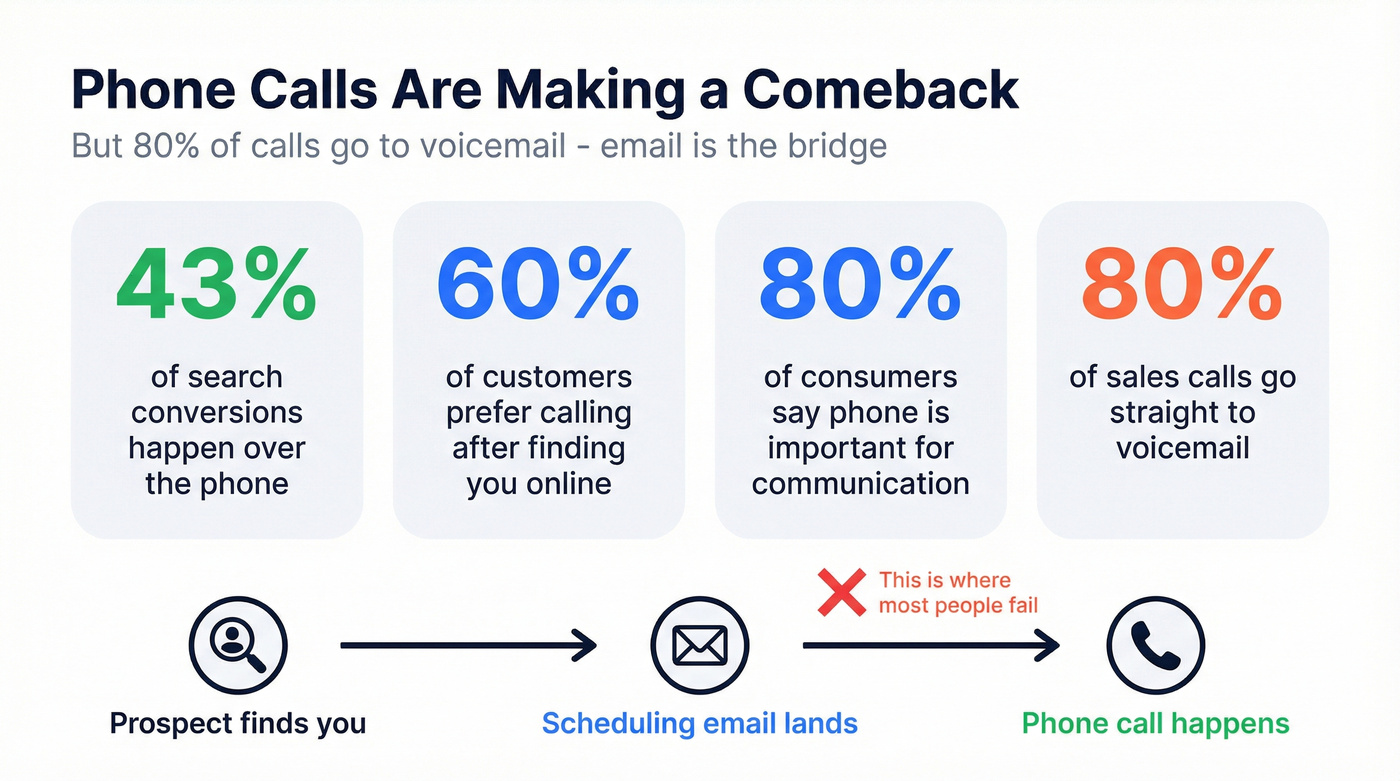
Here's something the "everything should be async" crowd won't tell you: phone calls are making a comeback. 43% of search-related conversions happen over the phone. 60% of customers prefer to call a business after finding them online. And 80% of consumers still consider the phone channel important for communicating with companies.
Why the resurgence? Zoom fatigue broke people. After years of mandatory video calls - the awkward lighting, the "you're on mute," the performative nodding - a simple phone call feels like relief. No camera anxiety. Lower cognitive load. You can pace around your kitchen in sweatpants and nobody knows.
But here's the catch: 80% of sales calls go to voicemail. You can't just cold-dial someone and expect them to pick up. The bridge between "I need to talk to this person" and "we're actually on the phone" is almost always email. That's why the scheduling email matters so much. It's the critical handoff that makes the call happen.
37% of salespeople cite phone calls as their most effective lead source. Yet 83% of businesses have lost customers due to communication problems. The gap between wanting a call and actually getting one on the calendar is where most people fail.
What You Need (Quick Version)
Before you scroll through all 12 templates, here's the cheat sheet:
- Keep your email under 125 words. Emails in the 50-125 word range see response rates above 50%. Anything longer and you're losing people.
- Use a timeline-based hook. "Can we talk Tuesday at 2?" produces a 10.01% reply rate - 2.3x higher than problem-based hooks like "I noticed you're struggling with X."
- Follow up once on Day 3. A single follow-up captures most of your total replies. After that, diminishing returns hit fast - four or more follow-ups triples your spam complaint rate.
Jump straight to the 12 templates →
What the Data Says: Anatomy of a High-Response Scheduling Email
Most scheduling emails fail because they break basic rules tested across millions of sends.
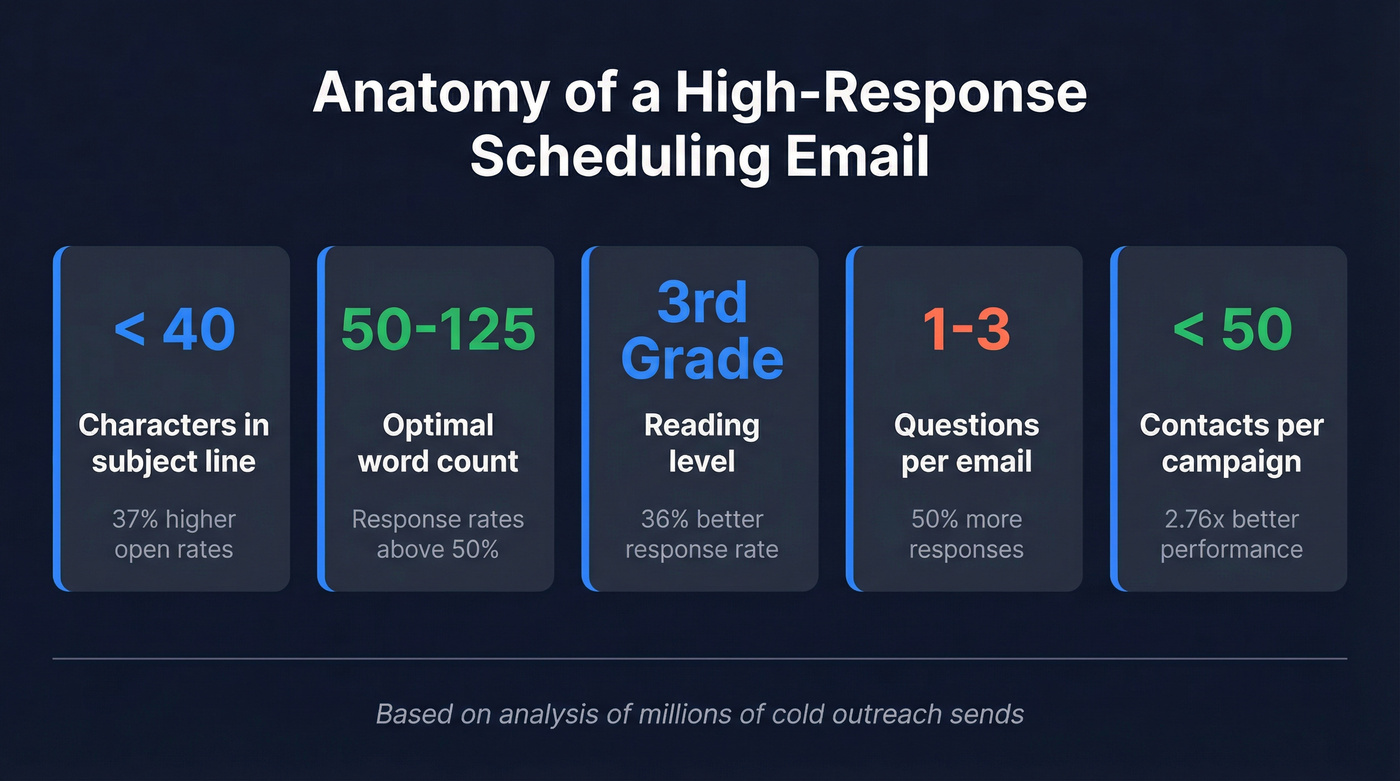
Subject lines under 40 characters with a specific claim see 37% higher open rates. "Quick call Tuesday?" beats "Would you be available for a brief phone conversation this week?" every time. Six to seven words is the sweet spot.
Personalized emails see 50% higher open rates. Even light personalization - referencing a specific initiative or recent event - makes a real difference. Only about 5% of senders bother personalizing each email, and those senders get 2-3x the replies.
Write as simply as possible. Emails written at a third-grade reading level see 36% better response rates than college-level writing in cold outreach. Your phone meeting request email isn't a whitepaper. Short words, short sentences.
The optimal length is 50-125 words. That's roughly the length of this paragraph and the one above it combined. Beyond 125 words, response rates fall sharply.
Include 1-3 questions. Emails with questions get 50% more responses than those without. Your scheduling email should have exactly one clear ask: "Can we talk [day] at [time]?"
Smaller, highly-targeted campaigns (under 50 contacts) outperform broad blasts by 2.76x. Decision-makers receive an average of 15 cold emails per week. Yours needs to be the one that takes 10 seconds to read and 5 seconds to reply to.

These templates get replies - but only if they land in real inboxes. Prospeo gives you 98% accurate emails and 125M+ verified mobile numbers with a 30% pickup rate, so your "quick call Tuesday?" email reaches the right person every time.
Stop scheduling calls with dead emails. Start with verified data.
Subject Line Formulas That Get Opened
Your subject line determines whether your email gets read or buried. Here's what works:
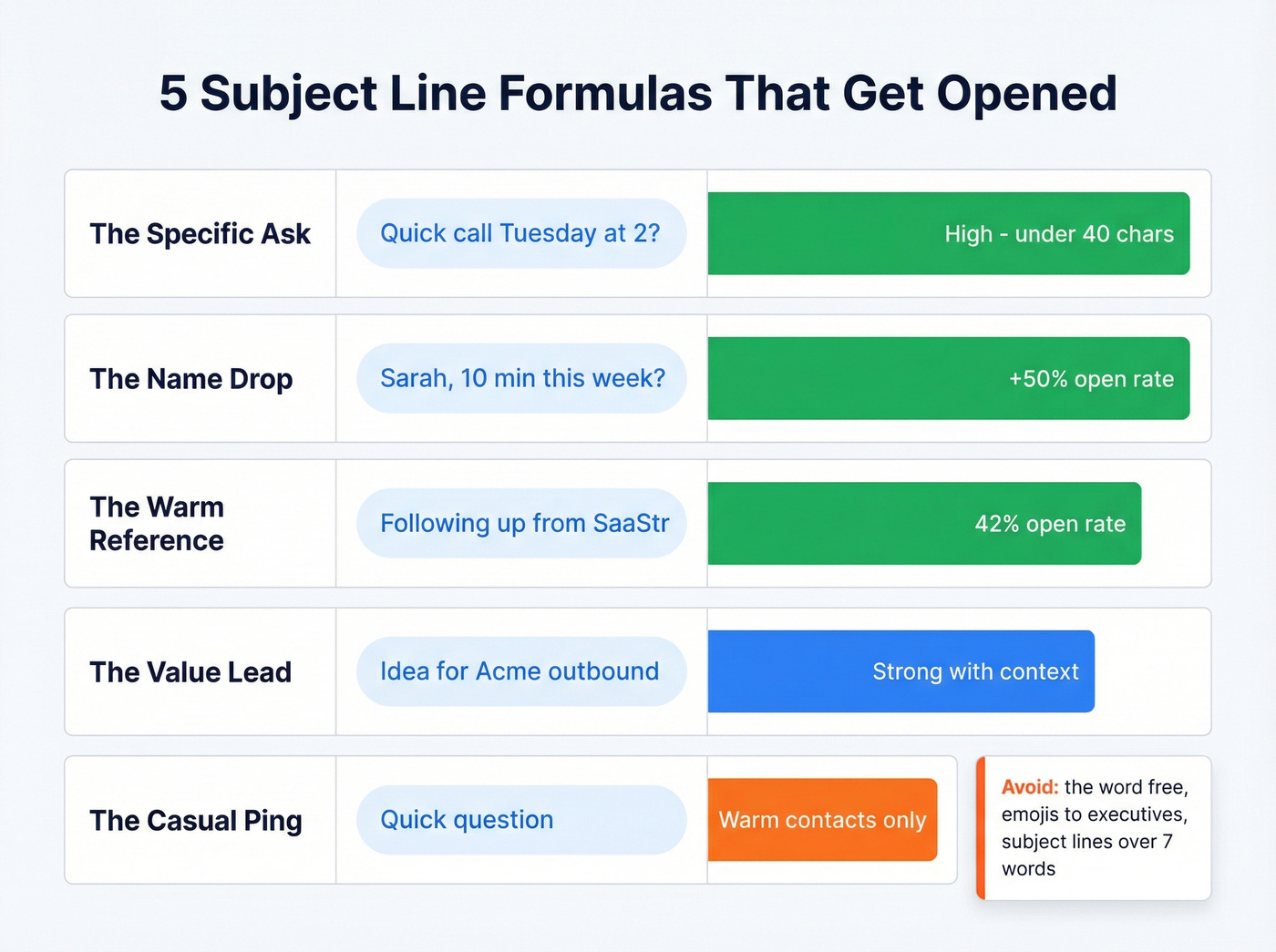
- The Specific Ask: "Quick call Tuesday at 2?" - Short, clear, actionable. Under 40 characters.
- The Name Drop: "[First Name], 10 min this week?" - Personalized subject lines increase open rates by 50%.
- The Warm Reference: "Following up from [event/intro]" - Emails referencing a warm connection hit 42% open rates.
- The Value Lead: "Idea for [Company]'s [initiative]" - Gives them a reason to care before they click.
- The Casual Ping: "Quick question" - Works for warm contacts. Too vague for cold outreach.
A few rules: keep the ratio of "I/my" to "you/your" at 1:2. Avoid the word "free" - it triggers spam filters. And skip emojis unless you're certain the recipient uses them. One misplaced 🎉 in a subject line to a CFO and you're in the trash folder.
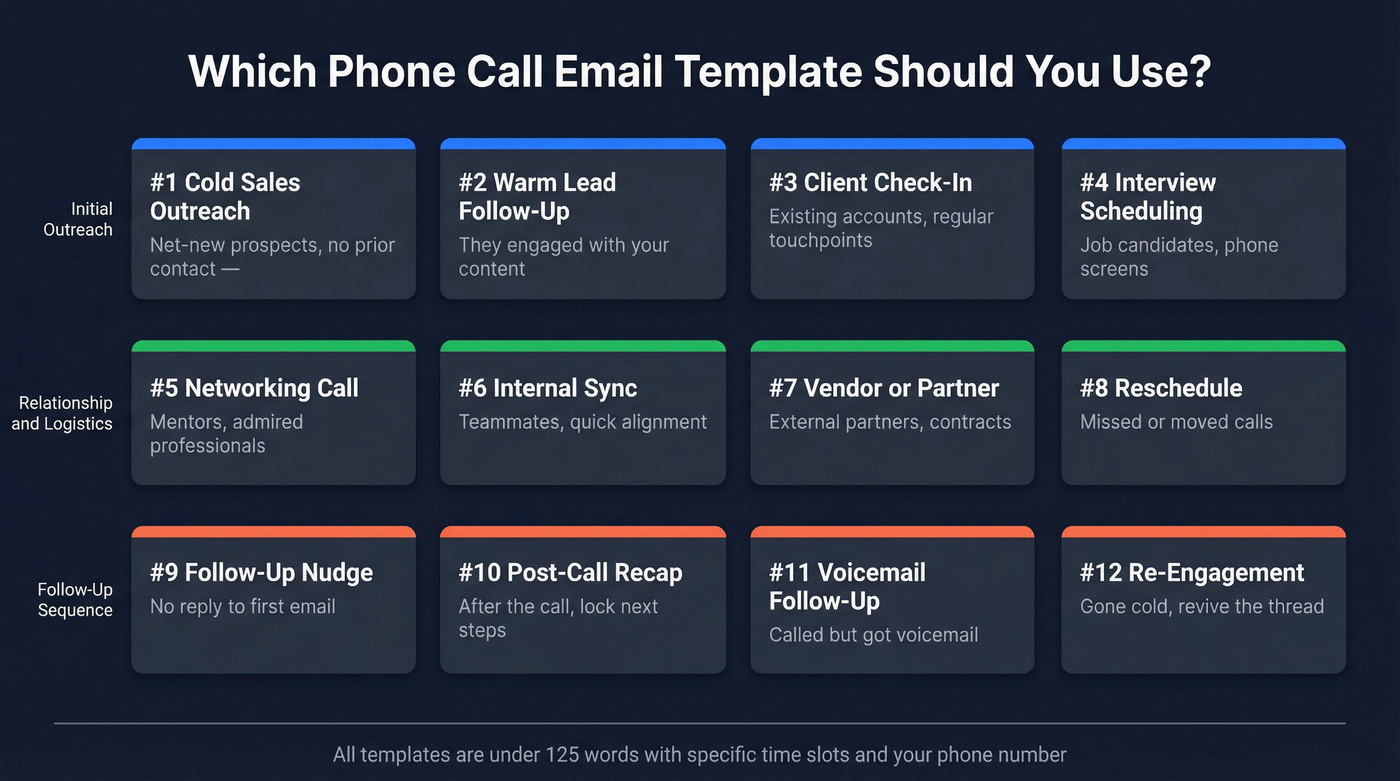
12 Phone Call Email Templates for Every Scenario
Most template articles give you the initial ask and stop there. These 12 cover the full lifecycle - from cold outreach to rescheduling to the post-call follow-up that seals the deal. Every template is under 125 words, offers specific time slots, and includes your phone number.
1. Cold Sales Outreach
Effectiveness: ⭐⭐⭐⭐⭐ High-conversion | Best for: Net-new prospects
Subject: Quick call, [First Name]?
Alt subjects: "10 min - idea for [Company]" · "[First Name], quick question about [initiative]"
Hi [First Name],
[One sentence about something specific to their company or role].
I've helped companies like [similar company] [specific result]. Can we talk on the phone for 10 minutes? I can explain this a lot better over the phone.
How about [Day 1] at [Time] or [Day 2] at [Time] [Timezone]?
My direct number is [Phone Number].
[Your Name]
Filled-in example:
Hi Sarah,
I saw Bolt just expanded into the DACH market - congrats.
I've helped companies like Paddle cut manual outreach time by 40% during international launches. Can we talk on the phone for 10 minutes? I can explain this a lot better over the phone.
How about Tuesday at 2 PM or Wednesday at 10 AM EST?
My direct number is (555) 234-5678.
James
Use this if: You're reaching out cold and want to stand out from the wall of "book a demo" emails. One practitioner ran this exact phone-call CTA to 100 contacts and hit an 81% open rate with a 59% reply rate. This is the phone call request email sample that consistently outperforms generic meeting invitations.
Skip this if: The prospect has explicitly asked for email-only communication.
2. Warm Lead Follow-Up
Effectiveness: ⭐⭐⭐⭐⭐ High-conversion | Best for: Engaged prospects
Subject: [First Name], following up on [initiative]
Alt subjects: "Saw your [action] - quick thought" · "Re: [initiative] - 15 min this week?"
Hi [First Name],
I noticed your team recently [specific initiative or announcement]. We've helped similar companies [specific outcome] - thought it might be relevant.
Would a quick 15-minute call make sense? I can share the exact process we used.
[Day 1] at [Time] or [Day 2] at [Time] [Timezone] work on your end?
My number: [Phone Number]
[Your Name]
Filled-in example:
Hi Marcus,
I noticed Acme just launched a new outbound team. We helped TechCorp ramp their SDRs 40% faster by fixing their data pipeline - thought it might be relevant.
Would a quick 15-minute call make sense? I can share the exact process we used.
Thursday at 11 AM or Friday at 3 PM CT work on your end?
My number: (555) 876-5432
David
Use this if: They've engaged with your content, attended a webinar, or been referred. Skip this if: You have zero context on them - use the cold template instead.
3. Client Check-In / Account Review
Effectiveness: ⭐⭐⭐⭐ Reliable | Best for: Existing accounts
Subject: Q2 review - [Company Name]
Hi [First Name],
It's been [timeframe] since our last check-in. I'd love to run through how things are tracking and flag a couple of ideas for [upcoming quarter/initiative].
Can we do a quick call [Day] at [Time] [Timezone]? Should take 20 minutes max.
My direct line: [Phone Number]
[Your Name]
Use this if: You're managing an existing account and need a regular touchpoint. Name the meeting something specific - "Q2 Pipeline Review" beats "Phone Call" in every calendar. Skip this if: There's an urgent issue. Pick up the phone and call them directly.
4. Interview Scheduling
Effectiveness: ⭐⭐⭐⭐ Reliable | Best for: Job candidates
Subject: Interview times - [Role Title]
Alt subjects: "[Role Title] phone screen - availability" · "Next step: [Role Title] interview"
Hi [First Name],
Thank you for reaching out about the [Role Title] position. I'm excited to learn more.
Here are a few times that work for a phone interview:
- [Date 1]: [Time Range] [Timezone]
- [Date 2]: [Time Range] [Timezone]
- [Date 3]: [Time Range] [Timezone]
Please let me know which works best, or suggest an alternative. My number is [Phone Number].
Looking forward to speaking with you.
[Your Name]
Use this if: A recruiter or hiring manager has reached out and you need to lock down a time. Offering 3-4 slots with specific date ranges gets the fastest replies.
5. Networking / Informational Call
Effectiveness: ⭐⭐⭐⭐ Reliable | Best for: Warm contacts, mentors
Subject: 15 min - loved your [talk/post/article]
Alt subjects: "Your [piece] sparked a question" · "[First Name], quick ask about [topic]"
Hi [First Name],
I came across your [specific piece of work] and it really resonated - especially [specific detail].
I'd love to pick your brain for strictly 15 minutes. No pitch, just a couple of questions about [topic].
Would [Day] at [Time] or [Day] at [Time] [Timezone] work?
My number: [Phone Number]
[Your Name]
Use this if: You genuinely admire their work and want to learn. The flattery-then-ask approach works because it's specific. Skip this if: You're actually trying to sell them something. They'll know.
6. Internal / Colleague Sync
Effectiveness: ⭐⭐⭐ Situational | Best for: Teammates, managers
Subject: Quick sync - [topic]
Hey [First Name],
When's a good time to sync up? Need to run through [specific topic] before [deadline/meeting].
I'm open [Day] afternoon or [Day] morning. Call or huddle - whatever's easier.
[Your Name]
Use this if: You need a quick alignment call with a teammate or manager. Mirror their communication style - if they use Slack shorthand, keep this casual. Skip this if: It can be resolved in a 3-sentence Slack message.
7. Vendor or Partner Call
Effectiveness: ⭐⭐⭐⭐ Reliable | Best for: External partners
Subject: [Topic] - quick call this week?
Hi [First Name],
I'd like to discuss [specific topic/agenda item] regarding our [partnership/contract/project]. Want to make sure we're aligned before [upcoming milestone].
Could we do a 20-minute call [Day] at [Time] or [Day] at [Time] [Timezone]?
Agenda: [1-2 bullet points so they can prepare]
My direct line: [Phone Number]
[Your Name]
Use this if: You're coordinating with an external partner and need alignment. Including the agenda upfront shows respect for their prep time. Skip this if: The topic is sensitive enough to warrant an in-person meeting.
8. Rescheduling a Call
Effectiveness: ⭐⭐⭐ Situational | Best for: Damage control
Subject: Rescheduling our [Day] call
Hi [First Name],
I'm sorry, but I need to reschedule our call originally set for [Date/Time]. Something came up that I can't move.
Would either of these work instead?
- [New Date 1] at [Time] [Timezone]
- [New Date 2] at [Time] [Timezone]
My number is still [Phone Number]. Apologies for the shuffle.
[Your Name]
Apologize briefly, offer two new times, and move on. Don't over-explain why you're rescheduling - nobody needs your calendar drama.
9. Confirming a Scheduled Call
Effectiveness: ⭐⭐⭐⭐ Reliable | Best for: Reducing no-shows
Subject: Confirming: [Day] at [Time]
Hi [First Name],
Just confirming our call:
- Date: [Day, Date]
- Time: [Time] [Your Timezone] / [Time] [Their Timezone]
- Phone: [Your Number] (I'll call you, or feel free to call me)
- Agenda: [1-2 sentences]
Looking forward to it.
[Your Name]
Restate everything. Date, time with timezone, phone number, and a brief agenda. Confirmation emails cut no-shows significantly - and they take 30 seconds to write.
10. Re-Engagement (Haven't Spoken in a While)
Effectiveness: ⭐⭐⭐ Situational | Best for: Dormant contacts
Subject: It's been a while, [First Name]
Hi [First Name],
It's been [timeframe] since we last connected about [topic/project]. Hope things are going well with [something specific to them].
I'd love to catch up - even just 10 minutes. Are you free [Day] at [Time] or [Day] at [Time] [Timezone]?
My number: [Phone Number]
[Your Name]
Reference your last interaction so they remember who you are. Keep it warm and zero-pressure - you're reopening a door, not kicking it down.
11. Post-Call Follow-Up
Effectiveness: ⭐⭐⭐⭐⭐ High-conversion | Best for: Every call you have
Subject: Great talking today - next steps
Hi [First Name],
Thanks for the call today. Here's a quick recap:
- [Key takeaway 1]
- [Key takeaway 2]
- [Next step + owner + deadline]
Let me know if I missed anything. Looking forward to [next action].
[Your Name]
80% of hiring managers say thank-you notes affect their decisions, and the same principle applies to sales and partnership calls. Summarize the key points while they're fresh. This email shows professionalism and creates a paper trail at the same time.
12. Phone Meeting Request Email for Someone Senior
Effectiveness: ⭐⭐⭐⭐ Reliable | Best for: Executives, industry leaders
Subject: [Specific reason] - 10 min, [First Name]?
Hi [First Name],
I've been following [specific thing they've done - talk, article, company initiative] and it directly relates to something we're working on at [Your Company].
I'd value 10 minutes of your perspective on [specific question]. Happy to work around your schedule.
Would [Day] at [Time] or [Day] at [Time] [Timezone] work? My number: [Phone Number].
[Your Name]
Use this if: You're reaching up the org chart and need to earn their attention. Lead with why their specific expertise matters - not a generic "I'd love to pick your brain." Skip this if: You can get the answer from someone on their team instead.
Follow-Up Sequence: What to Send When They Don't Respond
Real talk: most scheduling emails don't get a reply on the first send. That's normal. The question is what you do next.
A study of 16.5 million emails found that one initial email plus one follow-up is the sweet spot, maintaining roughly an 8% reply rate. The 3-7-7 cadence - follow up on Day 3, Day 10, and Day 17 - captures 93% of total replies by Day 10. And here's a stat that should shape your urgency: 90% of buyers respond within two days of their most recent message. If they're going to reply, it happens fast.
After that, you're fighting diminishing returns. Four or more follow-ups triples your spam complaint rate.
Here's the three-email sequence:
Follow-Up #1 (Day 3)
Subject: Re: [Original Subject]
Hi [First Name],
Just floating this back up. Would a quick call [Day] at [Time] [Timezone] work?
If the timing's off, happy to adjust. My number: [Phone Number].
[Your Name]
Follow-Up #2 (Day 10)
Subject: One more thought, [First Name]
Hi [First Name],
I know inboxes are brutal. Wanted to share one quick thing: [relevant insight, stat, or resource related to their situation].
If a 10-minute call would be useful, I'm open [Day] or [Day]. If not, no worries at all.
[Your Name]
Break-Up Email (Day 17)
Subject: Should I close your file?
Hi [First Name],
I haven't heard back, so I'll assume the timing isn't right. I'm going to close out my follow-up on this.
If things change down the road, my door's open. Just reply to this thread.
[Your Name]
That "Should I close your file?" subject line works because it's low-pressure and creates a small sense of finality. Many prospects respond to the break-up email specifically because it removes the friction of feeling obligated.
7 Mistakes That Tank Your Response Rate
I've seen teams obsess over template wording while ignoring basics that kill their emails before anyone reads them. The stakes keep rising: 69% of email senders report declining performance due to spam filters and AI content fatigue. Every mistake below compounds that problem.
1. Weak or generic subject line. "Meeting Request" is invisible. Personalized subject lines see 50% higher open rates. Use their name. Reference something specific.
2. Misspelling the recipient's name. "John" instead of "Jon." "Sara" instead of "Sarah." It's the fastest way to signal you don't care. Triple-check it.
3. No clear CTA. Every scheduling email needs exactly one ask: "Can we talk [day] at [time]?" Whether it's a call for meeting email or a cold outreach message, ambiguity kills replies.
4. Email too long. Over 125 words and response rates plummet. Your scheduling email isn't a pitch deck. Cut it.
5. Offering no specific times. "When are you free?" forces the recipient to do the work. Offer 2-3 specific slots. You're making it easy to say yes.
6. Sending to unverified email addresses. This one's invisible and devastating. If you're emailing addresses that bounce, your sender reputation tanks - and your future emails start landing in spam even when the address is valid. Run your list through a verification tool before any outreach. Prospeo catches invalid addresses, spam traps, honeypots, and catch-all domains in real time with 98% accuracy, and the free tier covers 75 emails per month.
7. Getting the date or timezone wrong. Nothing kills trust faster than "See you Tuesday at 3 PM" when Tuesday is a holiday in their country, or when 3 PM your time is 11 PM theirs. Always state both timezones.
Scheduling Across Time Zones
If you're scheduling calls with people in different time zones, you need a framework - not guesswork.
Near overlap (2-6 hours apart): Pick the middle of the workday for both parties. New York to London? 11 AM ET / 4 PM GMT works for everyone.
Moderate overlap (7-10 hours apart): Rotate the sacrifice. If you always schedule at 8 AM your time to accommodate Singapore's afternoon, eventually flip it. The burden of inconvenient hours should be shared.
Extreme overlap (11+ hours apart): Go async-first. If you absolutely need a live call, keep it short and focused - tight agenda, time limits per item. Record it and share a summary immediately after.
Practical rules that save headaches:
- Always state both your local time AND the recipient's time: "Tuesday at 2 PM ET / 11 AM PT"
- Don't trust "3 hours ahead" - it breaks during DST transitions. Arizona doesn't follow US daylight saving time. India never changes clocks. Europe shifts two weeks earlier than the US.
- Use World Time Buddy for visual side-by-side comparison, or enable Google Calendar's World Clock feature to auto-convert across zones.
Scheduling Tools That Eliminate Back-and-Forth
If you're sending more than a few scheduling emails per week, a tool pays for itself immediately.
| Tool | Free Tier | Paid From | Best For |
|---|---|---|---|
| Calendly | 1 event type | $12/user/mo | Teams and workflows (the default for a reason) |
| SavvyCal | 3 meeting types | $12/user/mo | Non-tech recipients (calendar overlay is killer) |
| Cal.com | Unlimited for individuals | $15/user/mo | Open-source fans and developers |
| zcal | Unlimited event types | $9.50/user/mo | Solo users on a budget |
| Reclaim | Smart scheduling, 1 calendar | $10/user/mo | Priority-based scheduling and focus time |
| lemcal | 1 connected calendar | $9/mo | Beautiful, branded booking pages |
| Sidekick | Basic scheduling | $5/user/mo | Cheapest paid option for simple needs |
Hot take: If your deals are typically under five figures, you don't need a $12/month scheduling tool. zcal's free tier handles unlimited event types - that's more than Calendly gives you at $0. For teams, Calendly is the safe bet because everyone recognizes it. SavvyCal is the sleeper pick: its calendar overlay means your recipient sees their own availability next to yours, no timezone math required.
Include a scheduling link as a backup in your email, not the primary ask. "If none of those times work, grab a slot here: [link]" is the right framing. Leading with a naked Calendly link feels lazy - like you couldn't be bothered to check your own calendar.
Pre-Send Checklist
Before you hit send on any scheduling email, run through this:
- ☐ Under 125 words
- ☐ Subject line under 40 characters
- ☐ 2-3 specific time slots offered
- ☐ Your phone number included
- ☐ Recipient's name spelled correctly
- ☐ Timezone stated for both parties
- ☐ Email address verified
- ☐ One clear CTA
- ☐ Scheduling link as backup, not primary ask
Nine items. Takes 60 seconds. Saves you from the embarrassment of a bounced email, a misspelled name, or a timezone disaster.
80% of sales calls go to voicemail because reps are dialing wrong numbers. Prospeo's verified direct dials connect you 3x more often than competitors - and at $0.01 per email, you're not paying enterprise prices to get there.
Send the template. Dial the real number. Book the call.
FAQ
How many time slots should I offer in a scheduling email?
Offer 2-3 specific time slots with date, time, and timezone for each. Fewer than two feels inflexible and forces unnecessary back-and-forth. More than four creates decision paralysis - the recipient stares at options instead of picking one.
Should I include a scheduling link or propose specific times?
Propose specific times first - it shows effort and reduces friction. Include a scheduling link as a backup: "If none of those work, grab a time here: [link]." Leading with just a bare link feels impersonal, especially for cold outreach or senior contacts.
How long should I wait before following up on a scheduling email?
Wait 3 business days for your first follow-up. The 3-7-7 cadence - follow up on Day 3, Day 10, and Day 17 - captures 93% of total replies by Day 10, based on analysis of 16.5 million emails. After the second follow-up, diminishing returns set in hard.
What's the best day and time to send a call-scheduling email?
Tuesday and Wednesday consistently outperform other days - 30% and 27% of reps rank them as top performers. Aim for 11 AM-12 PM or 4 PM-5 PM in the recipient's timezone for the highest engagement rates across industries.