


The Best VoIPstudio Alternatives (and How to Choose) in 2026
$6-$20 per user per month looks cheap until your calls sound like a robot underwater and your bill quietly doubles from numbers, minutes, and retention add-ons. If you're evaluating VoIPstudio alternatives because the cloud PBX/call-center bundle isn't matching your call quality, reporting, or total cost, these are the replacements worth trialing.
Look, most teams don't fail the switch because they picked the "wrong" vendor.
They fail because they never measured the switch in a way that isolates what actually changed.
Why most "alternatives" lists won't help you switch
Most directories rank phone systems like they're project management tools: feature checklist, star rating, done. That's how teams switch from VoIPstudio and feel... nothing.
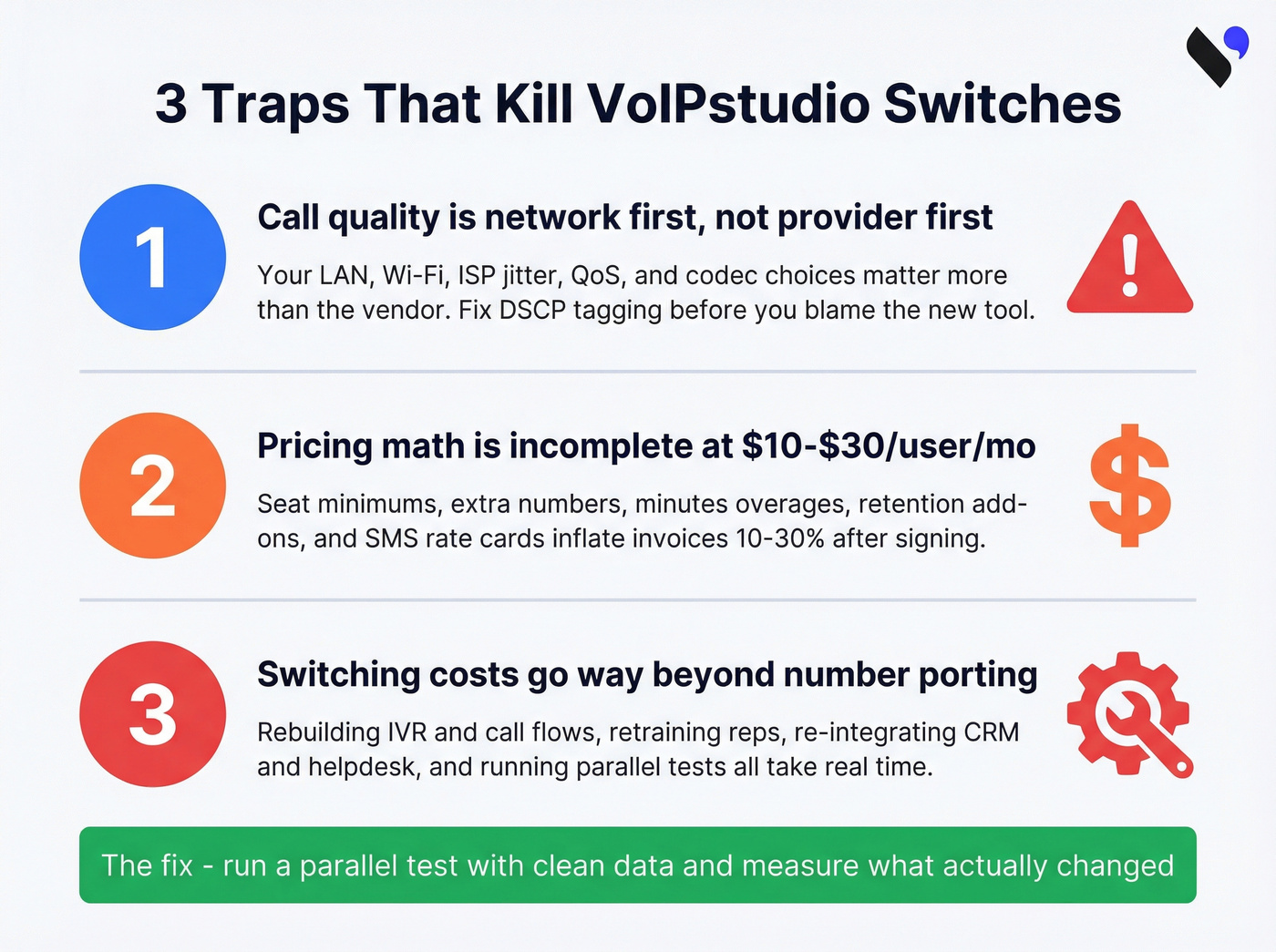
Here's the truth: call quality is network first. Your provider matters, but your LAN/Wi-Fi, ISP jitter, QoS, and codec choices matter more. I've watched teams churn providers three times when the real culprit was a misconfigured router and zero DSCP tagging.
The second trap is pricing math. Hosted VoIP benchmarks at $10-$30/user/month are real, but they're incomplete, because your invoice gets pushed around by seat minimums, extra numbers, minutes, retention, add-ons, that show up after the contract's signed.
Third: switching costs aren't just porting. They're rebuilding call flows (IVR, queues, routing rules), retraining reps, and re-integrating with your CRM/helpdesk. If you don't run a parallel test and measure properly, you'll blame the new tool for problems you carried over.
Below is the shortlist we'd actually trial, plus the math and checklist that prevent a bad switch.
Our picks (TL;DR): the best VoIPstudio alternatives for 2026
These are the tools we'd put in front of a team that's serious about switching, without wasting weeks on demos you'll never deploy.

GoTo Connect - best overall "all-in-one UCaaS" replacement
- Best for: Teams that want one vendor for phone + meetings + admin + support.
- Skip this if: You refuse quote-based pricing.
GoTo Connect is the cleanest "replace VoIPstudio with a grown-up UCaaS suite" move. It's strong where day-to-day pain lives: admin, queues, auto attendants, and support. You also get meaningful inclusions like 1,000 shared toll-free minutes and free calls to 50 countries (allowances vary by region, so confirm in your quote). It also advertises 99.999% reliability.
Pricing: Quote-based. Historical starting point: ~$27/user/month. Typical SMB quotes: ~$25-$40/user/month depending on tier and volume.
Prospeo - best for clean contact data so your VoIP trial results are real
- Best for: Outbound/support teams running a bake-off and measuring pickup rate, connect rate, and pipeline.
- Skip this if: You never call customers/prospects and don't track outcomes.
Prospeo isn't a VoIP provider. It's the missing piece that makes VoIP trials honest: clean, verified contact data so you're not comparing "Provider A with a decent list" vs "Provider B with a junk list." If you need a broader view of tools in this category, start with email lookup tools and narrow down by accuracy and workflow fit.
In our experience, teams underestimate how much bad data distorts a phone-system evaluation: wrong numbers inflate "no answer," duplicates mess up attribution, and stale records make a new dialer look worse than it is. Prospeo is "The B2B data platform built for accuracy" with 300M+ professional profiles, 143M+ verified emails (98% accuracy), and 125M+ verified mobile numbers with a 30% pickup rate, refreshed every 7 days (industry average: 6 weeks). It's self-serve, no contracts, GDPR compliant, and used by 15,000+ companies and 40,000+ Chrome extension users.
If you're trialing two phone systems, normalize the list first: verify emails, verify mobiles, dedupe, then run the same segments through both systems. That one step saves you from the most common "we switched and nothing improved" outcome - and it pairs well with a repeatable email verification list SOP.
Zoom Phone - best low-cost mainstream option (if you pick the right tier)
- Best for: Teams already living in Zoom and wanting a simple phone add-on.
- Skip this if: You want one flat price with zero metering decisions.
Zoom Phone is the "keep costs down" pick if you choose the tier with your eyes open. The tiers are straightforward: $10 metered, $15 unlimited, $20 Global Select. Metered punishes outbound-heavy teams fast - especially if you're running a real outbound calling strategy.
Pricing note: These tier anchors reflect late-2025/2026 pricing guidance; check current tiers before you buy.
VoIP.ms - best low-cost DIY/pay-as-you-go control
- Best for: Ops/IT-led teams that want granular control and itemized billing.
- Skip this if: You want "one seat price, one support number, zero tinkering."
VoIP.ms is the opposite of UCaaS bundles: it's pay-per-use, and you control the knobs. It runs prepaid with a $15 minimum deposit, and it can be dramatically cheaper than per-seat systems when you're disciplined about usage and configuration.
Aircall - best call-center-first for sales/support teams
- Best for: Teams that live in queues, coaching, and call analytics.
- Skip this if: You're under the seat minimum or you need long retention inside the product.
Aircall treats calling like a workflow, not a utility. It's strong on routing, integrations, coaching, and analytics. Two realities matter: 3-seat minimum and 6-month analytics retention.
Pricing: $30/user/month (annual) or $40/user/month (monthly). Budget 10%-30% extra above seat price once add-ons (numbers, SMS/international rate cards) land.
One more opinionated note: if you're not going to run coaching weekly, don't pay for a coaching-heavy stack. You'll end up with expensive dashboards and the same outcomes.

Most VoIP bake-offs fail because the data is dirty, not the dialer. Wrong numbers inflate "no answer," stale records tank connect rates, and you blame the new provider for problems you carried over. Prospeo's 125M+ verified mobiles with a 30% pickup rate - refreshed every 7 days - give you a clean baseline so you're comparing phone systems, not data quality.
Normalize your list before you trial. Start with 100 free credits.
Comparison table: pricing model, hidden costs, and best-for
This table's the fastest way to spot which tools will surprise you on the invoice, and which one wins for a specific buying style.

| Tool | Pricing model | Hidden costs to watch | Best for (winner call) |
|---|---|---|---|
| GoTo Connect | Quote-based | Tiering + add-ons; regional allowances | Best overall UCaaS replacement |
| Prospeo (Non-VoIP) | Credit-based monthly | Credits by volume | Best way to make VoIP trials measurable |
| Zoom Phone | $10 / $15 / $20 | Metered minutes + SMS caps + add-ons | Best low-cost add-on if you're already on Zoom |
| VoIP.ms | Pay-per-use | DID/E911/SMS/recording/transcripts | Best for lowest cost if you can DIY |
| Aircall | $30-$40/seat | 3-seat min, retention, add-ons | Best for sales/support call workflows |
| 3CX | Annual license + infra | Hosting, SIP trunk, IT time | Best for PBX control (IT-led) |
| RingCentral RingEX | $20-$45+/seat | Add-ons, bundles, contract uplift | Best for enterprise UCaaS maturity |
| Nextiva | $25-$45/seat | Tier jumps, add-ons | Best "simple SMB phone" pick |
| Ringover | $25-$50/seat | Add-ons, higher tiers | Best mid-market sales dialer UI |
| Google Voice | $10-$30/seat | Feature limits by tier | Best bare-bones calling |
| Microsoft Teams Phone | $10-$25/seat | Licensing + calling plan complexity | Best if Teams is your OS |
| Telnyx | Usage-based | Engineering time + compliance setup | Best for API-first custom comms |
Three takeaways that matter:
- Aircall's 3-seat minimum and 6-month analytics retention change your total cost and reporting workflow immediately.
- GoTo Connect's inclusions are real value, but allowances vary by region and the quote process is the price of convenience.
- VoIP.ms is itemized on purpose. It's a cost weapon when someone owns the configuration and the bill.
VoIPstudio alternatives: mini-reviews (what we'd actually trial)
GoTo Connect (Tier 1) - "set it up once, stop thinking about phones"
Why we'd pick it
- It's the most complete UCaaS replacement for VoIPstudio: phone + admin + support maturity.
- Call routing, queues, and auto attendants are strong - the stuff that breaks first during a migration.
Hidden cost trigger
- Quote-based tiers. If you buy a higher tier "just in case," you'll pay for shelfware.
Pricing (consistent model)
- Quote-based. Historical starting point: ~$27/user/month.
- Typical SMB quotes: ~$25-$40/user/month depending on tier and volume.
- Allowances vary by region - confirm in your quote (especially toll-free/international inclusions).
Zoom Phone (Tier 1) - the "don't overthink it" choice for Zoom-native teams
Best-fit checklist
- You're already standardized on Zoom meetings/chat.
- You want a simple phone layer, not a full contact center.
- You'll pick the calling plan up front and stick to it.
What to buy
- For outbound-heavy teams: Unlimited ($15).
- Metered only works when call volume stays low.
Pricing reality
- Standalone tiers: $10 metered / $15 unlimited / $20 Global Select.
- Bundles are commonly marketed around $18.33 and $22.49 per user/month.
- Pricing guidance reflects late-2025/2026 sources; check current tiers.
VoIP.ms (Tier 1) - cheapest serious option if you're willing to own it
The pro/con in one line
- Pro: You only pay for what you use.
- Con: You own the complexity.

Here's a real scenario we've seen: a small support team moved from a per-seat UCaaS plan to VoIP.ms to cut costs, saved money on paper, then lost two afternoons because nobody documented the call flow and SIP settings before the cutover. They still ended up happy, but only after they treated it like an IT project instead of "just switching phone apps."
What it costs (US/Canada examples)
- DID: $1.10/month
- Inbound: $0.009/min
- Outbound (US): $0.01/min
- E911: $1.50/month
- SMS: $0.0075/SMS and $0.02/SMS (as listed)
- Recording: $0.0025/min
- Transcripts: $0.05/min
- Porting: free (US/Canada), about ~5 business days
Skip this if Nobody on your team can confidently troubleshoot routing, trunks, or device provisioning.
Aircall (Tier 1) - call-center workflows without PBX headaches
Implementation reality Setup's fast. Adoption's the real work: tagging, dispositions, coaching habits, and dashboards.
Two non-negotiables
- 3-seat minimum
- 6-month analytics retention (plan exports/BI if you care about YoY)
Pricing
- $30/user/month annually or $40/user/month monthly.
- Add-ons push real spend 10%-30% above seat price for many teams (extra numbers + SMS/international rate cards).
Skip this if You need multi-year analytics inside the product without exports.

AI features that actually matter in 2026 (and what costs extra)
Most "AI" in business phone systems is either (1) genuinely useful or (2) expensive glitter. Here's what matters:
- Call transcription + searchable recordings: Useful for QA and dispute resolution. Often gated by tier or storage limits.
- Auto-summaries + next-step extraction: Great for sales handoffs and support notes; frequently bundled into higher plans.
- QA scoring / sentiment: Valuable only if you have a manager cadence to act on it weekly. Otherwise it becomes a dashboard nobody opens.
- Coaching + talk ratio + keyword tracking: High ROI for sales teams, but it's usually a higher tier or add-on.
My hot take: if your average deal size is modest and you don't run weekly call coaching, you don't need "AI contact center." Buy reliable calling and clean reporting first.
3CX (Tier 2) - PBX control for teams that like owning infrastructure
Why it wins
- You can architect routing, trunks, and deployment exactly how you want. If you're weighing these two specifically, see 3CX vs Aircall.
Watch-outs
- Pricing changed at the end of January 2026; old budgets are wrong.
- You pay in IT time: hosting, security, backups, and ongoing tuning.
Pricing Budget ~$350/year+ for entry licensing, then add hosting/SIP trunk and admin time.
RingCentral RingEX (Tier 2) - enterprise UCaaS maturity
Why teams buy it
- Broad features, mature admin, compliance options, and reliability.
Skip this if You're allergic to add-ons and contract negotiation.
Pricing Budget ~$20-$45+/user/month. The range's driven by annual vs monthly commit, tier, and add-ons (numbers, SMS, recording, analytics).
Nextiva (Tier 2) - the "simple SMB phone" pick
Why it wins
- Predictable onboarding and a straightforward SMB focus.
Social proof 4.6/5 with ~914 reviews (2026 snapshot).
Pricing Budget ~$25-$45/user/month. The range's driven by annual vs monthly commit, calling plan, and add-ons (numbers, SMS, recording, analytics).
Ringover (Tier 2) - sales-friendly cloud phone with a modern UI
Why it wins
- Strong fit for sales workflows when you want more than "basic phone" without full CC complexity.
Social proof 4.7/5 with ~825 reviews (2026 snapshot).
Pricing Budget ~$25-$50/user/month. The range's driven by annual vs monthly commit, plan tier, and add-ons (numbers, SMS, recording, analytics).
Google Voice (Tier 3) - good enough until you need queues
Best for
- Simple calling at low cost.
Skip this if You need real call-center features (advanced queues, wallboards, deep analytics).
Pricing Budget ~$10-$30/user/month, driven by tier.
Microsoft Teams Phone (Tier 3) - best when Teams is already your operating system
Best for Organizations already standardized on Microsoft 365 and Teams.
Skip this if Nobody wants to own licensing and calling plan complexity.
Pricing Budget ~$10-$25/user/month once you include the right license + calling plan; the range's driven by your Microsoft licensing stack and whether you need domestic/international calling plans.
Telnyx (Tier 3) - API-first voice/SMS infrastructure
Best for Product teams building custom comms (voice/SMS) into an app.
Pricing Usage-based plus numbers; engineering time's the real cost.
Also commonly short-listed (big-name options)
If you're scanning the market like most buyers, these show up in almost every shortlist:
- Dialpad: Best for AI-forward calling + coaching; budget ~$25-$45/user/month.
- 8x8: Best for global UCaaS bundles; budget ~$25-$50/user/month.
- Vonage Business: Best for broad SMB/UCaaS coverage; budget ~$20-$45/user/month.
- Intermedia Unite: Best for MSP-friendly UCaaS + support; budget ~$25-$45/user/month.
- Ooma Office: Best for budget SMB calling; budget ~$20-$35/user/month.
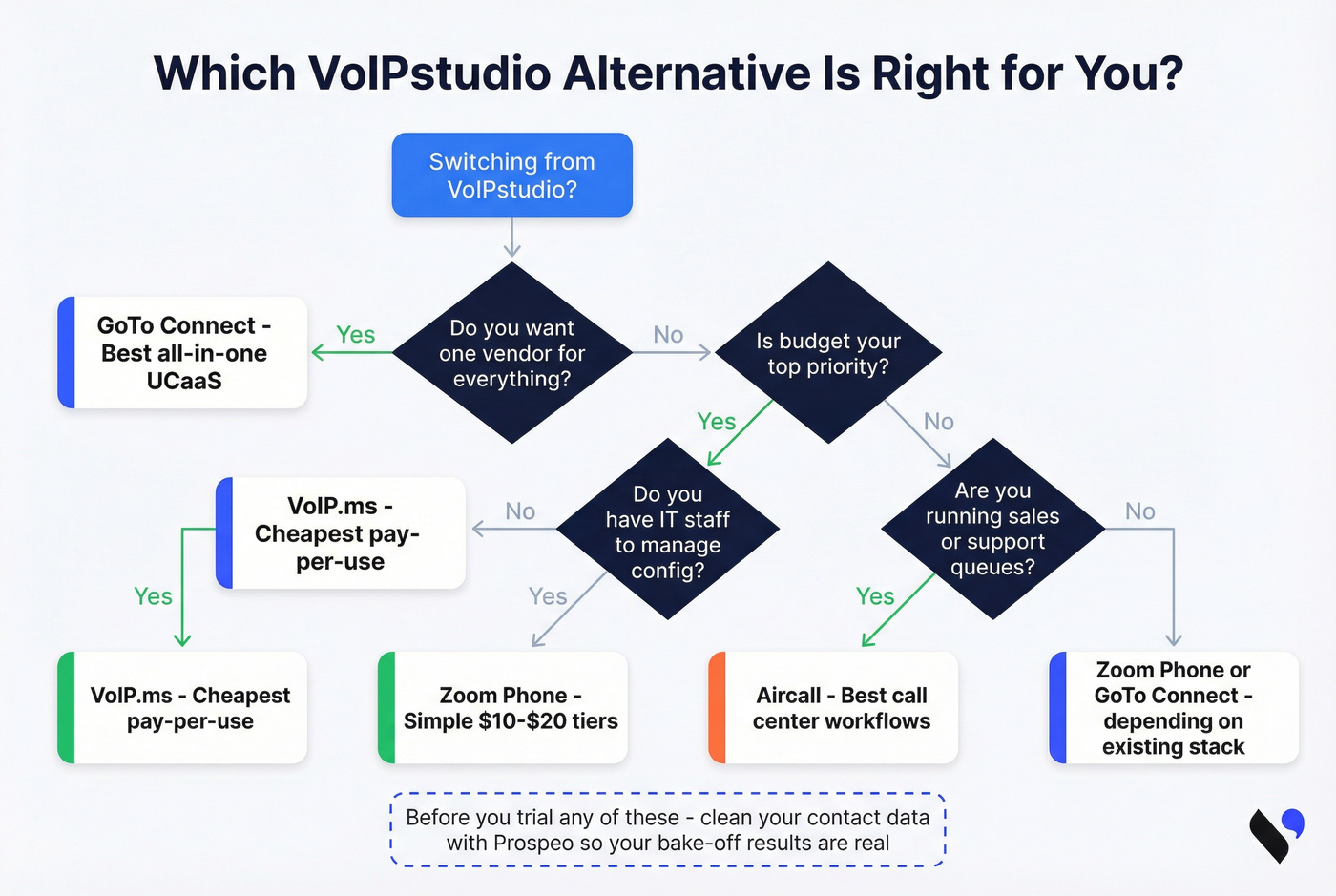
Choose the right category first (turnkey UCaaS vs call-center vs DIY SIP/PBX)
You don't need 10 tools - you need one of three lanes. Pick the lane, then pick the vendor.
| Category | What it optimizes for | Best picks |
|---|---|---|
| Turnkey UCaaS | "Just works" + admin simplicity | GoTo Connect, RingEX, Nextiva |
| Call-center-first | Coaching + queues + analytics | Aircall, Ringover |
| DIY SIP/PBX | Control + lowest unit cost | VoIP.ms, 3CX |
Rule of thumb: if nobody on your team can troubleshoot SIP, don't cosplay as a DIY shop. On the flip side, if you're paying for a UCaaS suite and only using "dial + voicemail," you're donating money.
What you'll really pay (TCO): seat minimums, minutes, numbers, E911, retention
Hosted VoIP benchmarks at $10-$30/user/month are a starting point. Your real TCO comes from the checklist below.
TCO checklist (the stuff that changes the invoice)
- Seats (and seat minimums like Aircall's 3-seat minimum)
- Calling plan: metered vs unlimited vs global
- Minutes: domestic, international, toll-free
- Phone numbers: local, toll-free, extra DIDs
- E911 fees (per number/location)
- SMS/MMS rate cards and caps
- Recording + storage + analytics retention
- Hardware: desk phone ~$80, headset ~$40
- Internet: $50-$350/month depending on office size and redundancy
- Implementation: onboarding, call flow rebuild, training time
Example A: 5-seat sales team (outbound-heavy)
Zoom Phone Unlimited: 5 x $15 = $75/month base. Add headsets (5 x $40 = $200 one-time) and budget for extra numbers/E911. If you pick metered and each rep uses 600 outbound minutes, that's 3,000 minutes x $0.0318/min ~= $95/month in outbound alone - metered loses immediately.
Example B: 8-seat support team (queues + analytics)
Aircall annual: 8 x $30 = $240/month base (and you can't go below 3 seats). If you need 12-month trending, plan an export/BI workflow because analytics retention is 6 months. If you want the lowest base cost and you have ops support, VoIP.ms can undercut per-seat pricing, but you'll pay in setup time and itemized usage (DID + E911 + minutes + recording + transcripts).
Blunt truth: the cheapest sticker price loses once you price in your time and your reporting needs.
Call quality checklist (so switching providers actually helps)
If you don't do this, you'll blame the provider for your network.
Targets (what "good" looks like)
- QoS marking: DSCP 46 (Expedited Forwarding) for voice
- One-way latency: <150 ms
- Jitter: keep it low and stable (spikes cause robotic audio)
- Packet loss: even ~1% causes noticeable dropouts
- Monitor MOS (Mean Opinion Score) if your system exposes it
Codec planning (bandwidth per call)
- G.711: ~80-100 Kbps (higher quality, more bandwidth)
- G.729: ~24-32 Kbps (lower bandwidth, more compression)
- Opus: variable (best balance when supported)
Fix order (do this in sequence)
- Go wired first for any desk that handles important calls.
- Turn on DSCP 46 end-to-end (phone/app -> switch -> router).
- Separate voice traffic (VLAN if you can) and stop saturating uplink with backups during business hours.
- Disable SIP ALG (it breaks more than it helps).
- Run test calls at peak load, not during a quiet hour.
Migration plan from VoIPstudio (porting, parallel run, cutover)
Switching safely is mostly process discipline.
Inventory what you actually use
- Numbers (local/toll-free), extensions, voicemail rules
- IVR menus, queues, ring groups, business hours
- Recording, retention, analytics reports you rely on
- Integrations (CRM, helpdesk, webhooks)
Pick your cutover strategy
- Best practice is a parallel run: keep VoIPstudio live while the new system runs with a subset of numbers/users.
- Only do a "big bang" cutover if you've got low call volume and high tolerance for chaos.
Recreate call flows before you port
- Build IVR/ACD/queues in the new tool first.
- Test every path: after-hours, overflow, voicemail, and failover routing.
Port numbers
- If you're moving to VoIP.ms, porting is free (US/Canada) and completes in ~5 business days.
- Start port requests early and keep a spreadsheet of losing carrier, number type, and LOA status.
Verify E911 Don't assume it's set. Follow provider guidance and confirm address mapping per location/number.
Measure the trial correctly
- Run the same reps, the same calling windows, and the same segments across providers.
- Clean and enrich your list first, then run the bake-off on identical inputs (see our data quality playbook for what to standardize).
Cutover + rollback plan
- Pick a low-risk window.
- Keep a rollback path for 48 hours (forwarding rules, temporary numbers, admin access).
In the video, we verify a CSV, dedupe it, then export a clean calling list for the bake-off.
You're about to spend weeks evaluating VoIPstudio alternatives. Don't let junk contact data decide the winner. Prospeo delivers 98% email accuracy and verified mobile numbers at $0.01/email - no contracts, no sales calls. Run the same verified segments through both systems and measure what actually changed.
Stop blaming the dialer. Fix the data first.
FAQ about VoIPstudio alternatives
What's the best overall alternative in 2026 for most SMBs?
GoTo Connect is the best overall pick for most SMBs because it's a complete UCaaS replacement with strong admin, queues, and meaningful inclusions. Expect most small-to-mid teams to land around $25-$40 per user/month on a quote, depending on tier and volume.
How long does it take to port numbers when switching from VoIPstudio?
Plan for ~7 business days for straightforward ports, with longer timelines when carrier paperwork drags. For VoIP.ms specifically, US/Canada porting is free and typically completes in ~5 business days, which makes it a solid "fast cutover" option.
Should I choose metered or unlimited calling plans?
Choose unlimited if your team sells or supports by phone, because a few hundred outbound minutes per rep can erase the savings from metered plans. Metered only wins when usage stays consistently low - model minutes per rep and compare totals before you commit.
What network settings matter most for call quality (QoS/DSCP 46)?
Prioritize voice traffic with DSCP 46, keep one-way latency under 150 ms, and avoid jitter spikes and packet loss above 1%. Put key callers on wired connections and disable SIP ALG, since it commonly breaks VoIP signaling more than it helps.
How do I measure outbound ROI fairly when I change phone systems?
Use the same lead list, reps, and calling windows across providers, then compare pickup rate, connect rate, and pipeline created over at least 2-3 weeks. Clean your contact data first so bad records don't poison the comparison.
Summary: picking the right VoIPstudio alternatives without wasting a quarter
If you're shopping VoIPstudio alternatives, don't start with feature checklists - start with your lane (UCaaS vs call-center vs DIY), model the real invoice (numbers, E911, minutes, retention), and fix your network so call quality's a fair test. Then run a parallel trial with identical inputs, and keep your contact data clean so the "winner" is actually the better phone system, not just the one that got luckier with your list. If outbound is part of the plan, align your evaluation with a modern B2B cold calling guide and track the right KPIs like answer rate.