How to Build a Cold Email Pipeline That Books Meetings in 2026
You've got 47 templates saved in a Google Doc, a sending tool you're paying $97/month for, and a reply rate stuck around 2%. The templates aren't the problem. The problem is you don't have a cold email pipeline - you have a collection of emails with no system connecting them.
Average open rates dropped from 36% to 27.7% between 2023 and 2024, and response rates slid from 6.8% to 5.8%. The bar keeps rising. Templates alone won't clear it.
What actually works is a system - seven connected stages where each one feeds the next. Let's build it.
What You Need Before You Write a Single Email
Get these three things right first:
- Warmed sending tool - Instantly or Smartlead. Handles multi-inbox rotation, warmup, and sequence automation. (If you’re comparing options, see our cold email marketing tools breakdown.)
- CRM that tracks pipeline - HubSpot (free tier works) or Salesforce.
That's the 90% that matters. Everything else is optimization.
The 7 Pipeline Stages
Each stage has a job. Skip any of them and you create a leak that compounds downstream.
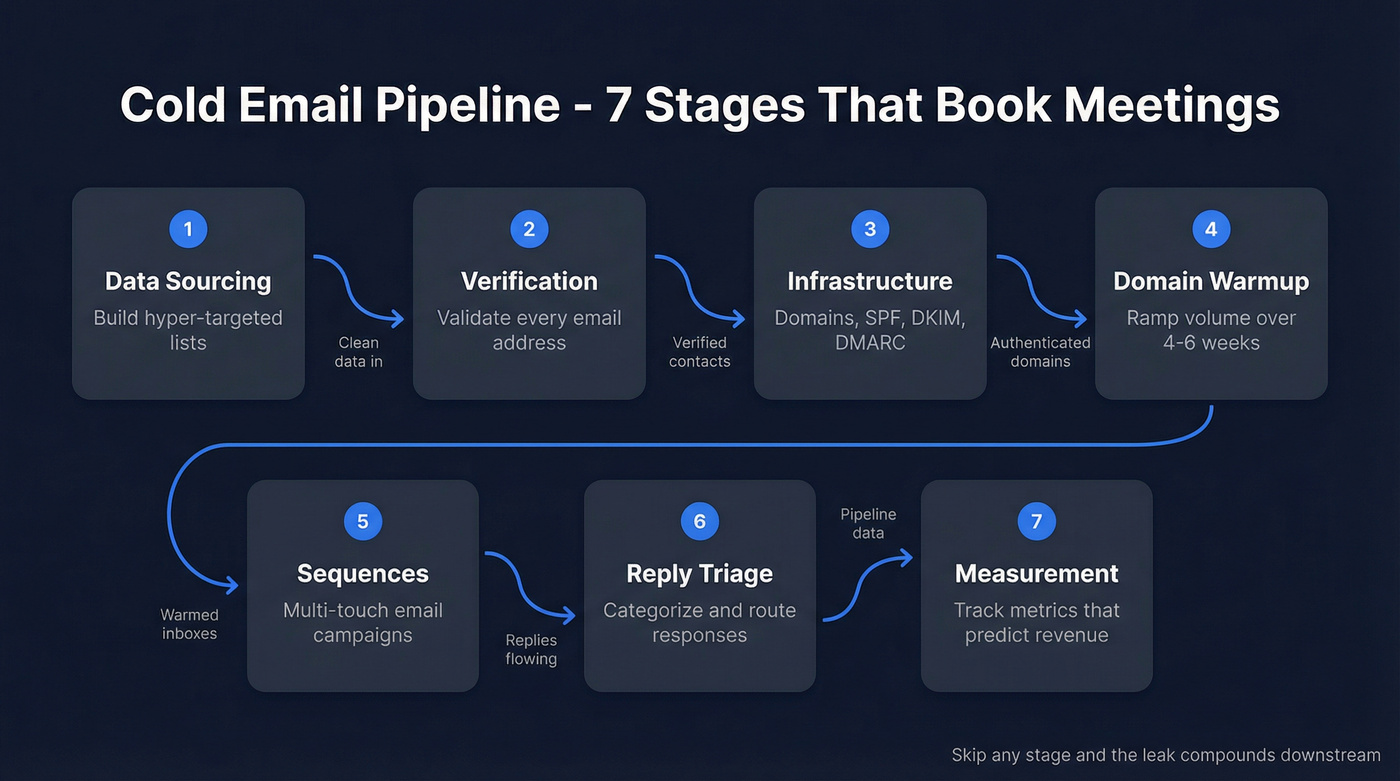
- Data Sourcing - Build hyper-targeted lists with verified contact data
- Verification - Validate every email before it touches your sending tool
- Infrastructure - Set up domains, authentication, and tracking
- Warmup - Ramp sending volume gradually to build domain reputation
- Sequences - Write and schedule multi-touch email campaigns
- Reply Triage - Categorize and route responses for maximum conversion
- Measurement - Track the metrics that actually predict revenue
Build Your Pipeline - Stage by Stage
Stage 1: Data Sourcing & List Building
Hyper-targeted lists outperform mass blasts by 2.76x). Trigger-event targeting - job changes, funding rounds, headcount growth - delivers 2.3x higher reply rates versus generic outreach. The data you start with determines everything downstream.
Before you touch a tool, define your ICP tightly. Role, company size, tech stack, and intent signals (more on intent signals here). "VP of Marketing at SaaS companies with 50-200 employees using HubSpot who just raised a Series A" is a list worth emailing. "Marketing people at tech companies" is a list worth ignoring.
Prospeo gives you 30+ search filters to build exactly that kind of list - buyer intent powered by Bombora tracking 15,000 topics, technographics, job change signals, headcount growth, and funding data. You're building your list with verified data from the start, not scraping contacts and hoping they're valid after the fact. If you want more options, compare list building tools.

Use this if you're running outbound at any scale and need contacts that won't bounce. Skip this at your peril - we've seen teams burn three domains in a month because they pulled unverified lists from cheap scraping tools and sent blind.
Stage 2: Email Verification
A bounce rate above 5% damages your domain reputation. Above 2% and you're already in the danger zone. Teams that skip verification typically see 35-40% bounce rates on their first campaign - at that point, you're not doing outreach. You're getting blacklisted. (If you need a shortlist, see the best email ID validators.)
The verification process that matters runs five steps with proprietary infrastructure - no third-party email providers in the chain. That includes catch-all domain handling, spam-trap removal, and honeypot filtering. The result is 98% email accuracy on a 7-day refresh cycle, compared to the 6-week industry average. For deeper mechanics, see email verification for outreach.
Here's the thing: the proof isn't theoretical. Meritt was running a 35% bounce rate before switching their data source. After the switch, bounces dropped under 4% and their pipeline tripled from $100K to $300K per week. That's not a verification story. That's a revenue story.


Every stage of your cold email pipeline depends on the data feeding it. Prospeo gives you 30+ filters - buyer intent, technographics, job changes, funding - so you build lists that convert, not lists that bounce. 98% email accuracy on a 7-day refresh cycle.
Stop leaking pipeline at Stage 1. Start with data that's already verified.
Stage 3: Infrastructure & Deliverability
Since May 2025, Google and Yahoo require SPF, DKIM, and DMARC authentication for bulk senders. RFC 8058 one-click unsubscribe is mandatory for marketing emails. These aren't suggestions - they're table stakes. (Full checklist: email deliverability checklist.)
Beyond authentication, here's your infrastructure checklist:
- Separate outbound domains. Never send cold email from your primary business domain. Register 2-3 dedicated domains that mirror your brand (tryacme.com, acmeteam.com).
- Custom tracking domain - a branded CNAME that isolates your reputation from shared tracking infrastructure.
- Multi-inbox setup. The best operators run 35+ subdomains and 70+ email accounts) per client campaign. You don't need that scale on day one, but plan for 3-5 inboxes minimum. If you’re building this from scratch, use an email sending infrastructure guide.
Real talk: this stage is boring. It's also the stage that separates teams with 90%+ deliverability from teams wondering why their emails vanish into spam folders.
Stage 4: Domain Warmup
New domains have zero reputation. Sending 500 emails on day one is like walking into a bank with no ID and asking for a loan. (More detail: automated email warmup.)
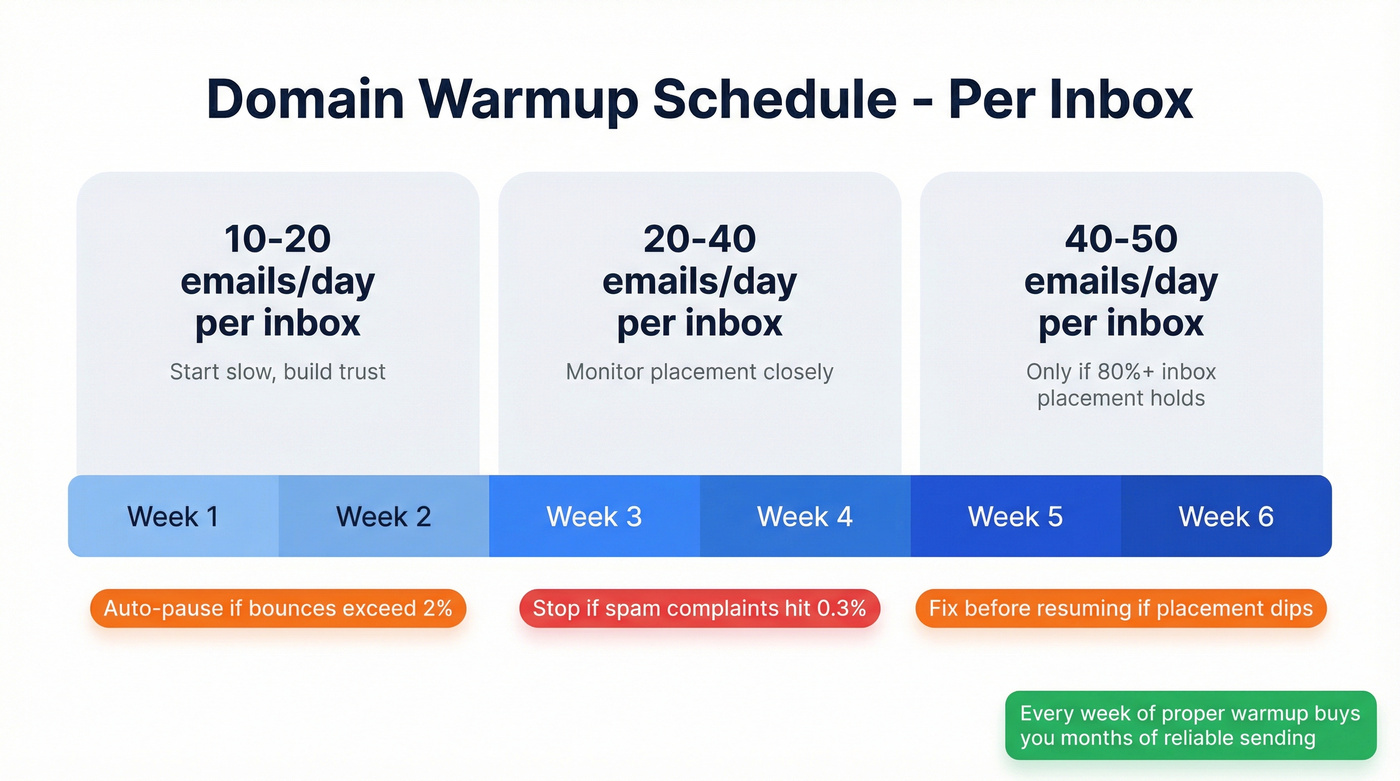
Start at 5-10 emails per day per inbox. Scale gradually over 4-6 weeks:
- Weeks 1-2: 10-20 emails/day per inbox
- Weeks 3-4: 20-40 emails/day per inbox
- Weeks 5-6: 40-50 emails/day per inbox (if placement holds)
Test inbox placement weekly. Don't increase volume until you're hitting 80%+ inbox placement consistently. Set auto-pause guardrails: if bounces exceed 2%, spam complaints approach 0.3%, or placement dips below threshold, stop and fix before resuming.
Patience here pays compound interest. Every week of proper warmup buys you months of reliable sending later.
Stage 5: Sending Sequences
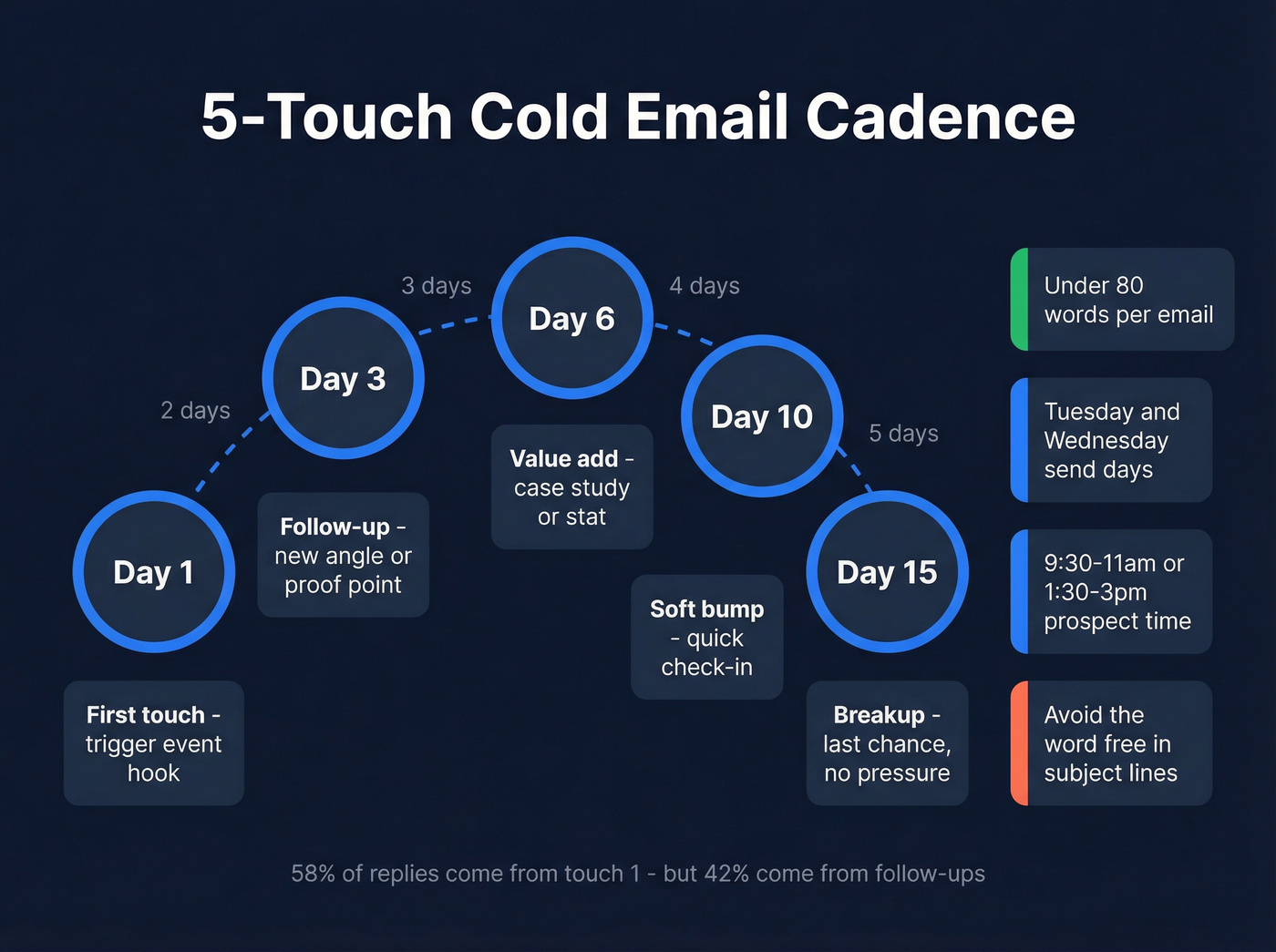
The 2026 benchmark report from Instantly analyzed billions of cold email interactions and found a clear pattern: best-performing campaigns keep emails under 80 words, run 4-7 touchpoints over 14-21 days, and A/B test messaging weekly. Tuesday and Wednesday consistently produce the highest reply rates. Send between 9:30-11:00am or 1:30-3:00pm in your prospect's timezone. (More timing guidance: best time to send prospecting emails.)
Personalized subject lines lift open rates by 22-36%. Keep them under 60 characters. No clickbait, no ALL CAPS, no emojis. (If you need guardrails, see words to avoid in email subject lines.)
A stripped-down first touch that works:
Subject: [Trigger event] at {{company}}
{{First name}}, saw {{company}} just {{trigger - hiring, raised, launched}}. When that happens, teams usually hit {{pain point}}.
We helped {{similar company}} solve that - {{one-line result}}.
Worth a 15-min call this week?
And the follow-up on Day 3-4:
Subject: Re: [original subject]
{{First name}}, quick follow-up. {{One new angle or proof point}}.
Would {{specific day}} work for a brief call?
A proven cadence: Day 1, 3, 6, 10, 15.
Copywriting micro-tactics that move the needle: The ratio of "I/my" to "you/your" in your cold emails should be about 1-to-2. Structure paragraphs in descending length to match how people scan emails in an F-pattern. And avoid the word "free" in subject lines - it's one of the most reliable spam-filter triggers. For more, use these cold email tactics.
One counterpoint worth considering: Buzzlead's data across 50+ companies shows 80% of positive responses come from the first two emails, which led them to run 2-3 email sequences instead of 7-8. We've seen this pattern too - shorter sequences with stronger targeting often outperform longer drip campaigns built on weaker lists. The consensus on r/coldemail tends to echo the same theme: data quality and targeting beat template hacks almost every time. Test both approaches and let your numbers decide.
Stage 6: Reply Triage
58% of all replies come from Step 1, and 42% from follow-ups. A Backlinko study of 12 million outreach emails found that one follow-up lifted replies by 65.8%. Follow-ups aren't optional - they're where nearly half your pipeline lives. (Next step: convert cold email replies to meetings.)
When replies come in, categorize them immediately:
- Positive - interested, wants a call
- Objection - timing, budget, authority
- Referral - wrong person, try someone else
- Not now - future opportunity
Each category gets a different response workflow. Objections get a one-line reframe. Referrals get a thank-you and a new outreach to the referred contact. "Not now" goes into a 90-day nurture sequence.
Don't let replies sit. Speed to response correlates directly with meeting conversion - every hour of delay erodes the momentum your sequence built.
Stage 7: Pipeline Measurement
If you're not measuring the right things, you're optimizing blind.
Reply rate formula: unique human replies / delivered emails x 100. Delivered means sent minus hard bounces. Exclude auto-replies, out-of-office messages, and system notices. Count only the first reply per contact. (Related: open rate vs click rate.)
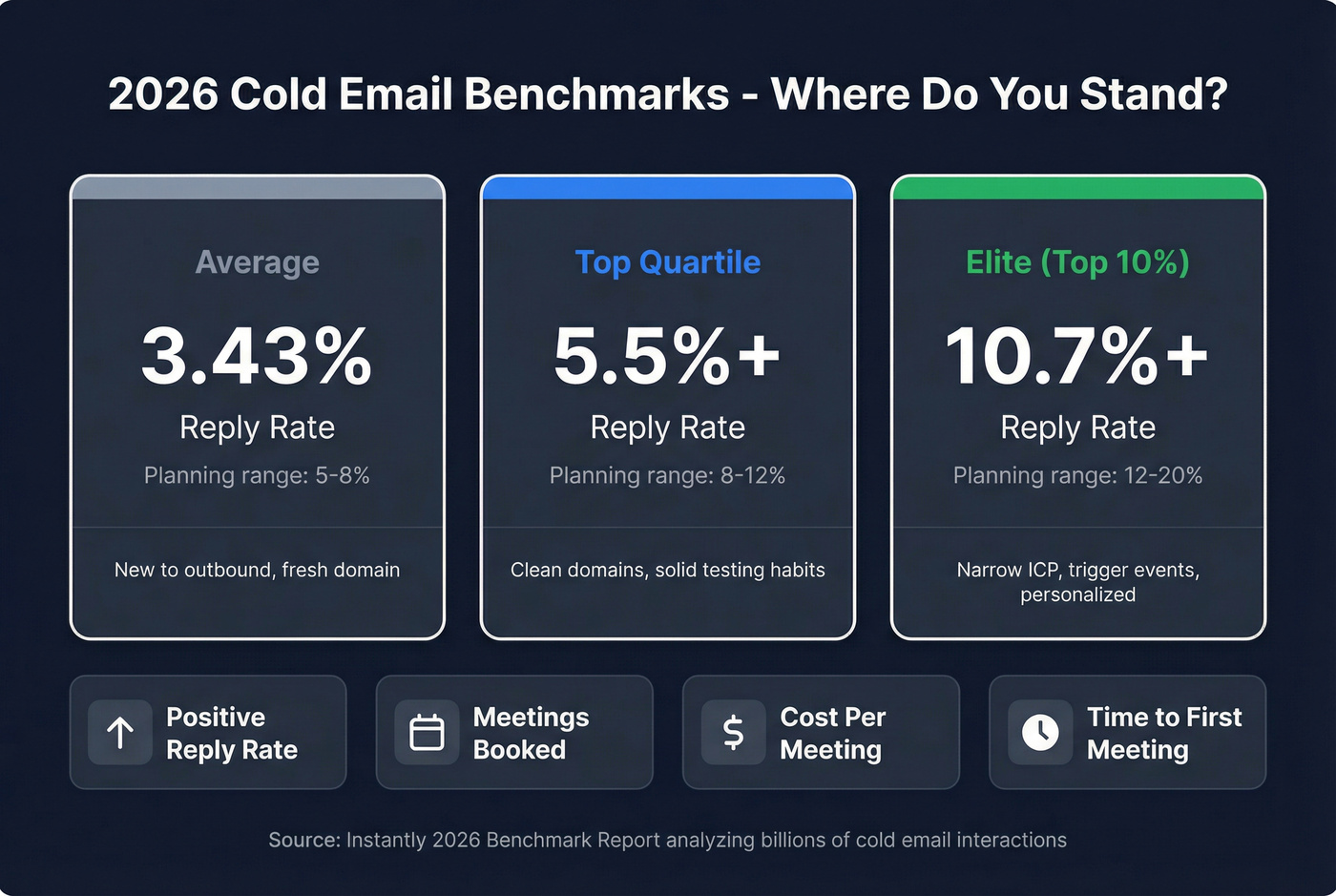
2026 benchmarks:
| Metric | Average | Top Quartile | Elite (Top 10%) |
|---|---|---|---|
| Reply rate | 3.43% | 5.5%+ | 10.7%+ |
| Planning range | 5-8% | 8-12% | 12-20% |
For context, Backlinko's study of 12 million outreach emails found an 8.5% average response rate - higher than the 3.43% benchmark because it included warmer outreach types. Use 3.43% for pure cold email planning; use 8.5% if your sequences include warm touches.
The planning ranges break down by maturity. New to outbound with a fresh domain? Target 5-8%. Clean domains with solid testing habits and verified data? 8-12% is realistic. Narrow ICP targeting combined with trigger events and personalized first lines pushes elite teams above 12%.
Beyond reply rate, track these weekly:
- Positive reply rate - positive replies / total replies
- Meetings booked - replies that convert to scheduled calls
- Cost per meeting - total spend (tools + data + time) / meetings
- Time to first meeting - days from campaign launch to first qualified meeting
Meritt tripled their pipeline from $100K to $300K/week after switching to Prospeo. Bounce rate dropped from 35% to under 4%. That's what happens when your cold email pipeline runs on 98% accurate data refreshed every 7 days - not the 6-week-old contacts your current provider is selling you.
75 free verified emails per month. No contracts. See the difference yourself.
Pipeline Math: Model Your Numbers
Say you're sending 1,000 emails per week with a 5% reply rate. Of those replies, 40% are positive. Of positive replies, 50% convert to meetings.
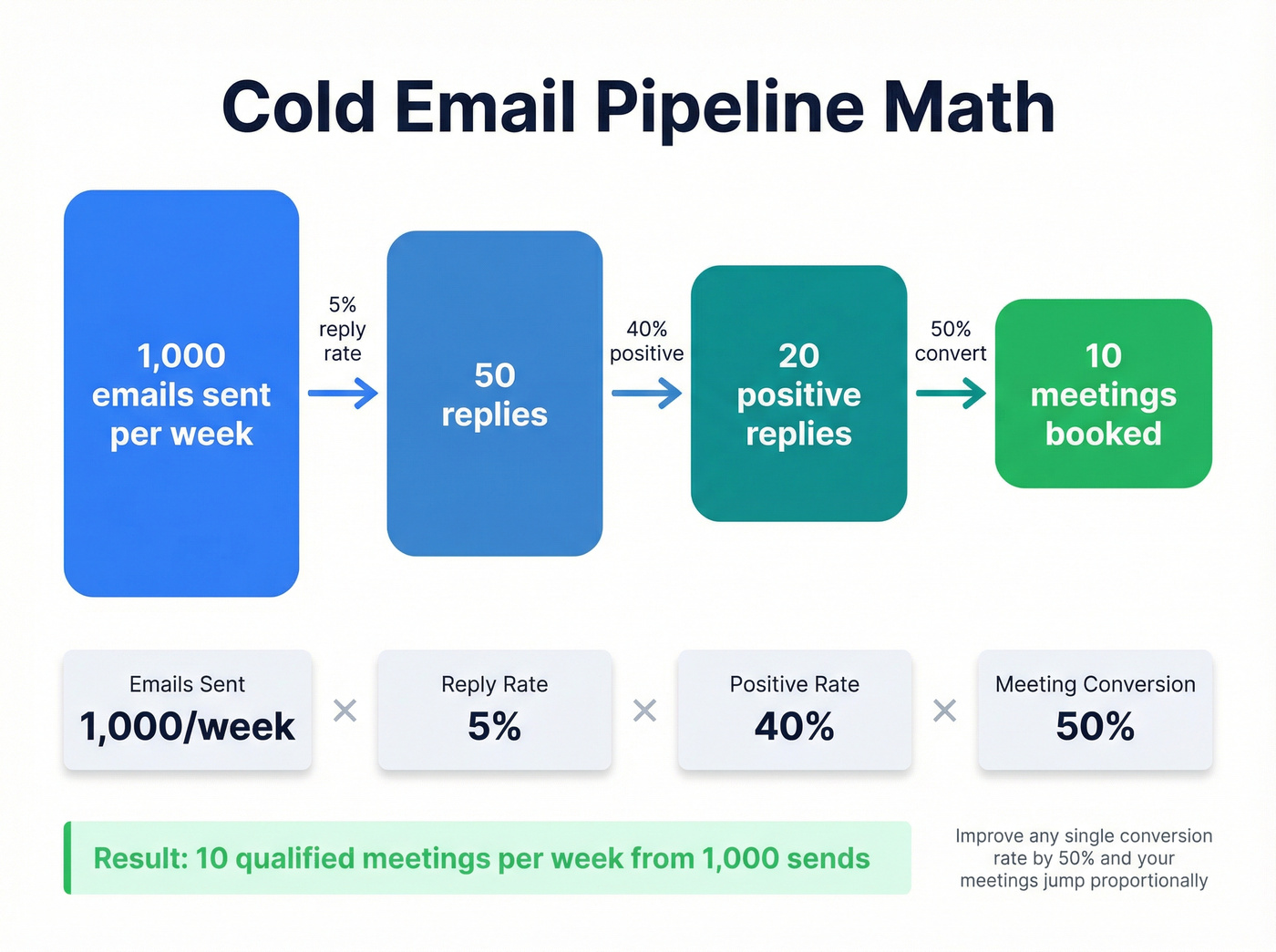
1,000 x 5% x 40% x 50% = 10 meetings per week.
Now a real campaign. RevenueFlow ran an 18-day campaign that sent 26,400 total emails to 15,569 new contacts. They hit a 1.59% response rate, generated 72 opportunities, and built $1.756M in pipeline. That's $24,389 per opportunity created in under three weeks.
The cost side matters too. At roughly $0.01 per lead for verified data, sourcing 15,000 contacts runs about $150. At enterprise pricing of around $1 per lead, that same list costs $15,000. The pipeline math doesn't change - but your cost per meeting drops by an order of magnitude when your data layer isn't eating your budget.
For teams with average deal sizes under $10K, you almost certainly don't need enterprise-tier data pricing. A self-serve data platform with 98% accuracy and a sending tool will get you 80% of the results at 10% of the cost. Save the big spend for when you have the revenue to justify it.
Recommended Tech Stack
| Pipeline Stage | Tool Category | Recommended | Approx. Cost |
|---|---|---|---|
| Data + Verification | B2B data platform | Prospeo | Free tier; ~$0.01/email paid |
| Data + Verification | Database (alt) | Apollo | Free tier; $49-99/mo |
| Data + Verification | Enterprise data | ZoomInfo | $15K-40K+/yr |
| Sending | Sequencer | Instantly | ~$30-97/mo |
| Sending | Sequencer (alt) | Smartlead | ~$39-94/mo |
| Sending | Sequencer (alt) | Lemlist | ~$39-99/mo |
| CRM | Pipeline tracking | HubSpot | Free-$100+/mo |
| CRM | Pipeline tracking | Salesforce | $25-300/mo |
Native integrations between your data platform, sequencer, and CRM matter more than most teams realize. Verified contacts should flow directly into your sending tool and CRM without CSV gymnastics. Every manual export-import step is a place where data gets stale, duplicated, or lost.
What Real Pipelines Produce
Numbers from teams running the system described above:
Pairaphrase hit an 84% open rate and 16% reply rate, booking 203 qualified appointments over 17 months. That's roughly 12 qualified appointments per month from cold email alone.
CustomChannels ran at 50-55% open rates and 8-10% reply rates, generating 115 appointments in 9 months with average deal sizes above $10,000. Their pipeline math: 115 appointments x $10K+ average deal = $1.15M+ in potential revenue from a single channel.
Stack Optimize built to $1M ARR with 94%+ deliverability, bounce rates under 3%, and zero domain flags across all clients. That's what happens when verification and infrastructure are done right from the start.
FAQ
How many emails does it take to book one meeting?
At a 5% reply rate with 40% positive replies and 50% meeting conversion, expect roughly one meeting per 100 delivered emails. Your data quality and ICP targeting are the biggest variables - tighter lists mean fewer emails needed per meeting.
What is a cold email pipeline?
A cold email pipeline is a structured system that moves prospects from first contact to booked meeting through seven connected stages: data sourcing, verification, infrastructure, warmup, sequences, reply triage, and measurement. It turns scattered outreach into a repeatable revenue engine.
What's a good reply rate in 2026?
The average is 3.43% per the 2026 benchmark data. Top-quartile performers hit 5.5%+, and elite senders exceed 10.7%. Anything above 5% means your fundamentals - list quality, deliverability, and copy - are solid.
How long does domain warmup take?
Plan 4-6 weeks minimum. Start at 5-10 emails per day per inbox and scale gradually. Test inbox placement weekly - don't increase volume until you're hitting 80%+ consistently. Rushing warmup is the fastest way to land in spam.
What's the cheapest way to build a pipeline with verified data?
Prospeo's free tier includes 75 verified emails and 100 Chrome extension credits per month - enough to test your first sequences. Paid plans run about $0.01 per email, which is roughly 90% cheaper than enterprise platforms while delivering 98% accuracy.