9 Cold Email Tactics That Actually Move Reply Rates in 2026
70% of cold email chains stop after a single message. That's not a copywriting problem - it's a systems problem. Most teams obsess over subject lines while sending unverified emails from unauthenticated domains into the void. The 9 cold email tactics below are ordered by impact, and every one has a benchmark attached so you know whether it's working.
Nail These Three First
If you skim nothing else:
- Move up the personalization ladder. Signal-based personalization pushes reply rates to 15-25% - a 5x lift over generic blasts.
- Build a 5-touch follow-up sequence. A single follow-up increases replies by 49-65%. Most of your wins come after email one.
The 9 Tactics
1. Verify Your List First
Bad data kills everything downstream. You can write the best cold email ever crafted, and it won't matter if 35% of your list bounces. That's not hypothetical - Meritt was running a 35% bounce rate before switching to verified data, and Snyk's team of 50 AEs was dealing with 35-40% bounces that tanked their domain reputation.
Bounce rate is a hard guardrail: keep it under 2%. Above that, deliverability degrades fast. Once your reputation slips, even your good emails land in spam.
We've seen teams triple pipeline just by fixing bounce rates. Meritt dropped from 35% bounces to under 4% and went from $100K to $300K in weekly pipeline. Snyk went from 35-40% to under 5%, and their AE-sourced pipeline jumped 180%. This single fix - cleaning your list before you write a word of copy - delivers more ROI than any subject line tweak ever will.

2. Set Up Deliverability Infrastructure
Authentication isn't optional anymore. Google and Yahoo began enforcing new requirements for bulk senders in February 2024, including authentication, spam-rate thresholds, and easy unsubscribe. Microsoft followed in May 2025, rejecting non-compliant high-volume messages to Outlook.com domains. If you haven't set this up, your emails are already getting filtered.
Here's the non-negotiable checklist:
- SPF + DKIM + DMARC published on your sending domain (days 1-2 of any new domain)
- Custom tracking domain via CNAME (days 3-5)
- Turn off click tracking if deliverability is slipping - and don't obsess over opens in 2026, because open tracking is increasingly unreliable
- Spam rate below 0.10% in Google Postmaster Tools - never hit 0.30%
- Bounce rate under 2% - pause campaigns if you breach this
For warmup, start at 5-10 emails per day, ramp to 20-40 by week two, and reach 40-50 per day only after 4-6 weeks of clean sending. A Mailpool analysis of 1 million cold emails found that authenticated domains hit 96-98% inbox placement, while domains missing authentication saw deliverability drop by as much as 30%.
3. Move Up the Personalization Ladder
Here's the thing: personalization is the single biggest lever most teams underinvest in. They'll spend hours A/B testing subject lines while sending the same generic pitch to every prospect. The data makes the case clearly.
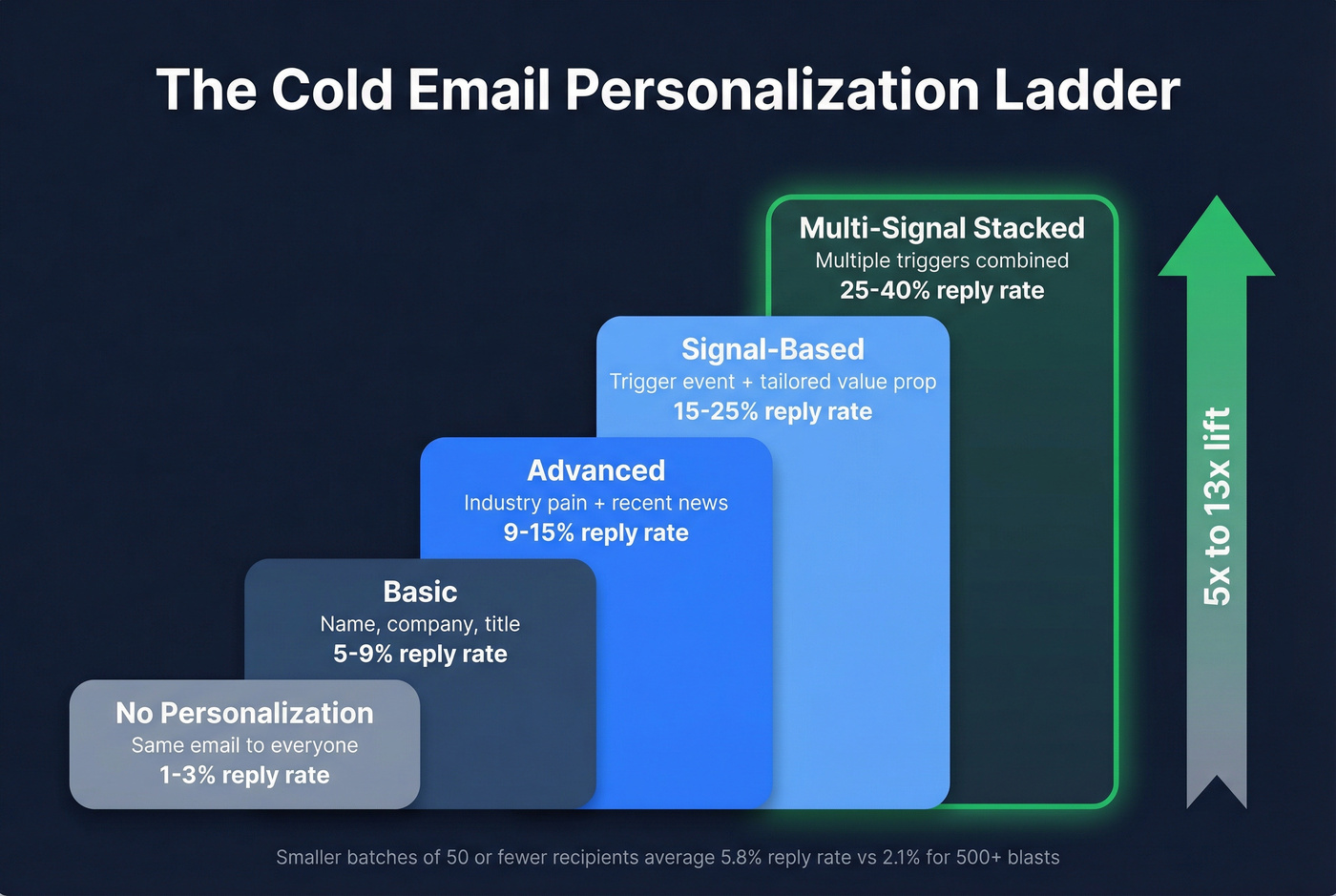
| Personalization Level | What It Looks Like | Expected Reply Rate |
|---|---|---|
| None | Same email to everyone | 1-3% |
| Basic | Name, company, title | 5-9% |
| Advanced | Industry pain + recent news | 9-15% |
| Signal-based | Trigger event + tailored value prop | 15-25% |
| Multi-signal stacked | Multiple triggers combined | 25-40% |
Campaigns targeting 50 or fewer recipients average a 5.8% reply rate, while large blasts of 500+ recipients drop to 2.1%. Smaller, more targeted batches win every time.
If your deal sizes are under $10K, you probably don't need 500-person campaigns at all. Build a list of 50 ideal-fit accounts, research each one for 5 minutes, and write emails that prove it. You'll book more meetings from 50 emails than most teams book from 5,000.
4. Write Subject Lines for Mobile
Keep subject lines between 30-50 characters - that's the mobile-safe zone where nothing gets truncated. [Personalized subject lines lift open rates](https://www.forbes.com/sites/blakemorgan/2020/02/18/50-stats-showing-the-power-of-personalization/) by roughly 26%, but the real metric is replies. Open tracking is increasingly unreliable thanks to privacy proxies.
Front-load the hook in the first 40-50 characters. And stop using "Quick question" or "Thoughts on..." - those templates are saturated. Every SDR on the planet has sent them. Write something specific to the trigger that made you reach out.
One counterintuitive finding: short isn't always better. A 6-word subject line that says nothing specific will lose to a 10-word line that references a real trigger event.
5. Keep It Under 125 Words
The sweet spot is 50-125 words - two scrolls or fewer on mobile. Here's the structure that works:
Hi [Name], saw [Company] just [trigger event]. Most [role]s at [company size] companies hit [specific problem] when that happens - [consequence if ignored]. We helped [similar company] fix that in [timeframe]. Worth 15 minutes Thursday?
That's it. Personalized hook proving you did research, specific problem, consequence of ignoring it, proof you can help, low-friction CTA. No walls of text. No three-paragraph company introductions. If your email requires scrolling past the fold on a phone, you've already lost most readers - a direct message that gets to the point in two sentences will always outperform a meandering pitch that buries the ask at the bottom.
6. Use Timeline-Based CTAs
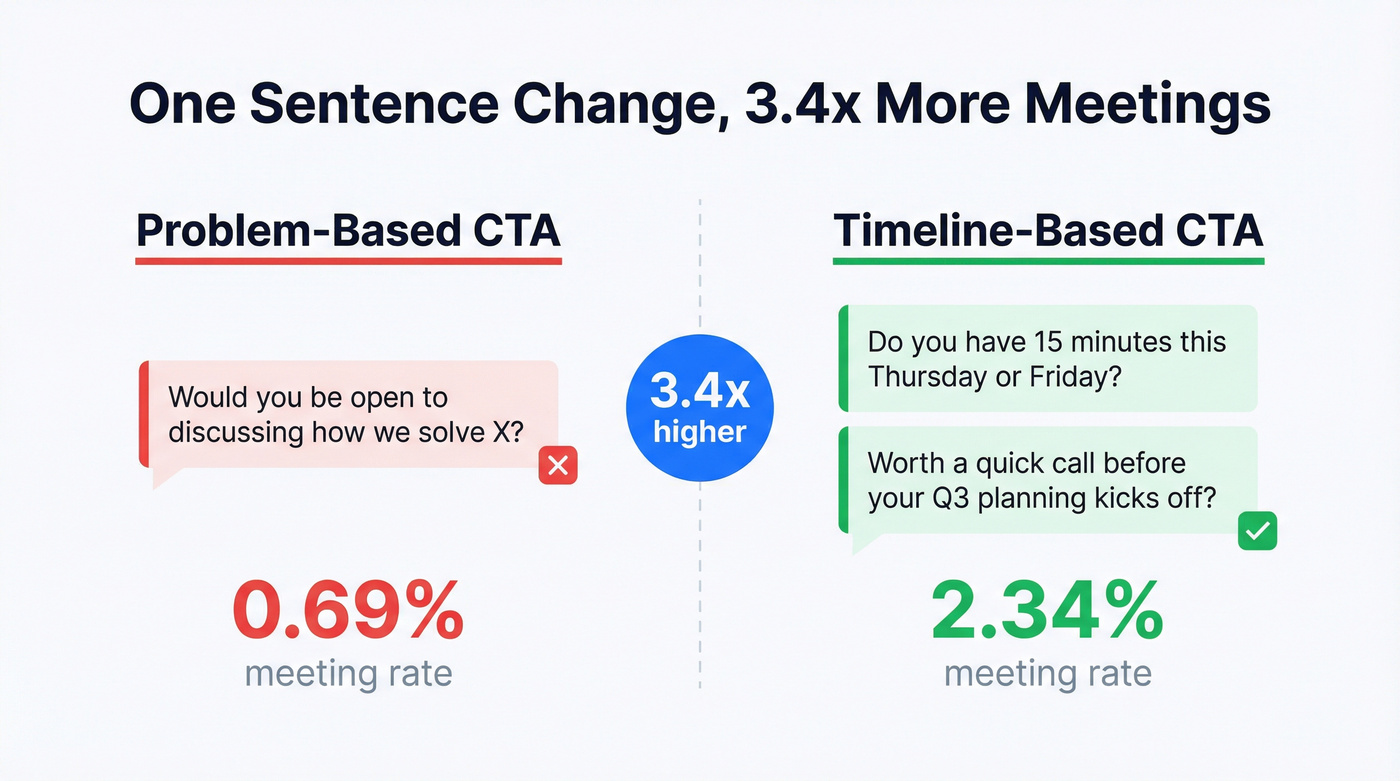
Your CTA matters more than most people think. Digital Bloom's data shows timeline-based CTAs convert at a 2.34% meeting rate versus 0.69% for problem-based CTAs. That's a 3.4x difference from changing one sentence.
Skip this if you're selling to C-suite executives who delegate scheduling - ask for their assistant's calendar link instead. For everyone else:
- ❌ "Would you be open to discussing how we solve X?"
- ✅ "Do you have 15 minutes this Thursday or Friday?"
- ✅ "Worth a quick call before your Q3 planning kicks off?"
The timeline creates urgency without pressure. It gives the prospect a concrete next step instead of an abstract commitment. Among all the cold email tactics we've tested, swapping a vague CTA for a specific time window is the easiest to implement and one of the highest-impact changes you can make.
7. Build a 5-Touch Follow-Up Sequence
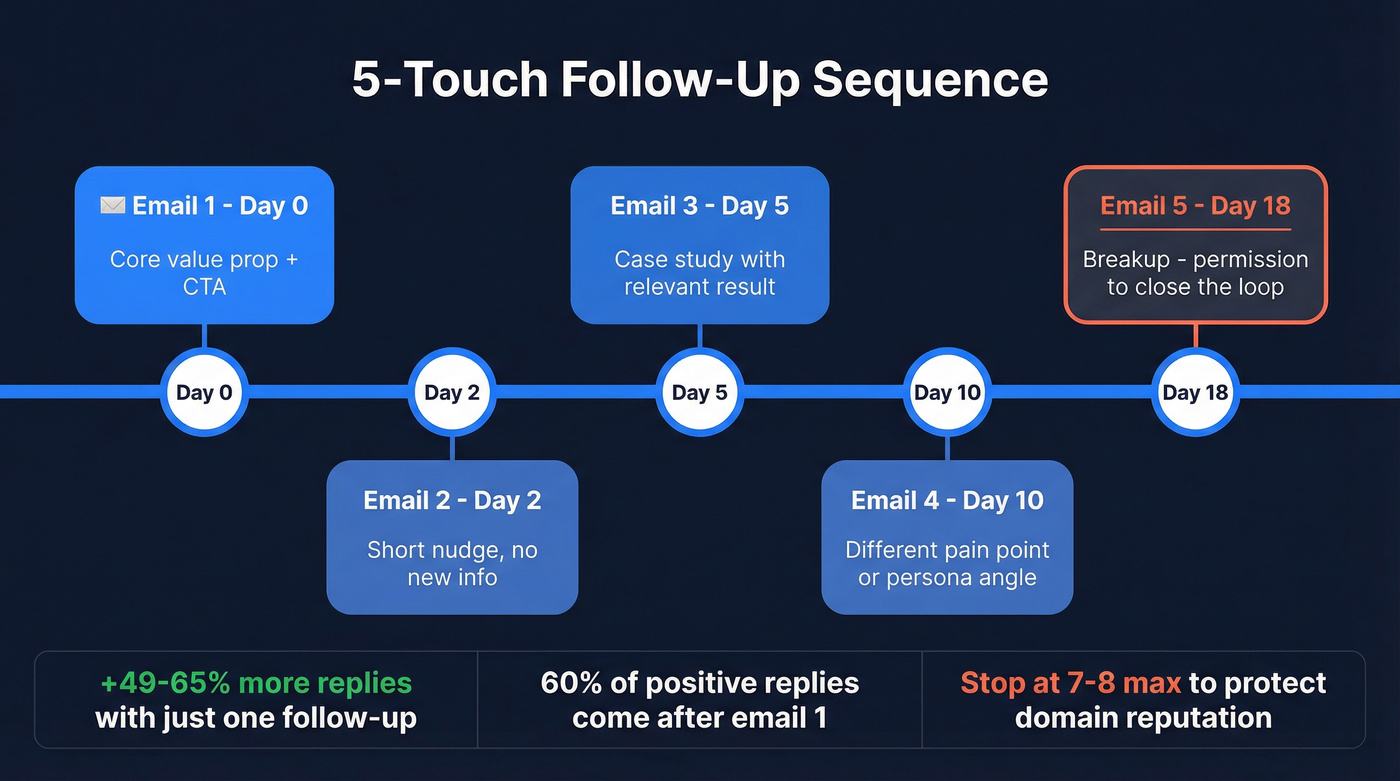
Most of your replies won't come from email one. A single follow-up increases replies by 49-65.8%, and roughly 60% of all positive replies come after the initial send. Lemlist's 2025 benchmark shows that 4-7 emails generate 3x more responses than 1-3 emails.
| Touch | Day | Angle |
|---|---|---|
| Initial | Day 0 | Core value prop + CTA |
| Nudge | Day 2 | Short bump, no new info |
| Case study | Day 5 | Social proof, relevant result |
| Alternate angle | Day 10 | Different pain point or persona |
| Breakup | Day 18 | Permission to close the loop |
Don't go past 7-8 total emails. Beyond that, spam complaints spike and you're burning domain reputation for diminishing returns. The sweet spot is 4-7 emails over 14-21 days.
8. Send Tuesday-Thursday, 9-11 AM
Mailpool's million-email dataset found the best engagement window is Tuesday through Thursday, 9-11 AM in the recipient's time zone. Monday inboxes are flooded. Friday attention is already gone.
Volume guardrails matter here too. Conservative: 15-20 emails per inbox per day. Ceiling for warmed domains: 20-50 per inbox per day. If you need more volume, add inboxes and domains - don't crank send rates from a single account. That's the fastest way to trigger spam filters.
9. A/B Test One Variable at a Time
Test subject lines first - they're the highest-leverage element because they determine whether anything else gets seen. Then test CTAs. Then body copy.
The framework is simple: one hypothesis per test, control everything else, and measure by reply rate, not opens. Run tests long enough for statistical significance. If you're testing on 50-person batches, you won't learn anything meaningful - aim for at least 200 sends per variant before drawing conclusions. Systematic A/B testing compounds over time, and each winning variant lifts every future campaign you run.

Meritt cut bounces from 35% to under 4% and tripled weekly pipeline to $300K. Snyk's 50 AEs saw pipeline jump 180%. Both started with the same fix: switching to Prospeo's 98% verified emails refreshed every 7 days.
Clean data is the first cold email tactic. Everything else is decoration.
Quick-Reference Benchmarks
Every tactic above has a number. Here they are in one place.
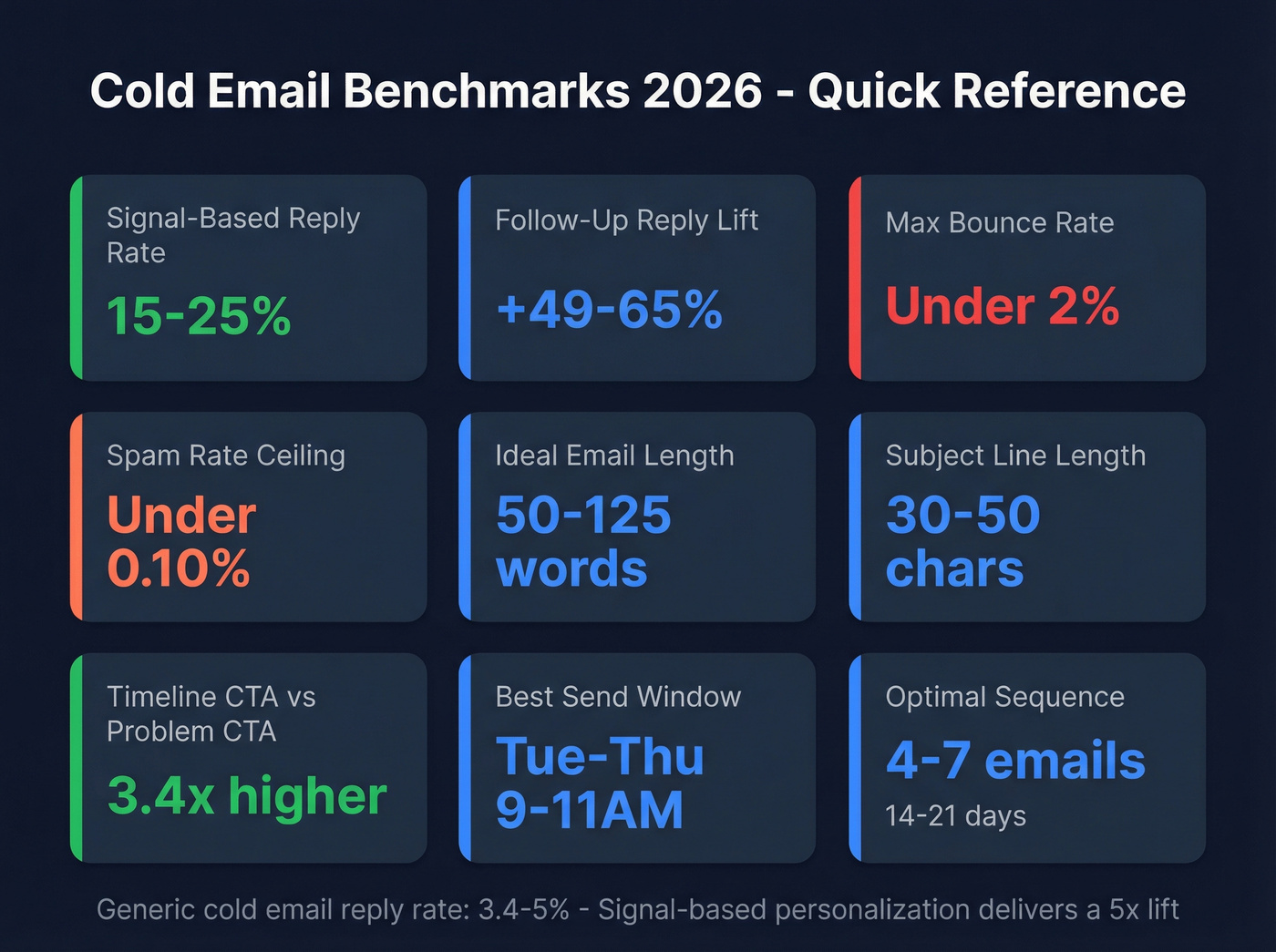
| Metric | Benchmark |
|---|---|
| Avg reply rate (generic) | 3.4-5% |
| Signal-based reply rate | 15-25% |
| Follow-up reply lift | +49-65% |
| Max bounce rate | Under 2% |
| Spam rate ceiling | Under 0.10% |
| Daily send (conservative) | 15-20/inbox |
| Daily send (ceiling) | 20-50/inbox |
| Email length | 50-125 words |
| Subject line length | 30-50 characters |
| Timeline CTA vs problem CTA | 2.34% vs 0.69% |
| Best send days | Tue-Thu, 9-11 AM |
| Optimal sequence length | 4-7 emails, 14-21 days |
Your Cold Email Stack
You need three layers: verified contact data, a sending platform, and a CRM. Prospeo handles the data layer - 98% email accuracy at roughly $0.01 per email, self-serve, no contracts. Stack Optimize built from $0 to $1M ARR using it, maintaining 94%+ deliverability across every client campaign with bounce rates under 3% and zero domain flags.
For sending, Instantly runs about $30/mo and Lemlist starts around $39/mo. CRM-side, HubSpot's free tier works until you outgrow it. Apollo (free tier available; paid from $59/mo per user) is a solid all-in-one alternative if you want database and sending in one tool. GMass ($25-55/mo depending on tier) works for Gmail-native teams who don't need a separate platform. If you're comparing platforms, start with these cold email marketing tools and a deliverability-first email deliverability checklist.
Signal-based personalization needs real data. Prospeo's 30+ filters - buyer intent, job changes, funding, technographics - let you build the 50-person hyper-targeted lists that hit 15-25% reply rates. At $0.01 per email.
Stop blasting 5,000 contacts. Start targeting 50 that actually reply.
FAQ
Which cold email tactics should I try first?
Fix your data quality - it unlocks everything else. Teams using verified lists and signal-based personalization with intent data push reply rates from 3-5% to 15-25%. Pair that with a 5-touch follow-up sequence for the biggest lift.
How many follow-up emails should I send?
Send 4-7 total emails over 14-21 days. A single follow-up increases replies by 49-65%, and roughly 60% of positive replies come after the first email. Going beyond 8 emails increases spam complaints without meaningful gains.
How do I keep cold emails out of spam?
Authenticate your domain with SPF, DKIM, and DMARC - this alone prevents a 30% deliverability drop. Keep bounce rates under 2% by verifying your list before sending. Warm up new domains over 4-6 weeks, and never let your spam complaint rate hit 0.30%.