

How to Build Cold Email Infrastructure That Doesn't Land in Spam
A RevOps lead we know ran cold outreach from his company's primary domain for three weeks. By week four, the CEO's emails to customers were landing in spam, finance couldn't send invoices reliably, and the entire company's sender reputation was torched. That's what bad cold email infrastructure does - it doesn't just hurt outbound, it poisons everything. With global inbox placement averaging just 83.1%, the margin for error is thinner than most teams realize.
Most infrastructure guides are written by infrastructure providers. We'll tell you when you don't need one.
What Is Cold Email Infrastructure?
It's the technical foundation that separates emails landing in primary inboxes from emails landing in spam - or never arriving at all. Five layers working together: secondary domains, DNS authentication, dedicated mailboxes, warmup protocols, and sending/rotation tools.
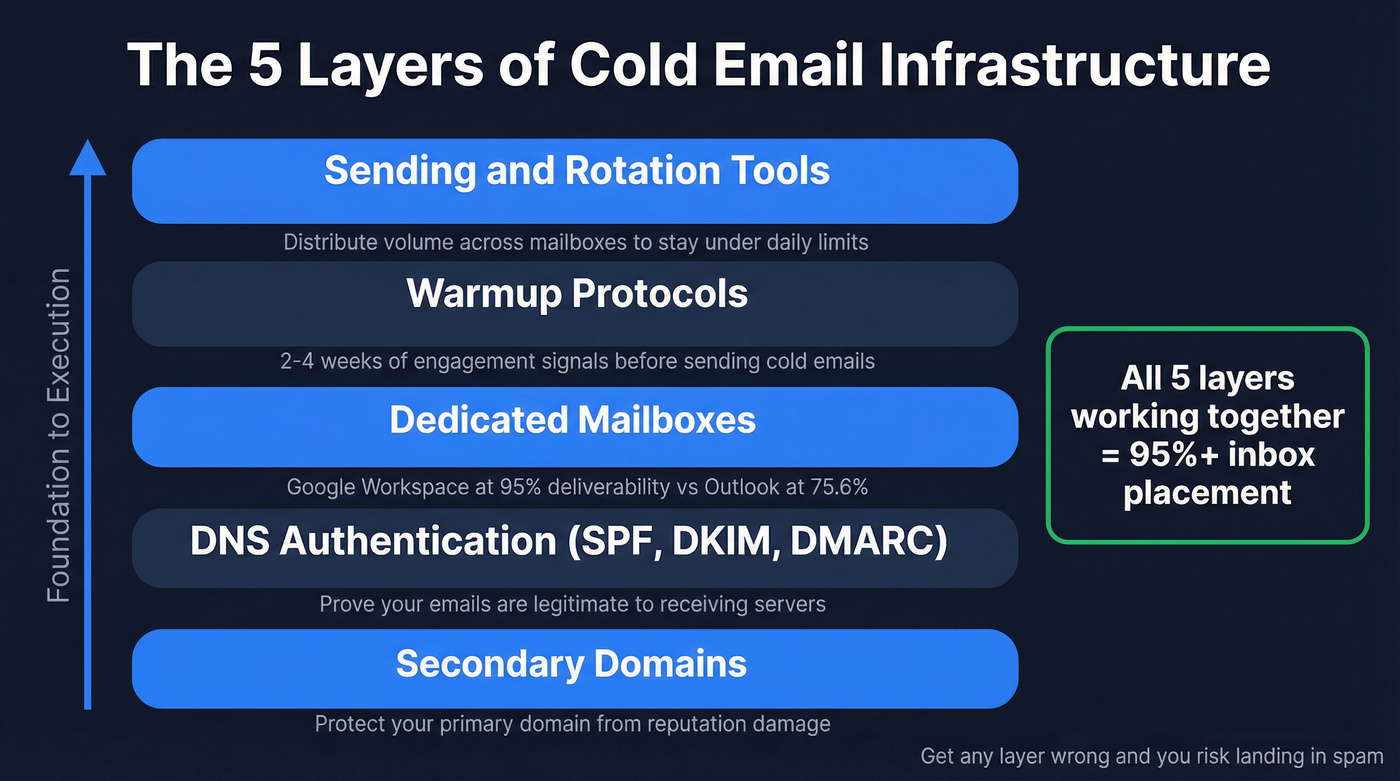
Each layer matters, but they're not equally weighted. Gmail mailboxes hit roughly 95% deliverability while Outlook sits around 75.6%. That gap alone should tell you provider choice isn't a minor detail - it's structural. Get the right setup in place and well-run programs reach 95%+ inbox placement. Get it wrong and you're burning money on sequences nobody reads.
DNS Authentication Done Right
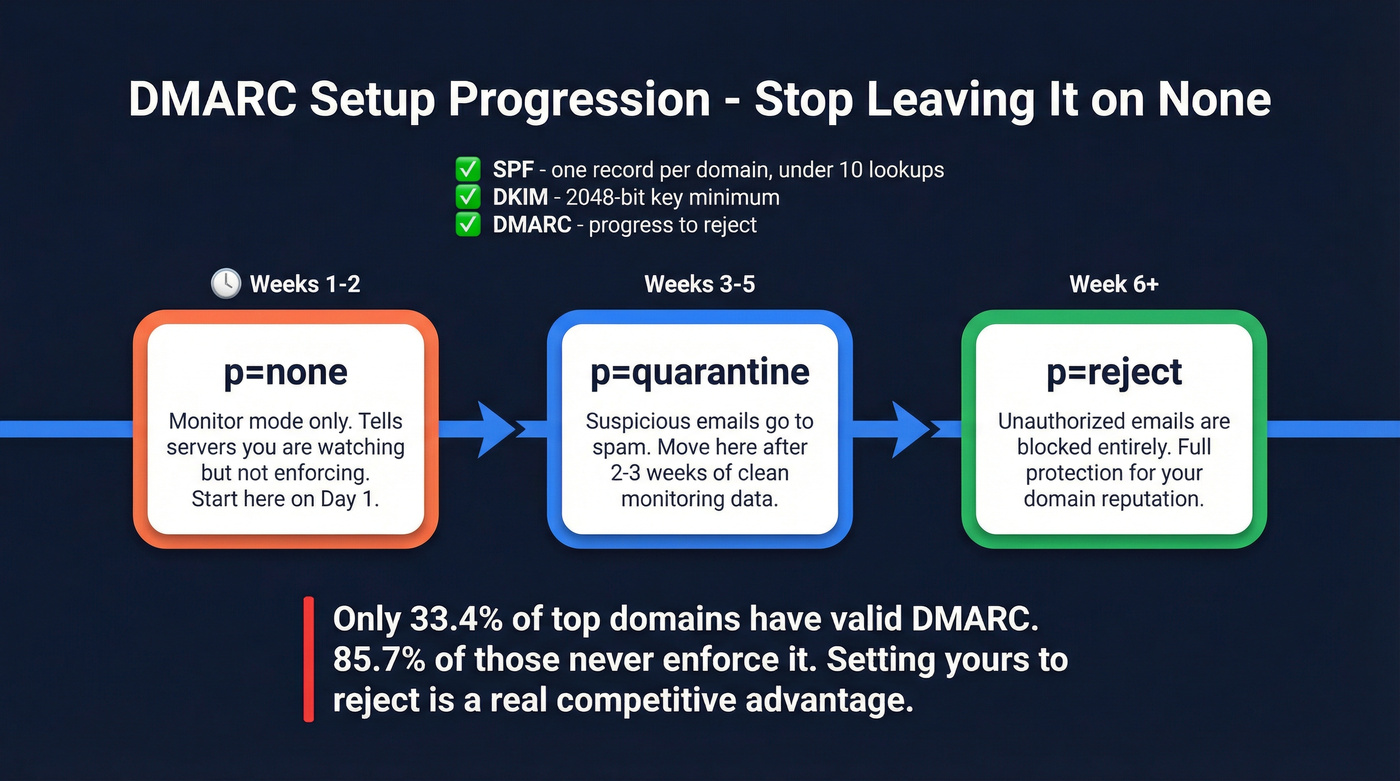
DNS authentication is three records that determine whether your emails arrive or vanish. SPF, DKIM, and DMARC tell receiving servers your emails are legitimate. Gmail, Yahoo, and Microsoft now require all three for bulk senders exceeding 5,000 messages per day.
Your setup checklist:
- SPF: One record per domain. Not two, not three - one. Multiple SPF records confuse recipient servers and can cause outright authentication failures. Stay under the 10 DNS lookup limit by minimizing
includemechanisms. - DKIM: Generate a 2048-bit key minimum. Your provider should handle this automatically. If they don't, that's a red flag.
- DMARC: Start with
p=noneto monitor, move top=quarantineafter 2-3 weeks of clean data, then graduate top=reject.
Only 33.4% of the top million domains even have a valid DMARC record, and 85.7% of those don't enforce it. Setting yours up properly is a genuine competitive advantage. (If you want the deeper technical walkthrough, see our SPF, DKIM, DMARC guide.)
Mistakes That Kill Deliverability
Publishing multiple SPF records is the #1 DNS error we see. It happens when teams add a new sending service and create a second SPF record instead of merging include statements into the existing one. Five-minute fix, weeks of damage if you miss it.
The second most common mistake is setting DMARC to p=none and never progressing. That's monitoring mode, not protection. It tells receiving servers you don't actually care about enforcement.
On enterprise recipients: if you're targeting mid-market or enterprise accounts, many run Secure Email Gateways like Proofpoint, Mimecast, or Barracuda. These gateways apply additional filtering beyond standard spam checks. Some sending platforms - Instantly among them - can detect SEG-protected domains and adjust routing accordingly. If enterprise is your ICP, factor this into your platform choice.
How Many Domains and Inboxes You Need
Let's do the math. A safe sending range for new domains is 20-30 cold emails per mailbox per day. The standard ratio is 1 domain for every 3-4 mailboxes.
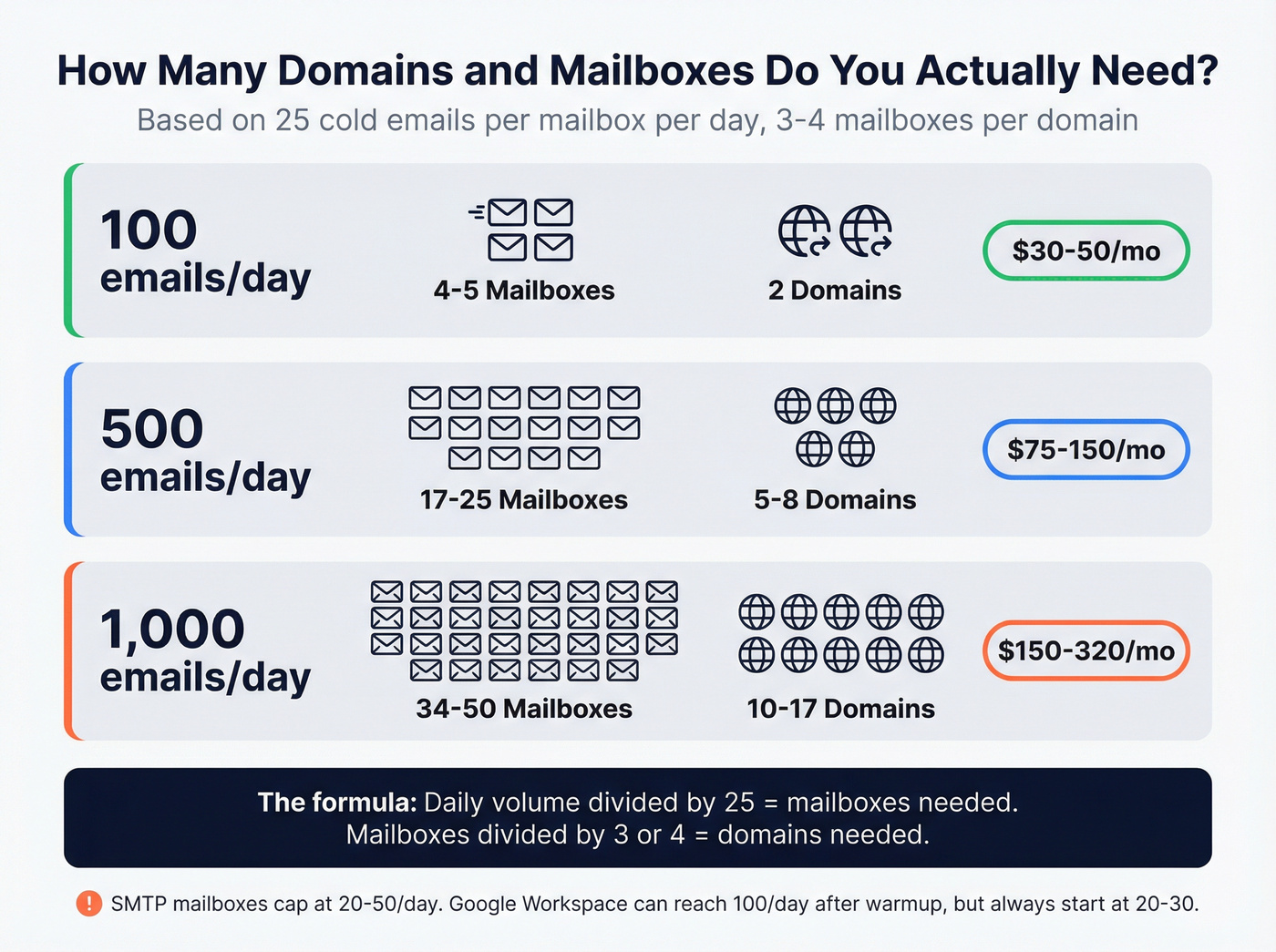
Say you want to send 1,000 cold emails per day. At 25 emails per mailbox, you need 40 mailboxes. At 3 mailboxes per domain, that's roughly 13-14 domains. At 4 mailboxes per domain, you're looking at 10.
| Daily Volume | Mailboxes Needed | Domains Needed | Monthly Infra Cost (est.) |
|---|---|---|---|
| 100/day | 4-5 | 2 | ~$30-50 |
| 500/day | 17-25 | 5-8 | ~$75-150 |
| 1,000/day | 34-50 | 10-17 | ~$150-320 |
SMTP mailboxes cap at 20-50 cold emails per day because they don't generate the trust signals that Google Workspace or Microsoft 365 accounts build naturally. Google Workspace accounts can push closer to 100/day after warmup, but starting at 20-30 is still the safest ramp regardless of provider. (For more on volume planning, see cold email volume best practices.)
Warmup - The Part Everyone Rushes
Warmup takes 2-4 weeks. Every team that tries to skip or compress this timeline ends up with domains in spam within the first month.
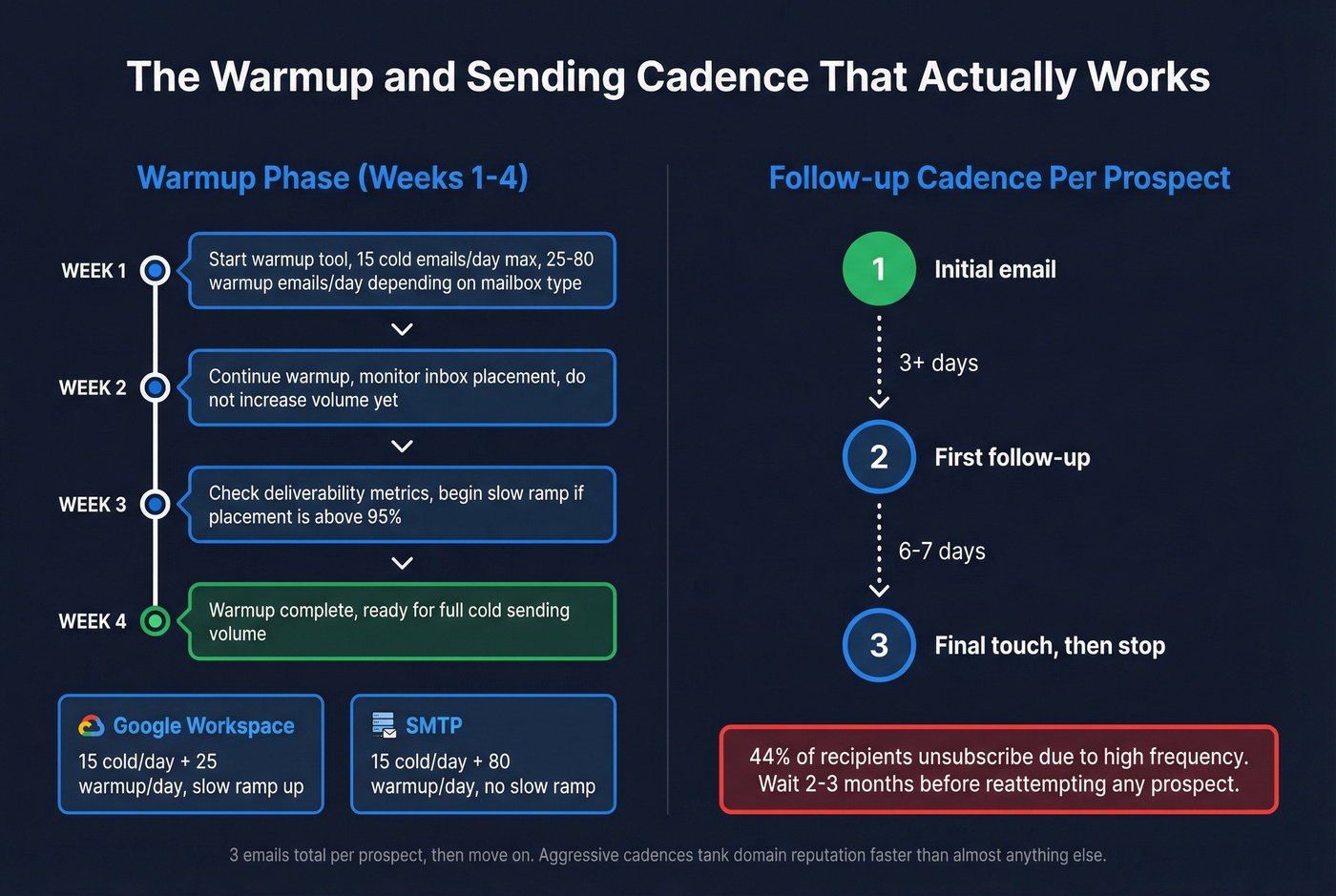
The process is straightforward: your warmup tool sends and receives emails between your new mailboxes and a network of real inboxes, building engagement signals that tell Gmail and Outlook your account is legitimate. Non-negotiable.
Maildoso publishes specific guidance that's worth following as a baseline:
| Mailbox Type | Cold Emails/Day | Warmup Emails/Day | Ramp Style |
|---|---|---|---|
| Google Workspace | 15 | 25 | Slow ramp up |
| SMTP | 15 | 80 | No slow ramp |
After warmup, keep your follow-up cadence conservative. The data supports 3 emails total per prospect - one initial, one follow-up at 3+ days, and a final touch at 6-7 days after that. Then stop. Wait 2-3 months before reattempting. 44% of recipients unsubscribe due to high frequency, and aggressive cadences tank domain reputation faster than almost anything else. (If you need copy help, start with these outreach email templates.)

Your domains, DNS, and warmup are only as good as the data you feed them. A single unverified list can torch weeks of infrastructure setup. Prospeo's 5-step verification - with spam-trap removal, honeypot filtering, and catch-all handling - keeps bounce rates under 3% so your sending reputation stays intact.
Don't let bad data burn the infrastructure you just built.
Bad Data Kills Good Infrastructure
Here's the thing: you can nail every technical detail - perfect DNS, proper warmup, conservative volume - and still land in spam. The culprit is almost always bad data.
A 15% bounce rate will destroy your domain reputation regardless of how clean your DNS setup is. Receiving servers interpret high bounce rates as a signal that you're scraping or buying junk lists, and they respond by throttling or blocking your entire sending domain. We've watched teams spend thousands on infrastructure only to torch it all with a single unverified list import. (Related: what a hard bounce actually means operationally.)
Stack Optimize built their agency from $0 to $1M ARR running cold outreach for clients. Their deliverability sits at 94%+, bounce rates stay under 3%, and they've had zero domain flags across all client accounts. The difference isn't infrastructure - it's verifying every email before it enters a sequence.
Prospeo's 5-step verification catches invalid addresses, spam traps, honeypots, and catch-all domains before they ever touch your sending infrastructure. At 98% email accuracy with a 7-day data refresh cycle, it's the layer between your infrastructure investment and your domain reputation. Upload a CSV, verify in bulk, and push clean contacts straight to Instantly, Smartlead, or Lemlist through native integrations. (If you're comparing tools, see our roundup of the best email ID validators.)

Stack Optimize runs cold outreach for dozens of clients with 94%+ deliverability and zero domain flags. Their secret isn't better infrastructure - it's verifying every contact through Prospeo at ~$0.01/email before it enters a sequence. Native integrations push clean lists straight to Instantly, Smartlead, or Lemlist.
Protect every domain in your rotation with 98% accurate contact data.
Best Outbound Infrastructure Providers in 2026
Most providers below auto-configure SPF, DKIM, and DMARC on every domain - that's table stakes now, not a differentiator.
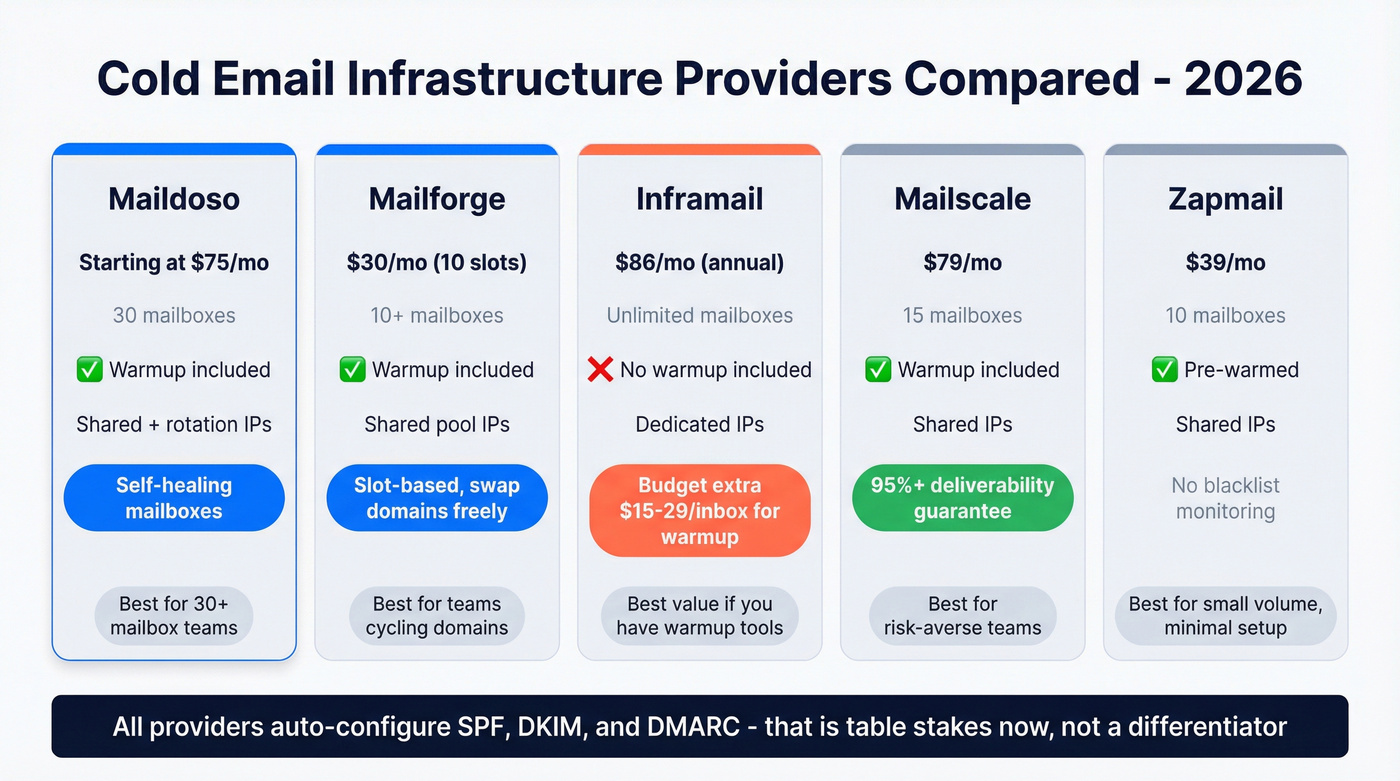
| Provider | Starting Price | Mailboxes | Warmup Included | IP Type |
|---|---|---|---|---|
| Maildoso | $75/mo | 30 | Yes | Shared + rotation |
| Mailforge | $30/mo (10 slots) | 10+ | Yes | Shared pool |
| Mailscale | $79/mo | 15 | Yes | Shared |
| Inframail | ~$86/mo (annual) | Unlimited | No | Dedicated |
| Zapmail | $39/mo | 10 | Yes (pre-warmed) | Shared |
Salesforge and Infraforge both offer competitive packages too, though neither matches the warmup tooling depth you get with Maildoso or Mailforge.
Maildoso
Maildoso is the obvious pick for teams scaling past 30 mailboxes. The SMTP plan starts at $75/mo for 30 mailboxes ($2.50 each), with a quarterly option at $299/qtr for 32 mailboxes including 8 free domains. SPF, DKIM, and DMARC are auto-configured. The platform runs inbox placement tests every 3 days and pauses underperforming mailboxes for 14 days before rotating them back in - "self-healing mailboxes" that genuinely reduce manual monitoring overhead.
Domain renewals run $12/year ($8 first year on promo). Google Workspace accounts cost $120/mo for 30 mailboxes. In our experience, the self-healing rotation alone justifies the price difference over cheaper alternatives, especially for teams running 50+ mailboxes where manual monitoring becomes a full-time job.
Mailforge
Skip this if you run fewer than 15 mailboxes and don't plan to cycle domains regularly.
Mailforge uses a slot-based model. You buy capacity - minimum 10 slots at $3/slot/month - and create or delete mailboxes freely within that allocation. Delete a burned mailbox, spin up a fresh one, no extra charge. Annual billing knocks off 2 months. Domains run $14/year for .com TLDs, with optional SSL and domain masking at $2/domain/month. The slot model shines for teams that retire domains every few months and need frictionless replacement.
Inframail
Unlimited inboxes on a dedicated IP for ~$86/mo on annual billing. Agency Pack adds two more dedicated IPs for ~$216/mo. Setup is fast - Trustpilot reviewers frequently mention DNS configuration speed and responsive support, with a 4.7/5 rating across 30 reviews.
The catch: warmup isn't included. Charging for unlimited inboxes but not including warmup is like selling a car without tires. Budget $15-29 per inbox per month for an external warmup tool, which changes the economics dramatically at scale. More on that in the cost section below.
Mailscale
Mailscale tiers at $79/mo for 15 accounts, $119/mo for 50, and $249/mo for 200. Additional accounts beyond your tier run $1/mo each. They offer a deliverability guarantee during the first 2 weeks of warmup, with refund terms tied to hitting 95%+ inboxing. Domains run $9-13 each. Warmup is included.
Zapmail
Zapmail starts at $39/mo for 10 mailboxes, $99 for 30, and $299 for 100. Pre-warmed mailboxes with AI-generated profiles. Shared IPs, no blacklist monitoring, heavily Google Workspace-biased. Fine for small-volume teams that want minimal setup friction, but you'll outgrow it fast.
Total Cost of Ownership
The number on the pricing page is never the real cost. Here's what a 50-mailbox setup actually runs:
| Cost Line | Maildoso (50 mb) | Mailforge (50 slots) | Inframail (50 mb) |
|---|---|---|---|
| Infrastructure | ~$125/mo | $150/mo | ~$86/mo |
| Domains (~13) | ~$13/mo | ~$15/mo | ~$13/mo |
| Warmup | Included | Included | $750-1,450/mo |
| Sending platform | ~$150/mo | ~$150/mo | ~$150/mo |
| Monthly total | ~$438/mo | ~$465/mo | ~$999-1,699/mo |
The all-in cost is 2-3x the number on the pricing page. That sending platform line - Instantly, Smartlead, or similar - runs $100-200/mo and is easy to forget when budgeting. External warmup tools like Warmbox ($15/inbox/mo), Warmup Inbox ($15-19), or Lemwarm ($29) add up fast when your provider doesn't bundle them.
Inframail's "unlimited inboxes" looks like a bargain until you add warmup costs for 50 mailboxes. At $15/inbox/mo for Warmbox alone, that's $750/mo on top of the ~$86 infrastructure fee. The break-even point against flat-rate providers hits around 43 mailboxes - below that, Inframail's dedicated IP might justify the premium. Above it, Maildoso and Mailforge include warmup, making their all-in cost roughly a third of Inframail's.
When You Don't Need a Provider
For teams sending fewer than 100 cold emails per day, don't over-engineer this. Buy 2-3 secondary domains, set up Google Workspace at $7/user/month, configure DNS manually (it takes 20 minutes per domain), and connect to Instantly or Smartlead. Inbox + domain cost: under $50/month. (If you're building from scratch, this email sending infrastructure guide goes deeper.)
Shared IPs are fine for 90% of teams. The dedicated IP conversation is mostly marketing - it only matters when you're sending thousands of emails per day and need full control over your sender reputation. Below that volume, a shared pool with a reputable provider works perfectly. If you're weighing the tradeoffs, see dedicated IP vs shared IP cold outreach.
Our hot take: most teams spending $300+/month on outbound sending would get better results spending half that on infrastructure and investing the rest in data quality and copywriting. The infrastructure arms race has diminishing returns past a certain point. A 50-mailbox setup with verified data and sharp messaging will outperform a 200-mailbox setup blasting unverified lists every single time.
Five Mistakes That Burn Domains
These errors consistently destroy sending reputation, and we've seen every one of them in the wild:
Multiple SPF records. One domain, one SPF record. Merging include statements is a 5-minute fix. Publishing a second SPF record is an instant authentication failure that can take weeks to recover from.
Skipping warmup or ramping too fast. Two to four weeks. Every time. Going from 0 to 50 emails/day on a fresh domain is the fastest way to get flagged.
Sending from your primary domain. This is the mistake that ends careers. Your company's main domain handles customer communication, invoicing, and support. One bad outbound campaign and all of it goes to spam.
Ignoring bounce rates. Anything above 3% is a red flag. Above 5% and you're actively damaging your domain. Verify every list before loading it into a sequence - it's cheaper than buying new domains. (If you need a process, use this email verification for outreach playbook.)
No DMARC enforcement. Monitor mode is step one, not the destination. Graduate to p=quarantine within a month and p=reject within two. Leaving DMARC unenforced tells receiving servers you're not serious about authentication.
One more that doesn't get enough attention: no domain retirement plan. Domains degrade over time, especially under heavy outbound use. Plan to retire and replace sending domains every 3-6 months. The consensus in outbound Slack communities and Reddit threads like r/coldemail is that this is routine maintenance, not a crisis - and you should treat it the same way.
FAQ
How long does setup take?
Domain purchase and DNS configuration take about a day. Warmup runs 2-4 weeks before you can send at full volume. Plan for 3-5 weeks from zero to production-ready cold email infrastructure.
Can I use Gmail or Outlook for cold outreach?
Yes, for low volume under 100 emails per day. Google Workspace mailboxes build stronger trust signals than custom SMTP and hit roughly 95% deliverability. At scale, use a dedicated infrastructure provider to manage rotation and monitoring.
How many emails per mailbox per day?
Start at 20-30 per day on new domains regardless of provider. After full warmup, SMTP accounts can push up to 50/day while Google Workspace accounts handle up to 100/day. Don't exceed these limits - the short-term volume gain isn't worth the reputation damage.
What's the difference between shared and dedicated IPs?
Shared IPs pool sender reputation across all users - bad neighbors can tank your deliverability. Dedicated IPs isolate your reputation but require consistent daily volume of 1,000+ emails to maintain. Below that threshold, shared IPs with a reputable provider are the better choice for most teams.
How do I keep bounce rates low enough to protect my domains?
Verify every email before it enters a sequence. A 5-step verification process that catches invalid addresses, spam traps, and catch-alls is the single most effective way to keep bounce rates under 3%. Pair that with list hygiene every 30 days and you'll avoid the reputation damage that forces domain replacement.