How to Build an Outbound Sales Engine (Inputs -> Loop -> Outputs)
Most outbound "systems" fail for one boring reason: dirty inputs. You can't test messaging when bounces are wrecking your domain reputation. The fix isn't another template. It's building an outbound sales engine with hard deliverability constraints, a real data workflow, KPI guardrails, and a stack that matches your stage so you can scale without your domains melting down.
Quick disambiguation: "outbound sales engine" here means a system, not OutboundEngine (the done-for-you marketing product).
What an outbound sales engine is (and isn't)
An outbound sales engine is a repeatable system that turns a defined ICP into predictable meetings and pipeline, using a measurable loop: inputs -> execution -> outputs -> feedback. Done right, it's how you sell at scale without turning your team into a volume factory.
It's not "SDRs sending a lot of emails." It's not "a sequence template." And it's definitely not "buy a database and pray."
Your engine's healthy when you can change one variable (list quality, offer, channel mix, cadence) and see a reliable movement in downstream metrics (reply rate, meeting rate, pipeline created) without deliverability collapsing.
Is:
- A pipeline system with guardrails, stop rules, and ownership
- A data supply chain (source -> verify -> refresh -> enrich -> route)
- A weekly operating cadence that forces learning
Isn't:
- A one-time list pull
- A "set it and forget it" sequencer
- A vanity volume machine
If bounce is over 5%, you don't have an engine. You've got a data problem.

The 4 non-negotiables (do these before you "optimize")
If you only do four things, do these. Everything else is optimization theater.
Clean inputs (verified data + ICP discipline) Start with verified emails/mobiles and a tight ICP. Clean inputs are the cheapest deliverability insurance you'll ever buy. Tools like Prospeo help you source, verify, refresh, and enrich contacts before they hit your sequencer.
Deliverability constraints (treat policy like physics) Yahoo's line in the sand is spam complaints under 0.3% and opt-outs honored within 2 days, plus SPF/DKIM, DMARC, and One-click unsubscribe. If you design sequences without these constraints, you're building a car with no brakes.
A measurable loop (KPIs + stop rules) Decide what "good" looks like before you send. Set stop rules like: bounce over 5% = pause; spam complaints approaching 0.3% = pause; reply rate below target after N contacts = change offer/segment.
A cadence that forces iteration (weekly QA + 4-6 week sprints) Multi-touch outbound only works when you run weekly QA and a sprint rhythm. Otherwise your list rots, your targeting drifts, and you "scale" the wrong thing.
The engine model: Inputs -> Execution loop -> Outputs -> Feedback
Most teams talk about "outbound" like it's a channel. Treat it like a control system.
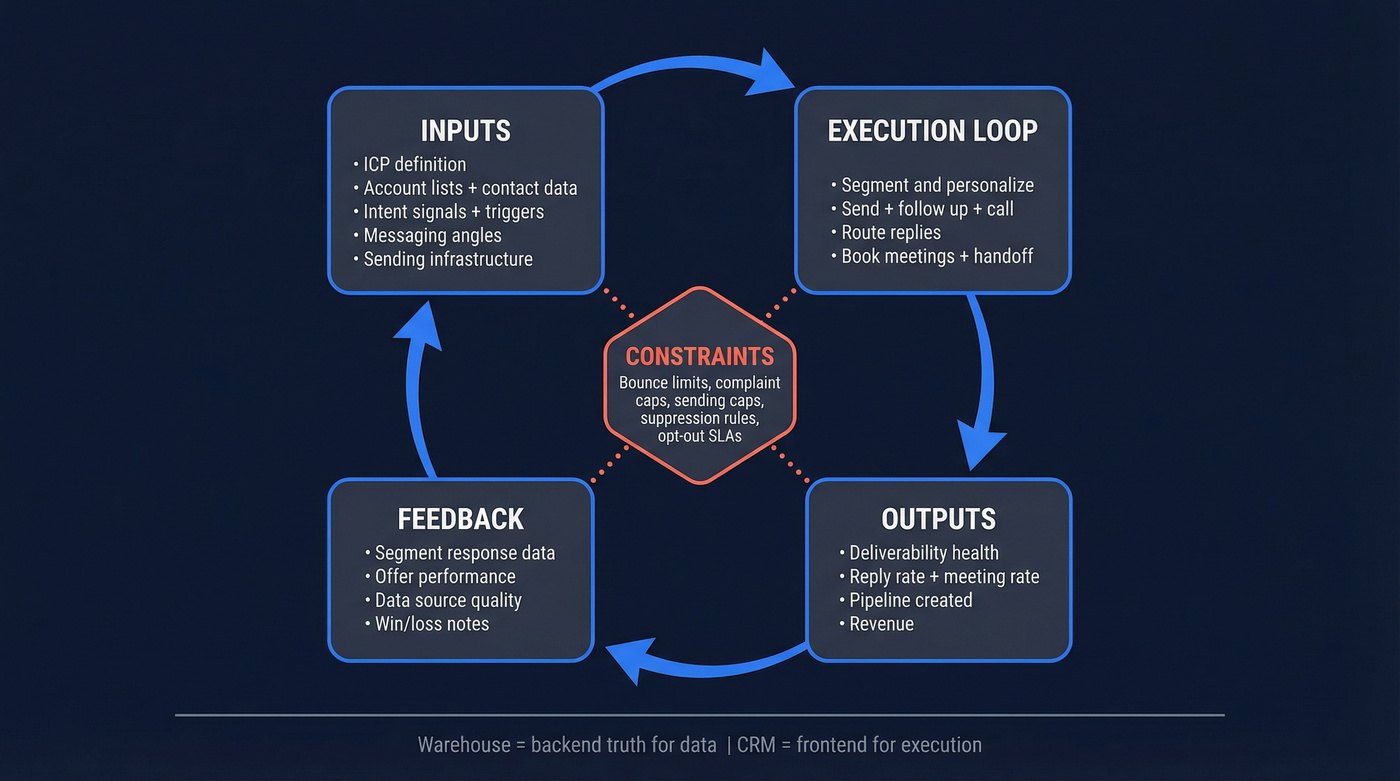
Inputs are what you feed the machine: ICP definition, account lists, contact data, intent signals, messaging angles, sending infrastructure.
Execution is the loop: segment -> personalize -> send -> follow up -> call -> route replies -> book meetings -> handoff.
Outputs are the measurable results: deliverability health, replies, meetings, pipeline, revenue.
Feedback is where the engine compounds: you learn what segments respond, what offers land, what data sources rot, and you update the inputs.
The framing that works in production is constraints + control loops:
- Constraints: deliverability policies, sending limits, opt-out rules, CRM hygiene rules
- Control loops: dashboards, weekly QA, stop rules, sprint experiments
One principle I'm firmly in the "yes, do it" camp on: warehouse-over-CRM. Your warehouse is the backend truth for sourcing, enrichment, scoring, and analysis. Your CRM is the frontend for execution and forecasting.
Mini-map (made concrete):
| Layer | What lives here | Examples you can actually use |
|---|---|---|
| Inputs | ICP + data | job change, headcount growth, funding, tech install (Wappalyzer), intent topic, competitor mention |
| Controls | constraints | bounce, complaints, unsub rate, per-inbox daily caps, suppression rules |
| Outputs | results | reply rate, meeting rate, pipeline created, meeting-held rate |
| Feedback | learning | "wrong persona," "bad timing," "already using competitor," segment-level win/loss notes |

You just read that bounce over 5% means you don't have an engine - you have a data problem. Prospeo's 5-step verification, catch-all handling, and 7-day refresh cycle keep your bounce rate under control so you can actually test messaging, not debug deliverability.
Stop rewriting copy when your real problem is dirty data.
Deliverability non-negotiables for an outbound engine (2026 policies = constraints)
Deliverability isn't a "nice to have." It's the constraint that determines whether your system runs at all, especially if you want to scale to more segments, more reps, and more inboxes without getting throttled.
Policy requirements you don't get to negotiate
Start with Yahoo and Google's published requirements and operate stricter than the minimums:
Yahoo sender requirements:
- Spam complaint rate <0.3%
- SPF + DKIM in place
- DMARC published with at least p=none, and DMARC must pass
- One-click unsubscribe (List-Unsubscribe header)
- Honor unsubscribes within 2 days Source: Yahoo Postmaster sender guidelines: https://senders.yahooinc.com/best-practices/
Google's guidance (summarized clearly by Braze): keep spam complaints under 0.10% if you want to stay out of trouble. Source: https://www.braze.com/resources/articles/gmail-yahoo-sender-requirements
DMARC alignment in one sentence: the domain in your From: address must match (align with) the domain authenticated by SPF or DKIM, otherwise DMARC fails even if SPF/DKIM exist.
Sending limits (the "don't get cute" reality)
Safe cold sending is lower than what your ESP technically allows. Use these caps as defaults:
- Google Workspace: 150 cold emails/day per inbox
- Microsoft 365: 150/day per inbox
- GoDaddy: 75/day per inbox
- New domains: ramp for 2-4 weeks (start 20/day -> 50/day -> 100/day -> 150/day)
If you want a single rule to stay alive: scale by adding inboxes, not by pushing one inbox harder.
Scaling math (worked example you can copy)
You don't need guesswork. You need a volume model.

Assumptions:
- 20 selling days/month
- 150 cold emails/day/inbox (cap)
- 10% of sends suppressed/paused by QA (bounces, opt-outs, role accounts)
Goal: 20,000 cold emails/month
1 inbox capacity/month = 150 x 20 = 3,000 Effective capacity after QA buffer = 3,000 x 0.9 = 2,700
Inboxes needed = 20,000 / 2,700 = 7.4 -> 8 inboxes
Now the part teams ignore: constraints override math. If complaints rise or bounce creeps up, you don't "power through." You cut volume, fix inputs, and earn your way back.
Stop rules (print these and tape them to your monitor)
- Bounce >5% -> pause sending, fix list quality (not copy)
- Spam complaints trending toward 0.3% -> pause, tighten targeting, shorten sequences, reduce volume
- Unsub spikes -> your offer/targeting's off, or you're over-touching

I've watched teams spend weeks rewriting copy while they were quietly sending to dead inboxes and role accounts. It's painful. It's also avoidable.
Data layer architecture (the part most teams skip)
Outbound engines die in the data layer, not in the copy doc.
Look, verification isn't optional. It's the difference between "we're testing offers" and "we're begging IT to fix our domain reputation."
Source (ICP-first lists, not "more leads")
Your list-building job isn't "find leads." It's "find the right accounts, then the right people, then the right moment."
Outreach's Prospecting 2025 report found about 54% of teams say identifying quality leads is their biggest hurdle. That's not a copy problem. That's an ICP + sourcing problem.
Source: https://outreach.io/resources/blog/prospecting-2026
Practical sourcing rules:
- Start with accounts (firmographics + technographics + triggers), then pull contacts
- Build segments you can explain in one sentence ("Series B fintechs hiring RevOps" beats "SaaS companies")
- Keep cohorts small enough to learn fast (50-200 contacts per micro-segment)
One scenario we see a lot: a team pulls 10,000 "VP Sales" contacts, blasts them, gets a 0.6% reply rate, and decides outbound "doesn't work." Then they narrow to "newly funded Series A-B dev tools hiring their first RevOps" and suddenly the same reps, same sequencer, and same calendar are booking meetings because the list finally makes sense.
Verify + refresh (validation loop)
Verification isn't a one-time step. It's a loop.
Use this standard:
- Bounce >5% = pause (popularized in Predictable Revenue-style operating rules) Source: https://predictablerevenue.com/
And use these benchmarks to calibrate what "good" looks like:
- Gong Engage benchmarks: 2.7% median bounce, 0.5% top quartile Source: https://help.gong.io/docs/engage-analytics-benchmarks-and-best-practices
A workflow that holds up:
- Source contacts (by ICP segment)
- Verify emails before they ever touch your sequencer
- Refresh "hot" fields on a schedule (job changes, company status, deliverability status)
- Feed learnings back into sourcing (which sources rot fastest, which segments bounce)
Enrich + route (warehouse-over-CRM)
This is where warehouse-over-CRM pays off.

- Warehouse = backend truth: raw sources, verification results, enrichment history, scoring, experimentation tags, suppression lists
- CRM = frontend execution: accounts/contacts approved for outreach, lifecycle stage, ownership, pipeline objects
Here's the missing piece most teams never write down: who owns what.
| Step | Artifact | Owner | QA metric | Tooling notes |
|---|---|---|---|---|
| Source | ICP segments + account lists | SDR lead + RevOps | segment reply rate, segment bounce | database + technographics + triggers |
| Verify | verified emails/mobiles + suppression | RevOps | hard bounce rate, role-account rate | verifier + suppression rules |
| Refresh | job/company changes | RevOps | data decay rate by source | scheduled refresh (weekly/biweekly) |
| Enrich | firmo/techno/intent fields | RevOps | enrichment match rate, field completeness | enrichment + intent provider |
| Route | "CRM-ready" contacts + ownership | RevOps + SDR manager | misroute rate, speed-to-lead | routing rules + SLAs |
| Feedback | reason codes + outcomes | SDRs + SDR ops | tagging completeness, meeting quality | required fields + QA sampling |
If you're running HubSpot or Salesforce, keep them clean. Don't dump every scraped contact into the CRM and call it "coverage." That's how you create duplicates, broken attribution, and angry AEs.
Sequence + messaging rules (optimize for replies without buying complaints)
Your sequence has one job: create replies and meetings without triggering complaints and unsub spikes. Protect deliverability first, then scale what's working.
Here are the defaults I'd start with:
Default #1: cap cold email sequences at 4 emails.
Default #2: start with 2 contacts per account.
If you need more than 4 emails to get traction, your targeting or offer's wrong. And multi-threading means picking the two people who matter, not spamming the org chart.
Now the evidence that backs the defaults:
- Belkins found emailing 1-2 contacts/company drove 7.8% reply, while blasting 10+ dropped to 3.8%.
- Belkins also found single-email campaigns had the highest reply rate (8.4%). Source: https://belkins.io/blog/cold-email-statistics
Complaints rise as sequences drag on: Belkins shows spam complaints climbing from 0.5% on email 1 to 1.6% by email 4, with unsub rates rising too. That's the hidden cost of "just add more steps."
Instantly's benchmark shows 58% of replies come from step 1.
Source: https://instantly.ai/blog/
Rules that keep you out of trouble:
- Email 1 must stand alone. Clear who/why/ask in under 80 words.
- Every follow-up must add new information: new proof, new trigger, new angle. Never "bumping this."
- Personalization belongs in the first line, not the whole email. One sharp reason you picked them beats a paragraph of fluff.
A simple 4-step cadence that works:
- Day 0: Email 1 (value + proof + clear ask)
- Day 3: Email 2 (new proof point)
- Day 10: Email 3 (new angle or trigger)
- Day 17: Email 4 (permission-based close)
Real talk: the "best copywriter" loses to the team that tightens segments and shortens sequences. Less noise, fewer complaints, more learning per send.
Channel mix (email + phone + light social) and when to use each
Email-only outbound is fragile. Phone-only outbound is slow. The best engines mix channels on purpose, especially if you're trying to scale without sacrificing meeting quality.
Use-skip matrix:
| Channel | Use this when | Skip this when |
|---|---|---|
| you're testing offers at scale | bounces/complaints are high | |
| Phone | your ICP's high-value and you have mobiles | you don't have direct dials |
| Light social | you can add real context fast | you can't personalize at all |
Phone's the underrated lever. Gong's data shows leading with a cold call can double the email reply rate within the flow, and leaving a voicemail increases the likelihood of an email reply.
Source: https://help.gong.io/docs/engage-analytics-benchmarks-and-best-practices
Benchmarks to calibrate expectations:
- Cognism reports an industry cold call success rate of 2.7% (2026) based on 200,000+ cold calls. They also report a meeting-held rate of 85.9%, which is the quality metric most teams ignore. Source: https://www.cognism.com/blog/cold-calling-statistics
One practical recommendation: block channels by intent. If a segment has a strong trigger (funding, hiring spike, job change), call first. If it's a broad segment (no trigger), email first and keep it tight.
Skip social touches if you can't add anything real. "Loved your post!" isn't a strategy, and it annoys people.
KPI dashboard for an outbound sales engine (targets, guardrails, and what to change)
Dashboards aren't for reporting. They're for control.
Track a small set of metrics that tell you what to fix: list quality, ICP, offer, channel mix, or routing.
KPI bands (so you can diagnose fast)
| Metric | Band | What it means | What to change next |
|---|---|---|---|
| Bounce rate | <1% | elite list hygiene | scale volume carefully |
| 1-3% | acceptable | keep verifying + refresh | |
| 3-5% | danger | tighten sources + re-verify | |
| >5% | stop | pause sending, fix data | |
| Spam complaints | <0.10% | safe | keep targeting tight |
| 0.10-0.30% | risky | reduce steps, narrow ICP | |
| >0.30% | stop | pause + retarget immediately | |
| Reply rate | <1% | broken | ICP/offer mismatch |
| 1-3% | baseline | iterate offer + segment | |
| 3-6% | strong | scale + expand adjacencies | |
| 6%+ | exceptional | double down on that segment | |
| Meeting booked (per sent) | <0.5% | weak | fix offer/ICP + routing |
| 1-2% | healthy | plan capacity here | |
| 3%+ | scale moment | add inboxes + reps |
Benchmarks that anchor those bands:
- Gong Engage: reply 1.8% median / 3.9% top quartile, bounce 2.7% / 0.5% Source: https://help.gong.io/docs/engage-analytics-benchmarks-and-best-practices
- Instantly: average reply 3.43%, top quartile 5.5%+, top 10% 10.7%+ Source: https://instantly.ai/blog/
Default #3 (planning): use 1-2% meetings booked per total sent unless you've proven otherwise.
It keeps your capacity math honest. If you're at 0.2%, don't "send more." Fix ICP/offer. If you're at 3%+, protect deliverability and scale with more inboxes.
Diagnose the bottleneck (decision tree)
When results drop, don't debate. Diagnose.
- Bounce >3%? It's data hygiene. Verify/refresh, tighten sources, suppress risky domains.
- Complaints/unsubs up but bounce fine? It's targeting + offer. Narrow ICP, shorten sequence, lead with a trigger.
- Replies fine but meetings low? It's routing + qualification. Fix speed-to-lead, tighten calendars, improve reply handling.
- Meetings fine but pipeline low? It's ICP definition or AE follow-up. Audit meeting quality and handoff SLAs.
Operating cadence + stack by stage (with realistic monthly costs)
Outbound doesn't get better because you "try harder." It gets better because you ship improvements on a schedule.
Run weekly QA and ship meaningful changes every 4-6 weeks.
Weekly QA checklist (the boring stuff that prints money)
- Bounce rate by segment and by source
- Spam complaints and unsub trends
- Suppression list updates (opt-outs honored within 2 days)
- Duplicate checks before CRM pushes
- Reply tagging quality (reason codes aren't optional)
- Meeting quality audit (are these real ICP meetings?)
- AE follow-up SLA (speed-to-lead on positive replies)
Signals that actually move reply rate (and how to use them)
Most "personalization" is wasted motion. Signals beat clever copy.
Signals worth building segments around:
- Funding (new budget + urgency)
- Hiring/headcount growth (new problems + new managers)
- Job change (new leader wants quick wins)
- Tech install/change (integration pain, migration windows)
- Competitor churn signals (review activity, job posts mentioning replacements)
- New geo expansion (new compliance, new ops)
Routing rule: when a lead has a strong signal, shorten the sequence and call earlier. Signals decay fast.
Build vs buy: a simple automation workflow that works
You don't need a giant platform to run a real engine.
A clean pattern:
- n8n pulls a daily list of triggered accounts (funding/hiring/tech change)
- Enrich + verify contacts via API
- Write raw + enriched records to your warehouse
- Push only "approved for outreach" contacts into HubSpot/Salesforce
- Sync suppression + opt-outs back to the warehouse
That's warehouse-over-CRM in practice: the warehouse stays truthful; the CRM stays usable. And once you've got it running, you stop arguing about "whose spreadsheet is right" because the pipeline has a single source of truth with a history of what changed, when, and why.
Environment & tooling ergonomics (yes, it matters)
If your reps are calling, give them a setup that makes calling sustainable:
- Quiet room or call blocks (no Slack drive-bys)
- Decent headset, stable internet, dual monitors
- Calendar buffers so meetings don't collide with call blocks
- A single "reply handling" window daily so hot leads don't sit
This isn't motivational fluff. It's throughput.
Cadence table (what happens when)
| Cadence | What you do | Owner |
|---|---|---|
| Daily | inbox health + reply handling | SDR lead |
| Weekly | QA checklist + fixes | RevOps + SDR |
| Sprint (4-6w) | new segments/offers + experiments | GTM pod |
| Quarterly | ICP + channel reset | Leadership |
Stack by stage (budget bands that match reality)
Budget bands (useful sanity check):
- Starter: $400-600/mo
- Growth: $1.2-1.8k/mo
- Scale: $4.5-5.5k/mo
Practical stack map:
| Stage | Core stack | Typical monthly cost |
|---|---|---|
| Starter | data + sequencer | $400-600 |
| Growth | data + enrichment/automation + sequencer | $1.2-1.8k |
| Scale | data + sales engagement + dialer + warehouse | $4.5-5.5k |
Tool pricing anchors (so you can actually budget):
- Instantly: $47 / $97 / $358 per month - https://instantly.ai/pricing
- Smartlead: $39 / $94 / $174 / $379 per month - https://www.smartlead.ai/pricing
- Clay: Free / $134 / $314 / $720 per month - https://www.clay.com/pricing
- Warehouse (BigQuery/Snowflake): $200-$2,000/mo depending on volume and modeling choices
- Sales engagement (Outreach/Salesloft): $120-$200 per user/month (typical market range)
- Conversation intelligence (Gong): $100-$160 per user/month (typical market range)
- Dialers (Orum/Nooks): $250-$500 per user/month (typical market range)
- Knowledge base (Guru): $10-$18 per user/month (typical market range)
- Automation (n8n): $0-$60+/mo for hosted tiers; self-hosted can be infra-only
Inbox rotation + domain strategy (how to scale without getting throttled)
When you scale volume, you're really scaling risk. The safest path is boring:
- Spread sends across multiple inboxes
- Keep per-inbox caps stable
- Rotate inboxes so no single identity spikes
- Pause segments that trip stop rules instead of "pushing through"
That's why inbox rotation settings matter: they enforce discipline when humans get impatient. It's also the operational backbone of global selling at scale, where different regions, languages, and time zones can otherwise create unpredictable spikes in sending behavior.

Wrap-up: the three defaults that keep your engine healthy
If you do nothing else, do these:
- Pause at bounce >5%. Fix data before copy.
- Cap sequences at 4 emails and 2 contacts per account until you've earned more.
- Plan on 1-2% meetings booked per send and build capacity from that math.
Next step: pick one micro-segment (50-200 contacts), apply the constraints, run it for a week, and let the dashboard tell you what to change. That's how an outbound sales engine becomes predictable instead of performative.
Building the data layer this article describes - source, verify, refresh, enrich, route - requires infrastructure that keeps up. Prospeo gives you 300M+ profiles, 30+ ICP filters (intent, tech stack, job changes, funding), and 98% email accuracy at $0.01/lead. That's your input layer, solved.
Feed your outbound engine inputs that actually convert.
FAQ
What's the difference between an outbound motion and an outbound sales engine?
An outbound motion is a set of activities (sequences, calls, follow-ups). An outbound sales engine is a repeatable system with clean inputs, deliverability constraints, KPIs, and a feedback loop you improve every 4-6 weeks. Motions create spikes; engines create predictable pipeline with stop rules like bounce >5% = pause.
What bounce rate and spam complaint rate should I target in 2026?
Target 0.5-2.7% bounce (0.5% is top-quartile performance) and keep spam complaints below 0.3% to meet Yahoo's requirement, with <0.10% as a safer operating target. If bounce exceeds 5%, pause and fix your data before sending more.
How many touches should an outbound sequence have before you stop?
Default to 4 emails max and reassess after the first 200 contacts in a segment, because longer sequences increase complaints and unsubscribes faster than they increase incremental replies. If you "need" 6-8 steps to get traction, your targeting or offer's the real problem.
What's a good free tool to verify contacts before sending?
For a free starting point, use Prospeo's free tier (75 emails + 100 Chrome extension credits/month) to verify emails before they hit your sequencer and keep bounce under 3%. If you outgrow that, move verification + enrichment into an API workflow so every new list gets checked automatically, not "cleaned later."