How to Write a Virtual Introduction Email That Gets Replies
You just got CC'd on an email from someone you barely know, introducing you to someone you've never heard of, with zero context about why you should care. That's an inbox ambush - and it's exactly how most virtual introductions die before they start.
The good news: writing a virtual introduction email that people actually respond to isn't hard. It just requires a process most people skip.
What You Need (Quick Version)
Three rules matter more than anything else:
- Always double opt-in before making the introduction. Ask both sides if they want the intro before you send it.
- Keep the email under 150 words. Three to five sentences. That's it.
- Verify the recipient's email before you hit send. A bounced intro wastes everyone's social capital - yours, the connector's, and the person who asked for the introduction.
What Is a Virtual Introduction Email?
A virtual introduction email connects two people who don't know each other through a mutual contact. It's the digital version of walking someone across a room at a conference and saying, "You two should talk."
There are two flavors. A three-way introduction involves a connector who emails both parties together. A self-introduction is when you email someone directly, usually referencing a mutual connection or shared context. Both should land between 50 and 150 words - anything longer and you're writing a pitch deck, not an introduction.
Here's the key distinction from cold outreach: a professional introduction carries borrowed trust. That trust is fragile. Abuse it with a sloppy email and you won't get a second chance.
The Double Opt-In Rule
The single biggest mistake in professional introductions isn't bad writing. It's skipping consent.
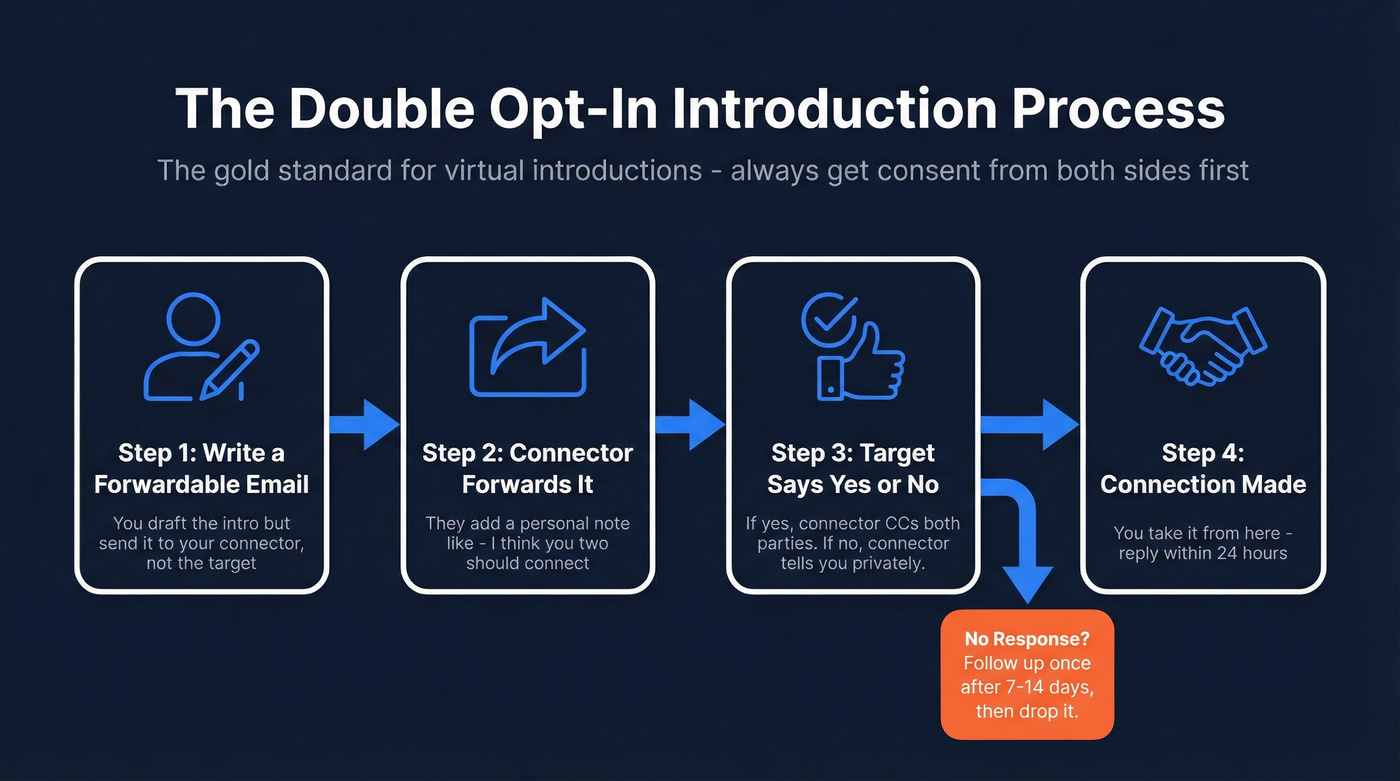
Jordan Harbinger popularized the term "double opt-in introduction," and it's become the gold standard for a reason - it respects everyone's time. We've seen connectors burn years of goodwill with a single unsolicited intro that put someone on the spot. Skipping consent isn't networking; it's volunteering someone else's calendar without asking.
Before making any intro, think about whether both parties are at roughly equal footing. Introducing a junior employee to a CEO without strong context puts the connector's credibility at risk and makes the junior person feel awkward.
Here's the step-by-step flow:
- You write a forwardable email addressed to the person you want to meet, but you send it to your connector.
- Your connector forwards it to the target with a brief personal note ("I think you two should connect - here's why").
- The target says yes or no. If yes, the connector CC's you both. If no, the connector lets you know privately.
- No response? The connector can follow up once after 7-14 days, then drop it.
The forwardable email is the most underrated networking tool in professional communication. Think of it as a self-contained pitch your connector can forward verbatim. It should include five elements:
- Hook - why this intro matters to the recipient
- Who you are - one sentence, not a bio
- What you do - specific, not vague
- Traction - a proof point like revenue, users, or a recognizable client
- Link - your deck, portfolio, or calendar. One link, not three.
How to Write the Perfect Intro Email
Every strong introduction email hits these elements, usually in this order:
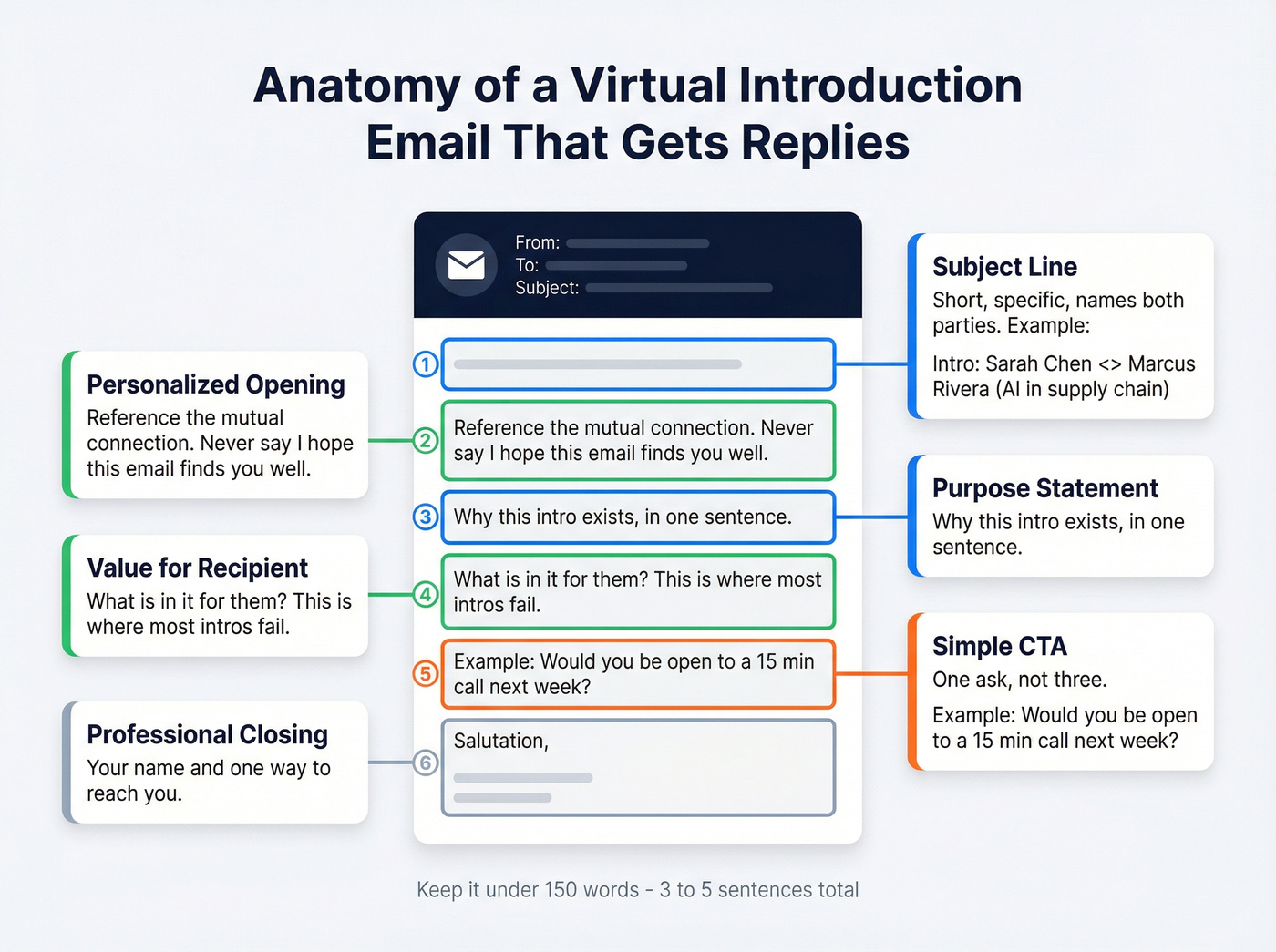
- Subject line - short, specific, names both parties or the reason
- Personalized opening - reference the connection, not "I hope this email finds you well"
- Purpose statement - why you're making this introduction in one sentence
- Value for the recipient - what's in it for them, which is where most intros fail
- Simple CTA - one ask, not three
- Professional closing - sign-off with your name and a way to reach you
Before the good example, here's what a bad intro looks like: "Hey Marcus, meet Sarah. She's great. You guys should chat." No context, no value, no reason to reply. Now compare:
Subject: Intro: Sarah Chen <> Marcus Rivera (AI in supply chain)
Marcus - I'd like to introduce you to Sarah Chen, who runs product at LogiFlow. They've cut warehouse fulfillment errors by 40% using the same computer vision approach you presented at Supply Chain World last month. Sarah's looking to partner with enterprise logistics teams, and I thought you'd want to hear what they've built. Would you be open to a 15-minute call next week? Happy to drop off after the intro.
It names the connection, states the value, and gives Marcus a reason to care.
A few rules that separate good intros from forgettable ones:
Match the recipient's tone. If they're formal, don't open with "Hey!" If they're casual, don't write like a legal brief. Jacqueline Whitmore, an email etiquette expert, recommends reading important emails out loud before sending - if it sounds stiff when spoken, rewrite it.
Don't guess pronouns. Look them up first. If you can't find them, use the person's first name.
Fill in the "To" line last. This prevents accidental sends while you're still drafting. Small habit, saves real embarrassment.

A bounced introduction email doesn't just waste your time - it burns the connector's credibility too. Prospeo's 98% email accuracy and 5-step verification process ensures every virtual intro lands in the right inbox, not a dead end.
Verify your recipient's email before you spend social capital.
Subject Lines That Work
69% of recipients decide whether to mark an email as spam based on the subject line alone. For introduction emails, the stakes are even higher - you're borrowing someone else's credibility, so a vague or spammy subject line burns trust before the email is even opened.
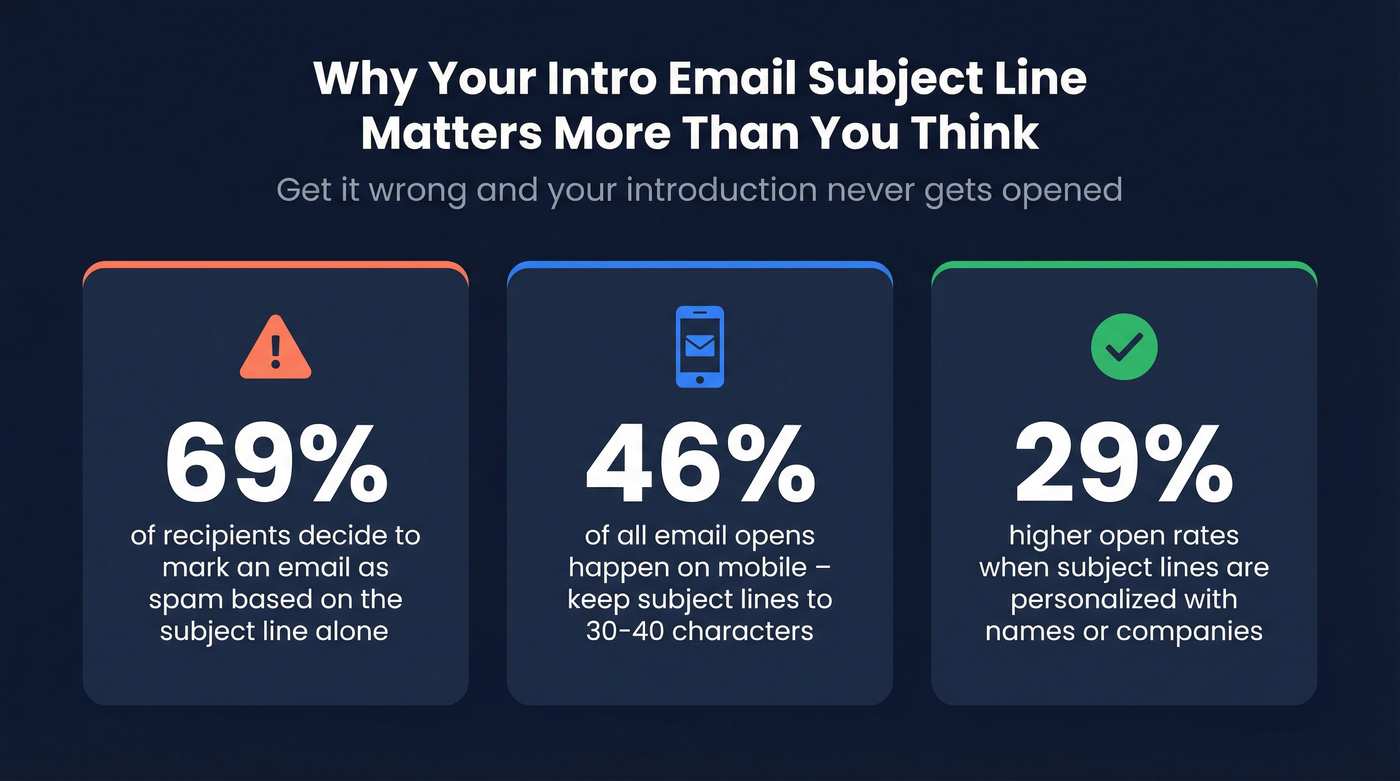
Keep subject lines short, specific, and named. Aim for around 30-40 characters so they display cleanly on mobile, where 46% of email opens happen. Personalized subject lines drive 29% higher open rates - use names, companies, or specific topics.
| Scenario | Subject Line Formula | Example |
|---|---|---|
| Mutual connection | Intro: [Name] <> [Name] | Intro: Priya <> James |
| Topic-specific | [Name] re: [Topic] | Sarah re: AI in logistics |
| Referral | [Connector] suggested we connect | David suggested we connect |
| Investor | Intro: [Company] - [One-line hook] | Intro: LogiFlow - 40% error cut |
| Internal | Welcome + [Name]'s role | Welcome + meet your new PM |
| Follow-up | Re: [Original subject] | Re: Intro: Priya <> James |
"Quick intro" tells the recipient nothing. "Intro: Sarah Chen <> Marcus Rivera (supply chain AI)" tells them everything.
Templates for Every Scenario
One template doesn't fit every situation. An investor intro and a new-hire onboarding email share nothing except the word "introduction." Here are six templates, each built for a different scenario.
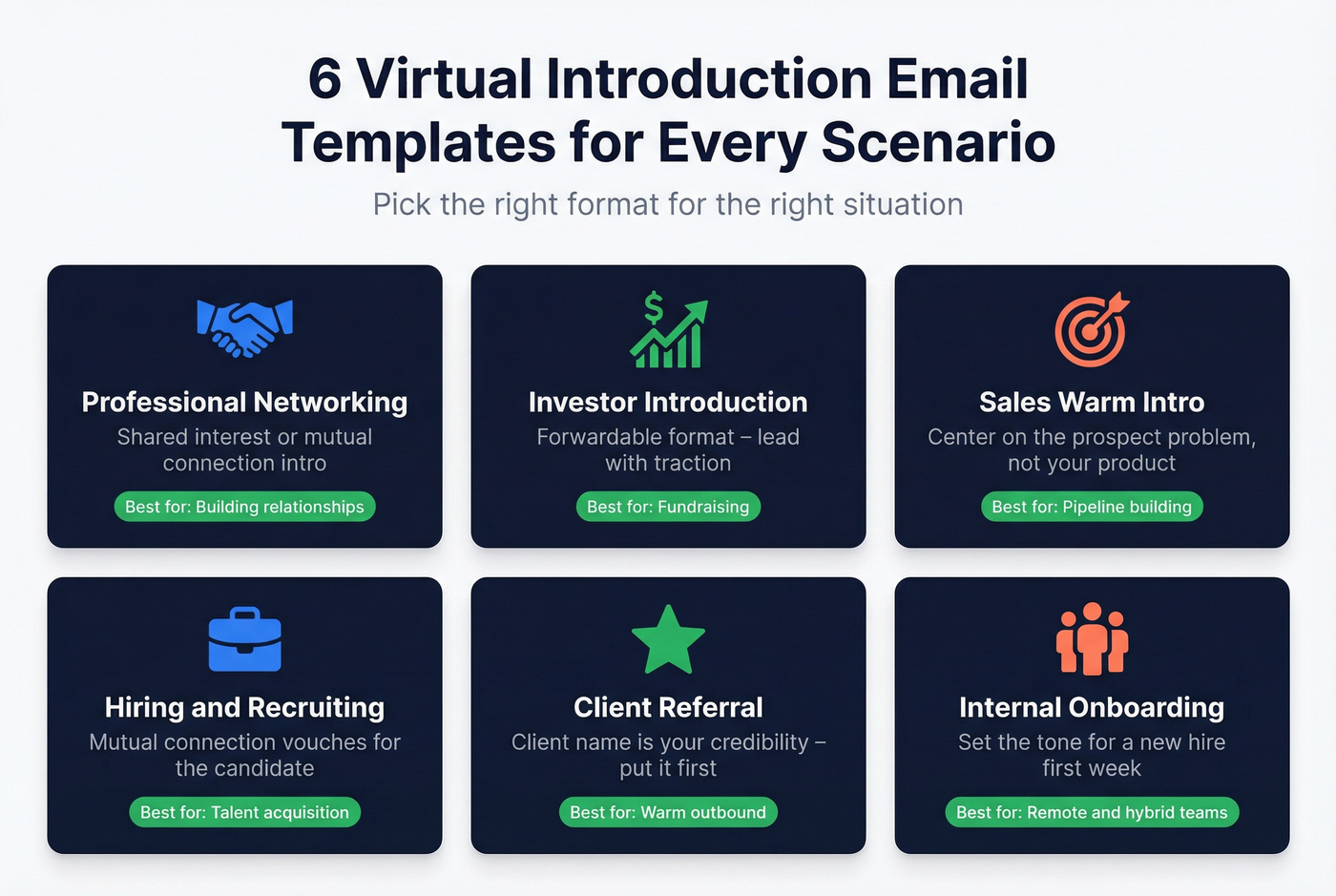
Professional Networking
Subject: Intro: [Your Name] <> [Recipient] - [Shared Interest]
Hi [Recipient], [Connector] suggested I reach out - we were discussing [topic] and your work at [Company] came up. I lead [your role] at [your company], and I'd love to hear how you're approaching [specific challenge]. Would you be open to a 15-minute call sometime next week?
Use when you've been given the green light through a double opt-in and want to start a professional relationship.
Investor Introduction (Forwardable Format)
This is the template your connector forwards verbatim. Lead with traction, not your life story.
Subject: Intro: [Company Name] - [One-Line Traction Hook]
Hi [Investor Name], I'm [Your Name], founder of [Company]. We [what you do in one sentence]. In the last [timeframe], we've [traction metric - revenue, users, growth rate]. I'm raising [round details] and would love 20 minutes to walk you through our deck: [link]. [Connector] can vouch for the team.
The traction metric sits in the third sentence - early enough to hook, late enough to have context. The connector vouch at the end adds social proof without making it the centerpiece.
Sales Warm Introduction
Most sales intros read like cold pitches with a name dropped in. Let's look at the difference:
Weak version:
"Hi [Prospect], [Connector] gave me your name. We're a leading provider of [solution] and I'd love to show you a demo."
Strong version:
Subject: [Connector] suggested I reach out - [specific value]
Hi [Prospect], [Connector] mentioned you're evaluating [problem/initiative]. At [your company], we helped [similar company] achieve [specific result with a number]. Would it make sense to chat for 15 minutes this week?
The weak version centers on you. The strong version centers on the prospect's problem and a proof point they can verify.
Hiring & Recruiting
Subject: [Connector] thought you'd be great for [Role] at [Company]
Hi [Candidate], [Connector] speaks highly of your work in [domain]. We're building out our [team/function] at [Company] and have a [role title] opening that aligns with your background in [specific skill]. No pressure - would you be open to a quick conversation to see if there's a fit?
Use when a mutual connection has vouched for the candidate and the candidate has opted in.
Client Referral
Subject: Intro: [Your Name] from [Company] - referred by [Client]
Hi [Prospect], [Client Name] at [Client Company] suggested I reach out. They mentioned you're [facing challenge / exploring initiative], and we helped them [specific result]. I'd love to share what worked for them and see if it's relevant to your situation. Would [day] or [day] work for a brief call?
The client's name is your credibility. Put it in the first sentence, not the third.
Internal Onboarding Introduction
Internal intros are the most neglected format. In remote and hybrid teams, a thoughtful onboarding email sets the tone for someone's first week.
Subject: Welcome - meet [Name], our new [Role]
Hi team, I'd like to introduce [Name], who's joining us as [Role] starting [date]. [Name] comes from [previous company/role] where they [one relevant achievement]. They'll be working closely with [team/function] on [project or area]. [Name], feel free to reply-all or reach out to anyone on this thread - everyone's friendly. Looking forward to having you on board.
Include one personal detail or fun fact to humanize the introduction. "She's also a competitive rock climber" gives people a conversation starter that isn't about work.
The Recipient Playbook
Getting introduced is easy. Handling the introduction well is where most people fumble.
Reply within 24-48 hours. The connector put their reputation on the line. Letting the email sit for a week signals you don't value the connection - or worse, that you don't value the connector.
Move the introducer to BCC after your first reply. Hit "Reply All" on your first response so the connector sees you've engaged, then move them to BCC so the conversation continues privately from there.
If you're not interested, decline gracefully. A simple "Thanks for thinking of me - this isn't the right fit right now, but I appreciate the intro" is infinitely better than ghosting. The connector will remember how you handled it.
Offer availability with context. Don't just drop a scheduling link. Say "I'm free Tuesday or Thursday afternoon - here's my calendar link if either works" so the other person feels like a human invited them, not a scheduling bot.
When No One Replies
Silence after an introduction email doesn't always mean rejection. People are busy, inboxes are brutal, and your email might have landed at the wrong moment.
Wait at least three business days. Research from Atlassian shows that waiting three business days before following up yields 31% more replies compared to immediate follow-ups. Jumping in after 24 hours feels pushy - especially for an introduction you didn't initiate.
Your first follow-up should be short and reference the original intro: "Hi [Name], just bumping this in case it got buried - [Connector] introduced us last week about [topic]. Still happy to find 15 minutes if the timing works."
If that gets no response, send one more follow-up about five business days later, then stop. Two follow-ups is the ceiling for introduction emails. Anything beyond that crosses from persistent into annoying.
In our experience, Monday afternoons and Tuesday mornings are a strong default for sending intros - you're past the Monday inbox avalanche but early enough in the week to get on someone's calendar.
For higher-stakes introductions, consider a video follow-up. Follow-up emails with video can boost click-through rates by 65%. A 30-second clip saying "Hey, just wanted to put a face to the name" stands out in a text-only inbox.
Mistakes That Kill Introductions
The inbox ambush. Don't CC two people on an email with no warning. Always confirm both sides want the intro before you send it. If you're the connector, your job is to ask - not to surprise.
The five-paragraph essay. If your intro email exceeds five sentences, you've lost the reader. Cut the backstory. Cut the qualifications list. Lead with one reason the recipient should care and one clear ask.
Guessing pronouns. Look up the person's pronouns before writing. If you can't find them, use their first name. Getting this wrong in an introduction - where first impressions are everything - is an unforced error.
Sending to an unverified address. A bounced introduction email is worse than no email at all. The connector looks careless, you look unprepared, and the recipient never sees it. Run every address through an email verification tool before sending.
"I hope this email finds you well." Generic openers waste the most valuable real estate in your email - the first line. Open with the mutual connection, the shared context, or the specific reason for the introduction.
Here's a hot take: if your average deal size is under $5k, you probably don't need a fancy introduction at all. A well-written cold email with a strong subject line will get you 80% of the way there. Virtual introductions are highest-value when the stakes justify the social capital spent.
FAQ
How long should a virtual introduction email be?
Keep it between 50 and 150 words - three to five sentences. Recipients start skimming anything longer, and the goal is to provide just enough context for them to decide whether to engage, not to tell your entire story.
Should I CC or BCC the introducer?
Keep the introducer on CC for your first reply so they see the connection was made. After that initial response, move them to BCC so the conversation continues privately. This is standard professional etiquette and most connectors expect it.
What if the person I'm introduced to doesn't respond?
Wait three business days, then send one short follow-up referencing the original intro and the connector's name. If that gets no reply, try once more five business days later. After two unanswered follow-ups, let it go - pushing further risks damaging the connector's relationship with the recipient.
How do I find verified email addresses for introductions?
Prospeo's Email Finder returns verified professional emails with 98% accuracy from a database of 143M+ addresses. The free tier includes 75 lookups per month - enough to verify every introduction you send without risking a bounce.
Writing the perfect forwardable email means nothing if you're sending it to an outdated address. Prospeo refreshes 300M+ professional profiles every 7 days - so the contact data behind your intro is never stale.
Stop guessing email addresses. Start verifying them at $0.01 each.