How to Improve Email Open Rates With AI (Without Chasing a Broken Metric)
If your open rate swings wildly but revenue doesn't, you're not crazy. You're looking at a metric that's been warped by privacy features and inbox UI changes.
AI can still help you improve email open rates in 2026, but not by pumping out 100 subject lines. The real wins come from inbox placement, list quality, and relevance.
Here's the hook: when you fix the boring stuff first, "open rate improvement" shows up as a side effect.
What you need (quick version): the 3-step AI roadmap
- Step 1 - Stop optimizing for opens as truth.
- Apple Mail Privacy Protection (MPP) creates machine opens and hides IP/timestamps, so open-based "insights" aren't reliable.
- Move reporting to clicks, replies, conversions, revenue, and CTOR.
- Build automations on clicks + site events, not "opened."

Step 2 - Fix list quality before you touch copy or send time.
- Bad data tanks sender reputation -> more spam placement -> fewer opens.
- Put verification in front of every send. Keep bounce <2% as your operating baseline.
- Use suppression rules that automatically block risky segments before they poison your domain.
Step 3 - Use AI where it's actually predictive: timing + relevance.
- Use send-time optimization (STO) when you have it; otherwise run AI-assisted time-window tests by region + engagement.
- Implement List-Unsubscribe (one-click) + a 2-day unsubscribe SLA and keep spam complaints <0.3%.
- Measure lift on clicks/CTOR/conversions because opens are noisy and attribution's harder post-privacy changes.

Open rates are noisy in 2026 (and what to track instead)
Open rates used to be a decent proxy for "did this subject line work?" Now they're a mash-up of real humans, privacy proxies, and inbox UI changes.
Apple MPP preloads tracking pixels through Apple's proxy. That creates machine opens, and it masks IP and timestamps, so your "best send time" report turns into fiction for Apple-heavy audiences. I've seen teams celebrate a 20-point open-rate jump while pipeline stayed flat for the month.
Apple Link Tracking Protection adds another layer of chaos by stripping tracking parameters like UTMs in Mail/Safari. So even when someone clicks, your analytics can under-attribute the email and make the campaign look weaker than it was.
Reality check: If opens go up but clicks, replies, and conversions don't, you didn't improve performance. You improved tracking artifacts.
Why your open rate changed without revenue changing
MPP's the big one, but inbox interfaces keep shifting too: categories/tabs, brand grouping, AI previews/summaries, and digest views all change what gets seen. Your email can be delivered and still get buried in a UI bucket people rarely open.
So yes, you can change a subject line and watch opens move.
That doesn't mean the subject line did anything.
Replace open-based automations
Here's the swap that holds up in 2026:
- Old: "If opened but didn't click -> resend with new subject"
- New: "If clicked but didn't convert -> send follow-up with proof/FAQ"
- Old: "If not opened in 7 days -> suppress"
- New: "If no clicks/site events in 30-60 days -> throttle frequency or re-permission"
Opens still belong on dashboards. They don't belong as the trigger that drives your lifecycle.
KPI shortlist
Use this stack:
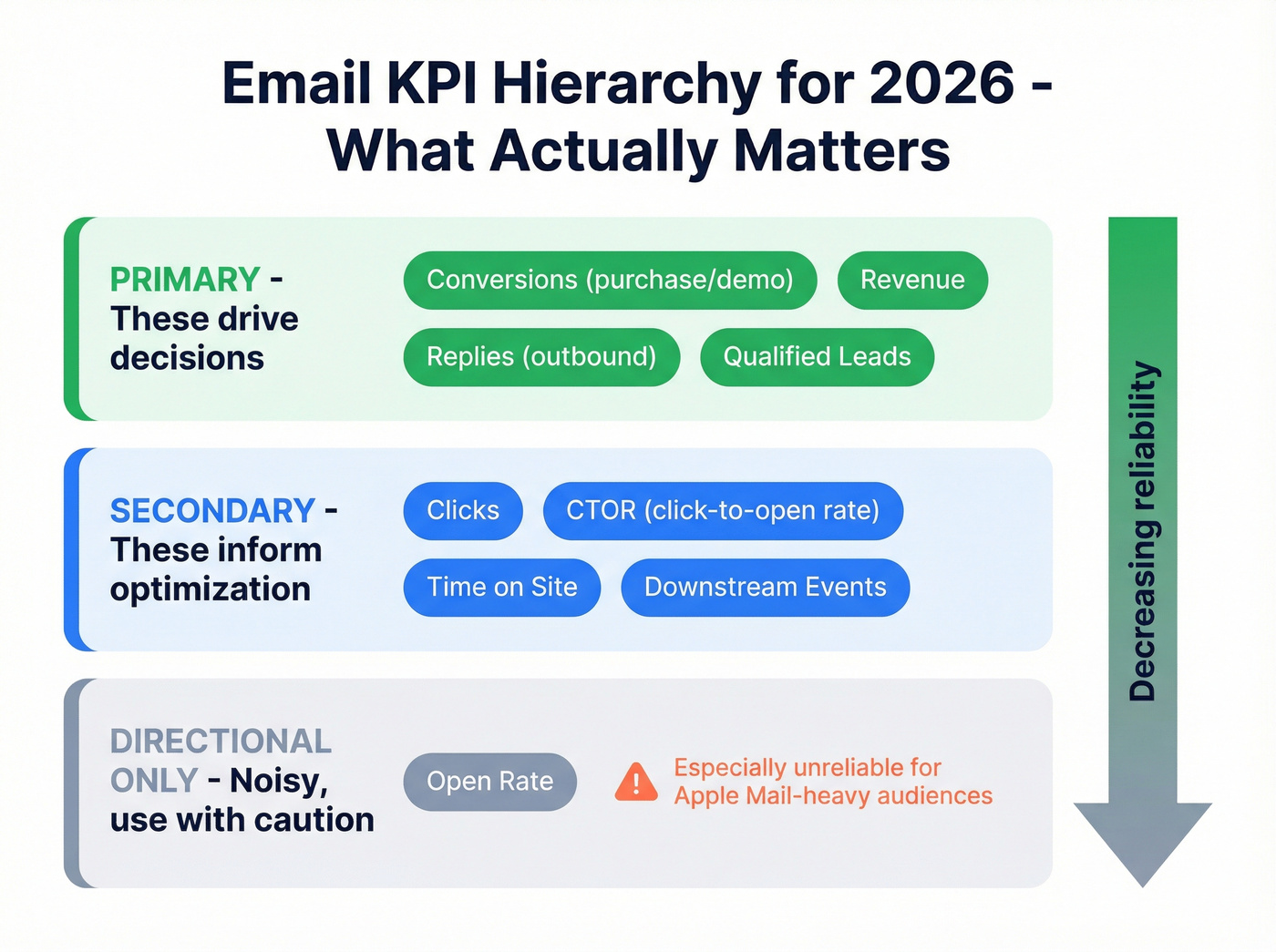
- Primary: conversions (purchase/demo), revenue, replies (for outbound), qualified leads
- Secondary: clicks, CTOR (click-to-open rate), time on site, downstream events
- Directional only: opens (especially Apple Mail-heavy audiences)
Fix deliverability first (the real lever behind higher opens)
If you want higher opens, you need more inbox placement. And inbox placement's mostly reputation + compliance + complaints, not clever copy.
Litmus puts it cleanly: delivery is "accepted by the receiving server," while deliverability is "landed in the inbox (not spam/promotions)." You can "deliver" 99% and still have a terrible month.
Authentication + alignment (SPF/DKIM/DMARC) in plain English
Non-negotiables for bulk sending (Yahoo requirements, and Gmail's broadly similar):
- SPF: tells receivers which servers can send for your domain.
- DKIM: cryptographic signature proving the email wasn't altered.
- DMARC (minimum p=none): policy layer that ties SPF/DKIM together and enforces alignment.
- Alignment: your visible From: domain needs to align with SPF or DKIM domains (relaxed alignment's fine).
If you're missing any of these, AI subject lines won't save you. You're optimizing the paint job on a car with no engine. (If you need the setup details, see our SPF/DKIM/DMARC explained guide.)
Complaint-rate targets that actually matter
Mailbox providers care about complaints more than your marketing team does.
- Operate at <0.1% spam complaints.
- Never cross 0.3%. Yahoo's bulk-sender threshold's <0.3%, and crossing it is how you end up in deliverability jail. (More benchmarks: spam rate threshold.)
Complaint rate's a lagging indicator of relevance and frequency. If it spikes, your segmentation and throttling already failed.
Unsubscribe compliance + frequency control
Yahoo's bulk requirements are blunt:
- Support one-click unsubscribe via List-Unsubscribe (RFC 8058 "Post" method's strongly recommended).
- Honor unsubscribes within 2 days.
- Keep complaints under 0.3%.
Gmail's "Manage subscriptions" UI makes it ridiculously easy for users to unsubscribe, especially from high-volume senders. Frequency's now a product decision, not just a marketing decision.
Mini if/then rules (operational):
- If complaints rise week-over-week -> then cut frequency to low-engagers first (don't punish your best users).
- If unsubscribes spike after a campaign -> then your offer mismatch is real; don't "AI rewrite" your way out of it.
- If you send >=5,000/day and Outlook starts rejecting mail -> then check for the "550; 5.7.515..." error tied to SPF/DKIM/DMARC enforcement (see 550 Recipient Rejected) (Outlook enforcement's now in effect for bulk senders; it began May 5, 2026).

Tomorrow-morning deliverability SOP (do this before your next send)
This is the "stop the bleeding" workflow that actually moves open rates:
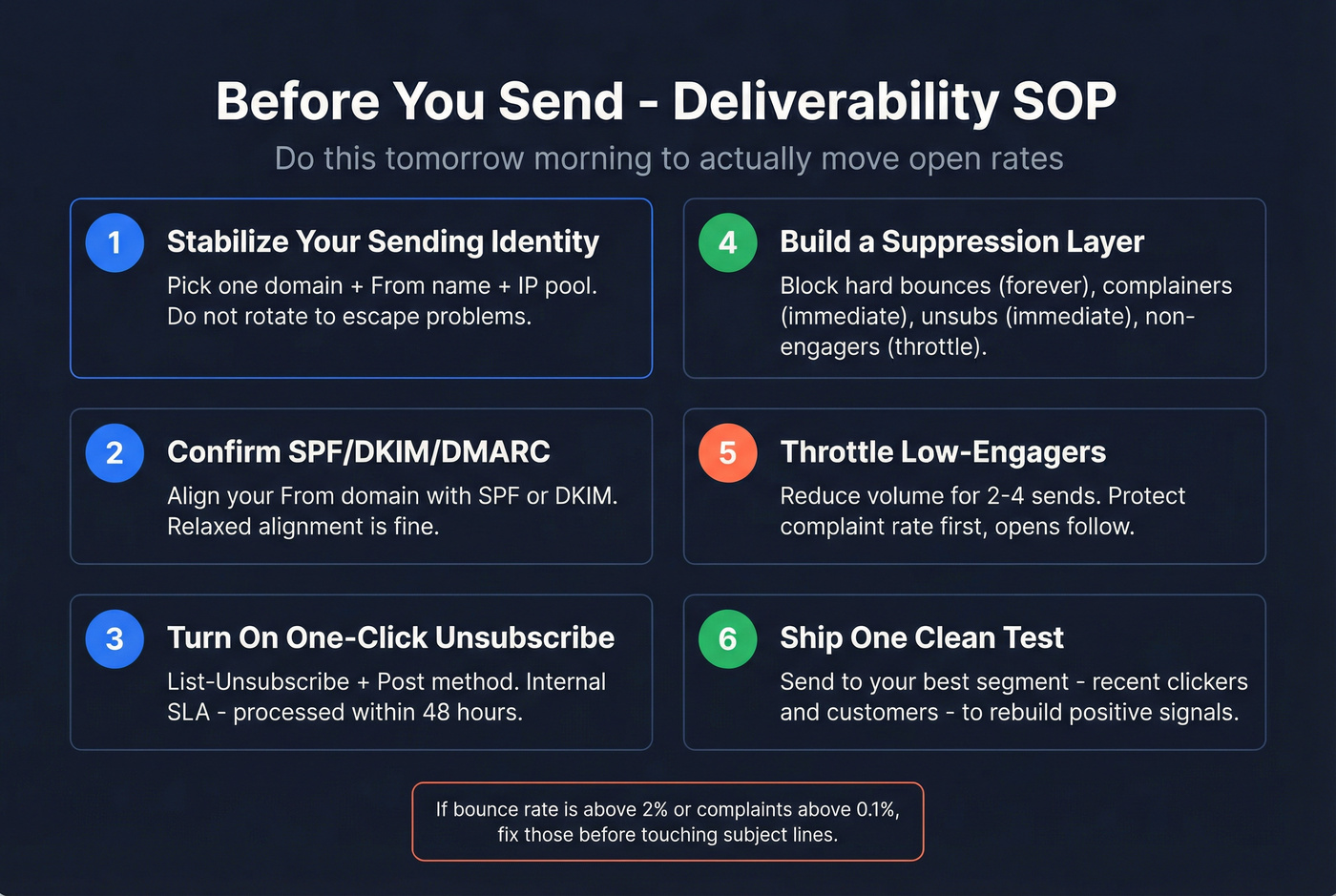
- Pick one sending identity to stabilize (domain + From name + IP pool). Don't rotate identities to "escape" problems; you'll just spread them.
- Confirm SPF/DKIM/DMARC alignment for the From domain you're using for bulk sends.
- Turn on one-click unsubscribe (List-Unsubscribe + Post) and set an internal SLA: processed within 48 hours.
- Create a suppression layer that blocks:
- hard bounces (forever)
- complainers (immediate)
- unsubscribes (immediate)
- chronic non-engagers (throttle/pause)
- Throttle volume for low-engagers for the next 2-4 sends. Protect complaints first; opens follow.
- Ship one clean test campaign to your best segment (recent clickers/customers) to re-establish positive engagement signals.
Post-send monitoring: the dashboard you check daily/weekly
Deliverability isn't a one-time setup. It's an ops loop.
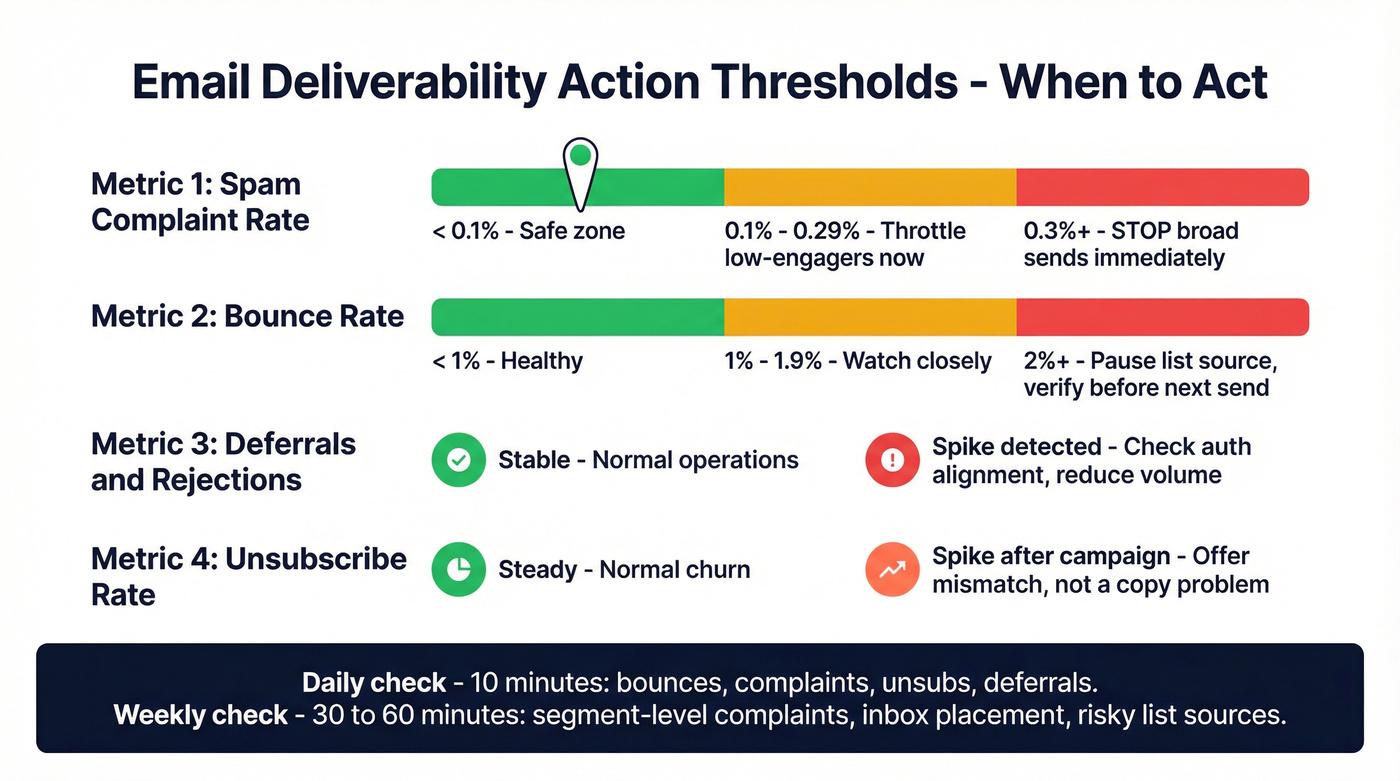
Daily (10 minutes):
- Bounce rate (overall + by domain)
- Spam complaint rate (overall + by campaign)
- Unsubscribe rate
- Deferrals/rejections (spikes = reputation/auth issues)
- Top mailbox providers (Gmail, Yahoo, Outlook) performance deltas
Weekly (30-60 minutes):
- Segment-level complaints (low-engagers vs high-engagers)
- Inbox placement sampling (seed tests or panel tools if you have them) (related: what is a seed list)
- "Newly risky" list sources (forms, partners, imports, scraped lists)
- Content patterns that correlate with complaints (offers, frequency, targeting)
Action thresholds (simple and strict):
- Complaint rate >0.1% -> throttle low-engagers immediately; pause the campaign type that triggered it.
- Complaint rate approaching 0.3% -> stop broad sends; send only to high-engagers until stable.
- Bounce rate >2% -> stop sending to that list source; verify/refresh before the next send.
- Deferrals/rejections spike -> check auth alignment and sending volume; reduce volume until errors normalize.
Hot take: if your average deal size is modest and your list hygiene's messy, you don't have a "subject line problem." You have a reputation problem, and reputation beats copy every time. (More: what is domain reputation.)
Improve email open rates with AI by cleaning your list (and enforcing suppression)
Most teams use AI to write subject lines. That's backwards.
The fastest path to higher opens is boring: stop sending to bad addresses and risky segments. Every bounce and complaint drags your reputation down, and reputation determines inbox placement.
Instantly's benchmark baseline is the right north star for outbound: bounce <2%. If you're above that, you're not "testing messaging." You're burning infrastructure. (If you're building a workflow, use this email verification list SOP.)
Suppression rules AI should enforce automatically
Your AI (or your rules engine) should suppress these by default:
- Hard bounces (forever)
- Role accounts (info@, support@, billing@) unless you explicitly sell to shared inboxes
- Recent complainers (immediate suppression)
- Unsubscribed (immediate suppression)
- Non-engagers (no clicks/replies/site events in 30-90 days -> throttle or pause)
- Risky domains (known disposable domains; high-bounce domains)
Here's the thing: sending "one last re-engagement" to a dead segment is how complaint rates creep up and deliverability collapses slowly enough that nobody notices until pipeline drops.
Verification workflow (before you "optimize subject lines")
This is the workflow I'd run in your ESP tomorrow morning:
- Export your next send audience (or your cold outreach list) to CSV.
- Verify and refresh the list. (How-to: verify an email address.)
- Split into segments:
- Verified safe -> send normally
- Catch-all / risky -> send at lower volume, watch bounces/complaints
- Invalid -> suppress
- Resend only to the clean segment when you're testing subject lines or STO.
Turn verification results into sending rules (the part most teams skip)
Don't just "verify" and move on. Export the fields that let you enforce guardrails, then make your sending rules dumb and strict.

Use these columns in your export/import:
- verification status (valid / risky / invalid)
- status reason (catch-all, mailbox full, disposable, etc.)
- last verified date
- source (form, partner, enrichment, manual import)
Then apply rules that protect reputation:
- Valid -> send normally.
- Risky / catch-all -> "slow lane" (lower daily volume, higher scrutiny).
- Invalid -> suppress permanently.
- Any segment with bounce trending toward 2% -> pause and re-verify before the next send.
- Any segment with complaints above 0.1% -> stop sending to low-engagers inside that segment first.
How to set a reputation-safe ramp
If you're increasing volume (new domain, new IP pool, or you've been in spam recently), ramp like you're protecting a fragile asset, because you are.
Start low, increase gradually week over week, and keep the audience tight: recent clickers, customers, high-intent leads. Don't mix cold and warm audiences on the same sending identity if you can avoid it, and watch bounce/complaints daily because they move faster than revenue dashboards and they'll warn you before the damage is done.
I've run bake-offs where copy was identical, but the "clean list + slow ramp" sender beat the "AI subject line wizard" by a mile on opens and clicks. That's not magic. That's reputation.

You just read that bounce rates must stay under 2% to protect deliverability. Prospeo's 5-step email verification delivers 98% accuracy - so your sends hit real inboxes, not spam folders.
Fix list quality first. Open rates follow.
Improve email open rates with AI using STO + relevance (not gimmicks)
"Best time to send" blog posts are fine, but they're averages. STO is where AI earns its keep because it predicts timing per recipient, not per campaign. (Deep dive: AI email send time optimization.)
MailerLite analyzed 2,138,817 campaigns and found:
- Opens peak 8-11 AM (local time) on weekdays
- Clicks peak 8-9 PM
- Friday had the highest average opens and clicks
That's a baseline. Your strategy is individualized timing tied to clicks and conversions.
Braze STO case studies show the kind of lift you can get when timing's individualized: +23% CTOR and +57% unique clicks in one example. Notice what moved: clicks and CTOR. That's the post-MPP reality.
Baseline timing (what to do if you don't have STO)
If you don't have STO, do this instead:
- Split by region/time zone (at minimum: Americas, EMEA, APAC).
- Split by engagement (recent clickers vs everyone else).
- Test two windows:
- AM window: 8-11 AM local
- PM window: 7-10 PM local
- Keep a small holdout that gets your current default send time.
AI's job here is analysis and iteration: pick the next test based on click/conversion deltas, not open deltas.
When automation beats manual AI (and when it doesn't)
This is the Reddit question nobody answers directly, so here's the answer.
Automation wins when:
- You have enough volume per segment (thousands delivered, not hundreds).
- You have stable engagement signals (clicks, purchases, site events).
- The system includes a control group so you can measure lift.
- Your list hygiene's already clean (otherwise STO optimizes around deliverability noise).
Manual wins when:
- You're in a cold start (new list, new segment, low volume).
- Tracking's messy (events missing, attribution messy).
- You're changing multiple variables at once (offer + audience + creative).
- Your deliverability's unstable (fix reputation first).
What "real STO" includes
Real STO has three parts:
- Per-recipient prediction (not "smart send time" for the whole audience)
- A defined delivery window (for example, deliver sometime in the next 24 hours)
- A built-in control group so you can measure lift
Klaviyo's Personalized Send Time is a good example of the "real" version: it predicts at the profile level and includes a control group. It's also paywalled into add-on packages, which is annoying when you're doing everything else right.
Common STO limitations (plan around them)
These limitations are common across ESPs:
- STO works for campaigns only
- You must schedule at least 1 day ahead
- It's not available in flows
- It's not available in A/B test campaigns
Practical move: use STO for big broadcasts, and use tested time windows for flows until your platform supports it.
AI lever #3 - subject lines + preview text that don't scream "generated"
AI can crank out 50 subject lines in 10 seconds. The problem is most of them look like they were cranked out in 10 seconds.
Belkins analyzed 5.5M cold emails and found personalized subject lines drove 46% opens vs 35% without personalization. They also found 2-4 word subject lines performed best, and hype/urgency terms underperformed. (Need examples? See cold email subject lines that get opened.)
Subject line constraints (2026)
Use these rules:
- Keep it 2-4 words when you can.
- Prefer specific + plain over witty.
- Avoid spammy tokens: excessive punctuation, ALL CAPS, "urgent," "act now," "last chance," etc.
- Don't over-personalize with creepy specifics. "For fintech teams" works. "Saw your post about X" backfires.
Also, iOS 18.2 AI summaries can override what users see as the preview. That means your live text (the actual body copy) matters more than ever.
Bad vs good subject lines (steal the pattern)
Bad (looks generated / triggers skepticism):
- "Unlock Your Growth Potential"
- "Quick question!!!"
- "Last chance to save"
- "Re: your business"
Good (plain, specific, readable):
- "Q2 pricing update"
- "New onboarding flow"
- "Your trial checklist"
- "Two deliverability fixes"
My opinion: "clever" subject lines are mostly ego.
Clear subject lines make money.
Preheader as a first-class lever
Most teams let templates auto-fill preheader text with "View in browser" or the first random sentence.
Don't.
Write preheader like it's your second subject line:
- Add context the subject line didn't include
- Reinforce the offer
- Reduce ambiguity
If Apple's UI summarizes your email, image-heavy fluff summarizes poorly. Put the meaning in text.
Prompt templates (steal these)
Use AI as a drafting assistant, then edit like a human.
Subject variants (short + specific) "Generate 12 subject lines, 2-4 words, no hype, for [offer]. Use plain language. Include 3 that reference [segment] without using the segment name."
Preheader variants (value-first) "Write 8 preheaders under 45 characters that clarify the benefit of [email]. No exclamation points. No urgency."
Humanize pass (remove AI tells) "Rewrite this email to sound like a busy operator. Short sentences. One ask. Remove adjectives and buzzwords. Keep under 90 words."
Spam-risk scan "Highlight any words/phrases that increase spam perception. Suggest neutral alternatives."
Clarity check "In one sentence, what's the reader supposed to do? If unclear, rewrite the first two lines to make it obvious."
AI lever #4 - segmentation + dynamic relevance (without creepy personalization)
Segmentation is where AI quietly wins without turning your emails into uncanny personalization. (Framework: how to segment your email list.)
The practitioner truth in 2026: "company niche/general area" personalization beats "scraped posts" personalization. People smell the latter instantly, and it doesn't scale.
Inbox UIs also reward engagement-based frequency control. If you keep blasting low-engagers, you train mailbox providers that your mail gets ignored, and then even your best emails land worse.
Behavior-based segments that still work post-MPP
Because opens are noisy, build segments on:
- Clicks (email clicks, site clicks)
- Site events (pricing page views, trial starts, feature usage)
- Purchases / renewals
- Replies (for outbound)
- Form submissions / demo requests
If you need a single "engagement score," weight clicks and conversions heavily, and treat opens as a light input.
Mini decision tree: "opens are down" diagnosis
Use this before you touch copy.
Did bounces increase or cross 2%? -> Yes: list quality problem. Verify/refresh, suppress invalid, slow-lane catch-all. -> No: go next.
Did complaints rise above 0.1% (or approach 0.3%)? -> Yes: relevance/frequency problem. Throttle low-engagers, tighten targeting, reduce volume. -> No: go next.
Did deferrals/rejections spike (especially at one mailbox provider)? -> Yes: deliverability/auth/volume problem. Check SPF/DKIM/DMARC alignment and reduce volume until stable. -> No: go next.
Did clicks/CTOR fall too? -> Yes: message/offer mismatch. Fix segmentation and offer first, then rewrite copy. -> No (clicks stable): it's mostly measurement/UI noise. Stop panicking and keep optimizing for clicks/conversions.
Frequency throttling with AI
This is the simplest AI use case with outsized deliverability impact:
- High engagers -> normal cadence
- Medium engagers -> reduced cadence
- Low/no engagers -> throttle hard or pause, then run a re-permission campaign
You're protecting complaint rate and unsub rate, which protects inbox placement, which protects opens.
Dynamic blocks: what to personalize vs what not to
Personalize:
- Use case (by industry or role)
- Proof (case study relevant to segment)
- Offer (demo vs checklist vs ROI calc)
Don't personalize:
- Over-specific "I saw you..." lines based on scraped content
- Personal details that feel invasive
- Fake familiarity
AI should help you choose the right message variant, not cosplay as a human who "noticed" something.
Testing system - how to run experiments when opens are unreliable
If you keep judging tests by open rate, you'll "win" the wrong experiments.
Braze talks about excluding machine opens, and Twilio recommends prioritizing clicks. That's the modern testing posture: opens are a hint, not the verdict. (If you're formalizing your approach: A/B testing lead generation campaigns.)
Experiment design (simple, repeatable)
- Test one variable at a time (subject, offer, send window, segment rule)
- Always keep a control/holdout
- Don't call a winner until you have enough volume to avoid random noise Practical rule: if each variant has fewer than a few hundred delivered emails, treat results as exploratory.
Also: don't test on dirty lists. Fix bounces first or you're testing deliverability variance, not messaging.
Scorecard table
| Metric | Use it for | Priority |
|---|---|---|
| Opens | Direction only | Low |
| Clicks | Engagement | High |
| CTOR | Message quality | High |
| Replies | Outbound success | High |
| Conversions | Business impact | Highest |
| Revenue | True north | Highest |
Automation swaps (copy this)
Replace open-based flows with behavior-based flows:
Old: opened but didn't click -> resend
New: clicked but didn't convert -> objection-handling email
Old: didn't open -> send again
New: visited site/pricing -> send proof + CTA
Old: opened 3 emails -> "engaged"
New: clicked 1+ or converted -> "engaged"
Optional branch - cold outreach vs opt-in marketing (apply AI differently)
Cold outreach and opt-in marketing share deliverability physics, but the playbooks diverge fast. (If you're building an outbound system: AI cold email campaigns.)
| Lever | Cold outreach | Opt-in marketing |
|---|---|---|
| Primary goal | Replies/meetings | Clicks/conversions |
| Best AI use | List hygiene + relevance | STO + segmentation |
| Risk | Bounces/complaints | Frequency fatigue |
| Copy | Plain, short | Brand-consistent |
| Cadence | Multi-touch | Journey-based |
Anecdote (composite, but painfully common): a team stopped obsessing over the first email, kept the opener under 75 words, used one low-friction CTA, and most replies came after follow-ups - 80% after the 3rd touch.
Benchmarks line up with that. Instantly's 2026 benchmark shows average reply rate 3.43%, top 25% 5.5%+, and 42% of replies come from follow-ups. Warmup takes 4-6 weeks, and bounce should stay under 2%.
Tool examples (small sidebar, not the point of the article)
Tools don't fix strategy, but they make the workflow easier. Here's a practical stack that matches the playbook above: deliverability guardrails, list hygiene, STO, and testing.
| Tool | Best for | Pricing snapshot (typical) |
|---|---|---|
| Prospeo | Verify/refresh emails + enrichment workflows | Free tier; paid credits typically ~$0.01/email (see https://prospeo.io/pricing) |
| Klaviyo | SMB ecom ESP + AI features | Free for small lists; paid plans scale with list size; Personalized Send Time requires add-on packages |
| Braze | STO + orchestration at scale | Enterprise platform; quote-based pricing |
| MailerLite | Baseline ESP + reporting | Free tier available; paid plans scale with list size |
| Litmus | Inbox testing + QA | Subscription pricing varies by plan and team needs |
| Clay | Enrichment workflows + routing | Tiered pricing based on usage and plan |
| Instantly | Cold email + warmup | Tiered monthly pricing by seat/tier |
| Salesforce Marketing Cloud | Enterprise journeys | Enterprise; quote-based pricing |
| Grammarly (editing) | Grammar + tone cleanup | Free tier available; paid plans available |
| Jasper (gen copy) | Marketing copy generation | Tiered monthly pricing |
Skip buying new tools if your bounce rate's already over 2%. Fix the list first, then shop. (If you’re comparing options, start with these email verifier websites.)
If you're trying to improve email open rates with AI, the best "first tool" is the one that stops bounces from dragging your sender reputation. Prospeo's built for that job: 98% verified email accuracy, 5-step verification with spam-trap and honeypot filtering, and a 7-day refresh cycle so your "clean list" doesn't quietly rot between campaigns.
Meritt cut their bounce rate from 35% to under 4% with Prospeo and tripled pipeline to $300K/week. Every email that bounces is a reputation hit that buries your next campaign in spam.
Stop optimizing subject lines on a list full of dead addresses.
FAQ
Are email open rates still reliable in 2026?
Open rates are directionally useful but not reliable in 2026 because Apple MPP creates machine opens and hides timestamps/IPs, which inflates opens and breaks send-time reporting. Track clicks, CTOR, replies (outbound), conversions, and revenue as primary KPIs, and keep opens as a secondary signal.
What's the fastest AI-driven change to improve opens without rewriting everything?
List hygiene and suppression. Verify addresses, block invalid/risky emails, and throttle low-engagers to keep bounces under 2% and complaints under 0.1%. That protects sender reputation and boosts inbox placement, which increases the number of messages that get seen and opened.
How do I use AI to improve send times if my ESP doesn't have STO?
Run two time-window tests per region (8-11 AM vs 7-10 PM local) and use AI to analyze lift using clicks, CTOR, and conversions, not opens, while keeping a control group on your current send time. After 2-3 cycles, you'll have a timing model that beats generic "best time to send" advice.
Summary: the non-gimmicky way to improve email open rates with AI
If you want real lift (not dashboard noise), use AI for the parts that are actually predictive in 2026: deliverability guardrails, list verification + suppression, and per-recipient timing and relevance.
Do that, and you'll improve email open rates with AI as a side effect of better inbox placement.
And you'll move the metrics that matter more: clicks, replies, conversions, and revenue.