

Bulk Emailing: How to Send at Scale Without Destroying Your Domain
One in six emails never reaches the inbox. That's the global average. If you're doing bulk emailing without the right authentication, list hygiene, and warm-up protocol, you're lighting money on fire and tanking your domain reputation in the process.
Here's how to do it right.
What Is Bulk Emailing?
It means sending the same (or templated) message to a large group of recipients at once. That covers three distinct categories: marketing email like newsletters and promotions, transactional email like receipts and password resets, and cold outreach - prospecting emails to people who haven't opted in. The rules, tools, and risks differ for each.
Google treats anyone sending roughly 5,000 emails per day as a bulk sender, and once you cross that line, stricter authentication and compliance requirements kick in. Yahoo takes an even harder line. They don't publish a hard cutoff, but their policy is essentially "once a bulk sender, always a bulk sender." Microsoft has gotten significantly tougher too.
The takeaway: volume alone doesn't get you flagged. Missing authentication, dirty lists, and high complaint rates do.
Deliverability: The Only Metric That Matters
Most people confuse delivery with deliverability. Delivery means the receiving server accepted your email - it didn't bounce. Deliverability means your email actually landed in the inbox, not the spam folder or the void. That distinction explains why your "delivered" dashboard shows 98% but half your prospects never saw the message.
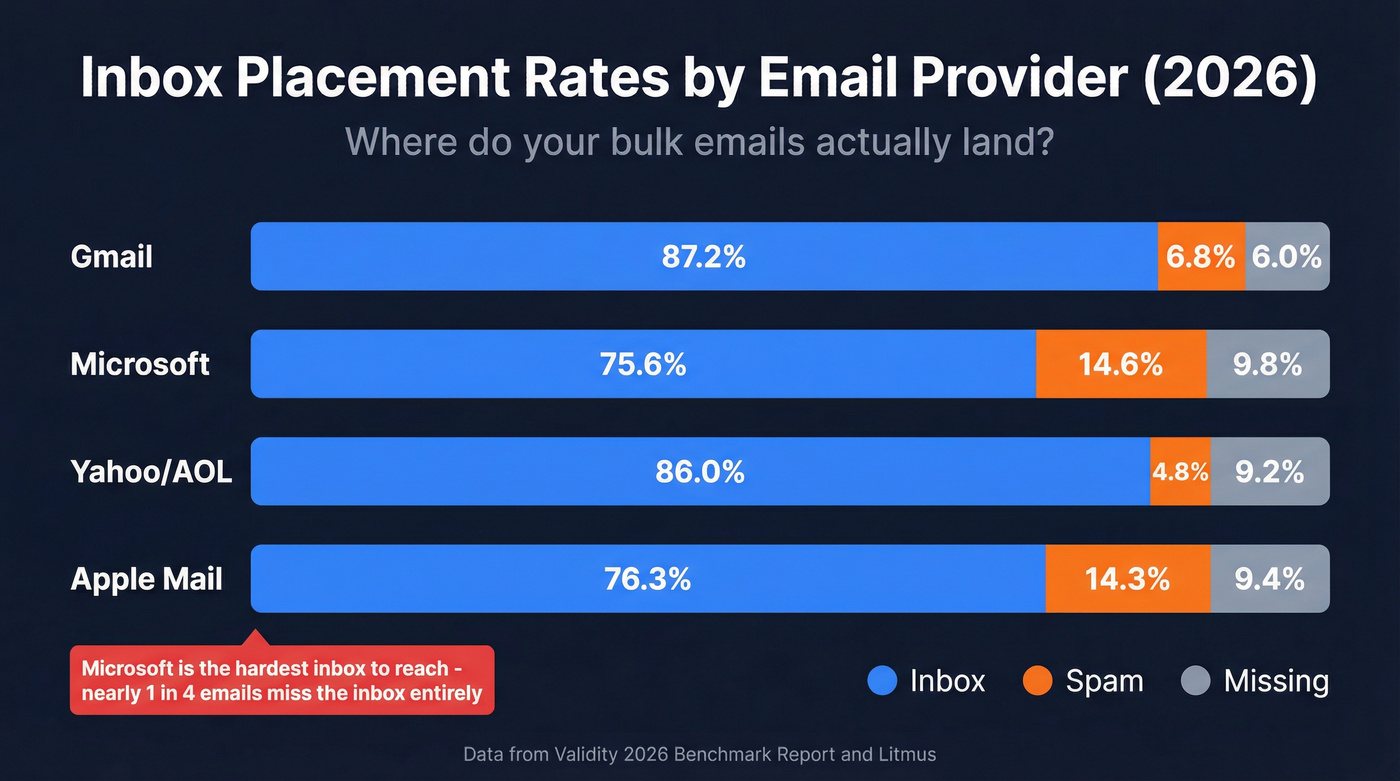
Global inbox placement sits around 83-85% for marketing email. Above 85% is good. Above 95% is excellent. Below 80% means something's broken.
| Provider | Inbox | Spam | Missing |
|---|---|---|---|
| Gmail | 87.2% | 6.8% | 6.0% |
| Microsoft | 75.6% | 14.6% | 9.8% |
| Yahoo/AOL | 86.0% | 4.8% | 9.2% |
| Apple Mail | 76.3% | 14.3% | 9.4% |
Data from Validity's 2026 benchmark report and Litmus.
Microsoft is the hardest inbox to reach - nearly 1 in 4 emails either hit spam or disappear entirely. Office 365 inbox placement dropped from 77.4% to 50.7% year over year. If your prospect list skews toward corporate Outlook domains, you need to be especially disciplined about authentication and list hygiene.
Deliverability degrades the moment you start sending to bad addresses, triggering bounces that tell ISPs your list is stale or purchased.
2026 Bulk Sender Rules
Google and Yahoo rolled out strict bulk sender requirements that are now fully enforced. Microsoft followed with its own tightening. These aren't suggestions - they're table stakes.
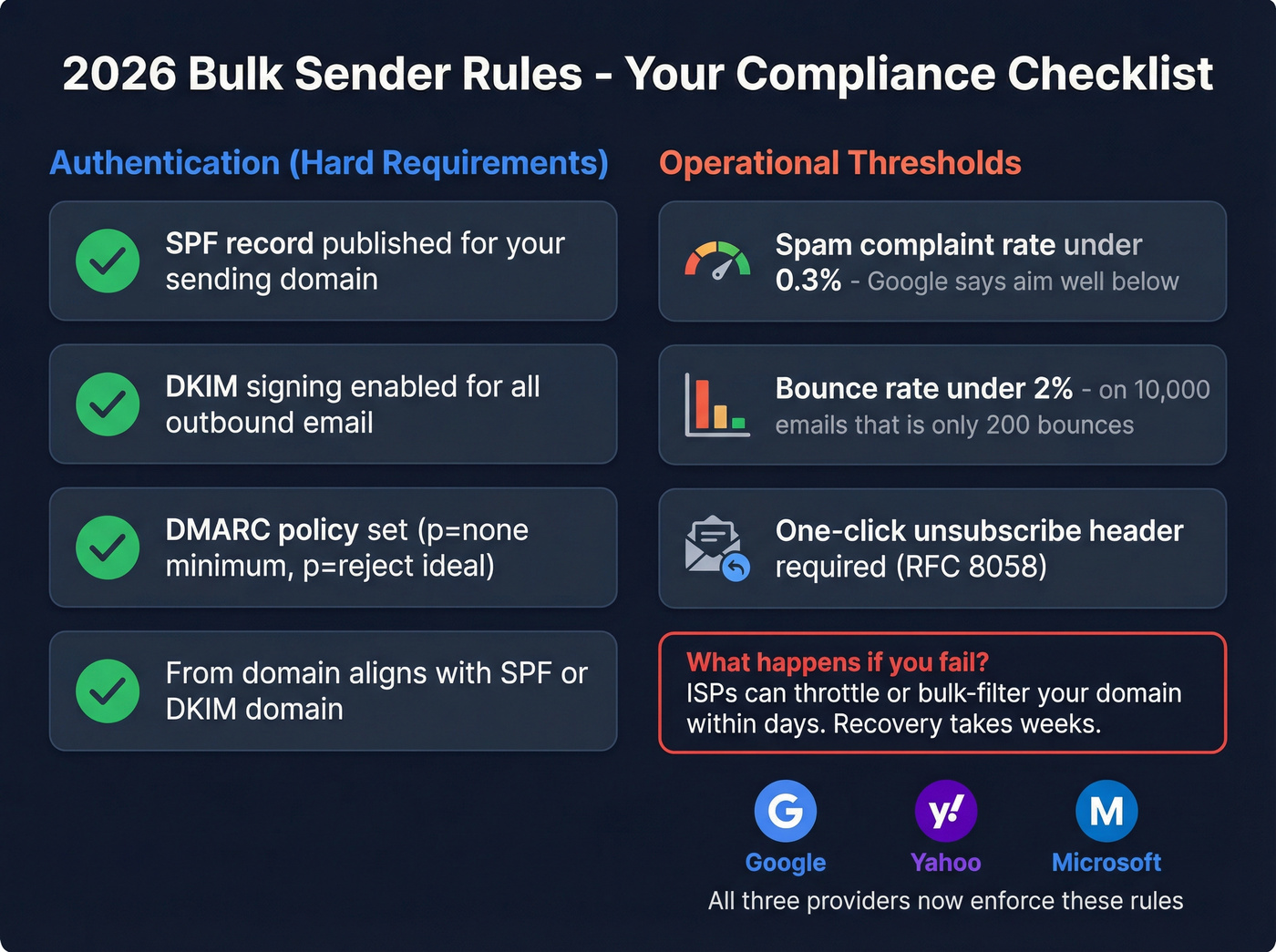
Authentication (hard requirements):
- SPF record published for your sending domain
- DKIM signing enabled for all outbound email
- DMARC policy set (p=none is acceptable to start, but p=quarantine or p=reject is better long-term)
- From domain must align with either your SPF or DKIM domain
Operational thresholds:
- Spam complaint rate must stay under 0.3% - and Google recommends targeting well below that
- Bounce rate must stay under 2%
- RFC 8058 one-click unsubscribe headers required for marketing email
What happens if you violate these? Your emails start routing to spam. Not gradually - ISPs can throttle or bulk-filter your domain within days. If your bounce rate spikes above 2% or complaints creep toward 0.3%, pause sending immediately, fix the underlying issue, and re-warm.
For cold outreach specifically, most teams cap at 20-50 emails per inbox per day and scale by adding sending accounts rather than blasting from one. The consensus on r/coldemail is pretty clear: if you're cranking up volume from a single inbox, you're going to get flagged. We've seen teams lose months of domain reputation from a single campaign sent to an unverified list. The recovery process is slow and painful.
Compliance by Region
Bulk email laws vary dramatically depending on where your recipients are. Ignorance isn't a defense, and the fines are real.
| Regulation | Consent Model | Key Requirement | Penalty |
|---|---|---|---|
| CAN-SPAM | Opt-out | Physical address + unsub link | $51,744/violation/violation |
| GDPR | Explicit opt-in | Proof of consent, erasure rights | Up to 4% global revenue |
| CASL | Express consent | Timestamped consent records | Up to $10M CAD |
CAN-SPAM is the most permissive - you can email someone who hasn't opted in, as long as you include a physical address and a working unsubscribe link. GDPR flips the model entirely: you need explicit, documented consent before sending, and recipients can demand you delete their data. CASL sits in between but requires careful record-keeping with timestamps.
Roughly 47% of all global email traffic is spam. Regulators are motivated. If you're sending mass emails into the EU or Canada, get your consent workflows airtight before you scale.

You just read that one bad campaign can torch months of domain reputation. Prospeo's 5-step verification - with catch-all handling, spam-trap removal, and honeypot filtering - delivers 98% email accuracy. That's how teams like Snyk cut bounce rates from 35% to under 5% across 50 AEs.
Stop sending blind. Verify every address before it costs you your domain.
Clean Your List Before You Send
Here's the thing: this is where most large-scale email campaigns quietly die. You authenticate your domain, pick a solid ESP, write great copy - and then send to a list full of invalid addresses, spam traps, and honeypots. Bounces spike. ISPs flag your domain. Future campaigns land in spam even when the list is clean.
The 2% bounce threshold isn't generous. On a 10,000-email campaign, that's 200 bounces max. If your list hasn't been verified recently, you'll blow past that number easily.

Skip verification if you enjoy explaining spam folder placement to your CEO.
Scaling bulk outreach means scaling clean data. Prospeo refreshes 300M+ profiles every 7 days - not 6 weeks like competitors - so your list doesn't decay between campaigns. At $0.01 per email, cleaning a 10,000-contact list costs less than a single spam complaint fine.
Fresh data every 7 days. Your bounce rate will thank you.
How to Warm Up a New Domain
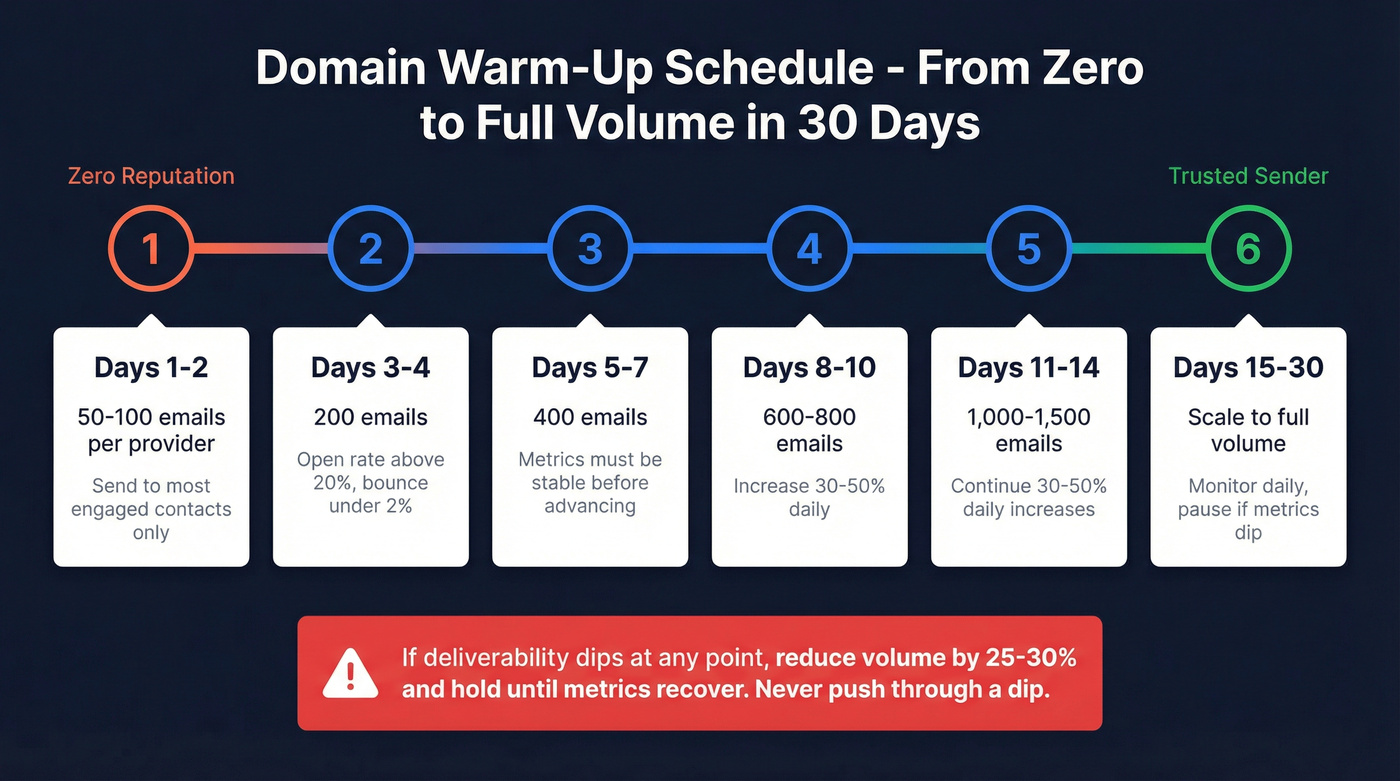
A brand-new domain or IP has zero reputation. ISPs don't trust it. Try to send thousands of messages on day one and you'll get filtered immediately. Warm-up builds trust gradually over 3-6 weeks. (If you want the full playbook, see automated email warmup.)
| Days | Emails/Provider | Condition to Advance |
|---|---|---|
| 1-2 | 50-100 | Send to most engaged contacts |
| 3-4 | 200 | Open rate >20%, bounce <2% |
| 5-7 | 400 | Metrics stable |
| 8-10 | 600-800 | 30-50% daily increases |
| 11-14 | 1,000-1,500 | Continue 30-50% increases |
| 15-30 | Scale to full volume | Monitor daily, pause if dip |
Schedule adapted from Postmark's warm-up guide.
Start with your most engaged recipients - people who've opened or clicked recently. Their positive engagement signals tell ISPs your email is wanted. Increase volume by 30-50% daily once metrics stabilize, but watch two dashboards closely: Google Postmaster Tools for Gmail reputation and Microsoft SNDS for Outlook.
If deliverability dips at any point, reduce volume by 25-30% and hold until metrics recover. Don't push through a dip. You'll compound the damage.
Best Bulk Sending Tools in 2026
The right tool depends on your volume, technical skill, and whether you need a visual editor or raw API access. No matter what you pick, the tool is only as good as the data you feed it. (If you're comparing platforms, see our best bulk email software breakdown.)
Marketing Platforms
Drag-and-drop editors, automation workflows, built-in analytics. Best for marketers who don't want to touch code.
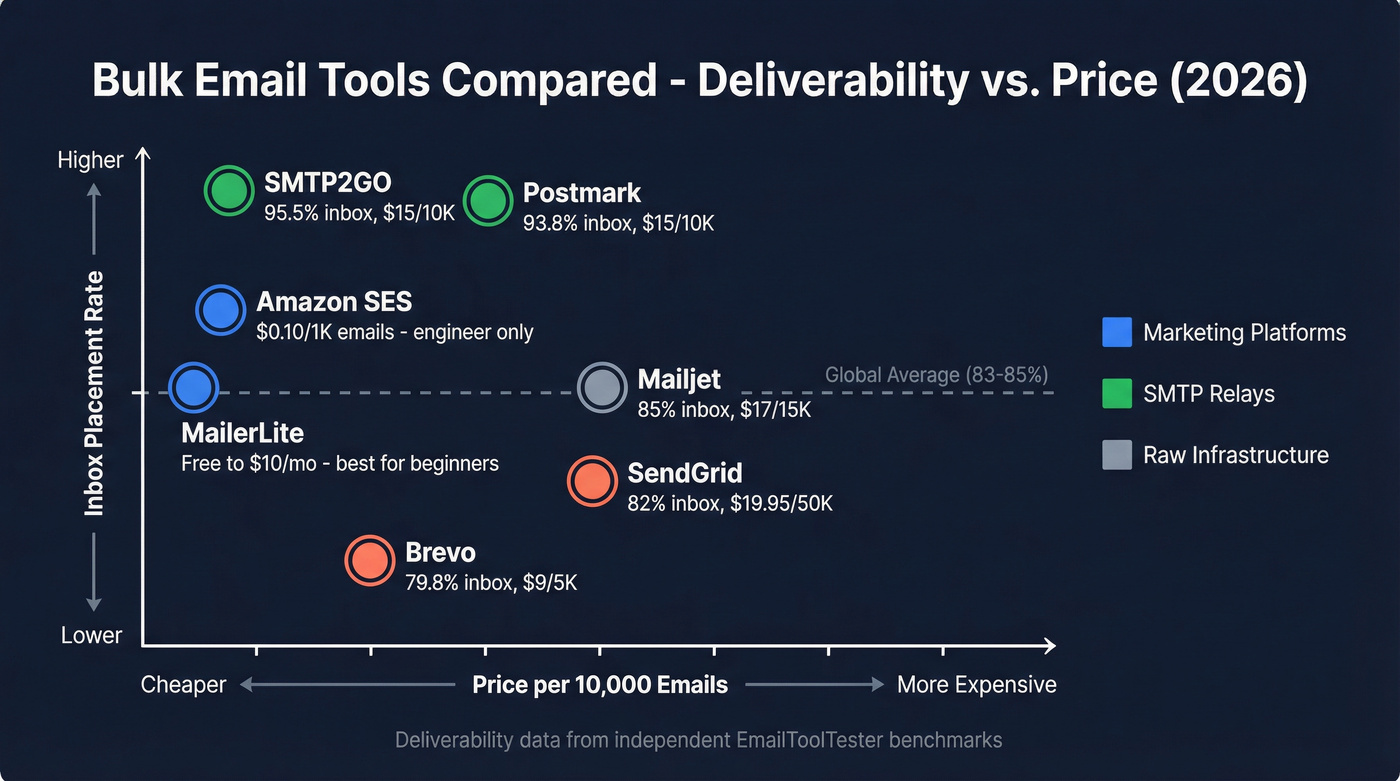
MailerLite is the obvious starting point for teams that need something working in 30 minutes. The free plan covers 12,000 emails per month, and paid plans start at $10/mo with no sending limits on paid tiers. The editor is clean, the automation builder is intuitive, and the learning curve is nearly flat. Use this for newsletters or product updates. Skip it if you need advanced segmentation or transactional email separation.
Brevo offers a free plan at 300 emails/day and paid plans from $9/mo for 5,000 emails and 500 contacts. On higher volumes, pricing commonly lands around $15/mo for 20,000 emails, $25/mo for 40,000, and $65/mo for 100,000. The catch: independent deliverability testing puts Brevo at 79.8% inbox placement - below the global average. Good automation features, but if inbox placement is your priority, look at the SMTP relay category instead.
SMTP Relays for Batch Delivery
Developer-friendly, higher deliverability, less hand-holding. You bring your own templates and logic; they handle the sending infrastructure. Separating transactional and marketing email into different streams protects your transactional deliverability from marketing reputation damage - a best practice that most platforms don't support natively.
SMTP2GO is the deliverability-to-price champion. Independent testing shows 95.5% inbox placement - the highest of any provider we've tracked. Pricing runs $15/mo for 10,000 emails, $30/mo for 50,000, $75/mo for 100,000, with a free plan at 1,000 emails/month. If you care about inbox placement and don't need a visual editor, this is where we'd start.
Postmark hits 93.8% inbox placement and offers separate message streams for transactional vs. marketing email out of the box. Pricing runs $15/mo for 10,000 emails, $55/mo for 50,000, and $115/mo for 100,000. The deliverability justifies the cost for teams where every email matters.
SendGrid starts at $19.95/mo for 50,000 emails with a free plan at 100/day, but deliverability tested at just 82%. Mailjet offers $17/mo for 15,000 emails with 85% deliverability. SMTP.com charges $25/mo for 50,000 emails with a dedicated IP and claims 98%+ deliverability - worth evaluating if you want a middle ground between SendGrid and Postmark.
Raw Infrastructure
Maximum scale, minimum cost, maximum technical effort. Engineers only.
Amazon SES is the cheapest option at scale by a wide margin: $0.10 per 1,000 emails. That's $1/month for 10,000 emails, $10/month for 100,000, and $100/month for a million. No visual editor, no deliverability support, no hand-holding. You manage reputation, authentication, and bounce handling yourself. Incredibly effective in the right hands, dangerous in the wrong ones.
Mailtrap runs $10/mo for 10,000 emails, $24/mo for 50,000, and $30/mo for 100,000 - a good testing sandbox with a clean interface. Elastic Email offers $15/mo for 50,000 and $25/mo for 100,000.

Volume-Scaled Pricing
| Tool | 10k/mo | 50k/mo | 100k/mo | Deliverability |
|---|---|---|---|---|
| Amazon SES | $1 | $5 | $10 | DIY |
| SMTP2GO | $15 | $30 | $75 | 95.5% |
| Mailtrap | $10 | $24 | $30 | Not tested |
| Brevo | ~$9 | ~$25 | $65 | 79.8% |
| Postmark | $15 | $55 | $115 | 93.8% |
| SendGrid | - | $19.95 | $34.95 | 82.0% |
| Mailjet | $17 | $37 | $105 | 85.0% |
| SMTP.com | - | $25 | ~$80 | 98%+ (claimed) |
| Elastic Email | - | $15 | $25 | Not tested |
Free plans worth noting: SMTP2GO (1,000/mo), MailerLite (12,000/mo), Brevo (300/day), SendGrid (100/day), Mailjet (free plan available).
Let's be honest: most teams agonize over which ESP to pick when the real variable is list quality. A verified list on Amazon SES will outperform a dirty list on Postmark every single time. The tool matters less than the data going into it.
2026 Email Performance Benchmarks
MailerLite published benchmarks from 3.6 million campaigns across 181,000 accounts. These are medians, not averages, which makes them more useful as realistic targets.
| Metric | Median | Notes |
|---|---|---|
| Open rate | 43.46% | Inflated by Apple MPP |
| Click rate | 2.09% | Most reliable metric |
| Click-to-open | 6.81% | Content quality signal |
| Unsubscribe | 0.22% | Up from 0.08% (Gmail UI change) |
The unsubscribe rate nearly tripled year over year - not because email quality declined, but because Gmail's one-click unsubscribe UI made opting out frictionless. That's actually healthy for list hygiene, even if the number looks alarming at first glance.
Industry variation is significant. Non-profits see 52.38% open rates and 2.90% click rates. Software companies land at 39.31% opens and 1.15% clicks. E-commerce sits lowest at 32.67% opens and 1.07% clicks. Don't benchmark against the global average - find your industry's numbers.
In our testing, click rate correlates more reliably with revenue than open rate does. Apple Mail Privacy Protection inflates open rates by pre-loading tracking pixels, making them unreliable as a performance signal. If you're optimizing for one number, optimize for clicks. (For a deeper breakdown, see open rate vs click rate.)
FAQ
Can I send bulk email from Gmail or Outlook?
Not at scale. Gmail caps personal accounts at 500 emails/day, Workspace at 2,000. Outlook limits you to 300. Exceed these and your account gets suspended - sometimes permanently. Use a dedicated ESP for anything beyond a few hundred messages.
What's the cheapest way to send in bulk?
Amazon SES at $0.10 per 1,000 emails is the cheapest infrastructure, but it requires technical setup and self-managed deliverability. For non-developers, Brevo's free plan (300/day) or MailerLite's free plan (12,000/month) are the best no-cost starting points.
How do I stop bulk emails from going to spam?
Authenticate with SPF, DKIM, and DMARC. Warm up over 3-6 weeks. Keep bounces under 2% and complaints under 0.3%. Most importantly, verify your list before sending - bad data is the root cause of most spam folder problems.
Is mass emailing legal?
Yes, but regulations vary by region. CAN-SPAM allows opt-out consent with an unsubscribe link and physical address. GDPR and CASL require explicit opt-in before sending. Violations carry fines up to 4% of global revenue under GDPR or $10M CAD under CASL.
How many emails per day triggers bulk sender rules?
Google considers roughly 5,000 emails/day the threshold. But volume alone isn't the trigger - missing authentication, bounce rates above 2%, and spam complaints above 0.3% cause filtering. A well-authenticated sender with clean lists can send far more without issues.