Calendly vs YouCanBookMe (YCBM): Which Scheduling Tool Wins in 2026?
Scheduling tools don't fail because they can't book a meeting. They fail because the billing and routing rules don't match how your team actually works once you scale past "a few links."
We've tested both in real rollouts, and the pattern's consistent: Calendly wins on sales-style routing and admin control; YouCanBookMe wins on booking-page UX and flexibility.
Here's the part people hate hearing: the "best" tool is usually the one that creates the fewest surprises for Finance and RevOps three months after launch.
30-second verdict
Choose Calendly if... you're running sales or recruiting where routing, qualification, and distribution rules matter. Calendly's edge is workflow: Routing Forms (Teams/Enterprise), stronger admin controls, and round robin that stays sane as the team grows.
Choose YouCanBookMe if... your booking page is customer-facing and you want it to feel like your product. YCBM's edge is booking-page UX/branding plus flexible forms, with payments and SMS you can switch on without climbing a bunch of tiers.
Skip both if... scheduling isn't the bottleneck; what happens after the booking is. If booked leads hit your CRM with bad emails, missing mobiles, or duplicates, follow-ups bounce and reps stop trusting the pipeline. That's where Prospeo fits: verify and enrich contact data after the meeting's booked so your sequences actually land.
The "gotcha" most teams miss is variable fees after rollout. YCBM's 1% payments commission and SMS charges can quietly become real money. Calendly's SMS is included on paid plans, but you can't point to a clean, published per-text overage price, so heavy usage tends to show up as "why are we upgrading plans again?"

At-a-glance comparison (features + plan gating)
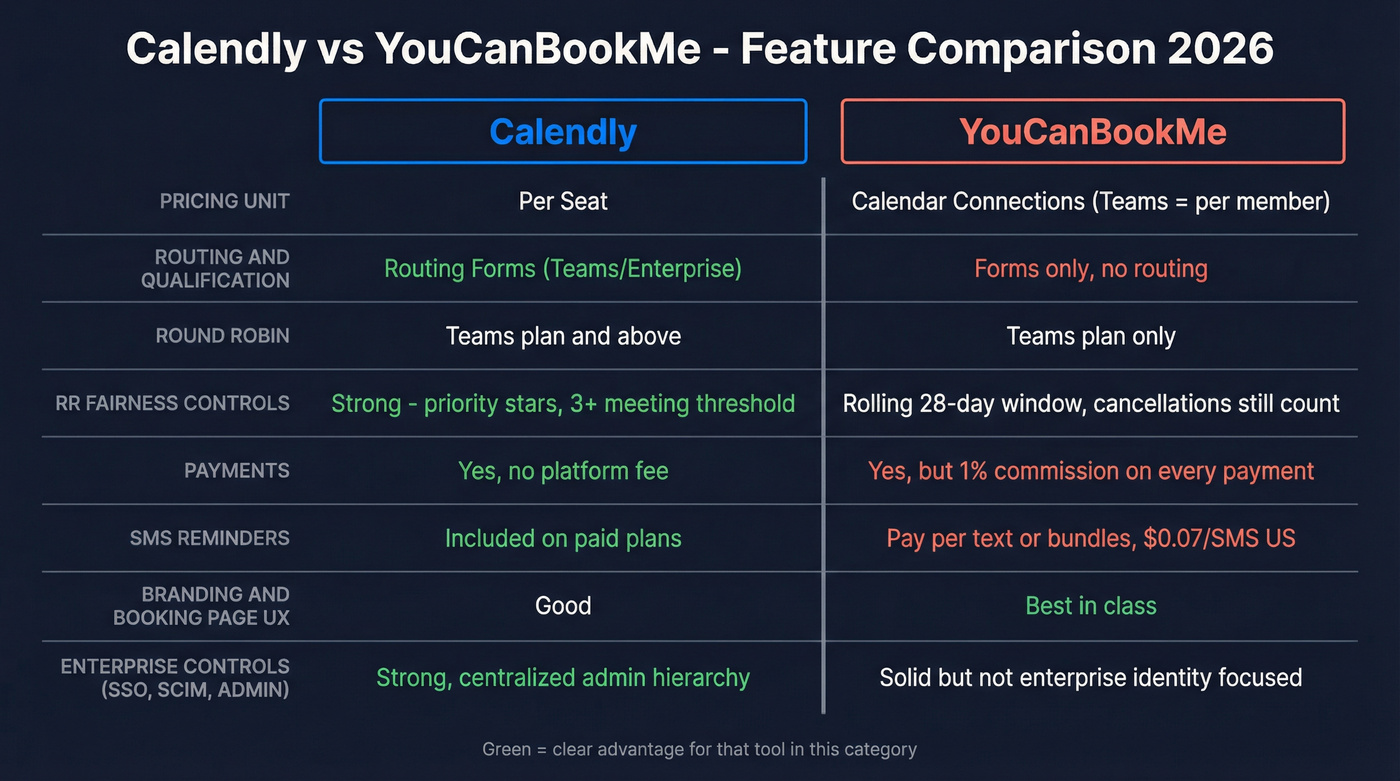
This is the "what do I actually get on the plan I'll really buy?" view. Plan gating is where teams get burned.
| Category | Calendly | YouCanBookMe (YCBM) | What it means |
|---|---|---|---|
| Pricing unit | Per seat | Calendar connections (Teams is per member) | Different cost curve |
| Routing/qualification | Routing Forms (Teams/Enterprise) | Forms (no routing) | Sales teams feel it |
| Round robin | Teams+ | Teams | Both can do it |
| RR fairness controls | Strong | Equal distribution uses a rolling 28-day window | Outcomes differ |
| Payments | Yes | Yes + 1% fee | YCBM adds take-rate |
| SMS reminders | Included (limits) | Pay-per-text or bundles | YCBM is modelable |
| Branding/UX | Good | Strong | YCBM wins |
| Enterprise controls | Strong | Solid | Calendly leads |
Plan-gating landmines (the stuff that changes your rollout)
- Calendly Routing Forms: Teams/Enterprise only. If you need "qualify -> route to the right rep/event/URL," this is the feature.
- YouCanBookMe Round Robin: Teams only. If you're distributing bookings across a team, you're not staying on Individual/Pro.
- Payments fees: YCBM supports Stripe on all plans and takes 1% commission on every payment collected through a booking page.
- SMS is a budget line item in YCBM: pay-per-text or bundles. Calendly includes SMS on paid plans, but you budget it indirectly (usage -> tier pressure).
- Admin roles & standardization: Calendly's built for centralized control (owners/admins/group admins). If you need one "source of truth" scheduling setup across a sales org, this matters.
- SSO/SCIM expectations: if your IT team expects SSO/SCIM and auditability, Calendly's Enterprise posture is usually the smoother path. (YCBM can still be secure; it just isn't positioned as "enterprise identity plumbing.")
- Booking-page sprawl: YCBM makes it easy to create lots of booking pages, but billing is driven by calendar connections. Sprawl's fine; connected calendars are what sneak up on you.
- Payments ops constraint (YCBM Teams): Teams can connect one Stripe account for the whole team. If you run multiple business units or regions with separate Stripe accounts, decide that up front.
calendly vs youcanbookme pricing in 2026 (and the billing physics)
If you only read one section, read this. Most comparisons talk features; the winner in real life is the tool whose billing matches how your org scales.
Calendly pricing (annual list)
Calendly's annual list pricing:
- Free: $0
- Standard: $10/seat/mo
- Teams: $16/seat/mo
- Enterprise: starts at $15k/yr
YouCanBookMe pricing (monthly list) + discounts that matter
YCBM pricing is driven by calendar connections across booking pages (and on Teams, it's priced per member).
Monthly pricing (USD):
- Free: $0 (1 calendar connection, 1 booking page)
- Individual: $9/mo (2 calendar connections, 2 booking pages)
- Pro: $13/mo (6 calendar connections, 6 booking pages)
- Teams: $18/member/mo (6+ calendar connections, 6+ booking pages)
Discounts (these change the math at scale):
- Annual: 10% off
- Pro: $11.70/mo
- Teams: $16.20/member/mo
- 2-year: 20% off
- Pro: $10.40/mo
- Teams: $14.40/member/mo
Canonical pricing table (no tab-hopping)
| Tool | Plan | Price basis | List price |
|---|---|---|---|
| Calendly | Free | Seat | $0 |
| Calendly | Standard | Seat | $10/seat/mo (annual) |
| Calendly | Teams | Seat | $16/seat/mo (annual) |
| Calendly | Enterprise | Contract | Starts $15k/yr |
| YCBM | Free | Calendar conn. | $0 |
| YCBM | Individual | Calendar conn. | $9/mo |
| YCBM | Pro | Calendar conn. | $13/mo |
| YCBM | Teams | Member | $18/member/mo (or $16.20 annual / $14.40 2-year) |
The billing physics (why your costs drift after rollout)
Calendly scales with headcount using the tool. Add 5 AEs -> add 5 seats. Predictable.
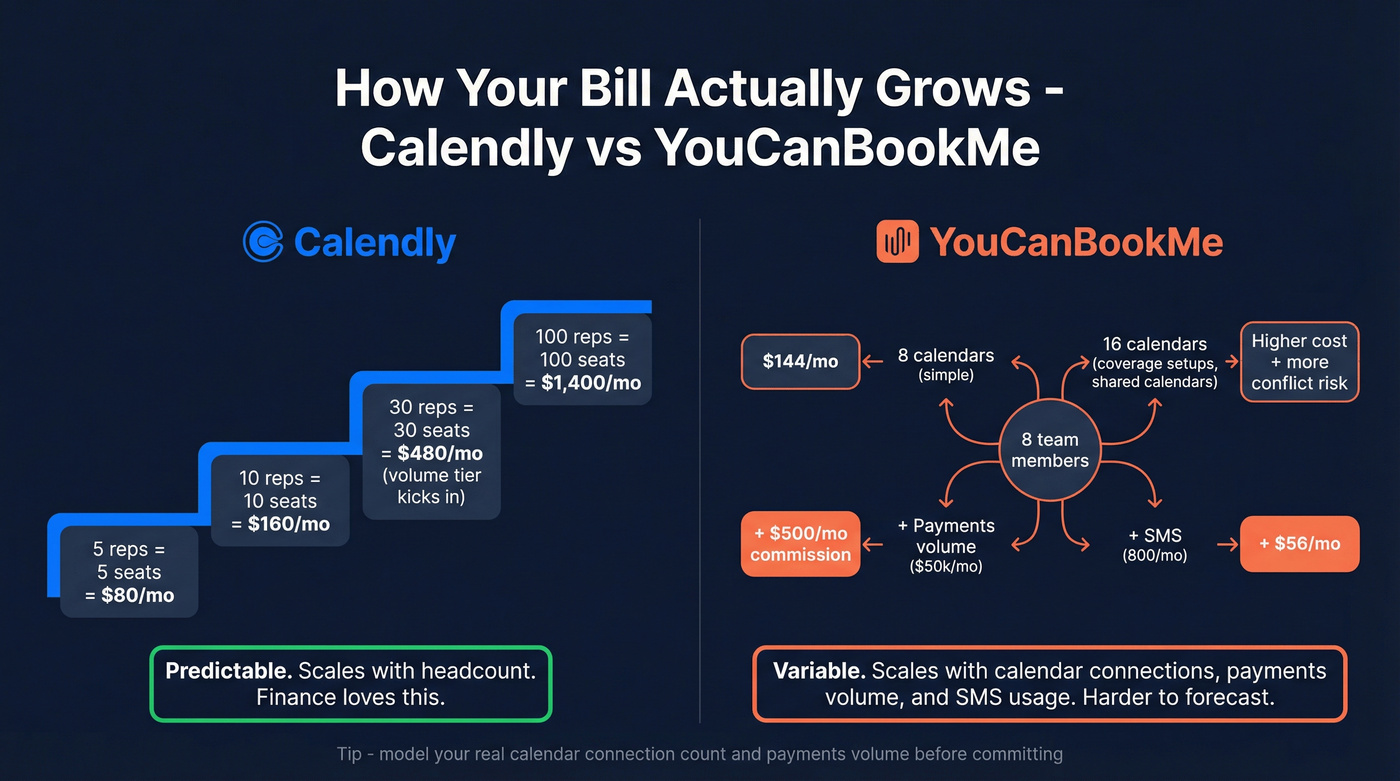
Calendly also publishes volume tiers on Teams (annual), which is rare and genuinely helpful once you're past a small team:
- 1-30 seats: $16/seat/mo
- 31-50: $14.50/seat/mo
- 51-100: $14/seat/mo
- 101-200: $13.50/seat/mo
- 201-300: $13/seat/mo
- 301+: $12/seat/mo
YouCanBookMe scales with calendar connections (and in Teams, members + linked calendars across booking pages). That's great when each person has one calendar and you keep things simple. It gets expensive and messy when you run coverage-heavy setups: multiple calendars per person, shared "team" calendars, pods by region, or lots of variations that require extra connected calendars, because each extra connection isn't just cost - it's another moving part that can create conflicts, missed blocks, and "why did this book over my OOO?" tickets.
My blunt recommendation: if your RevOps/Finance world thinks in seats and roles, Calendly will feel cleaner. If your world thinks in "booking pages as customer experience," YCBM will feel more natural.
Cost-at-scale scenarios (which is cheaper for my setup?)
I've watched teams pick the "cheaper" scheduler and then spend months arguing about why the bill doesn't match reality. Here's the math in plain English.
Assumptions (kept simple):
- Calendly Teams: $16/seat/mo (annual)
- YCBM Teams: $18/member/mo (monthly) or $16.20 (annual) / $14.40 (2-year)
- YCBM payments: 1% commission on top of Stripe
- YCBM Basic SMS: $0.07/SMS (US); Enhanced SMS bundles include $17/month (up to 500 SMS) or $27/month (up to 1,000 SMS) plus a $59 one-time setup
- Calendly SMS: included on paid plans (limits apply)
Quick scenario table
| Scenario | Calendly cost | YCBM cost | Winner |
|---|---|---|---|
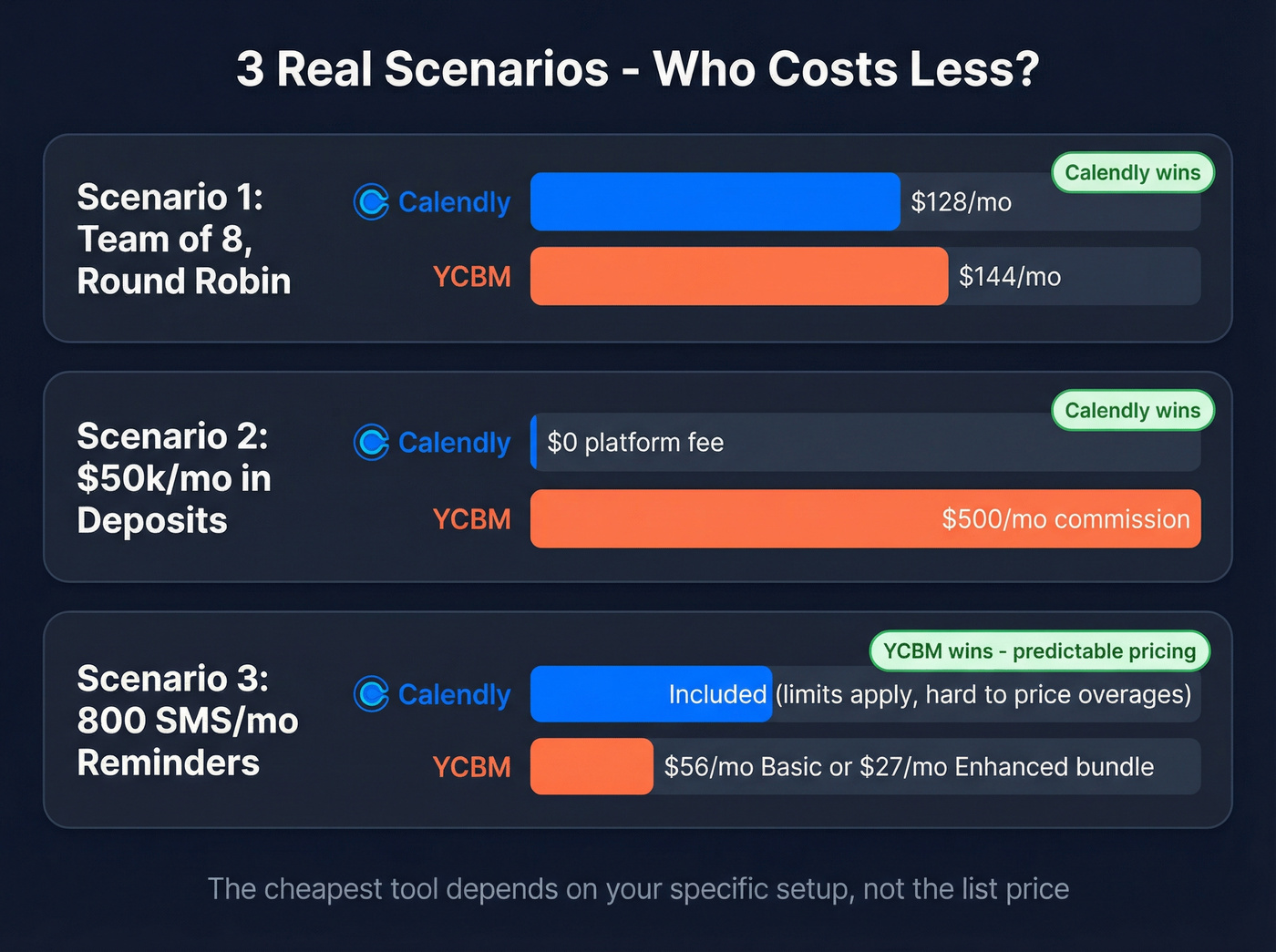
| 8-person team, round robin | ~$128/mo | ~$144/mo | Calendly |
| Deposits: $50k/mo collected | $0 platform fee | $500/mo | Calendly |
| 800 SMS/mo reminders | Included (limits) | ~$56/mo Basic | YCBM (if SMS-heavy) |
Scenario 1: "Team of 8, fairness matters" (and calendar connections creep)
Calendly (straightforward):
- 8 seats x $16 = $128/mo (annualized)
YCBM (two real outcomes):
- Case A: 8 people, 1 calendar each
- You'll almost certainly be on Teams for round robin
- 8 members x $18 = $144/mo (monthly)
- If annual: 8 x $16.20 = $129.60/mo
- Case B: 8 people, 2 calendars each (or shared team calendars)
- Your connected calendars double, and that's where YCBM's "calendar connection" model starts to bite operationally: more connections to manage, more places for conflicts, and more chances your setup drifts as coverage changes.
Here's the thing: YCBM isn't "bad at teams." Calendly's cost and ownership model just matches how sales orgs staff and forecast.
Scenario 2: Payments (deposits) change the economics fast
Say you're a services team collecting $50,000/mo in deposits through the booking page.
- YCBM commission: 1% x $50,000 = $500/mo
- Refunds are processed in Stripe; Stripe can't automatically return YCBM's 1% commission, so that portion stays charged even if you refund the customer.
If payments volume matters, Calendly is cheaper. Full stop.
Scenario 3: SMS volume (a variable cost you can actually budget)
You're sending reminders and follow-ups: 800 SMS/mo.
- YCBM Basic SMS: 800 x $0.07 = $56/mo (US)
- YCBM Enhanced SMS: $59 setup, then $27/month includes up to 1,000 SMS/month (plus a dedicated line). This can beat Basic if you're consistently high-volume and keep messages short.
Calendly SMS is included on paid plans, but you can't price overages cleanly. If you want SMS to behave like a predictable utility bill, YCBM's the better fit.

Calendly and YCBM get the meeting on the calendar. But when booked leads hit your CRM with bad emails and missing phone numbers, reps waste hours chasing ghosts. Prospeo enriches every booked contact with 98% accurate emails and verified mobile numbers - 50+ data points per lead, refreshed every 7 days.
Stop losing deals after the booking. Enrich every lead that schedules.
Round robin scheduling: what's actually different
"Both have round robin" is technically true and practically misleading. The mechanics are different, and the edge cases change outcomes.
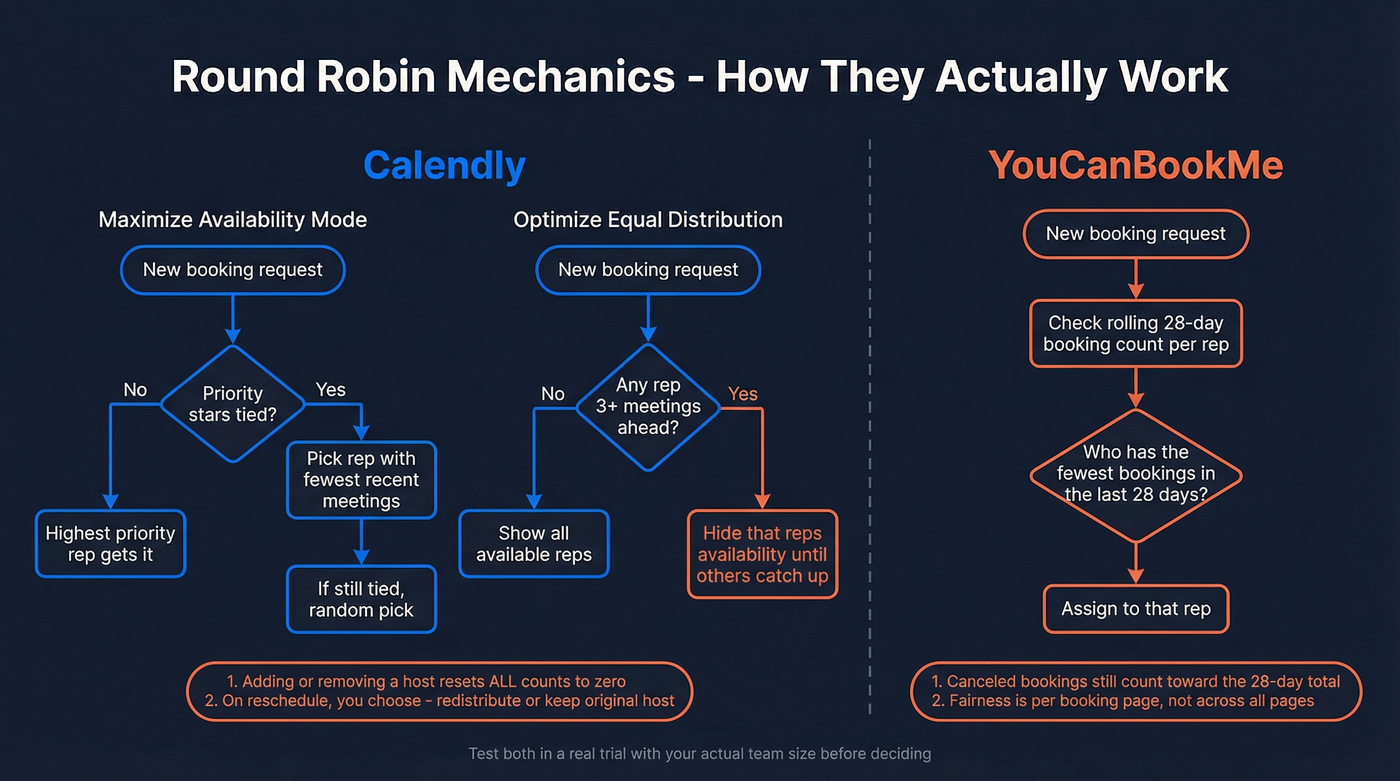
Calendly Round Robin: two modes + sales-friendly reschedule behavior
Calendly gives you two distribution modes:
- Maximize availability: uses priority stars; if there's a tie, it books the person who hasn't had a recent meeting, otherwise it goes random.
- Optimize equal distribution: hides availability for a teammate who's 3+ meetings ahead until others catch up.
Two edge cases matter in production:
- If you add or remove a host, meeting counts reset to zero for everyone. Plan host changes, especially mid-quarter.
- On reschedules, you can choose: redistribute via round robin or keep the original host. For sales continuity, "keep host" is gold.
YouCanBookMe Round Robin: 28-day window + cancellations still count
YCBM round robin is Teams-only.
For equal distribution, it's measured over a rolling 28-day window.
Two details change behavior:
- Canceled bookings still count toward the 28-day total.
- Distribution is based on the booking page team members are connected to.
If you run multiple booking pages (region, language, product line), you can get fair distribution within each page while still seeing uneven distribution across the whole team. For service teams, that's often exactly what you want.
Round robin checklist (what to test before rollout)
Run these tests in a real trial, not in your imagination:
- Add/remove a rep mid-week: do counts reset, and does fairness get weird?
- Reschedule: does it stay with the original host (sales continuity) or redistribute?
- Two booking pages: does fairness hold across pages or only within each page?
- Cancel a meeting: does it still count toward fairness (YCBM does)?
Sales workflows vs branded booking pages (routing, qualification, customization)
Think of this comparison as two lanes.
Sales lane: routing + qualification + distribution
Calendly wins the sales lane because of Routing Forms (Teams/Enterprise). You can qualify a visitor and route them to:
- an event type
- a custom message
- an external URL
And it's controlled: owners/admins/group admins manage routing forms, which is exactly what you want when you're standardizing inbound across a team.
If you're doing anything like "if company size > 200 route to AE, else route to SDR," pick Calendly. Trying to recreate this with generic forms + Zapier + a pile of calendar links turns into a brittle mess, and the first time someone changes a field name in your form, half your routing breaks quietly.
Service/Education lane: the booking page is the experience
YouCanBookMe wins when the booking page is part of your brand experience: embedded scheduling, custom fields, and a flow that feels less like "a scheduler link" and more like "our portal."
This isn't cosmetic. A clean booking experience lifts conversion for paid consults, coaching, clinics, education, and any high-intent booking where trust is part of the sale.
If your scheduler is customer-facing and you care about last-mile polish, YCBM's the pick.

Payments, refunds, and SMS reminders (the gotchas box)
This is where the real cost and operational risk live.
Gotcha box: YouCanBookMe payments
- Stripe + 1% commission on every payment through a YCBM booking page
- Refunds are processed in Stripe; Stripe can't automatically return YCBM's 1% commission, so that portion stays charged
- Teams can connect only one Stripe account for the entire team
If you have multiple Stripe accounts (regions, brands, business units), that last bullet forces a decision.
Gotcha box: refunds and credits in YouCanBookMe
- Refund requests are allowed within 30 days of purchase
- After 30 days, remaining value becomes account credit
- SMS purchases are non-refundable
- Account credits are non-refundable
Treat SMS and credits like consumables, not like money you'll definitely get back.
Gotcha box: YouCanBookMe SMS pricing (Basic vs Enhanced)
Basic SMS (pay-per-text)
- $0.07/SMS (US) (also EUR0.07 / GBP0.05)
- No setup fee, no monthly fee
- Available worldwide, on all plans (including Free)
Enhanced SMS (bundle + dedicated line)
- $59 one-time setup
- $17/month includes 1 dedicated line + up to 500 SMS/month
- $27/month includes 1 dedicated line + up to 1,000 SMS/month
- Extra dedicated line: $5/mo
- Enhanced is for Pro/Teams in the US/Canada
- 160 characters = 1 credit (longer messages burn multiple credits)
If you're doing reminders at scale, Enhanced is better unit economics. If you're doing occasional reminders, Basic's simpler.
Calendly SMS: included, but not infinite
Calendly SMS reminders are included on paid plans, but limits and country constraints apply. The practical issue is budgeting: you don't get a clean per-text price to model, so heavy SMS usage usually shows up as plan pressure instead of a predictable line item.
Integrations & reliability (native vs connectors + what to test)
Both tools cover the basics (Google Calendar, Outlook/M365, Zoom/Meet/Teams, Zapier/Make). The difference is how much you rely on connectors for long-tail workflows, and how well your setup survives real-world edge cases.
A quick scenario I've seen too many times: an SDR books a meeting, the prospect reschedules twice, then cancels, then rebooks from an old link. The calendar looks fine. The CRM, though, now has three activities, the owner field is wrong, and the rep's sequence fires anyway because the "meeting booked" trigger never got a clean "meeting canceled" update. Everyone blames the scheduler. It's usually the integration glue.
What most teams should test (do this before you roll out)
- CRM field mapping under stress Create -> reschedule -> cancel the same booking three times. Confirm your CRM fields update correctly every time (owner, meeting status, meeting date/time, source, notes). This is where "it works" turns into "it's unreliable."
If you're trying to standardize how meeting activity lands in your CRM, treat it like a real CRM integration project, not a "connect it and forget it" task.
- Reschedule/cancel edge cases with round robin
Test both: "keep original host" and "redistribute" behavior (Calendly supports this choice). Then test YCBM's cancellation-counting behavior against your fairness expectations.
Automation delivery and retries If you rely on automation, confirm you can get consistent event delivery (API events/webhooks/connector triggers) and what happens on failure. Kill your endpoint or pause your automation for 10 minutes and see whether events retry or disappear.
Calendar conflict protection with multiple calendars Connect a personal calendar + a shared team calendar + an "OOO" calendar. Try to force a double-book. If you can break it in testing, your reps will break it in production.
My opinion: a scheduler's a data source, not "just a link." Treat rollout like a real integration project and you'll save yourself a lot of late-night Slack threads.
Security & compliance (stated controls, not vibes)
Both vendors publish serious security posture. Calendly's more enterprise-featured (identity + admin controls), while YCBM's unusually transparent for a smaller vendor.
| Control / certification | Calendly | YouCanBookMe |
|---|---|---|
| SOC | SOC 2 Type 2 + SOC 3 | SOC 2 Type II |
| ISO | ISO/IEC 27001 report | ISO/IEC 27001:2022 (#20/3433) |
| CSA STAR | Level One | Not listed publicly |
| Encryption in transit | TLS 1.2+ | TLS 1.2 |
| Encryption at rest | AES-256 | AES-256 (AWS KMS) |
How to decide:
- If you need SSO/SCIM, audit logs, and centralized admin controls, Calendly's the cleaner enterprise fit.
- If you need strong baseline assurances (SOC/ISO + encryption) and don't need deep identity plumbing, YCBM clears the bar.
Reviews & support reality (Feb 2026 benchmarks)
Ratings are close enough that you shouldn't decide on vibes. Decide on mechanics: routing, round robin behavior, and fees.
On G2's comparison page:
- Both are 4.7/5
- Review counts: 2,543 (Calendly) vs 1,931 (YCBM)
- Support: 9.0 vs 9.1
- Product Direction: 8.8 vs 7.9
On Capterra's comparison (updated Feb 4, 2026):
- Calendly: 4.7 (4,054)
- YCBM: 4.6 (351)
- Customer Service: 4.4 vs 4.5
What the reviews actually tell you (and what they don't)
- Calendly complaint pattern: support can feel chatbot-first, and escalations can be slow when something breaks at the worst possible time (exec scheduling is where you feel this pain).
- YCBM complaint pattern: calendar integration edge cases show up repeatedly. If you're on M365/Exchange or have complex shared calendars, pressure-test hard.
One more reality check: review mixes vary by platform and over time. Use reviews for failure modes (support responsiveness, calendar sync reliability, billing surprises), then validate those failure modes in a trial.
The stance most teams need to hear
If your average deal size is relatively small and you're not routing inbound by qualification, you don't need a "sales scheduling platform." You need a scheduler that looks good, doesn't break, and doesn't surprise Finance.
That's why YCBM wins so often in service businesses, and why Calendly wins so often in sales orgs.
What most comparisons miss (and what to decide on)
If you're skimming, decide on these four things:
- Calendly Teams volume tiers: if you're scaling seats, Calendly gets cheaper per seat at higher volumes.
- Round robin edge cases: Calendly host changes reset counts; YCBM counts cancellations in its 28-day window.
- YCBM payments ops: one Stripe account for Teams + a 1% commission you can't claw back via Stripe refunds.
- SMS budgeting: YCBM is explicit per-text/bundle; Calendly is included but you can't model overages cleanly.
Also consider (if Calendly/YCBM aren't a fit)
Sometimes the right answer is "neither."
- Acuity Scheduling: strong for service businesses that live and die by payments, packages, and appointment-style workflows. Expect pricing in the ~$20-$60/month range depending on tier and add-ons.
- Cal.com: best if you want a customizable scheduling layer (including self-host options) and you have technical resources. Typical paid plans land around ~$15-$30/user/month, with enterprise higher.
- SimplyBook.me: solid for SMB appointment booking with lots of industry templates and add-ons. Pricing commonly sits around ~$10-$60/month depending on booking volume and features.
- Lunacal: lighter-weight, modern scheduling that leans into personal branding and shareable availability. Expect something like ~$10-$30/month for paid tiers.
"Skip both" or "pair it with" layer: clean contact data after booking
Look, scheduling is only half the job. If the meeting books but the email bounces (or the mobile's missing), your follow-up falls apart and the rep blames "lead quality" instead of fixing the underlying data.
Prospeo is the B2B data platform built for accuracy. It verifies and enriches contacts after the booking so your CRM stays clean: 98% verified email accuracy, a 7-day refresh cycle, and 15,000+ companies using it. Under the hood, it's backed by 300M+ professional profiles, 143M+ verified emails, and 125M+ verified mobiles, plus enrichment that returns 50+ data points per contact.
If you're building a simple workflow, we've had the best results with: booking happens -> enrichment runs -> sequence starts only if the email verifies and the record isn't a duplicate. That one change alone stops a ton of wasted cycles.
If you're serious about keeping your pipeline trustworthy, pair scheduling with a repeatable CRM data clean workflow and a documented data quality scorecard.
You just spent months choosing between Calendly and YCBM, optimizing routing, and perfecting round robin. Then your follow-up sequences bounce at 35% because the contact data is stale. Prospeo's 5-step verification and 7-day refresh cycle fix that - at $0.01 per email.
Your scheduling stack is only as good as the data flowing through it.
FAQ
Is YouCanBookMe cheaper than Calendly in 2026?
For most seat-based teams, Calendly's cheaper and easier to forecast. YouCanBookMe can win when you keep calendar connections simple and need stronger booking-page branding. Model the 1% payments commission and plan for SMS as a separate line item if you'll send 500+ texts/month.
How does Round Robin differ between Calendly and YouCanBookMe?
Calendly offers "maximize availability" and "optimize equal distribution," including a fairness rule that hides availability when someone's 3+ meetings ahead, plus an option to keep the original host on reschedules. YouCanBookMe's equal distribution uses a rolling 28-day window where canceled bookings still count, and fairness is scoped to each booking page.
Does YouCanBookMe take a fee on payments?
Yes. Payments run through Stripe, and YouCanBookMe adds a 1% commission on every payment collected via a booking page. If you process $50,000/month in deposits, that's $500/month in platform fees, and Stripe can't automatically return that 1% if you refund the customer.
Which is better for sales routing and qualification?
Calendly is better for sales routing because Routing Forms (Teams/Enterprise) can route based on answers to an event type, a custom message, or an external URL, with admin permissions to keep routing standardized. If you're qualifying inbound and distributing to the right rep, this is the feature that prevents a Zapier-and-links spaghetti setup.
After someone books, how do I keep follow-ups from bouncing?
Verify and enrich the contact before any sequence goes out, and keep your operational bounce-rate target under 5%. Prospeo delivers 98% verified email accuracy on a 7-day refresh cycle and enriches CRM/CSV records with 50+ data points, so the meeting you just booked doesn't turn into a dead follow-up.
Summary: which one should you pick?
If your decision's really about routing, admin control, and predictable seat-based scaling, pick Calendly. If it's really about a branded, customer-facing booking experience - and you're fine modeling variable costs like payments commission and SMS - pick YouCanBookMe.
That's the cleanest way to think about calendly vs youcanbookme in 2026.