

AI Cold Email Campaigns: How to Build a System That Gets Replies in 2026
$15,000 a year on tools. 50,000 emails sent. 23 meetings booked. I watched a team run this exact playbook last year - and the problem wasn't their AI prompts, their subject lines, or their sending cadence. It was their data. A 7.2% bounce rate tanked their domain reputation by week three, and half their "verified" emails were dead on arrival.
AI cold email campaigns are the biggest opportunity and the biggest threat to outbound right now. 64% of marketers use AI for email marketing, and AI-driven campaigns hit 13.44% CTR versus 3% for non-AI. But 95% of cold emails still fail to generate replies, and 88% of recipients ignore emails they suspect are AI-generated. The paradox: AI makes it easier to send more email, and sending more email is exactly what's killing outbound.
The winning formula hasn't changed - it's just gotten more precise. Clean data, smart enrichment, disciplined sending. Most campaigns fail at the data layer, not the AI layer.
What You Need (Quick Version)
- Enrichment: Clay - 130+ data sources, AI-powered research for real personalization variables.
- Sending: Instantly - strong deliverability infrastructure for most teams on the Growth plan at $30/mo.
- Total cost: Under $200/month.
That stack outperforms any $500+/month all-in-one platform. The rest of this guide explains why - and exactly how to build it.
The State of AI-Powered Cold Email - Benchmarks That Matter
Before you build anything, you need to know what "good" looks like. These numbers have shifted significantly from even 12 months ago.
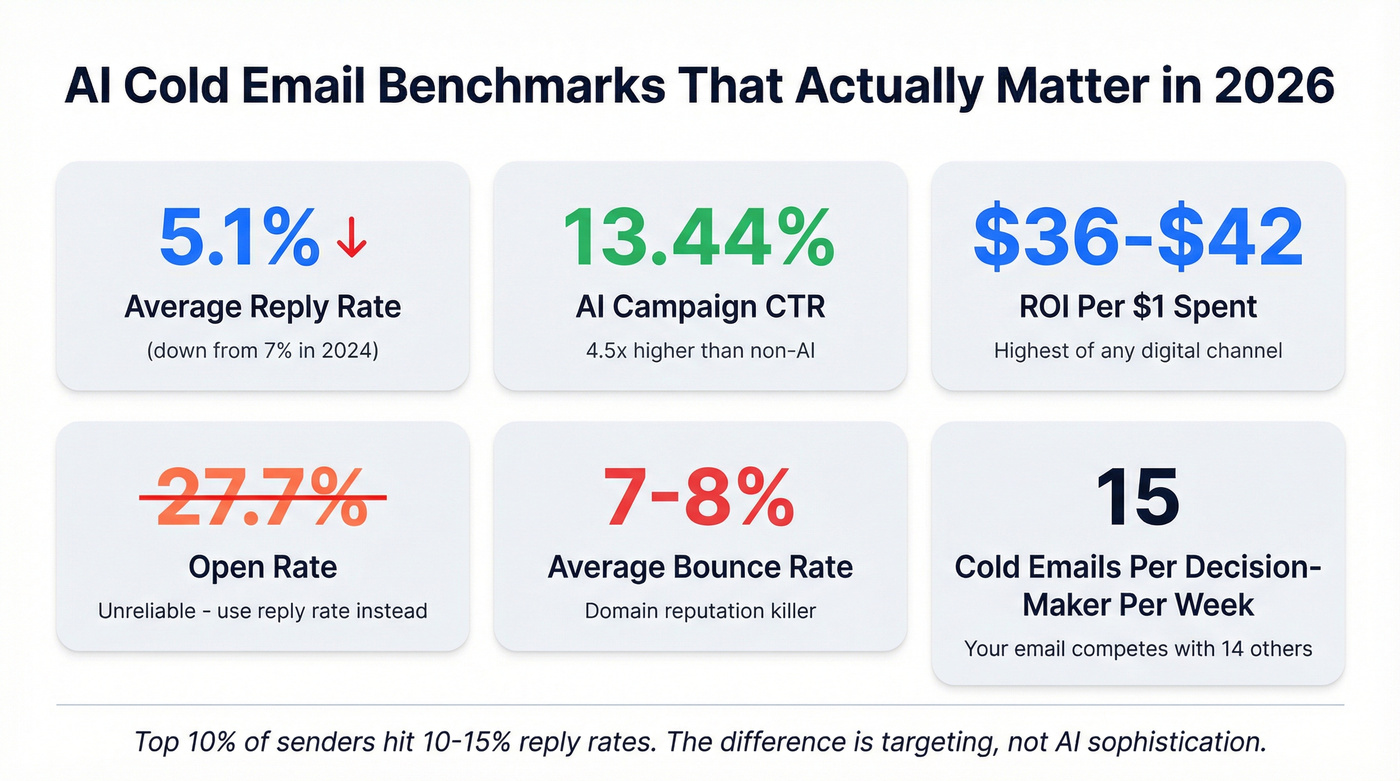
| Metric | Latest Benchmark | Trend |
|---|---|---|
| Open rate | 27.7% | Down from ~36% (2023) |
| Reply rate | 5.1% | Down from ~7% (2024) |
| Conversion rate | 0.2% | 1 deal per 500 emails |
| Bounce rate | 7-8% | Steady (and too high) |
| CTR (AI campaigns) | 13.44% | 4.5x non-AI campaigns |
| CTR (non-AI) | ~3% | Flat |
| ROI per $1 spent | $36-$42 | Highest of any digital channel |
The open rate decline is the headline everyone fixates on, but it's the wrong metric. Open tracking is increasingly unreliable - Apple's Mail Privacy Protection inflates numbers, and savvy senders are dropping tracking pixels entirely to protect deliverability.
Reply rate is what matters. And 5.1% is the average, which means half of all campaigns are doing worse. The top 10% hit 10-15% reply rates. The difference isn't AI sophistication. It's targeting precision and data quality.
Decision-makers receive an average of 15 cold emails per week. Your email isn't competing with silence - it's competing with 14 other pitches, most of which sound exactly like yours because they were all written by the same LLMs using the same prompts.
The ROI story is still compelling. $36-$42 back for every dollar spent makes cold email the highest-ROI digital channel by a wide margin. But that ROI is concentrated among teams who've figured out the system. For everyone else, it's a money pit.
When AI Cold Email Campaigns Fail (And Why Most Do)
AI didn't break cold email. It just made it easier to do cold email badly at scale.
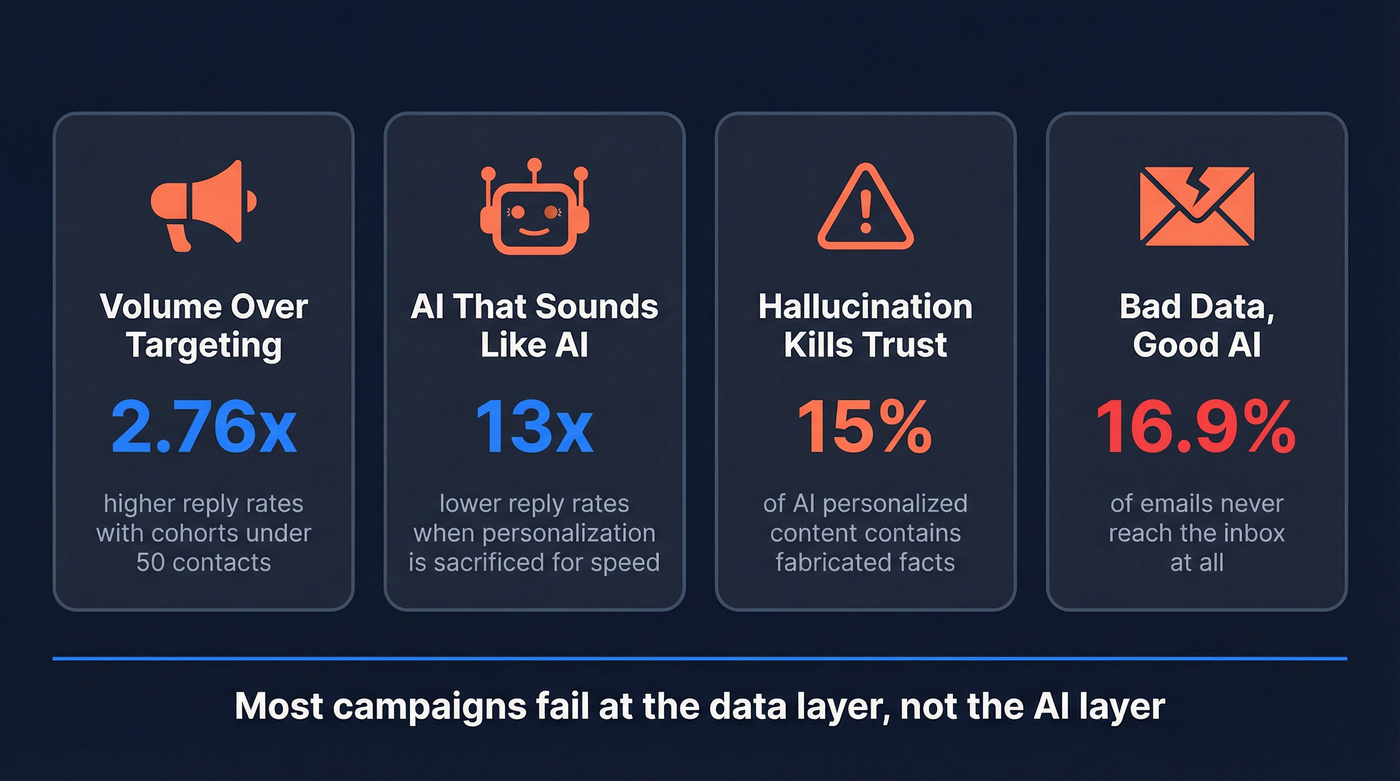
Failure Pattern 1: Volume Over Targeting
Campaigns under 100 recipients achieve 5.5% reply rates. Scale that to 1,000+ recipients and performance collapses. Targeting 1-2 contacts per company generates a 7.8% response rate; spray 10+ contacts at the same company and you're down to 3.8%.
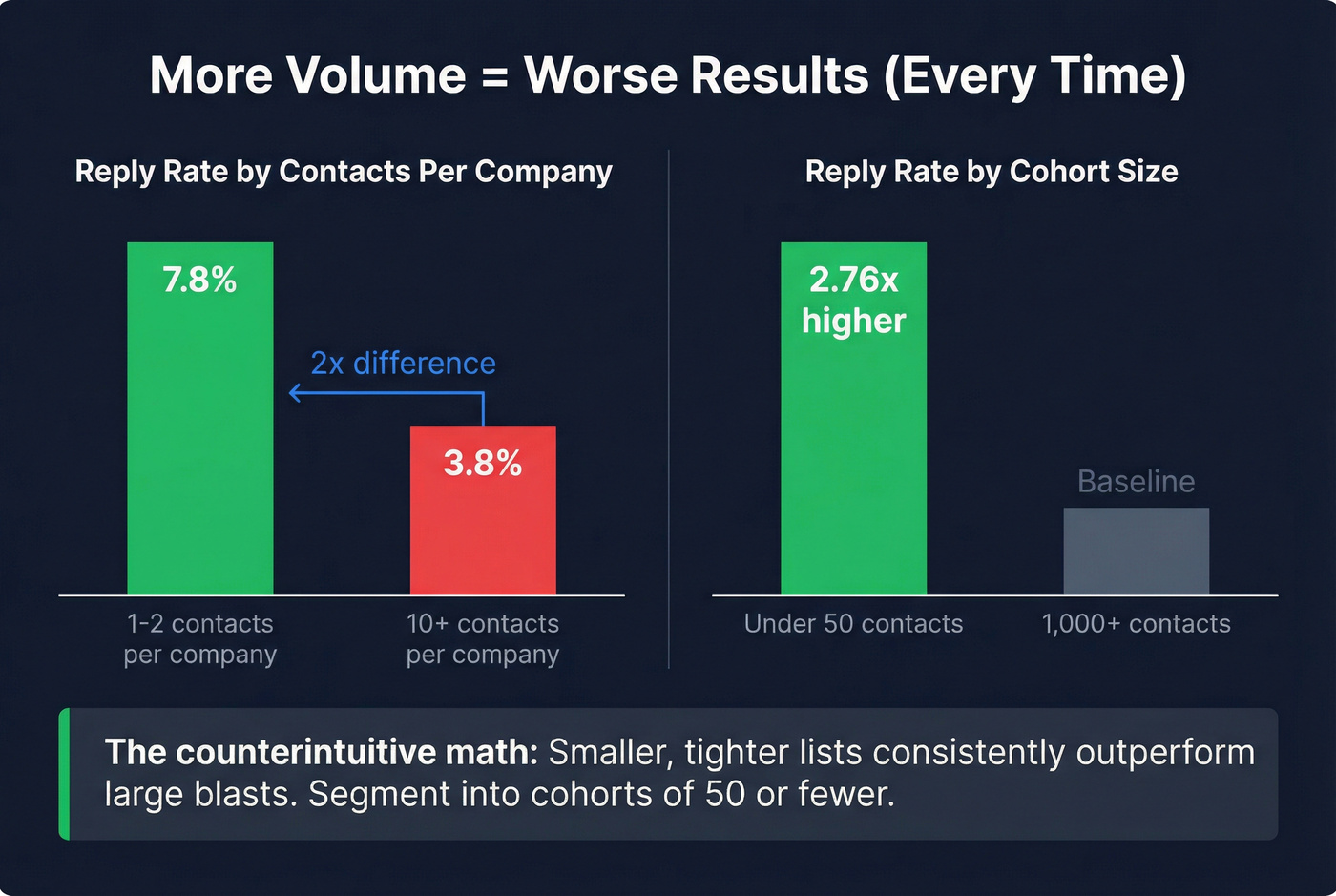
The math is counterintuitive but consistent: segmenting into cohorts of 50 or fewer contacts increases reply rates 2.76x. Smaller lists, better results. Every time.
Failure Pattern 2: AI That Sounds Like AI
When personalization is sacrificed for speed, reply rates fall 13x lower. That's not a typo - Lavender's analysis of 1B+ emails found a thirteen-fold drop.
The AI tells are everywhere now: perfect grammar that's too perfect, walls of text that no human would type on their phone, and the same buzzword-heavy phrasing in every inbox. Here's the kicker: 81% of emails are now opened on mobile devices. If your AI-generated email looks like a wall of text on a 6-inch screen, it's dead before the first sentence.
Spam is still spam, even when it's dressed up as AI.
Failure Pattern 3: Hallucination Kills Trust
Testing of 5 major AI personalization tools found that 85-95% of "personalized" content is just templates with 3-5 fields swapped. The remaining 5-15% that attempts genuine personalization hallucinates roughly 15% of the time - fake movie titles, invented articles the prospect never wrote, congratulations on promotions that never happened.
One hallucinated fact in a cold email doesn't just kill that email. It kills your brand's credibility with that prospect permanently. This is the core risk of using generative AI for cold outreach without a human review layer.
Failure Pattern 4: Bad Data, Good AI
This is the failure pattern nobody talks about because it's boring. 7-8% of cold emails bounce on average. That's not just wasted sends - it's domain reputation damage that compounds with every campaign. 16.9% of emails never make it to the inbox at all.
You can write the perfect AI-personalized email. If it bounces or lands in spam, it doesn't exist.
Why Recipients Actually Ignore You
The data is specific: 71% of ignored cold emails lack relevance to the recipient's role or business. 43% fail on personalization - they feel generic despite having merge tags. 36% lack trust signals like social proof, a real company domain, or a recognizable name.
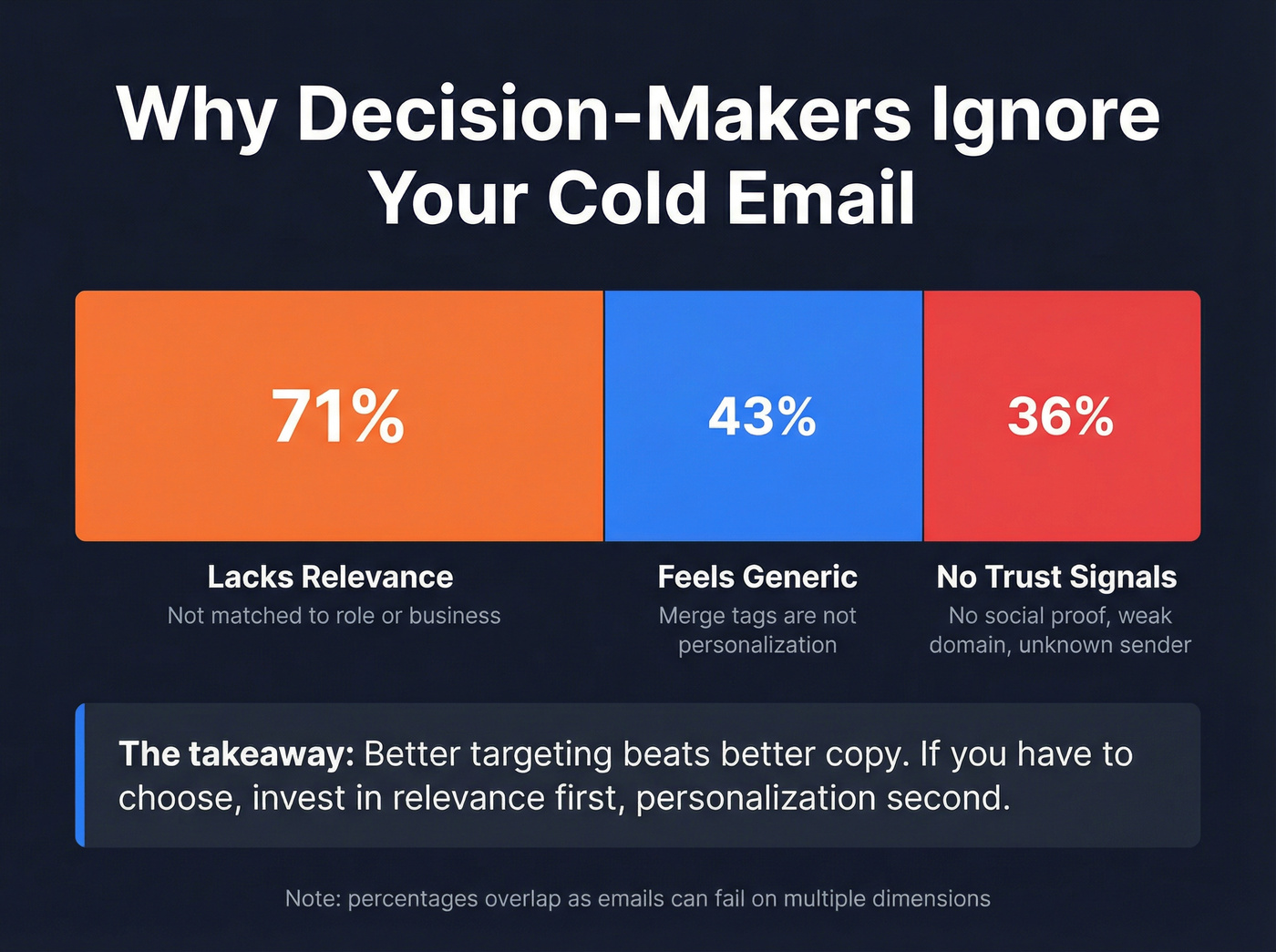
That breakdown matters because it tells you where to invest. Relevance - targeting the right person - matters more than personalization. Both matter, but if you have to choose, better targeting beats better copy.

This article proves it: most AI cold email campaigns fail at the data layer, not the AI layer. A 7% bounce rate kills your domain before your third campaign. Prospeo's 5-step verification delivers 98% email accuracy with a 7-day refresh cycle - so every AI-personalized email actually reaches a real inbox.
Stop feeding great AI copy into dead email addresses.
The Cold Email Tech Stack - What You Actually Need in 2026
A 3-tool stack beats any all-in-one platform. We've seen this play out repeatedly: teams buy a $500/month all-in-one, use 20% of the features, and get worse results than teams spending $200/month on three specialized tools that each do their job exceptionally well.
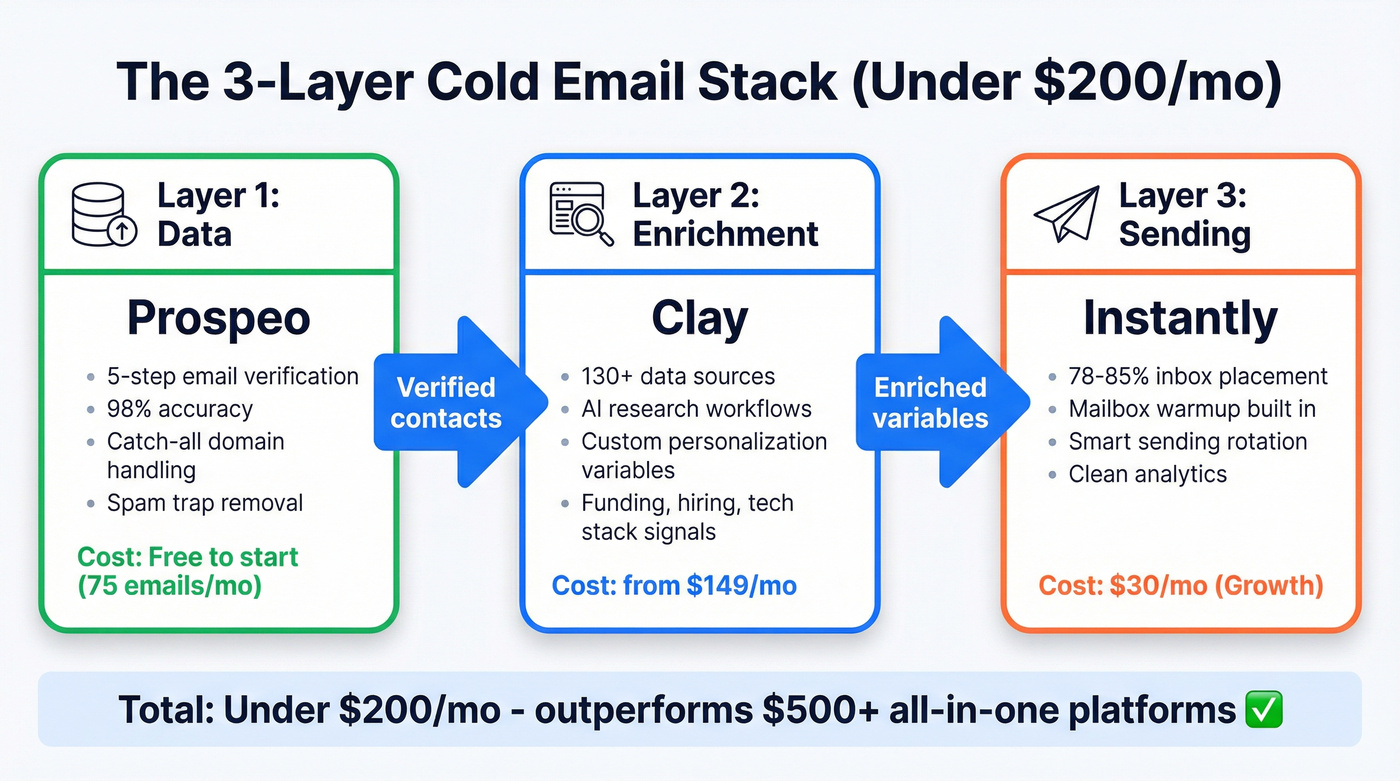
Hot take: If you're closing deals under $10K, you almost certainly don't need a $500/month all-in-one data platform. A lean stack of specialized tools will outperform it and cost 60% less.
The framework: Data -> Enrichment -> Sending. Get each layer right and the whole system compounds. Get one wrong - especially data - and nothing downstream matters.
Data Layer - Where Most Campaigns Die

The 5-step verification process handles the edge cases that destroy deliverability: catch-all domain verification, spam-trap removal, honeypot filtering. Stack Optimize built their entire agency to $1M ARR on Prospeo's data - 94%+ client deliverability, bounce rates under 3%, zero domain flags across all clients. And because Prospeo's native integrations push directly into Instantly, Smartlead, Lemlist, and Clay, there's no CSV exports, no manual uploads, no stale data sitting in a spreadsheet for three days while contacts change jobs. (If you want the full SOP, start with an email verification list workflow.)
Enrichment Layer - Making AI Personalization Possible
Clay is the enrichment engine that makes Level 3 personalization possible. It pulls from 130+ data sources and lets you build custom research workflows that would take a human 10-15 minutes per prospect.
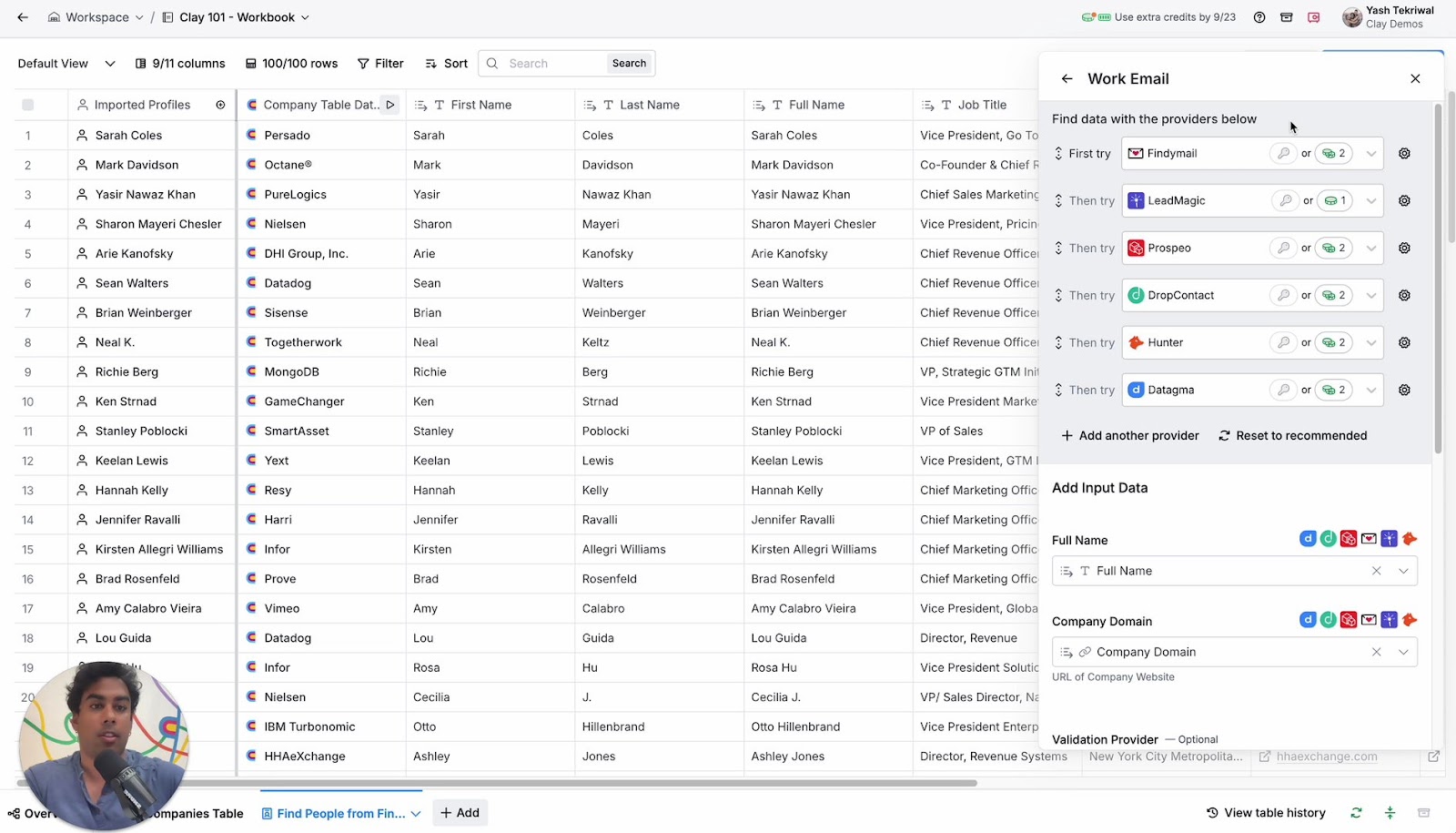
The variables Clay generates are what make AI emails not sound like AI emails: {{recent_funding_round}}, {{new_hire_title}}, {{uses_competitor_tool}}, {{icebreaker_line}}. These aren't merge tags - they're research outputs that give your AI prompt actual context to work with. This is where context engineering for AI outreach becomes critical: the quality of your enrichment data directly determines the quality of every email your model generates.
Clay starts at ~$149/mo on a credit-based system, scaling to $349-$800+ for teams. One critical thing: Clay does NOT send emails. It's a research and enrichment layer only. You still need a sending tool downstream.
Sending Layer - Deliverability Is the Product
Your sending tool's job isn't to send emails. It's to get emails into inboxes.
Instantly on the Growth plan at $30/mo is the default recommendation for most teams. It lands around 78-85% inbox placement, with a clean interface and fast support. It's what the Reddit case study used, what most agencies recommend, and where I'd start. (If you're comparing platforms, see Instantly vs Lemlist.)
Skip Instantly if you're an agency managing 5+ client brands. Saleshandy ($25-36/mo) includes unlimited clients on its agency-friendly plans, making it the better value play for multi-brand operations.
Consider Lemlist ($32-39/mo) if you want prospecting and sending in one tool - its 450M contact database means fewer moving parts, though the data won't match a dedicated provider's accuracy.
For high-volume agencies that need unlimited mailbox rotation, Smartlead ($39/mo) handles 2K active leads and 6K emails per month. G2 reviews flag occasional deliverability dips, so monitor closely. And for small teams who just need something simple, Woodpecker ($20-29/mo) covers 500 prospects with minimal setup.
| Tool | Category | Starting Price | Key Limit | Best For |
|---|---|---|---|---|
| Prospeo | Data/Verification | Free (75 emails/mo) | ~$0.01/email | Clean data foundation, verified emails |
| Apollo | Prospecting DB | Free; $49/mo Basic | 275M+ contacts | Lead sourcing on budget |
| Clay | Enrichment | ~$149/mo | Credit-based | Deep AI personalization |
| Instantly | Sending | $30/mo | 1K leads, 5K emails | Best deliverability |
| Smartlead | Sending | $39/mo | 2K active leads, 6K emails | Unlimited mailbox rotation |
| Lemlist | Sending | $32-39/mo | 450M contacts | Multichannel sequences |
| Saleshandy | Sending | $25-36/mo | Unlimited clients (agency plans) | Agency value play |
| Reply.io | Sending + AI SDR | $49/mo; AI SDR $500/mo | Varies | Built-in AI SDR |
| Woodpecker | Sending | $20-29/mo | 500 prospects | Small teams, simple |
The weekly workflow: Monday - pull prospects using intent and technographic filters. Tuesday - run through Clay for enrichment and AI personalization variables. Wednesday - load into Instantly, set up sequences. Thursday and Friday - monitor replies, optimize, iterate. (For a deeper structure, use a B2B cold email sequence framework.)
Technical Infrastructure - The Foundation Nobody Talks About
This is the section most guides on AI-driven outreach skip because it's not sexy. It's also the section that determines whether your emails reach inboxes or disappear into the void.
Authentication Setup (SPF, DKIM, DMARC)
All three are now required for bulk senders at 5,000+ emails per day for Gmail and Yahoo, and for Outlook.com consumer recipients (hotmail.com, live.com, outlook.com). 84% of domains lack a published DMARC record. That means setting up basic authentication is still a competitive advantage in 2026.
Absurd, but true. (If you need a checklist, follow SPF DKIM, and DMARC explained.)
| Requirement | Gmail | Yahoo | Microsoft |
|---|---|---|---|
| SPF | Required | Required | Required |
| DKIM | Required | Required | Required |
| DMARC (p=none min) | Required | Required | Required |
| One-click unsubscribe | Required | Required | Supported, not required |
| Spam rate threshold | <0.3% | <0.3% | Undefined |
| Enforcement | Active | Active | 550 rejection since May 2025 |
Microsoft's enforcement is the one that still catches teams off guard. Since May 2025, non-compliant messages to Outlook.com domains get an immediate 550 rejection - not a junk folder redirect, a hard bounce. If you haven't updated your DNS records, you're losing every Outlook recipient. (If you're seeing that error, start here: 550 recipient rejected.)
Safe Sending Limits by Provider
Never use your primary corporate domain for cold outreach. This is the cardinal sin of cold email, and I still see Series B companies doing it. One spam complaint spike and your entire company's email reputation is toast - including your CEO's investor updates.
| Provider | Technical Limit | Safe Cold Limit | Notes |
|---|---|---|---|
| Google Workspace | 2,000/day | 100-150/day | Most popular for cold |
| Microsoft 365 | 10,000/day | 100-150/day | Stricter enforcement for Outlook.com recipients since May 2025 |
| GoDaddy | 250/day | 50-75/day | Not ideal |
| Free Gmail | 500/day | Never use | Flagged immediately |
The multi-domain strategy is non-negotiable at scale: 100 emails from 5 domains instead of 500 from 1. Buy domain variations (yourcompany-mail.com, tryyourcompany.io, getyourcompany.com) and warm each individually. Three inboxes per domain, max. (More detail: email pacing and sending limits.)
Domain Warming - The Day-by-Day Plan
Domain warming is the tax you pay for using separate sending domains. It's boring and it takes 2-4 weeks minimum. There's no shortcut.
Here's the ramp:
- Week 1: 10-20 emails/day. Mostly warmup emails (Instantly handles this automatically). A few real sends to engaged contacts.
- Week 2: 20-40 emails/day. Start mixing in campaign emails. Monitor bounce rates obsessively.
- Week 3: 40-60 emails/day. Full campaign mode if bounce rates are under 2% and no spam flags.
- Week 4: 60-80 emails/day. This is your cruising altitude for a single inbox.
Critical rules during warmup: no images, no attachments, no tracking pixels, no HTML templates. Plain text only. The goal is to look like a human having conversations, not a marketing platform blasting campaigns. (Full playbook: how to warm up an email address.)
Here's the thing - one practitioner I know burned a fresh domain in week two, then shifted to fewer AI-personalized emails sent from their actual Gmail inbox. Higher inbox placement, higher reply rates, no domain warming nightmares. The game has shifted from volume to relationship, and your infrastructure needs to reflect that.
How to Write AI Cold Emails That Get Replies
The 3-Level Personalization Framework
Personalized emails generate 52% higher reply rates according to Hunter.io's analysis of 11M emails. But not all personalization is equal.
Level 1 - Merge Tags: {FirstName}, {CompanyName}, {JobTitle}. Table stakes. Everyone does it. Generic cold emails with only Level 1 personalization get less than 1% response rates. If this is all you're doing, you're wasting your sending infrastructure.
Level 2 - Deep Research: Reference their recent activity, company news, shared connections, professional achievements. This takes 10-15 minutes per prospect and generates 10-15% response rates. It works beautifully. It doesn't scale.
Level 3 - AI-Powered at Scale: AI aggregates data from Clay's 130+ sources, scores relevance, generates context-aware personalization, and executes at scale. You get Level 2 quality at Level 1 speed - if your data and prompts are right. The most advanced teams are now applying retrieval augmented generation to cold email workflows, pulling real-time prospect data from enrichment sources directly into the LLM prompt so the model writes from verified facts rather than its own training data.
81% of sales and marketing decision-makers engage with cold outreach when it's tailored to their company and context. The effort pays off.
Hook Types That Actually Work (With Data)
Not all hooks are created equal. Original research from The Digital Bloom tested thousands of cold emails and found massive performance gaps:
| Hook Type | Reply Rate | Meeting Rate | Example |
|---|---|---|---|
| Timeline | 10.01% | 2.34% | "Before your Q3 planning wraps..." |
| Numbers | 8.57% | 1.89% | "3 companies in [industry] cut [metric] by 40%..." |
| Social proof | 6.53% | 1.44% | "[Competitor] just solved the problem you posted about..." |
| Problem | 4.39% | 0.69% | "Most [role]s struggle with..." |
Timeline hooks outperform problem hooks by 3.4x on meeting rate. That's not a marginal improvement - it's a completely different outcome.
The email itself should be 3-4 sentences maximum. 25-100 words total. One clear ask. Subject lines perform best at 6-10 words, and those under 40 characters with a quantified claim get 37% higher open rates. Best-performing subject line format from the Snov.io test: {Prospect's company} x {Your company}. (If you want examples, use these cold email subject lines that get opened.)
Send timing matters too: Emails sent Monday or Tuesday around 1 PM consistently outperform other time slots.
Before and After: What Level 3 Personalization Looks Like
Level 1 email (generic - expect <1% reply rate):
Hi Sarah,
I'm reaching out because I think [Your Company] could help [Their Company] improve sales outreach. We work with companies in your industry to drive better results. Would you be open to a quick call this week?
Level 3 email (AI-personalized with Clay variables - expect 8-12% reply rate):
Sarah - saw you just hired 3 SDRs in the last 6 weeks (congrats on the growth). Most teams scaling outbound that fast hit a wall around month 2 when bounce rates spike and domain reputation drops. We helped [Similar Company] keep deliverability above 95% while tripling send volume - saved their ops team ~12 hrs/week on list cleanup. Worth a 15-min look before your new reps start burning domains?
The difference: the Level 3 email references a real hiring signal ({{recent_hires_count}}), connects it to a specific pain point, provides a concrete result with numbers, and makes a low-friction ask. Every sentence earns the next one.
Why RAG Cold Email Workflows Outperform Standard AI Prompts
Standard AI email generators pull from the model's training data - which is months or years old and knows nothing about your specific prospect. A RAG cold email workflow flips this by feeding verified, real-time enrichment data into the prompt at generation time. Instead of the LLM guessing that a prospect "might be interested in scaling outbound," it references their actual job posting from last Tuesday or the funding round announced three days ago.
The practical implementation: Clay enriches the prospect record, those variables get injected into a structured prompt template, and the LLM generates copy grounded in facts it can cite. Hallucination rates drop from ~15% to near zero because the model writes from retrieved evidence, not imagination. This is generative AI for B2B cold outreach done right - the AI handles the writing, but the data does the thinking.
AI Prompts That Actually Work for Cold Email
Generic prompts give you generic sales copy. Each sales situation has a different psychological dynamic, and your prompt needs to match it.
Prompt 1: Initial Cold Outreach ("One Shot")
You're writing a cold email to a {{job_title}} at {{company}}. They receive 15 cold emails per week and delete most within 2 seconds. You have ONE shot. Structure: (1) One sentence referencing {{personalization_variable}} that proves you did research. (2) One sentence connecting their situation to a specific result you've delivered - use numbers. (3) One sentence with a low-friction CTA. Total length: under 75 words. Tone: direct, peer-to-peer, zero buzzwords. Remove these words if they appear: delve, leverage, innovative, cutting-edge, seamless, synergy, tapestry, harness, landscape, impressed, fascinated, intrigued.
Prompt 2: Follow-Up ("New Angle")
You're writing follow-up #2 to a {{job_title}} at {{company}} who hasn't replied to two previous emails. Do NOT say "just checking in" or "circling back." Instead: (1) Share one specific, useful insight about {{industry_trend_or_benchmark}} in one sentence. (2) Connect it to {{company}}'s situation using {{enrichment_variable}}. (3) Ask a genuine question they can answer in one sentence. Total length: under 60 words. Tone: helpful peer, not salesperson.
Prompt 3: Cost of Inaction Reframe
Rewrite this cold email to focus on the cost of NOT acting rather than the cost of the solution. Replace any mention of features or pricing with: (1) the specific hours/dollars/opportunities lost each month by maintaining the status quo, and (2) what that compounds to over a quarter. Use {{company_size}} and {{industry}} to make the numbers realistic. Keep it under 75 words.
The "cost of inaction" reframe is critical. Instead of "our tool saves you $50K," try "every month without this costs you 40 hours of manual research and 3-5 missed deals." The prospect already knows solutions cost money. They haven't quantified what doing nothing costs.
And strip these from every AI output: "delve," "leverage," "tapestry," "synergy," "cutting-edge," "seamless," "harness." Throw in a dash, start a sentence with "And," use contractions. Make it sound like a human typed it on their laptop between meetings.
The Follow-Up Sequence That Makes AI-Driven Campaigns Convert
48% of reps never send a second message.
That stat is staggering when you consider that follow-up sequences improve reply rates by 50%+.
The 3-7-7 cadence captures 93% of total replies by Day 10:
- Day 0: Initial send
- Day 3: First follow-up
- Day 10: Second follow-up (93% of replies have happened by now)
- Day 17: Final follow-up
For teams that want to maximize every contact, here's the full 7-touch framework:
- Day 1 - Personalized intro. Your best hook, your strongest personalization variable, one clear CTA.
- Day 4 - Social proof. "[Similar company] saw [specific result]. Thought it'd be relevant given [their situation]."
- Day 8 - Value-add. Share something useful - a benchmark, a framework, a relevant case study. No ask.
- Day 12 - Question. Ask a genuine question about their process. Make it easy to reply with 1-2 sentences.
- Day 18 - Different angle. Approach the same problem from a new direction. Reference a different stakeholder's perspective.
- Day 25 - Urgency. Time-bound offer, limited availability, or seasonal relevance. Keep it honest.
- Day 35 - Soft breakup. "Seems like the timing isn't right. I'll stop reaching out - but if [problem] comes back up, here's where to find me."
Each follow-up should feel like a new conversation, not a "just checking in" nudge. AI can help generate variations, but the strategic arc - from personalized intro to soft breakup - needs human design.
Don't stop at email. Multichannel outreach combining email, phone, and social touches can boost results by over 287%. Even adding a single touchpoint on another channel dramatically increases reply rates. Your email sequence is the backbone, not the entire skeleton.
Real Campaign Results - What These Systems Actually Produce
The Recruitment Agency (732 Emails -> 14 Bookings)
A practitioner shared their full methodology on Reddit, and it's one of the best real-world breakdowns I've seen.
The numbers: 732 emails sent. 4.2% reply rate. 33 total replies, 19 positive (57.6% positive rate). 14 call bookings. 3 paid conversions in the first 4 weeks, with 5 more closing the following month.
The email structure that worked: enticing subject line, icebreaker referencing something specific and real, a suggestion tied to their job description, a case study with hard numbers, an easy CTA, and a light urgency element.
The key insight: "This level of variable/custom content in each email helps with deliverability too." When every email is genuinely different, spam filters treat them as individual messages, not a mass blast.
The Snov.io Test (3,000 Emails -> 7.1% Reply Rate)
Snov.io ran their AI Agent across 3,000 personalized cold emails and published the results. The best ICP hit a 7.1% reply rate (other ICPs ranged 3.2-4.3%). Bounce rate: 0.5%. Response rates ran 30% higher compared to their previous non-AI campaigns. Time saved: 4 hours per campaign.
A note on their open rate: they reported 61%, but only tracked opens for 200 of the 3,000 emails - a small sample that's probably not representative. The reply rate is the more reliable metric.
The best-performing CTA wasn't aggressive. It was "Where would you like to go from here?" Open-ended, low-pressure, easy to respond to.
Cost-Per-Meeting Economics
Based on the Reddit case study: 732 emails at roughly $150/month in tool costs (data + enrichment + sending) = approximately $50-150 per meeting booked, and $200-500 per paid conversion.
Compare that to LinkedIn ads at $100-300 per lead or Google Ads at $50-200 per B2B lead. Cold email's economics still win, especially for teams selling into specific niches where paid channels can't target precisely enough.
The full stack runs under $200/month: data verification (free tier or ~$39/mo), Clay for enrichment (~$149/mo), Instantly for sending ($30/mo). AI saves 60-70% of time on research and drafting, with human review adding back about 20% for quality control.
Compliance - What Gets You Fined (or Blocked)
GDPR fines have reached EUR5.65 billion across 2,245 cases. The top complaint: "I don't know how you got my email." If you can't answer that question for every contact in your list, you're exposed. (For a practical checklist, see GDPR for sales and marketing.)
CAN-SPAM (US): Physical address in every email. Functional unsubscribe link. Honor opt-outs within 10 business days. No deceptive subject lines or headers.
GDPR (EU/UK): Legitimate interest basis for B2B outreach (defensible but not bulletproof). Clear identification of who you are and why you're reaching out. Easy opt-out mechanism. Only use publicly available professional information - never personal data.
Email provider enforcement: Gmail and Yahoo require one-click unsubscribe for bulk senders. Microsoft's May 2025 enforcement means non-compliant emails to Outlook.com consumer domains get a hard 550 rejection. Spam rate must stay under 0.3% for Gmail and Yahoo.
20% of cold emails get flagged as spam despite legitimate intent. AI-powered filters now use NLP to assess the relevance and intent of your email - not just keywords. A well-personalized, relevant email to a genuine prospect is far less likely to trigger filters than a generic blast, regardless of whether AI wrote it.
The practical takeaway: compliance isn't just about avoiding fines. It's about deliverability. Every spam complaint, every bounce, every unsubscribe request that takes too long - they all feed into your sender reputation. Clean lists, relevant targeting, and easy opt-outs aren't just legal requirements. They're deliverability requirements.
Stack Optimize built a $1M agency on Prospeo data: 94%+ deliverability, under 3% bounce rates, zero domain flags. Native integrations with Instantly, Smartlead, and Clay mean your data flows straight into your sending stack - no stale CSVs, no manual uploads, no decayed contacts.
Build the data layer that makes your entire AI stack compound.
FAQ
How many cold emails should I send per day?
50-150 emails per inbox per day, depending on your ESP. Google Workspace and Microsoft 365 both cap practical cold sending around 100-150. Use a multi-domain strategy to scale: 5 domains x 3 inboxes = 15 sending accounts. Campaigns segmented into cohorts of 50 or fewer contacts get 2.76x higher reply rates.
Does AI cold email actually work in 2026?
Yes - when used as an assistant, not a replacement. The Snov.io test showed 30% higher response rates with AI personalization. But when teams use AI purely for volume, reply rates drop 13x. The sweet spot: AI handles research and drafting, humans handle editing and strategy.
What's the biggest reason AI cold email campaigns fail?
Bad data. The average bounce rate is 7-8%, which destroys domain reputation and tanks deliverability for every subsequent campaign. Run every list through verification before sending - a 5-step process covering catch-all handling, spam-trap removal, and honeypot filtering keeps bounce rates under 3%.
How long does it take to see results?
Budget 6-8 weeks from setup to first conversions. Domain warmup takes 2-4 weeks (10-20 emails/day ramping to 60-80). Then 2-4 weeks of active sending to generate meaningful data. The Reddit recruitment case study saw 14 bookings in 4 weeks of active sending - after infrastructure was already warmed.
What is a RAG cold email workflow and why does it matter?
A RAG workflow uses retrieval augmented generation to ground AI-written emails in real, verified prospect data instead of the model's generic training knowledge. You feed enrichment variables - recent funding, tech stack, hiring signals - into the LLM at generation time. The result: emails that reference real facts, hallucinate far less, and consistently outperform standard AI-generated copy on reply rates.