Email Subject Line Spam: Why It Happens (and How to Fix It)
If you're dealing with email subject line spam placement, the subject line's rarely the root cause. The real damage comes from what the subject line causes: low engagement, spam complaints, and a reputation slide that poisons future sends.
Here's the uncomfortable truth: you can rewrite subject lines all week and still land in Junk if your complaints, authentication alignment, or list quality are broken, even if you've removed the obvious "spammy" patterns.
Most teams waste days tweaking copy. The fix is usually in your headers, your list, and your complaint rate.
What you need (quick version)
- Get spam complaints under 0.10% (Gmail's target).
- Red line: 0.30%. If you're at/over it, pause scaling immediately. No exceptions.
- Where to check: Gmail Postmaster Tools -> "Spam rate" (requires domain verification + enough volume). If you don't have Postmaster data, use your ESP's complaint/FBL reporting and treat "stop emailing me" replies + instant deletes as a proxy, then cut volume and tighten targeting.
- Fix the cause, not the symptom: tighten ICP, remove broad segments, and make unsub effortless.

Pass authentication and alignment: SPF + DKIM + DMARC (aligned to your From domain).
- What "alignment" means in practice: the domain in your visible From: must align with either SPF (Return-Path / envelope-from) or DKIM (d=) so DMARC passes with alignment. "Pass" without alignment still fails DMARC.
- Where to check: look at raw headers for Authentication-Results and confirm dmarc=pass plus aligned domains; or use your ESP's authentication dashboard.
- Don't ship with DMARC misalignment. It's the fastest way to get filtered even when your copy's clean.
Implement one-click unsubscribe and honor it fast.
- You need a List-Unsubscribe header plus List-Unsubscribe-Post: List-Unsubscribe=One-Click (RFC 8058).
- Also include a visible unsubscribe link in the body.
- Operational rule: process unsubscribes within 2 days (Yahoo's requirement). If you can't do this reliably, you shouldn't send bulk cold email to Gmail/Yahoo at all.
Clean your list to cut bounces (and protect reputation).
- Hard bounce target: as close to zero as you can get. For cold outbound, treat any spike as a stop sign; for opt-in lists, hard bounces should be nearly nonexistent.
- Remove invalids, role accounts, and obvious junk before every meaningful send.
- Where to check: ESP deliverability report -> hard bounces, blocked, invalid mailbox, and spam complaint metrics.
If you only do three things this week: (1) complaints <0.10%, (2) SPF/DKIM/DMARC aligned + one-click unsubscribe, (3) list hygiene. Everything else is secondary.
The myth of "spam trigger words" (and why lists still rank)
"Don't say free." "Never use urgent." "Avoid $$$." Those lists won't die because they're easy to publish and they feel actionable, especially when you're hunting for email subject line words to avoid.
Modern filtering doesn't work like a word blacklist. Filters evaluate a stack of signals: sender reputation, headers, unsubscribe mechanics, formatting, deception patterns, and user behavior. Not one isolated word.
I've seen brands with squeaky-clean copy get buried because their unsubscribe was broken for two days and complaints spiked. Same template, same offer, same everything. The only change was user frustration.
A deliverability leader at Mailgun put it bluntly: "Reputation is the center of gravity." That's how it feels in the real world too. A trusted sender can use "Free trial" and land in Primary. A shaky sender gets junked for "Quick question."
Myth: "My subject line has a spam word, so Gmail sends it to spam." Fact: Gmail's strongest signals are user feedback + reputation; content becomes decisive when it looks deceptive or matches known spam fingerprints.
Myth: "If I remove spam words, I'll fix deliverability." Fact: If your complaint rate's high or your auth/alignment's broken, you can rewrite subject lines forever and still get buried.
Why the lists still rank: they're not useless, they're just incomplete. The real risk isn't the word. It's the pattern the word is part of, including templates that repeatedly show up in low-trust campaigns.
Two filtering worlds: SpamAssassin scoring vs Gmail/Yahoo/Outlook ML
When people say "spam filters," they're mixing two very different systems.
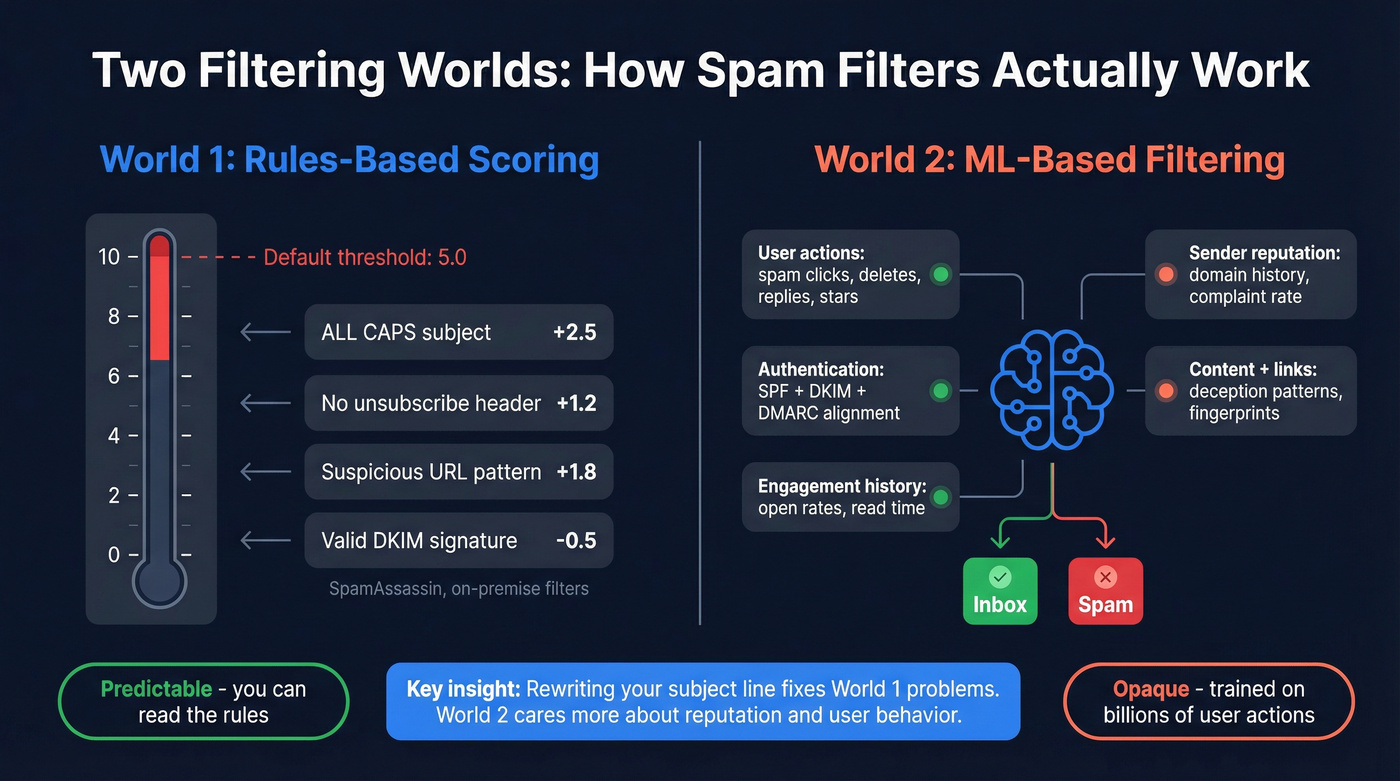
World 1: Deterministic scoring (SpamAssassin-style)
SpamAssassin is a rules engine. It assigns points for tests, adds them up, and compares the total to a threshold.
- Default
required_scoreis 5.0 per the Apache SpamAssassin configuration docs. - Each rule contributes a score (positive or negative).
- Enough small hits can push you over the line.
This is where "trigger word" thinking comes from. Some rule sets include explicit subject/body pattern tests like "Subject indicative of spam" (KAM rules are a common example), including checks for familiar promo phrasing.
World 2: Mailbox-provider ML (Gmail/Yahoo/Outlook.com)
Gmail, Yahoo, and Outlook.com don't run your email through a public scorecard and call it a day. They use machine learning models trained on massive feedback loops:
- User actions: spam button, deletes without reading, replies, moves to inbox, stars
- Sender reputation: domain/IP history, complaint rates, bounce patterns, consistency
- Authentication + alignment: SPF/DKIM/DMARC passing with alignment is table stakes
- Content + layout + links: evaluated in context, including deception and fingerprinting
So yes, your subject line matters, but mainly because it drives human behavior, and human behavior trains the model.
Practical takeaway: if you're landing in spam, don't start by rewriting the subject line. Start with complaints, bounces, and alignment.

Your subject line isn't the problem - your list is. Bad addresses create bounces, bounces destroy reputation, and reputation sends everything to spam. Prospeo's 5-step verification delivers 98% email accuracy with catch-all handling and spam-trap removal built in.
Kill bounce-rate problems at the source for $0.01 per verified email.
What actually makes a subject line "spammy" in 2026 (the real causes)
The subject line's rarely the root cause. It's the match that lights the fire.
Modern deliverability is multi-signal: reputation, engagement, authentication, links/attachments, and user feedback move inbox placement. The cleanest way to think about subject lines is: do they reduce surprise and build trust, or do they trigger "who is this?" reactions?
Do this (trust-first subject lines)
- Write for one specific person. Relevance beats cleverness.
- Make the promise match the email. If the subject implies one thing and the body delivers another, you earn spam clicks.
- Keep it boring-honest. Clarity beats "pattern interrupts" in 2026.
- Treat list hygiene as a deliverability tactic. Bad addresses create bounces, and bounces drag reputation.
Avoid this (complaint magnets)
- Clickbait or bait-and-switch ("Re: your invoice" when there's no invoice)
- One generic subject for a broad list. That's how you manufacture complaints at scale.
- Ignoring complaints because "opens look fine." Opens are noisy; spam complaints are decisive.
- Letting bounces pile up. A perfect subject line can't outrun a decaying list.
Hot take: if your average deal size is relatively small and you're sending cold outbound, you don't need "clever" subject lines. You need boring relevance and zero-surprise targeting.
Provider rules & thresholds you can't ignore (2026)
Mailbox providers have gotten less patient. In 2026, the "rules" aren't vibes. They're enforced requirements and measurable thresholds.

The rules that matter (quick table)
| Provider | Who it hits | Complaint target | Must-haves | Enforcement notes |
|---|---|---|---|---|
| Yahoo Mail | Bulk senders | <0.3% | SPF+DKIM+DMARC (aligned), one-click unsub, visible unsub | Honor unsub in 2 days |
| Gmail | Bulk senders (~5,000+/day to personal Gmail) | <0.10% (avoid 0.30%) | SPF/DKIM/DMARC (aligned), easy unsub | Enforcement tightens once you're treated like a bulk sender |
| Outlook.com | >5,000/day | Not stated | SPF+DKIM+DMARC (aligned) | Rejections like 550 5.7.515; unsubscribe and hygiene are strongly recommended |
Alignment callout (don't skip this): DMARC must pass with alignment. Your From domain must align with either the SPF-authenticated domain (envelope-from) or the DKIM signing domain (d=). Providers don't care that SPF "passed" on a different domain.
Yahoo: the "0.3%" line in the sand
Yahoo's bulk sender requirements have been enforced since February 2024 on their sender best practices page. Two rules drive most outcomes:
- Keep spam rate below 0.3%
- Support one-click unsubscribe and honor unsubscribes within 2 days
Look, if you're doing cold outbound at volume and you don't have one-click unsubscribe wired correctly, you're choosing deliverability debt on purpose.
Gmail: the stricter complaint target (and the bulk-sender threshold)
Gmail's complaint guidance is tighter:
- Aim for <0.10% spam complaints
- Don't exceed 0.30%
Also, once you're sending at bulk levels (commonly summarized as ~5,000+ messages/day to personal Gmail accounts), Gmail evaluates you like a bulk sender. Cutting volume later doesn't erase the reputation damage from high-complaint sends.
Outlook.com: authentication first, but hygiene still matters
Microsoft's Outlook.com requirements became explicit with enforcement starting May 2025 in an official Microsoft post:
- If you send >5,000 emails/day, you need SPF, DKIM, and DMARC
- Non-compliance can trigger junking and rejection, including: "550; 5.7.515 ... does not meet the required authentication level."
- They also call out: avoid deceptive subject lines
Hard call: never use deceptive "Re:" or "Fwd:" in cold outbound in 2026. The short-term open-rate bump isn't worth the reputation hit.
High-risk patterns that cause email subject line spam in 2026
You don't need a 400-word blacklist. You need pattern recognition, especially the patterns that both rules-based filters and ML models treat as low-trust clusters.

Pattern 1: ALL CAPS + excessive punctuation
- Why it gets filtered: deterministic systems score this as "shouty promo," and ML models associate it with low-quality bulk mail. It also drives instant deletes, which tanks engagement signals.
- Safer rewrite:
- Risky: "LAST CHANCE!!!"
- Safer: "Quick check before I close the loop"
Pattern 2: Deceptive "Re:" / "Fwd:"
- Why it gets filtered: it's a trust violation. It also overlaps with phishing patterns, which triggers stricter scrutiny. In rules engines, it can trip "deceptive header/subject" heuristics; in ML, it clusters with spam complaints.
- Safer rewrite:
- Risky: "Re: our call"
- Safer: "Question about {topic} at {company}"
Pattern 3: Overpromises + urgency stacking
- Why it gets filtered: "guaranteed + instant + today only" is a classic spam fingerprint. Deterministic filters score the language; ML models learn the complaint correlation fast, especially when the sender's new or engagement is weak.
- Safer rewrite:
- Risky: "Guaranteed 10x ROI in 7 days"
- Safer: "Idea to reduce {pain} for {team}"
Pattern 4: "Personal" bait (fake intimacy)
Examples: "Quick favor", "Need your help", "Are you the right person?", "Saw your profile" (when you didn't).
- Why it gets filtered: it reads like social engineering. People hit spam because they feel manipulated, not because the words are "banned." This also mirrors common scam templates, which increases fingerprint risk.
- Safer rewrite:
- Risky: "Quick favor?"
- Safer: "Question about {specific system/process} at {company}"
Pattern 5: Subject/body mismatch (the silent killer)
- Why it gets filtered: mailbox providers watch what users do after the open. If the subject promises one thing and the email delivers another, recipients delete, ignore, or report spam. That behavior trains the model against you.
- Safer rewrite:
- Risky: "Your Q1 report" (but it's a pitch)
- Safer: "Benchmark idea for {team}"
Pattern 6: Weird symbols or emoji strings
- Why it gets filtered: one emoji isn't the issue. The cluster is. Multiple symbols can trip rules-based heuristics and scream "promo blast," which drives low engagement and complaints.
- Safer rewrite:
- Risky: "🔥🔥 BIG update for you!!! 🔥🔥"
- Safer: "Update on {project}"
Real talk: if your subject line looks like it belongs in a discount retail blast, it'll get treated like one, especially if your reputation isn't pristine.
Subject line best practices that improve opens (without increasing complaints)
Open-rate findings aren't inbox-placement guarantees. They matter because relevance and clarity reduce surprise, and surprise is the fastest path to spam complaints ("who are you?" + spam button).
Belkins analyzed 5.5 million cold emails (2024 sends, published 2025). The patterns are practical.
Before/after examples (what works)
Personalization beats generic
- Before: "Quick question"
- After: "{Company} + {specific trigger}"
- Result: Personalized subjects hit 46% opens vs 35% without personalization.
Questions win
- Before: "New idea for your team"
- After: "Worth exploring {outcome}?"
- Result: Question subjects averaged 46% opens.
Short is strong
- Before: "A quick question about improving your outbound performance this quarter"
- After: "Outbound question"
- Result: 2-4 words averaged ~46% opens. At ~10 words, opens dropped to ~34%.
Hype terms underperform
- Before: "ASAP: last chance to boost revenue"
- After: "Idea for {team}"
- Result: "Marketing hype/urgency" terms pushed opens under 36%.
Preview limits by inbox (steal this advantage)
Subject lines don't fail only because they're "spammy." They fail because the important part gets cut off.
| Client | Approx subject preview length |
|---|---|
| Gmail (web/mobile) | ~70 characters |
| Outlook.com | ~60 characters |
| Yahoo Mail | ~46 characters |
| iPhone (portrait) | ~41 characters |
Don't waste the preheader
Your subject line and preheader are a single unit in the inbox preview. If the subject is calm but the preheader screams "LIMITED TIME OFFER," you create cognitive dissonance, and people delete or report spam.
My rule: subject = what this is, preheader = why it matters to them. Keep both consistent with the body.
Diagnose email subject line spam step-by-step (triage + decision tree)
When someone says "my subject line goes to spam," I translate it to: "my mail's getting filtered, and the subject line's the only visible thing to blame."
Here's the order that saves time, and a decision tree you can actually follow.
The decision tree (print this)
START
  |
  |-- A) Spam complaints ≥ 0.30% ?
  |       |-- YES → Pause scaling → tighten targeting + fix unsub → clean list → restart small
  |       |-- NO  → continue
  |
  |-- B) DMARC passes WITH alignment (From aligns with SPF or DKIM)?
  |       |-- NO  → fix SPF/DKIM domains + signing → retest headers
  |       |-- YES → continue
  |
  |-- C) One-click unsubscribe (RFC 8058) present + works end-to-end?
  |       |-- NO  → implement List-Unsubscribe + One-Click + 2-day processing → retest
  |       |-- YES → continue
  |
  |-- D) Hard bounces spiking / list decay?
  |       |-- YES → verify + remove invalid/risky → send smaller batches
  |       |-- NO  → continue
  |
  |-- E) Seed test shows spam but best-fit cohort engages?
  |       |-- YES → adjust volume ramp + consistency (reputation issue)
  |       |-- NO  → change message/offer (market mismatch) + simplify links
Step 1: Check complaint rate first (not opens)
- Where to check (best): Gmail Postmaster Tools -> Spam rate (you need domain verification and enough volume)
- Where to check (fallback): ESP complaint reporting and feedback loops where available
- If you have neither: treat negative replies, instant unsub spikes, and "delete without reading" patterns as a warning, then cut volume and tighten targeting
Targets you can run your program on:
- <0.10% = healthy
- 0.10-0.30% = danger zone
- ≥0.30% = stop scaling volume
If you're above 0.30%, changing subject lines is repainting a car with a blown engine.
Step 2: Verify authentication and alignment (SPF/DKIM/DMARC)
Passing SPF/DKIM/DMARC isn't enough if alignment's wrong.
- SPF: envelope domain aligns with From domain (or DMARC accepts it)
- DKIM: d= domain aligns with From domain
- DMARC: policy published and dmarc=pass with alignment
What to do: send a test email to yourself, open headers, and confirm Authentication-Results shows DMARC pass. If DMARC fails, fix DNS/signing before you touch copy.
Step 3: Confirm one-click unsubscribe (RFC 8058) is working
You need:
- List-Unsubscribe header supporting one-click (RFC 8058 POST method)
- A visible unsubscribe in the body
- A back-end process that removes the recipient fast (Yahoo: 2 days)
Hard rule: if unsub's hard to find or broken, recipients use the spam button. They're not being mean. They're trying to make the email stop.
Step 4: Fix list hygiene (where most teams bleed reputation)
High bounces and spam complaints share a root cause: you're sending to people who didn't ask for it and can't be reached reliably.
Here's a scenario we've watched play out more than once: a team imports a "fresh" list, launches a new sequence, and sees bounce rate jump in week two because half the addresses were catch-all or stale. They panic, rewrite subjects, and add more personalization. Complaints still climb because the real issue is trust: wrong people, wrong data, too much volume.
This is where verification pays for itself. In our experience, Prospeo - "The B2B data platform built for accuracy" - is one of the fastest ways to stop the bleeding for outbound teams because it's built for data quality: 98% email accuracy, real-time verification, and a 7-day refresh cycle (industry average: 6 weeks). It verifies against 143M+ verified emails across 300M+ professional profiles, so you're not blasting stale addresses that turn into bounces and "who are you?" complaints.
A practical workflow:
- Export your next send list (CSV) from your CRM or sequencer.
- Run bulk verification and remove:
- invalid emails
- risky/catch-all you can't validate confidently
- spam traps/honeypots flagged by the verifier
- Segment tighter (industry, role, trigger) so the subject line's relevant.
- Re-import the cleaned list and send smaller batches.
Skip this if you're sending only to recent double opt-in subscribers and your hard bounces are already near zero. You're better off spending the time on onboarding and retention emails.

Step 5: Run inbox placement tests (seed + real engagement)
Do both:
- Seed testing: send to a controlled set of inboxes across Gmail/Yahoo/Outlook.com and track placement.
- Real engagement test: send to a small cohort of your best-fit, most-likely-to-engage recipients.
Seed tests catch obvious filtering. Real engagement tests tell you whether the market rejects your message.
Step 6: Change one variable at a time (or you'll learn nothing)
Pick one lever:
- list quality
- volume ramp
- subject line style
- body copy
- link/redirect patterns
- sending domain
Then retest. If you change five things at once, you'll waste two weeks and still be guessing.
Mini case box: "If you see X, do Y"
| What you see | What it means | What to do next |
|---|---|---|
| Complaints spike after widening targeting | Audience mismatch | Narrow ICP + rewrite subject to be literal + add frictionless unsub |
| DMARC fails but SPF/DKIM "pass" | Misalignment | Align From with DKIM d= or SPF envelope domain; retest headers |
| Spam placement only when links are included | Link fingerprint/redirect risk | Remove redirects, reduce domains, use plain URLs, retest |
| Bounces climb week over week | List decay | Verify before every send; stop re-mailing old segments |
Recovery playbook: when Gmail says "similar content was marked as spam previously"
This is the banner that makes teams panic: "Emails with similar content were marked as spam previously."
In a widely-circulated r/Emailmarketing thread, a sender described blasting 100k cold emails without warming, getting roughly 5% spam complaints on day one, and then watching Gmail spam future sends even after SPF/DKIM/DMARC were green and Mail-Tester looked perfect. That's the classic trap: you "fix content," but the reputation memory stays.
What's happening is simple and annoying: Gmail uses reputation memory plus content fingerprinting, so your template (and sometimes your sending patterns/links) gets associated with spam complaints, and future emails that look similar inherit the penalty.
Timeline: what recovery looks like
Recovery takes 2-8 weeks.
It feels slow because it is slow.
The playbook (do this in order)
Days 1-3: Stop making it worse
- Pause high-volume sends.
- Cut the segment most likely to complain (broad, unqualified, old lists).
- Fix unsubscribe UX so annoyed recipients leave instead of reporting spam.
Week 1: Reset the inputs
- Clean the list aggressively (invalids, risky, stale).
- Simplify your first tests: fewer links, fewer domains, no fancy redirects.
- Send to your highest-intent cohort first (warm leads, recent signups, people who recognize you).
Weeks 2-4: Break the "similar content" fingerprint
- Keep the same domain and consistent sending patterns.
- Change one major fingerprint element: subject line style (literal, specific, no hype), body structure (shorter, clearer, fewer claims), or link strategy (plain links, fewer tracking layers).
- Retest with small batches and watch complaint rate daily.
Weeks 4-8: Scale carefully
- Increase volume only when complaints stay under 0.10%.
- If you drift toward 0.30%, you're back in the penalty box.
Opinionated truth: deliverability recovery is boring. The winners do the basics relentlessly: low complaints, clean lists, consistent behavior. They stop trying to "hack" Gmail with subject line tricks because that mindset is how you got here.
You just read that hard bounces should be "as close to zero as possible." Prospeo refreshes every record on a 7-day cycle - not the 6-week industry average - so the emails you pull today are still valid next week. 143M+ verified emails, zero spam traps.
Stop guessing which contacts are stale. Send to addresses verified this week.
FAQ
Does the word "free" in a subject line automatically cause email subject line spam?
No. "Free" doesn't automatically trigger spam by itself; inbox placement is driven by complaint rate (keep it under 0.10% in Gmail), sender reputation, and SPF/DKIM/DMARC alignment. "Free" gets risky when it's part of clickbait, overpromises, or a template that historically earns spam reports.
Do emojis in subject lines hurt deliverability?
Not inherently. One emoji won't tank deliverability, but emoji strings and heavy symbols often correlate with promo-blast behavior and higher complaint rates. If you're doing cold outbound, keep subjects plain, specific, and consistent with the first line of the email to reduce "who is this?" spam clicks.
Why do I pass SPF/DKIM/DMARC but still land in spam?
Because "pass" isn't enough. DMARC must pass with alignment, meaning your visible From domain aligns with the SPF envelope-from domain or the DKIM d= domain. After alignment, mailbox providers still judge you on complaints (avoid 0.30% at all costs), bounces, engagement, and link/template fingerprints.
What's a good free tool to reduce bounces before a send?
Use an email verifier with a real free tier and exportable results. Prospeo's free plan includes 75 email credits plus 100 Chrome extension credits/month, and it's built for accuracy (98%) with real-time verification and a 7-day refresh cycle. For best results, remove Invalid and high-risk Catch-all entries before you send any meaningful volume.
Should I use "Re:" or "Fwd:" in cold email subject lines?
No. Deceptive "Re:" or "Fwd:" subjects are a trust violation and can increase spam complaints, phishing suspicion, and long-term filtering. If you want replies in 2026, use a literal subject that matches the email (topic + company context) and make unsub frictionless so annoyed recipients don't hit spam.
Summary: fix the causes, not the subject line
Email subject line spam is usually a symptom of bigger deliverability problems: complaint rate, authentication alignment, unsubscribe mechanics, and list quality. Get complaints under 0.10%, make sure SPF/DKIM/DMARC pass with alignment, implement one-click unsubscribe, and verify your list before sending. Then your subject lines can be simple, honest, and effective.