

CRM With Email Warmup in 2026: Best Tools & Stacks
$15,000/year for a "CRM" - and you still can't get a new domain to inbox reliably. So you start searching for a crm with email warmup, expecting one tool to do it all.
Here's the thing: a "CRM with warmup" is almost never a real CRM. It's a sending platform (sequences + multi-inbox) with a light pipeline view and a warmup network attached.
We've tested enough stacks to be annoying about this: if your average deal size is modest and you're outbound-led, you don't need a "do-everything CRM." You need clean data, disciplined sending, and a CRM that stays clean (see how to keep CRM data clean).
One more opinion: warmup gets way too much credit.
What "crm with email warmup" actually means (and doesn't)
When buyers type crm with email warmup, they're usually trying to solve one of these problems:
What most people mean (real examples)
"I need sequences + warmup + multiple inboxes + one place to reply." Translation: you want a sales engagement tool (Instantly, Smartlead, Lemlist) with warmup and a unified inbox (see unified inbox for cold email). A traditional CRM won't do this well.
"I need a pipeline view so I can track who's interested." Translation: you want a lightweight deal board tied to outbound replies. That's not forecasting; it's operational tracking (see B2B sales pipeline management).
"I need to add 20 inboxes without paying per seat." Translation: you care about per-mailbox economics (unlimited senders/inboxes) more than CRM features.
"I need forecasting, lifecycle stages, permissions, and clean reporting." Translation: you need a real CRM (HubSpot, Close, Salesforce) and you should keep warmup outside it.
The 4 layers you're actually shopping for
Most SERP results mash these categories together:

- Traditional CRM (HubSpot, Salesforce, Close): system of record for pipeline, activities, forecasting, lifecycle stages, permissions.
- Sales engagement/cold outreach platform (Instantly, Smartlead, Lemlist): multi-inbox sending, sequences, reply handling, deliverability controls (see cold email outreach tools).
- Warmup tool (Mailreach, Lemwarm, Warmup Inbox): warms mailboxes/domains by generating realistic traffic.
- Data quality layer (Prospeo): verified emails/mobiles + enrichment so you don't torch deliverability with bounces (see data quality).
Traditional CRMs don't ship native warmup. They're built to log real conversations with real prospects, not simulate warmup interactions.
So when a vendor says "CRM with warmup," it's one of these:
- Outreach tool + warmup + lightweight pipeline view (most common)
- Outreach tool + warmup + optional CRM module (Instantly does this cleanly)
- Real CRM + external warmup (best for full-cycle teams that care about governance)
Where Prospeo fits: warmup helps reputation ramp, but bounce rate decides whether you keep inbox placement. The stack that wins is simple: verify/enrich first, then warm up and send (see email verification list SOP).
Our picks (TL;DR) + who each is for
Pick #1: Instantly - The closest thing to a "single ecosystem" setup: sequences, multi-inbox, warmup, and an optional CRM module. Instantly's G2 footprint is massive: 4.8/5 (4,008 reviews). Best for: outbound teams that want one tool to run sending + warmup, and only add CRM features when needed.
Pick #2: Smartlead - The sending engine for scale: strong deliverability controls, a unified inbox, and automation. G2 shows 4.6/5 (296 reviews). Best for: teams that live in the master inbox and want operational control across many mailboxes.
Pick #3: Prospeo - The B2B data platform built for accuracy. Use it to keep bounces low with 98% email accuracy, real-time verification, and a 7-day refresh cycle (industry average: 6 weeks) (see email verifier websites). Best paired with: Instantly/Smartlead/Lemlist warmup + sending. Prospeo handles verification/enrichment so warmup and sending stay clean.
Honorable mention: Lemlist (with Lemwarm) - Warmup bundled into a personalization-first outbound workflow (templates, multichannel, and a strong campaign builder). Best for: teams that care about personalization and creative execution as much as deliverability.
Comparison table: CRM with email warmup tools (CRM depth vs warmup + inbox features)
This is where most teams make the wrong purchase: they buy a "CRM with warmup," then realize they actually needed (1) a sending layer and (2) a system of record (see B2B sales stack blueprint).
Table A - Features that matter
| Tool | CRM depth | Warmup | Multi-inbox | Master inbox |
|---|---|---|---|---|
| Instantly | Medium | Native | Yes | Yes |
| Smartlead | Light | Native | Yes | Yes |
| Lemlist | Light | Native (Lemwarm) | Yes | Yes |
| Apollo | Medium | Via partners | Yes | Limited |
| HubSpot | Deep | External | No | No |
| Close | Deep | External | No | No |
| Mailreach | None | Warmup-only | No | No |
| Lemwarm | None | Warmup-only | No | No |
| EmailWarmup API | None | Warmup-only | No | No |

Table B - Pricing model + decisive "best for"
| Tool | Pricing model | Winner for | Notes |
|---|---|---|---|
| Instantly | Modules | Best "all-in-one outbound" | Add CRM only if you'll use it |
| Smartlead | Per plan | Best for scale ops | Strong master inbox workflow |
| Lemlist | Per user + add-ons | Best for personalization | Costs rise per seat |
| Apollo | Per seat | Best for Apollo-native teams | Warmup runs through partners; caps apply |
| HubSpot | Per seat + hubs | Best real CRM | Keep warmup out to avoid CRM rot |
| Close | Per seat | Best sales execution CRM | Calling/SMS + pipeline; add warmup separately |
| Mailreach | Per mailbox | Best warmup specialist | Pure warmup discipline |
| Lemwarm | Per mailbox | Best simple warmup | Easy add-on if you like Lemlist |
| EmailWarmup API | Flat price (unlimited mailboxes) | Best for builders | Embed warmup into internal tools |
How to choose (rules that actually work)
- If you need forecasting + permissions + lifecycle automation: pick HubSpot or Close and run warmup outside the CRM. Don't pretend a "CRM module" replaces governance.
- If you need multi-inbox + sequences + warmup + reply handling: pick Instantly or Smartlead. That's the job.
- If you're cost-sensitive and scaling inboxes: favor per-mailbox/unlimited inbox economics over per-seat pricing.
- If you're adding a CRM module "just in case": don't. Modular only wins when you keep the stack lean.
- If your bounce rate's ugly: stop tuning warmup settings and fix the list. Warmup can't outwork bad data (see B2B contact data decay).
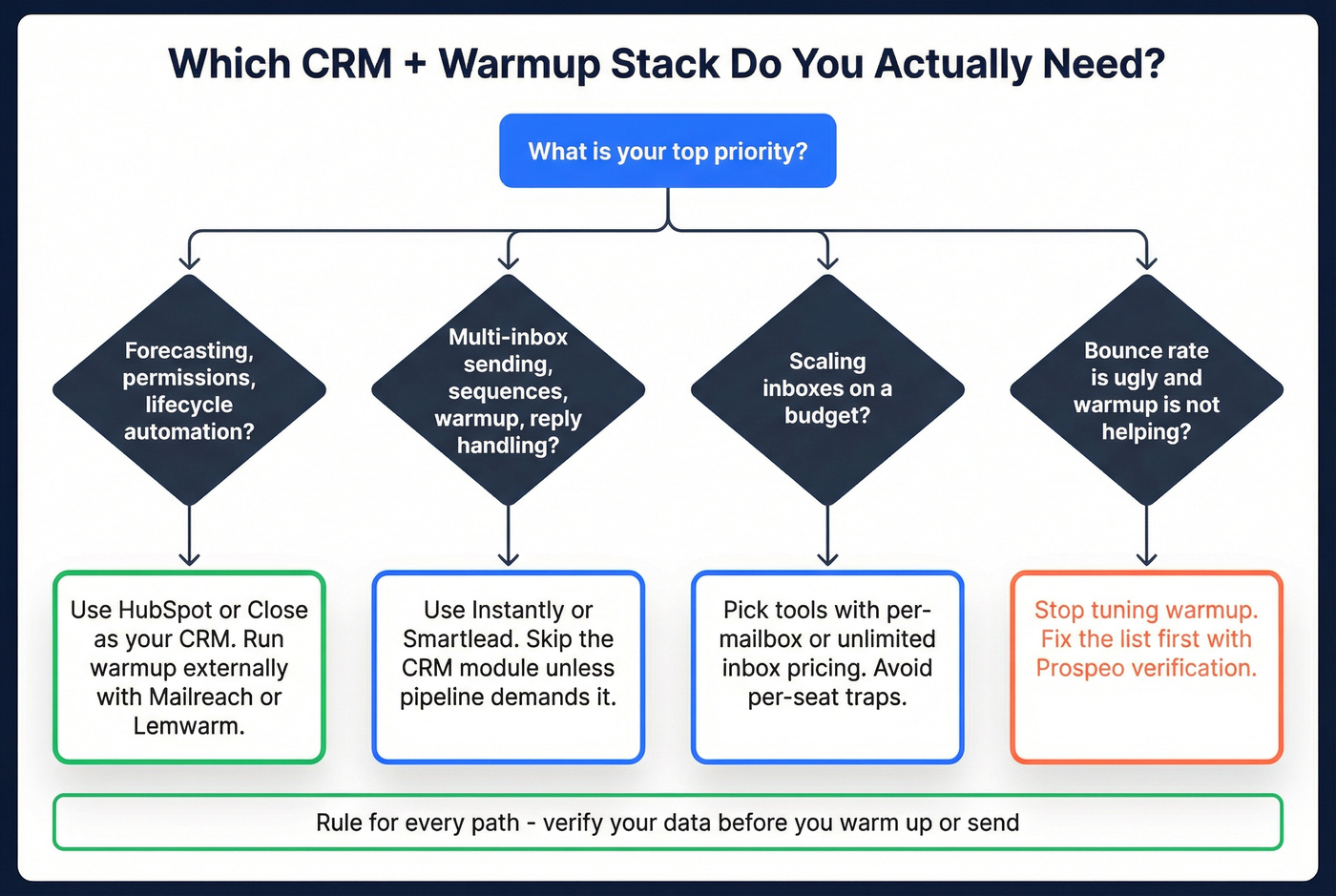

Warmup gets too much credit. Your bounce rate decides whether you stay in the inbox - not how many fake opens your warmup network generates. Prospeo's 98% email accuracy and 7-day data refresh mean your lists stay clean before they ever hit Instantly or Smartlead.
Fix the list first. Warmup handles the rest.
Best CRM With Email Warmup tools (ranked list)
Instantly (outreach + warmup + optional CRM module) - Tier 1
Best for: teams that want one place to run outbound (multi-inbox + sequences + warmup) and only add CRM features when the pipeline demands it.
What you get
- Unlimited email accounts + unlimited warmup on Instantly Outreach plans (this is why Instantly shows up for "CRM with email warmup" searches).
- A modular setup: run Outreach first, then add the CRM module when you need opportunities/tasks/reporting.
- A large warmup ecosystem: Instantly positions its warmup as a network with 1,000,000+ real email accounts.
The differentiator most reviews miss (and it matters): Instantly positions its warmup engagement as using a private network of headless browsers with read emulation. In plain English, it tries to generate more realistic engagement signals than "robot opens," which is exactly what you want when you're ramping a fresh domain, especially if you're also rotating multiple inboxes and testing new copy at the same time.
Watch-outs (blunt)
- If you need deep CRM objects, complex permissions, or lifecycle automation, don't force Instantly to be HubSpot. Use Instantly as the sending layer and keep your CRM separate.
Pricing signal (real numbers)
- Outreach Growth $47/mo, Hypergrowth $97/mo, Light Speed $358/mo
- CRM Growth $47/mo, Hyper CRM $97/mo
- Light Speed includes SISR (server & IP sharding/rotation) for serious volume
Link: Instantly pricing
Smartlead (warmup + master inbox + lightweight pipeline) - Tier 1
Best for: teams scaling outbound who want a master inbox as the control center.
Instead of selling you a "CRM," Smartlead wins on the operational loop: launch campaigns across many inboxes, then handle replies in one place without losing context.
Why we recommend it
- Master inbox is the product. If your team lives in replies all day, Smartlead feels fast.
- Deliverability controls are built for scale, not just "set it and forget it."
Real talk: the master inbox is where outbound either becomes a machine or becomes chaos. Smartlead's setup pushes you toward the machine.
Watch-outs
- If you need forecasting and permissions, Smartlead's pipeline view won't replace a real CRM. It's for tracking positive replies and next steps, not running a revenue process.
- This category always carries warmup-network risk. The safest teams treat warmup as a ramp tool, not a magic shield, and they keep list quality ruthless.
Pricing signal
- As of Jan 2026, Smartlead pricing is commonly seen as $34/mo (Basic) and $79/mo (Pro).
- You'll still see older tiers floating around on third-party listings.
Link: Smartlead pricing on G2

Prospeo (verification + enrichment that protects warmup and inboxing) - Tier 1
Prospeo is The B2B data platform built for accuracy. It belongs in a "crm with email warmup" stack for one reason: warmup can't save you from bounces, and bounces are what get new domains into trouble fast (see verify this email).

I've seen teams spend weeks "warming harder" while quietly sending to lists with catch-alls, spam traps, and stale addresses. Their dashboards look busy. Their inbox placement gets worse. Then they blame the warmup tool.
What you get (facts)
- 300M+ professional profiles (from 800M+ collected records, with 5-step verification)
- 143M+ verified emails with 98% email accuracy
- 125M+ verified mobile numbers with a 30% mobile pickup rate
- 7-day data refresh cycle (industry average: 6 weeks)
- 92% API match rate and 83% enrichment match rate, returning 50+ data points per enrichment
- Intent data across 15,000 topics (powered by Bombora)
- Used by 15,000+ companies and 40,000+ Chrome extension users
- GDPR compliant, self-serve, no contracts
Why it matters for warmup stacks
- Warmup ramps reputation. Verification prevents reputation damage.
- Prospeo's 5-step verification includes catch-all handling plus spam-trap and honeypot removal, which is the unsexy stuff that quietly wrecks deliverability once you scale beyond a couple of inboxes.
A quick scenario: you're launching a new domain with 5 inboxes. You ramp to 30/day each. That's only 150/day, which feels "safe." But if your list is bad and you bounce at 8%, you're generating 12 hard failures a day on a brand-new domain. That's how you end up in spam even though you "followed the warmup plan."
How to use it (simple workflow)
- Verify/enrich contacts before they hit your sequencer
- Warm up + send in Instantly/Smartlead/Lemlist with a conservative ramp
- Sync only real outcomes to your CRM (replies, meetings, opportunities)
Links: Prospeo pricing, Email Finder, Data Enrichment, Integrations
Lemlist (includes Lemwarm) - Tier 1 (honorable mention)
Best for: teams that win with personalization and want warmup bundled into the same workflow.
What you get
- Campaign builder with strong personalization mechanics
- Lemwarm included across plans, so you can start warming without bolting on another tool
Watch-outs
- Lemlist gets expensive fast if you scale seats and senders. If you're an agency or you run lots of inboxes, do the math before you commit.
Pricing signal (clear numbers)
- $79/user/mo (Email Pro)
- $109/user/mo (Multichannel Expert)
- Deliverability protection add-on: $20/user/mo
- Additional senders: $9/mo per sending email
Link: Lemlist pricing
Tier 2 options (good tools, but don't force them into one box)
Apollo (warmup via partners; strict caps) - Tier 2
When to choose Apollo: you already prospect and sequence inside Apollo and you want a single workflow more than you want best-in-class warmup.
Apollo's warmup connects to third-party providers, and Apollo's own guidance is conservative (which is correct):
- Minimum warmup timeframe: 2 weeks
- Daily warmup: 10-40/day (cap 50)
- Reply rate: 30% (cap 45%)
- Microsoft 365 requires SMTP AUTH enabled
Skip Apollo for warmup if warmup's your #1 requirement. You'll be happier with a native warmup network in your sending layer.
Pricing signal (useful range)
- Apollo is typically ~$59-$149 per seat/month for paid plans.
- Expect to be on a mid-tier seat plan to access the workflow features teams associate with "engagement," and then add warmup via the connected provider.
HubSpot CRM + warmup outside the CRM - Tier 2
When to choose HubSpot: you want a real CRM with lifecycle automation, reporting, and pipeline governance that doesn't collapse the moment you add more reps.
Don't warm up inside HubSpot. Warmup traffic creates junk contacts and junk activity logs. That's not a minor annoyance; it turns your CRM into a landfill and your reporting into fiction.
The clean approach is: warm in your sending layer, then sync only outcomes back to HubSpot.
Pricing signal (anchored to tiers)
- Sales Hub Starter commonly lands around ~$20-$50/seat/mo for basic pipeline + tracking.
- Sales Hub Professional commonly lands around ~$90-$150/seat/mo once you need automation, reporting depth, and team controls.
- Real-world totals vary with bundles and onboarding, but those ranges match how most SMBs experience HubSpot pricing.
Close (real CRM + outbound execution; warmup is separate) - Tier 2
When to choose Close: you want a CRM salespeople actually live in, with calling/SMS/email built into the workflow.
Close doesn't pretend to be a warmup platform, and that honesty is a feature. Use Close as your system of record and execution layer, then warm up in your sending tool or a warmup specialist.
Blunt guidance: if you need forecasting and clean pipeline discipline, Close beats "CRM modules" inside outreach tools.
Pricing (clear, per seat)
- Solo $19/mo (or $9/mo annually)
- Essentials $49/mo
- Growth $109/mo
- Scale $149/mo
Link: Close pricing
Tier 3 warmup-only tools (useful utilities, not CRMs)
Mailreach (warmup-only; keep it out of your CRM) - Tier 3
Mailreach is a dedicated warmup tool for teams that want warmup discipline without switching sending platforms. Their ramp guidance is solid and conservative:
- Start 15-20/day
- Scale to 100/day over 3-4 weeks
- Days 6-10: 15-25/day
- Days 11-14: 30-50/day
- Days 15-21: 75-100/day (best for Google Workspace/Outlook)
Pricing signal: typically ~$25-$49/mailbox/mo.
Lemwarm (standalone warmup pricing) - Tier 3
If you want Lemwarm without committing to Lemlist, it's straightforward warmup-only pricing.
Pricing signal: $29-$49/mailbox/mo depending on plan/volume.
Link: Lemwarm pricing
EmailWarmup API + other warmup tools (quick roundup) - Tier 3
API/embedded warmup is for builders who want to bake warmup into an internal tool or agency platform.
Other warmup-only options worth knowing: Warmup Inbox, TrulyInbox, Warmbox, Folderly, Mailwarm.
Pricing signal: most warmup-only tools land around ~$15-$99/mailbox/mo.
Link: EmailWarmup pricing
Stack recipes (the setups that actually work)
Most teams don't need "one tool." They need a stack where each layer does its job and nothing pollutes the CRM.
1) Founder-led outbound (lean + fast)
- Sending + warmup: Instantly (or Smartlead if you live in the master inbox)
- CRM: a simple pipeline (Instantly CRM module) or your existing lightweight CRM (see CRM software for small businesses)
- Non-negotiable: verify before sending, keep bounces near zero
Why this works: founders need speed, not governance theater.
2) SDR team (process + accountability)
- System of record: HubSpot or Close
- Sending + warmup: Instantly or Smartlead
- Rule: only sync real outcomes (replies/meetings/opps) back to the CRM
Why this works: you get clean reporting without slowing outbound execution.
3) Outbound agency (many inboxes, many clients)
- Sending + warmup: Smartlead (ops control) or Instantly (economics + modularity)
- Client reporting: keep a separate internal tracker + push only qualified outcomes into client CRMs
- Rule: strict bounce thresholds and auto-pauses (see safety rails below)
Why this works: agencies win by protecting domains across accounts and keeping operations predictable.
Warmup playbook (settings, ramp, and prerequisites)
Warmup's easy to overthink. The playbook that wins is boring: authenticate, ramp slowly, keep bounces near zero, and don't spike volume (see automated email warmup).
Prereqs (don't skip these)
- Set up SPF, DKIM, and DMARC on your sending domain (see SPF DKIM & DMARC explained).
- Use a dedicated sending domain if you're doing cold outreach at scale.
- Verify before sending. Warmup amplifies good sending habits; it doesn't fix bad data.
Safe ramp (week-by-week)
Use this as your default for a new domain/inbox:
| Week | Daily warmup | Notes |
|---|---|---|
| Week 1 | 15-25/day | Plain text |
| Week 2 | 30-50/day | Add replies |
| Week 3 | 75-100/day | Only if stable |
| Week 4 | 100/day | Maintain + send |
This matches Mailreach's guidance: start 15-20/day and reach 100/day in 3-4 weeks.
Settings that keep you out of trouble
- Stay conservative: 10-40/day warmup, hard cap 50, reply rate 30% (cap 45%).
- Don't crank reply rates to "look human." Over-optimization is a tell.
- Keep content simple during warmup: plain text, short threads, no heavy links.
Safety rails (the safeguards SERPs forget)
Add these rules and you'll avoid most warmup disasters:
- Auto-pause if bounces exceed 3-5% in any 24-hour window.
- Auto-pause if SPF/DKIM/DMARC breaks (or if your sending tool flags auth errors).
- Auto-pause if spam complaints spike (even a small number is a red alert at low volume) (see spam rate threshold).
- Check Google Postmaster Tools if you send meaningful Gmail volume; don't fly blind.
- Blacklist monitoring: if you land on a major blacklist, stop scaling volume immediately and fix the root cause (list + auth + content) (see blacklist alert).
Dedicated IP (when it matters)
A dedicated sending IP becomes more important at 200,000+ emails. A clean anchor price is $59/mo per IP. Below that, you're better off focusing on list quality, segmentation, and consistent volume.

Avoid CRM pollution (how to keep warmup from trashing your pipeline)
Warmup traffic doesn't belong in your CRM. If you connect warmup through CRM inbox logging, you'll create fake contacts, fake conversations, and fake activity history. Then your reporting becomes fiction (see CRM automatic email logging).
One-sentence rule: sync outcomes, not noise.
Do/don't checklist
Do:
- Warm up at the mailbox level (or inside your outreach tool), not via CRM inbox logging.
- Log only real prospect replies and meetings into your CRM.
- Use a separate sending workspace/inbox if your CRM makes logging control difficult.
Don't:
- Don't let warmup generate contacts automatically.
- Don't let warmup create conversations/tickets/threads in your CRM.
- Don't sync every outbound touch as an "activity" if it's not tied to a real lead.
HubSpot fix (common culprit): disable automatic contact creation from email threads here: Settings -> Data Management -> Data Enrichment -> Tools tab -> Conversational Enrichment -> New Contact Extraction
Connect vs don't connect (hygiene table)
| Component | Connect to CRM? | Keep outside? | Safe logging |
|---|---|---|---|
| Warmup tool | No | Yes | None |
| Outreach sends | Optional | Often yes | Log replies |
| Master inbox | Optional | Often yes | Log positives |
| Real CRM pipeline | Yes | No | Full sync |
| Bounce events | Optional | Yes | Alerts only |
Pricing reality in 2026 (what you'll actually pay)
Most teams underestimate cost because they price only the "CRM" and forget mailbox-based warmup, extra senders, and deliverability add-ons.
Three realistic scenarios
Scenario A: Solo operator, 3-5 inboxes, simple pipeline
- Smartlead Basic: $34/mo
- Warmup included (Smartlead) or add Lemwarm: $29-$49/mailbox/mo
Expected total: ~$34-$250/mo depending on mailbox count and warmup choice.
Scenario B: Small team, wants "CRM-ish + warmup" without enterprise CRM overhead
- Instantly Outreach Growth: $47/mo (unlimited warmup)
- Instantly CRM Growth module: $47/mo (only if you truly need it)
Expected total: ~$47-$94/mo (plus the cost of domains/inboxes you provision).
Scenario C: Real CRM + clean outbound stack (the grown-up setup)
- HubSpot or Close: ~$50-$150/seat/mo
- Warmup tool: ~$25-$49/mailbox/mo (or warmup included in Instantly/Smartlead)
- Lemlist deliverability protection add-on (if on Lemlist): $20/user/mo
- Dedicated IP (only at real scale): $59/mo per IP (most relevant at 200,000+ emails)
Quick pricing table (sanity-check)
| Scenario | Tools | Typical monthly range | Notes |
|---|---|---|---|
| Solo | Smartlead + warmup | $34-$250 | Mailboxes drive cost |
| Small team | Instantly (modules) | $47-$94 | Add CRM module only if used |
| Full-cycle | HubSpot/Close + warmup | $150-$800+ | Seats + mailboxes add up |
The cost everyone ignores is bad data: high bounces burn domains, waste rep time, and keep you paying the warmup tax forever.
Teams using Prospeo + Instantly/Smartlead cut bounce rates from 35% to under 4% and tripled pipeline. At $0.01 per verified email, clean data costs less than one wasted warmup cycle on a burned domain.
Stop warming up emails that will bounce anyway.
FAQ
Do any traditional CRMs have built-in email warmup?
Traditional CRMs almost never include native warmup because it's a deliverability simulation layer, not a pipeline feature. If you want something that feels like a crm with email warmup, look at sales engagement platforms (Instantly, Smartlead, Lemlist) and sync only replies/meetings back to HubSpot, Close, or Salesforce.
Should you warm up inside HubSpot (or keep it separate)?
Keep warmup separate from HubSpot because warmup traffic can create junk contacts and fake activity that wrecks reporting. A practical rule is "outcomes only": sync replies, meetings, and opportunities, and don't log warmup events or every cold touch as CRM activity.
How long does email warmup take for a new domain in 2026?
Plan for 3-4 weeks to warm up safely for stable inbox placement at meaningful volume. Start around 15-20 warmup emails/day, ramp gradually, and don't increase volume until bounces stay under 3-5% and engagement stays consistent.
What warmup daily volume is safe for Google Workspace/Microsoft 365?
A safe warmup range is 10-40/day, with a hard ceiling around 50/day, plus a reply rate around 30% (cap 45%). If you need more volume fast, add more inboxes and ramp them in parallel instead of spiking one mailbox.
What's a good free option to protect deliverability before warmup?
Prospeo's free tier includes 75 emails + 100 Chrome extension credits/month, which is enough to verify a starter list before you ramp sending. Keeping bounce rates under 3-5% is the fastest way to protect domain reputation while your warmup runs.
Summary: the "crm with email warmup" setup that actually wins
If you're shopping for a crm with email warmup, you're usually buying two things: (1) a sending layer with warmup and (2) a real CRM for governance and reporting.
The clean 2026 play is simple: verify/enrich first, warm up and send in Instantly/Smartlead/Lemlist, and sync only real outcomes back to HubSpot or Close.