Trade Show Lead Generation in 2026: An Ops + Data Playbook
Trade shows don't fail because "events don't work." They fail because most teams treat lead capture like a souvenir hunt, then dump badge scans into a spreadsheet and call it pipeline.
Trade show lead generation is a speed + data-quality game. If you can't follow up fast with a reachable contact, you didn't generate a lead - you collected a name.
What you need (quick version)
Six non-negotiables:

- Build a Top 50 list (accounts + specific people). Don't wing it from foot traffic.
- Use a 30-second capture flow every rep can run without thinking.
- Standardize your lead schema (same fields, same picklists, same routing rules).
- Treat badge scans as raw inputs. A lead is reachable + qualified + next step.
- Enforce a 48-hour follow-up SLA (and same-day calls for hot leads).
- Run a post-show dedupe -> enrich -> verify -> route step so sequences actually land.
Mini workflow (the one that wins):
- Capture (scan + 2 qualifiers + next step + owner)
- Qualify (A/B/C on the spot)
- Enrich missing email/mobile + firmographics
- Verify email/mobile to protect deliverability
- Route (A = call today, B = sequence, C = nurture)
- Follow up inside 48 hours

Why trade show leads die (and how to fix it)
Most trade show leads die in two places: context collapse and the follow-up black hole.

Context collapse is what happens when the "why this person cared" evaporates the second you leave the booth. On-site, you remember: "They're evaluating vendors this quarter, they hate their current workflow, they asked about integration X." Two days later, all you've got is "John Smith, Director, scanned."
Then comes the follow-up black hole. Someone exports leads to a spreadsheet. Someone else cleans it. Someone else uploads it. Sales gets a list with no owners, no next steps, and half the emails missing. By the time anyone touches it, you're past the conversion window and the attendee's talked to five competitors.
I've watched teams spend $30k on an event and then "save time" by waiting until the next Friday to do follow-up.
That's not saving time - it's lighting money on fire.
The fix is operational:
- Capture less but capture better (next step + owner beats 20 extra scans).
- Standardize fields so you can route automatically.
- Treat enrichment + verification as part of the event, not a "later" task.
- Enforce a follow-up SLA like it's inbound speed-to-lead - because it is.
Pre-show trade show lead generation: build your "Top 50" and book meetings
Hot take: target ~50 A/B leads instead of chasing 500 badge scans. The 500-scan strategy feels productive, but it creates a post-show cleanup project that kills speed. The Top 50 strategy creates meetings.
If your average deal is small, you don't need a "massive booth lead volume" plan. You need 10-25 real conversations with the right buyers and a follow-up machine that turns them into booked calls.
A simple event strategy that keeps working: pre-book half your meetings, then use the booth to qualify the rest - not to "collect" contacts you'll never reach again.
Step-by-step SOP (T-14 to T-1)
T-14 to T-10: Source the list (don't guess)

- Start with your CRM: pull closed-won logos from the last 12-18 months and cluster by industry + company size + title. That's your "works in real life" ICP, not a slide-deck ICP.
- Add show signals:
- Exhibitor list: partners, competitors, and adjacent tools your buyers already use.
- Speaker/session list: sessions reveal pain. If someone's speaking on "data governance," they're not window-shopping.
- Build the Top 50 as accounts + named people:
- A list (20): high-fit accounts where you'll do real work to get a meeting
- B list (30): strong fits you'll happily book
T-9 to T-7: Pick the right humans (two per account)
- One likely buyer (economic or technical) + one influencer/user.
- Rule: if you can't explain why that person would care in one sentence, they're not on the list.
T-6 to T-3: Run a simple 2-touch email + 1 call sequence
- Touch 1 email: value + reason to meet
- Touch 2 email: social proof + two time slots
- One call: "Are you attending?" + meeting ask
T-2 to T-1: Lock the calendar (do the math)
- Block meeting lanes on every rep calendar (example: 10-12 and 2-4).
- Capacity math that keeps you honest:
- If you've got 2 reps and each can do 6 meetings/day, you've got 12 meeting slots/day.
- Over a 2-day show, that's 24 slots. Your Top 50 should aim to fill half of those pre-booked (12) and leave half for walk-ups.
- Pre-write meeting note templates so reps don't freestyle and forget the next step.
Outreach sequence outline (copy/paste structure)
Email #1 (T-6) - direct meeting ask
Subject: Quick hello at [Event]?
- 1 line why them (role/company trigger)
- 1 line why you (outcome you drive)
- Ask: "Are you attending? If yes, 10 minutes at the booth or coffee?"
Email #2 (T-3) - make it easy
Subject: 2 times at [Event]
- "If you're there, I can do Tue 11:10 or Wed 2:40."
- "If not, want a 15-min debrief the week after?"
Call (T-2 or T-1) - 30 seconds
- "Hey [Name], quick one - are you going to [Event]?"
- If yes: "Worth grabbing 10 minutes? I can meet near [landmark/booth]."
- If no: "All good - want me to send the one-pager we're showing there?"
Pre-show outreach works because it gives you permission to follow up fast after the show. You're not a random vendor anymore - you're "the person I said I'd talk to."

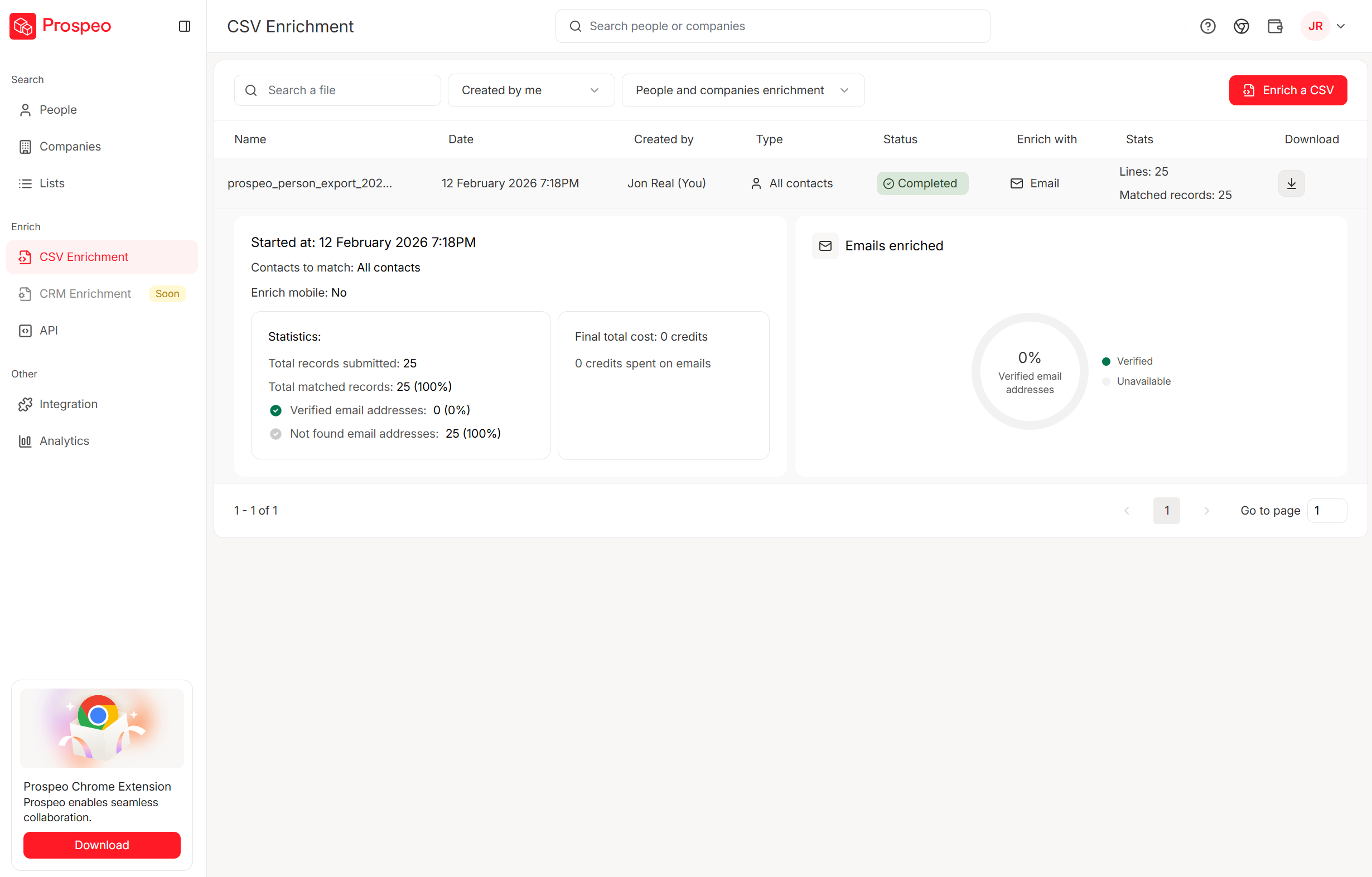
Your post-show enrichment step shouldn't take days. Prospeo turns badge scans into verified emails and direct dials in minutes - 98% email accuracy, 125M+ verified mobiles, and a 92% match rate on bulk enrichment. Upload your event CSV and get 50+ data points per contact back before your competitors even open their spreadsheets.
Stop letting trade show leads die in the enrichment queue.
On-site lead capture that works: the 30-second workflow + required fields
Your booth team needs a workflow they can run while standing, talking, and getting interrupted. If it takes longer than 30 seconds, reps'll skip fields or type junk.
The 30-second capture workflow
Step 1: Scan (or card)
- Scan badge or business card.
- If scanning fails, capture name + company + a way to reach them (email or phone) and keep moving.
Step 2: Ask 2 qualifier questions (max)
Pick two that match your sales motion:
- "What are you using today?"
- "What's the trigger for changing?"
- "Are you evaluating this quarter or later?"
Step 3: Lock the next step
This is the money field:
- "Send pricing"
- "Book demo"
- "Intro to security"
- "Follow up after event"
- "Not a fit"
Step 4: Assign an owner
If you don't assign an owner at the booth, you're choosing the follow-up black hole.
Failure modes on the show floor (and the workaround)
Trade shows are hostile environments for perfect process. Plan for it.
Wi-Fi is down / venue network is overloaded Workaround: run the capture app in offline mode if it supports it; if not, use a QR form that saves locally on the device and syncs later.
Scanner app crashes / login expires Workaround: keep a second device logged in and charged. Keep a paper backup with the minimum schema (name, company, email/phone, next step, owner).
Dead phone / dead battery pack Workaround: assign one person per shift to be the "power marshal" with spare cables + battery packs. Sounds silly until you lose an hour of leads.
Shared device chaos (multiple reps scanning into one login) Workaround: require reps to select their name as Owner on every capture. If the tool can't do that, you'll be manually reassigning later. Every time.
Badge scan works but data is thin Workaround: treat the scan as a pointer, not a record. Ask for the missing reach field: "What's the best email to send that to?"
No time to type notes Workaround: use picklists for qualifiers + next step. Notes are optional; routing isn't.
Daily export cadence (the rule that keeps you inside 48 hours)
- Export leads at lunch and at end of day.
- Ops (or a designated rep) runs a quick reconciliation: duplicates, missing owner, missing next step.
- Anything marked A gets a same-day call list before dinner. If you can't do that, stop calling them A.
Staffing model that prevents chaos
- Roamer: pulls people in, qualifies lightly, hands off
- Booth: runs the demo and captures the lead
- Closer: books the meeting / commits the next step
This model stops your best seller from being stuck typing notes while a perfect prospect walks away.
Required vs optional fields (standard lead data schema)
| Field | Required | Why it matters |
|---|---|---|
| First + last name | Yes | Dedupe + personalization |
| Company | Yes | Routing + ICP fit |
| Role/title | Yes | Buyer vs influencer |
| If available | Follow-up deliverability | |
| Phone | If available | Same-day calls |
| Product interest | Yes | Correct sequence |
| Next step | Yes | Prevents context collapse |
| Owner | Yes | Accountability |
| Consent status | Yes | Compliance + trust |
| Notes | Optional | Only if specific |
| Budget | Optional | Often wrong on-site |
| Timeline | Optional | Use picklist if possible |

Two operational rules I push hard:
- Picklists beat free text. Free text turns into unusable data.
- "Notes" isn't a dumping ground. If it's not actionable, don't type it.
Schema add-on that saves your reporting later (steal this):
Event_Name(exact string, consistent spelling)Event_Date(start date)Capture_Method(badge scan / QR / kiosk / session scan / manual)
Those three fields make attribution and ROI analysis possible without detective work.
Optional accelerators (only if they feed the schema)
Competitors love listing gadgets. Here's the thing: accelerators are great only when they populate your required fields and speed up follow-up.
Kiosk form (populates email/phone + consent + interest) Best for high traffic when reps can't type. Follow-up's cleaner because the attendee self-enters reach data.
QR landing page (populates email + product interest + "what you want") Best for after-hours or overflow. Follow-up works because you can personalize based on the page choice.
NFC badge tap (populates badge ID + timestamp + rep owner) Best for fast capture. Follow-up improves when you also capture next step; otherwise it's just a faster badge scan.
Session scan / theater attendance tag (populates topic interest + intent signal) Best for segmenting sequences: "You attended the security session..." beats "Nice meeting you."
Gamified giveaway (populates email + consent + qualifying question) Only run it if you can filter out freebie hunters with one qualifier (role/title or "evaluating this year?"). Otherwise you're buying junk leads.
Lead qualification and routing: simple A/B/C scoring that sales will use
If your scoring model needs a training deck, it won't get used. A/B/C works because it's human-friendly and enforceable.
A/B/C definitions (keep it brutally simple)
- A lead (hot): clear ICP fit + active pain + agreed next step (demo, pricing, intro) + near-term timeline
- B lead (warm): ICP fit but timing's unclear, or interest without urgency
- C lead (cold): not ICP, student/partner, competitor, or "nice chat" with no path

Guardrail that stops "everything is A"
Reps will over-score when they're tired or trying to look productive. Don't let them.
Rule: an A lead must have (1) Next step selected and (2) Timeline picklist = "0-90 days." If either's missing, it's a B. No exceptions.
Routing rules (make them automatic)
- A -> SDR/AE call same day (plus a recap email with a calendar link)
- B -> sequence within 48 hours
- C -> nurture (newsletter, webinar, quarterly touch)
Add one control field to your CRM schema: Follow-up due date = T+2 business days by default. That single field is how ops audits compliance without reading notes.
Three scenarios (so reps don't argue)
- Director asks for pricing + says they're replacing current vendor this quarter
Score: A
Route: owner call today + calendar link email
- Manager likes the demo but says "we're exploring for next year"
Score: B
Route: 48-hour recap + light sequence + set a reminder
- Consultant wants a partnership deck, no buying role
Score: C (or "Partner" track if you've got it)
Route: partner nurture, not sales follow-up
My opinion: the fastest way to get sales buy-in is to make A leads feel like free money and make C leads disappear from their queue.
Trade show lead follow-up: the 48-hour SLA (with sequences you can copy)
Real talk: the follow-up SLA is the whole game. Everything else is just how you feed it.
We've tested a bunch of variations, and the pattern's boring: the teams that win are the teams that touch leads fast, with a message that proves they remember the conversation, and a next step that's easy to say yes to.
Use this / skip this
Use this if:
- You assign owners at the booth
- You export leads twice daily (lunch + end of day)
- You can run sequences from your CRM or sales engagement tool
Skip this if:
- Your team insists on "we'll follow up when we're back"
- You can't dedupe/enrich fast enough to send clean emails
- Nobody owns the SLA (then it's just vibes)
Copyable templates (A / B / C)
A lead (hot) - meeting link
Subject: Great meeting at [Event] - next step
Hey [First] - good talking at [Event]. Based on what you said about [pain], I'd recommend we look at [specific outcome] together.
Here's my calendar: [link]. If you'd rather, reply with two times and I'll lock it.
B lead (warm) - value recap
Subject: Quick recap from [Event]
Hey [First] - enjoyed the chat at [Event]. You mentioned [current tool/process] and the goal of [goal]. Here's the 2-minute summary:
- [bullet]
- [bullet]
Want a short breakdown for teams like yours?
C lead (cold) - resource
Subject: Resource we mentioned at [Event]
Hey [First] - sharing the resource I referenced at [Event]: [link]. If you ever want a quick benchmark on [topic], reply "benchmark" and I'll send it over.
The one rule that makes this work
Every lead gets a first touch inside 48 hours, even if it's just a helpful resource. Silence is what turns "met you at the show" into "who are you?"
Data enrichment after the show: turn badge scans into reachable contacts
Badge scans are usually missing at least one of: email, mobile, correct title, or anything that lets you personalize. That's why teams "follow up" and get nothing - because they're not actually reaching people.
Here's the runbook that keeps you inside the 48-hour window.
The exact post-show runbook (timed)
T+0 hours (same day, end of show day): export + triage
- Export leads (CSV or CRM sync).
- Move obvious junk (competitors, students) into a separate list so they don't pollute sales queues.
- Validate required fields: owner, next step, product interest, consent.
T+4 to T+18 hours: dedupe + enrich
- Dedupe by email first; if it's missing, dedupe by name + company + title.
- Enrich missing reach fields (email, mobile) and firmographics (industry, size, HQ).
T+18 to T+24 hours: verify + protect deliverability
- Verify emails before any sequence goes out. This avoids bounces, spam traps, and domain reputation damage.
- If an email's risky, route the lead to phone-first or manual review.
T+24 to T+48 hours: route + launch
- Push clean records into CRM with follow-up due date and event identifiers.
- Launch A/B/C sequences and call tasks.
Before/after (what "usable" looks like)
| Field | Badge scan | After enrichment |
|---|---|---|
| Missing | Verified email | |
| Mobile | Missing | Verified mobile |
| Title | "Manager" | Specific role |
| Company | Abbrev | Normalized |
| Notes | Blank | Next step set |
Where Prospeo fits (fastest path to clean follow-up)
Prospeo's the enrichment + verification layer you run right after exporting leads. It returns 50+ data points per contact, hits an 83% enrichment match rate, verifies emails in real time at 98% accuracy, and refreshes records every 7 days (the industry average is about 6 weeks). That last part matters more than people think: right after events, job changes and inbox changes are common, and stale data turns your "48-hour SLA" into a bounce-fest.
If you want the practical setup: export your show leads, run enrichment, verify, then import the cleaned file into your CRM with Event_Name, Event_Date, and Capture_Method filled in so reporting doesn't turn into a month-long argument.
Building your Top 50 pre-show list? Prospeo's 30+ search filters - buyer intent, technographics, job changes, funding - let you find the exact decision-makers attending and reach them with verified emails at $0.01 each. Pre-book meetings with contacts you know are reachable.
Build your pre-show target list with data that actually connects.
Lead capture tech + pricing reality (what you'll actually pay)
The annoying part of event lead capture is you often pay twice:
- organizer lead retrieval (per event, per device/license)
- your capture platform (annual SaaS) ...and then you still need enrichment to make the data reachable.
Cost reality table (mobile-friendly)
| Category | Typical cost | What you get | Hidden costs | Best for |
|---|---|---|---|---|
| Organizer lead retrieval | $300-$900 per device/license per event | Badge scanning + basic notes/export | Onsite premiums; thin data | 1-3 events/year |
| Organizer API kit | ~$1,000-$1,500 per event | Access for third-party scanners | Surprise line item | Teams using their own capture app |
| Annual capture platform | $100-$170 per seat/month (annual; often min 5 seats) or ~$6k-$20k+/year | Workflows, questions, integrations, multi-event ops | Minimum seats; onboarding; add-ons | 6-20 events/year |
| Device rental | $450-$700 per device per event | Dedicated scanner hardware | Late fees; onsite rates | Booths without spare phones |
| Enrichment + verification | ~$0.01 per email; mobiles often credit-based | Reachable contacts + cleaner CRM | Mobile credits; API usage | Any team that cares about reply rates |
Watch-outs by category (the stuff that bites teams)
- Organizer retrieval is reliable, but the data's thin. Plan enrichment or accept low reply rates.
- Annual capture platforms don't magically replace organizer access. Many shows still require an API purchase to scan badges.
- Device rentals are convenient and expensive. Bring your own devices when you can.
- Enrichment isn't optional if you want speed. If you skip verification, you'll pay for it in deliverability.
Tool mini-reviews (practical takes + pricing anchors)
Cvent LeadCapture (organizer retrieval benchmark)
Cvent LeadCapture is commonly sold through organizer lead retrieval packages. It scans badges/cards, supports custom questions and ratings, and exports cleanly. The trade-off is procurement-style, event-by-event pricing - and the API kit line item surprises teams who assumed scanning "just comes with the booth."
One exhibitor order guide benchmark: $355 first app license / $205 additional (early), $455 first / $295 additional (onsite). Device rental: $455 early / $655 onsite. Badge API Kit: $1,075.
momencio (annual SaaS capture platform)
momencio is a classic "unlimited events" annual model: roughly $100-$170 per seat/month paid annually, commonly with a minimum seat count and a 1-year commitment. It shines when you run many events and want consistent workflows, content capture, and integrations across the year.
The gotcha's simple: badge scanning can still require an organizer API purchase. Budget for both or you'll end up with a great workflow and no badge data.
iCapture (enterprise floor price)
iCapture is priced like an enterprise tool because it's sold as an annual service agreement. Public starting price is $8,000/year. It makes sense when you need governance, support, and consistent workflows across many events and teams.
If you do only a couple shows a year, iCapture is overkill. Spend that budget on pre-booked meetings and post-show data cleanup instead.
Tier 3 tools and endpoints (keep expectations realistic)
CompuSystems (organizer retrieval provider): often the "official pipe" for badge scans at specific shows. Expect $300-$900 per device/license per event, with onsite premiums. Use it when the organizer makes it the easiest compliant option. Don't treat it like a data source - it's capture, not enrichment.
Freeman (event storefront bundles): frequently sells lead retrieval inside broader exhibitor packages. One example bundle lists $2,155 and includes three lead retrieval app licenses plus other items. It's convenient when you want one invoice and onsite support. It's rarely the cheapest way to solve lead capture if you only need scanning.
CRM endpoints (HubSpot, Salesforce, Dynamics, Zoho, Pipedrive): CRMs aren't capture tools; they're where leads should land with owner, next step, follow-up due date, and event identifiers. Use a clean import/sync path or you'll burn hours on mapping and dedupe. If your CRM can't enforce required fields, your SLA collapses.
Trade show ROI model (break-even math you can do in 5 minutes)
Most teams "measure" trade shows with lead counts. That's how you end up celebrating 800 scans that turn into 3 bad demos.
Use break-even math instead.
The simple formula
- Event cost (all-in)
- Needed gross profit = event cost (or cost x target ROI)
- Deals needed = needed gross profit / gross profit per deal
- Qualified meetings needed = deals needed / win rate from qualified meetings
A practical spend anchor: many exhibitors land around $18,000-$42,000 per event once you include space, build, travel, and staffing.
Also: benchmark reports move around year to year. Use them for context in a leadership deck, not as your operating plan.
Example #1 (SMB motion)
- All-in event cost: $30,000
- Average contract: $12,000
- Gross margin: 80% -> gross profit per deal = $9,600
- Win rate from qualified meetings: 20%
Deals needed = $30,000 / $9,600 = 3.125 -> 4 deals Qualified meetings needed = 4 / 0.20 = 20 qualified meetings
If your booth plan can't realistically produce 20 qualified meetings, the event isn't "bad." Your operating system is.
Example #2 (enterprise motion: fewer meetings, higher stakes)
- All-in event cost: $60,000 (bigger booth + travel + sponsorship)
- Average contract: $120,000
- Gross margin: 75% -> gross profit per deal = $90,000
- Win rate from qualified meetings: 12%
Deals needed = $60,000 / $90,000 = 0.67 -> 1 deal Qualified meetings needed = 1 / 0.12 = 9 qualified meetings
Enterprise shows aren't about volume. They're about pre-booked meetings + tight next steps, especially when you're trying to reach in-market buyers who are actively comparing options.
Cost buckets (so you stop lying to yourself)
| Cost bucket | Typical range |
|---|---|
| Booth space | $2k-$15k |
| Build/graphics | $4k-$17k |
| Travel/hotel | $1.5k-$8k |
| Shipping/logistics | $300-$2k |
| Tech/A/V | $500-$3k |
| Pre-show marketing | $500-$5k |
| Giveaways | $200-$2k |
Cvent publishes broader event/trade show benchmarks on their blog (useful context for leadership decks): https://www.cvent.com/en/blog/events/trade-show-statistics
Compliance at the booth: consent language, GDPR basics, retention
If you're scanning badges, you're collecting personal data. That means you need a booth script and a retention stance, not a shrug.
Booth compliance checklist
- Ask permission before scanning: "Mind if I scan your badge so I can send what we discussed?"
- Be clear what scanning means: "It'll add you to my follow-up list for this topic."
- Use unticked opt-in boxes for marketing consent if you're using a form.
- Keep a simple privacy blurb available (a QR code to your privacy policy works).
- Keep an audit trail: event name + timestamp + capture method.
- Define retention: what you keep, for how long, and how someone opts out.
A practical retention practice you'll see in event portals: leads are sometimes available for 60 days post-event, then removed. Treat that as a forcing function - download, process, and clean up quickly.
Simple booth script (GDPR-friendly without being weird)
"Before I scan - are you okay if I capture your details so I can send the info we discussed and follow up after the event? You can opt out anytime."
Post-show "permission reminder" email pattern (simple + effective)
Within 48 hours, include one line in your first email: "You're receiving this because we spoke at [Event] on [Day]. Here's our privacy policy [link] - opt out anytime."
You don't need legal theater. You need transparency you can prove.
Print-this checklist: trade show lead gen operating system
Pre-show (T-14 to T-1)
- Build Top 50 A/B list (accounts + named people)
- Book meetings with 2-touch email + 1 call
- Block calendars + assign booth roles (roamer/booth/closer)
- Pre-load qualification picklists + next-step options
On-site
- Run the 30-second capture workflow
- Capture required fields (name, company, role, interest, next step, owner, consent)
- Score A/B/C on the spot (use the A-lead guardrail)
- Export leads twice daily (lunch + end of day)
- Tag Event_Name, Event_Date, Capture_Method
Post-show (T+0 to T+2 days)
- Dedupe
- Enrich missing data
- Verify before sequences (protect deliverability)
- Push to CRM with follow-up due date = T+2 business days
- Execute the SLA: A leads get a same-day call; B leads enter sequences inside 48 hours
If you do nothing else: enforce the SLA.
Speed beats perfection.
FAQ: trade show lead generation
What information should I capture for every trade show lead?
Capture name, company, role/title, product interest, next step, owner, and consent status - plus email or phone when available. Those 7 fields are enough to dedupe, route, and follow up within 48 hours; if you skip "next step" or "owner," your list turns into unactionable badge scans.
How fast should you follow up after a trade show?
Follow up within 48 hours, and call A leads the same day. If you wait a week, you're not "being thoughtful" - you're letting competitors set the agenda while your reps try to remember who "John from Booth 614" was.
How much does lead retrieval/badge scanning usually cost?
Plan $300-$900 per device/license per event, plus onsite premiums. For Cvent-style retrieval, one exhibitor order guide benchmark lists $355 for the first license early ($455 onsite), device rentals around $455 early ($655 onsite), and an API kit around $1,075 if you're using third-party scanning.
What's a good free tool to enrich and verify event leads before follow-up?
Prospeo has a free tier with 75 emails plus 100 Chrome extension credits per month, and it verifies emails in real time with 98% accuracy. For teams doing heavier event enrichment, run dedupe -> enrich -> verify before you launch sequences so you don't torch deliverability on day one.
Summary
Trade show lead generation isn't about how many badges you scan. It's whether you can turn booth conversations into reachable, routed, followed-up opportunities inside 48 hours.
Build a Top 50, run a 30-second capture schema, score A/B/C on the floor, and treat dedupe + enrichment + verification as part of the event. That's how trade shows become pipeline instead of post-show regret.