How to Ask for an Appointment and Actually Get a Yes
You send 100 appointment request emails this week. About 94 get ignored. The most recent large-scale benchmark - 16.5M emails tracked by Belkins - puts the average cold email reply rate at 5.8%. The actual meeting booking rate? Between 0.5% and 2%.
Knowing how to ask for an appointment the right way is what separates the emails that land meetings from the ones that disappear into the void. It's not luck. It's structure, timing, and knowing who you're actually reaching.
The Quick Version
Email: Keep it under 8 sentences, personalize the subject line (2-4 words), propose 2-3 specific times, and close with a soft CTA like "Worth a quick chat?"
Phone: Use a 4-step script - opener, credibility, relevance check, binary time offer. The alternative close ("morning or afternoon?") outperforms open-ended asks every time.
Before anything: Verify you're reaching the right person at a live email address. A perfect template sent to a dead inbox is a 0% reply rate. Full stop.
What Every Appointment Request Needs
Every successful appointment request - email, phone, message, in-person - hits three pillars. Miss one and your conversion tanks.
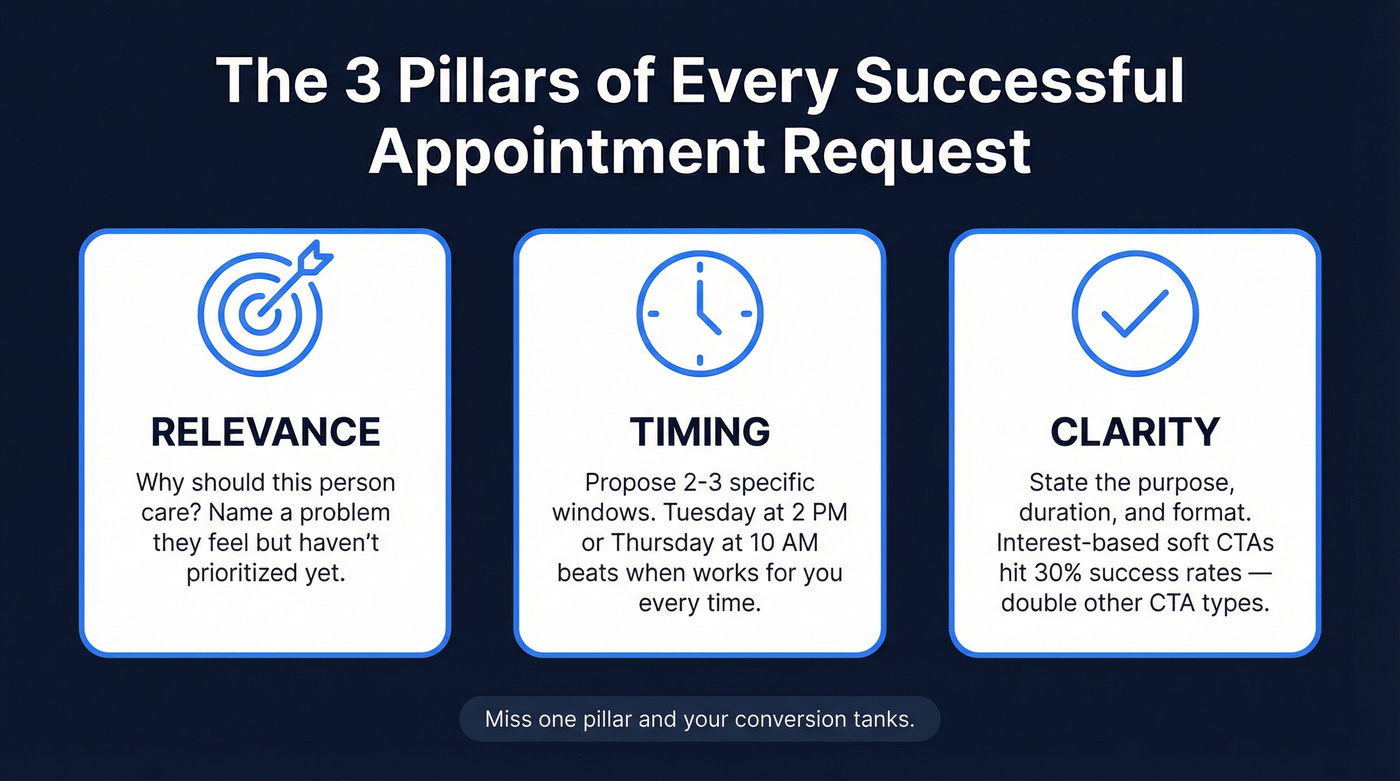
Relevance. Why should this person care? If you can't answer that in one sentence, you're not ready to send. Generic "I'd love to pick your brain" requests get deleted because they signal zero homework. The strongest requests go further: they surface a problem the prospect hasn't fully articulated yet, and if you can name a challenge they're feeling but haven't prioritized, you've earned the meeting before you even ask.
Timing. Propose 2-3 specific windows instead of asking "when works for you?" Open-ended scheduling pushes the cognitive load onto the recipient, and busy people don't do your scheduling homework for you. The alternative close - "Tuesday at 2 PM or Thursday at 10 AM?" - eliminates the back-and-forth.
Clarity. State the purpose, the duration, and the format. Interest-based soft CTAs like "Worth a quick chat?" achieve roughly 30% success rates, double the rate of other CTA types. Politeness comes from clarity, not from apologizing for taking someone's time.
Requesting an Appointment by Email
Email is still the highest-volume channel for booking meetings. It scales, it's asynchronous, and when done right, it converts. Here's what "done right" actually looks like.
Anatomy of a High-Performing Email
Six elements separate emails that book meetings from emails that get archived.
Your subject line earns the open. Your first sentence states the purpose - one sentence, no preamble. Then you propose 2-3 time options with the time zone included. People forget this constantly, and it kills international scheduling. Include the expected duration ("15 minutes" is less intimidating than leaving it ambiguous), close with a clear, low-effort CTA, and make the entire email feel like it took 30 seconds to read - even if it took you 10 minutes to write.
Before you write a word, make sure you're emailing the right person at a verified address. Prospeo's database lets you filter by role, company, and 30+ criteria so you're targeting the actual decision-maker, not a generic inbox.
Subject Lines That Get Opened
Personalized subject lines hit a 46% open rate versus 35% without personalization across 5.5M emails. Reply rates tell an even sharper story: 7% with personalization versus 3% without. That's a 133% lift from the subject line alone.
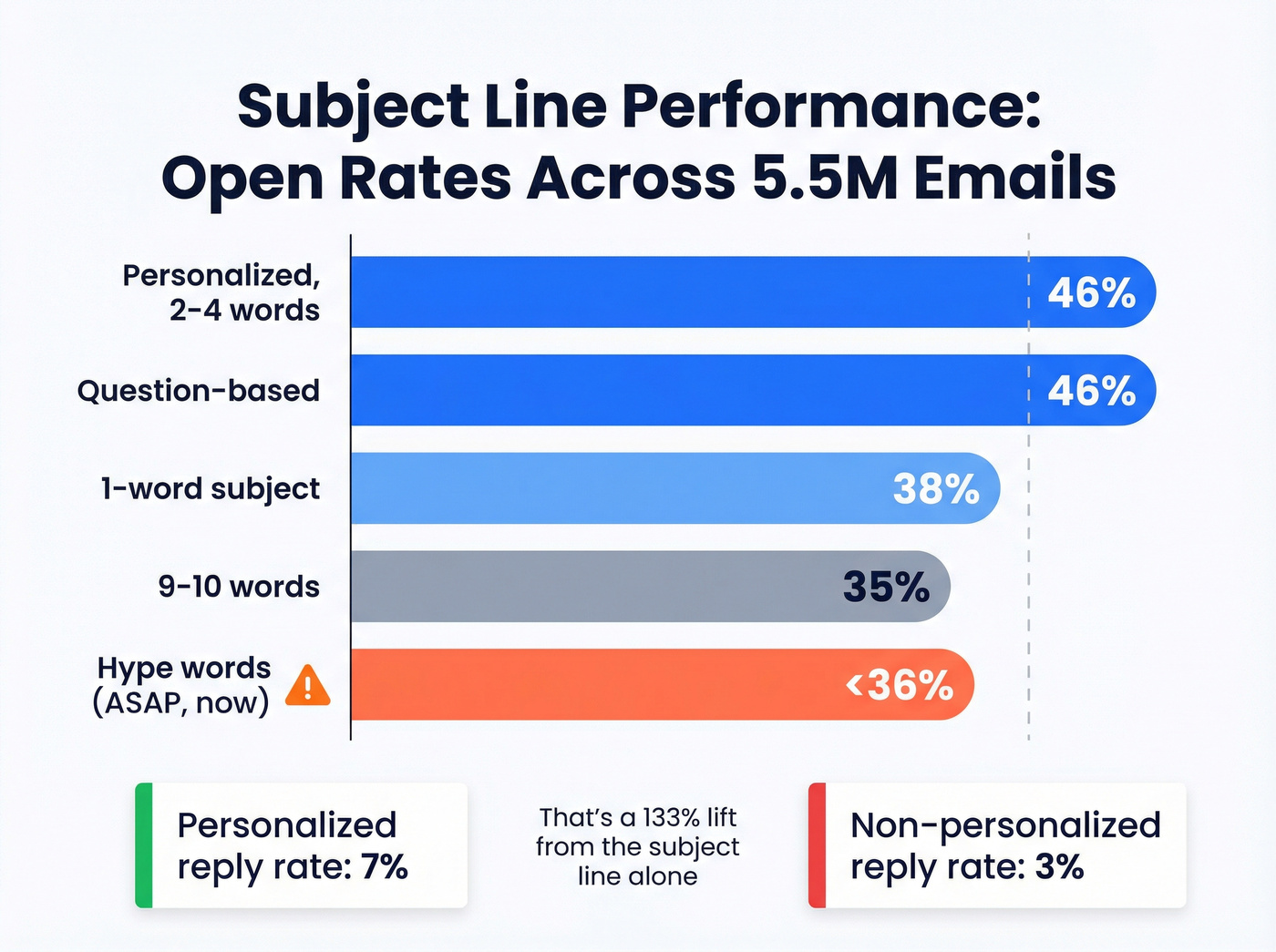
Keep them short. Two to four words hit that same 46% open rate. Once you cross nine words, opens drop to 35%.
| Subject Line Type | Open Rate | Notes |
|---|---|---|
| Personalized, 2-4 words | 46% | Top performer |
| Question-based | 46% | Equally strong |
| 1-word subject | 38% | Decent, but limited |
| 9-10 words | 34-35% | Too long |
| Hype words ("ASAP") | <36% | Avoid entirely |
Words like "ASAP," "now," and generic greetings like "Hello, friend" push opens below 36%. Skip them. If you’re tempted to open with a generic greeting, use these alternatives instead.
Templates by Scenario
The sweet spot for email length is 6-8 sentences, which produces a 6.9% reply rate. One more data point worth knowing: emailing just 1-2 contacts per company yields a 7.8% reply rate, compared to 3.8% when you blast 10+ contacts at the same org. Precision beats volume.
Cold B2B outreach (annotated):
Hi [Name], I noticed [Company] recently [specific trigger - funding round, new hire, product launch]. This proves you did homework. Generic openers get deleted. We help similar teams [one-sentence value prop]. One sentence. Not three. Would Tuesday at 2 PM or Thursday at 10 AM work for a 15-minute call? Alternative close with duration and specific times. Either way, happy to share [relevant resource]. - [Your name] Low-pressure exit ramp so they don't feel cornered.
Warm lead follow-up:
Hi [Name], great connecting at [event/context]. You mentioned [specific pain point]. I'd love to walk through how we've helped [similar company] solve that. Do you have 20 minutes this week - say Wednesday morning or Friday afternoon? - [Your name]
Client meeting request: For existing relationships, skip the value prop and get straight to logistics. "Hi [Name], I'd like to schedule our [quarterly review / project kickoff]. I've blocked out [Date 1], [Date 2], or [Date 3] at [time, timezone]. Let me know which works and I'll send the calendar invite."
What NOT to write:
Don't send this: "Hi team, I wanted to reach out and see if we could potentially find some time to align on the Q3 roadmap at some point in the coming weeks. Let me know your thoughts!" That email asks the recipient to do all the work. Instead: "Hey [Name], I need 30 minutes to align on [project]. I'm open [Date 1] afternoon or [Date 2] morning. Grab whichever works and I'll prep a one-pager beforehand."
Formal request for appointment letter:
Dear [Name], I'm writing to request a meeting regarding [specific matter]. I'm available [Date 1 at Time] or [Date 2 at Time, timezone]. The meeting should take approximately [duration]. Please let me know your preference, and I'll confirm with a calendar invitation. Kind regards, [Your name]
If you want more copy-paste options, start with these outreach email templates.
When to Send
Timing matters more than most people think. Thursday produces the highest reply rate at 6.87%. Monday is the weakest at 5.29% - people are buried in weekend catch-up.
The surprise? 8-11 PM is the peak reply window at 6.52%. We've seen this consistently - late-evening sends catch people during their inbox-clearing ritual before bed. Mornings between 7-11 AM also perform well. Mid-afternoon is the dead zone. (If you want a deeper breakdown, see the best time to send prospecting emails.)
One deliverability tip most guides skip: turning off open-tracking pixels produces roughly 3% higher response rates. Email providers increasingly flag tracking pixels as promotional signals, so your carefully timed email lands in the wrong tab. If you want the full deliverability angle, read does open tracking hurt cold email.
CTA Strategy - Calendar Links vs. Times
Here's the thing: calendar links in your first cold email increase spam risk and reduce inbox placement. Email providers flag link-heavy first touches, and your carefully crafted message ends up in promotions or spam. If that’s happening, this guide on emails landing in promotions tab will help.
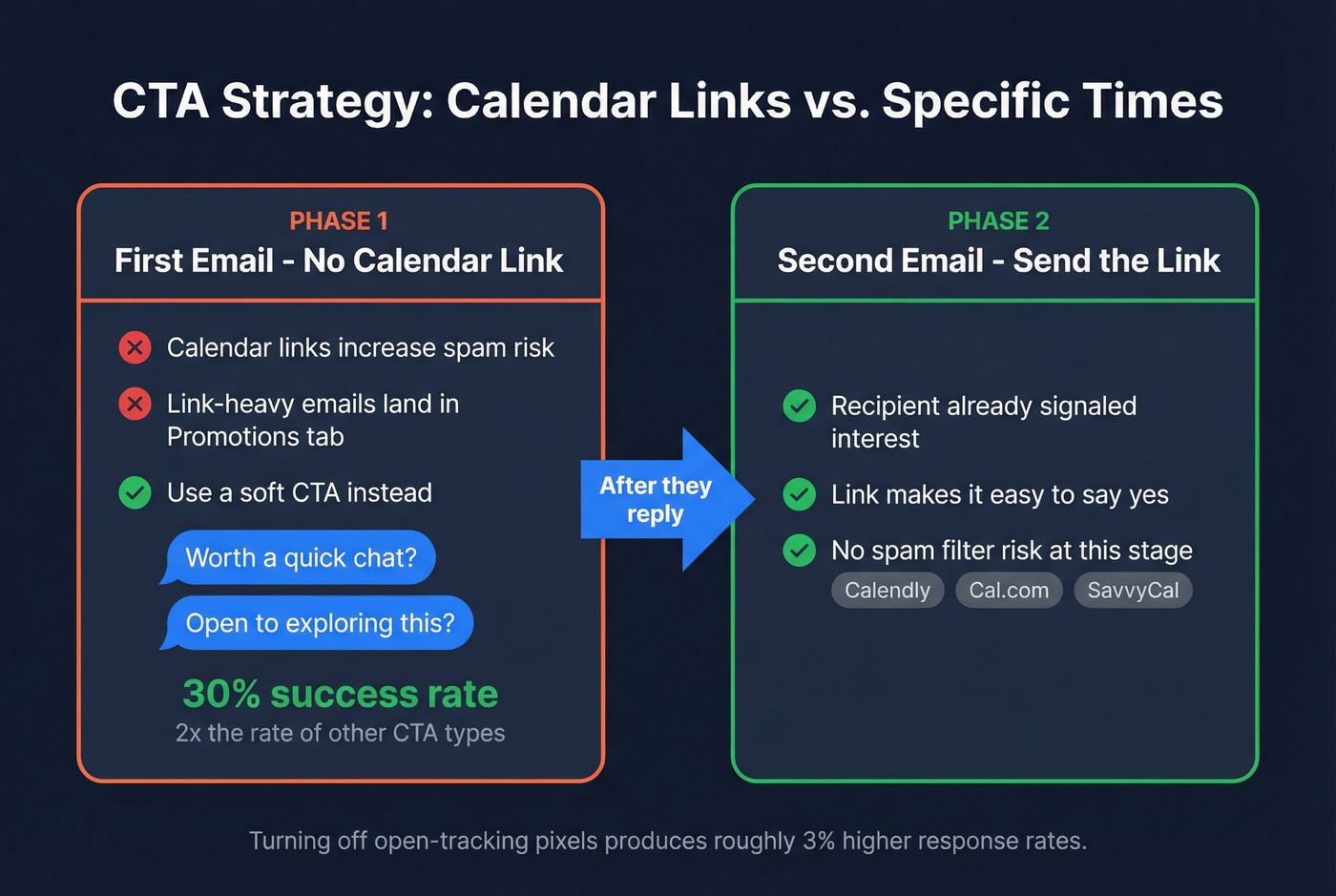
Use an interest-based soft CTA in your first email. "Worth a quick chat?" or "Open to exploring this?" These convert at roughly 30% - double the rate of other CTA types.
Save scheduling tools - Calendly, Cal.com, SavvyCal - for after the first reply, when the recipient has already signaled interest. At that point, the link makes it easy to say yes instead of triggering spam filters.
Booking Appointments by Phone
Cold calls without a script convert at roughly 2.3% - about 2-3 appointments per 100 dials. A structured approach doesn't guarantee a meeting, but it dramatically improves your odds. If you want the full benchmark + scripts, use this B2B cold calling guide.
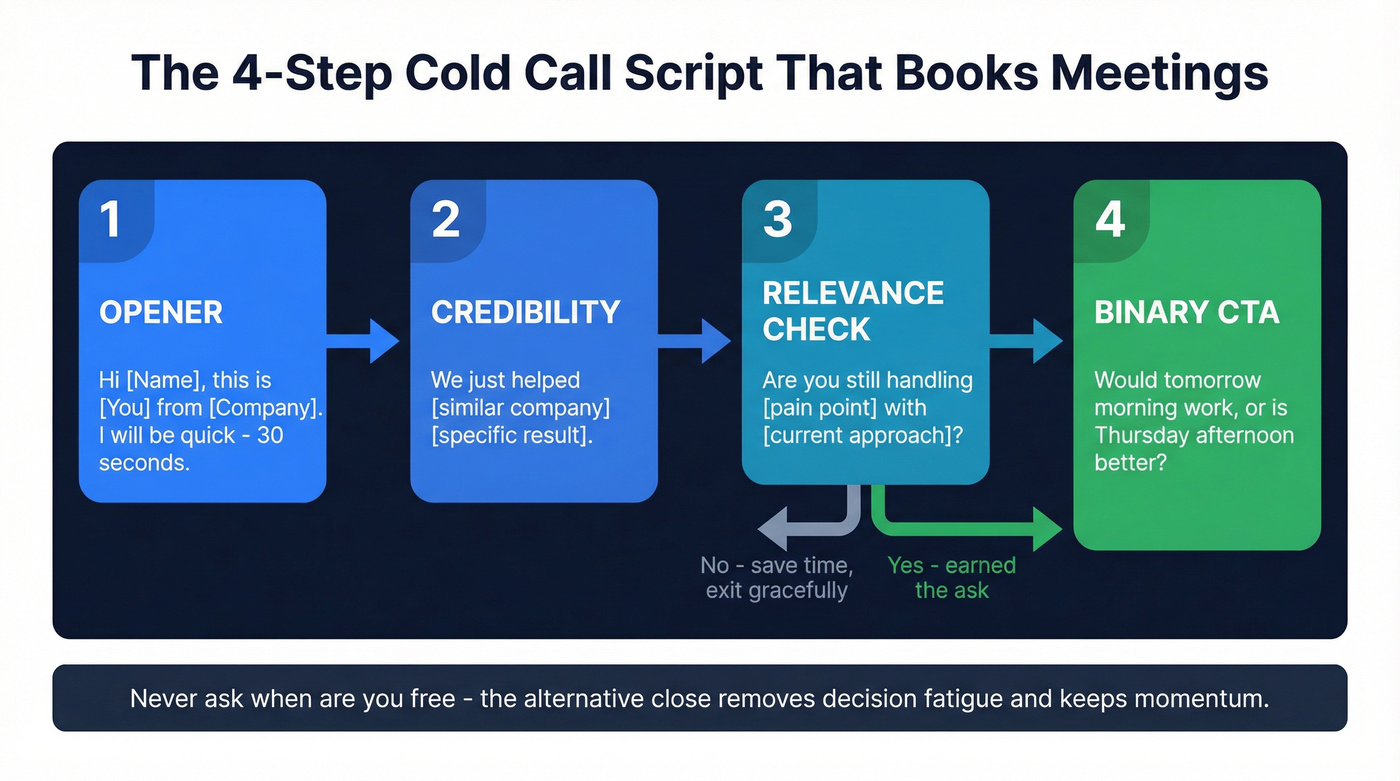
Step 1 - Opener. State your name, company, and that you'll be brief. "Hi [Name], this is [You] from [Company]. I'll be quick - 30 seconds."
Step 2 - Credibility. Drop one relevant proof point. "We just helped [similar company] [specific result]." This isn't bragging; it's earning the next 20 seconds. (More on this: how to build credibility in sales.)
Step 3 - Relevance check. Ask a question that confirms the problem exists. "Are you still handling [pain point] with [current approach]?" If they say yes, you've earned the ask. If no, you've saved both of you time.
Step 4 - Binary CTA. Never ask "when are you free?" Instead: "Would tomorrow morning work, or is Thursday afternoon better?" The alternative close removes decision fatigue and keeps momentum.
Here are six closing frameworks that work across phone and in-person conversations:
| Framework | Example |
|---|---|
| Assumptive | "The next step is a quick meeting. What time works?" |
| Soft | "What do you think about meeting this week?" |
| Trial | "Do you have enough info to take the next step?" |
| Hard | "Let's get together today - what are we waiting for?" |
| Tie-down | "An in-person meeting makes sense here, don't you think?" |
| Alternative | "We have mornings or afternoons open. Which works best?" |
The assumptive and alternative closes are the workhorses for B2B appointment setting. The hard close has its place - urgency-driven sales, time-sensitive offers - but use it sparingly or you'll burn trust fast.

The article says it clearly: a perfect template sent to a dead inbox is a 0% reply rate. Prospeo's 5-step verification delivers 98% email accuracy, so every appointment request you craft actually reaches a real person. Filter by role, seniority, and 30+ criteria to find the decision-maker - not a gatekeeper.
Stop perfecting templates for inboxes that don't exist.
Messaging Channels
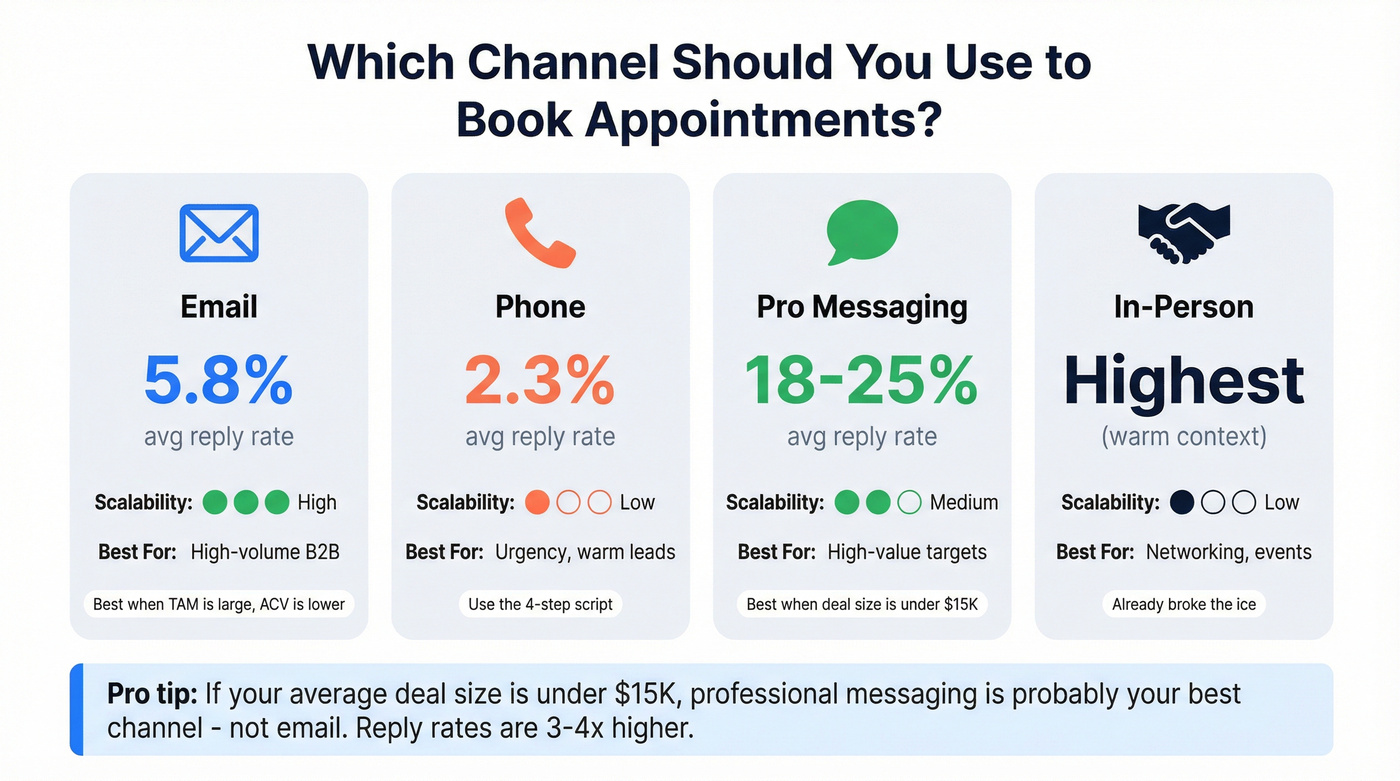
Professional messaging platforms produce 18-25% reply rates - dramatically higher than email's 5.8% or phone's 2.3%. The tradeoff is scalability. You can't blast 500 connection requests a day without getting flagged. If you’re building a true multi-channel motion, use this AI multi-channel prospecting playbook.
Referencing a mutual connection doubles your acceptance rate. Common ground - reacting to a post, commenting on a shared interest - gives people a reason to reply that isn't "some stranger wants my time."
Connection request template:
Hi [Name], I saw your [post/comment] on [topic] - really resonated with our work at [Company]. Would love to connect and swap notes on [specific angle]. - [Your name]
Follow-up message (after connection):
Thanks for connecting, [Name]. I noticed [Company] is [trigger event]. We've been helping teams like yours [one-line value prop]. Would you be open to a 15-minute call this week? Happy to work around your schedule.
| Channel | Avg Reply Rate | Best For | Scalability |
|---|---|---|---|
| 5.8% | High-volume B2B | High | |
| Phone | ~2.3% | Urgency, warm leads | Low |
| Pro messaging | 18-25% | High-value targets | Medium |
| In-person | Highest (warm context) | Networking, events | Low |
Let's be honest about something most playbooks won't say: if your average deal size is under $15K, professional messaging is probably your best appointment channel - not email. The reply rates are 3-4x higher, and the lower scalability doesn't matter when you only need 20 meetings a month. Email's volume advantage only pays off when you're working large TAMs with lower ACVs.
How to Ask In Person
In-person appointment requests happen at conferences, networking events, and chance encounters. The dynamics are different - you've already broken the ice, so the ask feels less cold.
The key is transitioning from small talk to a concrete next step without making it awkward. After a genuine conversation about their work or a shared challenge, the assumptive close works naturally: "This is exactly the kind of thing we should dig into. Let's grab 20 minutes next week - are mornings or afternoons better for you?" Get the commitment while you're face-to-face, then follow up with a calendar invite within 24 hours. Don't wait longer than that. Momentum dies fast.
The Follow-Up Sequence
Most deals require 5-12 touchpoints before closing, yet only 8% of reps follow up more than five times. That gap is where meetings die. Your first follow-up alone can lift replies by up to 49%. If you want a full cadence, use this prospect follow up playbook.
One nuance worth knowing: single-email campaigns actually produce the highest reply rate at 8.4%, and adding a third email can drop rates by up to 20%. That doesn't mean you should only send one email - it means each follow-up needs to earn its place by adding new value, not just "bumping" the thread.
90% of buyers who respond do so within two days of the most recent message. If they haven't replied in three days, they didn't miss it - they deprioritized it.
Day 3-5 - Gentle nudge:
Hi [Name], just floating this back up. I know [day you sent original] was probably hectic. Still happy to find 15 minutes this week if [original value prop] is relevant. Would [new specific time] work?
Day 7-10 - New angle:
Hi [Name], wanted to share something that might be useful regardless - [link to relevant resource, case study, or insight]. If it sparks any questions, I'm around for a quick call. No pressure either way.
Day 14-21 - Breakup email:
Hi [Name], I'll assume the timing's off and close this thread. If [pain point] comes back up, here's my calendar link for whenever it makes sense. Either way, wishing you a great [quarter/month].
The Confirmation Template Everyone Forgets
Send this 24 hours before any booked appointment:
Hi [Name], quick confirmation: we're on for [day] at [time, timezone] via [format - Zoom/phone/in-person]. I'll [send the link / call you at X / meet you at Y]. Looking forward to it. - [Your name]
Takes 20 seconds. Prevents the no-shows that waste everything you worked for.
Mistakes That Kill Your Appointment Rate
Skipping research. Not checking whether someone prefers video calls, phone, or in-person. Five minutes on their profile saves you a wasted ask.
Being vague about details. "Let's chat sometime" isn't a meeting request. State the purpose, duration, and format.
No confirmation 24 hours before. People forget. Use the template above.
No reminders for distant bookings. Appointments booked more than a week out need one reminder the day before, one the morning of.
Overloading your schedule. Back-to-back meetings with no prep or follow-up time means every meeting is worse. Build in 15-minute buffers.
No post-meeting follow-up. Send a recap with action items within 24 hours. This is where relationships either solidify or evaporate.
Playing phone tag instead of switching channels. If someone doesn't pick up twice, send an email or message. Stubbornly calling the same number is how you lose prospects to competitors who made it easy.
Build the Right List First
Every template above is wasted if you're emailing a dead address. On a 1,000-contact campaign, the difference between 98% email accuracy and 85-90% accuracy is roughly 20 bounces versus 100-150 bounces. The latter tanks your domain reputation and makes every future email harder to deliver. If you’re auditing list health, start with invalid emails.
We've watched teams burn through sender domains in weeks because they skipped verification. Prospeo's email finder runs a 5-step verification process - catch-all handling, spam-trap removal, honeypot filtering - and refreshes data every 7 days. The free tier gives you 75 emails plus 100 Chrome extension credits per month, enough to test every template in this guide before you spend a dollar.

Emailing 1-2 contacts per company yields double the reply rate of blasting 10+. Prospeo's 300M+ profile database with 30+ filters lets you pinpoint the exact decision-maker worth your carefully crafted appointment request - at $0.01 per verified email.
Precision beats volume. Start with the right person.
FAQ
How do you politely ask for an appointment in an email?
State your purpose in one sentence, propose 2-3 specific times with the time zone, include the expected duration, and close with a soft CTA like "Would any of these work?" Keep the entire email under 8 sentences. Politeness comes from respecting someone's time with clarity and brevity - not from apologizing for reaching out.
How many follow-ups should you send after no response?
Send at least three follow-ups spaced 3-5 days apart, each with a new angle - a resource, a proof point, then a breakup email. Most deals require 5-12 touchpoints, yet only 8% of reps follow up more than five times. The first follow-up alone can lift replies by up to 49%.
What's the best day and time to send an appointment request email?
Thursday produces the highest reply rate at 6.87%, while Monday is the weakest at 5.29%. The 8-11 PM window generates the most responses at 6.52%. Before optimizing send times, verify you're reaching a valid address - a bounced email doesn't care what day you sent it.
What should you say when you want to book an appointment?
Lead with why the meeting matters to the other person, propose two or three specific time slots, and state the expected duration. The formula works across email, phone, and messaging. Remove friction - the easier you make it for someone to say yes, the more often they will.