VPS Email Server: How to Set It Up (and Actually Deliver) in 2026
Spending a weekend building a VPS email server and still landing in spam is a special kind of pain. Most tutorials show you how to install packages; they don't show you how to earn trust with mailbox providers. This one does.
Here's the thing: inbound mail is plumbing. Outbound mail is reputation.
What you need (quick version)
Quick checklist (minimum viable setup):
- A VPS provider that allows outbound SMTP (or you've already decided you'll use a relay)
- A static IPv4 (IPv6 optional, but only publish it if it's correct)
- A hostname like
mail.yourdomain.com - PTR/rDNS control for that IP -> hostname
- Forward DNS:
A(andAAAAonly if valid) formail.yourdomain.com MXfor your domain pointing tomail.yourdomain.com- In 2026, SPF/DKIM/DMARC is the price of admission
- TLS certs (Let's Encrypt is fine)
- Monitoring: logs, queue, bounces, complaint signals
- Backups/snapshots (mail data's stateful; treat it like a database)
Decision mini-tree (don't overthink it):
- Need inbound mailboxes + webmail for a small team?
- Use a turnkey stack (Mail-in-a-Box) or a suite (Mailcow).
- Need outbound deliverability for anything beyond tiny volume?
- Self-host inbound is easier than outbound. Plan on relaying outbound through Amazon SES or Mailgun unless you already have reputation.
- Provider blocks port 25?
- You're choosing between: request unblock, move providers, or use a relay (details below).

Reality check: why VPS email fails (inbound vs outbound)
Inbound is mostly wiring. If your MX points to a reachable server and your firewall isn't a mess, you'll receive mail.
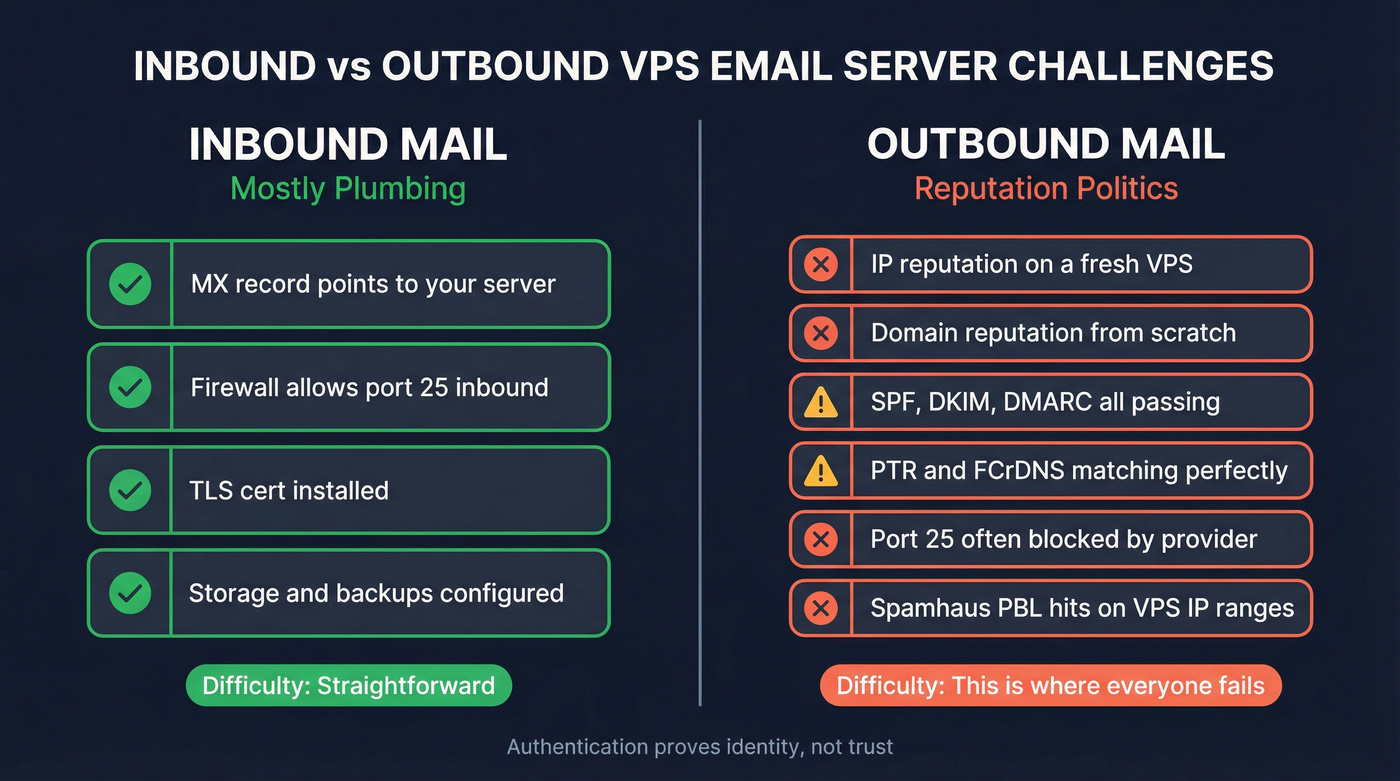
Outbound is politics.
Mailbox providers judge you by IP reputation, domain reputation, rDNS/PTR hygiene, and sending behavior. A brand-new VPS IP often looks exactly like the infrastructure spammers spin up and burn down, especially if you're using a VPS for cold email or any kind of outreach.
Port 25 blocks make it worse. Many VPS providers block outbound SMTP on 25 by default to reduce abuse. If you're trying to reach any upstream on port 25, the block applies. Authenticated submission on 587/465 usually gets through unless the provider blocks those too.
What failure looks like in logs (the exact pain you'll hit)
These patterns waste the most time because they feel random until you recognize them:

421 / 451 deferrals (temporary blocks):
421 4.7.0 Try again lateror451 4.7.650 The mail server [x.x.x.x] has been temporarily rate limitedTranslation: you're new, you're bursty, or you're getting complaints.550 5.7.1 policy blocks (reputation/auth mismatch):
550 5.7.1 Message rejected as spamor550 5.7.1 Access denied, banned sending IPTranslation: your IP/domain reputation's bad or your setup screams "misconfigured sender." (If you want a deeper fix list, see 550 Recipient Rejected.)rDNS/PTR failures:
550 5.7.1 Client host rejected: cannot find your reverse hostnameTranslation: no PTR, wrong PTR, or forward/reverse don't match.HELO/EHLO mismatch:
550 5.7.1 HELO/EHLO requires valid hostnameTranslation: your server identifies aslocalhostor a generic provider name.Spamhaus PBL hits (common on VPS ranges):
554 5.7.1 Service unavailable; Client host [x.x.x.x] blocked using zen.spamhaus.orgwith PBL in the text Translation: direct-to-MX from that IP range is a losing game. Relay outbound.High bounce rate spiral: You send a list, bounces spike, then you get throttled/blocked everywhere. Translation: bad list hygiene kills new senders fast.
What practitioners complain about (because it's true)
- "I did SPF/DKIM/DMARC and still hit spam." Authentication proves identity, not trust.
- "Port 25 is blocked and support treats me like a criminal." Providers are tired of being spam factories.
- "I became the on-call deliverability person." A mail server on a VPS is a product you operate, not a one-time install.
I've seen teams do everything "right" technically and still get buried because they blasted 2,000 cold emails on day one from a fresh domain on a fresh VPS IP, then spent the next two weeks chasing deferrals and blocklists instead of selling.
Hot take: if your average deal size is modest or you just need day-to-day business email, you don't need to prove yourself from a fresh VPS IP. Use Google Workspace/Microsoft 365, or relay outbound and move on with your life.
Before you install anything: VPS mail server readiness checklist
Treat this like a pre-flight check. If you hit a hard fail, stop.
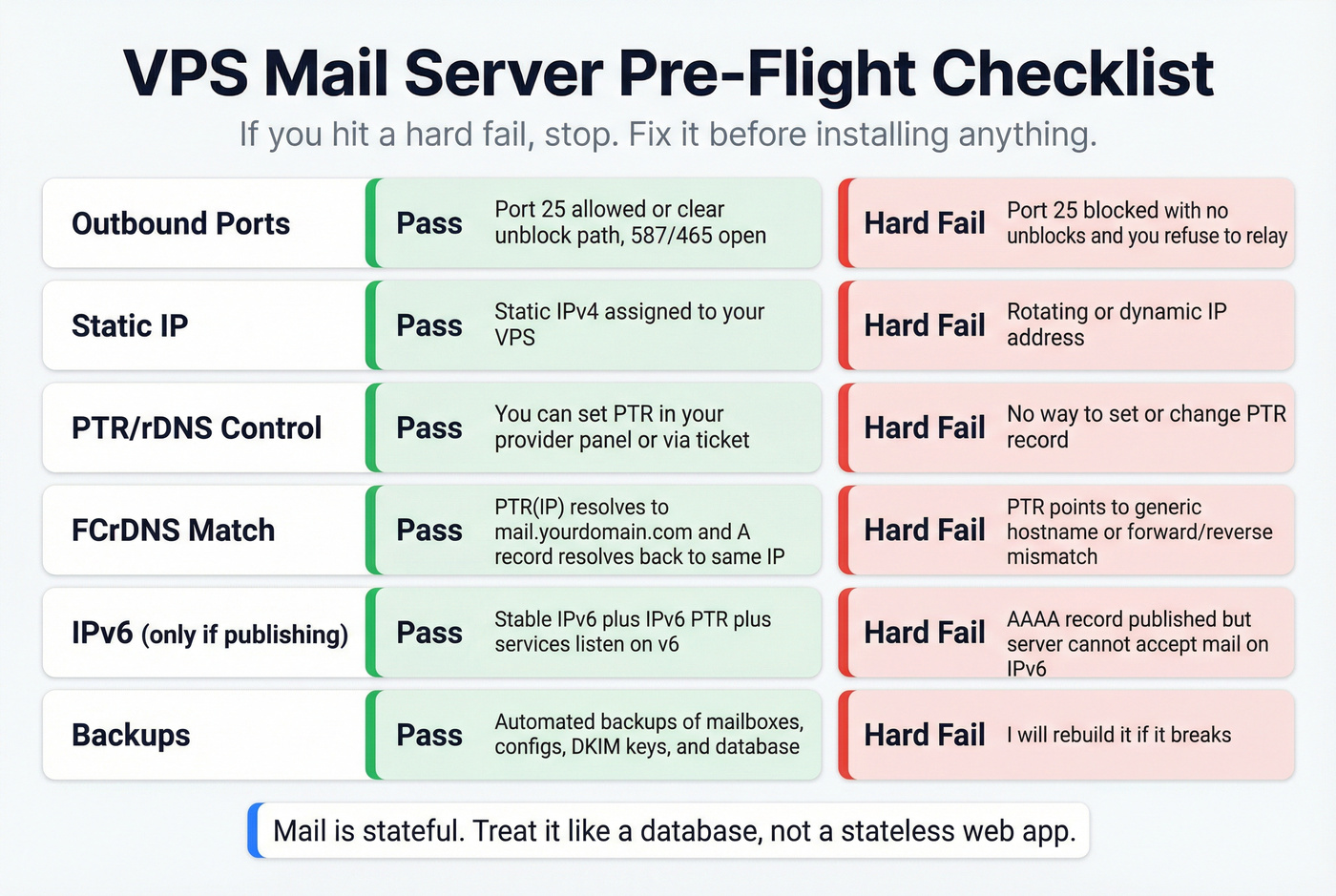
Pass/Fail checks
- Ports
- Pass: outbound 25 allowed or a clear unblock path; outbound 587/465 open
- Hard fail: 25 blocked with no unblocks and you refuse to relay; 587/465 blocked
- Static IP
- Pass: static IPv4 assigned to your VPS
- Hard fail: rotating/dynamic IP
- PTR/rDNS control
- Pass: you can set PTR in panel or via ticket
- Hard fail: you can't set PTR at all
- FCrDNS (forward-confirmed reverse DNS)
- Pass:
PTR(IP) -> mail.yourdomain.comandA(mail.yourdomain.com) -> same IP - Hard fail: PTR points to an unchangeable generic hostname or forward/reverse don't match
- Pass:
- IPv6 (only publish if complete)
- Pass: stable IPv6 + IPv6 PTR + services actually listen on v6
- Fail: you publish
AAAAbut the server can't accept mail on it
- Backups
- Pass: automated backups of mailboxes + configs + DKIM keys (+ DB if used), plus snapshots before upgrades
- Fail: "I'll rebuild it if it breaks"
Mail is stateful. Treat it that way.
Provider throttles (actionable)
- Some providers publish outbound limits (for example, Contabo documents a limit around 25 emails/minute). Treat that as a hard ceiling.
- Action: set Postfix rate limits (or your stack's equivalent), e.g.
anvil_rate_time_unit+smtpd_client_message_rate_limit, so you don't get throttled or flagged.
Quick rubric: how to pick a VPS provider for mail (before you buy)
| Requirement | Why it matters | How to verify pre-purchase |
|---|---|---|
| Port 25 policy | Direct-to-MX needs it | Provider docs + "SMTP/port 25" help article |
| Unblock process | You'll need it eventually | Is it self-serve? Ticket? KYC? Timeline? |
| PTR/rDNS control | Many receivers require it | Panel screenshot/docs or support confirmation |
| IPv6 PTR support | Broken v6 hurts delivery | Ask: "Can I set IPv6 PTR?" |
| Abuse handling clarity | You need predictable ops | Read AUP + ask what triggers blocks |

You're building a VPS email server to send outreach - but one bad list will torch your fresh IP before you send 100 emails. Prospeo's 5-step email verification and 98% accuracy rate means your bounce rate stays under 4%, not 35%.
Don't let bad data destroy the IP reputation you spent a weekend building.
Port 25 is blocked - now what? (the only 3 options)
This decision tree matches real life:
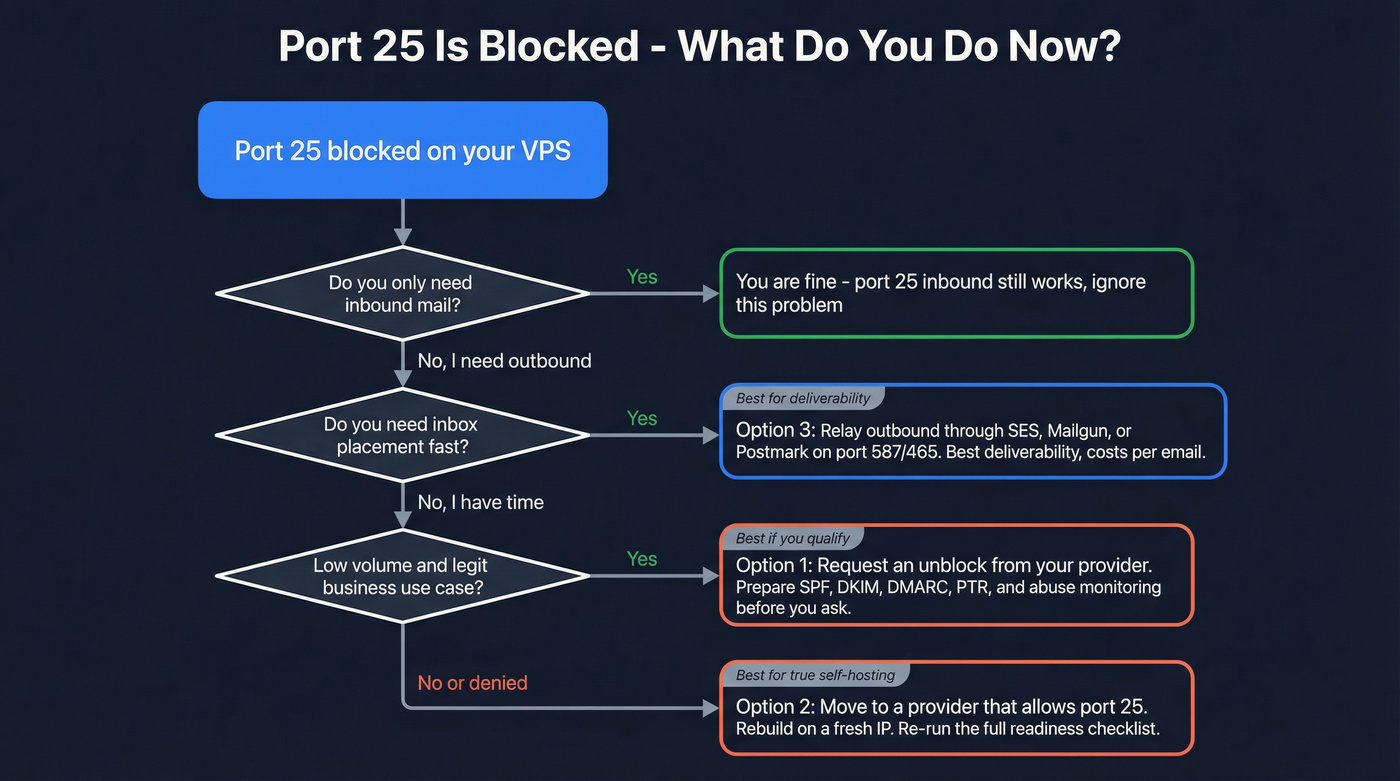
- Need direct-to-MX outbound from your server (no relay) right now? -> move providers.
- Need inbox placement fast (transactional, cold outreach, newsletters)? -> relay outbound.
- Low volume + legit business + time to wait on support? -> request an unblock first.
- Only hosting inbound mailboxes for a few users? -> you can ignore 25 for now and still receive mail.
Concrete example: DigitalOcean blocks outbound SMTP on port 25 by default on new accounts. That's an anti-abuse policy, not a technical limitation.
Option 1: Request an unblock (best if you qualify)
Do this next:
- Open a support ticket.
- Explain your use case (transactional mail, small team mailboxes, etc.).
- Confirm you have:
- SPF/DKIM/DMARC ready
- PTR/rDNS set
- Abuse monitoring in place
Tradeoff: it's not guaranteed, and it can take time.
Option 2: Move to a provider that allows port 25 (best for "true" self-hosting)
Do this next:
- Choose a provider with a clear port 25 policy and PTR control.
- Rebuild on a fresh IP (don't drag a tainted IP into your new setup).
- Re-run the readiness checklist.
Tradeoff: migration pain, and you still have to earn reputation.
Option 3: Use an SMTP relay/smarthost (best for deliverability)
Do this next:
- Keep inbound on your VPS.
- Configure Postfix to relay outbound through Amazon SES or Mailgun (or Postmark/SendGrid).
- Send authenticated SMTP to the relay on 587/465 (or an alternate like 2525 if your network's weird).
Tradeoff: you're outsourcing reputation (usually a win). You'll also pay per email, and you'll need to verify domains.
Choose your stack: turnkey vs suite vs manual (with sizing)
There are three paths: turnkey, suite, or manual. Pick based on how much you enjoy debugging mail queues at midnight.
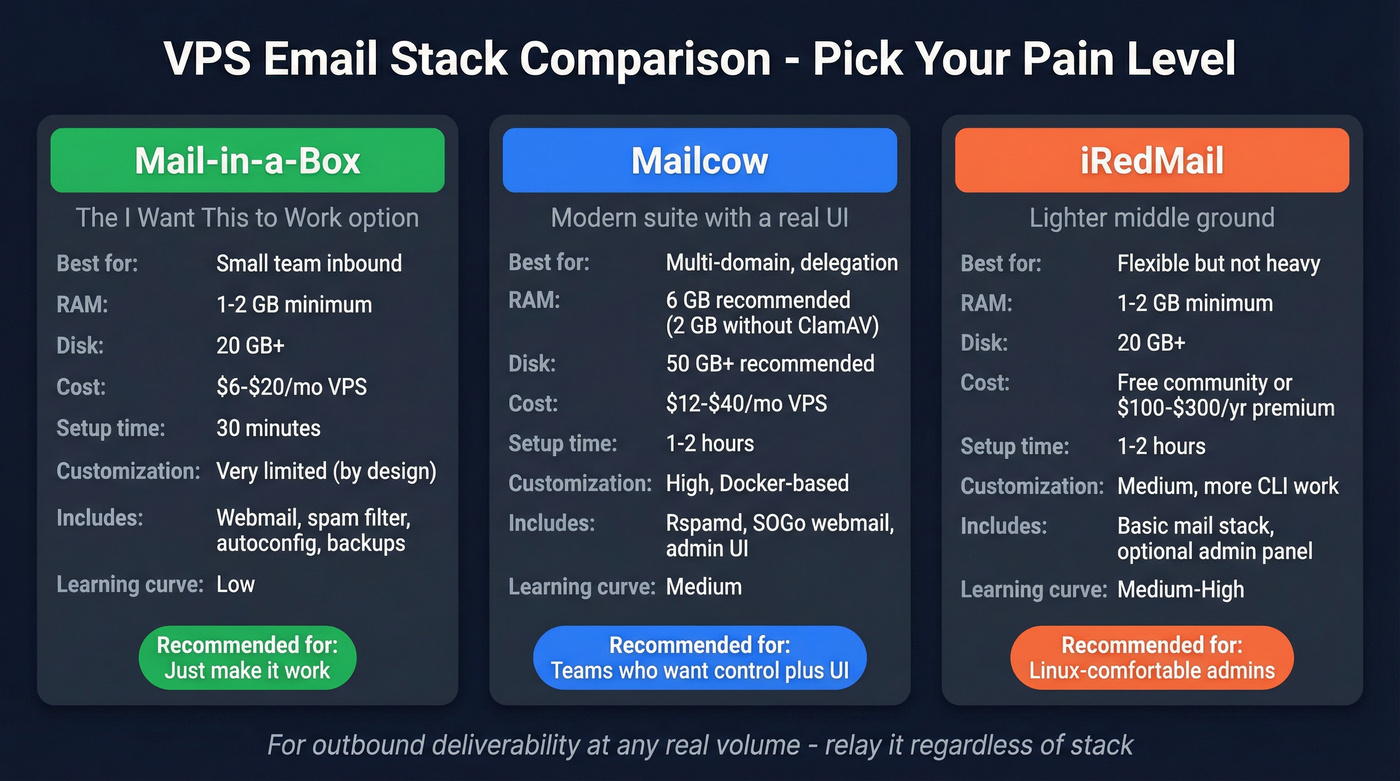
We've tested all three approaches in real environments, and the pattern's consistent: the more "flexible" you go, the more you pay in on-call time, weird edge cases, and upgrades that break at the worst possible moment.
My blunt recommendation:
- Small team inbound: Mail-in-a-Box is the fastest path to stable.
- Multi-domain + UI + delegation: Mailcow.
- Outbound: relay it. Don't debate it.
Mail-in-a-Box (turnkey, opinionated)
Mail-in-a-Box is the "I want this to work" option. Current release is v74 (Jan 4, 2026) and it runs on Ubuntu 22.04 x64.
It requires a fresh server. Not "mostly fresh." Fresh.
What you get: IMAP/SMTP, webmail, spam filtering, greylisting, autoconfig, and DNS automation for the stuff that matters in 2026, including SPF/DKIM/DMARC and MTA-STS. It'll also handle automated backups to Amazon S3 and other services, which is a bigger deal than people think until they lose a mailbox database and realize "restore from snapshot" doesn't bring back consistent mail state.
The tradeoff is the point: it's intentionally hard to tweak. If you want to customize every knob, you'll hate it. If you want a stable mail appliance, it's excellent.
Pricing signal: software's free; expect ~$6-$20/mo for a small VPS + storage, plus optional backup storage costs.
Mailcow (Docker suite + UI)
Mailcow is the "I want a modern suite with a UI" option. It's Dockerized, has a solid admin experience, and leans on Rspamd for spam filtering.
Sizing is where teams get burned:
- 6GB RAM recommended for production
- 2GB RAM possible if you disable ClamAV (virus scanning)
- Disk: 50GB+ recommended if you'll have multiple users/domains (20GB is bare minimum)
Under-size it and you'll get timeouts, slow webmail, and angry users. "Mail is down" incidents are often "the VPS is swapping itself to death."
Pricing signal: software's free; expect ~$12-$40/mo VPS for a small org (more if you want comfortable disk + RAM).
iRedMail (lighter footprint)
iRedMail's a good middle ground when you want something more flexible than Mail-in-a-Box but lighter than a full Docker suite.
It can run on smaller boxes, but you'll do more in the CLI unless you pay for premium admin features. If you're comfortable with Linux mail basics, it's fine. If you want everything clickable, Mailcow wins.
Pricing signal: community edition's free; premium admin features typically land around ~$100-$300/year. VPS costs are similar to Mail-in-a-Box for small setups.
Manual stack (Postfix + Dovecot + Rspamd)
This is the "I need full control" route: Postfix for SMTP, Dovecot for IMAP, Rspamd for filtering/signing, plus Redis/PostgreSQL depending on your design.
It's also the route with the highest ops burden: upgrades, config drift, TLS hardening, log parsing, and security patching are all on you. If that sounds fun, go for it. If you're doing this because you think it'll be cheaper, you're about to learn an expensive lesson.
Pricing signal: software's free; expect ~$10-$80/mo VPS depending on volume and redundancy (and your time's the real cost).
Control-panel route (CyberPanel / cPanel / Plesk): when it helps, when it hurts
This is the path people take when they already run websites on a VPS and want "email too."
When it helps
- You want a GUI for domains, mailboxes, and basic DNS records.
- You're managing multiple small sites and need delegation.
When it hurts
- You inherit a lot of moving parts you didn't choose (and you'll still be blamed for deliverability).
- Some panels make it easy to accidentally expose weak configs (open relays, sloppy TLS, permissive auth).
- You'll still need PTR/FCrDNS, sane HELO, and outbound reputation. Panels don't make that go away.
Pricing signal:
- CyberPanel: often free tier; paid features commonly ~$8-$15/mo.
- cPanel / Plesk: typically ~$15-$45/mo depending on license + VPS size.
Stack comparison (mobile-friendly)
| Stack | Time | UI | Needs | Best for |
|---|---|---|---|---|
| Mail-in-a-Box | 1-2h | Yes | Ubuntu 22.04 x64 (fresh server) | Small teams |
| Mailcow | 2-6h | Yes | Docker host | Multi-domain |
| iRedMail | 2-6h | Partial | Any Linux | Lean setups |
| Manual | 1-3d | No | Postfix stack | Full control |
| Control panel | 2-8h | Yes | License + panel | "Email + hosting" |
Notes: Mailcow uses Rspamd; manual stacks typically use Postfix+Dovecot with your choice of filtering/signing.
DNS + authentication setup (MX, SPF, DKIM, DMARC) that passes in 2026
If you want deliverability in 2026, authentication isn't optional.
Don't skip this: FCrDNS for your sending hostname.
Test it:
dig +short A mail.yourdomain.com
dig +short -x YOUR.IP.ADDR
The PTR hostname should resolve back to the same IP as the A record.
Yahoo's baseline requirement is simple: all senders must authenticate with SPF or DKIM, have valid forward and reverse DNS, and keep complaint rates below 0.3%. For bulk sending, you need SPF + DKIM + DMARC (with at least p=none) and alignment.
MX + A/AAAA basics (and why broken IPv6 hurts)
Minimum records:
Arecord:mail.yourdomain.com -> your_vps_ipv4MXrecord:yourdomain.com -> mail.yourdomain.com(priority 10 is fine)
If you publish IPv6:
AAAArecord must point to a working IPv6 on the server- You should also set IPv6 PTR/rDNS if you expect serious deliverability
Broken AAAA is worse than no AAAA.
SPF (keep it minimal; avoid multiple SPF records)
SPF is a TXT record on the domain you send from.
Example (sending only from your VPS IP):
yourdomain.com TXT "v=spf1 ip4:203.0.113.10 -all"
Example (sending from VPS + SES):
yourdomain.com TXT "v=spf1 ip4:203.0.113.10 include:amazonses.com -all"
Rules that save you pain:
- One SPF record per domain. Multiple records break evaluation.
- Keep includes minimal. Too many DNS lookups can cause SPF permerror.
DKIM (signing + selector hygiene)
DKIM signs outbound mail with a private key; recipients verify with your public key in DNS.
You'll publish something like:
selector1._domainkey.yourdomain.com TXT "v=DKIM1; k=rsa; p=MIIBIjANBgkq..."
Selector hygiene:
- Use a clear selector (
s2026,mail,selector1) - Rotate keys occasionally (yearly's fine for most orgs)
- Don't reuse the same selector across totally different systems forever
DMARC (start p=none; alignment explained; reporting addresses)
DMARC tells receivers what to do when SPF/DKIM fails, and it adds reporting.
Start here:
_dmarc.yourdomain.com TXT "v=DMARC1; p=none; rua=mailto:dmarc@yourdomain.com; adkim=r; aspf=r"
Notes:
p=noneis the minimum for "we're monitoring."- Many providers no longer send
rufforensic reports;ruaaggregate is the main signal. - Once you're stable, move to
p=quarantinethenp=rejectif you want anti-spoofing protection.
Internal guides (recommended next):
Modern mailbox-provider requirements (Gmail, Yahoo, Outlook.com)
Mailbox providers are basically saying: authenticate, behave, and make unsubscribing easy. If you're sending volume, they enforce it.
Practical view:
- Gmail defines bulk senders as 5,000+ emails/day to Gmail addresses.
- Yahoo's spam complaint threshold is 0.3%.
- Gmail doesn't publish one numeric complaint threshold in that bulk-sender post; in practice, treat 0.3% as the ceiling because it matches Yahoo's explicit requirement and lines up with what you'll see in throttling behavior.
| Provider | Who it applies to | Must-have | Complaint target | Unsubscribe (2 days) |
|---|---|---|---|---|
| Gmail | 5,000+/day | Auth + 1-click | <=0.3% (practical) | Yes |
| Yahoo | All / Bulk | SPF or DKIM / +DMARC | <0.3% | Yes (bulk) |
| Outlook.com | High volume | SPF or DKIM / +DMARC | <0.10% ideal | Yes (bulk) |
References: Yahoo sender best practices, Gmail bulk sender requirements.
Internal guides (recommended next):
VPS email server outbound architecture: relay vs direct-to-MX
This is the setup I recommend most often: run your mailboxes inbound on the VPS, but relay outbound through a provider that already has reputation. For most teams, that's the difference between a "working mail server" and outreach/transactional sending that actually lands in the inbox, because you're separating mailbox hosting (your problem) from sender reputation (their job). If you're building anything beyond tiny volume, it's worth understanding email sending infrastructure end-to-end.
When to relay (port 25 blocked, new IP reputation, deliverability now)
Relay outbound if:
- Port 25 is blocked
- You're on a brand-new VPS IP range
- You need inbox placement now (password resets, invoices, onboarding, outreach)
- You're doing cold outreach and don't want your sending judged purely on a fresh IP's reputation
- You'd rather pay a few dollars than fight deliverability for months
Pricing signals (so you can actually choose)
- Amazon SES: ~$0.10 per 1,000 emails + data transfer; dedicated IP ~$24.95/mo.
- Mailgun: typically ~$15-$35/mo entry tiers, then usage-based as you scale.
- Postmark: typically ~$15-$30/mo to start, then per-message tiers.
- SendGrid: typically ~$20-$40/mo entry tiers, then usage-based.
Amazon SES is the classic "cheap and reliable" relay. SES pricing is on Amazon SES pricing:
- $0.10 per 1,000 emails
- $0.12 per GB sent (attachments/data)
- $24.95/mo per dedicated IP
- Free tier: up to 3,000 message charges/month for the first 12 months (new accounts)
SES cost math examples (10k/100k emails)
Ignoring attachments:
- 10,000 emails/month -> 10 x $0.10 = $1.00/month
- 100,000 emails/month -> 100 x $0.10 = $10.00/month
Dedicated IPs change the math fast:
- 1 dedicated IP -> $24.95/month + usage
Where SMTP submission fits (587/465) vs server-to-server (25)
- Port 25: server-to-server delivery (your MTA to their MX)
- Port 587/465: authenticated submission (clients or your server to a relay)
When you relay, your VPS talks to SES (or another relay) on 587/465. Many relays also support 2525, which is handy when networks do weird filtering.
Postfix hint (minimal, not a full tutorial):
# /etc/postfix/main.cf
relayhost = [email-smtp.us-east-1.amazonaws.com]:587   # or :2525
smtp_sasl_auth_enable = yes
smtp_tls_security_level = encrypt
Internal guide (recommended next):
Optional: if you want a quick explainer embed on the "smarthost" concept, this is where a short video belongs.
Blacklists & troubleshooting flow (PBL vs SBL vs XBL)
When mail fails, people say "I'm blacklisted" like it's one thing. It isn't. If you’re doing this at any scale, keep a blacklist alert workflow so you don’t lose days to guesswork.
A solid reference for meanings is Spamhaus's own docs: Spamhaus PBL FAQ and Spamhaus blocklists overview.
Flowchart (text version)
Step 0: Grab the exact bounce text
- Copy the SMTP status code (421/451/550/etc.)
- Copy the receiving MX hostname and the full diagnostic line from your logs/bounce
Step 1: Identify the list
- Error mentions PBL?
- Error mentions SBL?
- Error mentions XBL?
Step 2: Apply the right fix
If it's PBL (Policy Block List):
- Meaning: your IP space "shouldn't be sending direct-to-MX."
- Fix:
- Don't send direct on port 25 from that IP range.
- Use SMTP AUTH via 587/465 to a relay.
- If you truly run a legit mail server, you can pursue an exclusion, but relaying's the clean fix.
If it's SBL (Spam source/support):
- Meaning: Spamhaus sees your IP as a spam source or spam-support service.
- Fix:
- Stop the spam (compromise, open relay, hacked CMS, bad list).
- Clean up and follow the delisting process.
- Never pay for removal. Paid "delisting services" are scams.
If it's XBL (Exploits Block List):
- Meaning: your IP shows signs of compromise/infection.
- Fix:
- Patch the box, rotate credentials, enable 2FA where possible
- Lock down outbound SMTP, add rate limits
- Add fail2ban, review auth logs, check for unknown processes
- Listings typically expire after bad behavior stops
Monitoring & hygiene (keep bounces/complaints low)
Keep this part boring and operational. That's how you stay out of spam.
Daily checks (5 minutes)
- Queue:
mailq(orpostqueue -p) If the queue grows every hour, you've got a delivery problem, not a "wait and see" problem. - Auth failures: scan for repeated SASL failures (brute force) and lock it down.
- Outbound spikes: sudden volume jumps are how you get throttled.
- Disk + RAM: mail servers die from full disks and swap storms.
Weekly checks (30 minutes)
- Bounce rate trend: if hard bounces jump, stop sending and fix the list/source.
- Complaint signals: if you're doing bulk mail, treat 0.3% complaints as a red line and 0.10% as the goal. (More on thresholds: spam rate threshold.)
- Blocklist spot-check: if deliverability dips, check the IP/domain against major lists before you change configs.
Bounce/complaint control (list hygiene + unsubscribe)
If you do outbound prospecting or any kind of list-based sending, verify addresses before your warm-up waves. In our experience, this is where most "VPS deliverability" projects quietly fail: the server's fine, the DNS is fine, and then a rushed list import detonates bounce rate and poisons reputation before you've even got stable sending patterns.
Prospeo, "The B2B data platform built for accuracy", is one of the simplest ways to keep that from happening because it verifies emails in real time with 98% accuracy and refreshes data every 7 days (industry average: 6 weeks), so you're not warming up a brand-new domain on stale, bounce-heavy contacts. If you’re comparing tools, start with our roundup of email verifier websites.
Also:
- Implement one-click unsubscribe for bulk mail (List-Unsubscribe + RFC 8058 style).
- Honor unsubscribes within 2 days.
Internal guide (recommended next):
Security basics (patching, 2FA, outbound rate limits, fail2ban)
Checklist:
- Patch OS and mail components monthly (faster for critical CVEs)
- Disable password auth where possible; use SSH keys
- Add fail2ban for SSH and SMTP auth endpoints
- Set outbound rate limits (per user + per IP)
- Monitor:
- mail queue growth
- auth failures
- sudden spikes in outbound volume
- new local users/mailboxes you didn't create
Advanced hardening (optional): MTA-STS, TLS-RPT, DANE, ports
If you want to look modern to other MTAs (and reduce downgrade/MITM risk), add MTA-STS and TLS reporting.
Skip this if you're still fighting basic delivery and haven't stabilized your DNS/auth yet.
MTA-STS (what it takes to do it right)
MTA-STS requires:
- A DNS TXT record:
_mta-sts.yourdomain.com TXT "v=STSv1; id=20260217"
- An HTTPS policy file:
https://mta-sts.yourdomain.com/.well-known/mta-sts.txt
Example policy:
version: STSv1
mode: enforce
mx: mail.yourdomain.com
max_age: 604800
Critical operational detail: when you change policy, update the id. Senders cache policies until max_age expires, so if you don't bump the id, you'll debug ghosts.
Microsoft's write-up is solid: MTA-STS overview.
Internal guide (recommended next):
TLS-RPT and DANE (only if you're ready)
- TLS-RPT gives you reports when TLS fails between MTAs.
- DANE (TLSA records) can be great if you run DNSSEC correctly.
If you're not already comfortable with DNSSEC operations, don't start with DANE on your production mail domain. Half-configured security is worse than none.
Practical firewall ports (and one resolver note)
Open only what you need:
| Port | Service |
|---|---|
| 25 | SMTP (MTA<->MTA) |
| 80 | HTTP (ACME) |
| 443 | HTTPS (admin/webmail/MTA-STS) |
| 143 | IMAP (STARTTLS) |
| 993 | IMAPS |
| 587 | Submission (STARTTLS) |
| 4190 | ManageSieve |
Resolver note: Rspamd generates a lot of DNS lookups. A local resolver (or at least a reliable recursive DNS setup) prevents rate limits and weird timeouts that look like "spam filter is broken."
FAQ
Is it worth running a mail server on a VPS vs Google Workspace or Microsoft 365?
For most businesses, no. Workspace/Microsoft 365 buy you built-in reputation, better inbox placement, and less operational risk. Self-hosting makes sense when you need data sovereignty, custom routing, or you're willing to own patching, monitoring, backups, and deliverability as an ongoing job.
Can I run a VPS mail server if my provider blocks port 25?
Yes: request an unblock, switch to a provider that allows outbound 25, or relay outbound through an SMTP service on ports 587/465 (often 2525 also works). Inbound delivery can still work because receiving mail doesn't require outbound port 25.
What's the minimum VPS size for Mailcow or Mail-in-a-Box?
Mail-in-a-Box is comfortable for a few users on 2GB RAM with enough disk for mail storage. Mailcow is heavier: 6GB RAM is the practical baseline, while 2GB only works if you disable ClamAV and keep usage light. Plan 50GB+ disk if you'll store real mail.
Why do my emails pass SPF/DKIM/DMARC but still land in spam?
Because authentication proves identity, not trust. Placement is dominated by IP/domain reputation, complaint rate, bounce rate, and sending consistency. New VPS IPs start with zero trust, and bursty sending looks suspicious. Also verify PTR/FCrDNS, your HELO hostname, and whether your IP range is on policy blocklists.
How do I keep bounce rates low when sending outbound campaigns?
Verify addresses before sending, ramp volume gradually, and remove bounces immediately to protect reputation. Prospeo helps by verifying emails in real time with 98% accuracy and refreshing data every 7 days (industry average: 6 weeks), which keeps bad addresses out of your first warm-up waves.
High bounce rates are the fastest way to land a new VPS IP on Spamhaus. Instead of gambling with unverified lists, start with 143M+ verified emails refreshed every 7 days - at roughly $0.01 per email, no contracts.
Protect your sender reputation with data that's verified before you hit send.
If you want inbox placement fast, don't prove yourself from a fresh VPS IP. Relay outbound until you've earned reputation, and keep your VPS email server focused on stable inbound mailboxes.