Follow-Up Email Subject Lines: 50+ Examples Backed by 5.5 Million Emails
You sent a great first email. The pitch was tight, the CTA was clear, the timing was right. Crickets. Now you're staring at a blank subject line field, trying to write something that earns a second chance - and the average professional receives ~122 emails per day. Your subject line is the only thing standing between your follow-up and the archive folder.
What the Data Says
Before the 50+ examples, here are the three rules that matter most, pulled from a [Belkins study of 5.5 million cold emails](https://belkins.io/blog/b2b-cold-email-subject-line-statistics) analyzed in partnership with Reply.io.
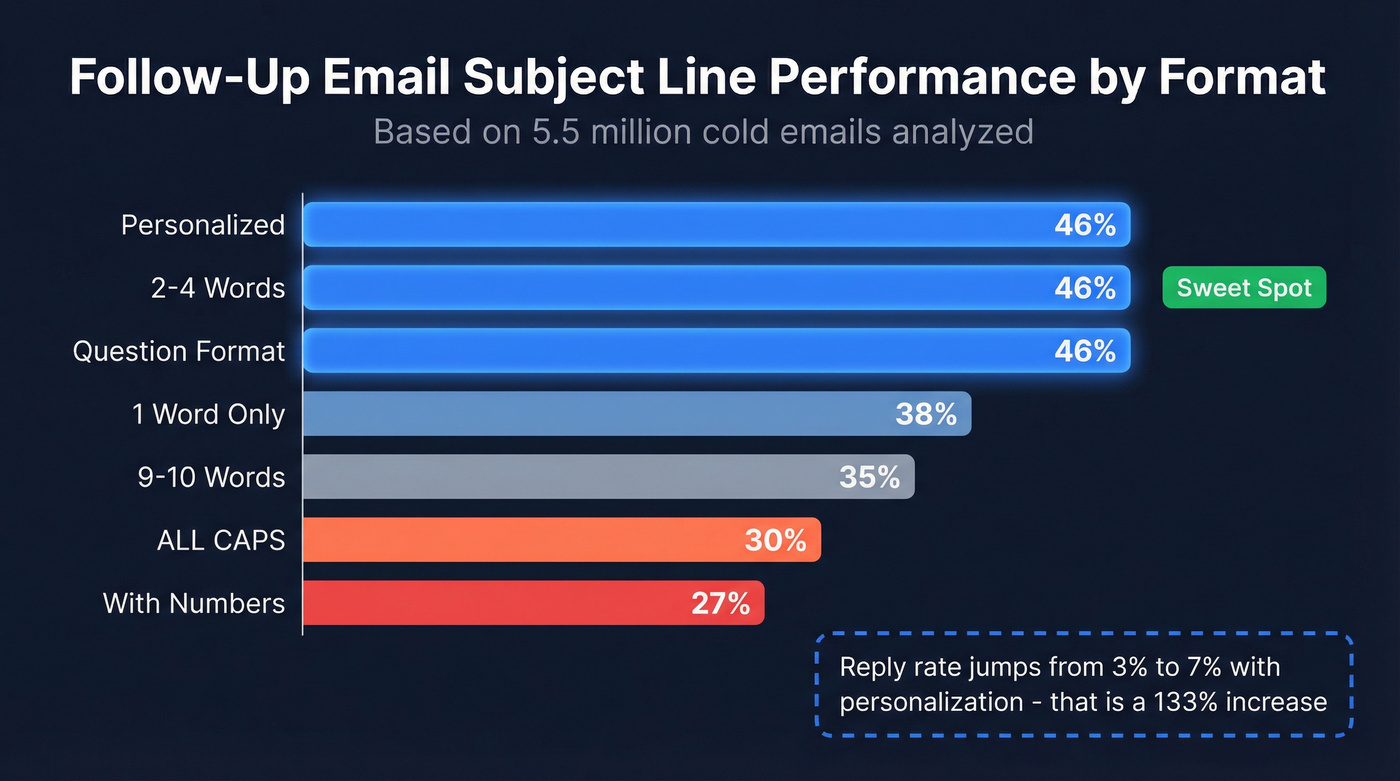
| Format | Open Rate | Reply Rate | Takeaway |
|---|---|---|---|
| Personalized | 46% | 7% | +31% opens, +133% replies vs generic |
| 2-4 words | 46% | - | Sweet spot; drops after 7 |
| Question format | 46% | - | Top-performing structure |
| With numbers | 27% | - | Skip numbers |
| ALL CAPS | 30% | - | Beats sentence case but feels spammy |
| 1 word only | 38% | - | Decent, lacks context |
| 9-10 words | 34-35% | - | Diminishing returns fast |
Three quick picks if you're in a hurry: keep it to 2-4 words, ask a question, and personalize with the recipient's name, company, or a specific detail from your last interaction. Front-load your key message into the first 33 characters - that's the safe zone across major clients and devices.
The personalization finding is the one that matters most for follow-ups specifically. Your first email goes to a cold list, but a follow-up has context. Use it. Mentioning a meeting date, a proposal name, or a shared connection in the subject line pushes you from 35% to 46% open rates - and reply rates jump from 3% to 7%. That reply rate stat is the real headline. Opens are cheap; replies pay the bills.
Open Rates Are Lying to You
That [42.35% average open rate](https://blog.hubspot.com/sales/average-email-open-rate-benchmark) from HubSpot's benchmark? It's inflated. [Apple Mail Privacy Protection pre-loads tracking pixels](https://www.litmus.com/blog/apple-mail-privacy-protection-for-marketers), registering an "open" even when nobody reads your email. A study of 80,000+ email marketing accounts found [open rates jumped 18 points](https://www.omeda.com/blog/the-impact-of-apples-mail-privacy-protection-6-months-later/) after MPP rolled out, and Apple Mail accounts for roughly 46% of email clients.
Open rates are a vanity metric in 2026. The better number is click-to-open rate, which sits at 5.3% across industries - that measures whether someone actually engaged after opening. For cold outreach and follow-ups, reply rate is the real scoreboard. Track that instead, and don't celebrate a 50% open rate that's half phantom reads.
Follow-Up Subject Lines to Retire
If your subject line could've been written by anyone, it won't get opened by anyone.
Six phrases are dead on arrival: "Quick question" (everyone uses it; it signals nothing), "Following up" (the most generic two words in sales), and "Just checking in" (no value, no reason to open). Equally useless are "Thoughts on [X]?" which is vague and low-effort, fake "Re:" threading which erodes trust and can trigger spam filters, and "ASAP" or "Urgent" - hype words that push opens below 36% in the Belkins dataset. Sybill's analysis of cold email subject lines calls out the same patterns: these lines are so overused they've become invisible. If you recognize your go-to follow-up subject in this paragraph, change it today.
50+ Follow-Up Subject Lines by Scenario
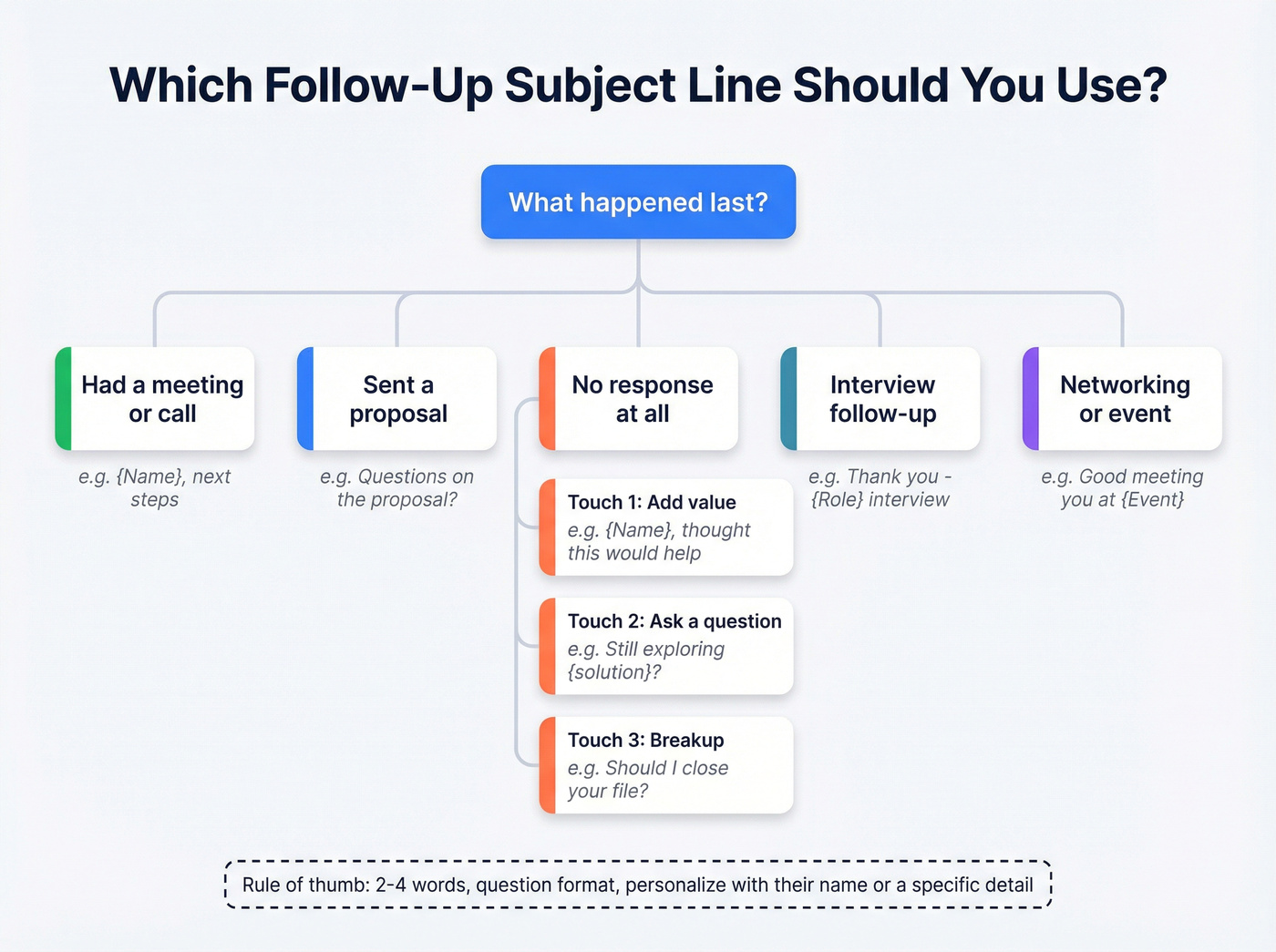
Every example below maps to the data: personalized lines, question formats, and 2-4 word lengths dominate. Steal freely.
After a Meeting or Call
Warm follow-up where you can reference something specific. Brevity wins.
- "{Name}, next steps"
- "Quick recap - {topic}"
- "{Company} + {your company} timeline"
- "The {metric} idea from Tuesday"
- "Loved the {project} insight"
- "One thing I missed"
- "{Name}, forgot to mention this"
After No Response
This is the highest-stakes scenario in any email sequence. The key distinction most people miss: someone who replied once then went dark needs a different approach than someone who never opened your first message. For the ghost-after-reply crowd, reference their last message directly - it proves you're paying attention, not just running an automated cadence.
They replied, then went silent:
- "Picking up where we left off"
- "{Name}, you mentioned {detail}"
- "Circling back to your question"
Never responded - Touch 1 (value-add):
- "{Name}, thought this would help"
- "Resource for {their challenge}"
- "Data on {topic} you mentioned"
Touch 2 (question format - 46% open rate):
- "Still exploring {solution}?"
- "Did the timing change?"
- "Worth another look?"
Touch 3 (breakup):
- "Should I close your file?"
- "Closing the loop"
After Sending a Proposal
Decision-stage follow-up. Reference the deliverable directly - don't make them guess which email this is about. Urgency-framed subject lines see 22% higher open rates, but only when the urgency is real. An actual deadline works; manufactured pressure backfires.
- "Questions on the proposal?"
- "{Company} proposal - one update"
- "The {$X}k quote expires Friday"
- "Revised numbers inside"
- "Feedback on the scope?"
- "{Name}, anything holding this up?"
Interview Follow-Up
The timing rule matters more than the words. Send a thank-you within 24 hours - 48 hours is the outer bound, but sooner is better. After 72 hours, switch to a status follow-up; a late thank-you just looks disorganized. Include the role title and your name per GDH's guidance.
- "Thank you - {Role} interview"
- "Your Name} | {Role} follow-up"
- "Great meeting the {Department} team"
- "Appreciated your insights on {project}"
- "Your Name} - checking in on {Role}"
- "Any update on the {Role} timeline?"
Networking or Event Follow-Up
Warm but low-stakes. Reference the shared experience to jog their memory.
- "Good meeting you at {Event}"
- "That {topic} panel was wild"
- "{Name}, continuing our chat"
- "The {speaker} talk - thoughts?"
- "Coffee this week?"
- "{Event} follow-up + an idea"
Re-Engaging a Cold Lead
Here's the thing: re-engagement is where most reps give up too early or try too hard. The move that tends to win is a pattern interrupt - something that breaks the rhythm of every other sales email in their inbox. Question format is your best weapon, and confirmation-status subject lines can lift opens by 30% compared to traditional re-engagement approaches.
If you want a full swipe file, use these re-engagement subject lines as a starting point.
- "Still a priority, {Name}?"
- "Things change - did yours?"
- "{Company}'s Q3 plans shifted?"
- "New data on {their pain point}"
- "Saw {Company} in the news"
- "Different approach this time"
- "What changed since March?"
- "Still confirmed for {solution}?"
Breakup / Final Follow-Up
Last touch. Ultra-short, permission-based. Let them opt out gracefully.
- "Closing this out"
- "Last note"
- "Permission to close?"
- "One last thing"
- "Should I stop reaching out?"
- "Not the right time?"
- "Removing you from my list"

A 46% open rate on your follow-up means nothing if 35% of those emails bounce. Prospeo's 5-step verification delivers 98% email accuracy - so every carefully crafted subject line actually lands in a real inbox.
Stop writing perfect subject lines for invalid email addresses.
Character Limits by Device
The 2-4 word rule handles performance. But there's a separate constraint: what actually fits on screen. With 81% of people checking email on smartphones, truncation is the silent killer of otherwise strong follow-up subject lines.
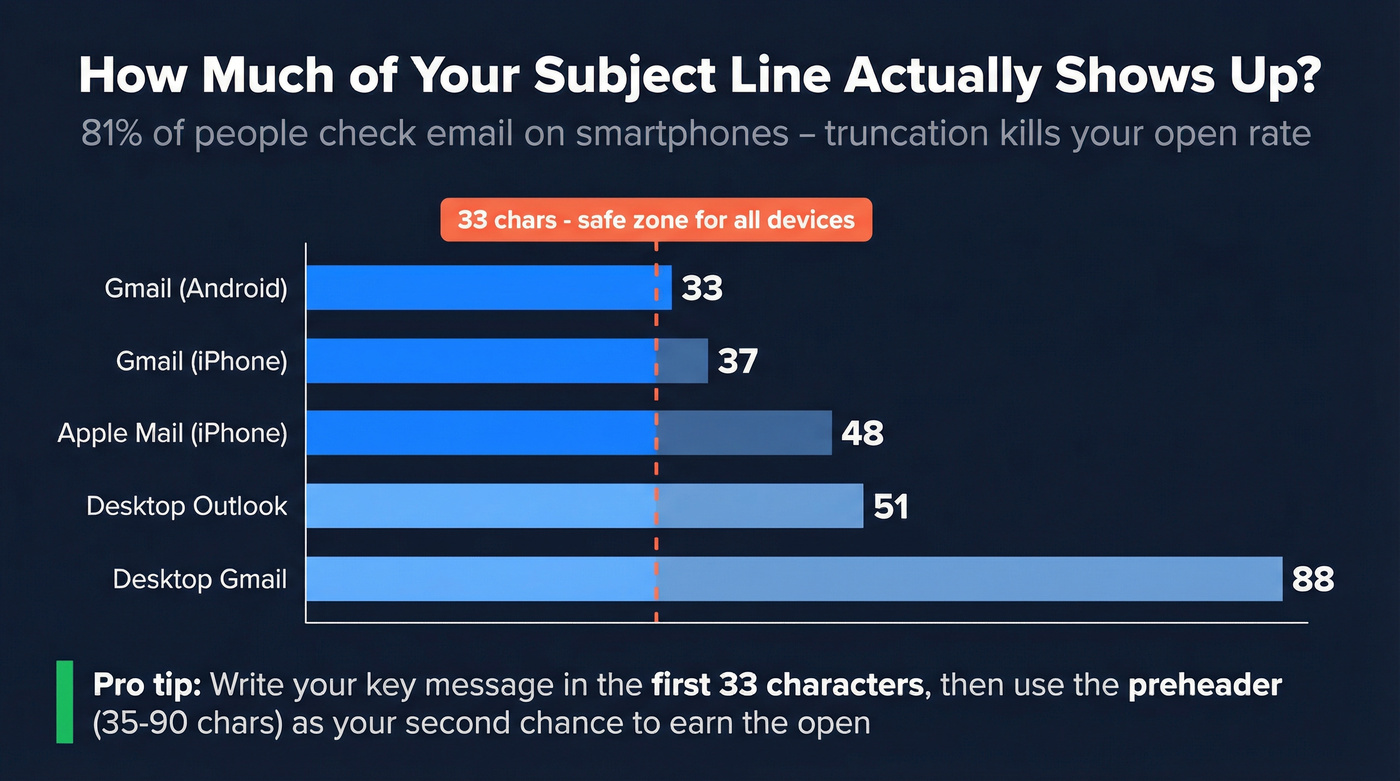
Here's what EmailToolTester found testing across devices:
| Device / Client | Subject Chars | Preheader Chars |
|---|---|---|
| Gmail (Android) | 33 | 37 |
| Gmail (iPhone) | 37 | 39 |
| Apple Mail (iPhone) | 48 | 99 |
| Desktop Gmail | ~88 | Varies |
| Desktop Outlook | ~51 | Varies |
Put your key message in the first 33 characters. That's the lowest common denominator across major mobile clients. Everything after that is bonus text half your audience won't see.
Don't forget the preheader - that grey preview text after the subject line. Keep it between 35-90 characters and use it to extend your subject line's message, not repeat it. A subject line of "Questions on the proposal?" paired with a preheader of "I updated the timeline based on your feedback" gives you two chances to earn the open.
Words That Kill Deliverability
Spam filters evaluate content, sender reputation, engagement history, and authentication. But certain words are red flags regardless of your reputation. Mailmeteor's categorized list highlights the worst offenders:
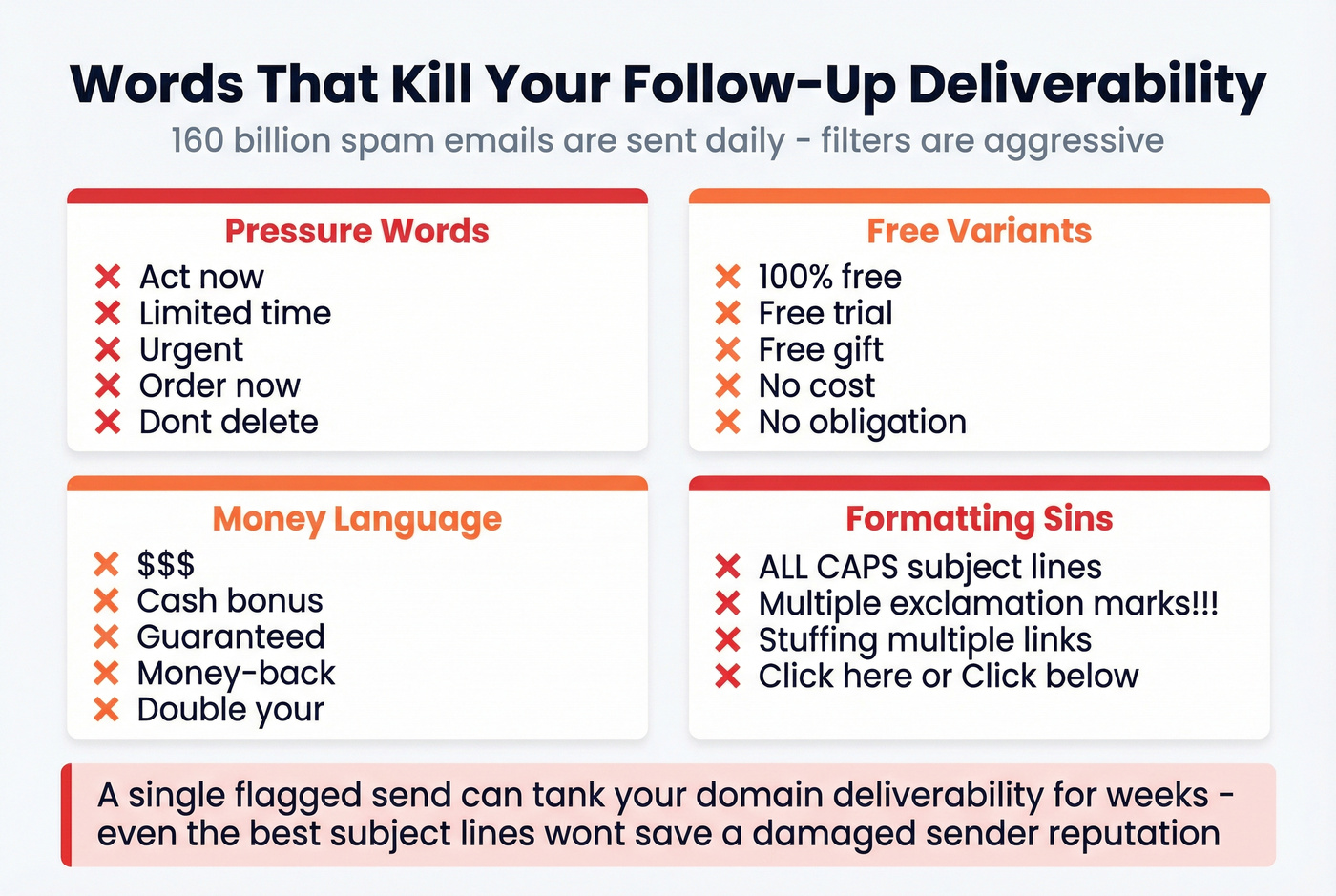
- Pressure words: "Act now," "Limited time," "Urgent," "Order now," "Don't delete"
- "Free" variants: "100% free," "Free trial," "Free gift"
- Money language: "$$$," "Cash bonus," "Guaranteed," "Money-back"
- Generic CTAs: "Click here," "Click below"
ALL CAPS, excessive exclamation marks, and stuffing multiple links into the body all raise filter scores. With 160 billion spam emails sent daily, filters are aggressive - and a single flagged send can tank your domain's deliverability for weeks. Even the best subject lines won't save you if your domain reputation is already damaged. If you want a deeper list, start with these words to avoid in email subject lines.
Fix Your Data Before Your Subject Lines
Let's be honest about something most "subject line" advice ignores entirely: we've seen teams A/B test follow-up subject lines obsessively while sending to lists with 10-20% bounce rates. That's optimizing the paint job on a car with no engine. Every bounce chips away at your sender reputation, which means lower open rates on every future follow-up - even to valid addresses.
This is step zero. Before you test a single subject line, verify your list. Prospeo runs every address through a 5-step verification process - catch-all handling, spam-trap removal, honeypot filtering - and delivers 98% email accuracy. The free tier gives you 75 verifications per month, enough to clean a test segment and see the difference in your own metrics.
If you're comparing tools, start with this list of email ID validators and work backward from accuracy and false-positive rates.

How to A/B Test Effectively
Once your list is clean, here's how to get reliable results. If you want a deeper framework, use this A/B test structure for lead-gen campaigns and apply it to subject lines.
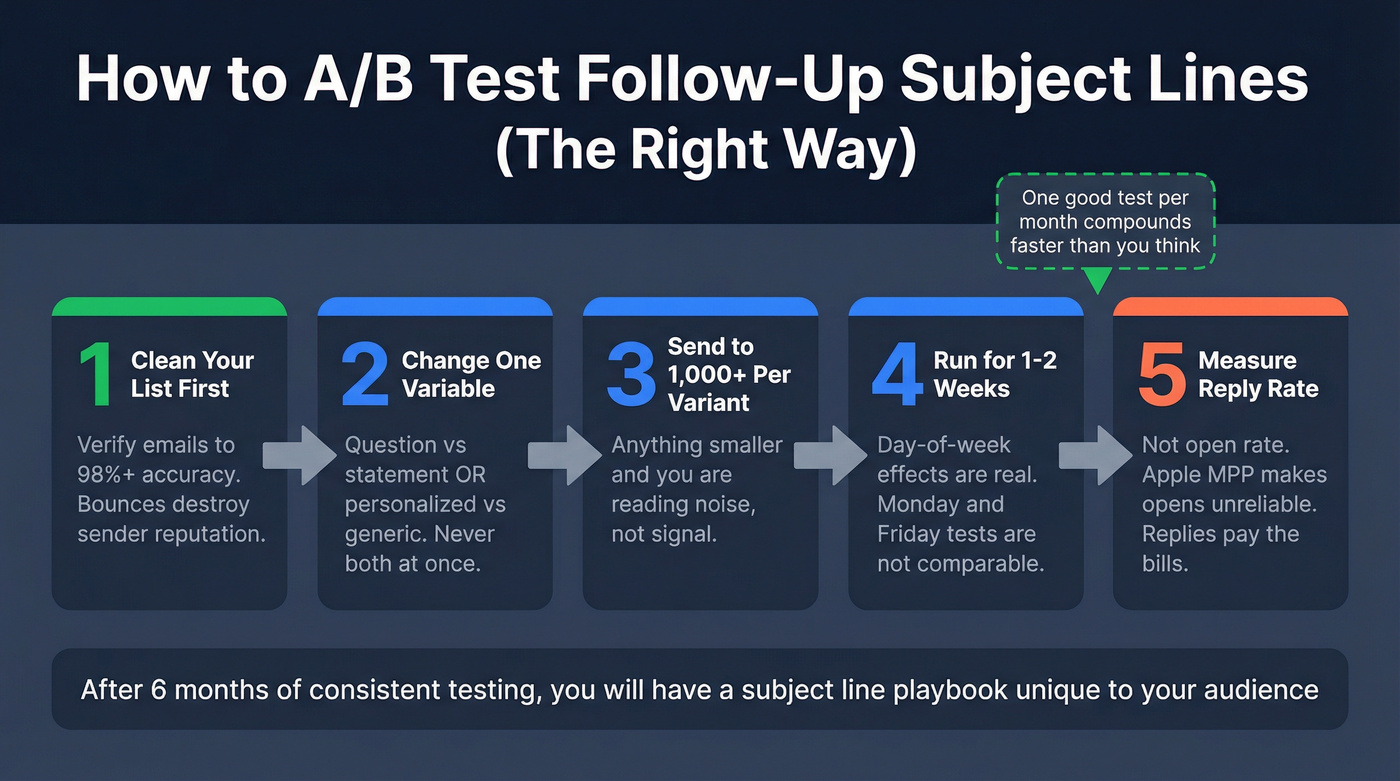
Change one variable at a time - question vs. statement, or personalized vs. generic, never both at once. Send to at least 1,000 recipients per variant; anything smaller and you're reading noise. Run tests for one to two weeks because day-of-week effects are real, and a Monday test and a Friday test aren't comparable.
The metric that matters is reply rate, not raw opens. Apple MPP makes open rates unreliable, so a follow-up subject line that gets opens but no clicks isn't winning. In our experience, one well-run test per month compounds faster than most teams expect. After six months, you'll have a subject line playbook built on your audience's actual behavior - not someone else's benchmarks.
If you want to go deeper on the math, use this guide on A/B test reply rates to avoid false winners.
Your follow-up sequence is only as good as the contact data behind it. Prospeo refreshes 300M+ profiles every 7 days - so the prospect who ghosted you last quarter still has a valid, verified email waiting.
Re-engage cold leads with emails that actually reach them.
FAQ
How long should a follow-up email subject line be?
Two to four words hit the highest open rates at 46%, based on the Belkins 5.5-million-email dataset. For character count, keep the core message within 33 characters so it displays fully on mobile. Performance drops noticeably past seven words.
What are the best follow-up email subject line formats?
Personalized lines referencing the recipient's name or company, question-based subject lines, and ultra-short two-to-four-word phrases consistently outperform. Combining two formats - like a personalized question in three words - gives you the best shot at a 46% open rate. Skip generic openers like "Just checking in."
Should I use "RE:" in follow-up subject lines?
Only if you're genuinely continuing an existing email thread. Fake "RE:" lines trigger spam filters and erode trust the moment your recipient realizes there's no prior conversation. If the context has changed or it's a new outreach sequence, write a fresh subject line.
How many follow-ups should I send before stopping?
Three to five follow-ups is standard for cold outreach. Each touch should use a different format - value-add on touch one, question on touch two, breakup on touch three - to avoid repetition fatigue. After five with no response, wait 60-90 days before re-engaging with a fresh sequence.
Does list quality affect follow-up open rates?
Absolutely. Bounced emails directly damage sender reputation, lowering deliverability on every future send - even to valid addresses. Teams with 15%+ bounce rates routinely see open rates crater regardless of subject line quality. Clean your list first, test your subject lines second.