

How to Remind Someone Who You Are in an Email Without Making It Awkward
You're staring at a blank compose window, cursor blinking, trying to figure out how to remind someone who you are in an email - someone you met three months ago at a conference. You remember the conversation clearly. They don't know you from anyone. Most guides on "reminder emails" are about invoices and deadlines, and that's not your problem. Your problem is re-introducing yourself to a human being without sounding presumptuous, desperate, or forgettable.
The Best Opening Line (Quick Version)
Here's the single best opening line for any re-introduction email:
"You may remember meeting me at [event] - we talked about [topic]."
It works because it hedges both directions. If they remember you, great - you've confirmed the connection. If they don't, you've given them enough context to place you without embarrassment.
Personalized follow-ups like this get roughly 18% response rates vs. 9% for generic templates. That's double. Keep reading for the psychology behind why this works, templates for six scenarios, subject lines that actually get opened, and the phrases you should never use.
Why People Forget You (It's Not Personal)
Forgetting someone's name after meeting them once isn't rude. It's how memory works.
The Nielsen Norman Group's research on recognition vs. recall explains this cleanly. Recognition is easy - your brain just needs a cue to match against something it's already stored. Recall is hard - it requires generating details from scratch with no cues at all. When someone gets your email and sees only your name, they're stuck in recall mode. Add the event name, the topic you discussed, or a mutual contact, and you've shifted them into recognition mode. That's the whole trick.
It gets worse. A study by Kapnoula et al. found that repeating a name immediately after hearing it can actually interfere with encoding it into memory. The brain does better when you pause about 4 seconds and just listen to lock the name in. So the person who shook your hand, repeated your name, and immediately turned to the next conversation? They probably encoded your face and your topic - but not your name.
The takeaway: they won't be offended by your re-introduction. They'll be relieved.
The Recognition Trigger Stack
Before you write your email, run through these four elements. Include at least two in your opening line.
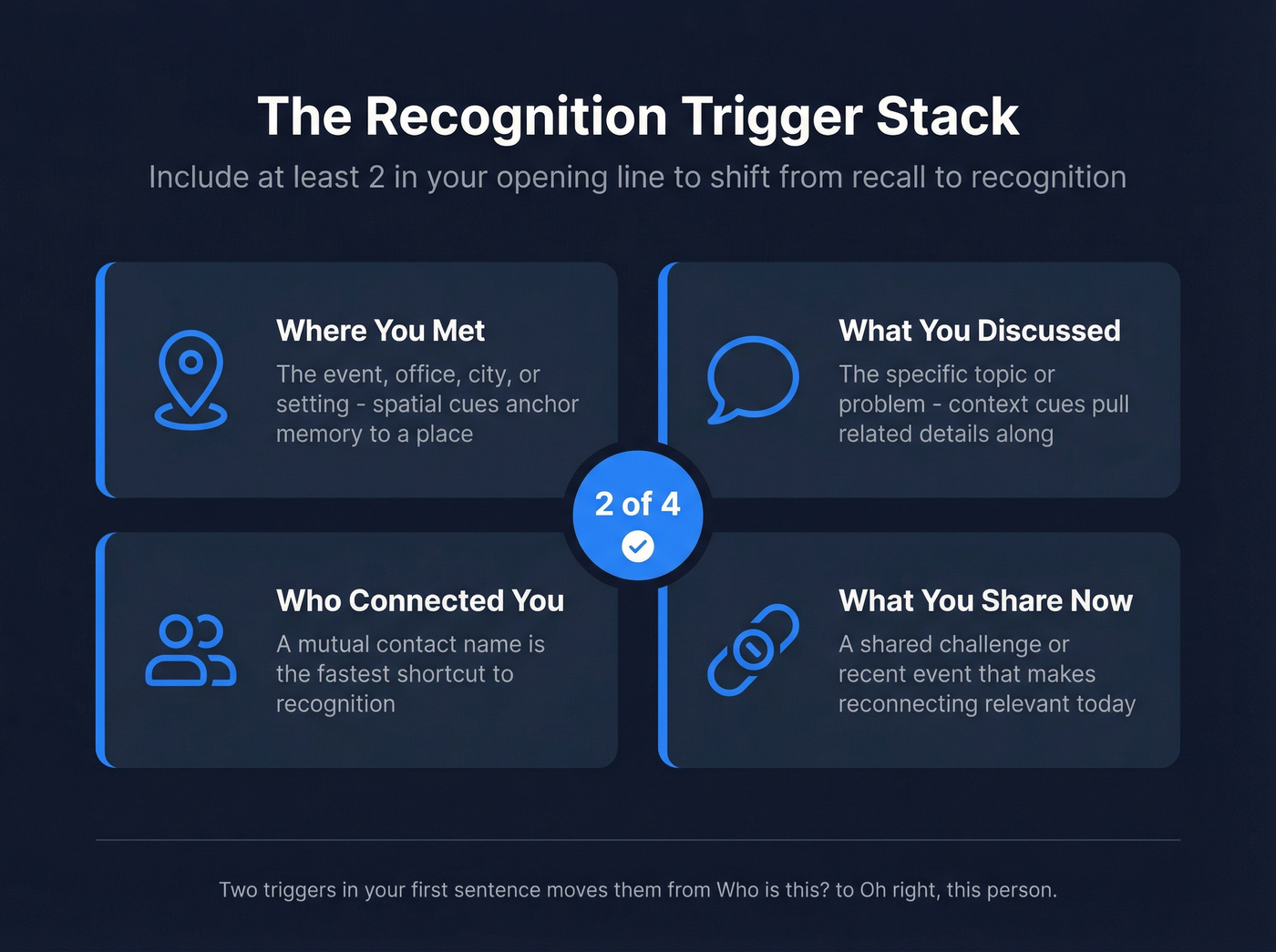
Where you met. The event, office, city, or setting. This is the strongest spatial cue - it anchors the memory to a place. "We met at SaaStr Annual" triggers more than "We met last September."
What you discussed. The specific topic, problem, or idea you talked about. Context cues spread activation to associated memories - one detail pulls related details along with it.
Who connected you. A mutual contact's name is often the fastest shortcut. People remember who introduced them even when they forget the introduction itself.
What you have in common now. A shared industry, challenge, or recent event that makes the reconnection relevant today - not just a trip down memory lane. This matters most when you're reaching out after a long gap.
Two of these four in your first sentence, and you've moved the recipient from "Who is this?" to "Oh right, this person."
Subject Lines That Get Opened
Your re-introduction is worthless if the email never gets opened.
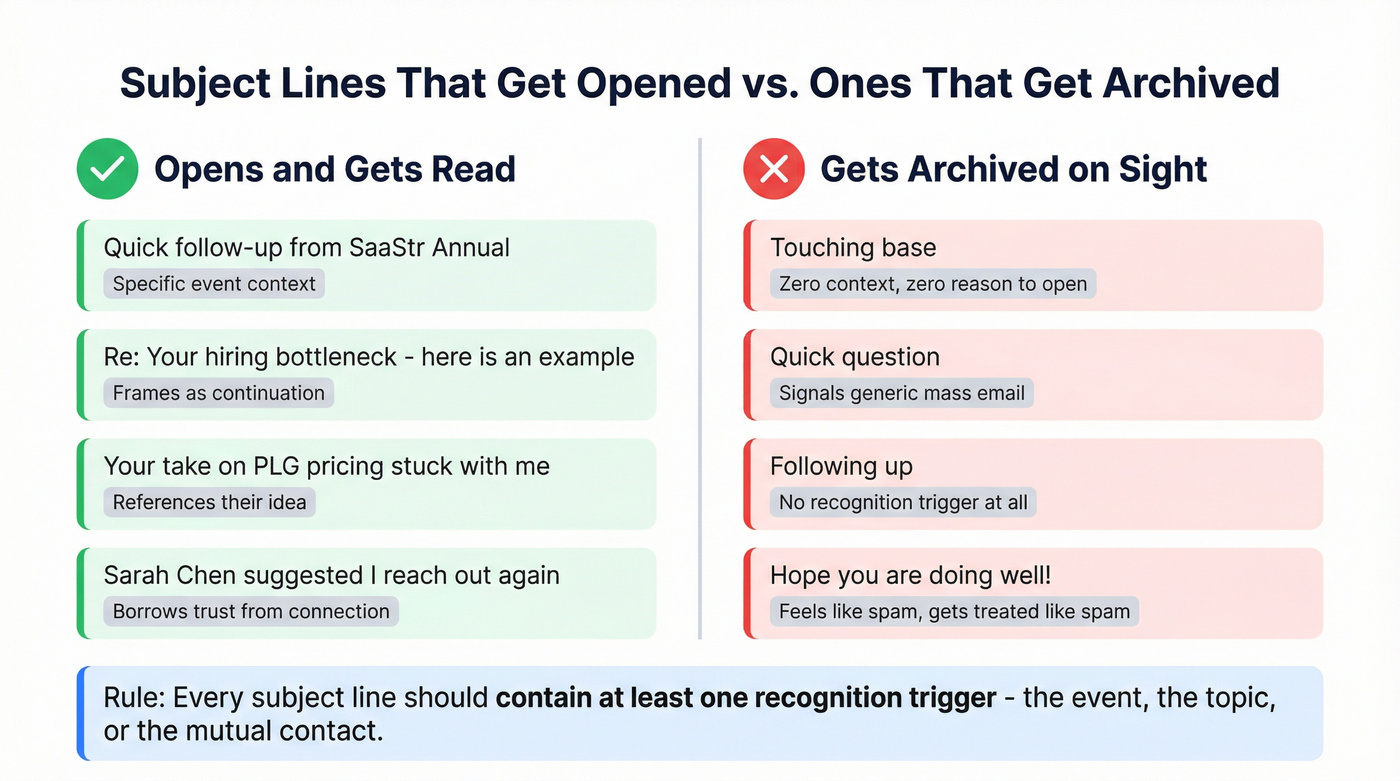
- "Quick follow-up from [Event]" - Simple, specific, immediately places the context.
- "Re: [their pain point] - here's an example" - Frames the email as a continuation, not cold outreach.
- "Your take on [topic] stuck with me" - Flattering without being sycophantic. People open emails that reference their own ideas.
- "[Mutual Contact] suggested I reach out again" - Borrows trust from the shared connection.
Avoid vague subject lines like "Touching base" or "Quick question." They signal a generic mass email and get archived on sight. Every subject line should contain at least one recognition trigger - the event, the topic, or the mutual contact.
If you want more options, pull from these re-engagement email subject lines and adapt them to your context cue.

A perfect re-introduction email is useless if it bounces. Prospeo gives you 98% verified emails for the people you actually met - pulled from 300M+ profiles and refreshed every 7 days. Find anyone's current work email for $0.01.
Stop guessing email addresses. Verify before you hit send.
Re-Introduction Templates for Every Scenario
After a Networking Event
Send this within 24-48 hours while the event is still fresh. Conversations blur together fast - the sooner you reach out, the less context you need.
Subject: Quick follow-up from [Event]
Hi [Name],
You may remember meeting me at [Event] - we talked about [specific topic]. I really enjoyed your take on [detail], and I wanted to follow up on [specific thing you discussed]. Would you be open to a quick call next week?
If you’re not sure how to phrase the ask, these schedule meeting email examples can help.
Reconnecting After Months or Years
The instinct here is to apologize for the gap. Don't. "Sorry it's been so long" frames you as someone who dropped the ball. We've watched people agonize over this exact email for 20 minutes - when the recipient reads it in 10 seconds and thinks nothing of the gap. Assume rapport and lead with shared context.
Subject: Your take on [topic] stuck with me
Hi [Name],
It's been a while since we connected at [event/company/project]. I've been following [their company or work] and noticed [specific recent development]. That reminded me of our conversation about [topic] - I'd love to catch up if you have 15 minutes.
No apology. No "I know it's been forever." Just pick up where you left off, with a reason for reaching out now. This approach works whether you're sending a follow-up email after a long time for business purposes or simply reviving a dormant professional relationship.
After a Sales or BD Conversation
Here's what most people get wrong with sales follow-ups: they write "just following up" and add nothing. That earns a delete. If you’re building a repeatable system, borrow a few ideas from this prospect follow up playbook.
The bad version: "Hi Sarah, just following up on our conversation. Let me know if you have any questions."
The version that gets replies:
Subject: Re: [their challenge] - here's an example
Hi [Name],
We spoke [timeframe] ago about [specific challenge they mentioned]. I came across [resource/case study/data point] that's directly relevant and wanted to share it. Worth a quick look - happy to walk through it if useful.
The resource is what earns the reply. A relevant case study or data point transforms "just following up" into something worth their time.
After a Job Interview
Interviewers meet dozens of candidates. One practical rule: the candidates who get remembered are the ones who reference something specific from the conversation, not the ones who send generic thank-you notes.
Subject: Following up on [Role Title] - [specific topic you discussed]
Hi [Name],
Thank you again for the conversation about the [Role Title] position on [date]. I especially enjoyed discussing [specific topic from the interview]. I wanted to reiterate my interest and ask if there's a timeline for next steps.
Reference something only you discussed with them. Generic "great conversation" emails disappear.
When Someone Doesn't Realize You've Met
This is the most delicate scenario. They've reached out - maybe to your whole team, maybe through a form - and clearly don't realize you've met. Preserve their ego.
Great to hear from you again! We actually worked together on [project/event] back in [timeframe]. Happy to help with [their request] - here's what I'd suggest...
The word "again" does the work without making it awkward. You're not correcting them. You're warmly reminding them while immediately being useful.
When a Mutual Contact Introduced You
Lead with the mutual connection's name. It's the single strongest recognition trigger available.
Subject: [Mutual Contact] suggested I reconnect
Hi [Name],
[Mutual Contact] introduced us [timeframe] ago regarding [topic]. I've been thinking about [specific aspect of what you discussed] and wanted to reconnect. Would [specific ask] work for you?
The mutual contact's name does 80% of the memory retrieval. Everything else is confirmation.
Phrases That Backfire
Some lines feel natural but create exactly the awkwardness you're trying to avoid. Let's be honest - we've all used at least one of these.
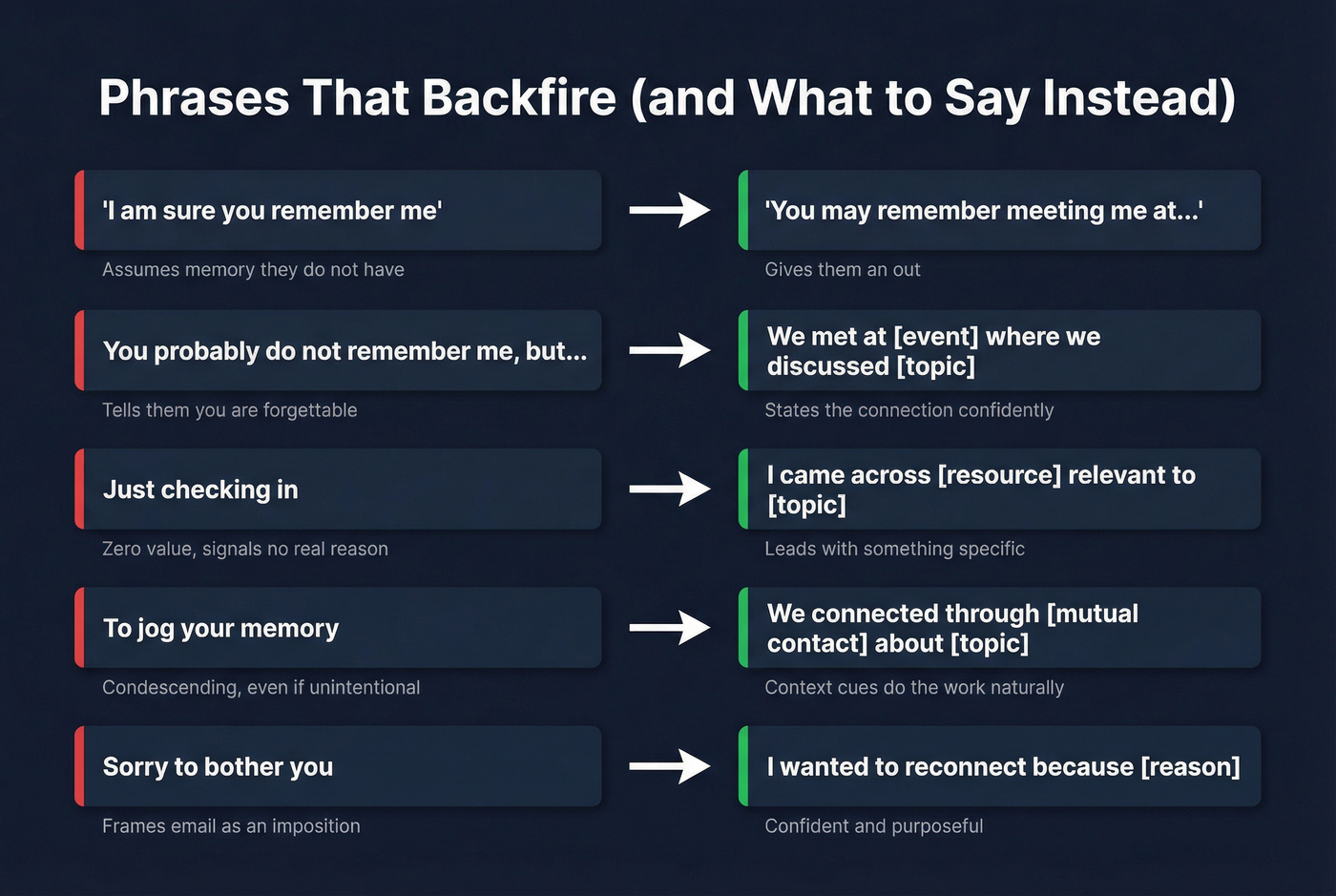
"I'm sure you remember me" - Assumes memory they don't have. Now they're embarrassed and annoyed. Use "You may remember" instead - it gives them an out.
"You probably don't remember me, but..." - Undersells the relationship before it starts. You're telling them you're forgettable. Just state how you know each other and move on.
"Just checking in" - The most overused phrase in professional email. It adds zero value and signals you don't have a real reason to reach out. Lead with something specific instead. (More examples: follow-up email greetings.)
"To jog your memory" - Condescending, even if you don't mean it that way. It implies their memory needs help - from you. Replace with context cues and let their brain do the work.
"Sorry to bother you" - You're not bothering them. You're reconnecting. Opening with an apology frames the entire email as an imposition. Drop it.
Ending without an ask - If you don't include a clear next step, even a perfectly written re-introduction dies on arrival. Every email needs a specific call to action: a question, a meeting request, or a resource to review. "Let me know your thoughts" doesn't count. If you need wording, see how to ask someone for a meeting via email.
As Grammarly's guide on reminder emails puts it, clarity and confidence beat hedging every time.
When and How Often to Follow Up
One follow-up email increases reply rates by 22%. That's significant. But there's a ceiling: a Belkins study of 16.5 million emails found the sweet spot is one initial email plus one follow-up, yielding around 8% reply rates. Push past four emails and spam complaints triple.
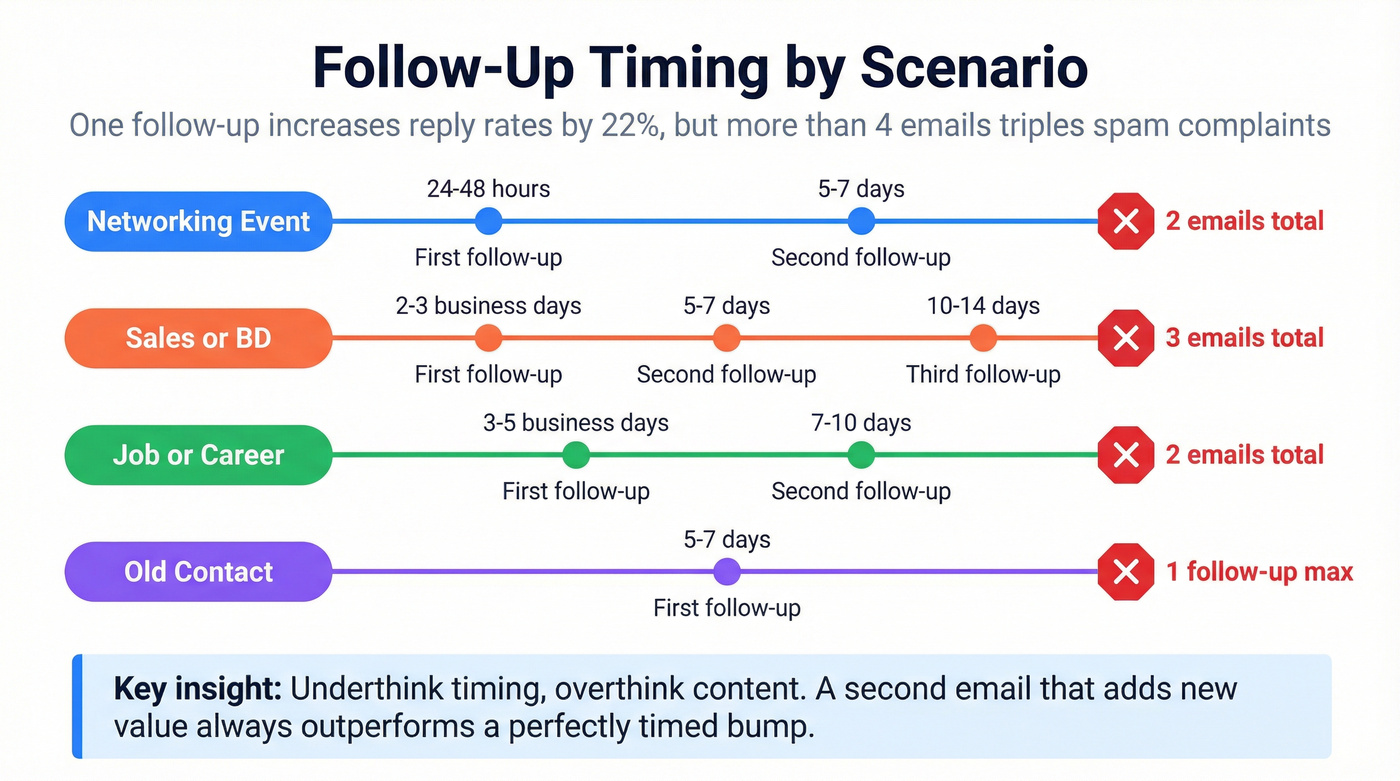
| Scenario | First follow-up | Second follow-up | Stop after |
|---|---|---|---|
| Networking event | 24-48 hours | 5-7 days | 2 emails total |
| Sales/BD | 2-3 business days | 5-7 days | 3 emails total |
| Job/career | 3-5 business days | 7-10 days | 2 emails total |
| Old contact | 5-7 days | Don't send one | 1 follow-up max |
Look, people overthink follow-up frequency and underthink follow-up content. A second email that adds new value - a relevant article, a shared connection, a specific observation about their work - will always outperform a perfectly timed "bump." If you wouldn't text someone "bump," don't email it either. For more timing rules, see when should you follow up on an email.
If two emails get no response, switch channels. A brief message on a professional network or a phone call can break through where email can't. Sometimes the problem isn't your message - it's the medium.
Verify the Address Before You Hit Send
You've written the perfect re-introduction. The recognition triggers are there, the tone is right, the ask is clear. Now the last-mile problem: is the email address even valid?
People change jobs. Companies get acquired. That business card from a conference is six months old and pointing at a dead inbox. In our experience, this is where most re-introduction efforts quietly fail - not because the email was bad, but because it bounced. Prospeo's Email Finder covers 143M+ verified emails at 98% accuracy. Enter a name and company domain, get a verified address in seconds. The free tier gives you 75 emails per month, no credit card required. If you’re comparing options, start with these email checker tools and email ID validators.

You nailed the recognition triggers, wrote the perfect subject line, and crafted a re-introduction that doesn't feel awkward. Now imagine doing that at scale - with verified contact data for every prospect you've ever met. Prospeo's Chrome extension lets 40,000+ users find verified emails and direct dials from any LinkedIn profile or company page in one click.
Turn every past conversation into a pipeline opportunity.
FAQ
How long should a re-introduction email be?
Aim for 75-150 words. That's enough context to trigger recognition and make your ask, short enough to respect their time. Get to your purpose within the first three sentences - everything after that is supporting detail, not preamble.
What if they still don't remember me?
Reply with one more specific context cue: "We were both at [specific panel] and you mentioned [detail]." If they still don't engage, move on. Two attempts is plenty - three starts feeling like pressure, not persistence.
Should I reply in the original email thread?
Always - if one exists. Replying in-thread is the easiest recognition trigger available. The recipient can scroll down and see the full conversation history without you summarizing it. It's effortless context that does the re-introduction for you.
Is it weird to email someone after years of silence?
Not at all. People reconnect after years constantly. Lead with shared context rather than apologizing for the gap. The longer it's been, the more specific your details should be: "SaaStr 2024, the session on PLG metrics" beats "we met a while back."
How do I find someone's current email if they changed jobs?
Use an email lookup tool like Prospeo's Email Finder - enter their name and current company domain to get a verified address. Old business cards go stale fast, especially in high-turnover industries. A quick search takes seconds and prevents your carefully crafted re-introduction from bouncing into a dead inbox.