Schedule Meeting Email Examples: Templates, Subject Lines, and Scripts That Actually Get Replies
Writing emails eats 28% of the average workday - that's 11+ hours a week spent crafting messages, and a massive chunk of those are meeting requests that never get a response. 60% of office workers say email volume actively adds stress to their jobs. The problem isn't that people don't want to meet. It's that most schedule meeting email examples floating around the internet are vague, too long, or built on outdated advice that ignores how people actually read email in 2026.
Here's the reality: a meeting request is a micro-pitch. You're asking a busy person to give you their most finite resource - time - and you have about three seconds to justify the ask. Most emails fail that test. They open with pleasantries nobody asked for, bury the ask in paragraph three, and close with "let me know when you're free," which is the scheduling equivalent of "you figure it out."
The Formula (Quick Version)
The anatomy of a meeting email that works comes down to three things: a specific time, a clear value prop, and one CTA. The #1 mistake? Vague asks like "Let me know when you're free." Personalized subject lines boost open rates to 46% (vs. 35% without), and reply rates jump from 3% to 7% - a 133% increase, based on a study of 5.5 million cold emails.

Here's the formula:
- Subject line (2-4 words, lowercase) → One-line context → Value to them → Specific time suggestion → Fallback option
That's it. Every template below follows this structure.
If you're sending cold meeting requests, a verified email address matters more than the perfect template. A beautifully written email that bounces is worth nothing - and it damages your sender reputation for every future send.
Anatomy of a Meeting Request Email That Works
The best meeting emails share five structural elements. Miss one and your reply rate drops. Here's the breakdown, built from what I've seen work across hundreds of outbound campaigns.
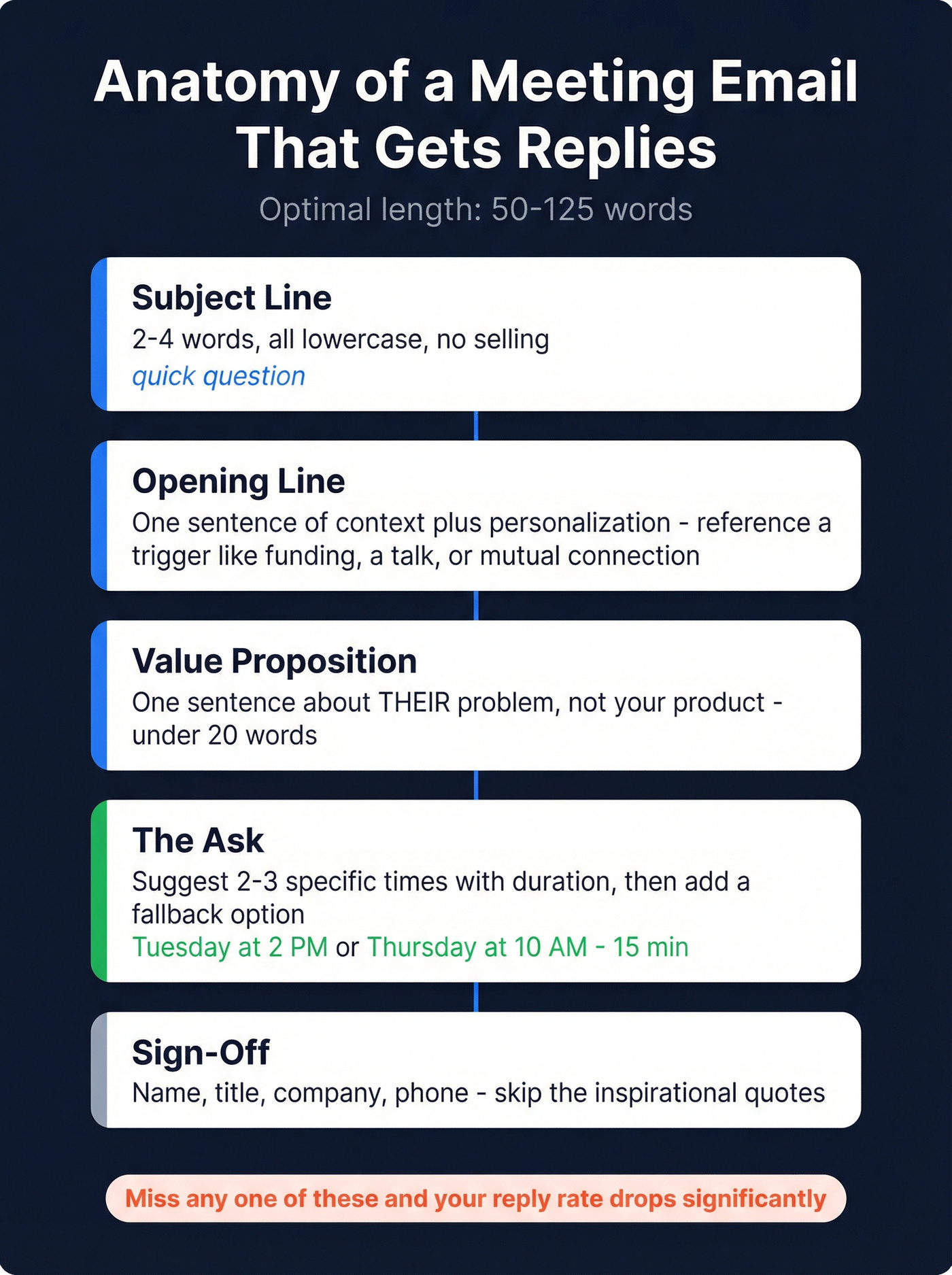
Optimal length: 50-125 words. As Steli Efti puts it, "busy people have short attention spans - get to your purpose, benefits, and request as quickly as possible."
Best send time: Tuesday through Thursday, 8-10 AM in the recipient's local time. Mondays are inbox-clearing days; Fridays are mentally checked out. Hit them mid-week, early morning, before the day buries your email.
Subject Line (2-4 Words, All Lowercase)
Your subject line isn't a pitch. It's a door. Keep it under four words, all lowercase, and don't sell anything. "quick question" outperforms "Exclusive Opportunity to Boost Your Revenue" every single time.
Don't forget the preview line. The preview text - the snippet visible after the subject line in most inboxes - is your second impression. It should reinforce the subject line, not repeat it. If your subject is "quick question," your preview should hint at the value, not start with "Hi [First Name], I hope this email finds you well."
Opening Line (Context + Personalization)
Tell them why you're emailing in one sentence. Reference something specific - a recent funding round, a mutual connection, a piece of content they published. "I saw your talk at SaaStr" beats "I hope this email finds you well" by a mile.
If you want more first-line ideas, swipe from these openers and adapt them to your trigger.
Value Proposition (One Sentence, About Them)
This isn't about your product. It's about their problem. One sentence that answers: "Why should I care?" If you can't articulate the value to them in under 20 words, you're not ready to send the email.
The Ask (Specific Time + Duration + Fallback)
Look, "Let me know when works" puts all the cognitive load on them. Instead, suggest 2-3 specific times with a duration. Then add a fallback: "If none of those work, happy to adjust - what's better for you?" This is the core of any effective meeting request. Make it effortless to say yes.
If you want a deeper breakdown of what a strong ask looks like, use this Sales CTA framework.
Sign-Off (Professional, With Contact Info)
Keep it clean. Name, title, company, phone number. Skip the inspirational quotes in your signature. Nobody's booking a meeting because you quoted Marcus Aurelius.
Subject Lines That Get Opened (Data From 85M+ Emails)
What the Data Says
A study of 5.5 million cold emails found that 2-4 word subject lines hit a 46% open rate. Stretch to 9-10 words and you're down to 34%. Question-based subject lines also hit 46% - they trigger curiosity. Subject lines with a CTA reached 44.6% open rates, making them a strong alternative to pure curiosity plays.

From a separate analysis of 85M+ cold emails by 30MPC and Gong: all-lowercase subject lines have the highest open rates. Salesy techniques reduce opens by up to 17.9%. Top reps get 2.1x the opens of average reps, and they're not doing anything fancy - they're just keeping it short and casual.
One weird finding: empty subject lines boost opens by 30% but tank reply rates by 12%. Curiosity gets the click, but confusion kills the response.
Mobile matters too. Subject lines get truncated after 35-50 characters on most phones. If your subject line needs a scroll to read, you've already lost.
A/B test your subject lines. Even small changes - question vs. statement, 2 words vs. 4 - can shift open rates by 10%+. Most email tools support this natively. Use it. (If you need a structure, here's a practical guide to A/B testing lead generation campaigns.)
10 Subject Lines for Meeting-Related Emails
Cold outreach:
- quick question
- saw your talk
- [mutual connection] suggested we chat
- idea for [company name]
Warm follow-up:
- 15 min to discuss [topic]?
- next steps?
- re: our conversation
Internal:
- sync on [project]?
- 15 min this week?
Rescheduling:
- need to move thursday
Subject Lines to Avoid (With Data on Why They Fail)
Marketing jargon and urgency words like "ASAP" drag open rates below 36%. "Urgent Matter" and "Quick Question" (capitalized, formal) tell the recipient this is a mass email before they even open it.
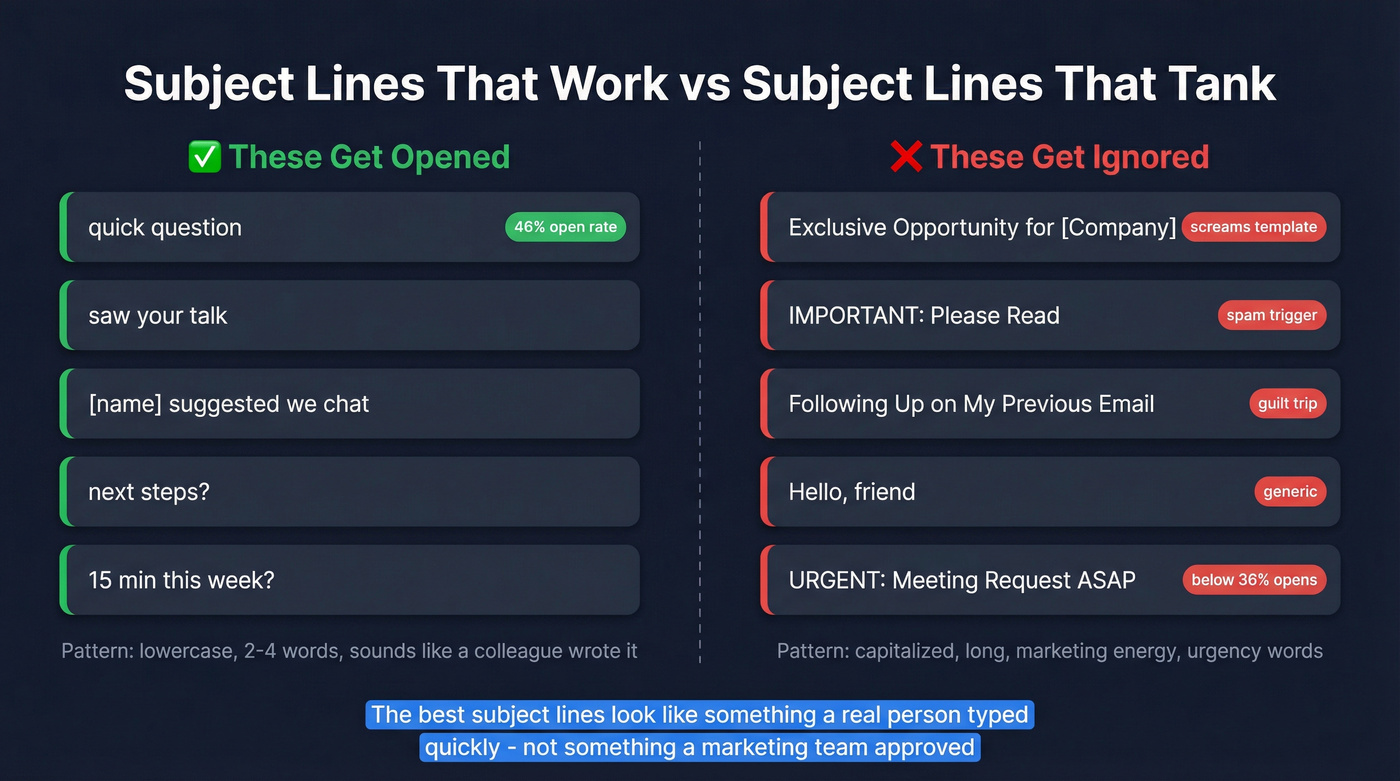
Avoid these patterns:
- "Exclusive Opportunity for [Company]" - screams template
- "Following Up on My Previous Email" - guilt-tripping doesn't work
- "IMPORTANT: Please Read" - all caps is a spam trigger
- "Hello, friend" - generic greetings tank performance
The best subject lines look like something a colleague would type. Short, lowercase, zero marketing energy.
If you want more options, use this list of reminder email subject lines.

You just spent time crafting the perfect meeting request. Now imagine it bouncing - and tanking your sender reputation for every future email. Prospeo's 98% email accuracy means your carefully written ask actually reaches the inbox, not the void.
Stop writing perfect emails to dead addresses. Verify first.
16 Email Templates to Schedule a Meeting (by Scenario)
Cold Meeting Request
Template 1: Stranger outreach
Subject: quick question
Hi [First Name],
I noticed [Company] just [specific trigger - expanded to new market, raised funding, hired 10 SDRs]. We help teams like yours [one-sentence value prop].
Would a 15-minute call on Tuesday at 2 PM or Thursday at 10 AM work? If neither fits, happy to adjust.
[Your name] [Title, Company] [Phone]
Keep it under 100 words. The trigger shows you did research. The specific times remove friction.
If you're building a full outbound motion, pair this with a simple B2B cold email sequence so you're not relying on one send.
Template 2: Referral-based
Subject: [mutual connection] suggested we connect
Hi [First Name],
[Mutual Connection] mentioned you're working on [specific challenge]. We helped [similar company] solve that - cut their [metric] by [number].
Do you have 20 minutes this Friday? If not, what works for you?
[Your name]
The referral does the heavy lifting here. Don't bury it.
Template 3: Event follow-up
Subject: great talk at [event]
Hi [First Name],
Your session on [topic] at [Event] resonated - especially the point about [specific detail]. I think there's an overlap with what we're building at [Company].
Worth a 15-minute chat next week? I'm open Tuesday or Wednesday afternoon.
[Your name]
Specificity proves you were actually there.
Warm Meeting Request
Template 4: Existing contact
Subject: catching up
Hi [First Name],
It's been a few months since we last connected. I've been thinking about [topic you discussed] and have some ideas that might help with [their challenge].
Free for 20 minutes next Tuesday or Thursday?
[Your name]
This works well for re-engaging dormant contacts because the tone is casual and the ask is low-commitment.
Template 5: After a positive reply
Subject: re: [original thread]
Great to hear you're interested, [First Name]. How about Wednesday at 3 PM ET for a quick 15-minute call? If that doesn't work, I'm also open Thursday morning.
Here's my number if you'd rather just call: [phone].
[Your name]
Notice: no Calendly link. More on why below.
Template 6: Mutual connection (warm intro)
Subject: [introducer] connected us
Hi [First Name],
[Introducer] thought we should talk about [topic]. I lead [function] at [Company] and we've been working on [relevant project].
Would you be open to connecting? I'm flexible Tuesday through Thursday - 20 minutes is all I'd need.
[Your name]
Internal Meeting Request
Template 7: Cross-team sync
Subject: sync on [project]?
Hi [Name],
I want to align on [specific deliverable] before the [deadline]. Should take 30 minutes max.
Does Wednesday at 11 AM or Friday at 2 PM work for your team?
Thanks, [Your name]
Template 8: Manager to direct report
Subject: 1:1 this week
Hey [Name],
Want to check in on [project/goal] and talk through [specific topic]. Let's block 30 minutes - does Thursday at 10 work, or would you prefer Friday?
[Your name]
Template 9: Project kickoff
Subject: kickoff for [project name]
Hi team,
We're kicking off [Project] next week. I'd like to get everyone aligned on scope, timeline, and ownership.
Proposing Tuesday at 1 PM ET for 45 minutes. Please reply if that conflicts - otherwise I'll send the invite.
[Your name]
The "reply if it conflicts" approach reduces back-and-forth when you're coordinating multiple stakeholders.
Follow-Up After No Response
Template 10: First bump (3-5 days later)
Subject: re: [original subject]
Hi [First Name],
Just floating this back up - I know inboxes get buried. Still happy to find 15 minutes if [value prop] is relevant.
Would next week work better?
[Your name]
Template 11: Second bump (7-10 days later)
Subject: one more try
Hi [First Name],
Totally understand if the timing's off. If [challenge] is still on your radar, I'd love to share how [Company] approached it.
Otherwise, no hard feelings - happy to reconnect down the road.
[Your name]
Template 12: Breakup email
Subject: closing the loop
Hi [First Name],
I'll assume the timing isn't right and won't keep following up. If [topic] becomes a priority later, my door's open.
All the best, [Your name]
Sending 2-3 follow-ups increases response rates by 30-50%. Don't skip them out of politeness. If you want a full system, follow this follow up email sequence strategy.
Rescheduling an Existing Meeting
Template 13: You need to reschedule
Subject: need to move thursday
Hi [First Name],
Something came up and I need to reschedule our Thursday call. Apologies for the shuffle.
Could we do Friday at the same time, or Monday morning? Happy to work around your schedule.
[Your name]
Template 14: They need to reschedule
Subject: re: rescheduling
No problem at all, [First Name]. How about [two alternative times]? If neither works, send me a couple options and I'll make it happen.
[Your name]
Short and gracious. Don't make them feel guilty.
International / Cross-Timezone Meeting Request
Template 15: Cross-timezone
Subject: finding a time across timezones
Hi [First Name],
I know we're working across [your timezone] and [their timezone], so I want to be mindful of your schedule.
Would [specific time] your time on [day] work? That's [converted time] for me. If mornings are better on your end, I can adjust.
Looking forward to connecting.
[Your name]
Always convert the time for them. Don't make them do timezone math. (For more nuance on timing, see cold email time zones.)
A note on cultural differences: This matters more than most people realize. In Germany and Japan, punctuality is non-negotiable - showing up five minutes late signals disrespect. In Brazil or India, meetings often start 10-15 minutes after the stated time, and that's normal. Beyond punctuality, communication style matters: Nordic and German business culture favors direct, agenda-driven emails, while Latin American and Middle Eastern cultures prioritize relationship-building, so your email might need a warmer opening before jumping to the ask. When in doubt, err on the side of formality and avoid idioms like "let's touch base" that confuse non-native English speakers.
Post-Meeting Thank You / Next Steps
Template 16: After the meeting
Subject: re: [meeting topic]
Hi [First Name],
Thanks for the time today. Quick recap of what we discussed:
- [Key takeaway 1]
- [Action item + owner]
- [Next step + timeline]
I'll [your next action] by [date]. Let me know if I missed anything.
[Your name]
Most people skip this email. Don't.
A post-meeting recap within 24 hours keeps momentum alive and gives both sides a written record of commitments. It's also the easiest way to set up the next meeting without it feeling like a cold ask.
The Follow-Up After a Positive Reply (Don't Blow It)
Why the Calendly Link Kills Momentum
This is one of the most common mistakes in sales outreach. A prospect replies "Sure, let's chat" - and you immediately fire back a Calendly link. Then silence.
A common complaint on r/sales: every time the rep sends a Calendly link after a positive response, the prospect disappears. It feels transactional. It shifts the work to them. And it breaks the conversational momentum you just built.
A scheduling link says "go do this task." A specific time suggestion says "I value your time and I'm making this easy."
Hot take: If you're closing deals under $20k, you probably don't need a scheduling tool in your outbound workflow at all. Just propose a time. The friction of clicking a link, loading a page, and picking a slot is higher than replying "Tuesday works." Save the scheduling links for inbound leads who are already motivated to book.
The Three-Option Approach That Works
Instead of a bare link, use the combination approach that consistently wins in practitioner polls:
- Propose a specific time: "How about Wednesday at 3 PM ET?"
- Ask their preference: "If that doesn't work, what's better for you?"
- Include a scheduling link as backup: "Or grab any open slot here: [link]"
This gives them three paths to yes. The specific time is the easiest to accept. The open question shows flexibility. The link is there if they prefer self-service. We've seen this approach outperform bare Calendly links consistently across outbound teams.
Before You Hit Send - Finding the Right Email Address
88% of people have regretted an email after sending it - and sending to the wrong address is one of the most common reasons. Autofill errors cause privacy breaches. Outdated contact data causes bounces. And bounces don't just waste your time; they damage your sender reputation, which means your next 100 emails are more likely to land in spam.
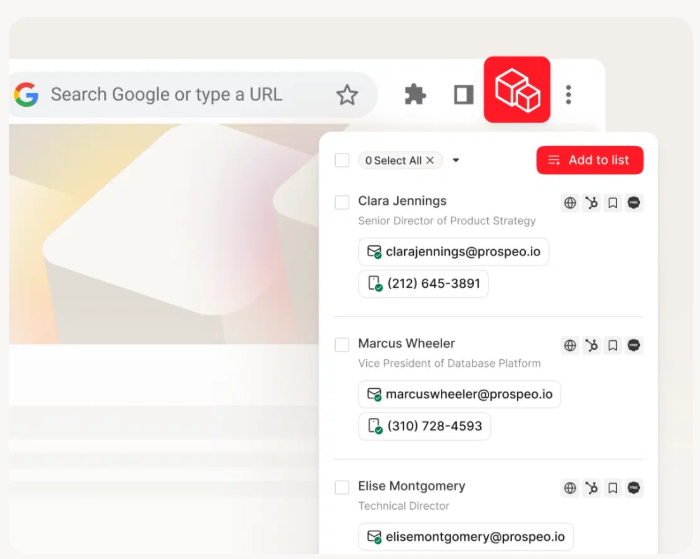
Before writing a single word of your meeting request, verify the address. Prospeo's Email Finder delivers 98% email accuracy across 143M+ verified addresses. Upload a CSV for bulk verification, search by 30+ filters to find the right contact, or use the Chrome extension on any company website. Data refreshes every 7 days - not the 6-week industry average - so you're not emailing someone who left the company last month.
If you're comparing options, start with these email lookup tools and this list of email verifier websites.
I'm biased, but the best meeting email in the world fails if it bounces. Verify first, write second.
Cold meeting requests live or die on two things: personalization and deliverability. Prospeo gives you 50+ data points per contact - job changes, funding rounds, tech stack - so every trigger line is real, sent to a verified email refreshed every 7 days.
Better triggers, verified emails, more meetings booked. Starting at $0.01 per lead.
Mistakes That Tank Your Meeting Request
1. Typos and grammar errors. 48% of professionals judge typos in email more harshly than on Slack or Teams. Proofread, especially the recipient's name. Even common names like "Caitlin" have many variations - spell it wrong and you've signaled you don't care enough to check.
2. Unclear subject lines. "Urgent Matter," "Quick Question," "In-Person Meeting" - none of these explain what the email is about. The recipient decides whether to open based on the subject line alone. Make it specific.
3. Vague asks. "Let me know if you'd like to connect sometime" isn't a CTA. It's a wish. Give them specific times, a duration, and a fallback.
4. Using a personal email address. Sending from Spacecowboy321@gmail.com undermines your credibility before they read a word. Use your company domain.
5. The wall of text. If your meeting request is longer than 125 words, you've lost them. Cut the backstory. Cut the pleasantries. Get to the point.
6. Punctuation disasters. There's a famous example: "Let's schedule a call when you have some time to kill, Brian" vs. "Let's schedule a call when you have some time, to kill Brian." Commas matter. Read it out loud before you send.
7. CC'ing the world. Including too many recipients or misusing CC and BCC makes your email feel like a mass blast, even if it isn't. Keep the recipient list tight.
28% of professionals say an email has hurt their careers. Don't let a meeting request be that email.
How to Write Meeting Emails Faster With AI Prompts
If emails consume 28% of your workday, automating the first draft is a no-brainer. But most people use AI wrong - they write vague prompts and get generic fluff back.
A good prompt needs three things: what's happening, who you're talking to, and what you want to accomplish.
Bad prompt:
"Write an email to schedule a meeting."
Good prompt:
"Write a 75-word email to a VP of Marketing at a Series B SaaS company. I want to schedule a 15-minute call to discuss how we reduced churn for a similar company by 22%. Suggest Tuesday at 2 PM or Thursday at 10 AM. Tone: direct, not salesy."
The specific prompt produces a sendable draft. The vague one produces garbage you'll rewrite from scratch anyway.
Pro tip: Build reusable prompt templates with placeholders. Instead of writing a new prompt every time, swap in the recipient's name, company, trigger event, and proposed times. You'll cut drafting time by 80% while keeping each email personalized.
For more systems-level guidance, this AI cold email campaigns playbook is a solid next step.
For scheduling coordination across teams:
"Write an email to [recipients] requesting availability for [event]. We need [logistics]. Request their preferred times by [deadline]. Tone: clear but not demanding."
The AI handles structure. You handle personalization. That's the split that works.
Scheduling Tools Worth Knowing
Once they say yes, you need to actually book the meeting. Here are the tools worth your time.
| Tool | Best For | Free Plan | Paid From | Standout Feature |
|---|---|---|---|---|
| Calendly | Self-serve booking | Yes (1 type) | $12/mo/user | Industry standard |
| SavvyCal | Mutual scheduling | Yes (limited) | $12/mo/user | Calendar overlay |
| Cal.com | Full customization | Yes | $15/mo/user | Open source |
| Reclaim | AI scheduling | Yes | $10/mo/user | Auto-schedules day |
Calendly is the default - everyone recognizes the link, and the free plan handles basic use cases. SavvyCal's calendar overlay is genuinely better UX: invitees overlay their own calendar when picking a time, which feels collaborative instead of one-sided. Cal.com is the open-source option for teams that want maximum control. Reclaim is the pick if you want AI to optimize your entire day, not just meeting slots.
For most people, Calendly's free plan is enough. Upgrade when you need team scheduling or payment collection.
FAQ
How long should a meeting request email be?
Keep it between 50 and 125 words. Busy people scan, they don't read - get to your purpose, the benefit to them, and your specific time ask in three to four sentences max. Anything longer is working against you.
Should I include a scheduling link in a cold email?
Not in the first touch. Offer two to three specific times instead - it's easier for them to reply "Tuesday works" than to navigate a booking page. Save the scheduling link for after they reply positively, and pair it with a proposed time so they have options.
What's the best subject line length for a meeting email?
Two to four words, hitting a 46% open rate - the highest of any bracket in a 5.5M-email study. Keep it lowercase, skip the marketing language, and make it look like something a colleague would type. "quick sync" beats "Meeting Request: Q2 Strategy Discussion" every time.
How do I make sure my meeting email reaches the right person?
Verify the email address before you send. Bounced emails damage your sender reputation for future sends. Tools like Prospeo check 143M+ addresses at 98% accuracy with a 7-day refresh cycle, or you can upload a CSV for bulk verification before launching outreach.
How many follow-ups should I send if I don't get a reply?
Two to three follow-ups is the sweet spot - industry benchmarks show this increases response rates by 30-50%. Space them 3-5 days apart, keep each one shorter than the last, and always give them an easy out in the final email.
The templates above work. But they only work if the email lands. Nail the copy, verify the address, and send mid-week before 10 AM. That's the whole game.