


10 Best Loom Alternatives After the Atlassian Price Hike
You just opened the renewal email. The billing model changed, and suddenly you're paying for a much bigger user tier than you expected. One example making the rounds: a team that used to pay for 10 active creators got pushed into paying for a 100-user tier, turning ~$240/year into $24,000/year.
Welcome to post-acquisition Loom. The Atlassian pricing migration has turned a simple screen recorder into an enterprise line item - and the r/sales and r/SaaS threads about these changes have been brutal since the migration started. The good news? The list of Loom alternatives that do 90% of what it does at a fraction of the cost has never been longer.
What Changed at Loom
Atlassian confirmed price increases for existing Loom customers - the first ever - with billing changes kicking in as early as November 30, 2025. Beyond pricing, Loom's editing is still geared toward quick cleanup and lightweight polish, not deep post-production, which is another reason teams are looking elsewhere.
Here's the breakdown:
- Free "Starter" plan: 25 videos max, 5-minute cap per video, 720p only, up to 50 members (Atlassian-integrated workspaces can be limited to 10 users)
- Business: $15/user/month (annual). Removes recording and storage caps.
- Business + AI: $20-24/user/month. Adds transcript-based editing and AI features like filler word removal, auto summaries, and chapters.
- Enterprise: Custom pricing. Vendr benchmarks put the average at ~$138,000/year for 510 users.
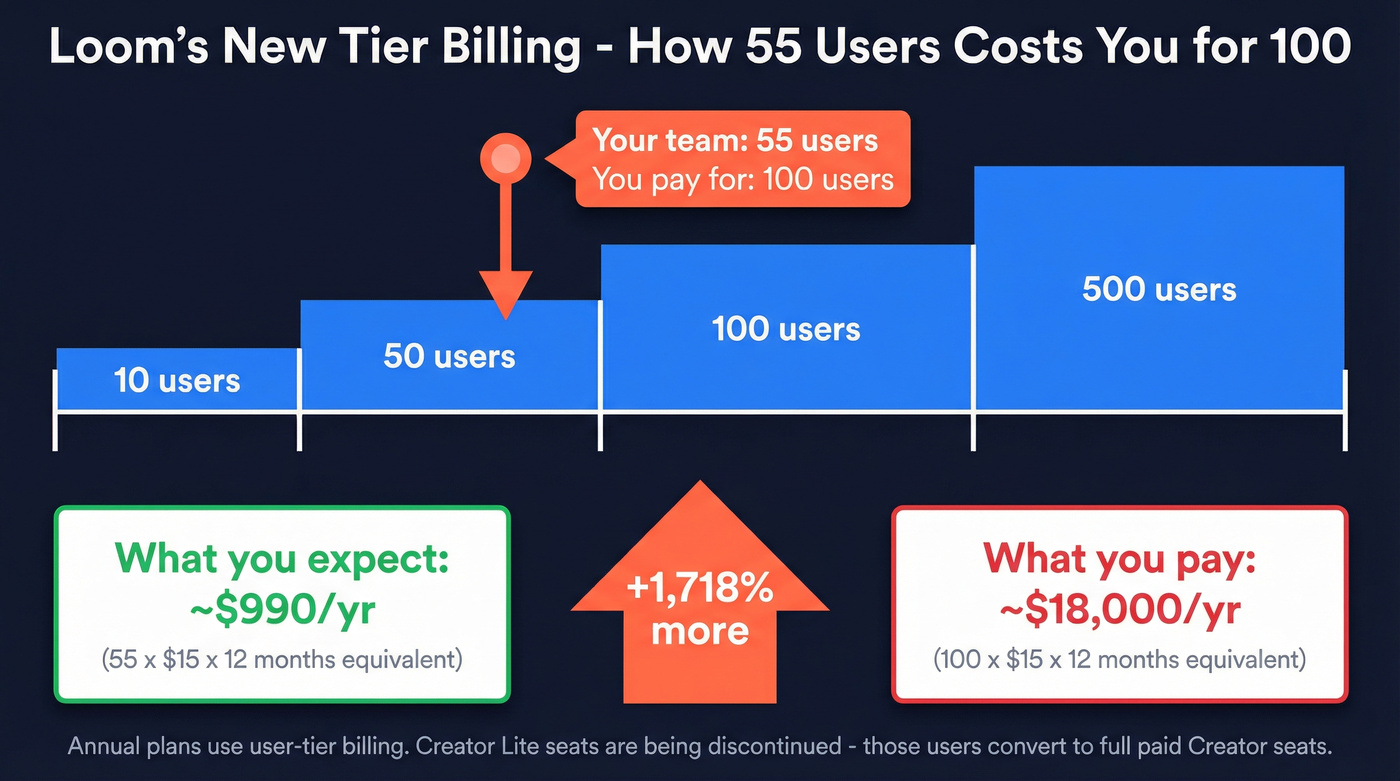
The real sting is the billing model. Annual plans moved to user-tier billing - so if you have 55 users, you get billed at the 100-user tier. And Creator Lite, the lightweight seat that let you keep costs down, is being discontinued entirely. Users on that plan get upgraded to paid Creator seats after the grace period, and admins have until the first billing cycle after the integration date to deactivate users they don't want billed.
For teams under 50 people who just need record-and-share, this pricing no longer makes sense.
Our Top Picks (TL;DR)
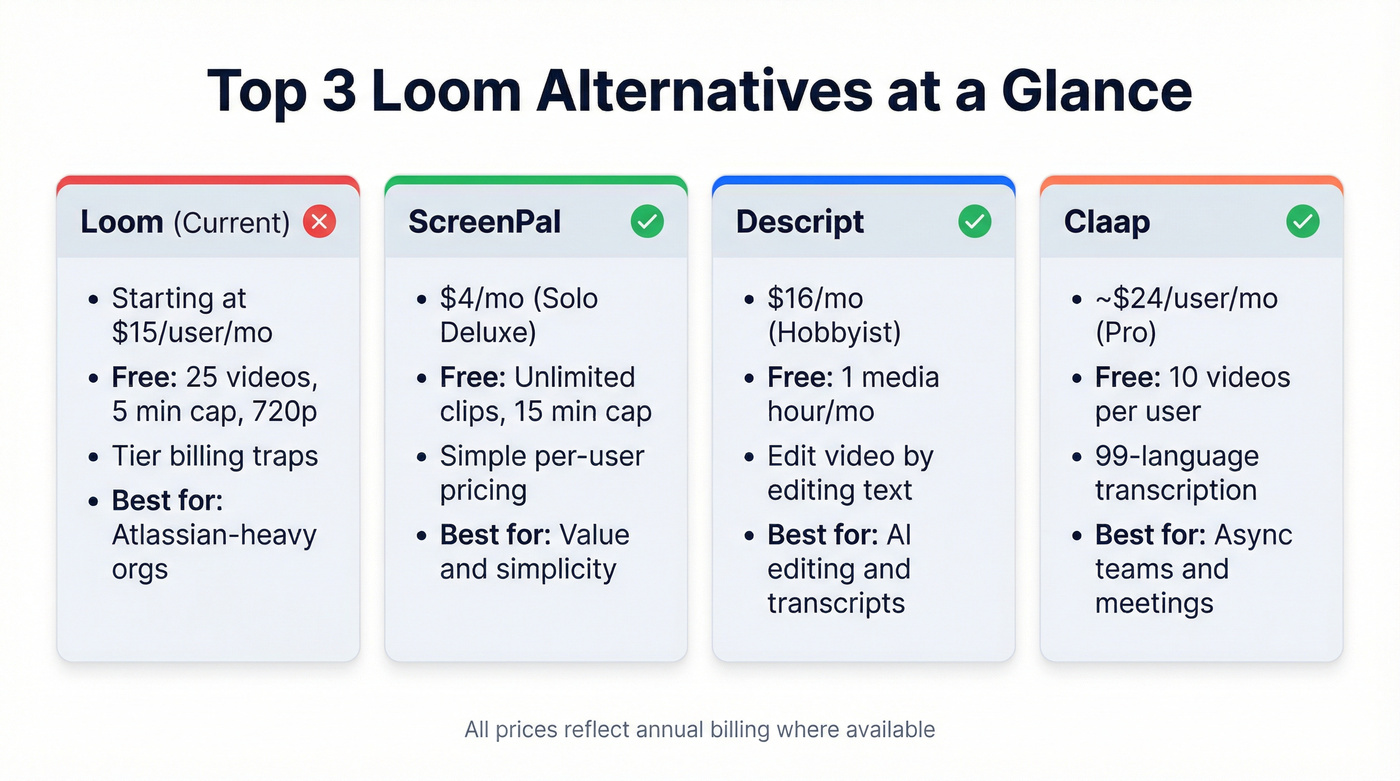
| Tool | Best For | Starting Price | Free Plan? |
|---|---|---|---|
| ScreenPal | Best value overall | $4/mo | Yes (15-min cap) |
| Descript | AI editing + transcripts | $16/mo | Yes (1 hr/mo) |
| Claap | Async teams + meetings | ~$24/user/mo | Yes (10 videos) |
If you use Loom for sales prospecting, the recording tool is only half the problem - see our stack recommendation below.
The Best Loom Alternatives for 2026
ScreenPal
Use this if you want Loom's simplicity without the Atlassian tax. ScreenPal's free plan is the most generous on this list - unlimited clips, unlimited cloud storage, capped at 15 minutes per recording. That's already more than Loom's free tier gives you.
Solo Deluxe at $4/month unlocks unlimited recording time. Solo Max at $10/month adds analytics, 4K playback, and AI tools like auto-titles and summaries. Team Business runs $10/user/month with collaboration features and LMS integration.
Skip this if you need deep AI editing or meeting recording with automatic recaps. ScreenPal is a recording-and-sharing tool, not a post-production suite. For pure record-share-done workflows, though, it's the best value on this list by a wide margin. PCMag's review highlights the unlimited cloud storage on the free plan as a standout.
Descript
Descript isn't really a Loom competitor. It's a video editor that happens to have screen recording. The killer feature is edit-by-transcript: record your screen, get an automatic transcript, then edit the video by editing the text. Delete a sentence from the transcript and the corresponding video segment disappears. Remove filler words with one click. For anyone who records explainers, demos, or tutorials, it's genuinely magical.
We've tested the transcript editing workflow extensively, and the time savings are real - what used to take 20 minutes of scrubbing through video to cut a section takes about 30 seconds of highlighting and deleting text.
Pros:
- Transcript-based editing is a category-defining feature
- AI filler word removal, auto-chapters, and Studio Sound cleanup
- Free plan includes 1 media hour/month with 100 AI credits - enough to test properly
- 4K export on the Creator plan ($24/mo)
Cons:
- Media hour limits are the real constraint. Hobbyist ($16/mo) includes 10 media hours/month; Creator ($24/mo) includes 30. Heavy recording teams will burn through hours fast.
- Not built for instant sharing - the workflow is record, edit, export, share. Not record, link, done.
- Overkill if you just need quick screen recordings for Slack or email
The pricing page is transparent, which is refreshing. Just watch those media hour caps - they're the gotcha that most reviews don't mention. The record-to-share time is the slowest of any tool here because the editing step is baked into the workflow. That's a feature, not a bug, but only if you actually need the editing.
Claap
Claap sits in a different lane. It's built for async team collaboration - meeting recaps, AI-powered summaries, collaborative video workspaces, and async standups. The 99-language transcription is legitimately useful for distributed teams. Where Claap shines is the meeting intelligence layer: automatic insights, action items, and a searchable video library that makes "I missed the standup" a non-issue.
The free plan gives you 10 videos per user, 300 minutes of recording, and 3 months of storage. Pro typically runs ~$24-30/user/month with 1,000 minutes/month and 2-year storage. Business typically runs ~$48-60/user/month with unlimited recordings, longer storage, plus CRM features and AI coaching. Getting actual dollar amounts from Claap requires digging - their pricing page hides numbers behind JavaScript rendering, which isn't a great look for a tool that markets itself on transparency.
Vidyard
Vidyard's unique value is CRM-integrated viewer analytics - you can see exactly who watched your video, how long they watched, and which parts they replayed. That data feeds directly into Salesforce or HubSpot. For video-heavy outbound teams, this is intelligence that no other tool on this list matches.
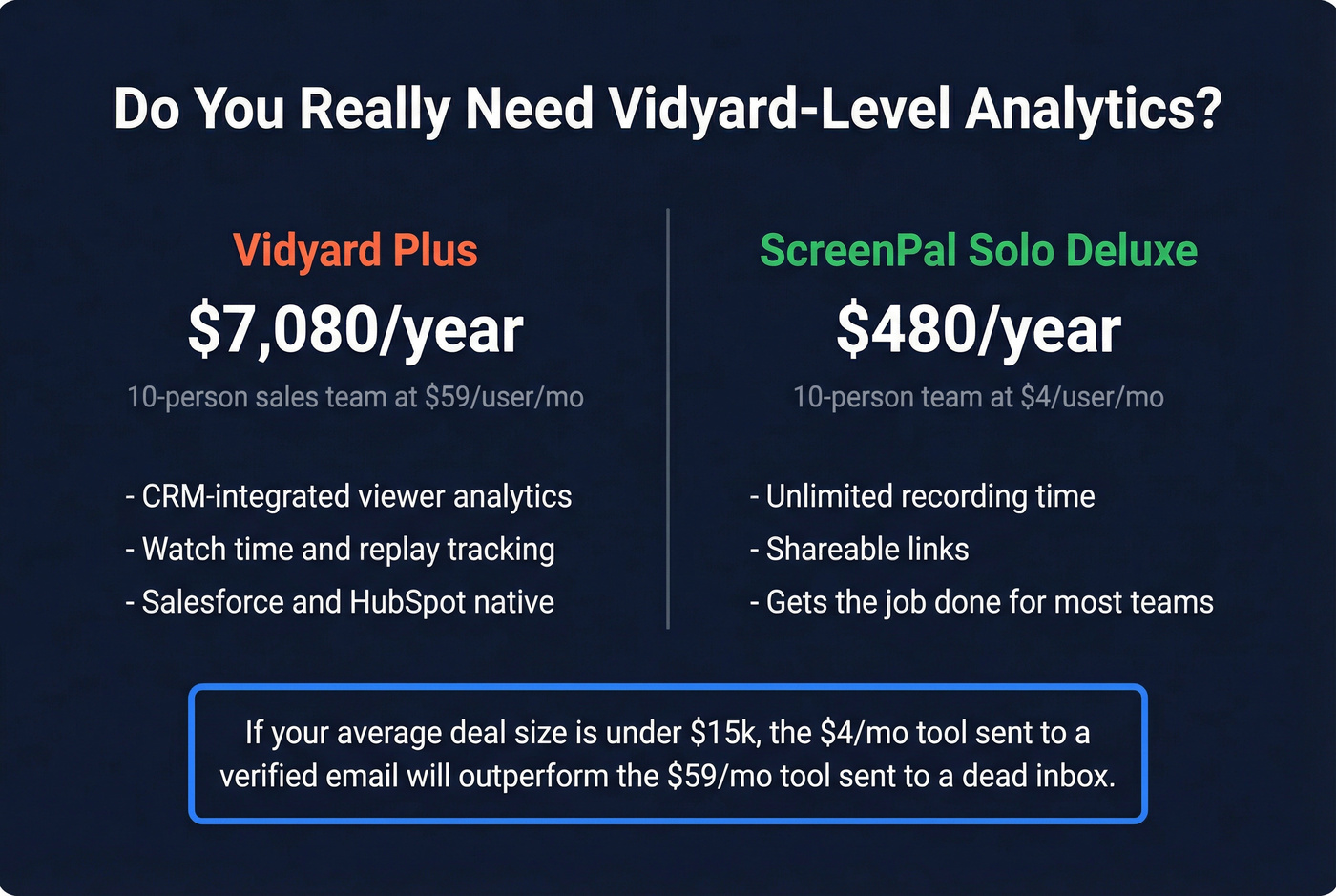
The problem is cost. Vidyard Plus runs $59/user/month billed annually ($89 monthly). That's 3-4x more expensive than most alternatives here. The free plan exists but limits how many videos you can create per month. For a 10-person sales team, you're looking at ~$7,080/year just for the recording tool.
Here's the thing: if your average deal size is under $15k, you probably don't need Vidyard-level analytics. A $4/month ScreenPal recording sent to a verified email address will outperform a $59/month Vidyard video that bounces.
Cap
Cap is the open-source darling that everyone wants to love. Self-hostable with S3-compatible storage, pricing starts at $8.16/user/month. The free plan includes Studio mode for personal use, and Instant Mode supports 5-minute shareable links.
The concept is excellent - a privacy-first, open-source screen recorder you can run on your own infrastructure. The execution isn't there yet. ProductHunt reviews (3.7/5 from 7 reviews) flag Windows crashes, multi-screen recording failures, and recordings that simply don't start. One reviewer said they paid $38, couldn't get the app to boot, and got ghosted on Discord when requesting a refund.
Cap is a great concept that isn't production-ready. If you're a developer who wants to self-host and doesn't mind debugging, keep an eye on it. For a team that needs reliable daily recording, look elsewhere.
Zight
Zight (formerly CloudApp) looks affordable at first glance - Pro at $9/month, Team at $11/user/month. Then you discover that AI features like transcription, summaries, smart actions, and captions are sold as add-ons. Expect those to tack on $5-10/user/month, pushing your effective cost to $15-20/user/month with AI enabled. That's dangerously close to Loom Business pricing.
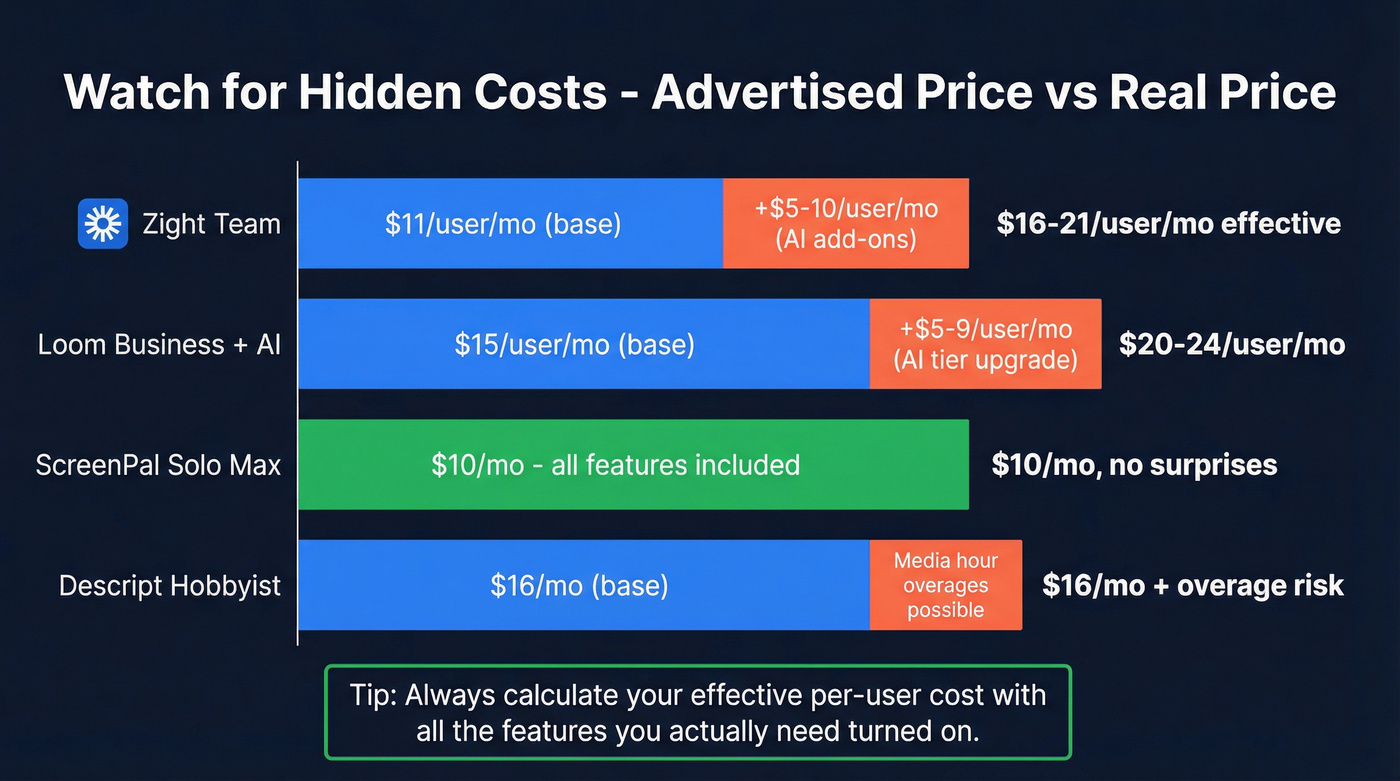
The free plan caps recordings at 5 minutes and 720p. On the enterprise side, Zight does offer SOC 2 Type II and HIPAA compliance, which matters if you're in healthcare or finance. For most teams, the add-on pricing model feels like a bait-and-switch.
VEED.IO
VEED is browser-based - no install, no desktop app, just open a tab and record. That's its superpower and its limitation. The free plan gives you 10-minute recordings at 720p with a watermark. Lite runs $9/month, Pro $24/month.
Best for quick social-ready clips and one-off recordings where you need fast editing like subtitles, trimming, and resizing for different platforms. It's not built for team collaboration, async standups, or viewer analytics. Think of VEED as a recording-plus-editing tool for content creators, not a Loom replacement for internal comms. Chromebook users should pay special attention - VEED's browser-first approach makes it the strongest option on that platform.
OBS Studio
Free, open-source, and wildly powerful - but OBS is a recording studio, not a Loom replacement. No shareable links, no cloud hosting, no viewer analytics, no async collaboration. You record locally, then manually upload wherever you want.
For streamers and content producers who need granular control over scenes, sources, and encoding, OBS is unbeatable. For someone who just wants to record a quick product walkthrough and share a link in Slack, it's the wrong tool entirely.
Sendspark
Built specifically for sales video outreach. Sendspark gives you personalization tokens, custom landing pages, and CTA buttons on your videos. Solo runs ~$39/month, and team plans land in the ~$129-$149/month range depending on seats and features. If your use case is "send personalized video emails to prospects," Sendspark is more purpose-built than Loom ever was. Niche, but it owns that niche.
ShareX
Free, open-source, Windows only. ShareX is a power tool for screenshots, GIFs, and screen recordings with dozens of capture modes and annotation options. Zero cloud hosting or sharing features - everything saves locally. Best for developers and power users who want maximum control. Not a Loom replacement in any meaningful sense, but Windows power users swear by it.
Honorable mentions: Tella, Vmaker, and Screencastify are worth a look but didn't crack our top 10 based on the combination of pricing, features, and reliability.

Switching screen recorders saves you money. But a $4/month video sent to a dead email address still gets zero views. Prospeo gives you 98% verified emails and 125M+ direct dials so your async videos actually reach decision-makers - at $0.01 per lead.
Stop recording videos that bounce. Start sending them to verified inboxes.
Pricing Comparison
All prices reflect annual billing where available. Pay attention to the billing model column - per-user pricing adds up fast for teams, while flat-rate tools stay predictable regardless of headcount.

| Tool | Free Plan Limits | Paid From | AI Features | Best For |
|---|---|---|---|---|
| Loom | 25 vids, 5 min, 720p | $15/user/mo | Yes (paid tier) | Enterprise async |
| ScreenPal | 15 min, unlimited clips | $4/mo (flat) | Yes ($10/mo tier) | Budget value |
| Descript | 1 hr/mo, 720p | $16/mo (flat) | Yes (all tiers) | Editing |
| Claap | 10 vids, 300 min | ~$24/user/mo | Yes | Async teams |
| Vidyard | Limited videos/mo, 30 min each | $59/user/mo | Limited | Sales analytics |
| Cap | 5-min links | $8.16/user/mo | No | Self-hosting |
| Zight | 5 min, 720p | $9/mo (flat) | Add-on (+$5-10) | Compliance |
| VEED.IO | 10 min, watermark | $9/mo (flat) | Yes | Quick clips |
| OBS Studio | Unlimited (local) | Free | No | Local recording |
| Sendspark | - | ~$39/mo (flat) | Limited | Sales outreach |
| ShareX | Unlimited (local) | Free | No | Dev screenshots |
Video Prospecting? Fix Your Data First
Let's be honest about a scenario we've seen play out dozens of times. Your SDR just spent 4 minutes recording a killer personalized video - they mentioned the prospect's recent funding round, demoed a relevant feature, nailed the CTA. They paste the Vidyard or Sendspark link into their sequence, hit send, and the email bounces.
The recording tool is 50% of the equation. Clean contact data is the other 50%.
The three-layer stack for video prospecting: a recorder (ScreenPal, Sendspark, or Vidyard), a data platform for verified emails and direct dials, and a sequencer (Instantly, Lemlist, or Smartlead) to automate delivery. Skip any layer and the whole workflow breaks.
If you’re troubleshooting bounces and list quality, start with an email validator and a tighter email deliverability process.
Vidyard charges $59/user/month for viewer analytics on videos that never arrive. Prospeo verifies every email on a 7-day refresh cycle - so your sales videos land in real inboxes, not spam traps. 15,000+ teams already made the switch.
The best video tool means nothing without accurate contact data behind it.
How to Choose the Right Tool
Your decision comes down to use case, team size, and budget.
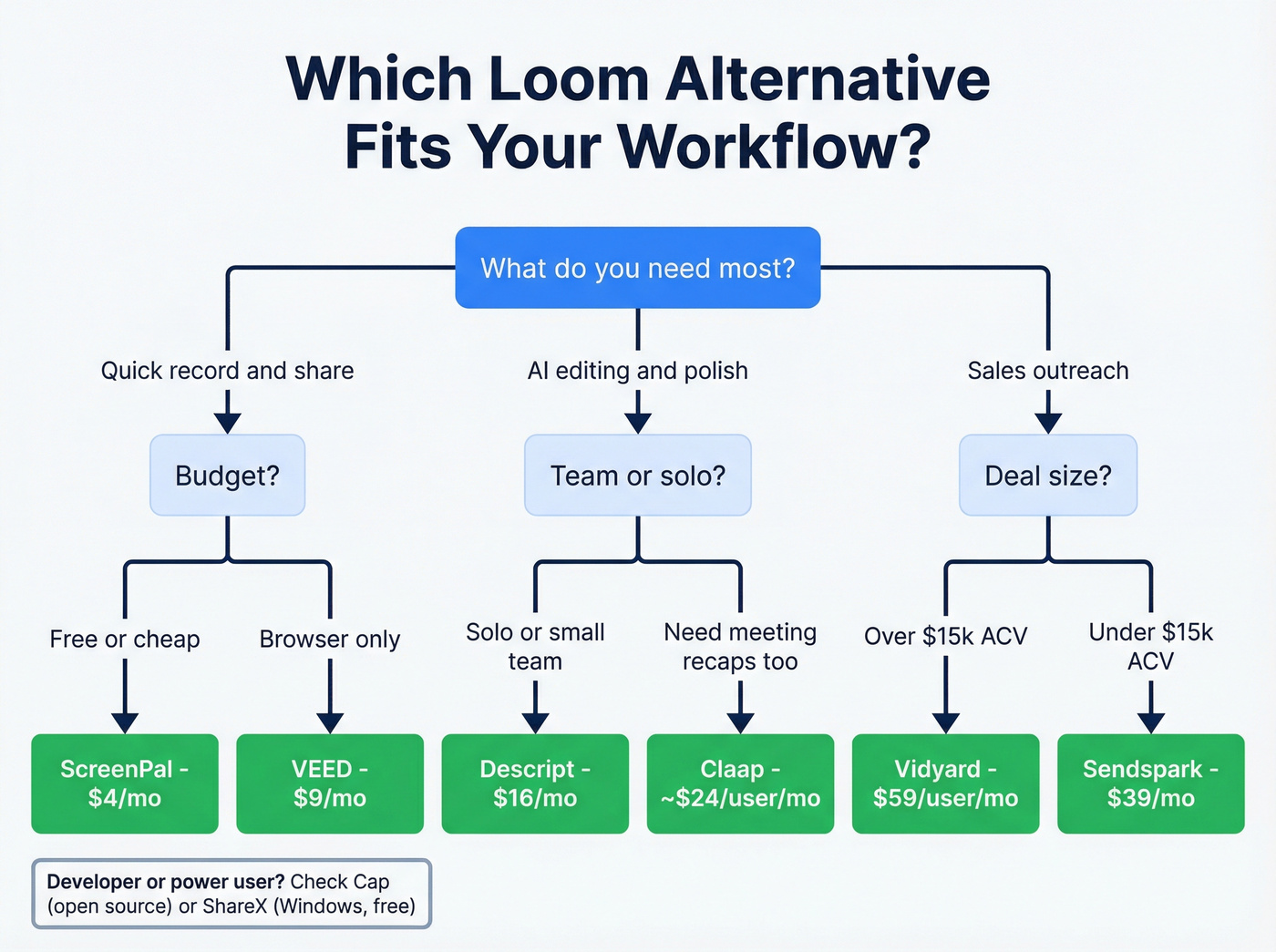
Record + share, nothing fancy. ScreenPal. The free plan handles most individual needs, and $4/month unlocks unlimited recording. It's the closest thing to "old Loom" pricing.
AI editing and transcripts matter. Descript. The transcript-based editing workflow is unmatched. Watch the media hour limits on lower tiers.
Async standups and meeting recaps. Claap. The 99-language transcription and meeting intelligence features are built for distributed teams. Budget for ~$24-30/user/month on Pro.
Sales video with analytics. Vidyard - but at $59/user/month, make sure those analytics actually have data to show by verifying your prospect emails first.
Zero-budget teams should start with ScreenPal's free tier. Cap is interesting if you're technical and patient, but expect stability hiccups. Enterprise security requirements point to Zight for SOC 2 Type II and HIPAA, or Claap Enterprise for SSO and SCIM.
If you’re building a repeatable outbound motion, pair this with a modern B2B sales stack and a clear outbound sales engine.
By platform: Windows power users who want local control should grab ShareX. Chromebook-only teams should default to VEED.IO's browser-based workflow.
At 100+ seats, you're in enterprise territory - evaluate Claap Enterprise or, honestly, just negotiate hard with Loom's sales team. At that scale, the Atlassian integrations with Jira and Confluence might actually justify the cost.
FAQ
Is Loom still worth paying for in 2026?
Loom remains polished and reliable with strong Atlassian ecosystem integrations, but post-acquisition pricing pushes it into enterprise territory. If your team has fewer than 25 people and you don't need Jira or Confluence integrations, alternatives like ScreenPal or Descript deliver 90% of the value at 20-30% of the cost.
What's the best free Loom alternative?
ScreenPal offers the most generous free plan - unlimited clips, unlimited cloud storage, capped at 15 minutes per recording. That already exceeds Loom's free tier of 25 videos at 5 minutes each. Cap is another free option if you value open-source, but expect stability issues on Windows.
Which alternative is best for sales teams?
Vidyard has the strongest sales analytics with CRM-integrated viewer tracking, but at $59/user/month it's expensive. A more cost-effective stack: pair a cheaper recorder like Sendspark (~$39/mo) with Prospeo for verified emails at ~$0.01 each. Clean data matters more than fancy analytics when your bounce rate is killing deliverability.
Can I self-host a Loom alternative?
Cap is the only notable open-source, self-hostable option on this list. It supports S3-compatible storage backends. Stability reports are mixed - test thoroughly before rolling it out to your team. OBS Studio is also open-source but lacks any sharing or hosting features.
How much does Loom cost after the Atlassian changes?
Loom's free plan allows 25 videos at 5 minutes each in 720p. Business starts at $15/user/month billed annually. Business + AI runs $20-24/user/month. The tier-based billing model means a team of 55 can get billed at the 100-user tier - so your actual per-user cost can be significantly higher than the sticker price.