

Top Performing Sequences: Templates, Benchmarks, and the One Thing Nobody Tells You
One automated follow-up sequence generated $100K in 30 days. Another campaign hit a 35% bounce rate on the first send and torched deliverability before it ever had a chance. The difference wasn't copy - it was data.
Meritt's outbound team learned this the hard way. They built a polished multichannel sequence, launched it, and watched bounces sit around 35%. After switching to verified data, bounces dropped under 4% and pipeline tripled from $100K to $300K per week.
That's the story nobody tells about top performing sequences: the biggest lever isn't your subject line. It's whether your emails reach real inboxes.
Three Sequences, One Baseline
Three sequences cover most outbound pipeline: cold outbound, post-demo follow-up, and re-engagement.
The benchmark that matters most is 5.8% - the average reply rate across 16.5M cold emails. Anything above 8% is strong. Top performers hit 15-25%. These numbers should anchor every optimization decision you make.
The single biggest lever? Data quality. Outreach's average bounce rate across customers is 2.8%. If you're running at 3%+ bounces, treat it as an operational stop sign: fix the data first, then optimize the sequence.
What "Top Performing" Means in 2026
"Top performing" depends entirely on sequence type. A 10% reply rate on cold outbound is excellent. That same 10% on warm inbound means something's broken. Here are the benchmarks, pulled from Outreach's platform data and Belkins' study.
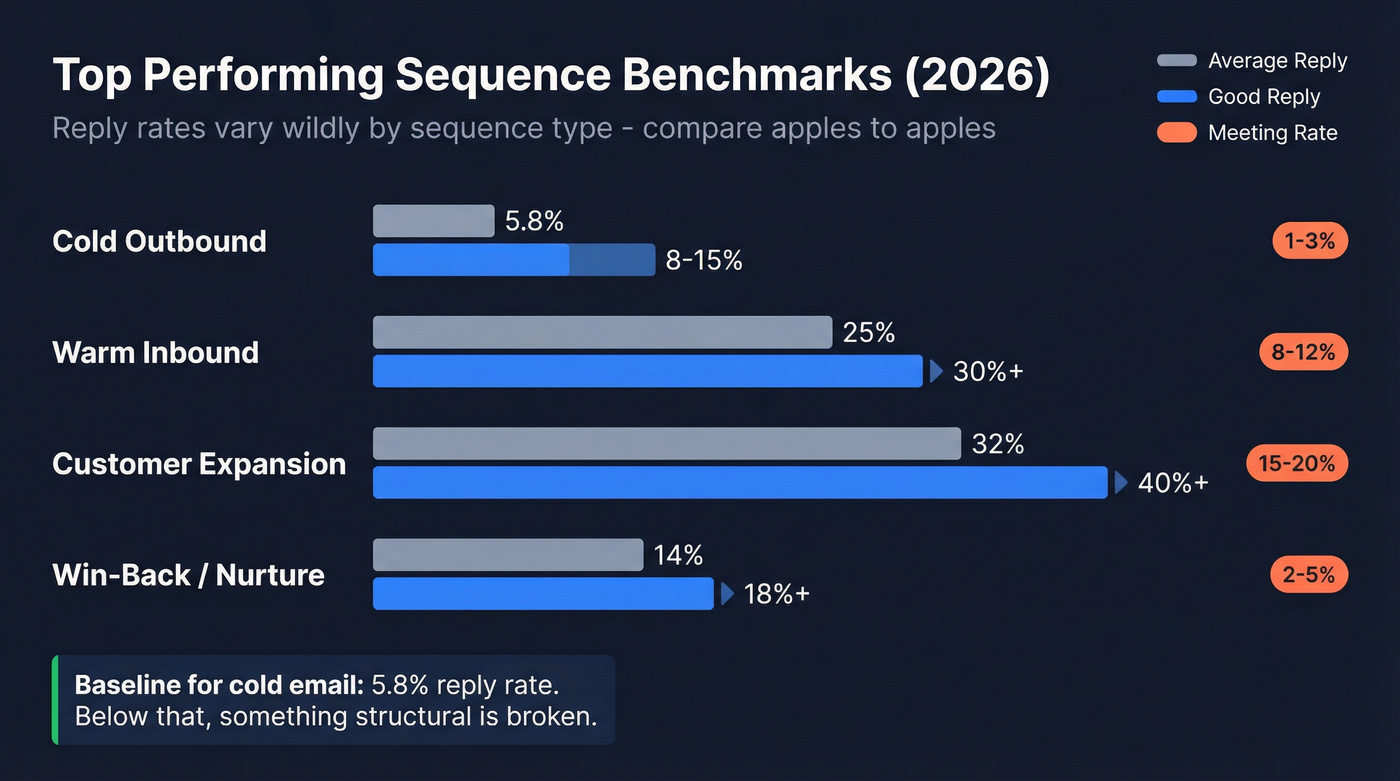
| Sequence Type | Avg Reply | Good Reply | Meeting Rate |
|---|---|---|---|
| Cold Outbound | 5.8% | 8-15% | 1-3% |
| Warm Inbound | 20-30% | 30%+ | 8-12% |
| Customer Expansion | 25-40% | 40%+ | 15-20% |
| Win-Back / Nurture | 10-18% | 18%+ | 2-5% |
B2B sales prospecting often lands in the 1-5% reply range, while founder-to-founder outreach can hit 15-25% when done well. Recruiting sequences can clear 20-35%. The key is not mixing categories: warm sequences will always make cold outbound look "bad" by comparison, and any honest performance comparison needs to account for that. Don't let someone wave a 30% reply rate at you without asking what list they sent to.
The 5.8% average is your baseline for cold email. Below that, something structural is wrong - targeting, data quality, or deliverability. Above 8%, you're outperforming most teams.
Why Most Sequences Fail
Most sequence failures aren't copywriting failures. They're data failures wearing a copywriting mask.
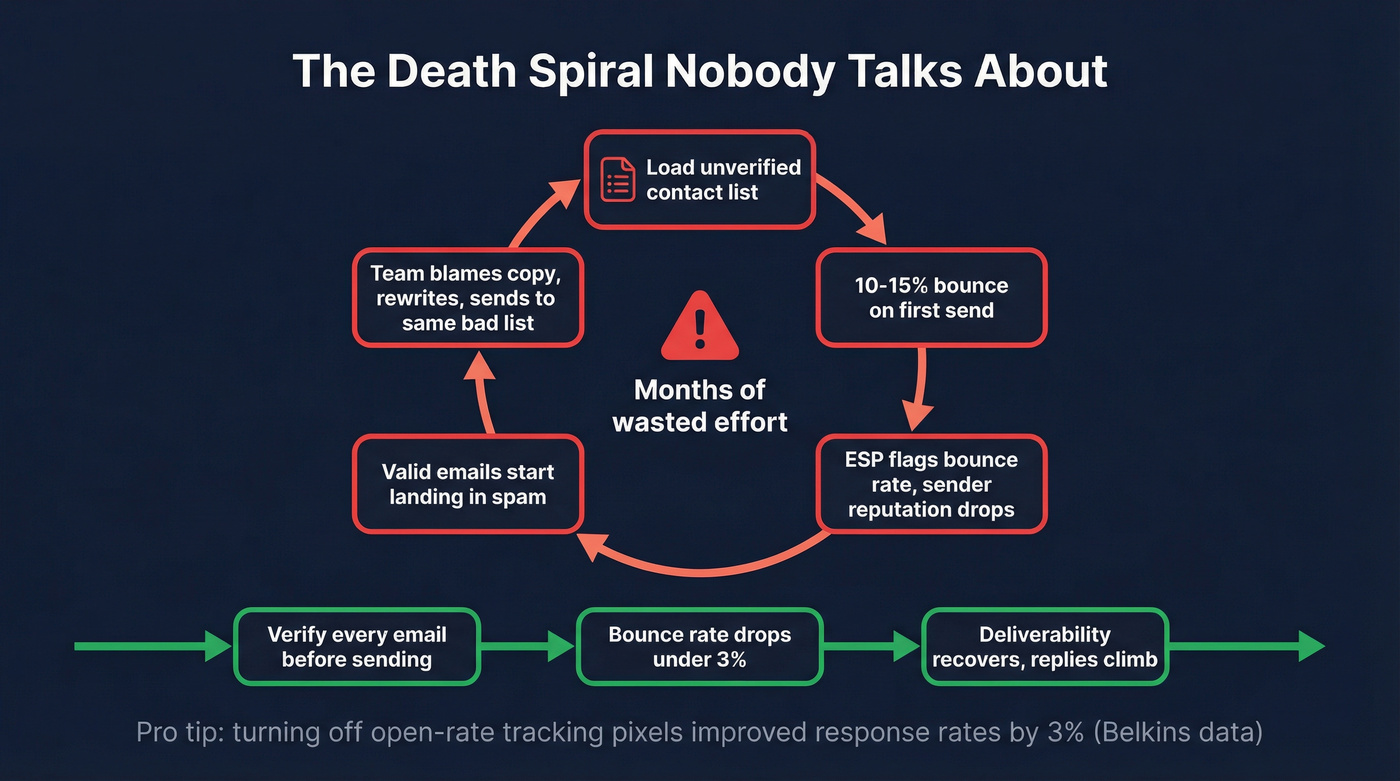
The death spiral works like this: you load a list with unverified contacts, 10-15% bounce on the first send, your email service provider flags the bounce rate, and your sender reputation drops. The next batch of emails - even to valid addresses - starts landing in spam. Reply rates crater. Your team blames the copy, rewrites everything, and sends again to the same bad list. We've watched teams repeat this cycle for months before someone finally checks the data. Without proper sequence tracking, the root cause stays invisible.
One underrated finding from Belkins: turning off open-rate tracking pixels improved response rates by 3%. Tracking pixels trigger spam filters, which means teams obsessing over open rates are actively hurting their deliverability.
Here's the thing: if your bounce rate is above 5%, stop tweaking subject lines immediately. You're optimizing the wrong thing. Fix the data, then come back to copy.


You just read it: bounce rates above 5% kill sequences before copy ever gets a chance. Prospeo's 5-step verification delivers 98% email accuracy - the same data that took Meritt from 35% bounces to under 4% and tripled their pipeline to $300K/week.
Stop optimizing dead sequences. Fix the data first.
5 Proven Sequence Templates
Cold Outbound (7-Touch)
This is the workhorse. The philosophy: 15-20 prospects per day, 10-15 minutes of research each. One campaign using this structure pulled a 38% reply rate across 1,200+ sends.
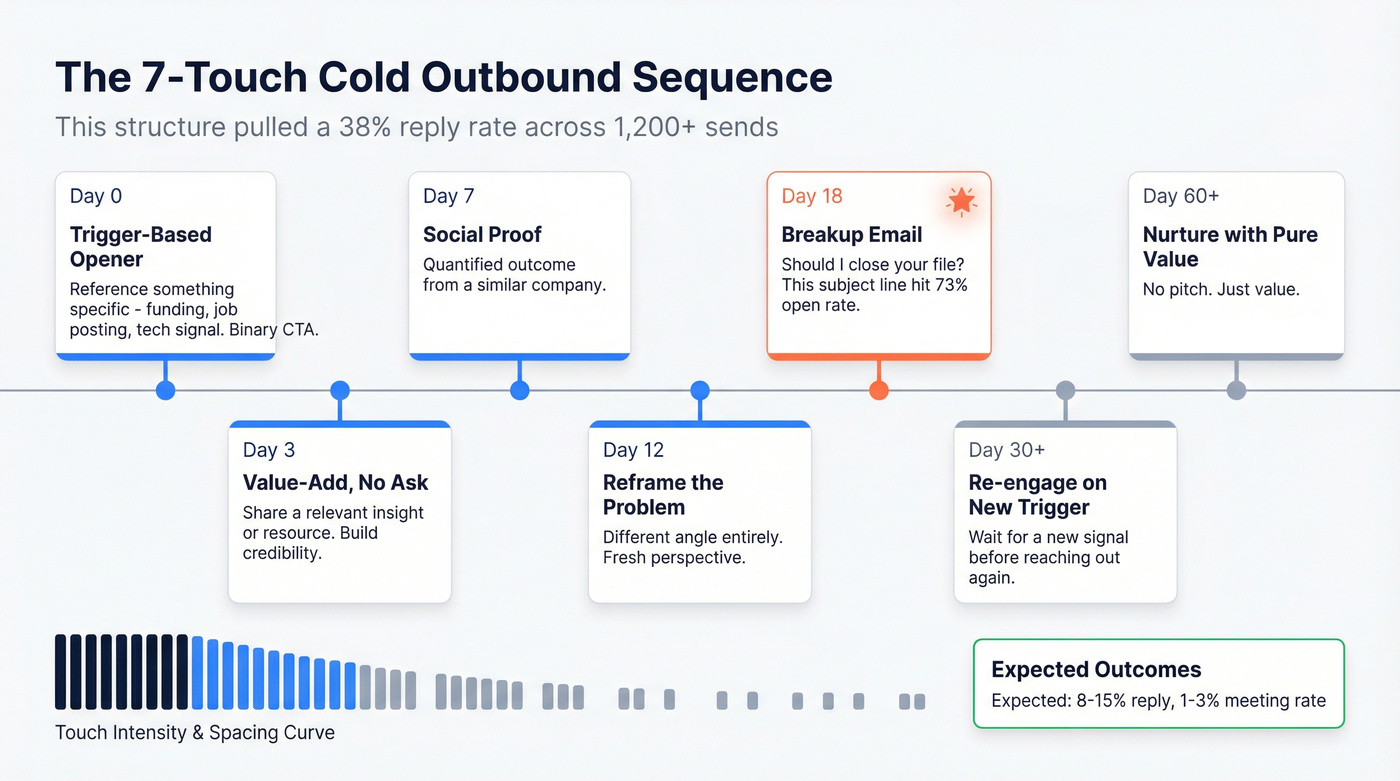
Day 0 - Trigger-based opener. Reference something specific: a recent funding round, a new job posting, a tech adoption signal. Binary CTA: "Worth 15 minutes Tuesday or Thursday?"
Day 3 - Value-add with no ask. Share a relevant insight or resource.
Day 7 - Social proof with a quantified outcome from a similar company.
Day 12 - Reframe the problem from a different angle entirely.
Day 18 - Breakup: "Should I close your file?" This subject line pulled a 73% open rate in A/B testing.
Day 30+ - Re-engage on a new trigger.
Day 60+ - Nurture with pure value, no pitch.
Build your list using 30+ filters - buyer intent, job changes, technographics - so you're targeting prospects who match your ICP before the first email goes out. The research step isn't optional. It's what separates a 5% reply rate from a 15% one. (If you want more levers beyond templates, start with cold email tactics.)
Multichannel Prospecting (8-Touch, 21-Day)
Email-only sequences leave pipeline on the table. Adding calls and social touches roughly doubles response rates, and in our experience, the call on Day 5 is what converts fence-sitters who read your emails but didn't reply.
| Day | Channel | Purpose |
|---|---|---|
| 1 | Personalized opener | |
| 3 | Social | Connect request |
| 5 | Call | Voicemail drop |
| 7 | Video message | |
| 10 | Follow-up | |
| 14 | Social | Direct message |
| 17 | Call | Final attempt |
| 21 | Breakup |
Expect 8-15% reply and 1-3% meeting rate. Each touch adds a different channel, not just another email in the inbox.
Warm Inbound Follow-Up
Your first touch should hit within 5 minutes of the form fill. Speed-to-lead is everything here.
Day 0: immediate response referencing exactly what they downloaded or requested. Day 3: follow-up with a micro-ask CTA. Day 6: address a common objection from a different angle. Day 10: breakup with value.
Benchmarks are 20-30% reply and 8-12% meeting rate. If you're below 20%, speed-to-lead is usually the bottleneck - not the copy, not the offer. (For the ops side, see inbound lead qualification.)
Post-Demo / No-Show Recovery
Automated follow-up workflows generate 320% more revenue than standard non-automated campaigns, and post-demo is where that gap is widest. We've seen teams add $50K+ in quarterly pipeline just by automating this cadence instead of leaving it to individual reps.
Day 0: recap within 2 hours, summarize key points, attach materials. Day 2: address the #1 objection from the call. Day 5: share a case study from a similar company. Day 8: direct ask with a deadline.
For no-shows, swap Day 0 for a "missed you" email with a one-click reschedule link. Skip this template if your no-show rate is under 10% - your time is better spent on cold outbound optimization.
Re-Engagement / Win-Back
Only re-enroll contacts when you detect a new signal - leadership change, funding round, or technology shift. Without a trigger, this is just another cold email with baggage.
Day 0: reference the trigger directly ("Saw you just raised a Series B - congrats"). Day 4: share what's changed since you last spoke. Day 10: soft ask ("Worth revisiting?"). Day 18: final touch, value-only.
Expect 10-18% reply and 2-5% meeting rate. The trigger-based enrollment is what separates a 10% reply from an 18% one, and the consensus on r/sales is that re-engagement without a trigger is basically spam with extra steps.
Top performing sequences start with trigger-based targeting - funding rounds, job changes, tech adoption. Prospeo's 30+ search filters and Bombora intent data across 15,000 topics let you build lists of in-market buyers before you write a single word of copy. At ~$0.01/email, the research step finally scales.
Build trigger-based lists in minutes, not hours.
Subject Lines That Get Opened
Subject lines are the highest-leverage A/B test you can run. These are relative comparisons from tested campaigns - the absolute numbers matter less than the gap between winners and losers.
| Subject Line Type | Open Rate |
|---|---|
| Breakup signals | 73% |
| Trigger + angle | 71% |
| Quick question | 23% |
| Following up | 18% |
"Following up" is the worst-performing subject line in cold email, and it's the one most reps default to. The winners reference something specific - a trigger event, a breakup signal, a concrete angle. In our testing, the breakup email consistently outperforms every other touch in the sequence. It's not even close.
Plain-text emails outperform branded HTML templates in cold outreach. Strip the banners and logos. If you're stuck on open rates, use a sales email structure that earns replies, not just opens.
When to Stop Following Up
There's a point where persistence becomes domain damage.
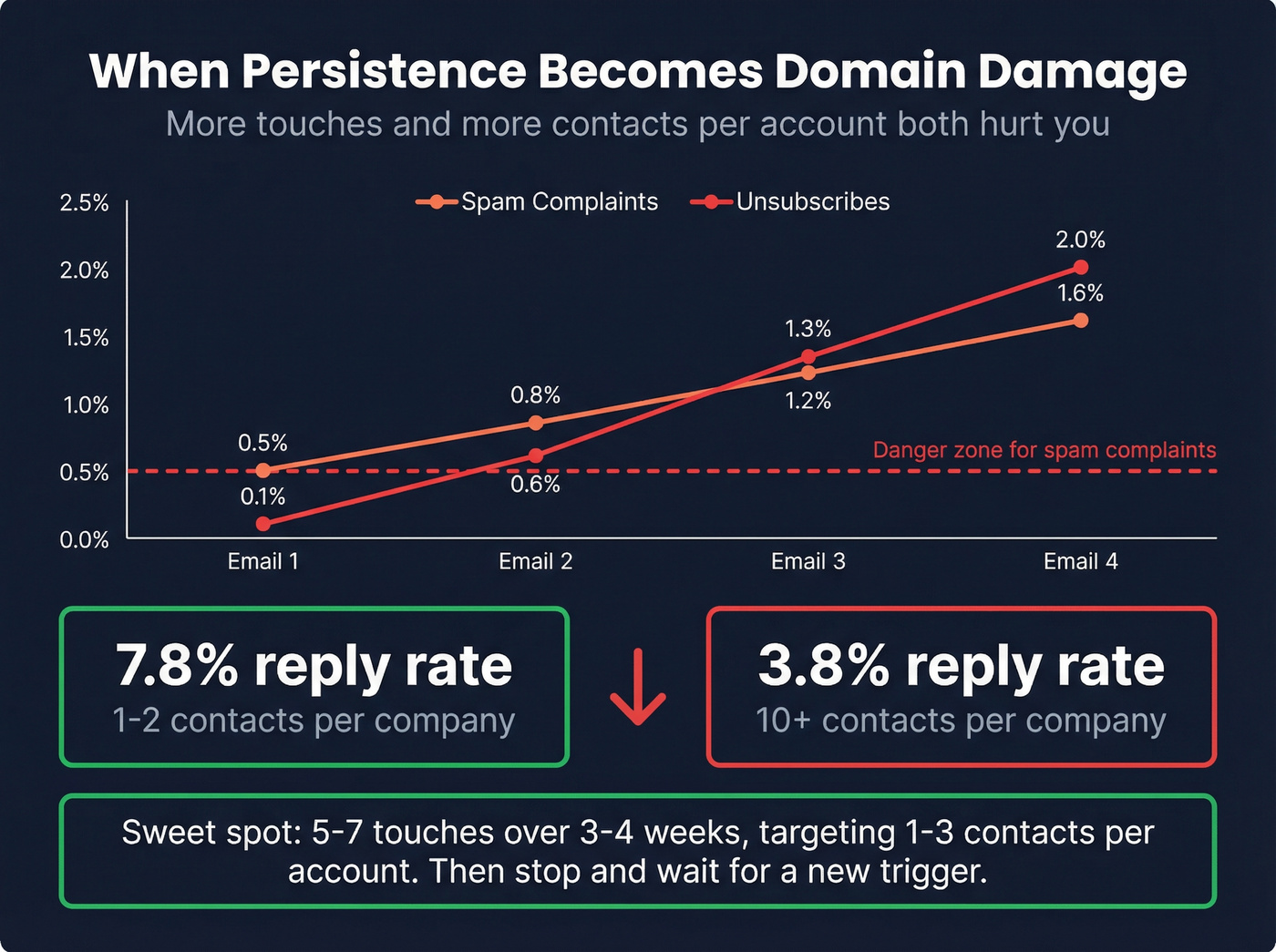
Belkins' data shows spam complaints jump from 0.5% on the first email to 1.6% by the fourth follow-up. Unsubscribes escalate from 0.1% to 2% over the same window. And here's a stat that should change how you think about account coverage: teams emailing 1-2 contacts per company see a 7.8% reply rate, while teams blasting 10+ contacts at the same company drop to 3.8%. More contacts doesn't mean more pipeline - it means more spam complaints and a slower death for your domain.
The sweet spot is 5-7 touches over 3-4 weeks, targeting 1-3 contacts per account. After that, move the contact to a nurture track and wait for a new trigger. The discipline to stop is harder than the discipline to start, but your domain reputation depends on it. (If you're scaling volume, follow How to Scale Outbound Campaigns.)
Sequence Audit Checklist
Before you rewrite a single email, run through these five diagnostics. We've seen teams fix underperforming sequences in a day just by working through this list:
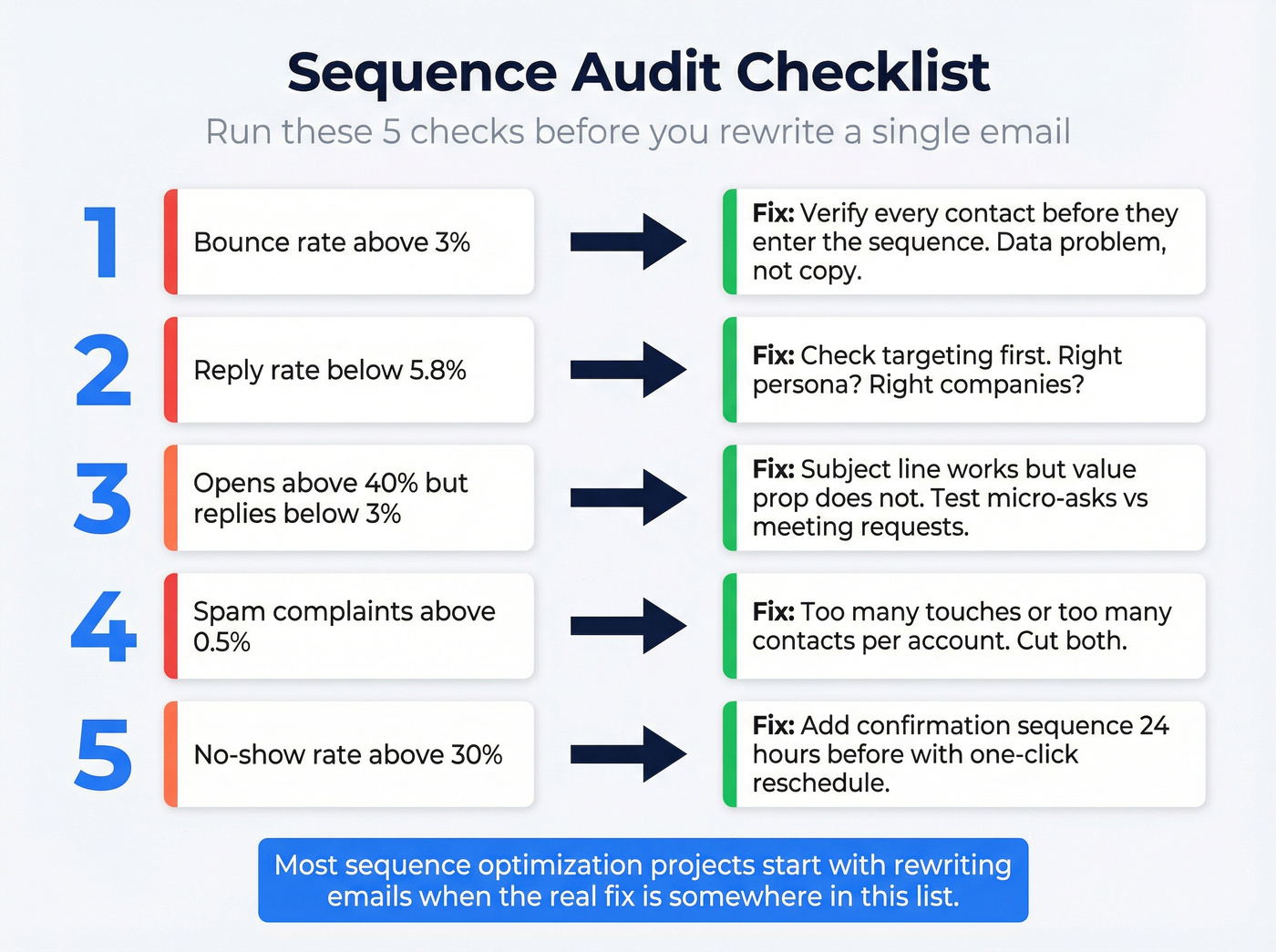
- Bounce rate above 3%? Your data is the problem, not your copy. Verify every contact before they enter the sequence. (Start with email verification for outreach.)
- Reply rate below 5.8%? Check targeting first. Are you reaching the right persona at the right companies? (Use account qualification to tighten ICP fit.)
- Opens above 40% but replies below 3%? Your subject line works but your value prop doesn't. Test micro-asks vs. meeting requests.
- Spam complaints above 0.5%? You're either sending too many touches or targeting too many contacts per account. Cut both.
- No-show rate above 30%? Add a confirmation sequence 24 hours before the meeting with a one-click reschedule option.
Let's be honest - most "sequence optimization" projects start with rewriting emails when the real fix is somewhere in this checklist.
How to A/B Test Sequence Performance
Most teams "A/B test" by changing a subject line on 20 sends and declaring a winner. That's not testing - that's guessing with extra steps. Here's the priority list by impact:
Subject lines are the highest leverage and easiest to test. You need 100-200 prospects per variant minimum to get a meaningful signal. Below that, you're reading noise.
CTA type comes next - micro-asks vs. meeting requests vs. open-ended questions. Then send timing, where Thursday consistently outperforms Monday by about 1.5 percentage points. After that, test sequence length (5-touch vs. 7-touch, measuring spam complaints alongside replies) and channel mix (email-only vs. multichannel, which is the hardest to test cleanly but carries the biggest upside).
Let the full cadence run before calling a winner. 65% of businesses that systematically A/B test report 10%+ conversion improvements. Tracking every variant across the full cadence is what turns anecdotal wins into repeatable playbooks. (If you want the math, use How to A/B Test Reply Rates.)
Tools for Running Sequences
The sequence platform matters less than the data feeding it. Here's the shortlist:
Outreach (~$100-150/user/mo) is the enterprise standard with deep analytics and sequence performance reporting. Its built-in insights dashboard lets managers compare cadences side by side. Salesloft (~$100-150/user/mo) is Outreach's main competitor with a slightly different UX philosophy. For teams that don't need enterprise features, Apollo (free tier, from ~$49/user/mo) offers the best value for SMBs with a built-in database.
HubSpot Sales Hub (from ~$90/user/mo) requires Sales Hub Professional or higher for sequences - great if you're already in the ecosystem, expensive to adopt just for cadences. Instantly (~$30-97/mo) is purpose-built for cold email at scale and popular with agencies. Lemlist (~$39-159/user/mo) is strong on personalization and multichannel. Smartlead (~$39-94/mo) focuses on inbox rotation and deliverability.
Prospeo sits underneath these as the data layer - 300M+ profiles, 143M+ verified emails, 125M+ mobile numbers - with native integrations into Instantly, Lemlist, Smartlead, HubSpot, and Salesforce. (If you're comparing stacks, start with cold email marketing tools.)
FAQ
How many emails should a cold outreach sequence have?
Five to seven touches over 3-4 weeks. Spam complaints jump from 0.5% on the first email to 1.6% by the fourth follow-up, so longer sequences risk domain damage that outlasts any single campaign.
What's a good reply rate for a cold email sequence?
The most recent large-scale benchmark is 5.8% across 16.5M emails. Anything above 8% is strong, and consistently above 12% puts you in elite territory. Top performers running verified, trigger-based lists hit 15-25%.
Should I use multichannel or email-only sequences?
Multichannel outperforms email-only by roughly 2x on response rates. Adding calls and social touches costs more effort per prospect but pays for itself in meeting conversion - expect 8-15% reply vs. 4-7% for email alone.
What's the best day to send cold emails?
Thursday pulls the highest reply rate at 6.87%, compared to Monday's 5.29%. Best reply windows are 8-11 PM and 7-11 AM in the prospect's time zone. Tuesday through Thursday mornings are the safest bet for most B2B audiences.
How do I prevent sequences from hurting my domain?
Verify your contact list before launching - bounce rates above 3% damage sender reputation and push future emails to spam. Pair verified data with a 5-7 touch cap and 1-3 contacts per account, and you'll stay well within safe territory.