

Cold Email Drip Campaign in 2026: The Deliverability-First Playbook
Cold email isn't dead in 2026. Sloppy cold email is dead.
Most "drip campaign" advice is opt-in marketing dressed up as outbound. This is the cold version: deliverability, list hygiene, ramp/volume caps, and stop rules, because that's what decides whether you get meetings or you get junked.
I learned this the expensive way.
After burning through more sending domains than I'd like to admit, the boring truth finally stuck: bounces and complaints beat clever copy every time, and they do it fast.
What you need (quick version)
Skip these steps and you'll "learn" the wrong lesson (usually: "cold email doesn't work").

Fix first (in this order):
- Set up SPF, DKIM, and DMARC on your sending domain (DMARC policy at least
p=none). Yahoo's stricter SPF+DKIM+DMARC requirements apply to bulk senders; for cold outreach, treat that as the minimum from day one. (If you need the full setup flow, use this SPF/DKIM/DMARC guide.) - Verify your list and suppress invalids, risky catch-alls you shouldn't mail, and traps/honeypots. (Use a repeatable Email Verification List SOP so your process doesn’t drift.)
- Cap volume per inbox and ramp slowly. Brute-force scale is how you burn domains. (More on email pacing and sending limits.)
Default cold drip settings that win for B2B:
- 4-7 touches total
- 3-4 day spacing between touches
- Every touch adds new value (new proof, new angle, new asset, or a sharper question)
Hard guardrails (don't negotiate):
- Bounce rate stays under 2%. If it crosses 2%, pause and fix the list.
- Spam complaints stay under 0.3%. If you trend toward 0.3%, pause and tighten targeting.
- Stop the sequence when you've got nothing new to say. "Just checking in" is complaint fuel.
What you measure (not opens):
- Reply rate (overall + by step)
- Positive reply rate
- Bounce rate, complaints, unsubscribes (watch for spikes after step 3-4)

Drip campaign vs cold email sequence (same word, different reality)
In marketing automation, a "drip campaign" is triggered by behavior: welcome series, onboarding, abandoned cart, reactivation. Mailchimp describes drip campaigns as automated emails triggered by actions, like welcome and re-engagement flows.
A cold email drip campaign is triggered by your targeting hypothesis: "This role at this type of company has this problem, and we can help." Your success metric isn't clicks. It's replies and meetings.
Here's what trips teams up:
- Opt-in drips ride on brand trust and engagement history.
- Cold sequences start at zero trust, and mailbox providers look for reasons to junk you.
So when someone brags about "48% opens," it's usually opt-in email marketing. Cold outreach is closer to direct response: relevance + deliverability + restraint. (If you want a clean build-from-scratch, see a B2B cold email sequence framework.)
Benchmarks for cold outreach in 2026 (set expectations before you write copy)
Reply rates are the benchmark that matters. Opens are noisy, increasingly hidden, and easy to misread.
Instantly's 2026 benchmark report (aggregated platform sending data) is a clean baseline for cadence and reply distribution. Belkins' study is also useful because it spans 16.5M cold emails across 93 domains and includes downside signals like unsubscribes and spam rising with follow-ups.
Cold email drip benchmarks (directional)
| Metric | Baseline | Good | Great |
|---|---|---|---|
| Reply rate (Instantly) | 3.43% | 5.5%+ | 10%+ |
| Reply rate (Belkins) | 5.8% | 7%+ | 10%+ |
| Replies from Step 1 | 58% | - | - |
| Replies from follow-ups | 42% | - | - |

Two takeaways that keep teams sane:
- Step 1 does most of the work, but follow-ups still drive a big chunk of replies.
- Instantly also found "reply-like" follow-ups (the "Quick follow-up..." style) outperform formal follow-ups by about 30%.
Look, if you're under 2% replies, don't rewrite your entire sequence on day two. Fix deliverability and list quality first. Copy can't outrun a throttled domain. (To instrument this properly, track sales sequence metrics by step.)

You just read that bounce rates must stay under 2% or you pause everything. Prospeo's 5-step verification with catch-all handling, spam-trap removal, and honeypot filtering delivers 98% email accuracy - so your drip campaigns hit inboxes, not spam folders. Data refreshes every 7 days, not 6 weeks.
Stop burning domains. Start with data that's already verified.
Non-negotiable deliverability & compliance checklist (Yahoo/Outlook era)
Cold email got harder because mailbox providers stopped tolerating sloppy bulk sending. Yahoo began enforcing stricter requirements in February 2024. Microsoft followed with Outlook.com high-volume requirements enforced starting May 5, 2025.
You can debate whether cold email "should" be treated like bulk marketing. The inbox doesn't care.
Authentication (set this up before you send)
Operational minimum (for cold outreach):
- SPF set up for your sending domain
- DKIM signing enabled
- DMARC published with at least
p=none - DMARC alignment: your From: domain aligns with SPF or DKIM (relaxed alignment is fine)
Without this, you get silent junking, throttling, or outright rejection. Outlook's rejection often looks like: 550; 5.7.515 Access denied... does not meet the required authentication level. (If you’re seeing variants of this, start with 550 Recipient Rejected.)
Tracking domain (the silent deliverability killer)
Use a custom tracking domain (CNAME) for your sequencer, or disable opens/clicks entirely for cold. Shared tracking domains spread reputation risk across thousands of senders, and you pay for other people's behavior.
One bad neighbor can wreck your week. (For the bigger picture, see email deliverability changes and what to do about them.)
Spam complaint thresholds (the number that quietly kills you)
Yahoo's line in the sand is simple: keep spam complaints below 0.3%.
That's 3 complaints per 1,000 delivered emails. You can hit that with a decent offer if your targeting is broad or your list is stale.
Operational rule: when complaints trend upward, pause. Don't "push through." Reduce volume, tighten targeting, and clean the list. (If you want the full set of limits, use this spam rate threshold reference.)

Unsubscribe requirements (yes, even for cold)
The fastest way to buy complaints is to make it hard to opt out.
Do this:
- Add a clear opt-out line (simple text is fine)
- Support List-Unsubscribe headers
- Support one-click unsubscribe (RFC 8058 "Post" method)
- Honor unsubscribes within 2 days (Yahoo's requirement)
If your tool can't do this cleanly, switch tools. This isn't the hill to die on.
Outlook.com high-volume rule (the >5,000/day tripwire)
Microsoft's requirement applies to domains sending more than 5,000 emails/day to Outlook.com consumer inboxes (hotmail.com, live.com, outlook.com). At that level, Outlook expects SPF, DKIM, and DMARC.
Build like you'll hit this threshold. Inbox rotation makes "small sender" a temporary phase.
Practical compliance (UK/EU quick reality check)
If you sell into the UK, anchor your policy decisions in the ICO's direct marketing hub. Their guidance is under review after the Data (Use and Access) Act that came into law on 19 June 2025, so stop taking random blog posts as gospel.
UK B2B cold email minimums (operator checklist):
- Identify the sender and company clearly (no vague "team" signatures)
- Say why you picked them (role relevance in one sentence)
- State where the data came from at a high level (e.g., public web sources / your database)
- Include a plain opt-out line in every email
- Suppress opt-outs within 2 days and keep a suppression list across tools
If your company has real legal exposure, get counsel. Just don't hide behind "compliance uncertainty" while ignoring unsubscribe and list hygiene. That's how domains die.
Cold email drip campaign cadence blueprint (timing, touches, and the plan that doesn't torch reputation)
Cadence is where teams either spam too hard or quit too early.
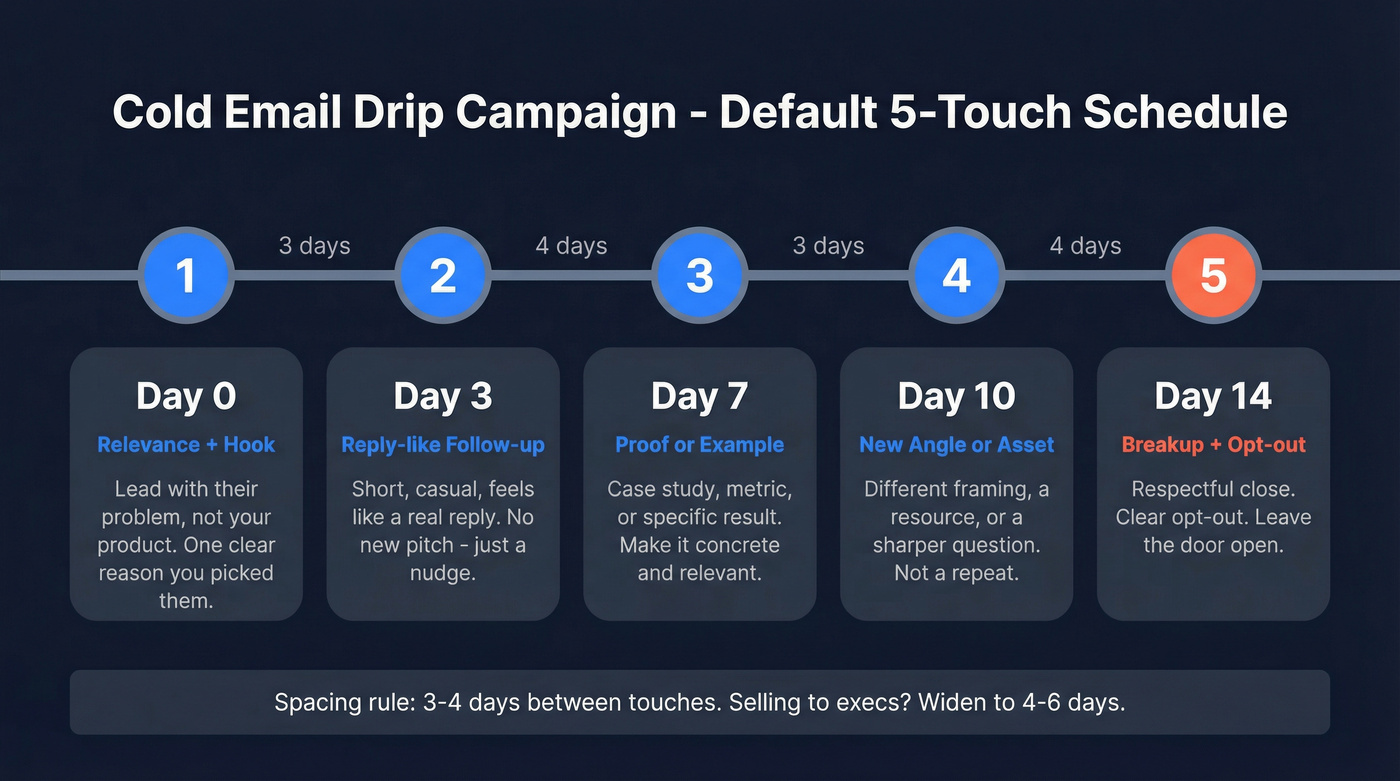
Use this default:
- 4-7 touches
- 3-4 days between touches
- Tue-Wed starts
- Follow-ups that read like a reply, not a reminder
If you sell to execs, widen spacing (4-6 days) and test later send times. Exec inboxes punish clingy sequences. (More on cold email time zones and timing.)
A simple default schedule (works for most B2B)
| Day | Touch | Goal |
|---|---|---|
| 0 | Email 1 | Relevance + hook |
| 3 | Email 2 | Reply-like follow-up |
| 7 | Email 3 | Proof / example |
| 10 | Email 4 | New angle / asset |
| 14 | Email 5 | Breakup + opt-out |
Warm-up, ramp, and volume caps (scale without burning domains)
New domains and new inboxes need warm-up. Treat warm-up as part of your outbound system, not a one-time chore. (Here’s the operator version of how to warm up an email address.)

Ramp schedule (per inbox):
| Weeks | Daily send cap | What you're proving |
|---|---|---|
| 1-2 | 5-10/day | Authentication is clean; bounces are stable |
| 3-4 | 15-25/day | Inbox placement holds; replies appear |
| 5-6 | 30-40/day | You can scale without complaint spikes |
| 7+ | 40-50/day (max) | Sustainable volume without throttling |
Hard pause rules (non-negotiable):
- Bounce rate goes above 2% -> pause sending, re-verify, and tighten filters.
- Complaints trend toward 0.3% -> pause sending, reduce volume, narrow targeting, and rewrite the step that triggered the spike.
One more best practice: set up a custom tracking domain (CNAME) for your sequencer before you scale, or turn tracking off. Shared tracking domains are reputation roulette.
The "numbers-first" launch plan (how we run a new cold drip)
- Start with 500-2,000 highly relevant contacts (tight ICP beats big lists)
- Run 1-2 variants of Email 1 only (small A/B, no multivariate circus)
- Keep the sequence to 5 touches
- Cap volume so you can watch bounces/complaints daily
I've run bake-offs where the "best copywriter" lost because their list had hidden junk and the domain got throttled by day 4, which meant the better message never even got a fair shot at the inbox.
Stop rules (how to avoid buying unsubscribes and complaints)
Most cold programs don't fail because they didn't send enough follow-ups. They fail because they kept sending after the campaign stopped being relevant.

Belkins' data shows the cost curve:
- Spam rate rises from 0.5% (email #1) to 1.6% (email #4)
- Unsub rate rises from 0.1% (round 1) to 2% (round 4)
- Adding a third email can drop replies by up to 20% in their dataset
Follow-ups work. They're just not free.
Use this / skip this (decision rules)
Keep following up when:
- Bounce rate is under 2%
- Complaints are safely under 0.3%
- Each touch adds new value
- Step 2-3 generate incremental positive replies (not just "stop emailing me")
Stop the sequence early when:
- "Not relevant" replies show up at scale (targeting's wrong)
- Unsubscribes spike after a specific step (that step's too generic or too pushy)
- You've got nothing new to add (the real stop rule)
Hard stops (pause sending and fix ops):
- Bounce rate above 2%
- Complaints trending toward 0.3%
- Provider-specific errors or sudden inbox placement drops
List quality system (the hidden lever behind "cold email is dead")
When someone says "cold email is dead," I ask one question: what was your bounce rate?
Here's the pattern behind the doom posts: a founder sends 2,000 emails, gets 6 replies, closes 0 customers, and declares the channel dead. That's not a channel verdict. That's a targeting + deliverability failure, usually paired with stale data and aggressive volume.
The targets that keep you alive
- Bounce rate target: under 2%
- Complaint rate target: well under 0.3%
- Data decay is real: 22-30% of B2B contact data goes stale per year, and high-turnover industries can hit 70% (plan around B2B contact data decay)
That's why "we bought a list last quarter" isn't a plan. It's a liability.
A real-world turnaround pattern (what actually changes outcomes)
The turnaround looks the same every time:
- verify + suppress risky addresses
- warm up for about 3 weeks
- lower per-inbox volume to ~35-40/day until metrics stabilize
One team I watched went from "we're done with cold email" to "we need more inboxes" in a month, simply by fixing the list first, slowing down, and letting deliverability recover before they touched a single subject line.
Verify + refresh before Step 1 (the workflow we use)
Workflow:
- Upload your CSV (or build the list with filters)
- Verify and suppress invalids, risky catch-alls, and traps
- Refresh older records (anything older than 30-60 days)
- Export only "safe to send" contacts into your sequencer
Templates: 3 sequences you can send today (with decision logic)
Constraints that keep you out of trouble:
- Keep emails under 200 words and 6-8 sentences (Belkins)
- The best-performing campaigns are often under 80 words (Instantly)
- Every step adds something new. No "just checking in."
And yes: Step 2 should read like a reply. Instantly's data backs it: reply-like follow-ups beat formal follow-ups by about 30%.
These are prospecting drip emails, so the goal is a reply and a next step, not a click.
If/then routing (use this across all templates)
- Positive reply -> propose 2 time options + confirm the goal ("Worth a 15-min chat to see if X is true for you?")
- Neutral reply / questions -> answer briefly + ask one qualifying question
- Not interested -> confirm close + ask if there's a better owner (optional)
- OOO -> reschedule to their return date + stop other touches
- Unsubscribe / stop -> suppress immediately (and honor within 2 days)
Template A - Problem/insight opener (B2B SDR default)
Audience: one clear ICP, one clear pain Cadence: 5 touches over 14-18 days
Subject options:
Quick question about {{company}}{{role}} ops at {{company}}Idea for {{pain}}
Day 0 - Email 1 (insight + question) Hi {{first_name}} - I noticed {{company}} is {{trigger}}.
Teams like yours hit {{specific pain}} when {{context}}. The fix is usually {{one-line approach}}.
Is {{pain}} on your radar this quarter, or is someone else closer to it?
- {{sender_name}}
Day 3 - Email 2 (reply-like follow-up) {{first_name}}, quick follow-up - if you're already handling {{pain}}, what'd you choose: {{option A}} or {{option B}}?
I'm asking because we're seeing {{1-sentence pattern}} across {{peer group}}.
Day 7 - Email 3 (proof)
One example: we helped a {{similar company}} reduce {{metric}} by {{range}} by changing {{specific lever}}.
If I send a 5-bullet breakdown, do you want the version for {{use case 1}} or {{use case 2}}?
Day 10 - Email 4 (new angle)
Different angle: most teams try to solve {{pain}} with {{common approach}}, but the bottleneck is {{hidden constraint}}.
Want a simple checklist we use to spot it in 10 minutes?
Day 14-18 - Email 5 (breakup-lite) I haven't heard back, so I'm going to close the loop.
If {{pain}} becomes a priority later, want me to reach back out in {{month}} - or should I stop emailing you?
Template B - Referral / "right person?" (multi-thread safe)
Audience: accounts where you're not sure of the owner Cadence: 4-6 touches, keep it polite
Multi-threading rule: email 1-2 people per company on purpose. Don't spray the org chart.
Subject options:
Right person for {{topic}}?Who owns {{area}} at {{company}}?
Day 0 - Email 1 Hi {{first_name}} - quick one.
Who's the right person at {{company}} for {{area}} ({{example responsibility}})? If it's you, I've got a specific idea around {{pain}}.
Day 3 - Email 2 (add context)
Context: we help {{ICP}} with {{outcome}} by {{mechanism}}.
If you point me to the owner, I'll send a 3-sentence summary so you're not forwarding a novel.
Day 7 - Email 3 (micro-proof) We did this for a {{similar company}} and saw {{result}} in {{timeframe}}.
Is {{owner_name}} the best contact, or is there someone else?
Day 10-14 - Email 4 (close the loop) If I'm in the wrong place, no worries - should I stop reaching out to you about {{area}}?
Template C - Breakup that protects reputation
Audience: any sequence where you delivered value but got silence Cadence: final touch (Day 12-21 depending on spacing)
Subject options:
Close the loop?Should I stop?
Hi {{first_name}} - I'm going to close this out so I don't keep pinging you.
If {{pain}} isn't a priority, reply "no" and I'll stop. If it is, reply "yes" and I'll send two times for a quick call.
Either way, what's the best path?
- {{sender_name}} P.S. You can also opt out here: {{unsubscribe_link}}
Stale lists are complaint fuel. Every contact in Prospeo's 300M+ database is refreshed on a 7-day cycle and run through proprietary verification - no third-party email providers, no inherited bad data. Teams using Prospeo see bounce rates drop from 35%+ to under 4%.
Fix your list quality before you rewrite a single subject line.
Tools & stack (keep it boring, keep it reliable)
Your cold drip stack should be boring. "All-in-one" stacks create hidden coupling: shared tracking domains, messy suppression lists, and deliverability problems you can't isolate. (If you’re evaluating platforms, start with cold email outreach tools.)
How to choose tools (practitioner rubric):
- Time-zone sending and send-window controls
- Warm-up + inbox rotation you can govern
- Clean unsubscribe handling + global suppression lists
- Custom tracking domain support (CNAME) or easy tracking disable
- Simple exports/imports so your data layer stays clean
Pricing + role table (quick reality check)
| Tool | Role in stack | Best for | Price signal (USD) |
|---|---|---|---|
| Prospeo | Data + verify | Fresh, verified contacts | ~$0.01/email (credits); free tier |
| Instantly | Send | Scale + rotation | $47 / $97 / $358 mo; annual as low as $37.60 / $77.60 / $286.30 mo |
| Woodpecker | Send | Simple sequencing | $24+/mo |
| Smartreach.io | Send | Time-zone + multichannel | ~$29-$99+/mo |
| Lemlist | Send | Personalization-first outbound | ~$55-$99+/mo |
| Smartlead | Send | Rotation + deliverability controls | ~$39-$99+/mo |
| Apollo | Data + send | All-in-one prospecting for SMB | ~$59-$99+/user/mo |
| ZeroBounce | Verify | Email verification only | ~$0.008-$0.02/email |
Instantly (sending + scaling)
Instantly is a clean starting point when you care about volume, inbox rotation, and operational control. It's also where a lot of modern cadence norms show up in Instantly's 2026 benchmark dataset (4-7 touches, 3-4 day gaps).
Pricing is simple: $47/mo, $97/mo, or $358/mo, with annual billing as low as $37.60/mo, $77.60/mo, or $286.30/mo.
Compared to "all-in-one" databases: Instantly's a sending engine. Pair it with a data layer you trust.
Woodpecker (lean sequencing)
Woodpecker is for teams that want sequencing without the growth-hacker cockpit. It's clean, easy to govern across a small SDR team, and hard to mess up.
Starter pricing begins around $24/mo with a trial available. If you're not doing heavy inbox rotation, this is the simplest path to "good enough" outbound.
Smartreach.io (multichannel + time-zone control)
Smartreach.io is a solid execution layer when time-zone sending and multichannel touches matter. It's built for operational control across sequences without turning setup into a week-long project.
Expect entry pricing around $29/mo and higher tiers as features and volume increase.
Lemlist (personalization-first)
Lemlist is the tool I pick when the strategy is "fewer accounts, more personalization." If you're doing custom snippets and tailored first lines, it supports that motion better than most.
Pricing generally sits in the ~$55-$99/mo range depending on plan and billing.
Smartlead (Tier 3)
Smartlead is a common alternative sending platform when you want inbox rotation and deliverability controls without overcomplicating the workflow. It's a good fit for teams that already have a data source and just need reliable execution.
Expect roughly $39-$99/mo depending on scale.
Apollo (Tier 3)
Apollo is convenient because it bundles leads and sequencing in one place, usually around $59-$99+/user/mo depending on plan. It's great for getting started fast.
My rule: don't push high volume inside Apollo. Use it to source prospects, then run sending in a dedicated sequencer where you can control tracking domains, rotation, and suppression cleanly.
ZeroBounce (Tier 3)
ZeroBounce is verification-only: you use it to clean lists and reduce bounces, not to run outbound. Pricing is volume-based, commonly ~$0.008-$0.02 per email depending on how many you verify.
Mailchimp and Klaviyo are opt-in marketing tools. They're excellent at drips, just not cold drips.
FAQ
What's the ideal length for a cold email drip campaign in 2026?
A cold email drip campaign that performs usually runs 4-7 touches across about 14-21 days, with 3-4 days between emails. This range captures the ~42% of replies that come from follow-ups without pushing complaint and unsubscribe rates into the danger zone.
How many days should you wait between cold email follow-ups?
Wait 3-4 days between follow-ups for most B2B offers, then widen to 4-6 days for executive audiences. If you're seeing complaints creep up toward 0.3% by step 3-4, increase spacing and reduce volume before you touch the copy.
When should you stop a cold email drip campaign?
Stop when you can't add new value, or when risk signals spike: bounce above 2%, complaints trending toward 0.3%, or unsubscribes jumping after a specific step. As a rule, if a follow-up is basically "checking in," don't send it. Replace it with proof, a new angle, or end the sequence.
Do you need open tracking for cold email sequences?
No. Most teams can run strong outbound without open tracking, and turning it off can reduce tracking-domain risk and noisy decision-making. Optimize for replies and positive replies; Belkins reported about a ~3% response lift after turning off open tracking.
What's a good free tool to keep bounce rate under 2% before launching?
Use an email verification tool with catch-all handling and trap filtering, and re-verify anything older than 30-60 days. Prospeo's free tier includes 75 email credits plus 100 Chrome extension credits/month, and it refreshes data every 7 days, which helps keep bounce rates under control as you scale.
Summary: the playbook that actually works
A cold email drip campaign wins in 2026 when you treat it like an ops system, not a copy contest: authenticate properly (SPF/DKIM/DMARC), verify and refresh your list, ramp volume slowly, keep spacing sane, and enforce stop rules when bounces or complaints rise.
Do that, and your templates finally get judged on relevance, where they belong.
