

Email Outreach Q&A: 15 Answers That Matter in 2026
Your first campaign went out to 500 prospects. Bounce rate: 12%. Reply rate: barely 1% - less than a fifth of the industry average. Your sending domain's reputation took a hit before you even got started. Most guides would've told you to rewrite your subject line. The real problem was your list.
This email outreach Q&A covers the questions that actually trip people up, answered with data from 16.5M emails analyzed by Belkins, enforcement timelines from Google and Microsoft, and patterns from campaigns that actually booked meetings. Think of it as the stuff that separates campaigns booking meetings from campaigns burning domains.
Quick-Start Summary
- List quality > copy quality. Verify every email before sending. Keep bounce rate under 3%. (If you need tooling, start with an email validator.)
- Keep it tight. Two follow-ups is usually enough. Campaigns under 100 recipients, emails under 8 sentences. (More cadence ideas: best sales sequences.)
- A complete cold email stack costs $120-200/month. Data and verification, sending and warm-up via Instantly or Smartlead, inboxes on Google Workspace. (Full breakdown: cold email marketing tools.)
Strategy & Expectations
Is cold email still worth it?
61% of decision makers prefer cold email over other outbound channels. In the US, that number jumps to 71%. Cold calls? Only 10% prefer them, and they connect roughly 3% of the time. Social outreach reply rates run around 30%, but at a much higher cost per touch. (If you're weighing channels, see cold emailing vs cold calling.)
The economics still work. A well-run cold email program costs $100-300 per qualified meeting. Compare that to paid ads or event sponsorships and it's not close.
What reply rate should I expect?
The most recent full-year dataset - 16.5M cold emails in 2024 - shows a [5.8% average reply rate](https://belkins.io/blog/cold-email-response-rates), down from 6.8% in 2023. That's a 15% year-over-year drop, tracking with tighter spam filters and inbox fatigue. (To go deeper on what moves replies, use these cold email tactics.)
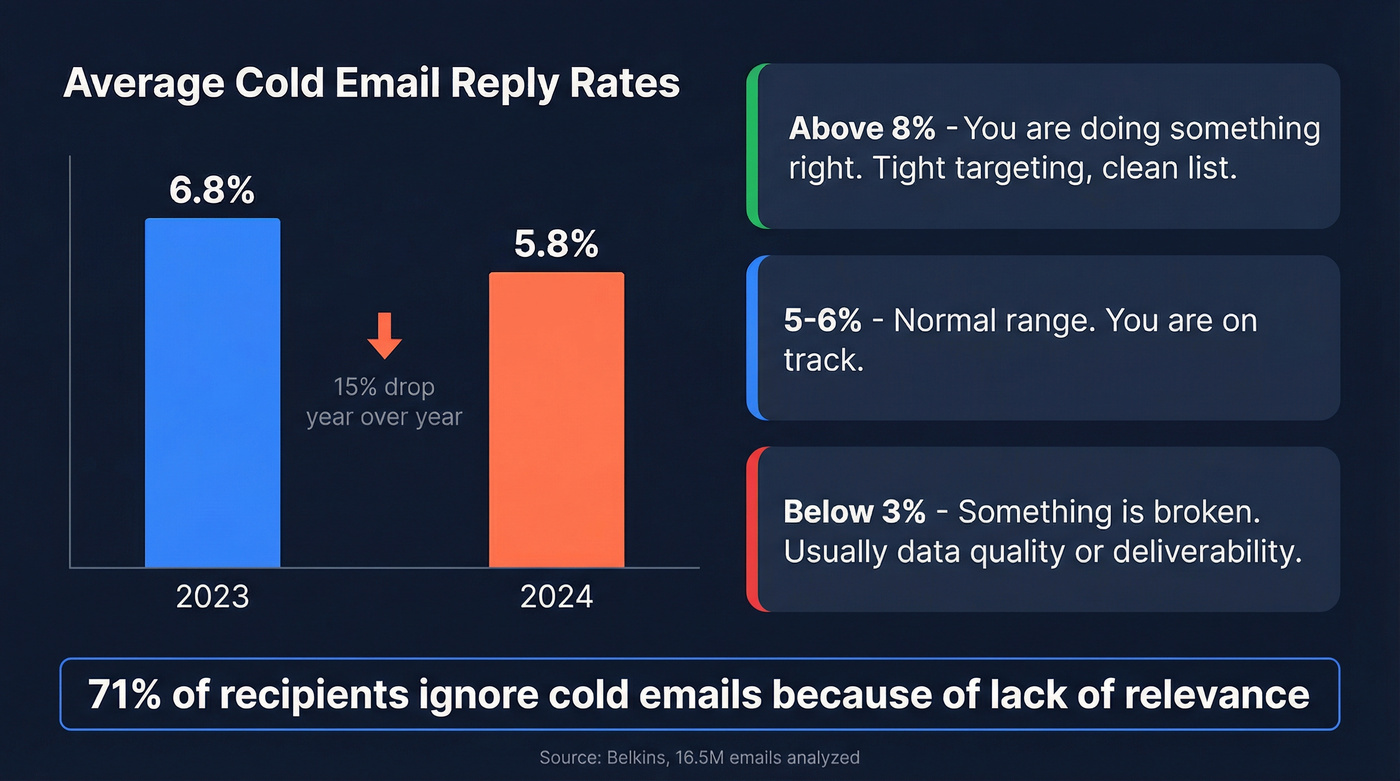
If you're hitting 5-6%, you're normal. Above 8%, you're doing something right - probably tight targeting and a clean list. Below 3%? Something's broken, and it's almost always data quality or deliverability, not your copy.
Here's the stat that should reframe your entire approach: 71% of recipients ignore cold emails because of lack of relevance. Not because the channel is dead. Because most senders spray generic messages at poorly targeted lists. (If you want a tighter approach, start with choosing targets for cold outreach.)
Best day and time to send?
Thursday wins at 6.87% reply rate. Monday is the worst at 5.29%. For time of day, 8-11 PM peaks at 6.52% - people catch up on email after dinner. Morning sends (7-11 AM) also perform well. Midday tends to underperform. (More benchmarks: best time to send prospecting emails.)
Does my sending domain matter?
More than most people realize. Emails from custom domains get nearly 2x the reply rate of generic Gmail addresses. Stick to credible TLDs - .com and .io outperform novelty extensions like .ninja or .xyz. This is one of the cheapest wins in cold outreach. (If you're building the foundation, read the email sending infrastructure guide.)
Writing Emails That Get Replies
How long should a cold email be?
Six to eight sentences hits the sweet spot: 42.67% open rate and 6.9% reply rate. Under 200 words consistently beats longer emails. Recipients spend about 5-7 seconds scanning before deciding to engage or delete - you don't have time for a three-paragraph company intro.
One clear CTA. One ask. That's it. (If you want examples, use these outreach email templates.)
How many follow-ups should I send?
Here's the thing: most guides tell you to send 4-5 follow-ups. The data says that's torching your domain. Spam complaint rates escalate from 0.5% on the first email to 1.6% by the fourth. Unsubscribe rates jump from 0.1% to 2%. Adding a third email can drop reply rates by up to 20%. (For timing rules, see when should you follow up on an email.)
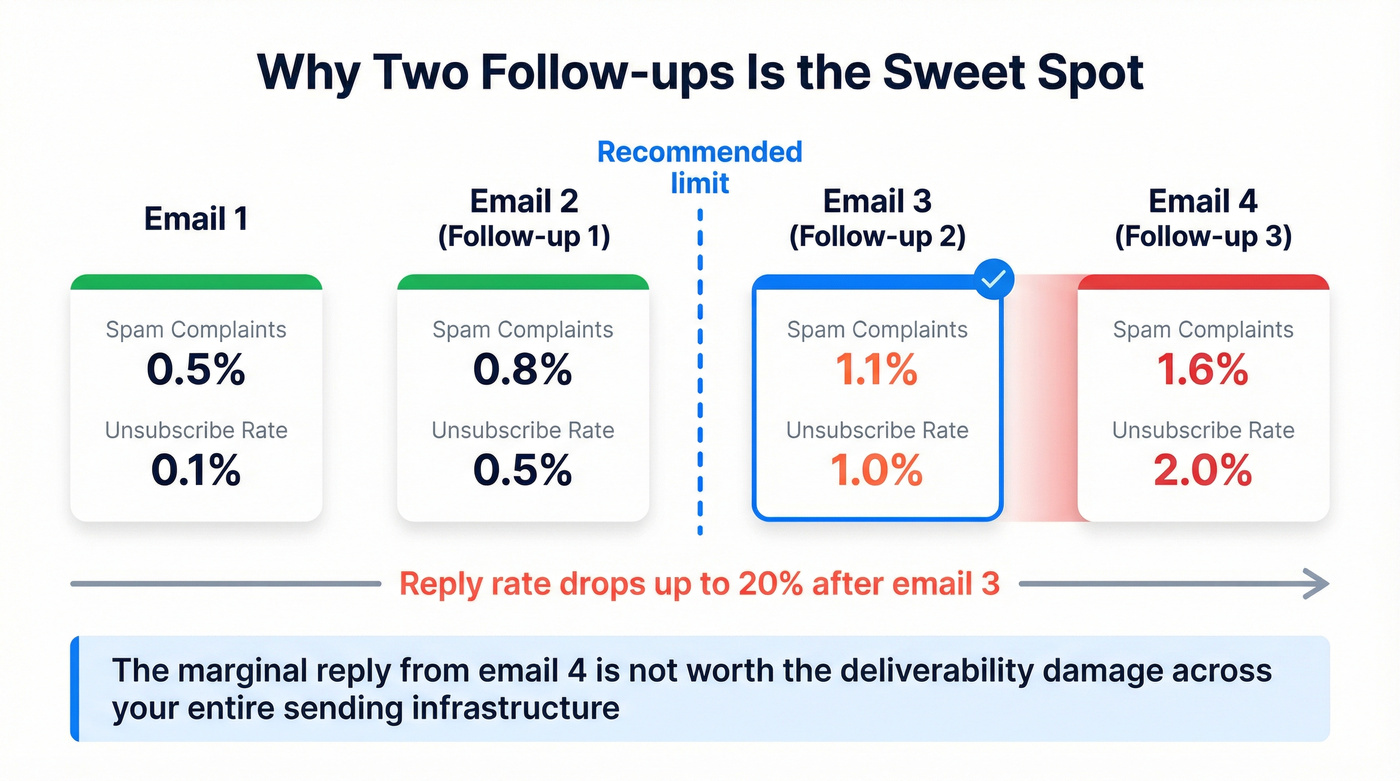
Two follow-ups is the sweet spot for most campaigns. The marginal reply from email #4 isn't worth the deliverability damage across your entire sending infrastructure, and we've seen this play out across dozens of client campaigns.

You just read it: two follow-ups is the limit before spam complaints spike and deliverability craters. That means every email you send has to land. Prospeo's 5-step verification delivers 98% email accuracy on a 7-day refresh cycle - so you're not wasting your two shots on bounced addresses or stale data.
Stop burning follow-ups on bad emails. Verify before you send.
Deliverability & Compliance
How do I set up my domain?
The checklist that matters before you send a single email:
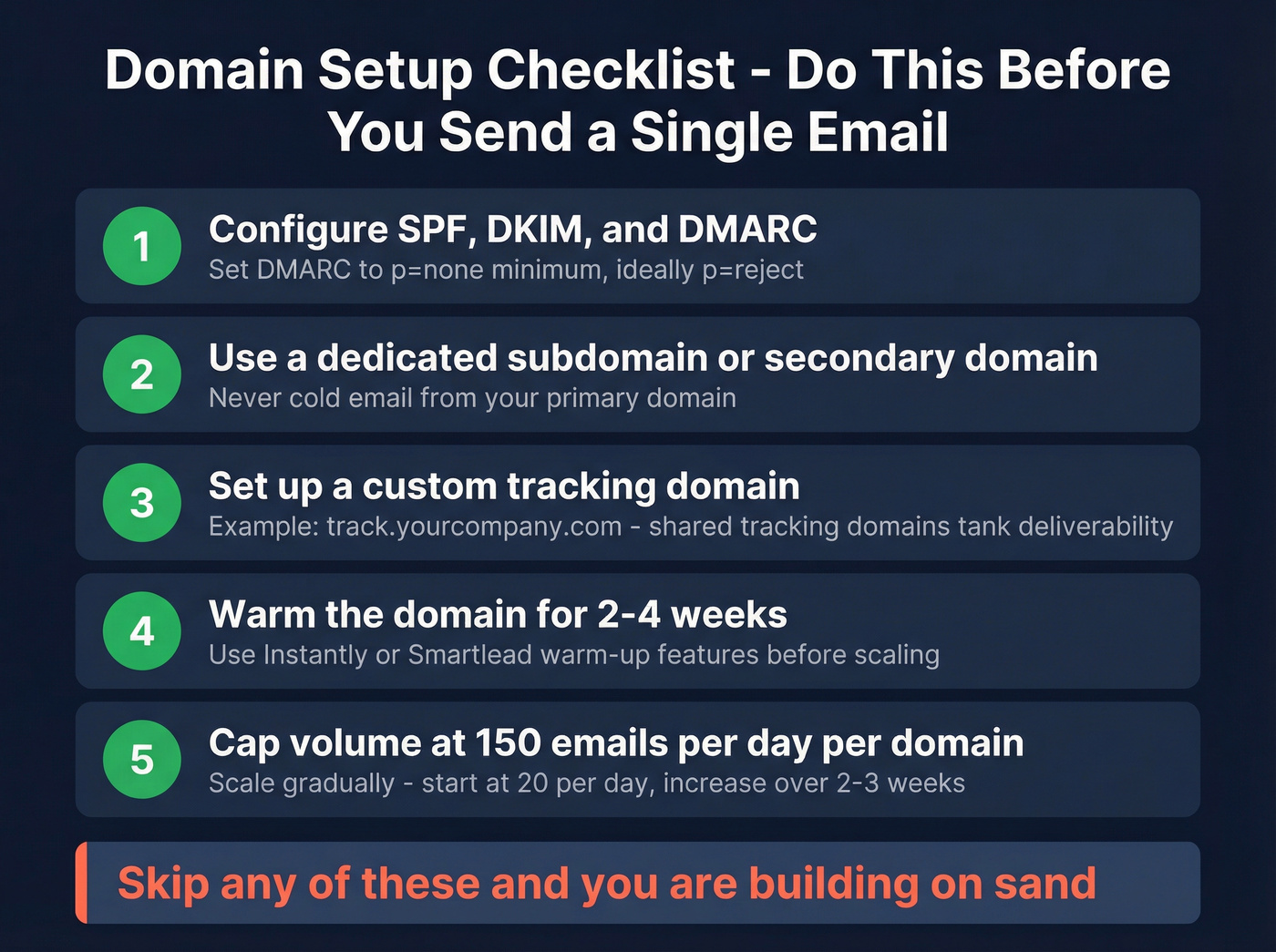
- SPF, DKIM, and DMARC - configure all three. DMARC at minimum
[p=none](https://dmarc.org/wiki/FAQ), ideallyp=reject. - Dedicated subdomain or secondary domain for outreach. Never cold email from your primary domain.
- Custom tracking domain like
track.yourcompany.com. Shared tracking domains tank deliverability. - Warm the domain for 2-4 weeks before scaling. Instantly and Smartlead include warm-up features. (More detail: automated email warmup.)
- Cap volume at 150 emails per day per domain. (See cold email volume best practices.)
Skip any of these and you're building on sand.
What are the 2026 authentication rules?
Google, Yahoo, and Microsoft have all tightened enforcement over the past two years. Here's the timeline from Proofpoint:
| Date | What Happened |
|---|---|
| Feb 2024 | Initial compliance period |
| Apr 2024 | Google rejects non-compliant mail |
| Jun 2024 | One-click unsubscribe deadline |
| May 2025 | Microsoft enforces for Outlook/Hotmail |
| Nov 2025 | Google stricter enforcement begins |
| 2026 | All major providers now enforce these requirements |
The rules technically target senders hitting 5,000+ messages per day, but smart teams follow them regardless. Keep spam complaint rates below 0.3% - ideally under 0.1%. Include one-click unsubscribe and honor opt-outs within 2 business days. These aren't suggestions anymore. (If you want a full playbook, use the email deliverability checklist.)
Is cold email legal?
In the US, yes - as long as you follow opt-out rules. Under CAN-SPAM: identify yourself clearly, include a physical mailing address, provide an opt-out mechanism, and honor opt-outs promptly.
In the EU/UK, B2B cold email is commonly done under legitimate interest when you've got a clear, defensible reason for contacting that specific person. If someone says stop, stop immediately.
Building a Clean Prospect List
Bad data is the #1 infrastructure killer in cold email, and it's frustrating how many teams overlook it. Here's the death spiral: unverified emails lead to high bounce rates, which tank domain reputation, which means even your good emails land in spam, which kills the campaign. We've seen teams blame their copy, their offer, their timing - when the real problem was a 15% bounce rate torching their sender reputation. (This is exactly what B2B contact data decay looks like in practice.)
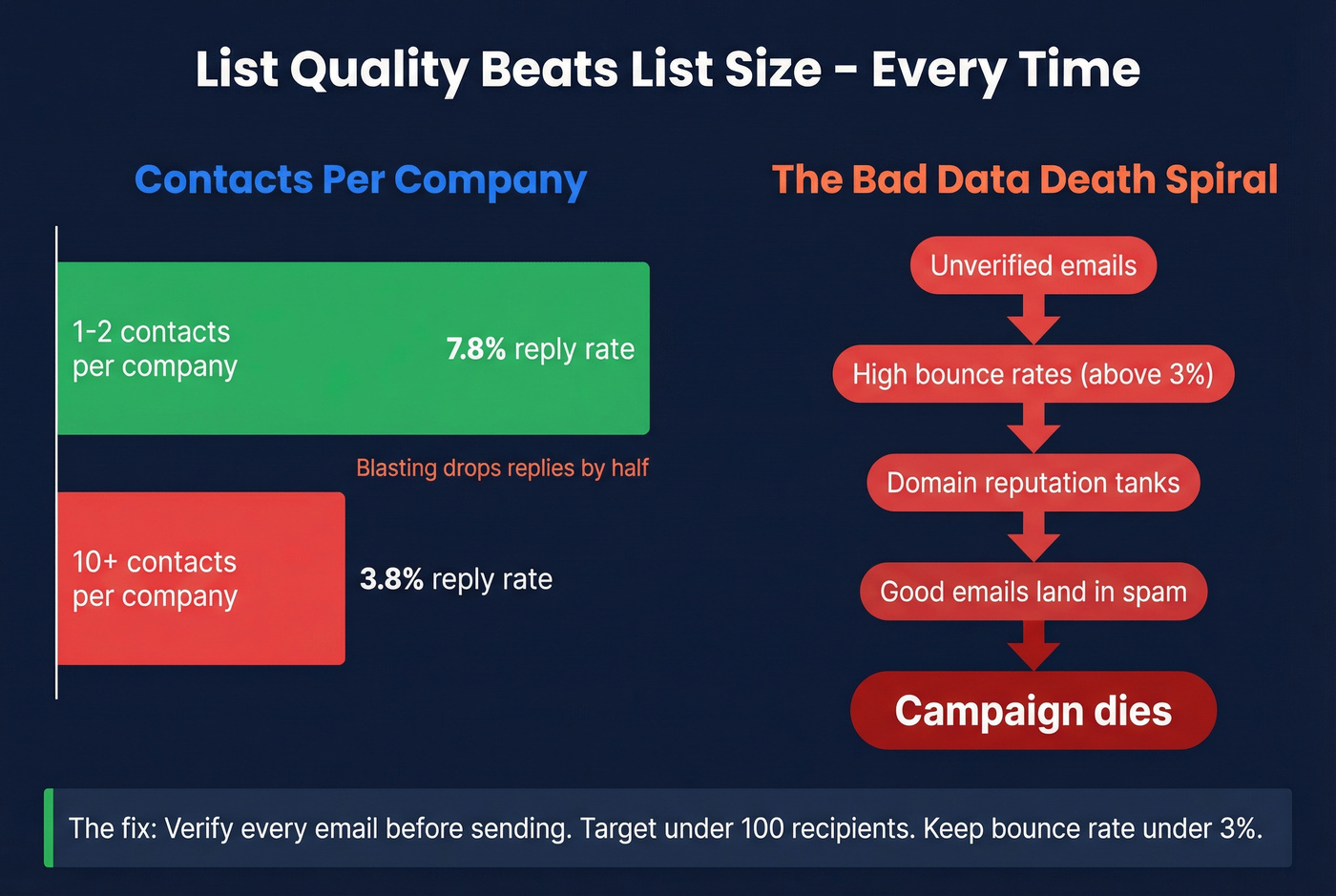
The data backs this up. Emailing 1-2 contacts per company yields a 7.8% reply rate. Blast 10+ contacts at the same company and it drops to 3.8%. Campaigns under 100 recipients hit the best reply rates. Tight, verified lists beat big, sloppy ones every time.
Prospeo's 5-step verification process delivers 98% email accuracy with a 7-day data refresh cycle - compared to the 6-week industry average. Stack Optimize scaled from $0 to $1M ARR running outbound for clients using this pipeline: 94%+ deliverability, under 3% bounce, zero domain flags across all clients. The free tier gives you 75 verified emails per month to start, and paid plans run about $0.01 per email.
Campaigns under 100 recipients hit the highest reply rates. Blasting 10+ contacts per company cuts replies in half. The winning formula is tight, verified lists - not volume. Prospeo gives you 30+ filters to build laser-targeted lists and 98% accurate emails at $0.01 each, with data refreshed every 7 days instead of the industry-standard 6 weeks.
Build the tight, clean lists that actually book meetings.
The Cold Email Tool Stack
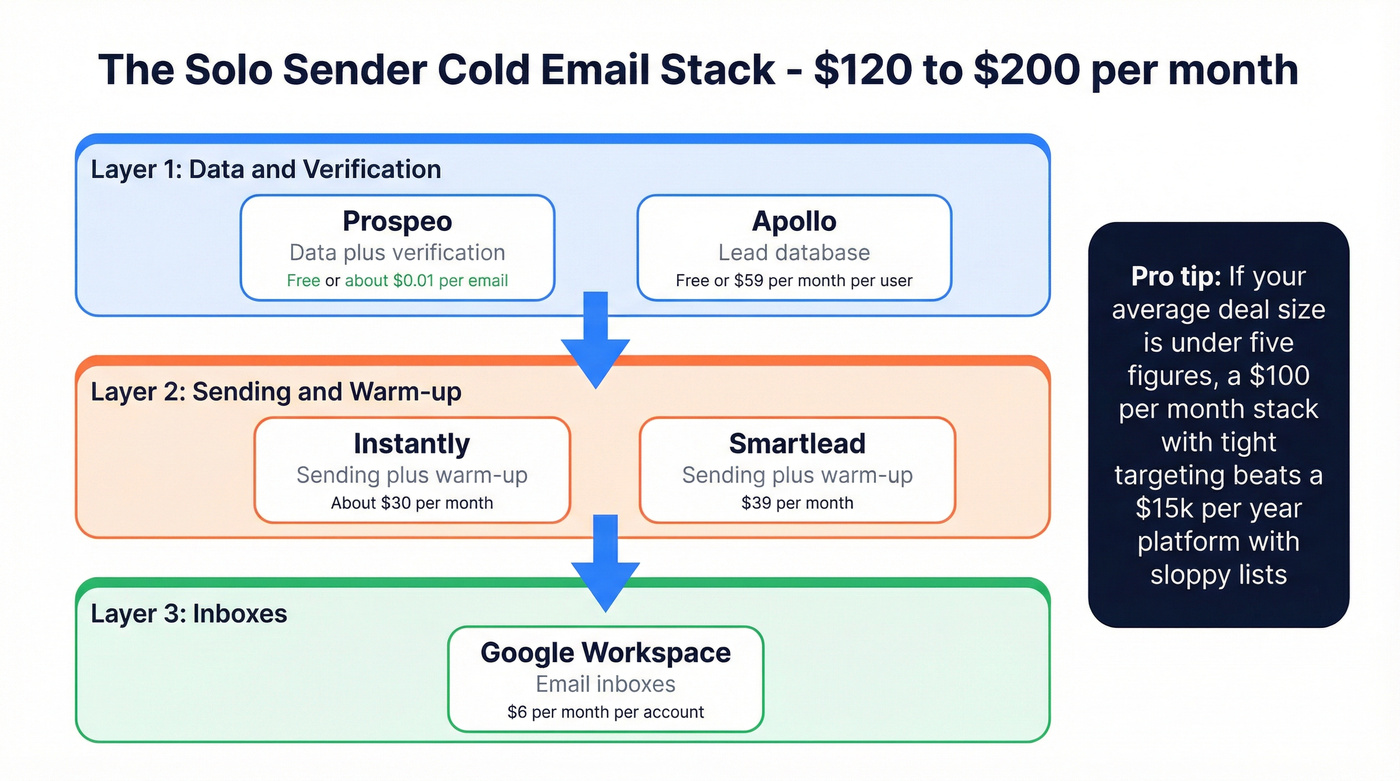
You need three layers: data and verification, sending and warm-up, and inboxes. Here's what a solo sender's stack looks like:
| Tool | What It Does | Starting Price |
|---|---|---|
| Prospeo | Data + verification | Free / ~$0.01/email |
| Apollo | Lead database | Free / $59/mo/user |
| Instantly | Sending + warm-up | ~$30/mo |
| Smartlead | Sending + warm-up | $39/mo |
| Google Workspace | Inboxes | $6/mo/account |
Full stack estimate: $120-200/month for a solo sender. Apollo is a solid lead database, but it doesn't verify emails at the level you need for safe sending - in our experience, running verification through a dedicated tool before uploading to your sending platform is non-negotiable. If you can only fix one thing today, verify your list. (More on verification workflows: email verification for outreach.)
Let's be honest about something the consensus on r/sales backs up: if your average deal size is under five figures, you probably don't need ZoomInfo-level data. A $100/month stack with tight targeting will outperform a $15k/year platform with sloppy lists. We've tested both sides of this and the expensive tool loses when the data hygiene isn't there.
Common Cold Email Questions
Should I track email opens?
Turning off open tracking improved response rates by ~3%. Apple Mail Privacy Protection inflates open numbers anyway. Open rates are a vanity metric in 2026 - track replies and positive responses instead.
Should I use AI to write cold emails?
AI is useful for drafting, but NLP-based spam filters are getting better at detecting generic AI output. Use it for structure and first drafts, then edit heavily. More than 5 personalization variables can backfire - the email starts feeling uncanny. Human editing is non-negotiable.
How do I handle negative replies?
Acknowledge the response, don't argue, and remove them from your sequence immediately. "Not interested" is data, not rejection. Mark it, learn from it, move on. Arguing with a negative reply is the fastest way to get reported as spam.
How do I keep bounce rates under 3%?
Always run verification through a dedicated tool before uploading contacts to your sending platform - never trust the data source alone. Your target is under 3%. Anything above that and your domain reputation takes damage with every send. This single step separates campaigns that scale from campaigns that die.
What's the biggest mistake new senders make?
Sending too many emails too fast from an unwarmed domain with unverified data. We've watched teams torch brand-new domains in under a week by skipping warm-up and blasting 500 unverified contacts on day one. Start with 20 emails per day, scale over 2-3 weeks, and verify everything before it touches your sending platform. Skip this advice and you'll be buying a new domain by Friday.