

How to Check If Your IP Is Blacklisted (and What to Do About It)
Your sales team's emails stopped landing on Tuesday. Open rates cratered from 45% to single digits overnight. The sequences didn't change, the copy didn't change - but a blacklist listing quietly cut your deliverability by up to 90% within hours.
We've watched this exact scenario play out with outbound teams more times than we'd like to count. Here's how to check if your IP is blacklisted, diagnose the cause, and make sure it doesn't happen again.
Quick Action Plan
1. Check now. Paste your sending IP into MxToolbox or Spamhaus - these are the two that matter most.
2. If you're listed: Fix the root cause first, then request delisting. Spamhaus typically clears manual requests in 24-72 hours depending on the sub-list, Barracuda in 12-24 hours, and SpamCop auto-delists in 24-48 hours if no new reports come in.
3. Prevent re-listing: Set up SPF/DKIM/DMARC, verify your email lists before sending, and monitor with Google Postmaster Tools. Most blacklisting traces back to bad data, missing authentication, or a compromised server. (For a deeper prevention playbook, see prevent re-listing.)
What Is an IP Blacklist?
An IP blacklist - technically a DNSBL (DNS-based Blackhole List) - is a real-time database of IP addresses flagged for sending spam or malicious traffic. When your mail server sends an email, the receiving server queries one or more DNSBLs before deciding whether to accept, filter, or reject the message.
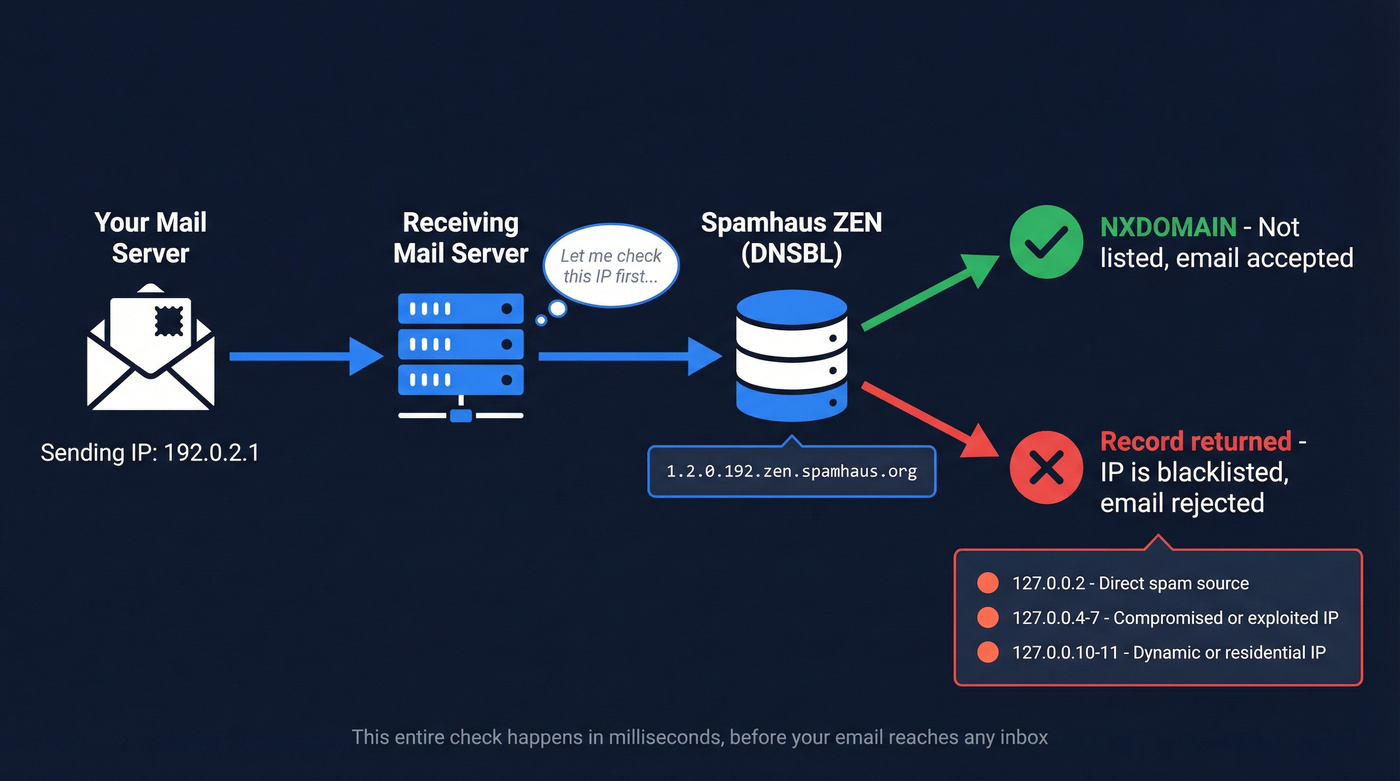
The lookup works through a reversed-IP DNS query. If your sending IP is 192.0.2.1, the receiving server queries 1.2.0.192.zen.spamhaus.org. An NXDOMAIN response means you're clean. A returned result tells the server why you're flagged. For Spamhaus ZEN specifically, the return codes break down like this:
- 127.0.0.2 - confirmed direct spam source
- 127.0.0.4-7 - compromised or exploited IP
- 127.0.0.10-11 - dynamic/residential IP (policy block)
The whole check happens in milliseconds, before your email ever reaches the inbox. No grace period.
IP Reputation vs. IP Blacklist
IP reputation is a score - think 0 to 100 - shaped by sending volume, engagement, bounces, and spam complaints. A bad reputation pushes emails to the spam folder gradually. A blacklist listing is binary: you're on it or you're not. Being on a major one means outright rejection, not just spam folder placement.
If you're sending under 100,000 emails per month, a shared IP is fine. Over that, get a dedicated IP - but know that dedicated IPs are more sensitive to your own behavior, since there's no one else's good reputation to dilute your mistakes. (If you're deciding between setups, compare shared IP tradeoffs.)
How to Run an IP Blacklist Check
Step 1: Find your sending IP. Check your email headers - the "Received: from" lines show the originating IP. If you use a shared sending service like Mailgun or SendGrid, ask them which IPs your emails originate from.
Step 2: Paste the IP into a blacklist checker. Run it through at least two tools - one broad scanner and one Spamhaus-specific check.
Step 3: Interpret the results. A clean scan across MxToolbox and Spamhaus means you're fine. A listing on Spamhaus is an emergency. A listing on an obscure list nobody references? That's noise.
| Tool | Lists Checked | Best For | Cost |
|---|---|---|---|
| MxToolbox | 100+ | Broadest scan | Free (paid monitoring available) |
| Spamhaus | ZEN suite | The list that matters most | Free |
| IPVoid | 80+ | Quick multi-list scan | Free |
| AbuseIPDB | Abuse reports | Security/abuse framing | Free |
| Mailtrap | Multiple | Quick check (10 free) | Free (paid plans available) |
If you're also troubleshooting inbox placement (not just listings), use an email deliverability checklist to rule out the basics fast.
Which Blacklists Actually Matter
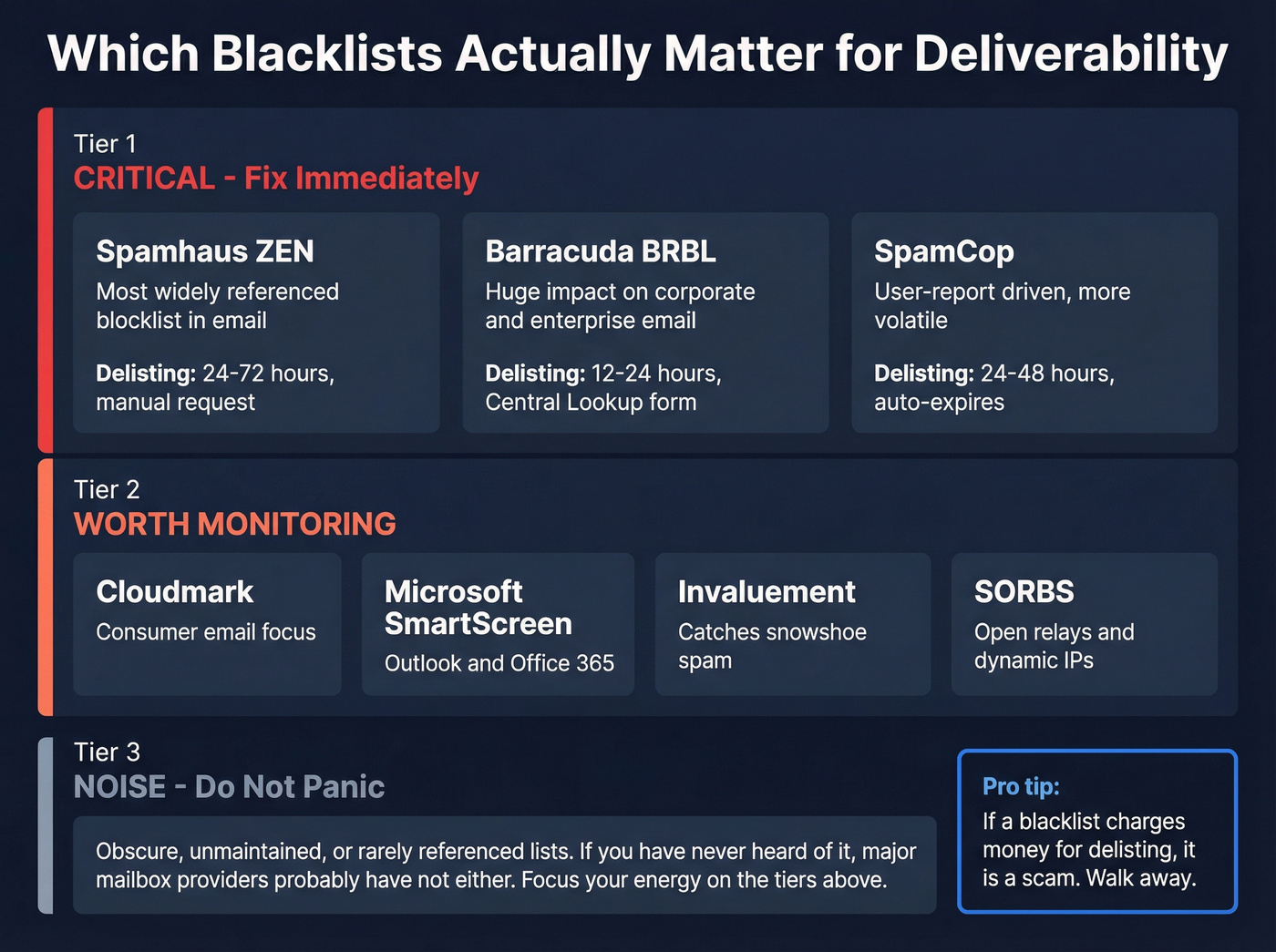
Here's the thing: stop checking 100 blacklists and panicking over every hit. Most DNSBLs are tiny, unmaintained, or not referenced by any major mailbox provider. The blacklists that actually move the needle for deliverability are a handful of widely used lists and reputation systems. Everything else is noise.
Spamhaus (Highest Priority)
Spamhaus ZEN is the most widely referenced blocklist in email filtering, and it's the one that should keep you up at night. It aggregates multiple sub-lists - SBL for direct spam sources, XBL for compromised IPs, PBL for dynamic/residential IPs, CSS for snowshoe spam, and DBL for domain-based listings. A Spamhaus listing is a five-alarm fire. Delisting requires a manual request through their Blocklist Removal Center, and it typically takes 24-72 hours depending on which sub-list you're on. They're thorough - they'll reject your first request if they don't believe the issue is fully resolved.
Barracuda BRBL
Barracuda's Reputation Block List draws from appliance feedback and machine learning analysis. Its impact is particularly severe on corporate email - a huge number of companies run Barracuda appliances for security. If your outbound targets enterprise buyers, a BRBL listing will hurt. Delisting typically runs 12-24 hours through their Central Lookup form.
SpamCop
SpamCop is user-report driven, which makes it more volatile but less severe than Spamhaus or Barracuda. It auto-delists in 24-48 hours if no new reports come in. No manual request needed - just stop whatever triggered the reports.
Others Worth Monitoring
Cloudmark is worth watching for consumer-facing email. Microsoft SmartScreen isn't a traditional DNSBL - it's a reputation system - but it's critical for Outlook and Office 365 deliverability. Invaluement catches snowshoe spam that slips past other lists. SORBS flags open relays and dynamic IPs. SpamRATS focuses on compromised and dynamic IPs. DroneBL targets botnets and open proxies.
None of these carry the weight of Spamhaus, but a listing on any of them signals something is wrong with your infrastructure. Skip panicking over lists you've never heard of - focus your energy on the big three. (If you need a faster triage flow, use this blacklist alert guide.)

Bad data is the #1 reason outbound teams land on Spamhaus. Prospeo's 5-step email verification - with catch-all handling, spam-trap removal, and honeypot filtering - keeps bounce rates under 4%. At $0.01 per verified email, it's cheaper than a single delisting headache.
Stop sending to addresses that get you blacklisted.
Why You Got Blacklisted
90% of blacklisting problems trace back to one of three things: bad data, no authentication, or a compromised server.
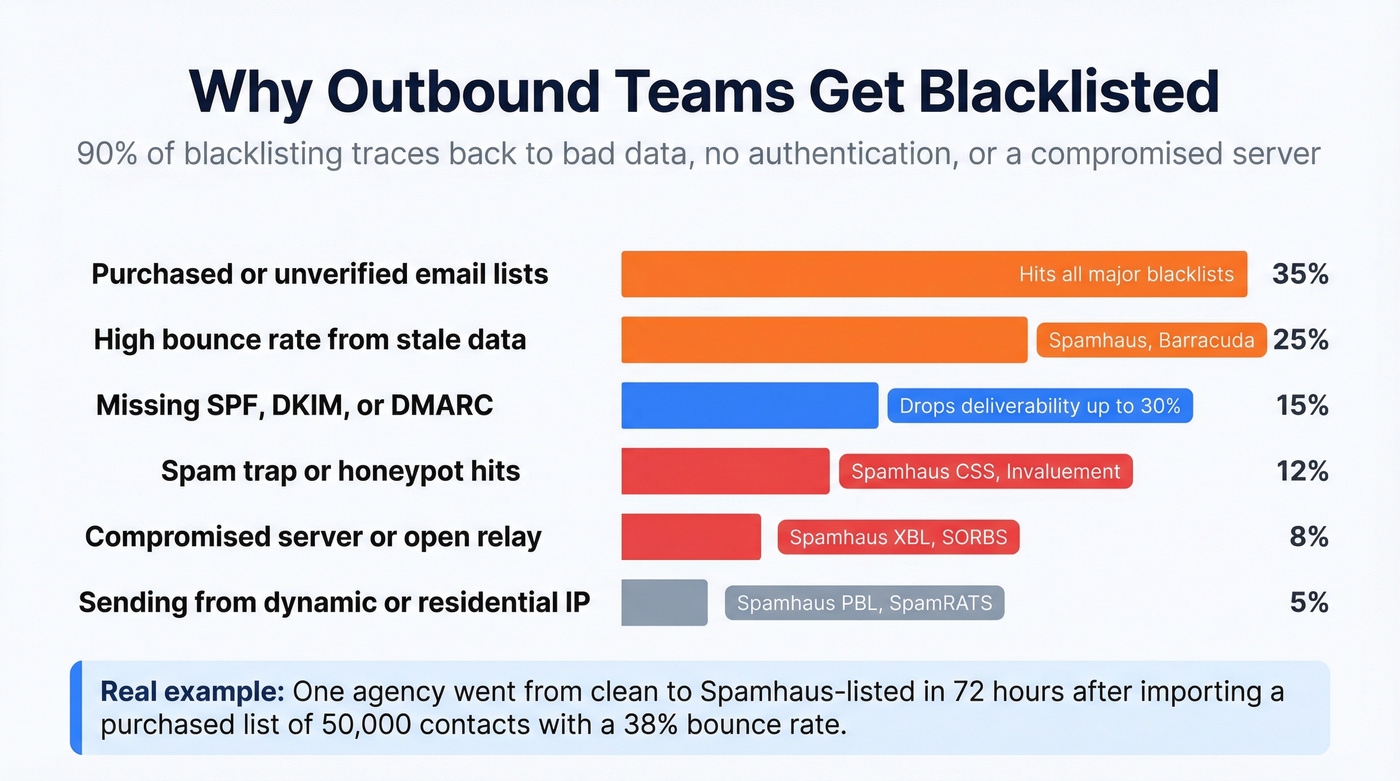
| Cause | Likely Blacklist | Fix |
|---|---|---|
| Compromised server | Spamhaus XBL, Barracuda, SpamCop | Scan, patch, secure |
| Open relay | SORBS, Spamhaus SBL | Restrict to authenticated users |
| Dynamic/residential IP | Spamhaus PBL, SpamRATS | Use a proper mail server IP |
| Purchased/unverified list | All major lists | Stop. Verify your data. |
| High bounce rate | Spamhaus, Barracuda | Verify emails before sending |
| Spam trap hits | Spamhaus CSS, Invaluement | Clean list, remove inactives |
If you're running cold outbound, the most common culprit is rows four and five. Purchased lists and unverified data generate bounces and spam trap hits that get you flagged fast. We've seen teams get listed within days of launching a campaign built on bad data - one agency we work with went from clean to Spamhaus-listed in 72 hours after importing a purchased list of 50,000 contacts with a 38% bounce rate.
Suspect an open relay? Test by telnetting to port 25. If your server accepts unauthenticated RCPT commands, it's an open relay and you need to lock it down immediately. (If bounces are the trigger, start with hard bounces and work backward to the source.)
How to Get Delisted
The process follows the same logic regardless of which blacklist caught you:
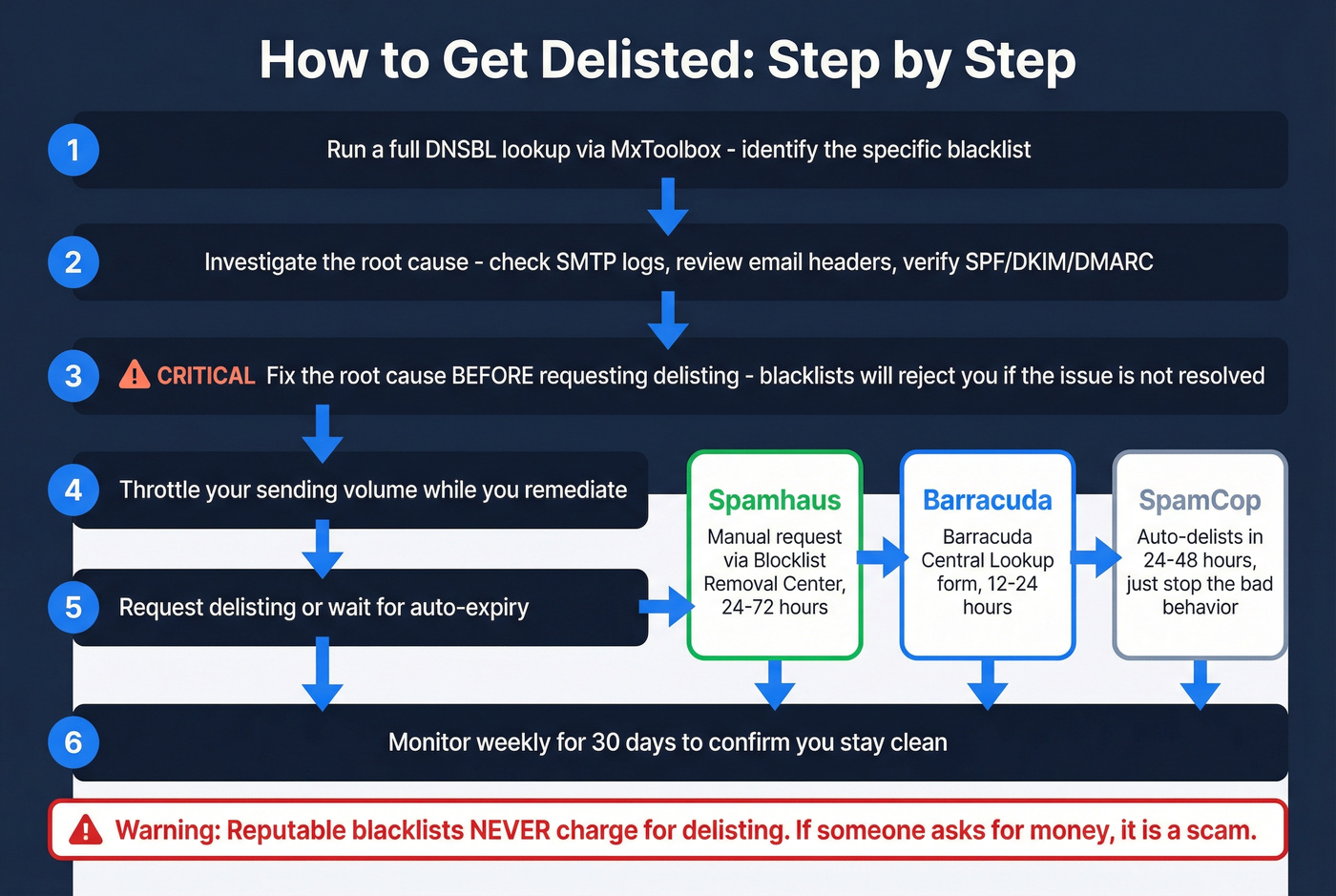
- Run a full DNSBL lookup via MxToolbox and identify the specific list.
- Investigate the root cause - check SMTP logs, review email headers, verify SPF/DKIM/DMARC.
- Fix the root cause before requesting delisting. Blacklists will reject requests if the underlying issue isn't resolved.
- Throttle sending while you remediate.
- Request delisting or wait for auto-expiry.
- Monitor weekly for 30 days to confirm you stay clean.
One critical warning: reputable DNSBLs don't charge for delisting. If a "blacklist" asks for money to remove your IP, it's a scam. Walk away.
Spamhaus
Submit a manual request through the Blocklist Removal Center. You'll need to demonstrate the root cause is fixed. Expect 24-72 hours depending on the sub-list.
Barracuda
Request removal through the Barracuda Central Lookup form. Turnaround is typically 12-24 hours. More straightforward than Spamhaus, but you still need to have fixed the underlying problem.
SpamCop and Yahoo
SpamCop auto-delists in 24-48 hours if no new user reports come in. Just stop the behavior that triggered the reports and wait. Yahoo doesn't offer a direct delisting process - fix your Spamhaus listing, set up a complaint feedback loop, and contact Yahoo sender support if issues persist.
How to Prevent Future Blacklisting
Getting delisted is the easy part. Staying off blacklists requires ongoing discipline.
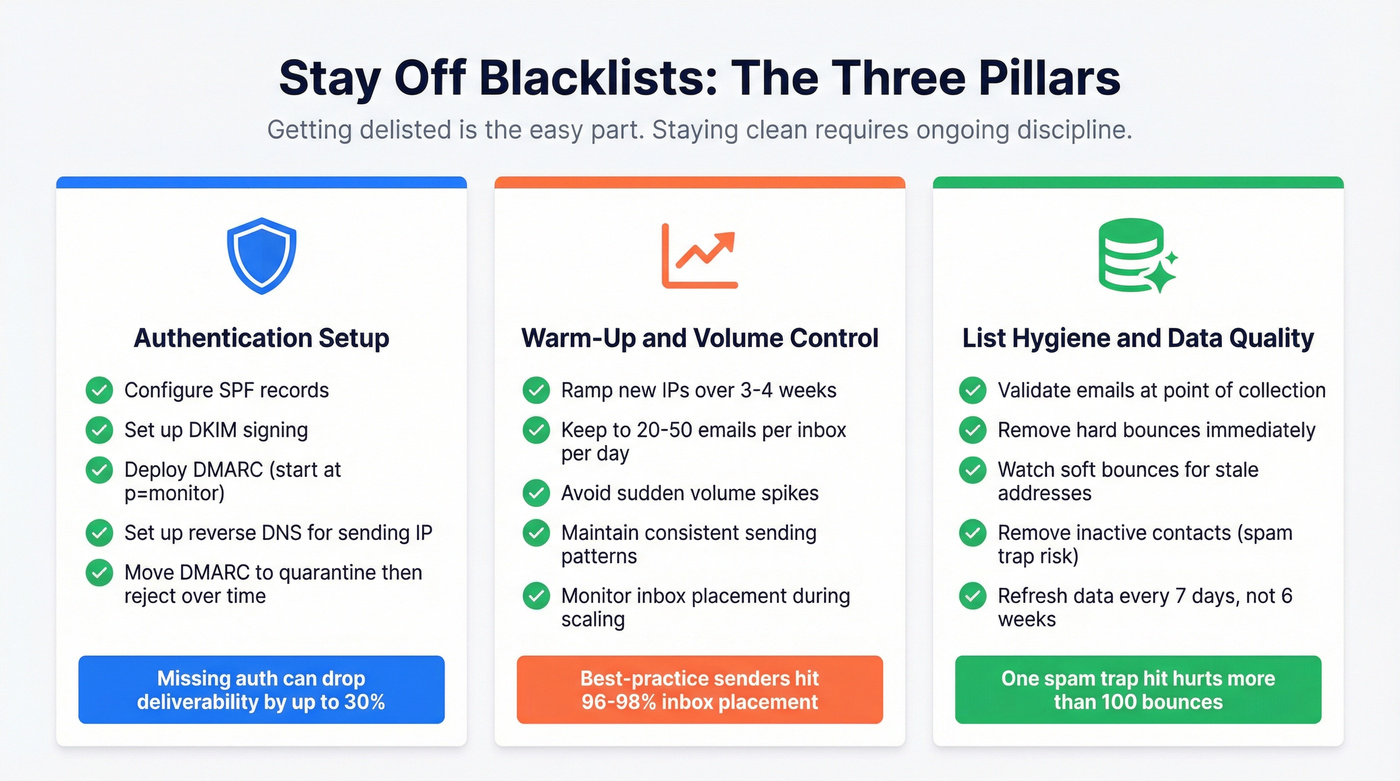
Authentication Setup
Missing SPF/DKIM/DMARC can drop deliverability by up to 30%. Configure all three - this isn't optional in 2026. Start DMARC at p=monitor to collect data, then move to quarantine and eventually reject as you confirm alignment. Set up reverse DNS so your sending IP resolves to your mail hostname. These are table-stakes configurations that too many teams skip. (If you want the full setup walkthrough, follow this SPF, DKIM, DMARC guide.)
Warm-Up and Volume Control
Ramp new sending IPs and domains over 3-4 weeks. During scaling, keep volume to 20-50 emails per inbox per day. Sudden spikes trigger spam filters, especially on new domains. Best-practice senders achieve 96-98% inbox placement - but only with disciplined warm-up and consistent sending patterns.
In our experience, teams that skip warm-up get flagged within the first week. It's the single most common mistake we see with outbound teams scaling campaigns. (Use an automated email warmup plan if you're ramping multiple inboxes.)
List Hygiene and Data Quality
If your bounce rate is what got you blacklisted, fix the source. Validate emails at the point of collection. Remove hard bounces immediately. Watch soft bounces - they signal addresses going stale. Inactive addresses are particularly dangerous because they can become recycled spam traps, and a single spam trap hit carries more weight with Spamhaus than a hundred bounces.
Prospeo's 5-step verification process catches spam traps and honeypots automatically, with 98% email accuracy and a 7-day data refresh cycle that keeps contacts from going stale between verification and send. For outbound teams running volume, that's the difference between a clean campaign and a blacklist listing. (If you're comparing tools, start with these email ID validators.)

One agency went from a 38% bounce rate to under 3% - and zero domain flags across all clients - after switching to Prospeo's 143M+ verified email database. Data refreshed every 7 days, not the 6-week industry average that lets bad addresses pile up.
Clean data every week means clean IPs every week.
Ongoing Monitoring
Set up monitoring so you catch listings before they crater your campaigns:
- Google Postmaster Tools - free, Gmail-specific reputation and spam rate data
- Microsoft SNDS - free, Outlook-specific delivery data
- MxToolbox monitoring - paid, broad blacklist coverage with alerts
Check monthly at minimum. For teams sending over 100,000 emails per month, check weekly. Running a regular IP blacklist check is what separates teams that catch problems early from those who discover them after a campaign tanks. (If you're building a system around this, use email deliverability tracking to operationalize it.)
Beyond Blacklists: Check Your Reputation
There's no universal IP reputation score. Each provider - Gmail, Outlook, Yahoo - maintains its own scoring based on volume, engagement, complaints, bounces, and authentication. A clean blacklist scan doesn't mean your reputation is healthy.
Let's be honest about something the industry doesn't talk about enough: domain reputation often matters more than IP reputation now. IPs can be changed or shared, so mailbox providers increasingly weight domain signals. If your domain reputation is damaged, switching IPs won't save you. Fix the domain first.
Tools to check reputation beyond blacklists: Cisco Talos Intelligence, Validity Sender Score, Google Postmaster Tools, BarracudaCentral, and Microsoft SNDS. Use at least two - they measure different things and reference different data.
FAQ
How do I check if my IP is on a blacklist?
Paste your sending IP into MxToolbox (scans 100+ lists at once) and Spamhaus (the single most impactful blocklist suite). Run both - MxToolbox gives breadth, Spamhaus gives depth on the listing that matters most. The whole process takes under 30 seconds.
Can I get blacklisted for sending cold emails?
Yes - if your bounce rate exceeds 5%, you hit spam traps, or recipients mark you as spam. Verify every address before sending, authenticate with SPF/DKIM/DMARC, and ramp volume gradually. The r/coldemail community consistently flags unverified lists as the number-one cause of blacklisting for outbound teams.
How long does delisting take?
SpamCop auto-delists in 24-48 hours with no action needed. Barracuda processes manual requests in 12-24 hours. Spamhaus typically takes 24-72 hours through their Blocklist Removal Center depending on the sub-list. You must fix the root cause first - requests get rejected otherwise.
Is being on one blacklist a big deal?
A Spamhaus listing can cut deliverability by 90% within hours - that's an emergency. A listing on an obscure DNSBL that no major provider references is noise you can safely ignore. Focus on Spamhaus, Barracuda, and SpamCop - these are the three that directly affect inbox placement at scale.
Do blacklist listings expire on their own?
Some do. SpamCop auto-expires in 24-48 hours if no new reports arrive. Others require manual delisting with proof of remediation. A few auto-expire after 7-30 days. Never pay for removal - reputable DNSBLs don't charge, and pay-to-remove "blacklists" are a scam.