

Mailbox Verification: How It Works, Where It Fails, and Which Tools to Trust
You verified your list. You hit send on 10,000 emails. Twelve hours later your ESP flags you - 4.8% bounce rate, sender reputation damaged, next campaign headed straight to spam. The verification tool said those addresses were "valid." So what went wrong?
Mailbox verification is supposed to prevent exactly this, but most teams don't understand where the process breaks down - or why their tool's "99% accuracy" claim is fiction. A public benchmark of 15 verifiers showed the top performer hitting just 70% accuracy. Let's break down why that gap exists and what you can actually do about it.
What Is Mailbox Verification?
Most people use "email verification" as a catch-all term, but there are three distinct layers. Confusing them is how teams end up with bounced campaigns.
Validation checks whether an address follows the correct format - proper syntax per RFC 5322, no illegal characters, a real-looking structure. It'll catch captain@@tidalmail.com but won't tell you whether captain@tidalmail.com actually exists.
Verification - the SMTP-level inbox check we're focused on here - goes deeper. It queries DNS records, connects to the recipient's mail server over SMTP, and probes whether that specific mailbox can accept mail. This is the server-level existence check that actually prevents hard bounces.
Cleaning sits above both. It combines validation, verification, engagement history, and risk profiling to decide which contacts stay on your list. Cleaning is a judgment call; verification is a technical check.
When someone says "mailbox verification," they mean the middle layer - the SMTP-level probe that answers one question: does this inbox exist right now, and will it accept my email?
How the 5-Step Process Works
Here's what happens when a verification tool checks an address. The whole sequence usually completes in seconds, but each step catches different problems - and understanding it explains how you can verify an email address without ever sending one.
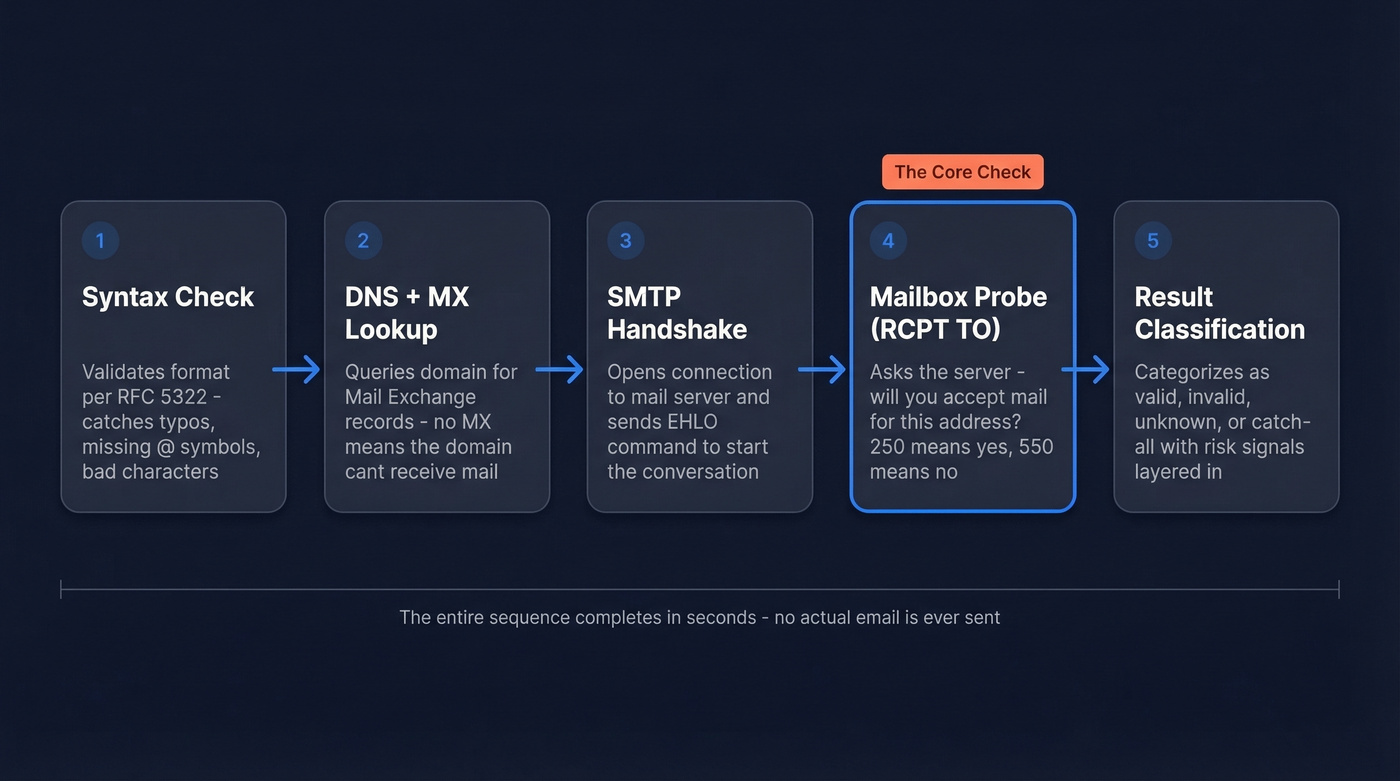
Step 1: Syntax and format check. The tool validates the address structure against RFC 5322 rules. Typos, missing @ symbols, invalid characters - all caught here. Every tool does this. It's the bare minimum.
Step 2: DNS and MX record lookup. The tool queries DNS for the domain's MX (Mail Exchange) records to confirm the domain has a mail server configured to receive email. No MX record means the address is dead regardless of what comes after the @.
Step 3: SMTP connection and EHLO handshake. The tool opens a connection to the mail server and introduces itself with an EHLO command. This is where the conversation with the recipient's server begins.
Step 4: Mailbox probe (RCPT TO). This is the core of the whole process. The tool issues a RCPT TO command with the target address, essentially asking the server "will you accept mail for this recipient?" A 250 response means yes. A 550 5.1.1 means the mailbox doesn't exist. The server reveals whether the mailbox is active before any message is transmitted.
Step 5: Result classification. The tool categorizes the address as valid, invalid, unknown, or catch-all based on the server's response. Better tools layer in additional risk signals - spam-trap indicators, catch-all pattern analysis, honeypot detection - to separate high-quality verification from basic SMTP pinging.

Why It Matters for Deliverability
Bounce rate connects inbox verification to everything else in your email program. The guidance is clear: under 2% is safe, above 5% triggers alarms. Sustained high bounce rates damage sender reputation and push future campaigns into spam - even the ones going to perfectly valid addresses.
Software companies average 0.93% bounce rate. E-commerce sits at 0.29%. If you're running outbound B2B campaigns and seeing rates above 3%, that's a data-quality red flag before you blame your copy or your sending infrastructure. (If you want the deeper benchmarks and fixes, see our email bounce rate guide.)
One practitioner on r/CRM reported dropping from a 6% bounce rate to under 2% after switching to real-time verification. That's the difference between a healthy sending domain and one that's circling the drain.
Why Verification Isn't a Perfect Yes/No
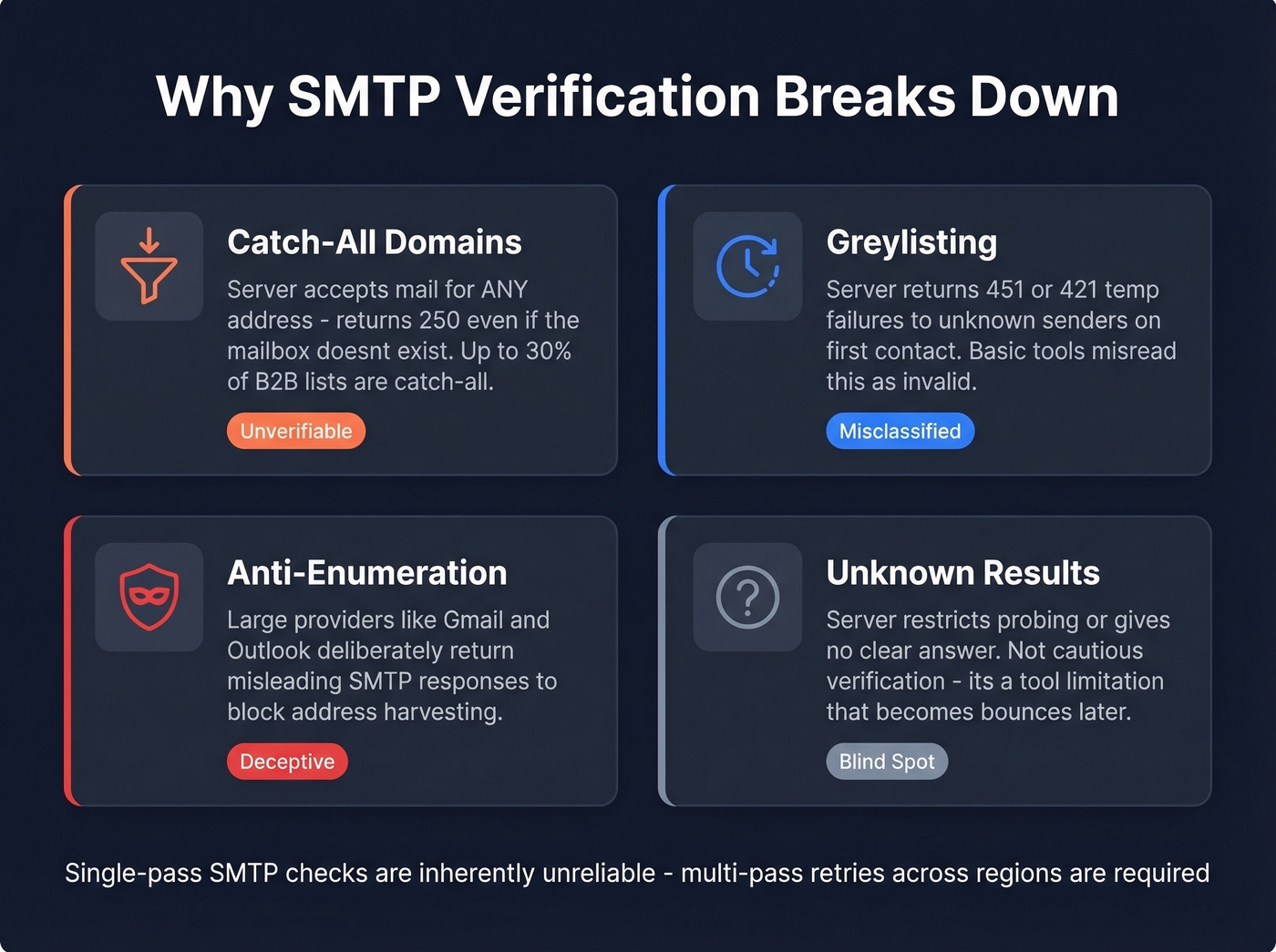
SMTP verification would be straightforward if every mail server played by the rules. They don't.
Catch-All Domains
A catch-all domain accepts mail for any address - anything@company.com returns a 250 success code whether the mailbox exists or not. Up to 30% of a typical B2B list can be catch-all or unknown addresses, which means a huge chunk of your data is unverifiable through basic methods. Quarantine catch-alls by default. Test them separately, monitor bounces, and only promote them to your main send list if bounce rate stays under control.
Greylisting and Temporary Failures
Greylisting is an anti-spam technique where servers return temporary failure codes - typically 451 or 421 - to unknown senders on first contact. Legitimate mail servers retry; spammers usually don't. Basic verifiers treat these temporary codes as "invalid" or "unknown," misclassifying perfectly good addresses.
A 451 isn't a rejection. It's a "come back later."
Anti-Enumeration Behavior
Here's the thing: large email providers deliberately return misleading SMTP responses to prevent address harvesting. Some return 250 for non-existent mailboxes. Others return errors for valid ones. Even misconfigured Exchange setups can create phantom mailboxes instead of returning proper 550-style rejections, as r/exchangeserver threads have documented. Single-pass SMTP checks against major providers are inherently unreliable, which is why professional tools use multi-pass retries at different times and across different regions - treating patterns across attempts as truth rather than trusting any single response.
The "Unknown" Problem
Unknown results happen when servers restrict SMTP probing or don't provide enough information to confirm mailbox existence. If a big chunk of your list comes back as unknown, that's not "cautious verification" - it's a tool limitation, and it'll show up later as bounces.

Most verifiers top out at 70% accuracy in independent benchmarks. Prospeo's proprietary 5-step verification - with catch-all handling, spam-trap removal, and honeypot filtering - delivers 98% email accuracy. No third-party email providers. Data refreshed every 7 days, not 6 weeks.
Stop paying for "verified" emails that bounce at 5%.
The Accuracy Myth
Every verification vendor's marketing page says "99% accuracy." The actual numbers tell a different story.
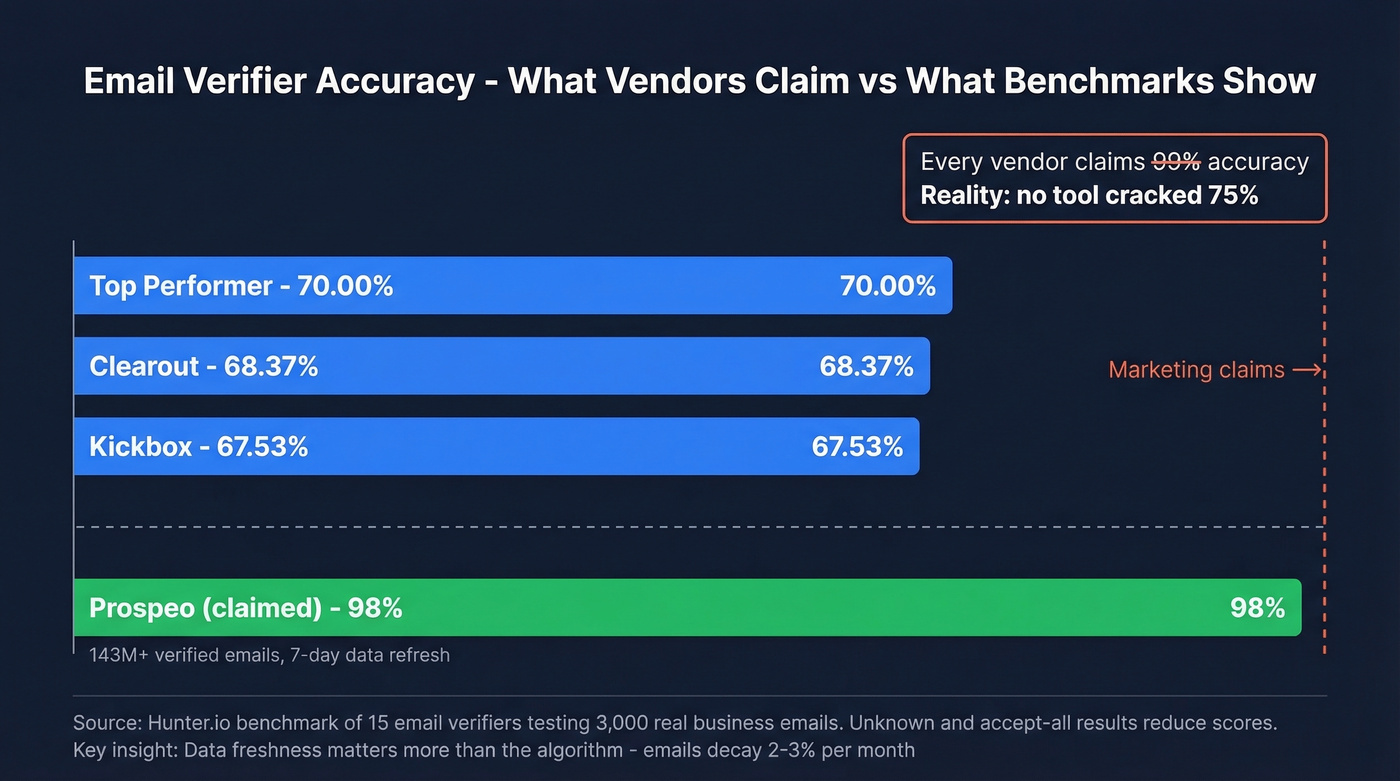
Hunter's benchmark of 15 email verifiers tested 3,000 real business emails segmented by company size. The top overall accuracy was 70.00%, followed by Clearout at 68.37% and Kickbox at 67.53%. Not one tool cracked 75%.
The methodology matters here. Unknown and accept-all results reduce accuracy scores because they're non-answers - they represent the tool throwing up its hands rather than giving you something actionable.
Separately, an email-finder benchmark shows how widely "verified rate" varies across tools, ranging from 37.6% to 77.5% depending on how the tool finds emails and handles catch-alls.
Dropcontact's methodology takes a different approach entirely: their benchmark of 20,000 real contacts uses 100% live email delivery to measure hard bounces. That's the gold standard - actually sending mail and seeing what happens.
Our hot take: The hidden variable in all of this is data freshness, and it matters more than any verification algorithm. A verification result is only as good as the moment it was generated. Email addresses decay at 2-3% per month as people change jobs. We've seen teams maintain sub-2% bounce rates for months simply by using a data source with a 7-day refresh cycle, while teams sitting on 6-week-old data fight constant deliverability fires. The algorithm matters less than the age of the data feeding it.
SMTP Response Code Cheat Sheet
| Code | Meaning | Type | Action |
|---|---|---|---|
| 250 | Mailbox exists, accepted | Success | Send normally |
| 421 4.7.0 | Rate-limited / try later | Soft (temp) | Retry; don't mark invalid |
| 451 | Greylisted / temp failure | Soft (temp) | Retry later |
| 550 5.1.1 | Mailbox doesn't exist | Hard (perm) | Remove immediately |
| 550 5.7.1 | Blocked for policy/reputation | Hard (perm) | Check sender reputation |
| 554 5.7.5 | Spam filter rejection | Hard (perm) | Review content + auth |
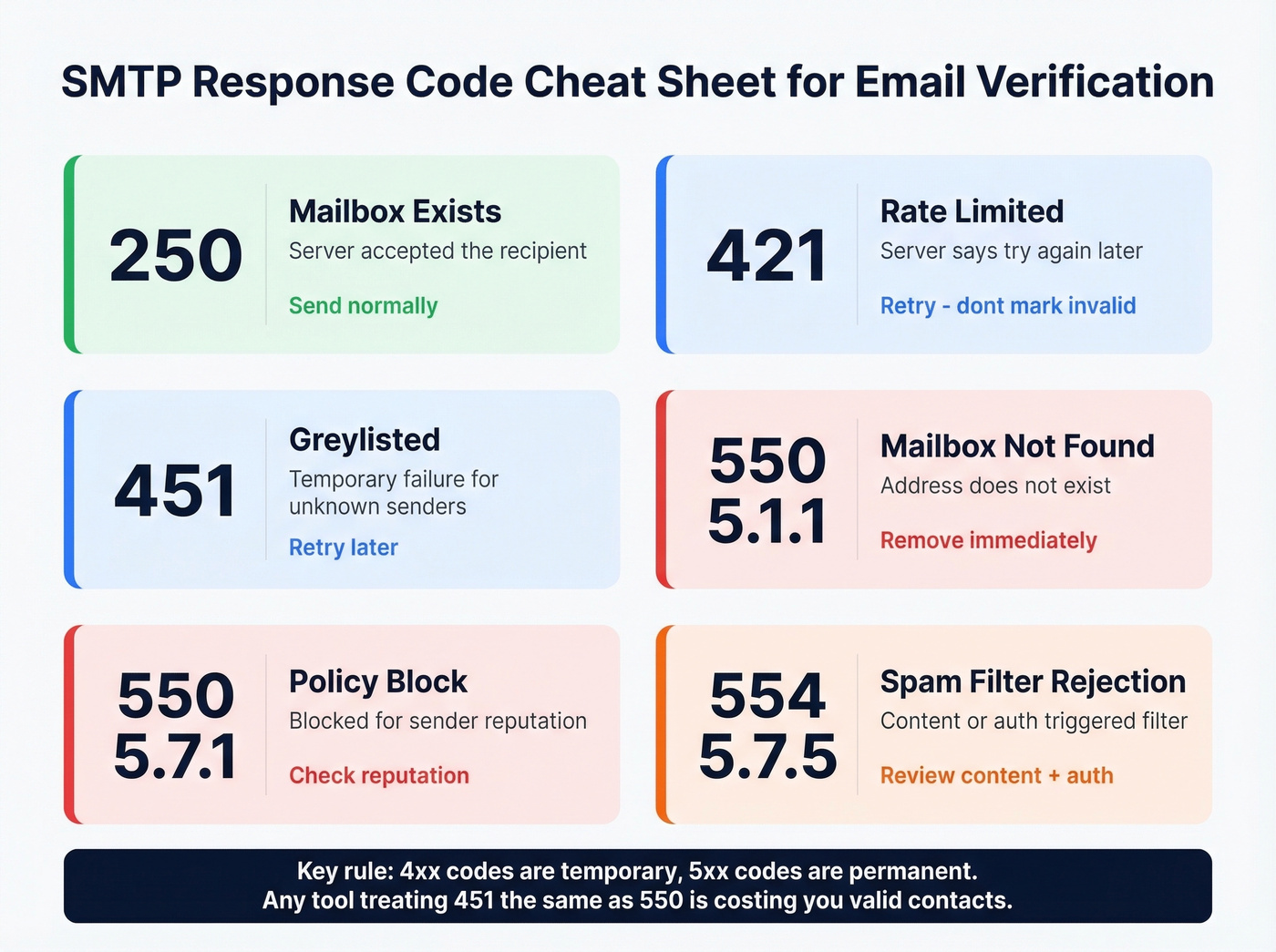
The key distinction: 4xx codes are temporary, 5xx codes are permanent. Any tool that treats a 451 the same as a 550 is costing you valid contacts.
Best Tools for Mailbox Verification
| Tool | Price / 1,000 | Free Tier | Best For | Accuracy Approach |
|---|---|---|---|---|
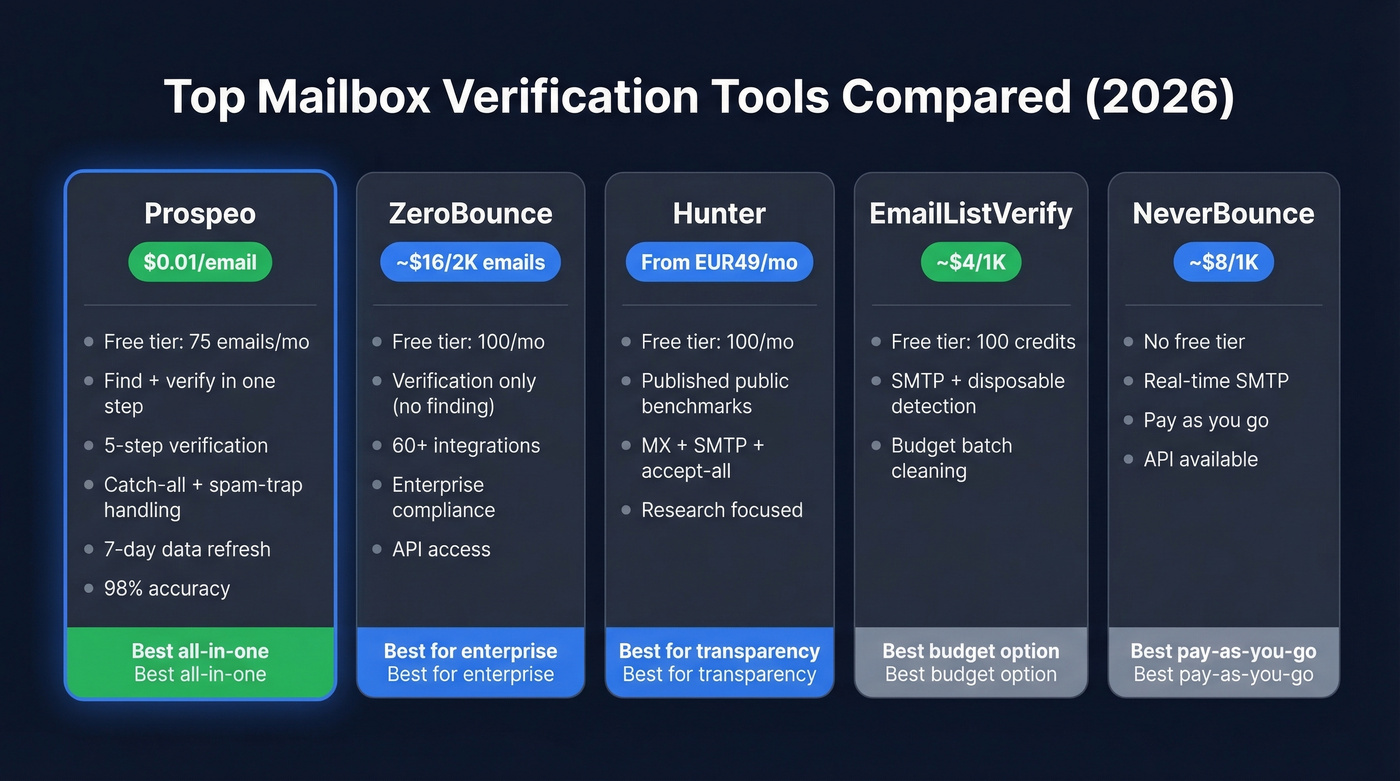
| Prospeo | ~$10 | 75 emails/mo | Find + verify in one step | 5-step; catch-all + spam-trap; 7-day refresh |
| ZeroBounce | ~$16 (2K pack) | 100/mo | Enterprise compliance | Multi-step; 60+ integrations |
| Hunter | From EUR49/mo | 100/mo | Free testing + research | MX + SMTP + accept-all |
| EmailListVerify | ~$4 | 100 credits | Budget batch cleaning | SMTP + disposable detection |
| NeverBounce | ~$8 | None | Pay-as-you-go simplicity | Real-time SMTP; API available |
| Emailable | Credit-based | 250 credits | Quick one-off checks | Standard multi-step |
| Verifalia | Varies | Yes | Compliance-focused teams | 30+ step verification |
Prospeo
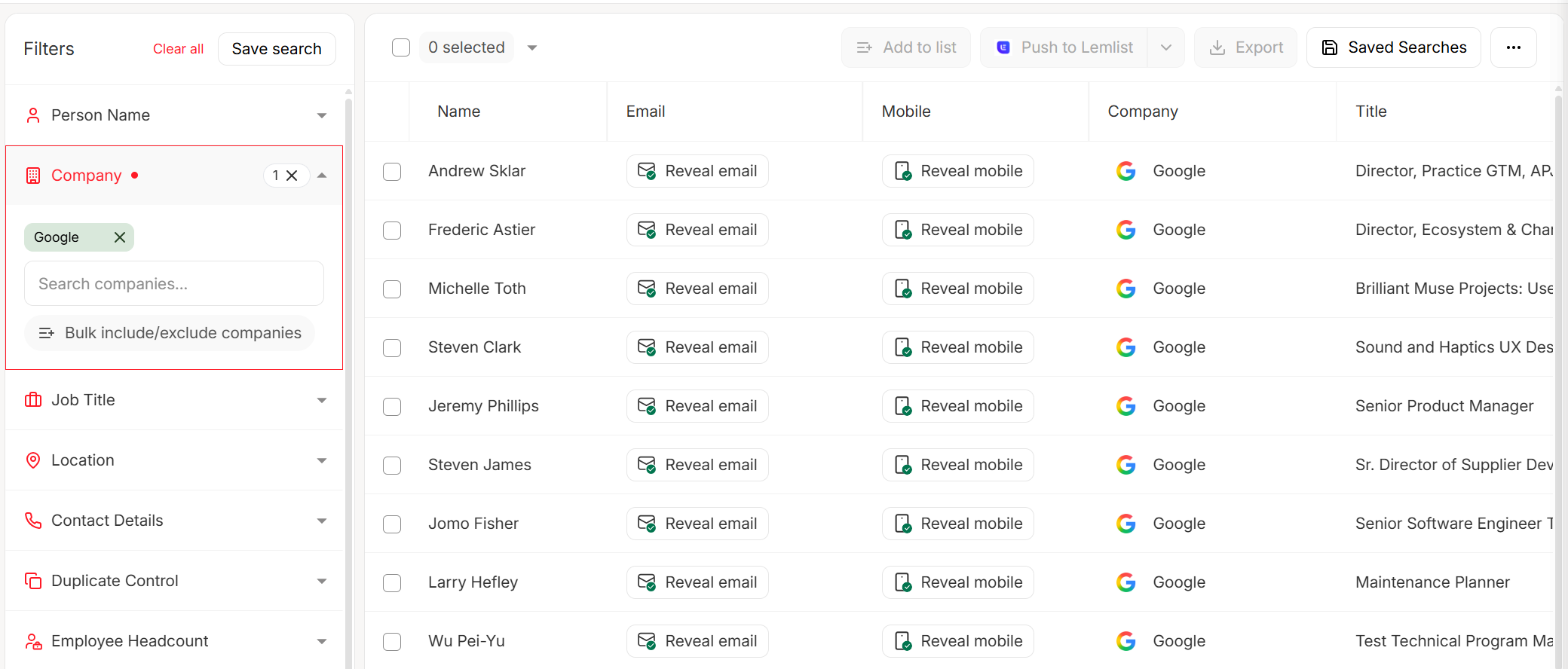
Prospeo collapses two steps into one. Instead of finding emails with one tool and verifying them with another, its email finder runs 5-step verification - including catch-all handling, spam-trap removal, and honeypot filtering - on every result before you see it. You only pay for verified addresses.
The numbers: 98% email accuracy across 143M+ verified emails, with a 7-day data refresh cycle. Stack Optimize built from $0 to $1M ARR using Prospeo data, maintaining bounce rates under 3% with zero domain flags across all clients. Meritt dropped their bounce rate from 35% to under 4%. Free tier gives you 75 emails and 100 Chrome extension credits per month - at scale, roughly $0.01 per email with no contracts and self-serve from day one.
ZeroBounce
Use this if: you're an enterprise team that needs 60+ native integrations and compliance documentation.
Skip this if: you also need email finding. ZeroBounce is verification-only - you'll need a separate tool to source addresses. Starts at ~$16 for 2,000 emails, with 100 free monthly verifications and API access for real-time checks.

Hunter
Hunter deserves credit for publishing the most transparent benchmark data in the space. Their 15-tool accuracy test is the closest thing we have to independent public verification benchmarks. The free plan gives you 100 verifications per month - enough to test before committing. Paid plans start at EUR49/mo.
EmailListVerify
The budget pick. At ~$4 per 1,000 emails, it's the cheapest option for high-volume batch cleaning, covering standard SMTP checks plus disposable email detection. You won't get the catch-all sophistication of higher-end tools, but for cleaning a 500K-record list on a tight budget, it handles the basics. 100 free credits to start.
NeverBounce, Emailable, and Verifalia
NeverBounce offers pay-as-you-go at ~$8 per 1,000 with real-time SMTP verification and API access - solid for occasional batch cleaning without a subscription. Emailable gives you 250 free credits and a clean UI for one-off checks. Verifalia runs a 30+ step verification process with a free tier; paid plans vary by volume. For teams that only verify occasionally, any of these three work fine without a monthly commitment.
Catch-alls, greylisting, anti-enumeration - every failure mode in this article is exactly what Prospeo's infrastructure was built to solve. 143M+ verified emails, multi-pass verification, and bounce rates under 4% across 15,000+ companies. At $0.01 per email, bad data costs more.
Get emails that actually land in inboxes - 98% of the time.
Real-Time vs. Batch: When to Verify
Signup forms and inbound leads: Use real-time API verification at the point of capture. Every email gets checked before it enters your CRM, preventing bad data from ever touching your database.
Pre-campaign list cleaning: Bulk batch verification. Upload your CSV, let the tool process it, remove invalids and quarantine unknowns before you hit send.
Ongoing CRM hygiene: Schedule verification monthly at minimum. Addresses decay constantly as people change roles. A list that was 98% valid three months ago might be 90% valid today.
The contrarian take: you don't need a standalone verification tool if your data source verifies at the point of collection. When your email finder already runs verification on every result before delivering it, adding a second verification layer is redundant cost. In our experience, the teams with the best deliverability aren't the ones running the most verification passes - they're the ones starting with the freshest data. (If you're building outbound at scale, pair this with a broader email deliverability guide and a plan to improve sender reputation.)
Is It Legal?
Yes. SMTP probing doesn't send emails and doesn't violate CAN-SPAM or similar anti-spam laws. Since these tools verify an email address without sending email, there's no message content, no opt-out requirement, and no recipient interaction. GDPR compliance depends on how you store and process the contact data, not the verification act itself. If you're processing EU contacts, ensure your data processor agreements are in order regardless of which tool you use.
FAQ
Does mailbox verification actually send emails?
No. It simulates the first steps of an SMTP conversation - EHLO, MAIL FROM, RCPT TO - but disconnects before transmitting any message. The recipient never receives anything. The server confirms or denies the mailbox during the handshake alone.
How often should I re-verify my email list?
Every 30 days for active outbound lists. Email addresses decay at roughly 2-3% per month as people change jobs. Tools with a 7-day data refresh cycle handle this automatically by keeping records current between your verification runs.
What should I do with "unknown" results?
Quarantine them. Never include unknowns in your first campaign wave. Test them in a separate send with a small batch, monitor bounces closely, and only promote addresses to your main list if hard bounce rate stays below 2%.
Can I verify catch-all emails?
Standard SMTP checks can't confirm individual mailboxes on catch-all domains because the server accepts everything. Look for tools with dedicated catch-all handling that use pattern analysis and historical data to estimate validity rather than relying solely on the SMTP response.
What's a good free tool for verifying emails?
Prospeo's free tier includes 75 email lookups per month with full 5-step verification built in. Hunter offers 100 free verifications monthly, and Emailable provides 250 free credits. For quick one-off checks, any of these work - but Prospeo is the only free option that combines finding and verifying in a single step.