

How to Check If an Email Exists - Without Sending a Single Message
Every verification tool claims 99% accuracy. A public benchmark testing 3,000 real business emails plus 300 invalid emails across 15 providers found the top tool hitting 70%. That gap between marketing and reality is why your "verified" list still bounces at rates that damage sender reputation. Let's close that gap - starting with what actually happens when you check if an email exists, and which tools handle the hard cases that matter.
What You Need (Quick Version)
Checking one email right now? Use any free tool - Hunter, ZeroBounce, or Kickbox all offer free single-check verification. Paste the address, get a result in seconds.
Cleaning a list of 1,000+ emails? You need a tool that handles catch-all domains - that's where most tools fall apart. ZeroBounce, Bouncer, and Prospeo are the three worth testing.
Want to understand how it works technically? Keep reading. We cover the full SMTP method, bounce codes, and why no tool is 100% accurate.
What "Verifying an Email" Actually Means
When you verify whether an address is real, you're asking three layered questions - and each one gets progressively harder to answer.
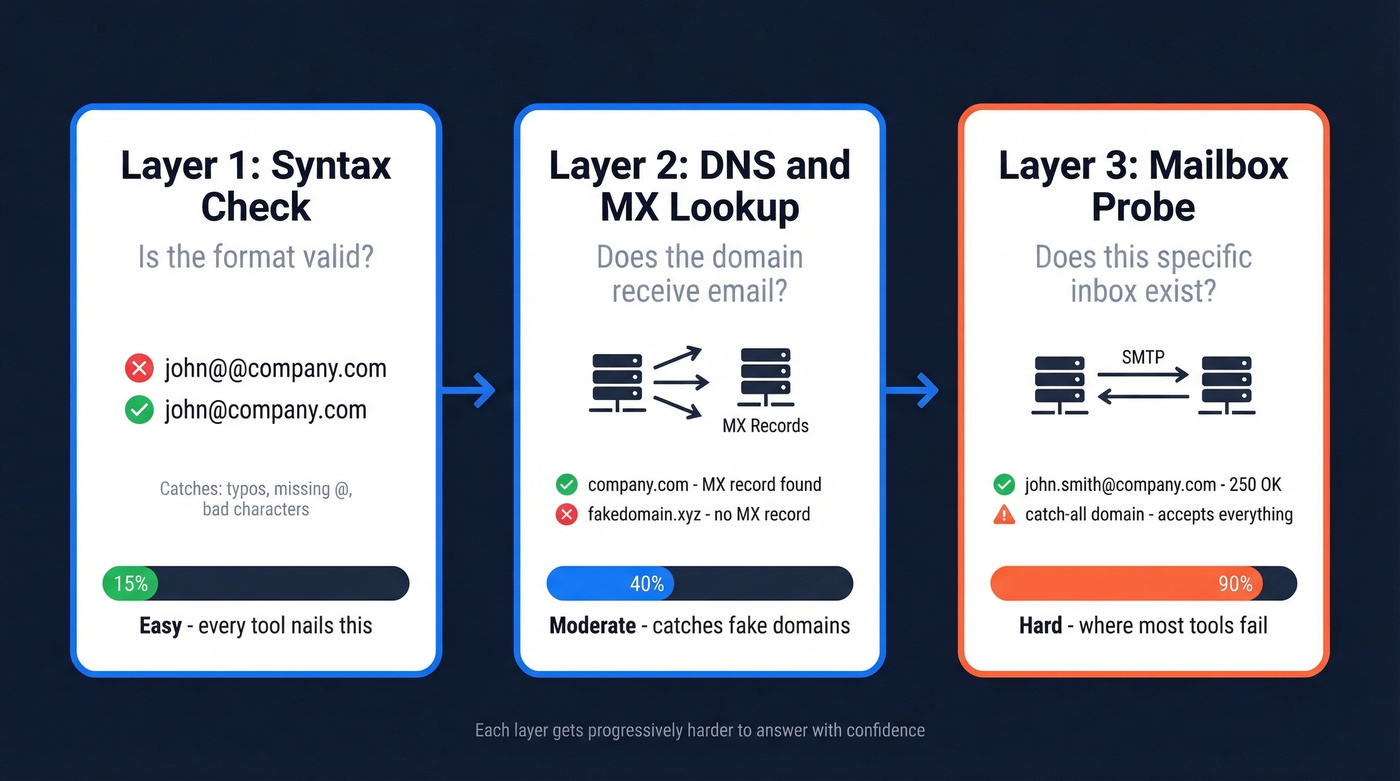
Layer 1: Syntax. Is the address formatted correctly? Does it have an @ symbol, a valid domain structure, no illegal characters? This catches typos like john@@company.com or john@company and takes milliseconds. Every tool nails this.
Layer 2: Domain and MX records. Does the domain actually exist, and is it configured to receive email? A DNS lookup confirms the domain resolves, and an MX (Mail Exchange) records check confirms there's a mail server listening. This catches fake domains and parked pages.
Layer 3: Mailbox probe. Does the specific mailbox - john.smith@company.com - actually exist on that server? This requires an SMTP handshake with the receiving server, and it's where the entire verification industry lives and struggles.
How Verification Works Under the Hood
Syntax Check
The first pass is pure pattern matching. The tool checks RFC 5321 compliance: valid characters before the @, a properly structured domain after it, correct length limits. This eliminates obvious garbage - addresses with spaces, missing TLDs, double dots.
DNS and MX Lookup
Next, the tool queries DNS for the domain's MX (Mail Exchange) records. These records tell the internet which servers handle email for that domain. If company.com has no MX records - or the domain doesn't resolve at all - the email can't exist.
This step also hints at the mail infrastructure. Whether the domain routes through a major hosted provider or a self-managed setup matters, because different setups handle verification probes differently.
The SMTP Handshake
Here's where it gets interesting. The tool opens a connection to the mail server on port 25 and initiates an SMTP conversation - the same protocol your email client uses to send messages. It introduces itself with EHLO, declares a sender with MAIL FROM, then asks: "Would you accept a message for this recipient?" via RCPT TO.
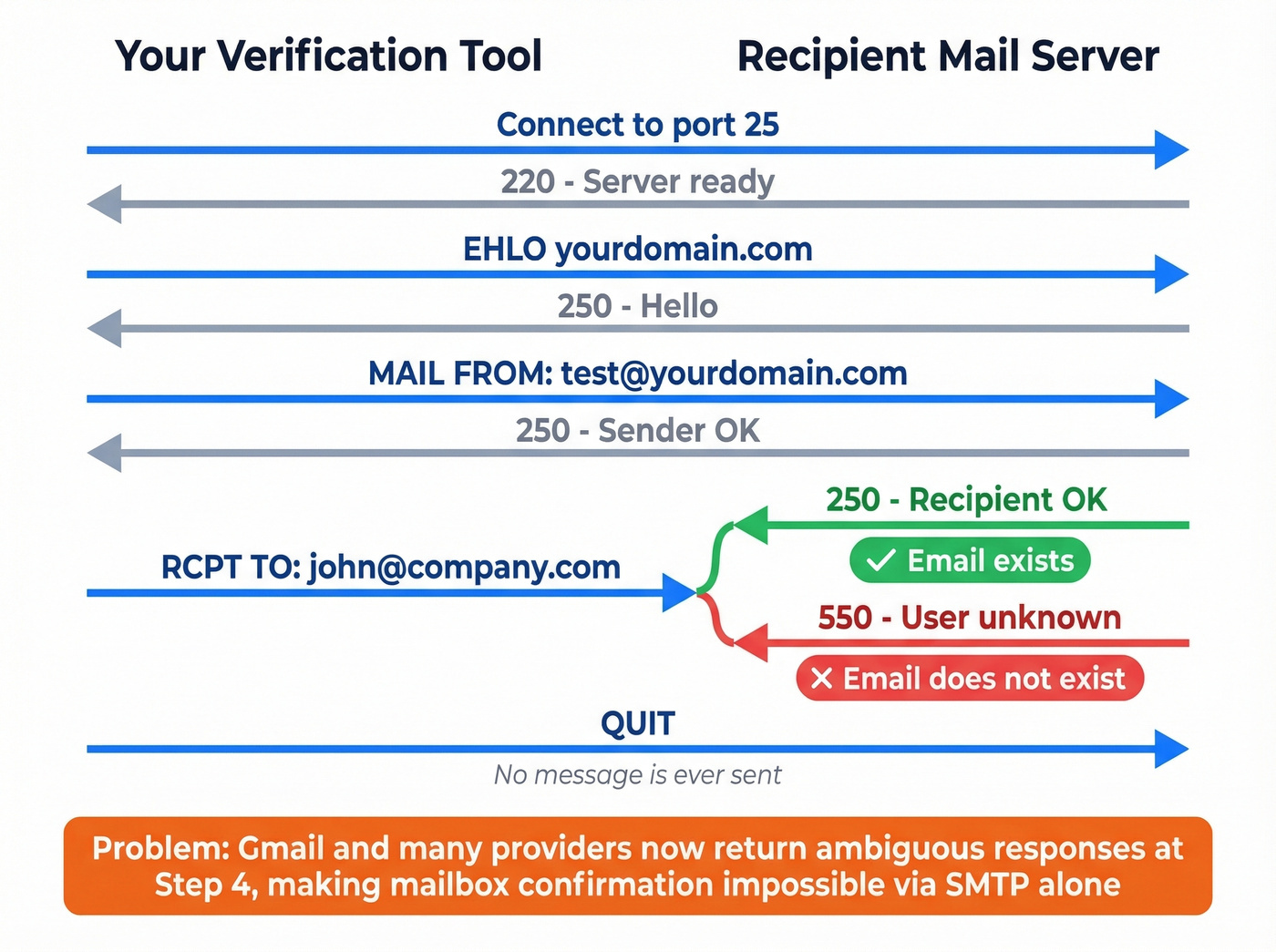
If the server responds with a 250 code, the mailbox exists. A 550 means it doesn't. The tool never actually sends a message - it quits the conversation before the DATA step.
Why Providers Are Blocking This
Major email providers have caught on. Gmail returns a "disabled" response to SMTP probes regardless of whether the mailbox is real - Reacher's open-source tool documents this explicitly in its output. The result: verification tools increasingly return "unknown" for providers and domains that mask mailbox-level responses.
How to Manually Verify an Email Address
If you want to confirm a specific address yourself - or you're a developer who likes to understand the plumbing - here's how to do it from a terminal.
Find the MX Record
Discover which server handles email for the target domain. Using Microsoft's documented approach:
nslookup
> set type=mx
> company.com
You'll get back something like:
company.com    MX preference = 10, mail exchanger = mx1.company.com
company.com    MX preference = 20, mail exchanger = mx2.company.com
Use the lowest preference number - that's the primary mail server.
Connect and Test via Telnet
Open an SMTP session with that server on port 25:
telnet mx1.company.com 25
The server responds with a 220 banner. Then run through the SMTP conversation:
EHLO yourdomain.com
250-mx1.company.com Hello

MAIL FROM:<test@yourdomain.com>
250 2.1.0 Sender OK

RCPT TO:<john.smith@company.com>
250 2.1.5 Recipient OK        ← Email exists

RCPT TO:<fakeperson99@company.com>
[550 5.1.1 User unknown](https://learn.microsoft.com/en-us/troubleshoot/exchange/email-delivery/ndr/fix-error-code-550-5-1-1-through-5-1-20-in-exchange-online)         ← Email doesn't exist

QUIT
A 250 response to RCPT TO means the server acknowledges that mailbox. A 550 5.1.1 means it doesn't exist.
Why This Doesn't Scale
This manual method works for one-off checks against cooperative servers, but it falls apart fast. You need outbound port 25 open (most cloud providers block it), servers rate-limit connections, and many providers won't give you straight answers. Doing this for 5,000 emails would take days - which is why verification tools exist. They maintain distributed infrastructure, proxy networks, and retry logic to handle all of this at scale.

You just saw why manual SMTP checks don't scale - blocked ports, rate limits, and catch-all domains that lie to your probes. Prospeo's proprietary verification infrastructure handles all of it automatically with a 5-step process that catches spam traps, honeypots, and catch-all domains. The result: 98% email accuracy at $0.01 per email.
Get 75 free verified emails and see your bounce rate drop to under 4%.
Why No Tool Is 100% Accurate
Even the best verification tools can't give you a definitive answer for every email. Understanding why helps you pick the right tool and set realistic expectations.
Catch-All Domains
In LeadMagic's 10,000-email benchmark dataset, 28% of the emails were on catch-all domains - servers configured to accept email sent to any address at that domain, even ones that don't exist. When a verification tool sends an RCPT TO probe, the server says "sure, I'll take it" regardless. The tool can't distinguish ceo@company.com from asdfghjkl@company.com.
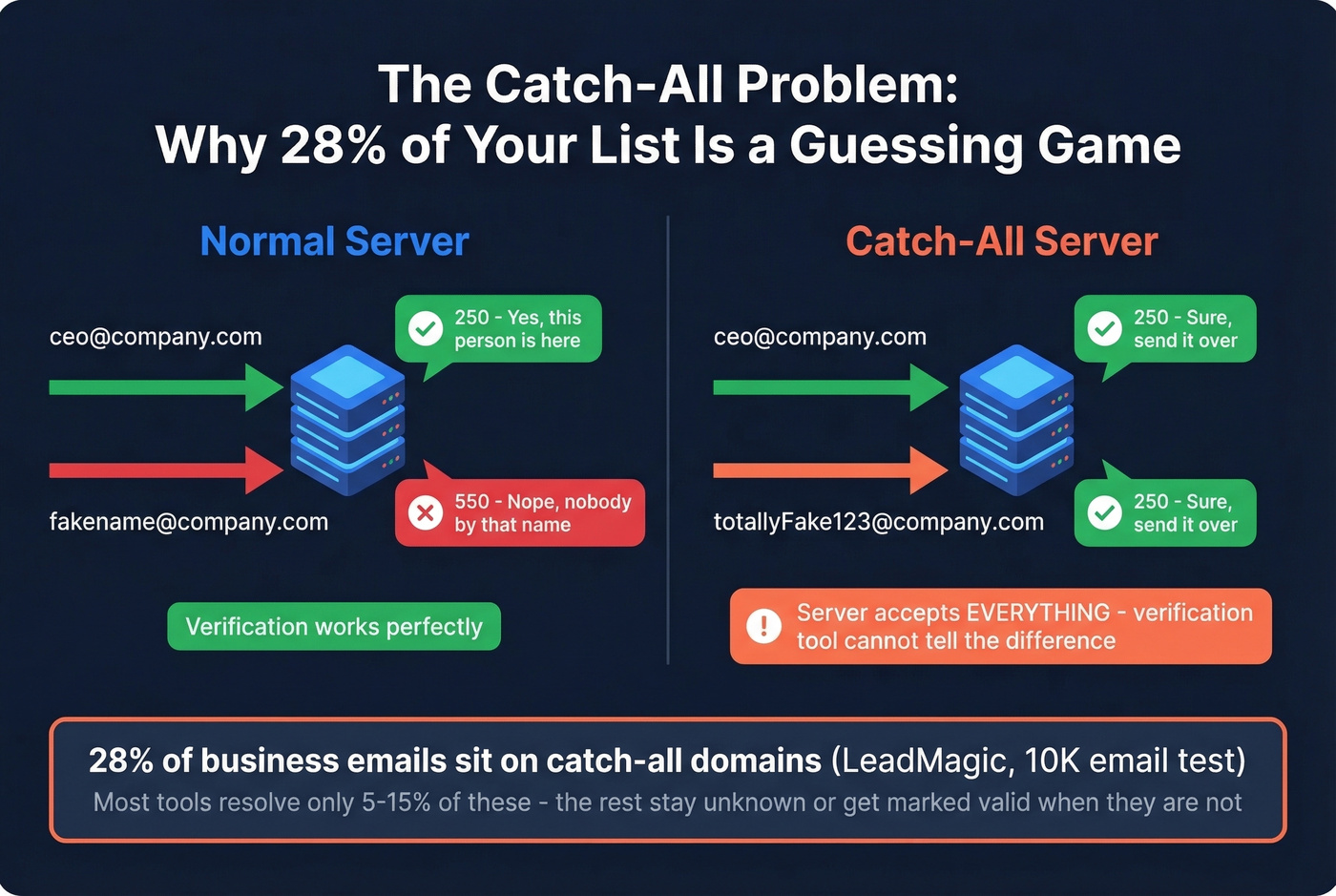
This is the single biggest accuracy problem in email verification, and it's where tools diverge most dramatically. Some mark every catch-all as "unknown" and move on. Others attempt to resolve them using behavioral signals, historical data, or secondary checks.
In the LeadMagic benchmark, catch-all resolution for common tools ranges from 5% to 15% - a 3x spread that directly impacts your bounce rate.
Some tools advertise "30+ verification steps," but more steps don't automatically mean better results. What matters is whether those steps actually resolve catch-all addresses into confident valid/invalid answers.
If you’re building a full outbound workflow, pair verification with solid email deliverability fundamentals so “valid” emails actually land in inboxes.
Greylisting and Temporary Failures
Some servers use greylisting as a spam defense: they reject the first connection attempt with a temporary 451 or 421 code, expecting legitimate senders to retry. Basic verification tools see that 4xx response and mark the address as "unknown" or "risky." Smarter tools distinguish between temporary and permanent failures and implement retry logic - but that takes time and infrastructure.
Provider Blocking
Some providers intentionally make SMTP probing ambiguous. Gmail is the most clearly documented example: Reacher returns a "disabled" flag for Gmail probes, which prevents mailbox-level confirmation through SMTP alone.
If Gmail is your main pain point, see our guide on how to check if a Gmail account exists.
The Real Question to Ask
Stop obsessing over "99% accuracy" claims. The metric that actually matters is catch-all resolution rate - how many of those ambiguous addresses can the tool resolve into a confident valid/invalid answer. That's where your bounce rate lives or dies.
Here's the thing: if more than 20% of your list sits on catch-all domains and your verification tool doesn't resolve them, you're not really verifying - you're just removing the easy invalids that would've hard-bounced anyway. The hard work is in the catch-all pile, and most tools skip it entirely.
To put numbers around it, track your email bounce rate before and after verification (and after you start sending).
Real Accuracy Benchmarks
Two public benchmarks give us actual numbers. Neither is perfect, but together they paint a useful picture.
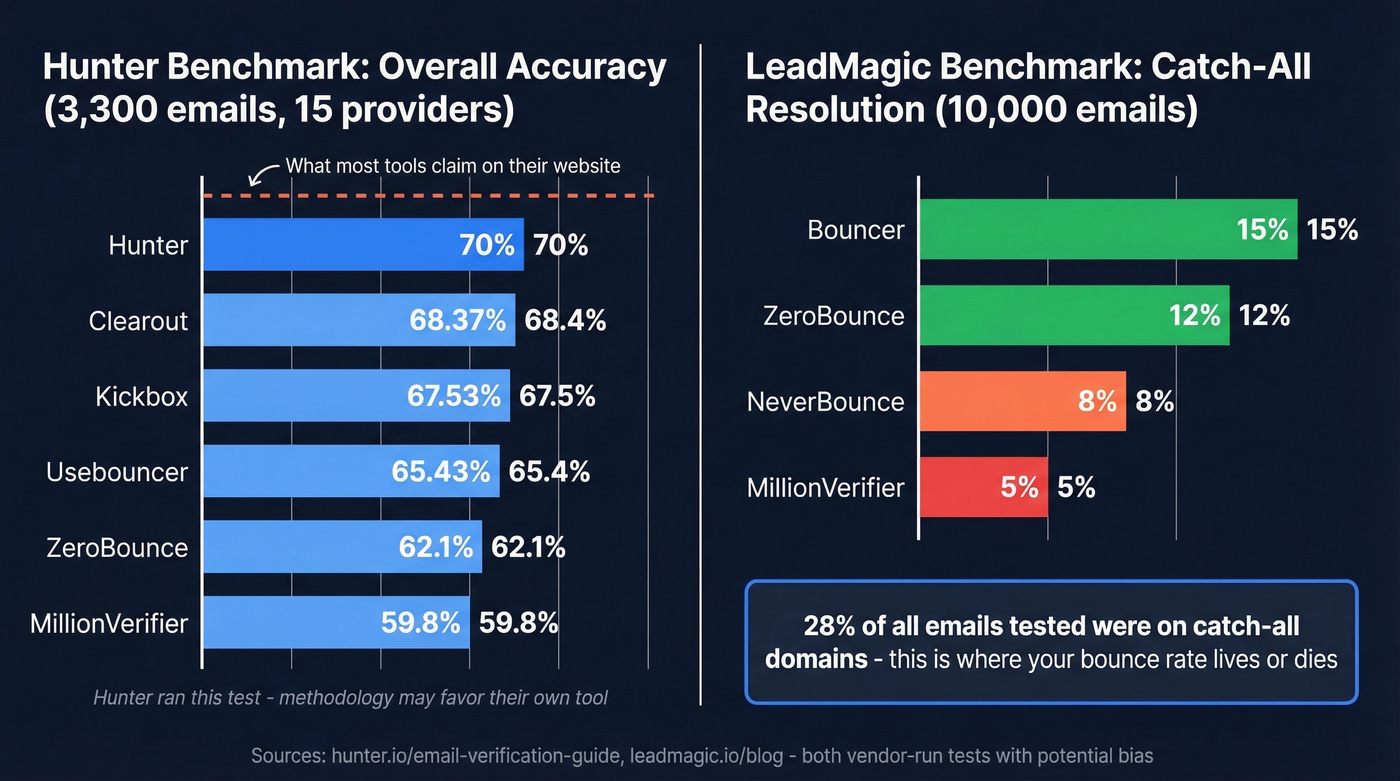
Hunter ran a benchmark of 15 verification providers using 3,000 real business emails (segmented by company size: Small 1-50, Medium 51-200, Large 201+) plus 300 invalid emails. Their accuracy metric counts correct predictions divided by total tested, with "unknown" results reducing accuracy. The top four: Hunter 70%, Clearout 68.37%, Kickbox 67.53%, Usebouncer 65.43%. Hunter acknowledges the methodology may favor their own tool since dataset labels came from their outreach activity.
LeadMagic ran a 10,000-email test focused on catch-all resolution and false positive/negative rates. Their dataset included 28% catch-all domains. LeadMagic's own tool scored 94.2% catch-all resolution in their test.
| Tool | Catch-All Resolution | False Positive | False Negative |
|---|---|---|---|
| ZeroBounce | 12% | 0.9% | 1.3% |
| Bouncer | 15% | 1.2% | 2.3% |
| NeverBounce | 8% | 1.4% | 1.7% |
| MillionVerifier | 5% | 1.8% | 2.4% |
Most tools in both benchmarks still advertise 95%+ accuracy on their marketing pages. The actual numbers tell a different story. We've seen this pattern across vendor benchmarks - the methodology always matters more than the headline number. Pay attention to how "unknown" results are counted, whether catch-all domains are included, and who funded the test.
Best Tools to Verify Email Addresses
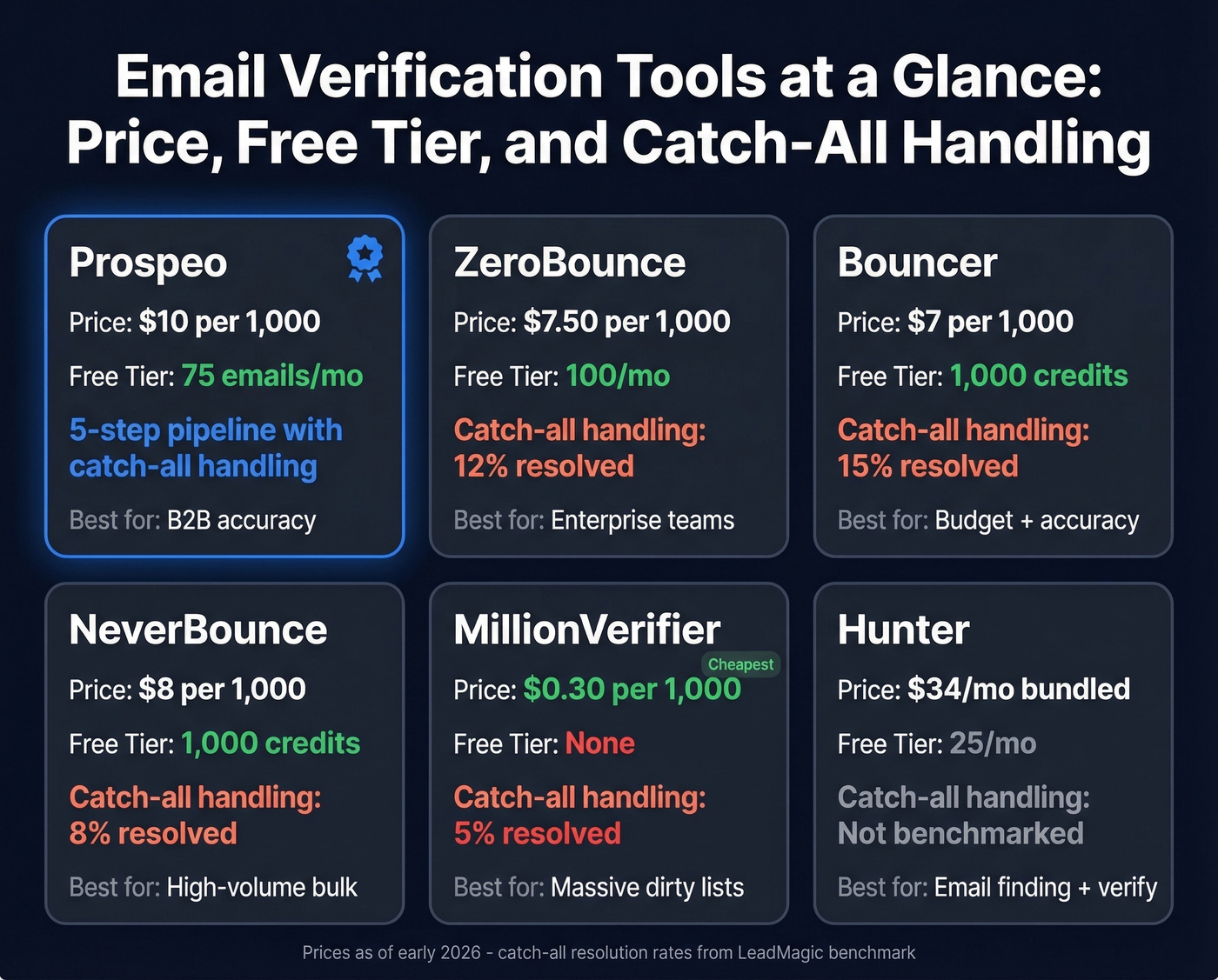
| Tool | Price/1,000 | Free Tier | Catch-All | Speed (10K) | Best For |
|---|---|---|---|---|---|
| Prospeo | ~$10 | 75 emails/mo + 100 extension credits | 5-step with catch-all handling | - | B2B accuracy |
| ZeroBounce | $7.50 | 100/mo | 12% resolved | 22 min | Enterprise teams |
| Bouncer | $7 | 1,000 credits | 15% resolved | 25 min | Budget + accuracy |
| NeverBounce | $8 | 1,000 credits | 8% resolved | 18 min | High-volume bulk |
| MillionVerifier | $0.30 | None | 5% resolved | 35 min | Massive dirty lists |
| Hunter | ~$34/mo bundled | 25/mo | Not benchmarked | - | Email finding + verify |
| Kickbox | $10/1,000 | $5 for 500 | Not benchmarked | - | Small batches |
| BriteVerify | $10/1,000 | None | Not benchmarked | - | CRM integrations |
| Xverify | $9.20/1,000 | None | Not benchmarked | - | Mid-market teams |
Prospeo
Prospeo runs a 5-step verification pipeline: syntax validation, DNS/MX lookup, SMTP mailbox probe, catch-all handling, and spam-trap/honeypot filtering. That pipeline delivers 98% verified email accuracy across 143M+ verified emails, backed by proprietary infrastructure that doesn't depend on third-party email providers. A 7-day data refresh cycle means you're verifying against current data, not records that went stale a month ago.
If you’re also sourcing contacts (not just cleaning), combine verification with an email finder workflow so you don’t waste credits on bad inputs.
Real results: Meritt went from a 35% bounce rate to under 4% after switching. Stack Optimize maintains under 3% bounce across all clients. The free tier gives you 75 verifications per month plus 100 Chrome extension credits - enough to test before committing. Paid plans run about $0.01 per email with no contracts.
Use this if you're running outbound campaigns where deliverability directly impacts revenue and you need catch-all handling that actually works.
Skip this if you're verifying a one-time list of 50 emails and don't want to create an account.
ZeroBounce
ZeroBounce is the safe pick for teams that need to verify addresses across large lists without risking sender reputation. Its 0.9% false positive rate is the lowest in the LeadMagic test - it rarely tells you an email is valid when it isn't. The 12% catch-all resolution is middling but better than most. Pricing starts at $15 minimum for 2,000 emails (about $7.50 per 1,000), with 100 free monthly credits. Processing speed is solid at 22 minutes for 10,000 emails.

The trade-off? A 1.3% false negative rate means it occasionally marks valid emails as invalid - you'll lose some real contacts. For enterprise teams that prioritize sender reputation over list size, that's the right trade-off.
Bouncer: Best Catch-All Resolution Per Dollar
Forget the standard pitch. At 15% catch-all resolution, Bouncer beats every other budget tool on the single metric that matters most.
The catch: a 2.3% false negative rate, the highest in the benchmark. You'll resolve more catch-all addresses, but you'll also incorrectly reject more valid ones. At $7 per 1,000 emails with 1,000 free credits to start, the math works if catch-all domains are your primary headache. It doesn't work if losing 2%+ of valid contacts is unacceptable for your list size.
If you’re comparing options in this tier, see our roundup of Bouncer alternatives.
NeverBounce
Speed is NeverBounce's edge - it processed 10,000 emails in 18 minutes in the LeadMagic test, fastest in the field. It's widely integrated with marketing platforms and CRMs, and at $8 per 1,000 emails with 1,000 free credits, pricing is straightforward. The weak spot is catch-all resolution at just 8%, which means a lot of "unknown" results on B2B lists.
MillionVerifier
Here's the scenario where this makes sense: you have a 500K-email list from a trade show, a legacy CRM, or a data purchase. You know the list is dirty. You just need to strip out the obvious invalids before running the survivors through a better tool.
At $0.30 per 1,000 emails - yes, thirty cents - MillionVerifier is absurdly cheap for that first pass. But only 5% catch-all resolution, 1.8% false positives, and 2.4% false negatives mean you shouldn't trust it as your only verification step. We've used it as a pre-filter before running the cleaned list through a more accurate tool, and that two-pass approach works well for massive lists where per-email cost matters.
Hunter
Hunter bundles verification with its email-finding tool starting around $34/mo. They ran the 15-provider benchmark and came out on top at 70% accuracy - though they acknowledge the methodology may favor their own tool. Best for teams already using Hunter for email discovery who want verification in the same workflow.
If you’re shopping around, compare against other Hunter alternatives before you commit.
Kickbox
Solid starter option at $5 for 500 verifications. Hit 67.53% overall accuracy in the Hunter benchmark. Good for one-off small batches when you don't need a monthly subscription.
The benchmark showed top tools hitting just 70% accuracy on real business emails. That gap destroys your sender reputation. Prospeo refreshes 300M+ profiles every 7 days - not every 6 weeks - so you're never emailing stale addresses. Teams using Prospeo cut bounce rates from 35%+ to under 4%.
Stop burning your domain on data that was accurate six weeks ago.
Reading Verification Results
When you run a verification - whether manually via SMTP or through a tool - you'll get response codes that tell you exactly what happened. Understanding the underlying codes gives you more control than simplified OK/Bad/Unverifiable labels.
| Code | Meaning | What to Do |
|---|---|---|
| 250 | Valid recipient | Safe to send |
| 550 5.1.1 | Invalid address | Remove immediately |
| 550 5.7.1 | Blocked by policy | Check sender reputation |
| 421 4.7.0 | Rate-limited | Retry later |
| 451 | Greylisting | Retry after delay |
| 554 5.7.5 | Spam filter rejection | Investigate reputation |
The action plan is straightforward. Send to valid addresses. Remove invalid ones permanently. Test risky addresses in small batches with careful monitoring. And suppress unknown results entirely - sending to them risks bounces that damage your sender reputation for weeks.
If you’re sending at scale, also watch email velocity so you don’t trigger rate limits and filtering.
Open-Source and Self-Hosted Options
For developers who want full control - or teams verifying at scale who want to avoid per-email costs - open-source tools let you run verification without relying on a third-party API.
Reacher is the standout. Written in Rust with 8.5k+ GitHub stars, it runs as a Docker container and exposes an HTTP API. It handles syntax, MX, SMTP, and catch-all detection. The caveats: you need outbound port 25 open, you'll need SMTP proxies for any real volume, and Gmail addresses come back as "disabled" regardless. Licensing is AGPL-3.0, with a commercial license available for proprietary embedding.
Other options include AfterShip/email-verifier in Go for the full syntax/DNS/MX/SMTP stack, email-validator in Python for syntax and MX only, and validator.js in JavaScript for fast syntax validation.
Real talk: self-hosting verification is a rabbit hole. Between proxy management, IP rotation, port 25 access, and keeping up with provider blocking changes, most teams are better off paying $7-10 per thousand emails and focusing on their actual job. I've watched teams spend more engineering hours maintaining a self-hosted setup than the API costs would've been for three years.
If you’re doing this as part of a bigger pipeline, consider pairing verification with data enrichment services to keep records current.
FAQ
Can you check if a Gmail address exists?
Not reliably. Gmail blocks SMTP verification probes, returning a "disabled" response regardless of whether the mailbox is real. Most verification tools mark Gmail addresses as "unknown" or "risky." The only dependable method is sending an actual email and monitoring for a hard bounce - which defeats the purpose of pre-send verification.
Mailmeteor offers a Google Sheets-based option for list hygiene workflows, including 50 email verifications per month free, but it faces the same underlying limitation on Gmail mailbox confirmation.
How do you verify an email for free?
Several tools offer free tiers. Hunter gives you 25 free verifications per month, ZeroBounce offers 100, and Bouncer provides 1,000 free credits to start. Prospeo's free tier includes 75 verifications per month plus 100 Chrome extension credits - the most generous option for teams running real outbound. For a single address, paste it into any of these tools and get a result in seconds.
What's a catch-all domain?
A catch-all domain accepts email sent to any address at that domain, even addresses that don't exist. SMTP verification returns "valid" for these, making it impossible to distinguish real from fake. In LeadMagic's benchmark, 28% of emails were on catch-all domains - which is why catch-all resolution rate matters more than headline accuracy claims.
Is email verification legal?
Yes. Verification checks publicly accessible DNS records and initiates standard SMTP connections without sending actual messages. It doesn't access private data. GDPR compliance depends on how you obtained and process the email addresses themselves, not on the verification step.
How often should you re-verify your list?
Every 30-90 days for active outbound lists. Email addresses decay at roughly 2-3% per month due to job changes and company turnover. Monthly re-verification is ideal for high-volume senders. Tools with shorter data refresh cycles catch stale records faster - a 7-day refresh catches a job change within a week, while a 4-6 week refresh lets you send to a dead address for over a month.