

How to Check If a Gmail Account Exists - Every Method Explained
A user on r/GMail posted something that perfectly captures this problem: they tried logging into a known Gmail address and Google said "it doesn't exist." Then they tried creating that exact same address - and Google said "someone already has that username." The recovery flow? Also said it doesn't exist.
Google can't even agree with itself.
And if Google's own systems give contradictory answers when you check if a Gmail account exists, imagine what happens when you're trying to verify a prospect list of 500 addresses before launching a cold email sequence. You send, a quarter bounce, your domain reputation tanks, and now you're Googling "how to warm up a burned domain" instead of booking meetings.
Verifying whether a Gmail address is real is genuinely harder than checking any other email provider. But there are reliable methods - they just depend on whether you're checking one address, a list, or building verification into your product.
What You Need (Quick Version)
Checking one address? Go to Google's account recovery page. It's free and instant. Google will confirm or deny the account exists.
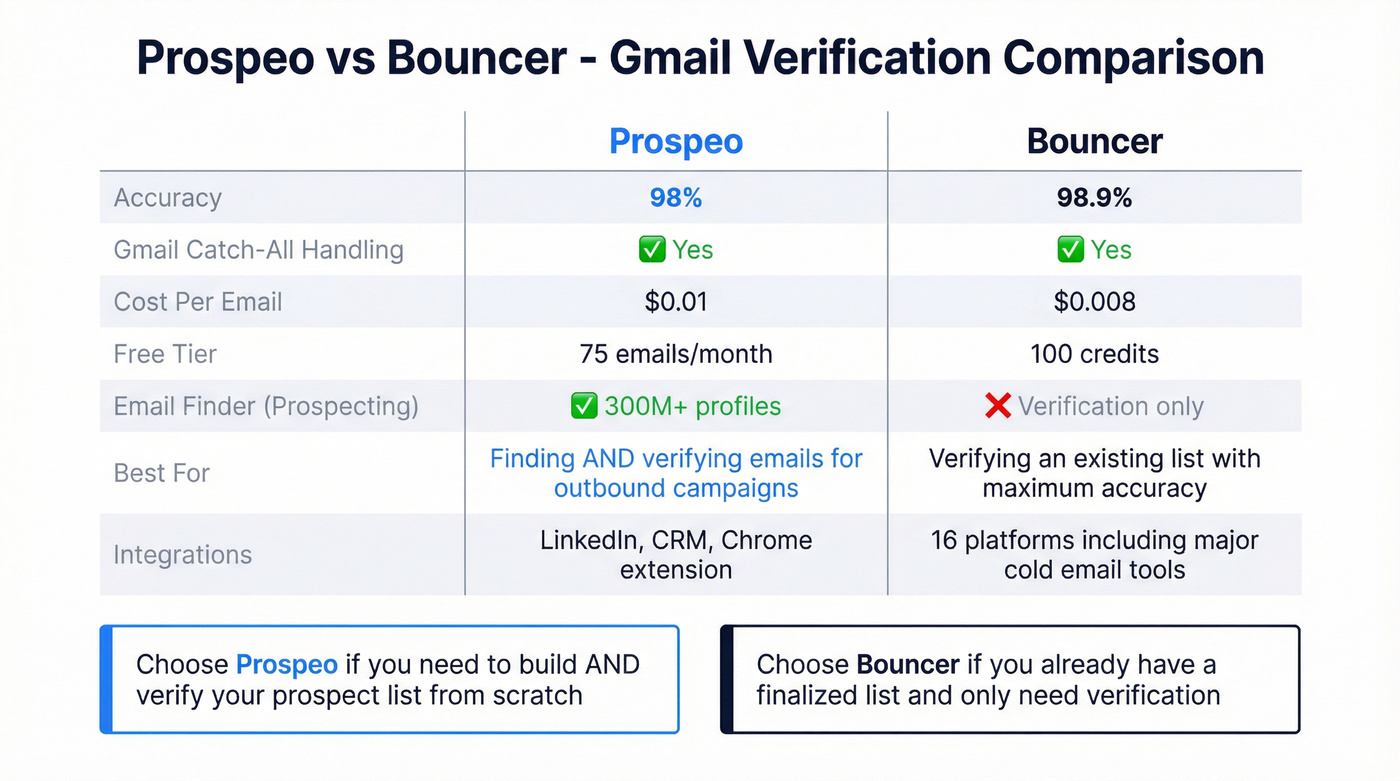
Verifying a list of 10+? Use a verification tool. Prospeo handles Gmail's catch-all behavior with 98% accuracy, and Bouncer scored 98.9% in independent benchmarks. Both offer free tiers. If you want a broader comparison, see our list of email verifier websites.
Building it into your app? SMTP callback verification works for most providers, but you'll need a verification API specifically for Gmail addresses - standard SMTP checks don't work on Gmail. For the full workflow, see our guide on how to verify an email address.
Why It's Hard to Verify a Gmail Address
Most email verification works through SMTP - you connect to the mail server, ask "does this mailbox exist?", and the server tells you yes or no. Simple.
Gmail doesn't play by those rules.
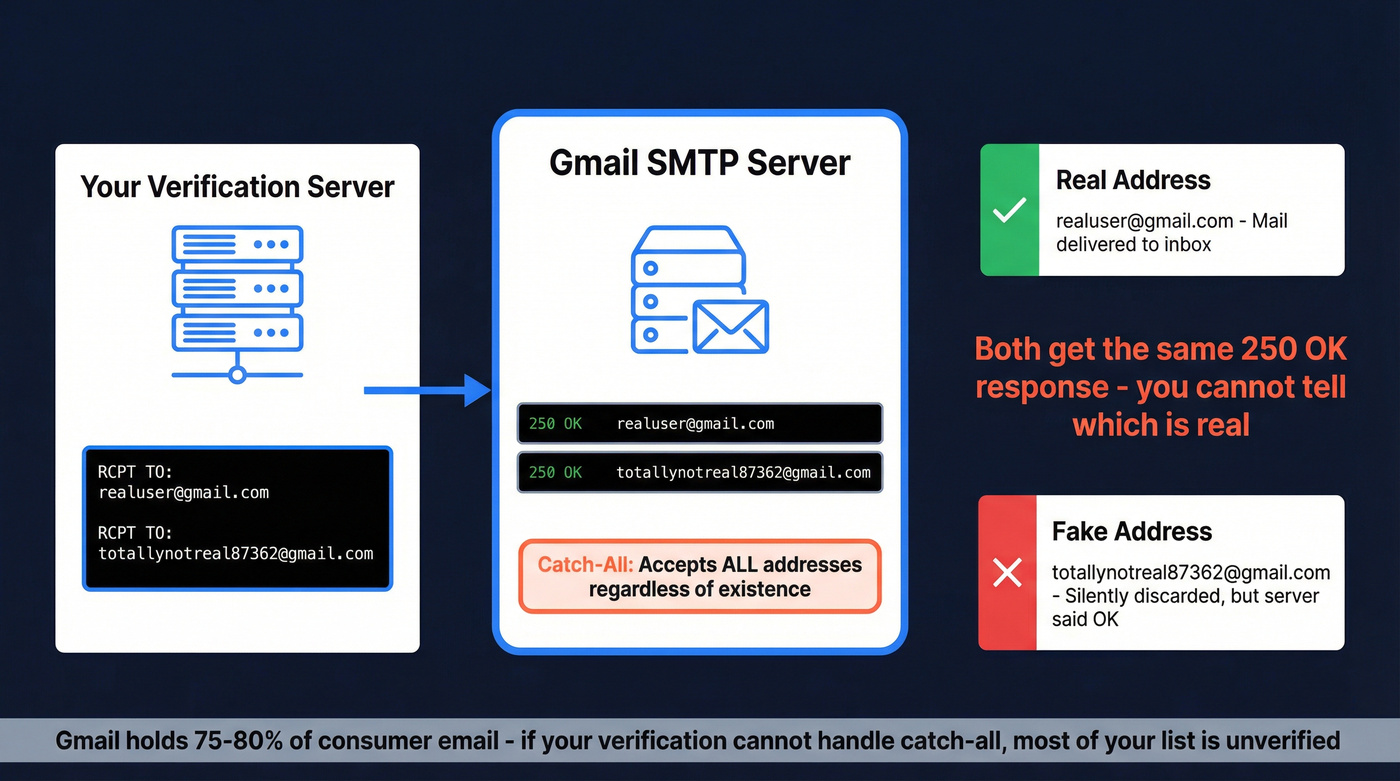
Gmail's SMTP servers return a 250 OK response for every address you query - real or fake. Send a RCPT TO command for totallynotreal87362@gmail.com and Gmail says "yep, that's fine." This is called catch-all behavior: the server accepts everything at the protocol level, regardless of whether the mailbox actually exists. So when you try to verify a Gmail address through standard SMTP, you'll always get a false positive.
A catch-all domain is any domain configured to accept mail for all addresses, even nonexistent ones. It's common in corporate email (Google Workspace domains often enable it), but Gmail.com itself behaves this way for SMTP verification purposes. The server directs everything to what appears to be a valid endpoint, making traditional verification impossible. This matters at massive scale - Gmail holds roughly 75-80% of the consumer email market, so any verification workflow that can't handle catch-all is broken for the majority of addresses you'll encounter.
One important distinction: catch-all behavior isn't the same as email aliases. A Gmail alias (like yourname+newsletter@gmail.com) routes to a real inbox. A catch-all acceptance means the server says "sure, I'll take it" even when no inbox exists. Verification tools that confuse the two will give you garbage results.
It gets worse. Catch-all statuses aren't permanent - domains can toggle this setting, and Gmail's own behavior has shifted over time. We recommend rechecking any Gmail-heavy list every 60-90 days to catch changes. If you need a repeatable process, use an email verification list SOP.
This is why a developer on r/SaaS recently built a dedicated API just for checking Gmail existence - "people kept signing up with fake Gmail accounts" and standard format validation wasn't catching them. The demand for Gmail-specific verification is real because the technical challenge is unique.


Gmail's catch-all behavior breaks standard SMTP verification. Prospeo's 5-step verification process handles catch-all domains, spam traps, and honeypots - delivering 98% email accuracy across 143M+ verified addresses. Stop guessing which Gmail addresses are real.
Verify your entire prospect list in minutes, not one address at a time.
Why Email Verification Matters More Than Ever in 2026
Since late 2025, Gmail has been actively rejecting non-compliant email at the SMTP protocol level. This isn't spam foldering - it's outright blocking. Your message never arrives. The recipient never sees it. Your sending infrastructure gets a 5xx permanent rejection.
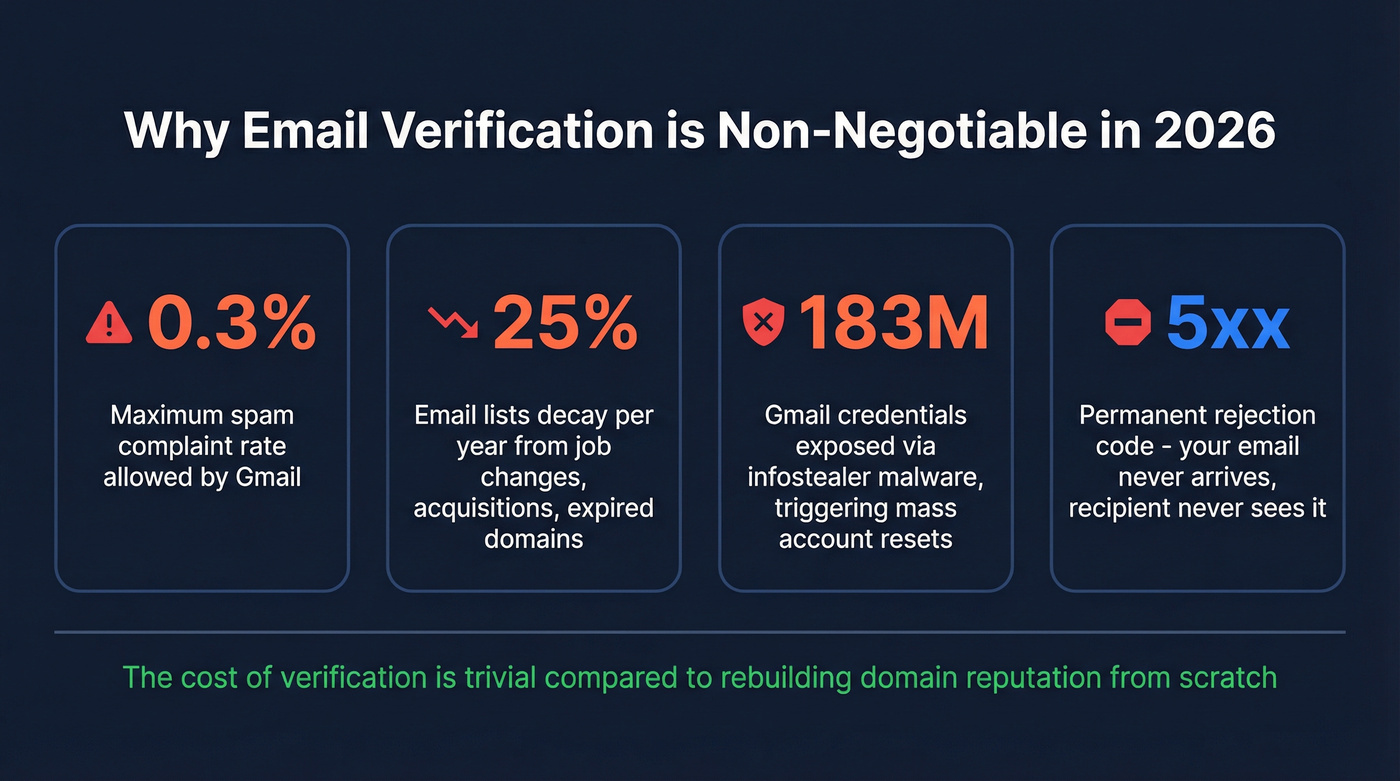
The requirements are strict: SPF, DKIM, and DMARC alignment. TLS encryption. Valid DNS. And here's the number that matters most - a spam complaint rate below 0.3%. That's three complaints per thousand emails. Send to a list full of dead addresses, and the bounces alone can push you past that threshold before a single human even reports you. (If you need help setting this up, start with SPF, DKIM, and DMARC.)
The data hygiene problem is getting worse, not better. Email lists decay by about 25% per year - people change jobs, companies get acquired, domains expire. And 183 million Gmail credentials were exposed through infostealer malware in recent years, triggering mass account resets and abandonments. For more on this, see B2B contact data decay.
Look, if you're sending cold email to unverified Gmail addresses in 2026, you're not just risking bounces. You're risking your entire sending domain. We've seen teams lose months of domain warming because they skipped a $20 verification step. The cost of verification is trivial compared to rebuilding domain reputation from scratch. If you’re actively repairing deliverability, it helps to understand domain reputation and follow a proper email warm-up plan.
Free Methods to Check If a Gmail Address Exists
Google's Account Recovery Page
This is the simplest way to check if a Gmail account exists manually. Here's the exact process:
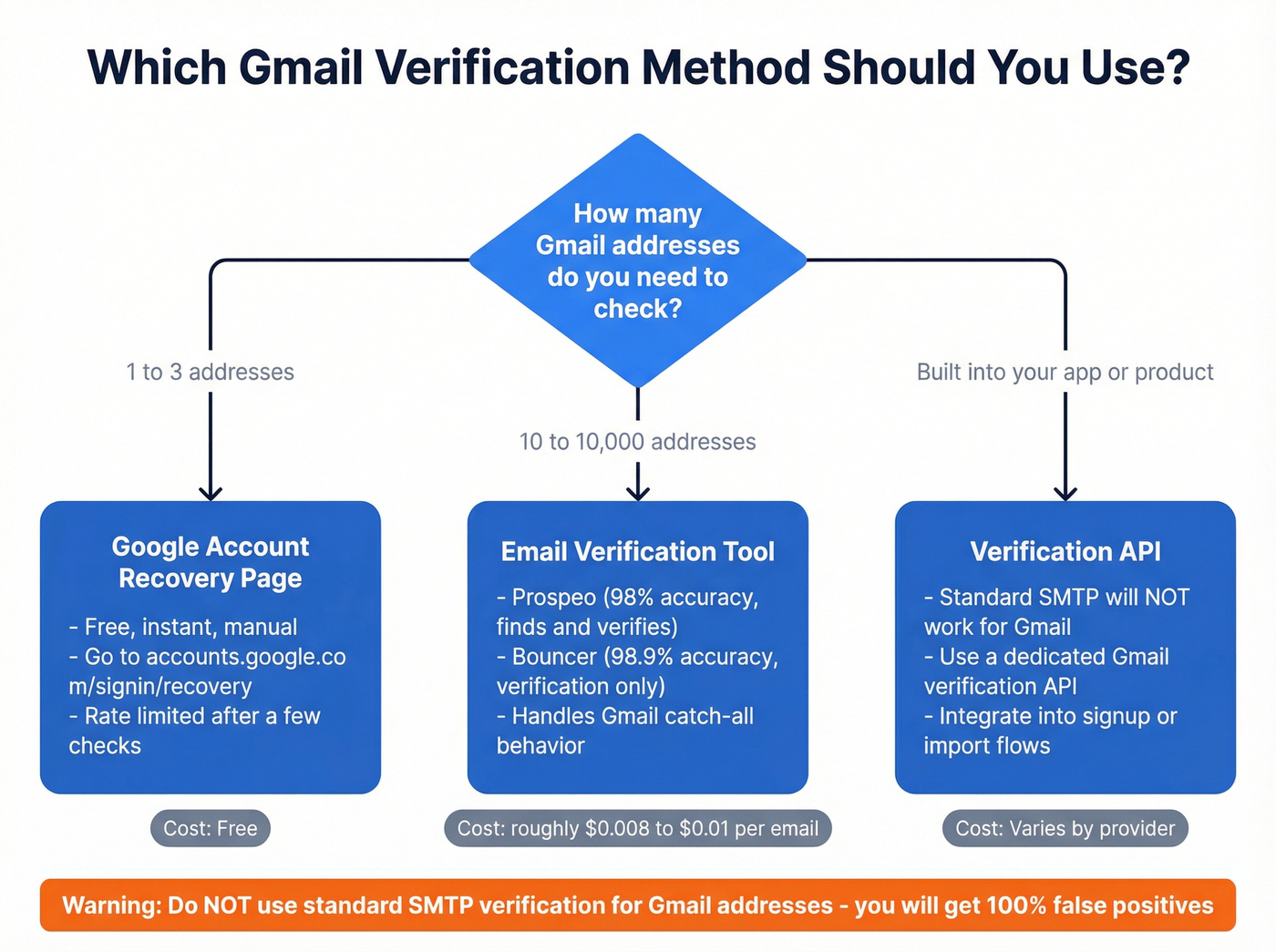
- Go to accounts.google.com/signin/recovery
- Click "Forgot email?" or enter the Gmail address directly
- Follow the prompts - Google will ask you to verify ownership
- If the account doesn't exist, Google redirects to a
noaccountsfoundpage with a clear "No account found with that email address" message - If the account exists, Google redirects to a verification challenge
It works. But there are hard limits.
Google rate-limits this flow aggressively. After a few attempts from the same IP, you'll hit a CAPTCHA. Datacenter IPs get CAPTCHAs immediately - Google's BotGuard system runs proof-of-work JavaScript challenges specifically to block automated enumeration. A security researcher demonstrated that IPv6 rotation could bypass these limits, but that required sophisticated tooling most people don't have.
Bottom line: Great for checking 1-3 addresses manually. Completely unusable for lists. Google has been progressively tightening this flow - they removed display name data from their People API in 2024, and each quarter brings more restrictions.
Google's Signup Page
This method works in reverse - instead of asking "does this account exist?", you try to create it.
- Go to accounts.google.com/SignUp
- Enter the username portion of the Gmail address you want to check
- If the account exists, Google returns: "Someone already has that username"
- If it doesn't exist, Google lets you proceed with account creation (just don't finish)
Two important limitations. First, this only works for @gmail.com addresses. Google Workspace accounts (like someone@company.com hosted on Google) won't show up here - the signup page only checks the gmail.com namespace. Second, this method is subject to the same rate limiting and CAPTCHA protections as the recovery page.
I've seen teams try to script this with Selenium or Puppeteer. Don't bother. Google's anti-bot detection catches headless browsers within a handful of requests. For anything beyond a quick manual check, you need a proper verification tool.
Use an Email Verification Tool
Verification tools work in layers. A good one runs four or five checks in sequence:
- Format validation - is it a properly structured email address? (If you’re still guessing formats, see guess email address format.)
- Domain/MX check - does the domain exist and accept mail?
- SMTP verification - does the mail server confirm the mailbox?
- Proprietary signals - historical bounce data, social graph analysis, pattern matching
- Catch-all handling - additional logic for domains (like Gmail) that accept everything
That fourth and fifth step is where tools differentiate. Any tool can check format and MX records. The ones worth paying for are the ones that solve the catch-all problem - the ones that can actually tell you whether a Gmail address is real despite Gmail's 250 OK responses.
Prospeo - Best for Gmail Catch-All Handling
Use this if: You need to find AND verify professional emails, not just check addresses you already have. You're running outbound campaigns and can't afford bounces.
Prospeo runs a 5-step verification process with dedicated catch-all handling, spam-trap removal, and honeypot filtering. The 98% email accuracy comes from proprietary infrastructure - Prospeo doesn't rely on third-party email providers, which means it isn't subject to the same limitations as tools that just wrap someone else's SMTP checks.
What sets it apart for Gmail verification specifically: Prospeo doesn't just tell you whether an address exists. It searches 300M+ professional profiles to find the right email in the first place, then verifies it before you ever see it. The cost works out to roughly $0.01 per email, with a free tier of 75 emails per month. For teams running outbound at scale, that combination of finding and verifying in one workflow eliminates an entire step from the process - and the bounce rates reflect it. Stack Optimize, for example, maintains under 3% bounce rates and 94%+ deliverability across all their client campaigns using Prospeo's data. If you’re comparing tools, start with email lookup tools and B2B email lookup tools.

If you already have a finalized list and only need verification, a dedicated tool like Bouncer is a solid option - but pairing it with Prospeo's email finder fills gaps in your list that pure verification tools can't touch.
Bouncer - Best Independent Accuracy Score
Bouncer scored 98.9% in an independent 10,000-email benchmark by Warmup Inbox - the highest observed accuracy of any tool tested. At $0.008 per email ($8 per thousand), it's also one of the cheapest options that actually performs. You get 100 free credits to start, a 4.9 rating on Capterra across 233 reviews, and integrations with 16 platforms including most major cold email tools.
Bouncer does one thing - verification - and does it better than almost anyone. No prospecting database, no email finder. That focus is its strength.
Skip this if: You need to find emails, not just verify ones you have. Bouncer won't help you build a list.
ZeroBounce - The Deliverability Swiss Army Knife
45 integrations - more than any other verification tool. That's ZeroBounce's real story. Verification is just one piece of a platform that includes inbox placement testing, blacklist monitoring, and email scoring.
ZeroBounce hit 98.8% observed accuracy in the same benchmark. Pricing starts at $16 for 2,000 emails with 100 free credits. If you're already fighting deliverability fires and need diagnostics alongside verification, ZeroBounce consolidates those tools. If you just need fast, cheap verification, the extras add cost you won't use.
EmailListVerify - The Budget Pick
Here's a hot take: the assumption that cheaper verification tools are less accurate is dead wrong. EmailListVerify charges $4 per 1,000 emails - the cheapest tool on this list - and scored 98.5% in independent testing. That's only 0.4 percentage points behind Bouncer at half the price.
Users on r/AskProgramming have called verification tools "outrageously expensive for the volume." EmailListVerify addresses that complaint directly. You get 100 free credits to test. No deliverability suite, no fancy integrations - just accurate results at the lowest cost per email.
If you're verifying 50,000+ addresses and every dollar matters, start here.
NeverBounce - Best for CRM Automation
NeverBounce scored 98.6% observed accuracy at $8 per 1,000 emails. Its real strength is 80+ integrations - if you're running HubSpot or Salesforce and want verification baked into your CRM workflows without manual exports, NeverBounce is the path of least resistance.
Bouncing off dead Gmail addresses destroys domain reputation fast. Prospeo refreshes data every 7 days - not the 6-week industry average - so your lists stay clean. Teams using Prospeo see bounce rates drop from 35% to under 4%.
Protect your sending domain. Verify before you send.
How Accurate Are Verification Tools, Really?
Every verification vendor claims 97-99% accuracy. The independent benchmarks tell a different story - not because the tools are bad, but because "accuracy" means different things depending on how you count.
An independent benchmark by Warmup Inbox tested 15 tools against the same 10,000-contact mixed-quality list:
| Tool | Observed Accuracy | Price / 1,000 | Free Tier | Best For |
|---|---|---|---|---|
| Bouncer | 98.9% | $8 | 100 credits | Verification accuracy |
| ZeroBounce | 98.8% | $8 | 100 credits | Deliverability suite |
| Emailable | 98.7% | $5 | 250 credits | Speed (2M/hr) |
| NeverBounce | 98.6% | $8 | 10 credits | CRM integrations |
| EmailListVerify | 98.5% | $4 | 100 credits | Budget-conscious teams |
| Kickbox | 98.4% | $10 | 100 credits | Enterprise compliance |
| Clearout | 98.1% | $5.80 | 100 credits | Balanced price/accuracy |
| MillionVerifier | 97.9% | ~$3 | None | Massive bulk lists |
| Snov.io | 97.2% | $19 | 50 credits | Prospecting combo |
| Hunter | 96.4% | $15 | 50 credits | Email finding |
| GetProspect | 95.9% | ~$10 | None | Lead gen |
Our recommendation for most readers: Bouncer for pure verification, EmailListVerify if budget is tight, Prospeo if you need to find AND verify. If you want more options, see email verification free.
Now compare that to Hunter's own 3,000-email benchmark. In that test, the best tool achieved only 70% accuracy. Why the massive gap? Because Hunter counted "unknown" results as failures. Most vendors exclude unknowns from their accuracy calculations entirely.
This is the dirty secret of email verification benchmarks. When a tool returns "unknown" for a Gmail address (because of the catch-all problem), vendors don't count that as a miss. But if you're the one sending the campaign, an "unknown" result is useless - you still don't know if the address is real. Whether you're verifying a consumer Gmail or a corporate domain, the "unknown" bucket is where accuracy claims fall apart.
In our testing, the gap between 98% and 99% accuracy matters far less than how a tool handles unknowns. Any tool scoring above 98% in independent testing is genuinely good. The real differentiator is whether the tool resolves catch-all domains or just punts them to "unknown."
SMTP Verification for Developers
If you're building verification into your own application, here's how SMTP callback verification works at the protocol level.
Step 1: Look up MX records. Query DNS for the domain's mail exchange records. This tells you which server handles email for that domain.
Step 2: Connect to the mail server. Open a TCP connection to port 25 on the MX server.
Step 3: Run the SMTP handshake. Issue these commands in sequence:
HELO verify.yourdomain.com
MAIL FROM:<verify@yourdomain.com>
RCPT TO:<target@theirdomain.com>
QUIT
Step 4: Interpret the response code.
- 250 - The server accepted the recipient. The address likely exists.
- 550 - The server rejected the recipient. The address doesn't exist.
- 451 - Greylisting. The server temporarily accepts everything and asks you to retry later. This is a false positive trap. (If you’re seeing hard bounces, this guide on 550 recipient rejected helps.)
The VRFY command technically exists in the SMTP spec for exactly this purpose - verifying whether a mailbox exists. In practice, almost every mail server disables it to prevent enumeration attacks. Don't rely on it.
Here's where it falls apart for Gmail. Gmail returns 250 for every RCPT TO command, regardless of whether the mailbox is real. Your SMTP check will tell you nonexistent-garbage-address@gmail.com is perfectly valid. It's not. This is precisely why developers trying to check if a Gmail account exists programmatically can't rely on standard SMTP alone.
There are also real risks to running SMTP callbacks at scale. Some Real-time Blackhole Lists (RBLs) will blacklist your IP just for performing callback verification - they can't distinguish your verification probes from a spammer testing addresses. Greylisting servers will accept everything on first attempt, giving you false positives across the board.
For production systems, the practical approach is: use SMTP verification for non-Gmail domains, and route Gmail addresses through a dedicated verification API that uses proprietary signals beyond SMTP. Trying to build Gmail-specific verification from scratch is a rabbit hole - Google actively works to prevent exactly this kind of enumeration.
Legal Considerations - GDPR and Email Verification
Email addresses are personal data under GDPR. Full stop.
If an address can identify a natural person - and a work email like john.smith@company.com obviously can - GDPR applies.
The good news: email verification actually aligns with GDPR's requirements. Article 5(1)(d) requires data to be "accurate, up-to-date and corrected or deleted if incorrect." Verifying your email list isn't just legal - it's arguably required if you're processing EU personal data. For the outbound-specific version, see GDPR for Sales and Marketing.
But there are rules. Your verification provider is a Data Processor under GDPR, which means they're legally co-responsible for data security. If they have a breach, you're both liable.
B2B cold email is legal under GDPR if:
- The email is relevant to the recipient's professional role
- You're sending to a corporate email address
- You have a legitimate interest basis
- You include an opt-out option
B2C is different. Sending unsolicited emails to personal Gmail addresses requires prior consent. An Austrian company was fined EUR15,000 in 2020 for sending unsolicited emails to personal addresses scraped from online directories. Spain's AEPD has penalized companies for not explaining how they obtained contact details.
Before choosing a verification tool, check:
- Does the provider have a Data Protection Officer?
- Where are their servers located? (EU servers simplify compliance)
- What's their data retention period? (Shorter is better)
- Do they offer a Data Processing Agreement?
- Do they delete your uploaded lists after verification?
Data minimization matters too. Under Article 5(1)(c), you should be deleting invalid, duplicate, and irrelevant emails - not hoarding them. Verification isn't just about deliverability. It's about compliance.
FAQ
Can you check if a Gmail account exists without sending an email?
Yes. Google's account recovery page at accounts.google.com/signin/recovery confirms existence without delivering any message. Verification tools also use SMTP handshakes and proprietary signals - they probe the server without actually sending mail to the inbox.
How do you check if a Gmail address exists for free?
Google's account recovery page is the fastest free method - enter the address and Google confirms whether the account is found. Prospeo's free tier (75 emails/month) and Bouncer's 100 free credits let you verify small batches without paying. Manual methods hit rate limits after a few checks.
Why does Gmail say an account doesn't exist when it does?
Google's anti-enumeration security intentionally gives inconsistent signals across login, signup, and recovery flows. The contradictory responses are a deliberate security feature to prevent automated account harvesting, not a bug. That's why different Google pages return conflicting results for the same address.
Is it legal to verify whether someone's email exists?
For B2B purposes, yes - email verification aligns with GDPR's data accuracy requirement under Article 5(1)(d). B2C verification of personal Gmail addresses requires more caution around consent, especially in the EU where fines for unsolicited outreach to personal addresses start at EUR15,000.
Why do verification tools return "unknown" for Gmail addresses?
Gmail's SMTP servers return 250 OK for every address, real or fake. Tools relying solely on SMTP can't distinguish valid from invalid accounts, so they label them "unknown." Only tools with proprietary signals beyond SMTP - like multi-signal catch-all handling and historical bounce analysis - can resolve these reliably.