

Territory-Based Lead Routing: Get Every Lead to the Right Rep
A RevOps lead we know ran a territory routing audit last quarter. Forty percent of their inbound leads were landing in a catch-all queue because the state field was blank on the form submission. Average time to first touch on those leads? Eleven days. The routing rules were fine. The data wasn't.
That's not an outlier. Research shows responding within five minutes makes you 100x more likely to connect than waiting an hour, and a RevenueHero study of 1,000 businesses found 63.5% never responded at all. Territory-based lead routing solves the "who owns this?" question - but only if the data feeding your rules is accurate.
The short version:
- Clean your data first. Routing rules built on inaccurate firmographics misfire constantly.
- Design territories with non-overlapping criteria before writing a single routing rule.
- Start with native CRM workflows. Add a dedicated routing tool like LeanData or Chili Piper only when complexity demands it.
What Is Territory-Based Routing?
Territory-based lead routing automatically assigns incoming leads to sales reps based on predefined territory criteria - geography, industry, account size, or a blend of all three. When a lead hits your CRM, the routing engine evaluates its attributes against your territory map and drops it into the right rep's queue.
It's one of six common routing methods. The four you'll most often weigh against each other:
- Round-robin distributes leads evenly regardless of fit. Simple, but ignores rep expertise and market knowledge.
- Score-based routes by lead quality. Great for prioritization, weak for ownership clarity. (If you’re building this layer, see lead scoring.)
- Availability-based sends leads to whoever's free right now. Fast, but creates territorial chaos over time.
- Territory-based assigns by structured criteria. Best for B2B orgs with geographic sales structures, field teams, or regional compliance requirements.
Company hierarchy routing works well for enterprise orgs managing parent/child accounts, while use-case and deal-value routing layer on top of territory assignments for teams with specialized product lines or tiered sales motions.
If your reps own named accounts, cover specific regions, or specialize in verticals, territory routing is the right foundation. You can layer round-robin or availability logic within each territory - but the territory assignment comes first.
Why Territory Routing Matters
The math on speed-to-lead is brutal. That five-minute window where you're 100x more likely to connect? Calling within the first minute boosts conversion by 391%. Every minute after that, the number craters. (If you want the broader context on why calls still matter, see benefits of cold calling.)

A 2026 benchmark summary covering 433 companies found only 7% respond within five minutes - meaning 93% of teams are leaving the highest-converting window on the table. The RevenueHero study paints an even bleaker picture: average response time across 1,000 businesses was 29+ hours, and 63.5% never responded at all. That's not a rounding error. That's the majority of leads dying in a queue.
Location-based lead routing fixes this by eliminating the "who owns this?" question before it gets asked. When a lead arrives pre-assigned to the right rep, there's no handoff delay, no manager triage, no Slack thread asking "is this yours?" Companies with optimized territory plans see 10-20% higher productivity and 2-7% revenue increases without adding headcount. Field reps already spend only 35-39% of their time selling - clear territory ownership claws back hours lost to ambiguity.
Fix Your Data Before You Route
Here's the thing: every territory routing guide starts with routing rules. That's backwards. Territory routing is step three of a four-step process - data quality, territory design, routing logic, measurement. (If you need a baseline for what “clean” means, start with CRM hygiene.)
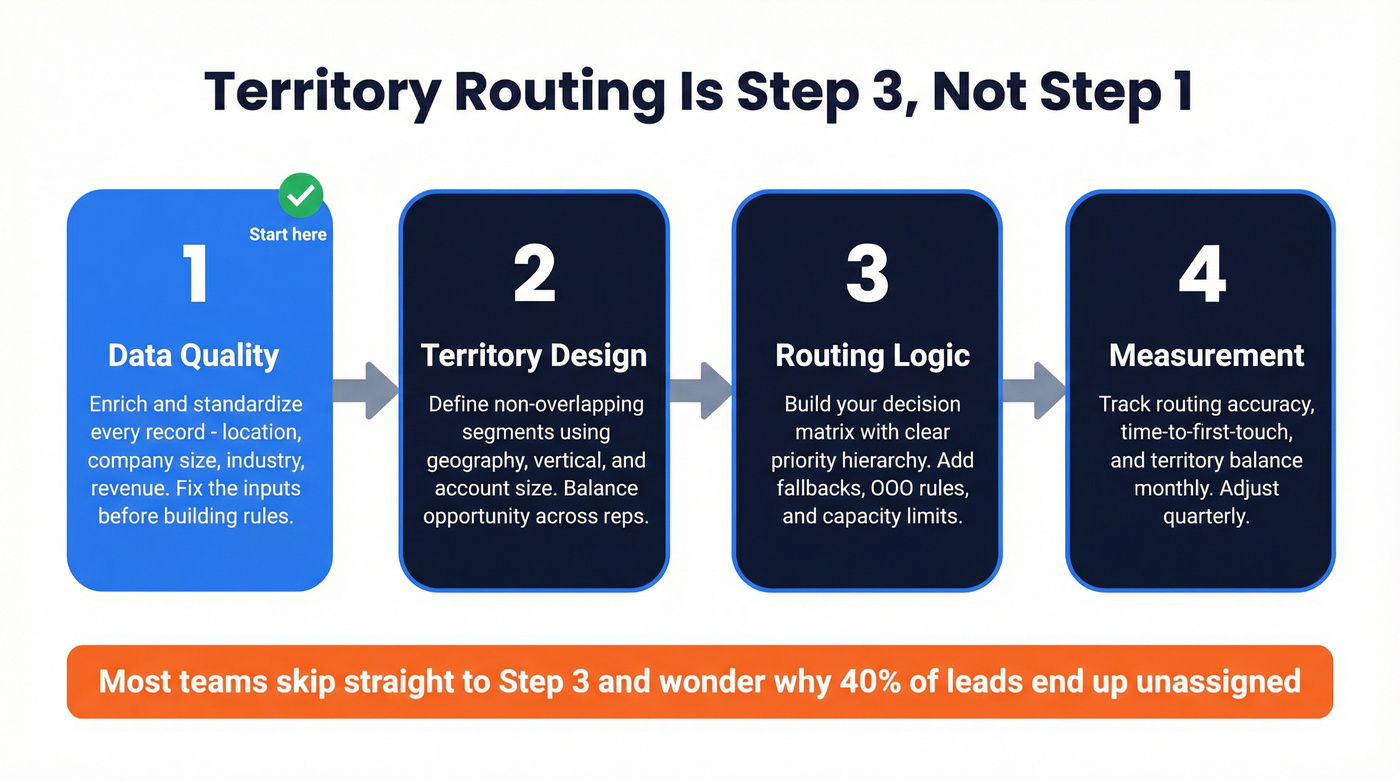
A prospect fills out your webinar form. They enter "NY" in the state field, but your territory rules expect "New York." The routing engine doesn't match it to any territory. The lead drops into a catch-all queue. Three days later, someone notices. By then, the prospect booked a demo with your competitor.
We've seen this exact scenario play out dozens of times, and it's a recurring ops reality: teams build elegant routing rules, then wonder why a huge chunk of leads still end up unassigned. The answer is almost always bad data. Up to 40% of B2B data is inaccurate, which means nearly half the records your routing rules evaluate are working with bad inputs - missing location data, outdated company size, wrong industry codes. (More on why this happens in B2B contact data decay.)
This is where enrichment becomes step zero. Prospeo fills in the gaps before your routing rule ever fires - standardized location, company size, industry, revenue - returning 50+ data points per contact at 98% email accuracy and a 92% API match rate, on a 7-day refresh cycle versus the six-week industry average. At roughly $0.01 per email, that's a fraction of what you'd spend on a dedicated routing tool that still needs clean data to function. (If you’re comparing vendors, see Waterfall alternatives for B2B data enrichment.)


40% of B2B data is inaccurate - that's 40% of leads your routing rules will misfire on. Prospeo enriches every CRM record with 50+ data points at 98% accuracy on a 7-day refresh cycle, so your territory assignments actually work. At $0.01 per email, it costs less than a single misrouted lead.
Stop routing leads into a black hole. Fix the data first.
How to Design Sales Territories
Territory design is where most teams either overthink or underthink. The goal is simple: every lead matches exactly one territory, every rep has a balanced book, and no gaps exist.
Start with your segmentation dimensions. Common ones include geography, industry vertical, account size, revenue potential, sales channel, and agent expertise. The key is blending criteria rather than relying on a single axis - pure geographic territories create imbalances because a rep covering Manhattan and a rep covering Montana don't have equivalent pipelines. (If you’re formalizing ICP inputs, use customer profiling for B2B sales.)
Start with geography as the base layer - region, state, or country. Then overlay account size or revenue potential to balance opportunity across territories. Carve out named accounts for strategic reps; these override geographic rules.
Before going live, run your existing lead database through the proposed territory map and flag every double-match or gap. Document every rule so new reps and ops hires can understand ownership without tribal knowledge. We've seen teams skip the documentation step and regret it within a quarter when a rep leaves and nobody can explain why certain accounts route the way they do.
The biggest mistake here is designing territories once and never revisiting them. Markets shift, reps leave, accounts grow. Quarterly reviews are the minimum - monthly is better if you're growing fast. (A lightweight cadence template helps - see internal QBR.)
Balanced territories need accurate firmographics - company size, revenue, location, industry. Prospeo's enrichment API returns all of these at a 92% match rate, refreshed every 7 days. Your territory map stays current without manual cleanup, and leads route correctly on the first pass.
Build territories on data that's actually accurate. Try it free today.
Building Your Routing Decision Matrix
Your routing logic needs a clear priority hierarchy. When a lead comes in, the system should evaluate criteria in a specific order - not try to match everything simultaneously. (If you’re aligning scoring + SLAs + routing, see AI lead qualification.)
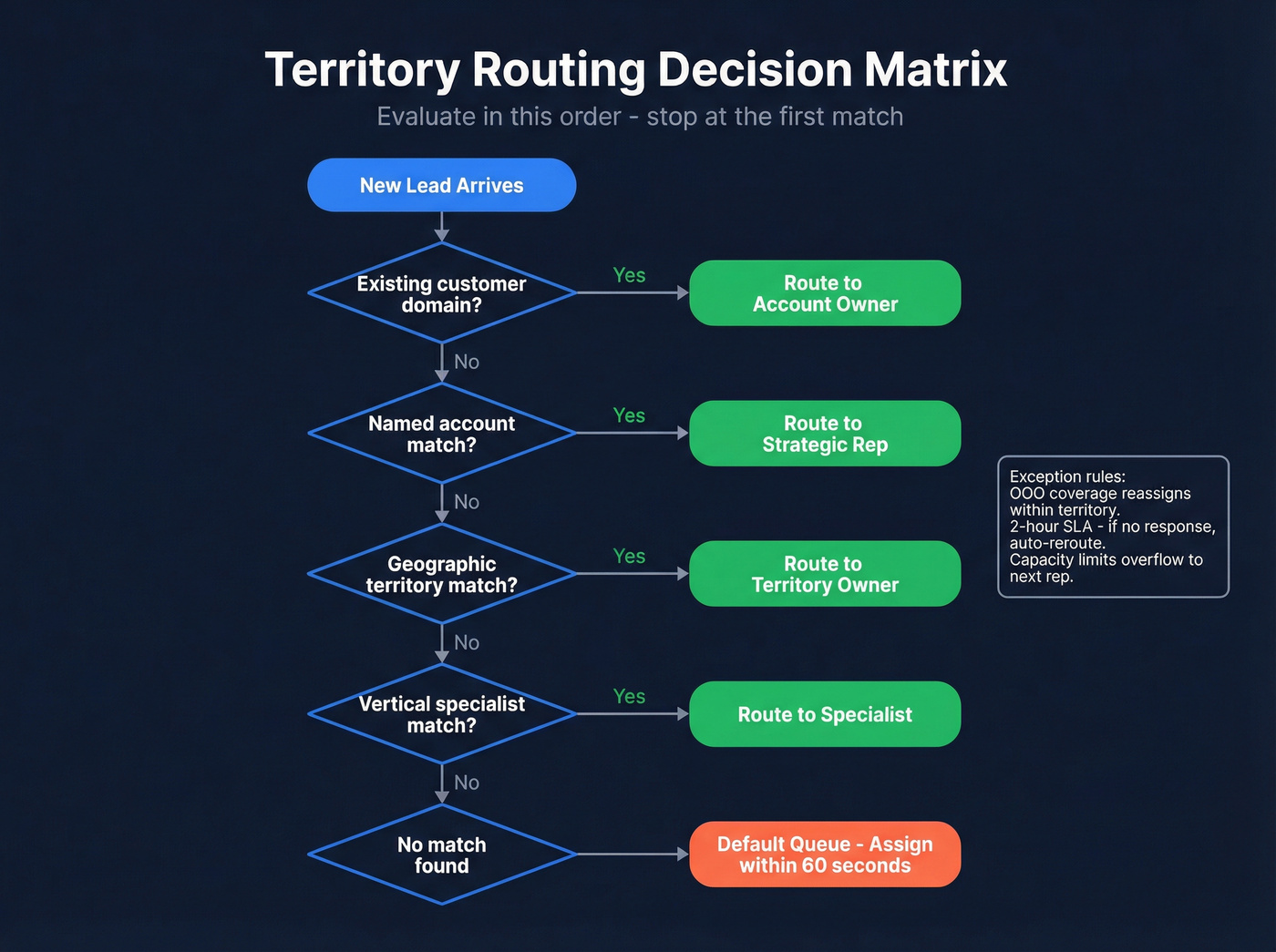
Here's a decision matrix that works for most B2B orgs:
- Existing customer domain? Route to the account owner. Always.
- Named account match? Route to the strategic rep who owns that account.
- Geographic territory match? Route to the territory owner based on HQ location.
- Vertical specialist match? If the lead's industry maps to a specialist, route there.
- Default queue Route to a designated SDR or manager immediately.
Let's walk through three quick scenarios. A lead from Acme Corp (existing customer) fills out a demo form - it goes straight to Acme's account owner, regardless of geography. A new lead from a fintech startup in Chicago matches both the Midwest territory and the fintech vertical - your priority rules determine the winner. A lead with no company data and a Gmail address hits the default queue instantly.
Exception handling matters just as much as the happy path. Build rules for OOO coverage so leads reassign to a backup within the territory. Set capacity limits that overflow to the next rep when someone hits their weekly cap. Align for timezone where possible. And set a reassignment SLA - if a rep doesn't respond within two hours, the lead automatically reroutes. That two-hour window balances giving reps a fair shot against letting leads go cold. (For follow-up behavior benchmarks, see SDR follow-up strategy.)
Five Mistakes That Kill Territory Routing
- No fallback queue. If a lead doesn't match any rule, it vanishes. Build a monitored default queue with a 60-second assignment SLA.
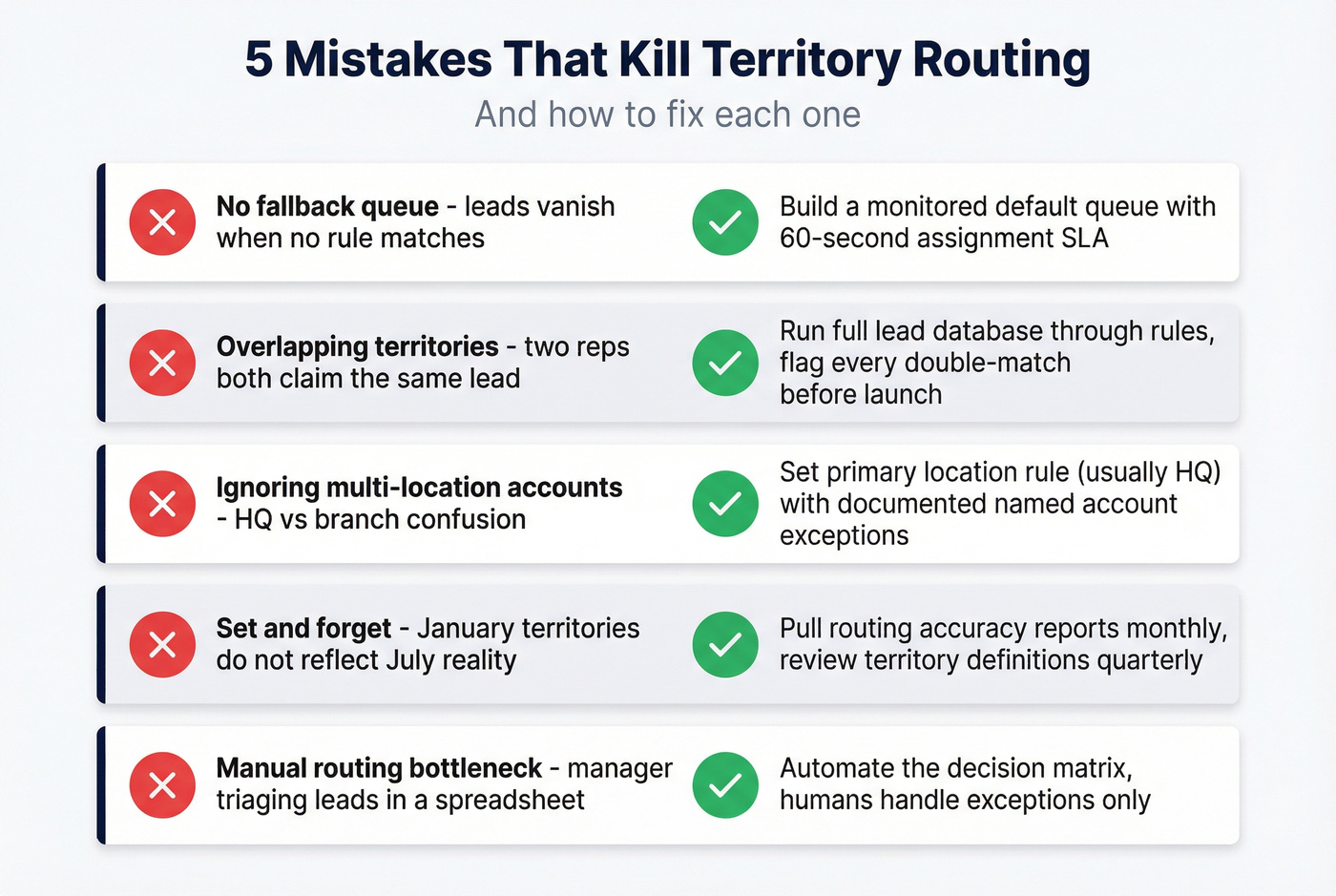
Overlapping territory definitions. Two reps both "own" mid-market fintech in the Northeast. Run your full lead database through proposed rules and flag every double-match before going live.
Ignoring multi-location accounts. A company HQ'd in San Francisco with offices in London and Singapore needs a primary location rule - usually HQ - with documented exceptions for named accounts.
Set-and-forget mentality. Territories designed in January don't reflect July's reality. Pull routing accuracy reports monthly; review territory definitions quarterly.
Manual routing bottlenecks. A manager triaging leads in a spreadsheet every morning is a single point of failure. Automate the decision matrix; human judgment handles exceptions, not the default path.
Best Tools for Territory Routing
You don't always need a dedicated routing tool. But when you do, here's what's worth evaluating. (If you’re building a lean stack, compare options in best revenue workflow software tools.)
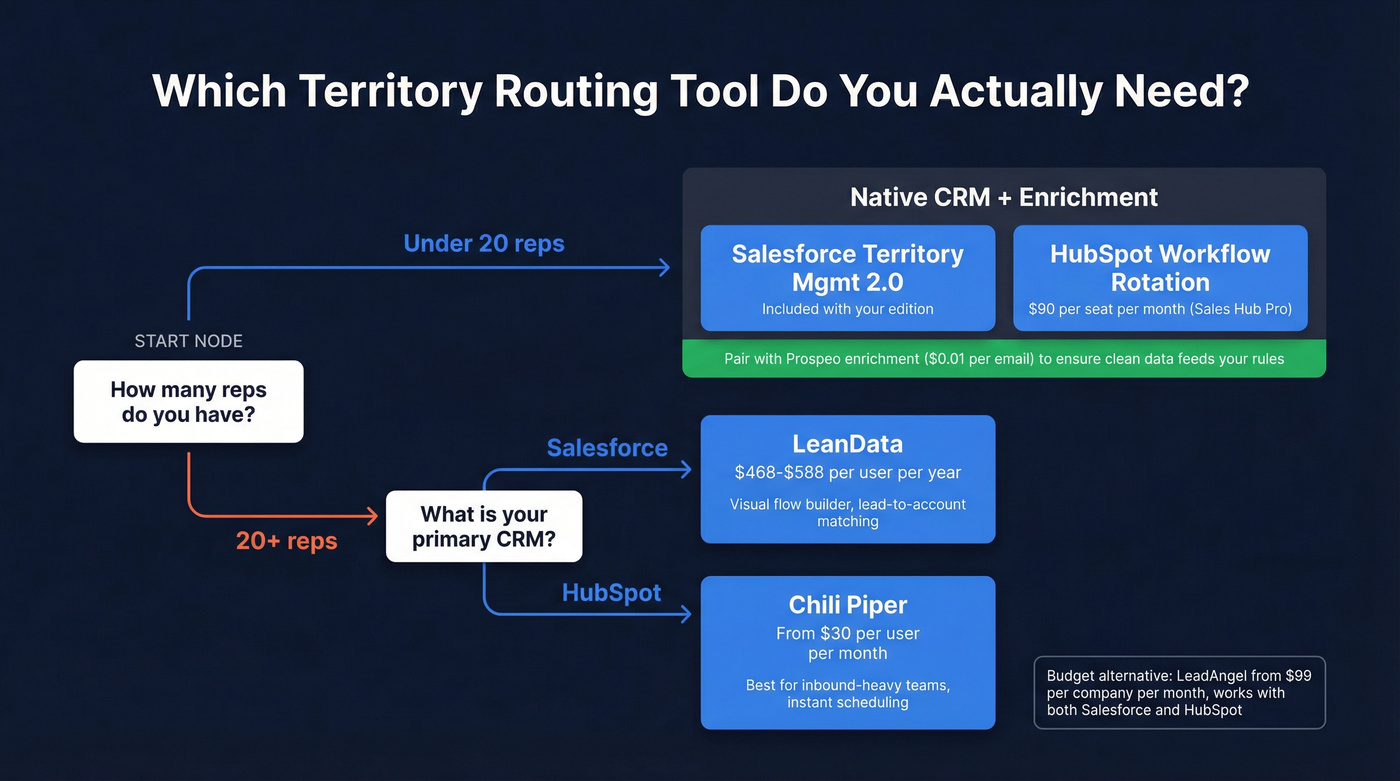
| Tool | Best For | Pricing | CRM | Key Feature |
|---|---|---|---|---|
| LeanData | Complex SF routing | ~$468-$588/user/yr | Salesforce | Visual flow builder |
| Chili Piper | Form-to-meeting speed | From $30/user/mo | SF, HubSpot | Instant scheduling |
| Prospeo | Data enrichment | Free tier; ~$0.01/email | SF, HubSpot | 98% email accuracy |
| Salesforce | Native routing | Included (edition-dependent) | Salesforce | Territory Mgmt 2.0 |
| HubSpot | Native routing | $90/seat/mo (Sales Hub Pro) | HubSpot | Workflow rotation |
| LeadAngel | Budget routing | From $99/co/mo | SF, HubSpot | Affordable dedicated |
| Traction Complete | SF-native alt | ~$500-$700/user/yr | Salesforce | Lead-to-account match |
Our recommendation: For most teams under 20 reps, native CRM routing plus data enrichment is all you need. For 20+ rep Salesforce orgs with complex hierarchies, LeanData is the move. For inbound-heavy HubSpot teams focused on speed-to-meeting, Chili Piper earns its keep.

LeanData
Who this is for: 20+ rep Salesforce orgs running complex territory hierarchies, lead-to-account matching, and round-robin within territories - all without writing Apex code. The visual flow builder and audit logs alone justify the price for compliance-heavy organizations.
The tradeoff is cost and complexity. Standard starts at $468/user/year, Advanced at $588/user/year, and implementation services typically add 15-25% on top. BookIt packages for scheduling can push total annual spend past $15K. Look, if you've got three SDRs and a simple territory map, LeanData is overkill. Save your budget for when you actually need it.
Chili Piper
Picture this: a lead fills out your demo request form. Instead of waiting for a rep to email back tomorrow, Chili Piper routes the lead based on territory rules and shows available calendar slots immediately. The lead books a meeting before they've even closed the browser tab.
Starting at $30/user/month plus a platform fee, it's more accessible than LeanData. But the routing logic is simpler - if you need deep lead-to-account matching or multi-object routing in Salesforce, Chili Piper won't cut it. It's a scheduling tool with routing capabilities, not a routing engine with scheduling bolted on. Use it if your primary goal is converting inbound form fills into meetings within seconds. Skip it if your routing complexity lives in account hierarchies and territory overlaps.
Salesforce Native
Quick-start checklist:
- Enable Territory Management 2.0 in Setup
- Define your territory model with hierarchy and assignment rules
- Build routing Flows that evaluate territory membership
- Test in sandbox before rollout
It's included with Salesforce - no incremental cost. The limitation is flexibility: complex matching logic and visual debugging are clunky compared to LeanData's purpose-built canvas. For teams under 20 reps with straightforward territory structures, it's plenty.
HubSpot Native
HubSpot's workflow engine handles territory routing through custom properties and rotation actions. Create a custom "Territory" property, build workflows that assign territory based on lead attributes, then use "Rotate record to owner" actions for round-robin within each territory. Included with Sales Hub Professional at $90/seat/month. It works for simple territory structures but lacks lead-to-account matching and the visual routing logic that dedicated tools provide.
Budget Alternatives
If you've outgrown native CRM workflows but can't justify LeanData's per-user pricing, two options deserve a look. LeadAngel starts at $99/company/month and covers territory-based assignment, lead-to-account matching, and round-robin - solid value for mid-market teams. Traction Complete is Salesforce-native with strong lead-to-account matching; expect enterprise-tier pricing in the $500-$700/user/year range. Both are worth evaluating if budget is the primary constraint.
CRM Setup Walkthrough
Regardless of which tool you choose, the implementation sequence stays the same: enrich first, define territories, build logic, measure.
Salesforce: Enable Territory Management 2.0 in Setup. Define your territory model - hierarchy of regions, segments, named accounts. Create assignment rules that map leads to territories based on enriched fields. Build a Flow that evaluates territory membership and assigns the record owner. Test everything in sandbox - routing mistakes in production create real pipeline damage.
HubSpot: Create custom contact properties for territory assignment. Build enrollment-triggered workflows that evaluate location, company size, and industry against your territory map. Use "Rotate record to owner" actions for distribution within each territories. The main limitation versus dedicated tools is the lack of lead-to-account matching - you'll need to handle that logic manually or with a third-party integration.
Both CRM paths assume your data is clean before routing fires. Enrichment isn't optional - it's the foundation the entire routing architecture sits on.
KPIs to Track
| KPI | Target | Why It Matters |
|---|---|---|
| Routing accuracy | 95%+ | Misroutes waste rep time |
| Time to assignment | <60 seconds | Automation baseline |
| Avg response time | <5 minutes | 100x connect rate |
| Misroute rate | <2% | Measures rule quality |
| Lead-to-opp by territory | Compare across | Spots imbalanced territories |
Pull these monthly. If routing accuracy drops below 90%, your territory definitions or data quality have drifted. If response time creeps up despite fast assignment, the problem is rep behavior, not routing logic.
Real talk: most teams obsess over routing tool features when the real win is in the data layer. A $99/month routing tool running on enriched data will outperform a $15K/year platform running on garbage inputs every single time. If your average deal size is under $25K, you almost certainly don't need enterprise routing software - you need clean records and a well-designed territory map. (If you want a scorecard for the data layer, see data quality.)
FAQ
What's the difference between territory routing and round-robin?
Territory routing assigns leads based on geography, industry, or account criteria - the lead goes to whoever owns that territory. Round-robin distributes leads evenly regardless of fit. Most teams combine both: territory assignment first to determine the right team, then round-robin within that territory to balance workload across reps.
How often should I review territory definitions?
Quarterly at minimum, monthly if you're scaling fast. Pull routing accuracy and conversion-by-territory reports regularly to catch drift early. If a territory's lead-to-opportunity rate drops 20%+ below the team average, something's misaligned - rebalance before the gap widens.
What if a lead doesn't match any territory rule?
Build a fallback queue that routes unmatched leads to a designated SDR or manager within 60 seconds. Most unmatched leads stem from missing firmographic data - enriching records before routing fires prevents the gap entirely.
How does location-based routing differ from full territory-based routing?
Location-based lead routing uses geography as the sole assignment criterion - country, state, zip code, or region. Full territory-based routing layers in dimensions like industry vertical, company size, and revenue potential. If your sales org is purely regional with no vertical specialization, location-based routing works fine. Once you add product-line specialists or tiered segments, the multi-dimensional approach prevents overlaps and gives reps clearer ownership.