

AI Agent for Email Outreach in 2026 (Plus a Buyer's Rubric)
Every ai agent for email outreach demo looks magical for about 12 minutes. Then you put it in front of real prospects and realize most "agents" are just copy tools bolted onto a sequencer.
The failure mode isn't "the AI wrote a bad sentence." It's "the AI confidently targeted the wrong person with a perfectly written email," then your deliverability tanks and you blame the tool.
Here's the thing: the best teams aren't chasing autonomy. They're chasing control.
Below are three tools to trial first, a benchmark-style rubric, and the deliverability checklist that keeps you from burning domains.
Best tools to trial first (TL;DR)
Trial these first (in this order):
Prospeo - best foundation for any agent: verified emails/mobiles, enrichment, and intent so your autonomy runs on clean inputs. Best for: teams that care about deliverability and list quality more than shiny "AI SDR" branding. Pair with: Instantly or Smartlead for sending, and Reply.io for reply triage.
Instantly - best for scaling outbound sending with clear pricing tiers and warmup baked in. Best for: outbound teams rotating inboxes and running high-volume tests without enterprise overhead. Skip this if: you need strict approvals, complex routing, or heavy CRM governance.
Reply.io (Jason AI SDR) - best for agent-like reply handling + multichannel workflows when you want the "SDR brain" closer to the inbox. Best for: teams that want AI to classify replies, ask follow-ups, and route handoffs. Skip this if: you won't staff reply QA (even 20 minutes/day) or you hate metering by active contacts.

What counts as an AI agent (vs. AI assist)?
"Agent" gets thrown around so loosely that buyers end up comparing totally different products. Here's the clean way to think about it, especially if you're evaluating agentic outbound email and not just a subject-line generator.
The three buckets (and what they actually do)
- AI assist (copy help) Writes subject lines, rewrites paragraphs, generates first-line personalization, and suggests variants. Useful. It doesn't run the motion.

Workflow automation (rules + triggers) Sequences, if/then logic, basic routing ("if reply contains 'not interested,' mark as closed"). That's automation, not agency.
Agentic behavior (plan -> act -> adapt) A real agent decides what to do next, executes it, and changes course based on outcomes, especially in multi-turn replies. If it can't handle a messy thread ("We're evaluating Q3, send security docs, loop in procurement"), it's not an agent.
I've seen teams buy "autonomous SDR" software, turn on autopilot, and then spend the next two weeks doing damage control in their inbox because the tool treated every "send details" as a green light to pitch harder instead of a cue to hand off to a human with context and attachments.
Agent vs assist: the practical table
| Capability | AI assist | AI agent (real) |
|---|---|---|
| Generates copy | Yes | Yes |
| Chooses targets | Rarely | Yes |
| Decides next step | No | Yes |
| Handles replies | Minimal | Yes (multi-turn) |
| Books meetings | No | Yes (handoff) |
| Needs guardrails | Some | A lot |
The 3 autonomy modes you'll actually run
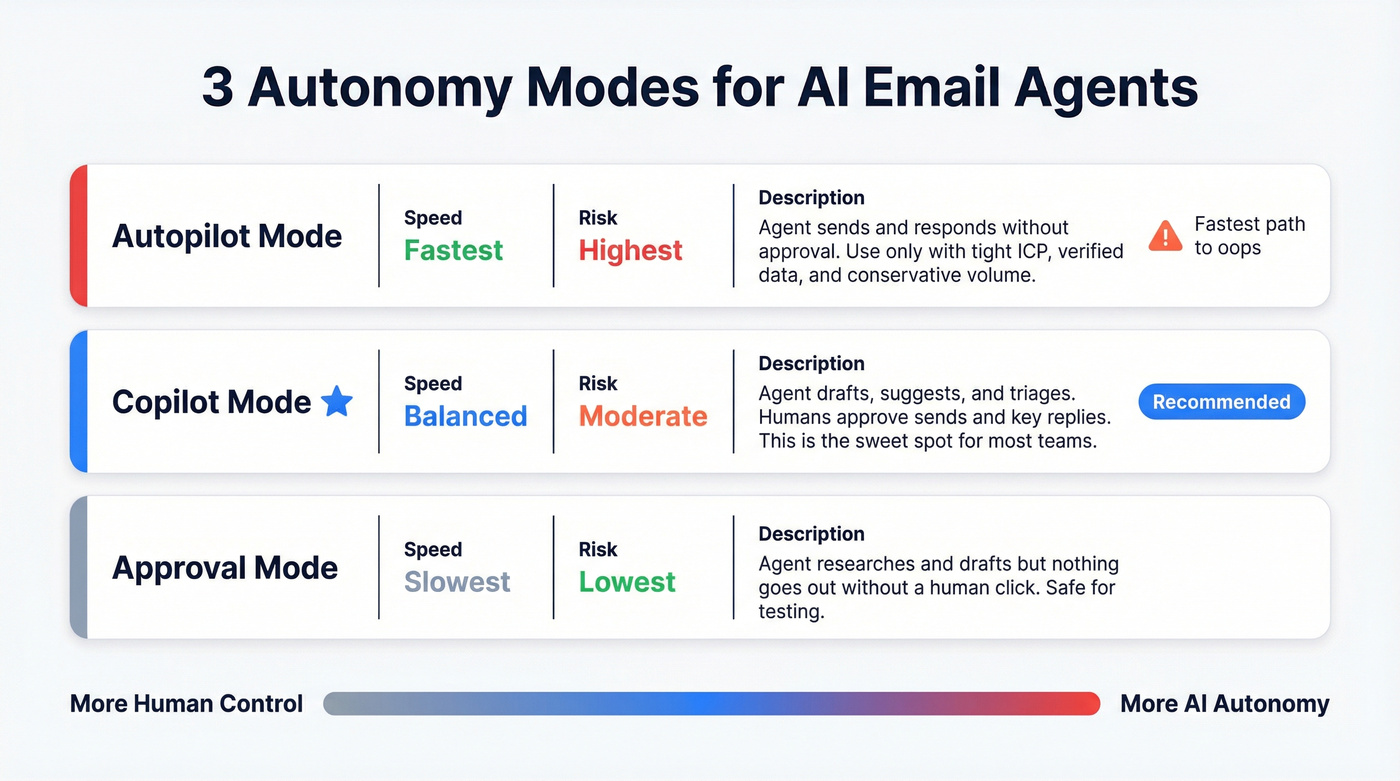
- Autopilot: the agent sends and responds without approval. Fastest path to "oops." Use only with a tight ICP, verified data, and conservative volume.
- Copilot: the agent drafts, suggests, and triages; humans approve sends and key replies. This is the sweet spot for most teams. (If you're standardizing this, see co-pilot mode.)
- Approval mode: the agent can research and draft, but nothing goes out without a human click. Slow, but safe when you're testing.
Signals that actually move reply rates (not "better copy")
If you want more replies, stop obsessing over adjectives and start feeding the system better signals. The best-performing agentic setups use buying signals to decide who gets emailed and why now, because "nice email" doesn't beat "right reason, right timing." (More on buying signals for outbound.)
Use these signals (roughly in this order):
- Job changes (new VP/Head = new priorities, new vendors) (see job change outreach timing.)
- Headcount growth (especially in the target department)
- Funding / revenue growth (budget + urgency)
- Hiring for your category (job posts that mention your problem)
- Technographics (new tool installs, migrations, security stack changes)
- Intent topics (in-market research behavior) (see intent signals.)
Common failure modes we see in week 1
These show up in almost every rollout, regardless of tool:
- Wrong target selection: the agent picks adjacent personas because the data's fuzzy (titles, departments, seniority). (If this is recurring, fix data quality before prompts.)
- Creepy personalization: it overuses personal details and reads like surveillance instead of relevance.
- Reply misclassification: "Send details" gets tagged as "Interested" when it's really "Info request" (handoff needed).
- Compliance misses: missing one-click unsubscribe or sloppy suppression lists. (Use a real verification list SOP.)
- Volume spikes: someone flips a switch because "the agent's ready," and inbox placement collapses.
Fix those five and your "AI agent" suddenly looks a lot smarter, without changing a single prompt.

Every AI agent failure mode in this article traces back to one thing: bad data. Wrong targets, bounced emails, collapsed deliverability - all symptoms of feeding your agent unverified inputs. Prospeo's 98% email accuracy, 7-day data refresh, and intent signals across 15,000 topics give your agent the clean foundation it needs to actually perform.
Fix the inputs and your agent stops looking broken overnight.
How to evaluate an ai agent for email outreach (benchmark-style rubric)
Vendor accuracy numbers are marketing. The evaluation model worth copying is Microsoft Research's Sales Qualification Bench methodology because it looks like a real-world test, not a screenshot contest.
Their benchmark corpus includes 300+ leads across 33 industries and 6 regions, with 500+ email exchanges that simulate real conversations: technical questions, meeting requests, ambiguous intent, and low-quality inbound. That's the shape of evaluation you want: messy, multi-turn, and full of edge cases, because that's what your inbox looks like on a random Tuesday.
Pass/fail gates (don't buy if it fails these)
- Handoff safety: it escalates to a human when the prospect asks for pricing, security, legal, or a custom request.
- No hallucinated facts: it doesn't invent integrations, customer logos, or product capabilities.
- Deliverability controls: throttling, mailbox rotation support, and unsubscribe compliance. (If you're tightening this up, use an email pacing and sending limits playbook.)
- Auditability: logs of what it sent and why. If you can't explain it, you can't govern it.
One strong opinion: if a tool can't show you a clear audit trail, it's not "agentic." It's unaccountable automation, and that gets ugly the first time a prospect forwards a thread to your CEO.
Weighted scorecard (100 points)
| Category | Weight | What "good" looks like |
|---|---|---|
| Answer quality | 20 | Correct, specific, not salesy |
| Agent comprehension | 15 | Tracks context across turns |
| Readability | 10 | Human tone, short, clear |
| Discovery coverage | 15 | Asks useful questions |
| Human handoff accuracy | 20 | Routes right, fast |
| Personalization relevance | 10 | Uses real signals |
| Ops & governance | 10 | Roles, logs, controls |

I've watched teams waste months "prompt tuning" when the real issue was handoff accuracy. If the agent can't recognize "send me your SOC 2" as a human moment, you lose deals and annoy serious buyers.
A 7-day evaluation protocol (fast, fair, hard to game)
You don't need a four-week bake-off. You need a controlled test that forces apples-to-apples comparisons.
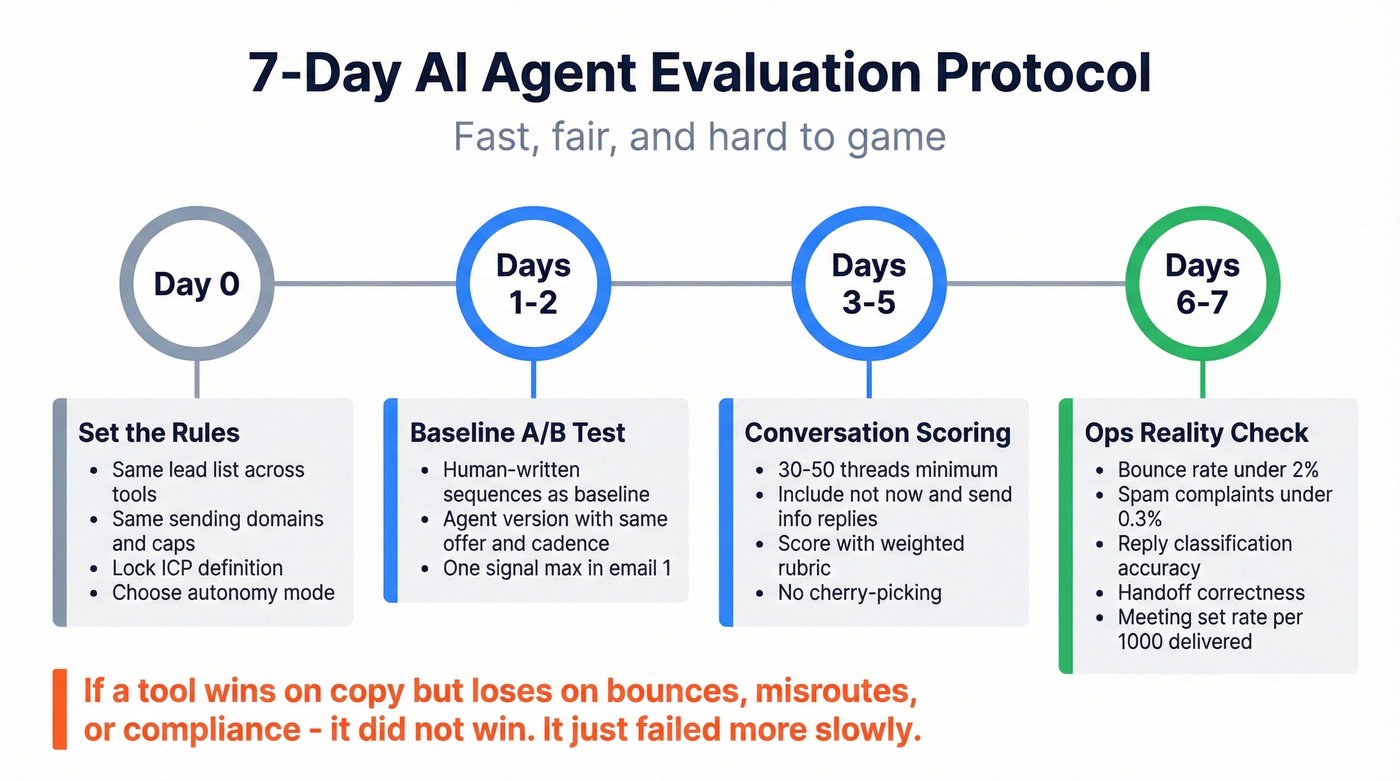
Day 0: Set the rules (non-negotiable controls)
- Use the same lead list (or two matched lists) across tools.
- Use the same sending domains, inbox count, and daily caps.
- Lock the same ICP definition and exclusion rules. (If your ICP is fuzzy, start with an ideal customer definition.)
- Decide your autonomy mode: approval, copilot, or autopilot.
Days 1-2: Baseline A/B (agent vs human)
- Run human-written sequences as a baseline (even if it's just 2-3 templates).
- Run the agent version with the same offer, same cadence, same audience.
- Keep personalization rules consistent (example: one signal max in email #1).
Days 3-5: Conversation scoring (30-50 threads minimum) Score real conversations using the rubric above. Don't cherry-pick. Include:
- "Not now" replies
- "Send info" replies
- Procurement/security questions
- Wrong-person redirects ("Talk to X")
- Angry replies (they happen)
Days 6-7: Ops reality check (the part buyers forget) Track the metrics that decide whether you can scale safely:
- Bounce rate (keep it under ~2% as an operational ceiling)
- Spam complaint rate (stay under 0.3%)
- Unsubscribe rate (watch spikes by template)
- Reply classification accuracy (correct bucket?)
- Handoff correctness (did it escalate when it should?)
- Meeting set rate (per 1,000 delivered emails)
If a tool wins on copy but loses on bounces, misroutes, or compliance, it didn't win. It just failed more slowly.
Deliverability & compliance are non-negotiable (before you scale)
If you're scaling outreach with AI, deliverability isn't a nice-to-have. It's the whole game. AI makes it easier to send more email; it doesn't make inbox placement easier.
The hard requirements (the stuff that gets you blocked)
- Bulk sender threshold: sending 5,000/day to Gmail/Yahoo triggers stricter requirements and ongoing scrutiny as a bulk sender.
- DMARC is mandatory for bulk senders (alignment via SPF or DKIM). (If you're implementing this, use our SPF, DKIM & DMARC setup guide.)
- One-click unsubscribe (RFC 8058) is required.
- Keep spam complaint rate <0.3%. (Bookmark the spam rate threshold.)
- Process unsubscribes within 48 hours.
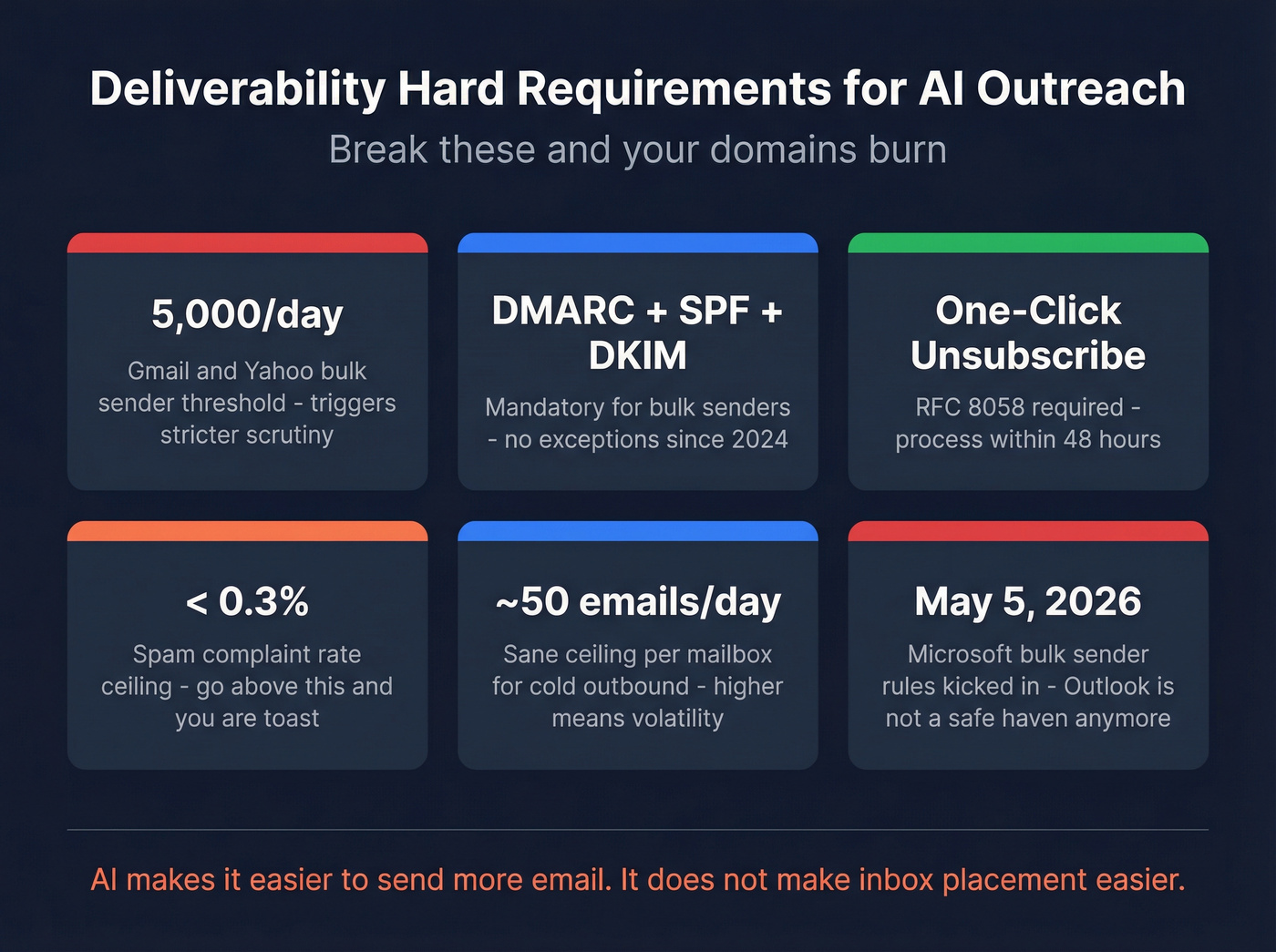
A clean operational summary: Yahoo and Google DMARC required.
Microsoft joined the party (and it matters)
Microsoft rolled out bulk sender requirements starting May 5, 2026. If your prospects live in Outlook/Office 365, you can't treat this as a "Gmail-only" problem. The takeaway stays simple: authenticate correctly, keep complaint rates low, and stop doing anything that looks like spray-and-pray.
Practitioner rules of thumb (the stuff that keeps you alive)
- ~50 emails/day per mailbox is a sane ceiling for cold outbound. You can go higher, but you're choosing volatility.
- Disable open tracking. Open rates are noisy now, and tracking can hurt deliverability. Optimize for replies and booked meetings.
- Warm up slowly (weeks, not days), and don't spike volume because "the agent's ready." (For a full ramp, follow how to warm up an email address.)
- Bounce-rate target: treat 2% as the red line. Above that, fix your list and verification before you touch copy.
Enforcement & monitoring (what happens when you fail)
When you fail these requirements, you don't just "get fewer opens." You get rate-limited, temp-failed, or rejected, often with SMTP signals that look like 4.7.x (temporary deferrals) turning into 5.7.x (policy rejections). That's why teams feel like deliverability suddenly died: the mailbox provider's enforcing policy, not judging your writing.
Monitoring is how you catch this early:
- Google Postmaster Tools shows domain reputation trends, spam rates, and delivery errors before your pipeline notices.
- Watch bounce categories (invalid vs blocked vs policy) and complaint spikes by campaign.
- Enforce suppression lists centrally. The fastest way to get burned is "agent + multiple senders + no shared suppression."
One more operational truth: compliance is a workflow, not a checkbox.
Where verified inputs fit (and why it's not optional)
Most "AI SDR" demos skip verification mechanics. A real data layer removes spam traps, filters honeypots, handles catch-all domains, and keeps freshness high, because stale data is how you rack up bounces and blocks. (If you’re auditing vendors, compare against email verifier websites.)
Prospeo's verification is built for this reality: a 5-step verification process with catch-all handling, spam-trap removal, and honeypot filtering, plus GDPR compliance and global opt-out enforcement.
Real talk: AI doesn't fix bad inputs; it amplifies them.
Best AI outreach tools (compared)
Quick comparison table (Table A: behavior + deliverability)
| Tool | Autonomy mode | Reply handling | Deliverability tooling | Best for |
|---|---|---|---|---|
| Prospeo | Copilot enabler | N/A | Verification + hygiene | Clean inputs |
| Instantly | Copilot | Basic | Warmup + rotation | Scale sends |
| Reply.io | Copilot->Auto | Strong | Warmup + checks | Reply triage |
| Smartlead | Copilot | Basic | Infra add-ons | Infra control |
| Outreach | Copilot | Strong | Governance + logs | Enterprise |
| Saleshandy | Approval | Light | Basic limits | Simple seq |
| Clay | Copilot enabler | N/A | N/A | Signal research |
Buying table (Table B: data, integrations, pricing)
| Tool | Data/verification | Integrations | Pricing model | Pricing signal |
|---|---|---|---|---|
| Prospeo | 98% verify | SFDC/HubSpot + senders | Data credits | ~$0.01/email |
| Instantly | Add-on DB | HubSpot + Zapier | Tiered SaaS | $47-$358/mo |
| Reply.io | Built-in DB | SFDC/HubSpot | Active contacts | $49+/user/mo; Jason AI SDR from $500/mo |
| Smartlead | None | Webhooks + Zapier | Tiered SaaS | $39-$379/mo |
| Outreach | None | SFDC (deep) | Seat + credits | $15k-$150k/yr |
| Saleshandy | None | Zapier | Per seat | $25-$100/user/mo |
| Clay | Enrich stack | Zapier/Make/n8n | Credits | $150-$2k+/mo |
Now the tool cards - opinionated, consistent, and budgetable.
Prospeo - The B2B data platform built for accuracy
Prospeo is the data layer we recommend when you want an outreach agent to behave responsibly at scale: it keeps targeting clean and bounces low, which is still the fastest way to protect reply rates.
What it does well (and why it matters for agents)
- Accuracy + freshness: 300M+ professional profiles, 143M+ verified emails, 125M+ verified mobiles, refreshed every 7 days (industry average: 6 weeks). That refresh cadence matters because agents don't just send faster; they also burn through stale lists faster.
- Verification you can trust: 98% email accuracy with a 5-step verification process, including catch-all handling, spam-trap removal, and honeypot filtering.
- Enrichment that actually returns data: CRM and CSV enrichment returns 50+ data points per contact, with an 83% enrichment match rate and 92% API match rate, so your agent isn't guessing at firmographics or writing to half-empty records.
- Signals for relevance: 15,000 intent topics powered by Bombora, plus 30+ search filters (technographics, job changes, headcount growth, funding, revenue) to build lists that have a real "why now."
Best for: outbound teams and agencies that want deliverability stability and higher connect rates without enterprise contracts. Pricing signal: free tier includes 75 emails + 100 Chrome extension credits/month; paid usage is ~$0.01/email and 10 credits per mobile.
Links: Pricing, Email Finder, Data Enrichment, Intent Data, Integrations.
A quick scenario we see a lot: a team turns on an "AI SDR," hits 4-6% bounces for three days straight, then wonders why inboxing fell off a cliff. Nothing was wrong with the prompts. The list was just dirty, and the agent helped them fail faster.
Reply.io (Jason AI SDR) - best for agent-like reply handling + multichannel
Reply.io is where "agent" becomes real: it's built around what happens after the send - classification, follow-ups, and routing.
Pros
- Strong reply categorization and multi-step workflows.
- Multichannel support when email alone isn't enough.
Cons
- You must run reply QA; autopilot without oversight will bite you.
Pricing: Email Volume starts at $49/user/mo; Jason AI SDR starts at $500/mo. AI SDR tiers: $500/$800/$1,000 per month for 1k/2k/3k active contacts; $1,500/$3,000 per month for 5k/10k active contacts. Best for: teams drowning in replies or missing hot ones. Skip this if: you can't forecast active contacts or won't staff daily QA.
Instantly - best for scaling sending with clear tiers
Instantly is the sending workhorse: inbox rotation, warmup, and campaign ops without enterprise friction.
Pros
- Warmup + inbox rotation are first-class features (built for volume operators).
- Clear tiering makes budgeting simple.
Cons
- It's not a governance-heavy platform; approvals and routing stay lightweight.
Pricing: $47/mo (Growth), $97/mo (Hypergrowth), $358/mo (Light Speed). Best for: agencies and outbound teams that want to test fast, then scale. Skip this if: you need strict permissions, complex approvals, or deep CRM enforcement.
Smartlead - best for deliverability infrastructure control
Smartlead is for operators who want knobs: mailbox management, sending controls, and infrastructure add-ons.
Pros
- Strong mailbox management and sending controls.
- Infra add-ons (SmartServers, SmartDelivery) for teams that treat deliverability like a discipline.
Cons
- Easy to overbuild a complicated setup if you don't have a clear operating model.
Pricing: $39 / $94 / $174 / $379 per month; SmartServers are $39/server/mo. Best for: teams that want infra control more than "AI SDR" branding. Skip this if: you want the simplest possible workflow and minimal configuration.
Outreach - best for enterprise workflows + governance
Outreach is what you buy when governance is the product: roles, permissions, reporting, and consistent execution across big teams.
Pros
- Deep Salesforce governance and auditability.
- Strong workflows for enterprise process.
Cons
- Implementation and admin overhead are real; this isn't a "set it up in a day" tool.
Pricing (range): $15k-$50k/year for small teams; $100k-$250k+/year once you scale seats and modules. Best for: 50+ reps, regulated workflows, and RevOps-owned process. Skip this if: you're a lean outbound team that needs speed over governance.
Clay - best for building agent-ready research + personalization inputs
Clay isn't a sequencer. It's the research and enrichment workbench that turns signals into structured fields your agent can actually use.
Pros
- Excellent for stitching together signals (funding, hiring, tech stack, job changes) into usable personalization fields.
- Plays well with automation (Zapier/Make/n8n) for production workflows.
Cons
- Costs climb fast if you run heavy enrichment at scale.
Pricing signal: $150-$500/mo for many SMB workflows; $500-$2,000+/mo for heavy enrichment and high row counts. Best for: teams that win on relevance and timing, not volume. Skip this if: you want an all-in-one sequencer with minimal setup.
Saleshandy - best for simpler SMB sequencing with approvals
Saleshandy is the "keep it simple" sequencer: straightforward campaigns and follow-ups without pretending to be a fully autonomous SDR.
Pros
- Simple sequencing and approvals.
- Low operational overhead.
Cons
- Reply intelligence is light; you'll handle nuance manually.
Pricing signal: $25-$100/user/mo depending on tier and volume. Best for: small teams that need consistency and control. Skip this if: you want agentic reply handling or complex routing.
Other tools you'll see (Tier 3, quick hits)
These come up in shortlists. They're not bad; they're just not where we'd start for most teams.
- Coldreach.ai - outbound platform with agent positioning and guided workflows; pricing signal: $50-$300/mo depending on seats and volume.
- Lemlist - strong personalization mechanics and sequencing; pricing signal: $59-$159/user/mo.
- Apollo - database + sequencing in one place for fast rep ramp; pricing signal: $30-$120/user/mo depending on enrichment/dialer needs.
- 11x - autonomous SDR positioning with enterprise-style pricing; pricing signal: $40k-$80k/year.
- Artisan - done-for-you style bundle (data + deliverability + outreach); pricing signal: $30k-$80k/year based on lead volume and scope.
- AiSDR - autonomy-first outbound; pricing signal: $900+/mo and you'll want strict guardrails.
- Lindy / Persana / Salesforge / Klenty - adjacent options for general agents, data automation, or classic sales engagement; pricing signal: $50-$300/user/mo.
Pricing models explained (so you can estimate cost per meeting)
Most teams compare tools on sticker price and then get surprised by the metering model. That's how budgets get blown.
| Model | Example | What you pay for | Winner (most teams) |
|---|---|---|---|
| Per seat | Instantly | Users/features | Instantly (predictable) |
| Per active contact | Reply.io | New contacts/mo | Reply.io (if you prospect <10k/mo) |
| Per-action credits | Outreach | AI actions | Outreach (if you have governance) |
Plain-English definitions:
- Per-seat: predictable. Your real constraint is mailbox count and deliverability, not license limits.
- Per-active-contact: you pay for the number of unique people you initiate with each month; follow-ups are effectively free.
- Per-action credits: flexible for enterprise workflows, but spend gets unpredictable without strict governance.
- Data credits: you pay for valid, verified addresses. This is the cleanest model for unit economics because you can tie spend to delivered opportunities.
Recommended stacks (email-only vs multichannel; by team size)
Stop shopping for an AI SDR. Shop for a system. The "agent" is the last mile; the system is data -> deliverability -> sequencing -> reply handling -> CRM hygiene.
Benchmarks to keep you grounded: average reply rate is 3.43%, top 10% is 10.7%+, and 58% of replies come from email #1. That means targeting and the first message beat fancy follow-up logic.
Instantly publishes the long-form benchmark here: Instantly's cold email benchmark report 2026.
A simple decision tree (what to fix first)
- If bounces/unsubs are high -> fix verification + suppression first.
- If inboxing collapses at scale -> fix sending infra + volume discipline next.
- If you're missing hot replies -> add reply triage + handoff rules.
- If you need audit trails across many reps -> buy enterprise governance.
Stack recipes (with "who owns what")
Solo / SMB (email-first, controlled autonomy)
- Owner: founder or first SDR
- Workflow: build a tight list -> verify -> send 30-50/day/mailbox -> daily reply triage
- Stack: Prospeo -> Instantly or Smartlead -> Reply.io -> HubSpot/Salesforce
- Why it works: you get speed without losing control; the agent helps where humans slow down (triage + follow-ups).
Agency (multi-client, deliverability obsessed)
- Owner: ops lead (not the copywriter)
- Workflow: separate domains + suppression per client -> conservative ramp -> weekly list refresh -> weekly deliverability review
- Stack: Prospeo -> Smartlead -> human-in-the-loop reply QA (or Reply.io)
- Why it works: agencies win by not burning domains. Verified data and volume discipline beat "AI personalization" every time.
Enterprise (governance + audit trails)
- Owner: RevOps + enablement
- Workflow: centralized ICP + routing rules -> controlled templates -> logged handoffs -> reporting
- Stack: Prospeo into CRM -> Outreach (engagement + governance) -> AI actions where they're auditable
- Why it works: governance is the feature. You're paying for consistency and defensibility.
Agent connectivity layer (MCP, n8n, and "bring your own brain")
A 2026 pattern worth copying: treat outreach tools as execution endpoints, and connect them to an external "brain" via an agent connectivity layer.
- MCP (Model Context Protocol): a standard way to let an agent call tools and retrieve context safely.
- n8n / Zapier Agents / Make: practical orchestration for "when X happens, do Y" across CRM, enrichment, and sequencers.
This is how teams build agentic workflows without betting the company on one vendor's "AI SDR." You keep the system modular: swap the agent, keep the infrastructure.
We've run bake-offs where the "smartest" agent lost because the team couldn't operationalize handoffs and QA. The boring stack won because it was measurable and safe.
You just read that the best agentic setups use job changes, headcount growth, funding, and intent to decide who gets emailed. Prospeo surfaces all of those signals - plus technographics and department-level headcount - through 30+ filters on 300M+ profiles. At $0.01 per email, you're not paying enterprise prices to run enterprise-grade outbound.
Stop tuning prompts. Start feeding your agent real buying signals.
FAQ - AI agents for email outreach
What's the difference between an AI outreach agent and an AI email writer?
An AI email writer generates copy, but it doesn't reliably choose targets, decide next steps, or manage multi-turn replies. An AI outreach agent adds planning, execution, and adaptation, plus handoff logic. If it can't triage replies and escalate correctly, it's not an agent, it's a writing assistant.
How do I keep deliverability safe when using AI to scale cold email?
Meet bulk-sender rules (DMARC + alignment), add one-click unsubscribe (RFC 8058), process unsubscribes within 48 hours, and keep spam complaints under 0.3%. Operationally, cap volume at ~50/day/mailbox, ramp slowly, monitor reputation (Google Postmaster Tools), and keep bounces under ~2%.
What reply rate should I expect in 2026?
Expect about a 3.43% average reply rate on cold email, with top performers hitting 10.7%+ when targeting and deliverability are tight. And since 58% of replies come from the first email, your initial targeting and message matter more than long follow-up chains.
Do I need a data tool before I pick an AI agent for email outreach?
Yes. Your agent's only as good as the list and signals you feed it. Clean, verified data and fresh enrichment keep your targeting tight and your bounce rate under control, which protects inbox placement and makes every downstream "agent" feature work better.
Summary: picking the right ai agent for email outreach in 2026
If you're buying in 2026, optimize for inputs and control, not demo magic.
Start with verified data, pick a sending platform that matches your operational maturity, and add reply intelligence where it actually matters.
That's how an ai agent for email outreach becomes a scalable system instead of a fast way to burn domains.