

ChatGPT Email Outreach: Why Your AI Emails Aren't Getting Replies (and How to Fix It)
You pasted your pitch into ChatGPT, tweaked the subject line twice, sent 200 emails, and got one reply - someone asking to unsubscribe. Sound familiar?
The problem isn't ChatGPT. Email copy accounts for roughly 30% of what determines whether cold outreach works. The other 70% is data quality, deliverability infrastructure, and sequencing strategy. Most guides on ChatGPT email outreach skip the 70% entirely and hand you a prompt template. Let's not do that.
What You Need Before Writing a Single Prompt
Three layers, in order:
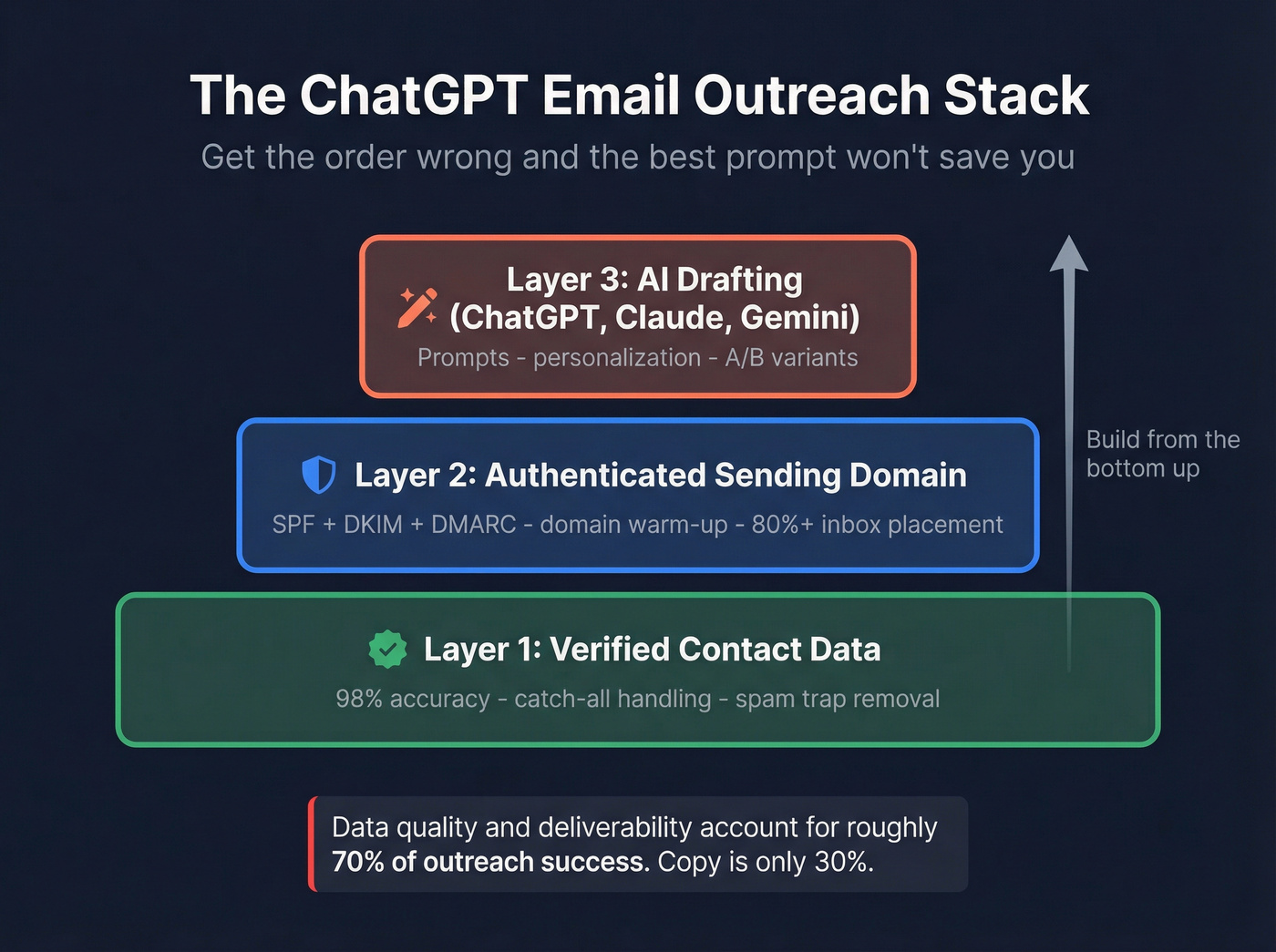
- Verified contact data. If half your list bounces, nothing else matters. (If you need a workflow, start with verified emails.)
- An authenticated sending domain. SPF, DKIM, DMARC configured. Domain warmed up. Inbox placement above 80%.
- ChatGPT (or Claude, or Gemini) for drafting. This is the last step, not the first.
Get the stack wrong and the best prompt in the world won't save you.
Do Recipients Trust AI-Written Emails?
Here's the thing: most recipients can't reliably tell if an email was written by AI. A Hunter survey found that even the best-performing industries guessed correctly about half the time. 67% of surveyed decision makers don't mind if GenAI was used to write the email.
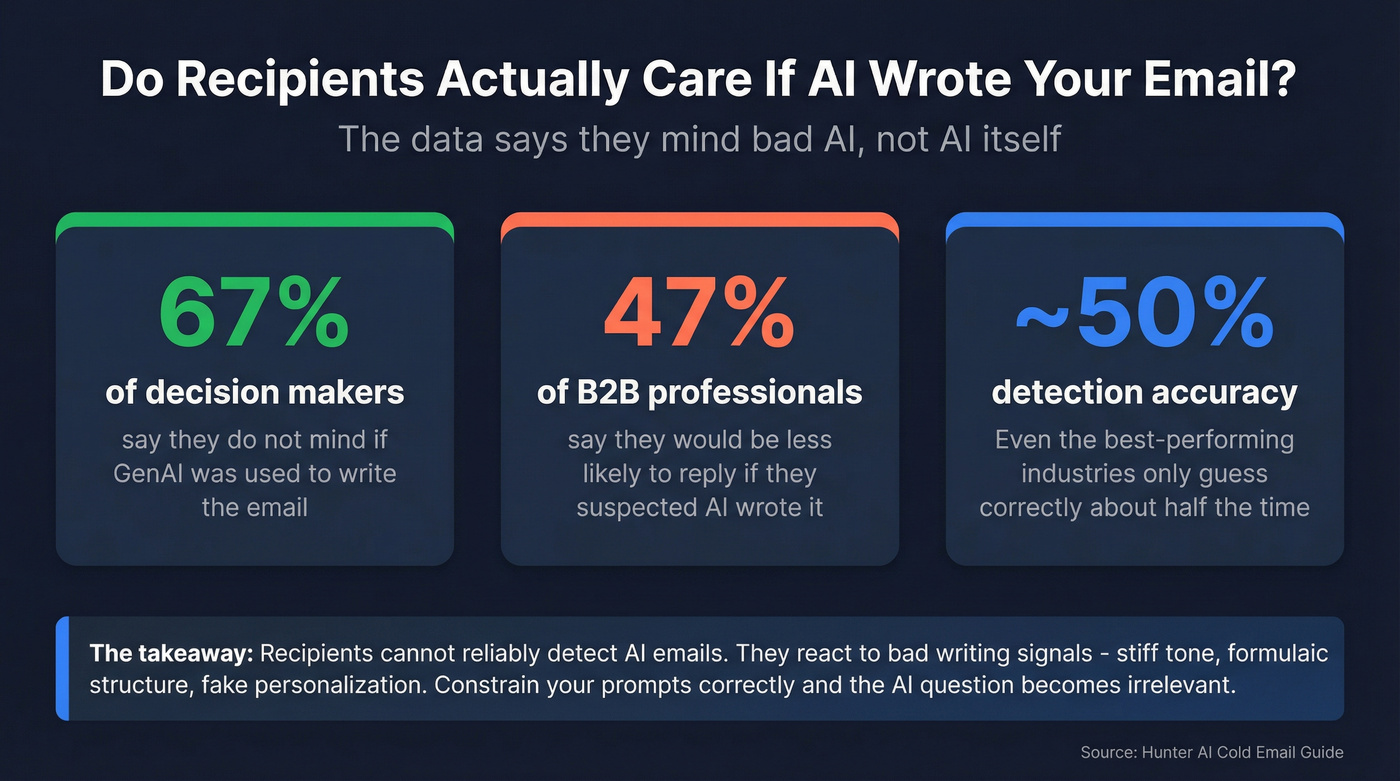
But 47% of B2B professionals said they'd be less likely to reply if they suspected AI wrote it. The gap between those two numbers is where your opportunity lives. Recipients don't mind AI - they mind bad AI. The red flags are specific: overly formal language, formulaic structures, stiff personalization that reads like a mail merge, and subject lines like "Quick question" that ChatGPT defaults to constantly.
Some practitioners try to beat the AI detector by deliberately introducing imperfections - a casual aside, an incomplete sentence, even a minor typo. It works as a band-aid, but it's treating the symptom. Better to constrain the prompt correctly from the start so the output never triggers that "this is AI" instinct.
AI-drafted emails perform fine as long as they don't read like AI-drafted emails. That means constraints in your prompts, editing on the back end, and enough real signal in the personalization that it couldn't have been mass-produced. (If you want the common failure modes, see AI personalization mistakes.)
2026 Cold Email Benchmarks
Let's ground this in real numbers. Instantly's 2026 benchmark report aggregated billions of interactions:
| Metric | Number |
|---|---|
| Average reply rate | 3.43% |
| Top quartile | ~5.5% |
| Elite (top 10%) | 10.7%+ |
| Replies from first touch | 58% |
| Best word count | Under 80 |
| Peak send days | Tue-Wed |
A Backlinko analysis of 12 million outreach emails found an 8.5% overall reply rate - the higher figure reflects a broader mix of outreach types, including warmer campaigns. Personalizing the hook alone boosts open rates to 45-60%, per Novoslo's research.
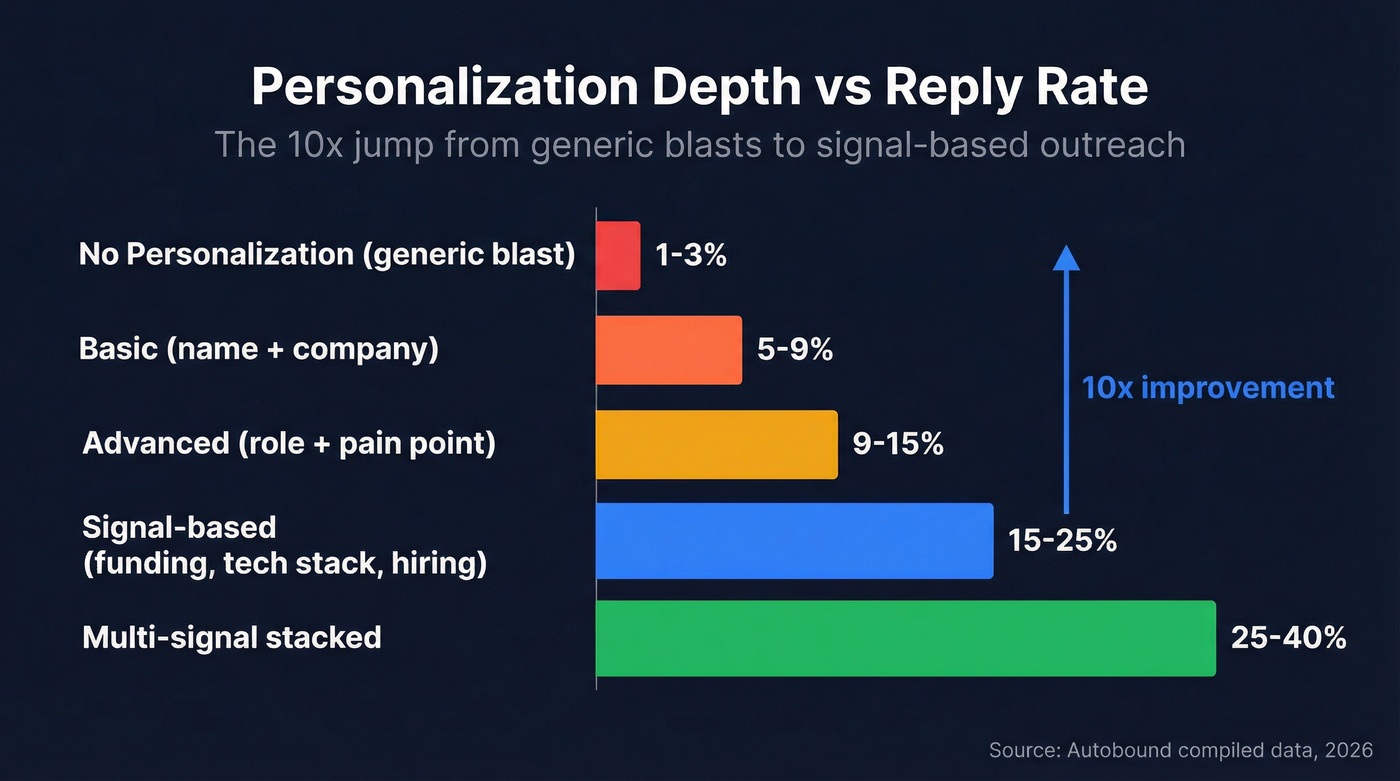
The real story is in the personalization depth spectrum. Autobound compiled data across multiple sources and the pattern is stark:
| Personalization Level | Expected Reply Rate |
|---|---|
| None (generic blast) | 1-3% |
| Basic (name + company) | 5-9% |
| Advanced (role + pain) | 9-15% |
| Signal-based | 15-25% |
| Multi-signal stacked | 25-40% |
The jump from "no personalization" to "signal-based" is a 10x improvement. That's not a copywriting problem - it's a data problem. You can't personalize around funding rounds, tech stack changes, or hiring signals if you don't have that data in the first place. (More on this in intent signals.)
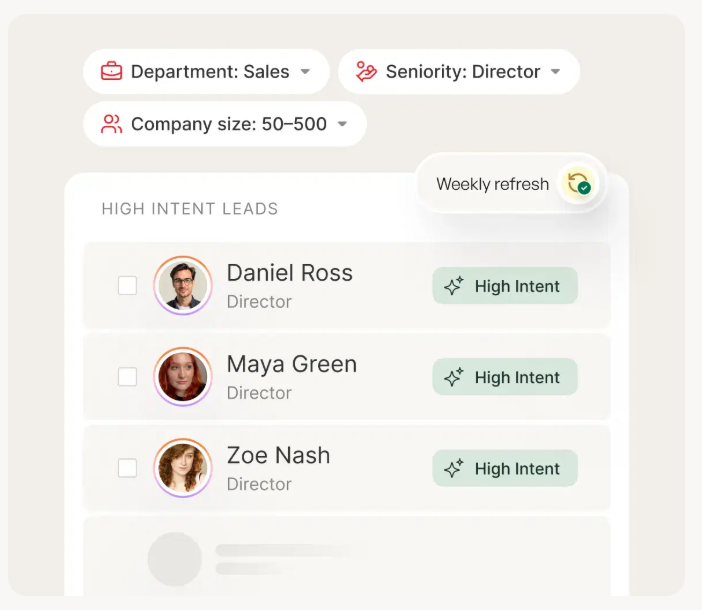
If your average deal size is under $10K, you probably don't need a $15K/year data platform. But you absolutely need verified emails and a few enrichment signals. The ROI math changes fast when a single bounced batch tanks your domain for three weeks. (This is also why B2B contact data decay matters more than most teams think.)
Step Zero: Deliverability and Data
This is the section most AI outreach guides skip, and it's the section that matters most.
The technical baseline. Your sending domain needs SPF, DKIM, and DMARC configured correctly. Spam complaints must stay under 0.3%. Bounces must stay under 2%. Gmail and Yahoo enforce these for bulk senders, and cold outreach qualifies. (If you want the full checklist, use this SPF/DKIM/DMARC setup for cold email.)
The warm-up. New domains start at 5-10 emails per day and ramp over 4-6 weeks. Tools like Instantly and Smartlead automate this, but there's no shortcut. Skip the warm-up and your carefully crafted AI emails land in spam. (See email warmup best practices.)
The data quality layer. We've seen this pattern over and over: an SDR spends three hours personalizing emails with ChatGPT, hits send, and half the list bounces. Sender reputation tanks. The next batch - even the good emails - goes to spam. One bad send can wreck your reputation for weeks.
Between "ChatGPT wrote the email" and "I hit send," there needs to be a verification step. Prospeo runs a 5-step verification process with 98% email accuracy - catch-all domain handling, spam-trap removal, and honeypot filtering that most verification tools miss. Data refreshes every 7 days versus the 6-week industry average, so you're not sending to addresses that were valid last quarter but aren't anymore. (If you're comparing vendors, start with email verifier websites.)
The proof is in the numbers. Stack Optimize built to $1M ARR running client campaigns with 94%+ deliverability and under 3% bounce rates - zero domain flags. Meritt cut their bounce rate from 35% to under 4% and tripled their pipeline from $100K to $300K per week.

Signal-based personalization drives 15-25% reply rates - but only if your emails actually land. Prospeo's 5-step verification delivers 98% email accuracy with 7-day data refresh, so your ChatGPT-crafted outreach hits real inboxes, not spam folders.
Stop perfecting prompts for emails that bounce. Fix the data first.
How to Prompt ChatGPT for Outreach Emails
Most people prompt ChatGPT like they're texting a friend: "Write me a cold email to a VP of Sales." That produces generic, forgettable output. HubSpot's prompt framework breaks effective prompts into seven components:
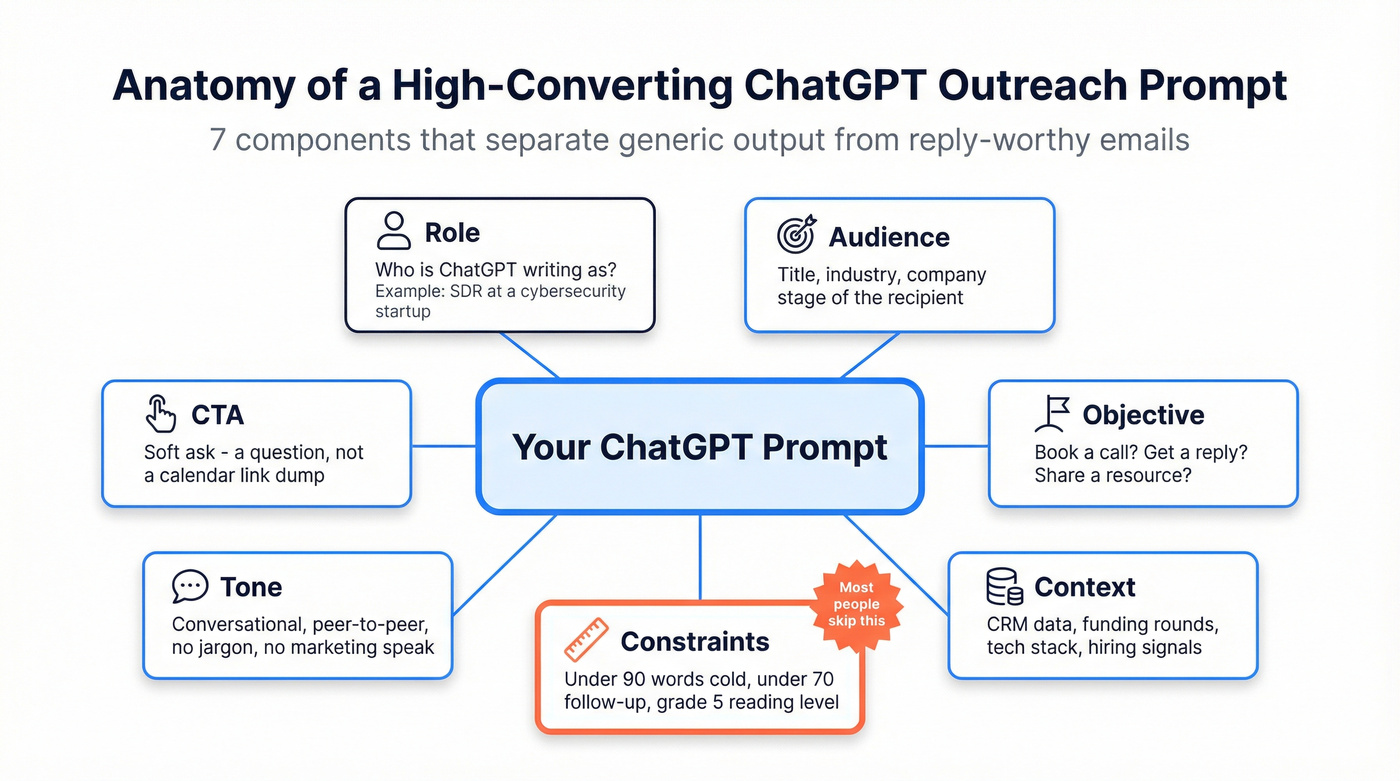
- Role - Tell ChatGPT who it's writing as ("You're an SDR at a cybersecurity startup")
- Audience - Specify the recipient's title, industry, and company stage (tie this to your ideal customer)
- Objective - What should the email accomplish? Book a call, get a reply, share a resource
- Context - CRM data, recent news, funding round, tech stack signals
- Constraints - Under 90 words for cold emails, under 70 for follow-ups, under 40 for bumps
- Tone - Conversational, peer-to-peer, grade 5 reading level
- CTA - Soft ask, not a calendar link dump (use a reply-first sales CTA)
The constraint piece is where most people fail. Without explicit word count limits and reading level instructions, ChatGPT writes like a marketing brochure. The consensus on r/coldemail is that grade 5 reading level is the sweet spot - short sentences, simple words, no jargon. Generate 3-4 variants of each email and A/B test them. ChatGPT makes this trivial: ask for "three variations with different opening hooks" and test which performs. (If you want a system, see A/B testing lead generation campaigns.)
ChatGPT can write the email. It can't tell you who just raised a Series B, switched CRMs, or hired three new SDRs. Prospeo's 30+ filters - intent data, technographics, job changes, funding - give you the signals that turn generic AI copy into replies.
Feed ChatGPT real buyer signals instead of guessing. Start at $0.01 per email.
Frameworks and Prompt Templates
The 4T Framework (Josh Braun)
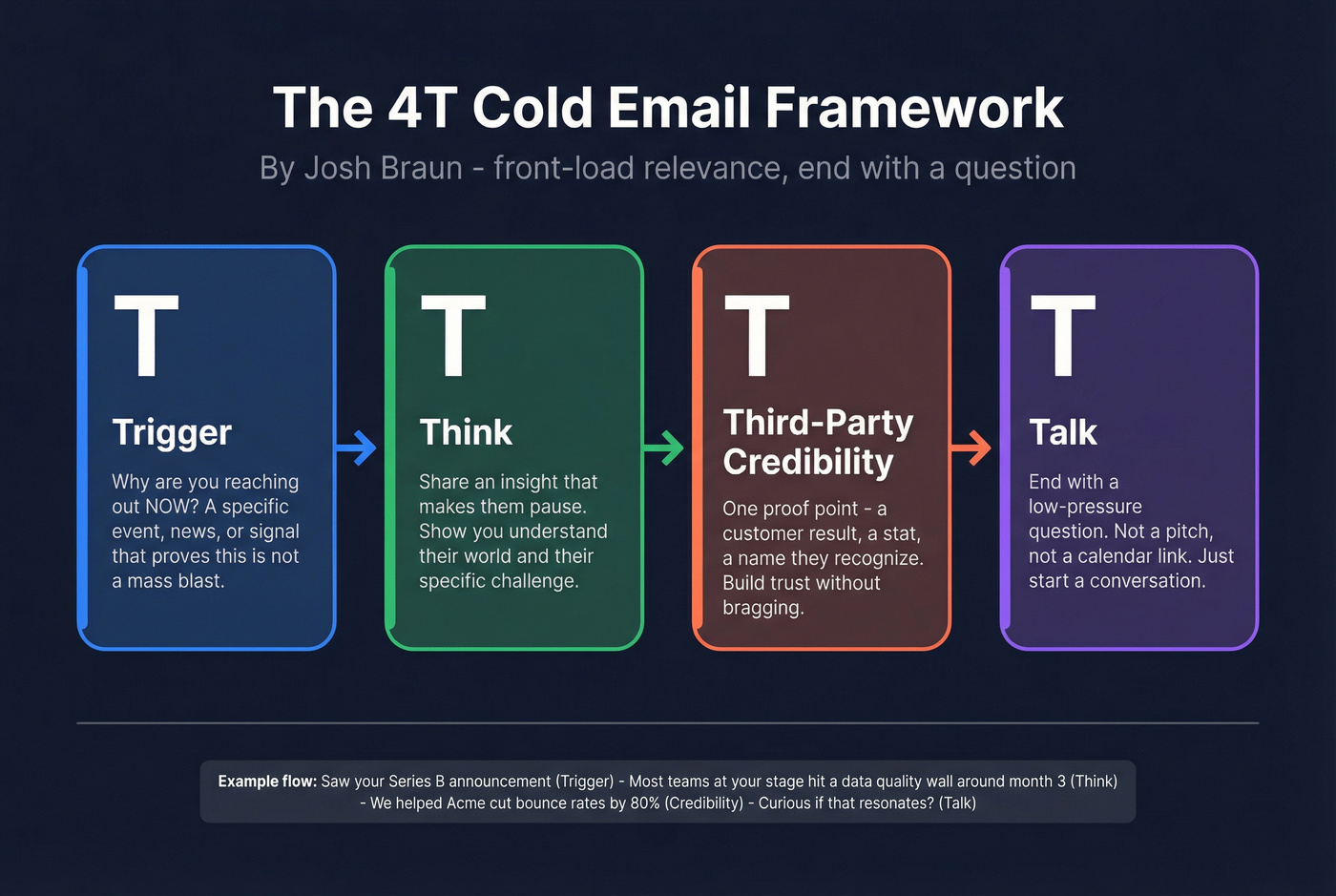
Josh Braun's 4T framework is one of the cleanest structures for cold email: Trigger (why you're reaching out now), Think (an insight that makes them pause), Third-Party Credibility (social proof), Talk (a low-pressure CTA).
Copy-paste this into ChatGPT:
Write a cold email using the 4-T framework (Trigger, Think, Third-Party Credibility, Talk). The recipient is a [ROLE] at [COMPANY] in [INDUSTRY]. The trigger is [SPECIFIC EVENT]. Include one third-party proof point about [YOUR PRODUCT/RESULT]. Keep the tone conversational and under 150 words. End with a question, not a pitch.
It works because it front-loads relevance. The trigger proves you didn't mass-blast. The insight proves you understand their world. The proof point builds credibility without bragging. (If you want more examples, use these email opener examples.)
The FUND Framework
Post-funding companies operate in a 90-120 day sprint. They're hiring, buying tools, and making decisions fast. The FUND framework is built for that window:
- Funding context - round size, investors, announced use of funds
- Urgency signal - the clock is ticking on deployment
- Name the decision maker - persona-specific language
- Differentiate value - the problem that becomes acute post-funding
Start with a research prompt before you write the email:
Analyze [COMPANY]'s recent funding announcement. Extract: round size, lead investors, stated use of funds, any quotes from leadership, and likely pain points they'll face in the next 90 days given their stage and industry.
Then feed that output into your email prompt. The research step is what separates a 3% reply rate from a 15% one.
Copy-Paste Prompt Templates
1. Cold outreach (first touch):
Write a cold email for a [ROLE] in [INDUSTRY]. Use a pattern interrupt opening. Include one social proof point. End with a soft CTA. Under 125 words. Grade 5 reading level. No jargon.
2. News/announcement hook:
Analyze [COMPANY]'s recent [ANNOUNCEMENT]. Write a 3-line cold email hook using the "noticed-impact-question" framework. Keep it under 80 words.
3. Rewrite/editing prompt:
Rewrite this cold email. Cut 40% of the words. Add one specific metric. Target grade 5 reading level. Strengthen the CTA. Remove any phrase that sounds like marketing copy.
4. Subject line generator:
Generate 10 subject lines for a cold email about [TOPIC] to [ROLE]. Each under 50 characters. Avoid spam trigger words like "free," "guaranteed," "act now." No questions starting with "Quick." (More ideas: cold email subject lines that get opened.)
5. Five-touch sequence:
Design a 5-touch cold email sequence for [PRODUCT] targeting [ROLE]. Touch 1: Pattern Interrupt. Touch 2: Value-First. Touch 3: Social Proof. Touch 4: Objection Handling. Touch 5: Breakup. Include timing between each touch and word count targets (Touch 1: under 90 words, Touch 2-4: under 70, Touch 5: under 40).
6. Follow-up:
Write a follow-up email to someone who didn't reply to my cold email about [TOPIC]. Under 70 words. Curiosity-based subject line. Reference the original email without repeating it. One new value point.
7. Short bump:
Write a bump email. Under 40 words. No new pitch - just a friendly nudge referencing the previous email. Casual tone.
Building a Multi-Touch Sequence
58% of replies come from the first touch, but that means 42% come from follow-ups. A single email isn't a strategy. (If you want a proven structure, use a B2B cold email sequence.)
| Touch | Goal | Timing | Word Count |
|---|---|---|---|
| 1 | Pattern interrupt | Day 0 | Under 90 |
| 2 | Value-first | Day 3 | Under 70 |
| 3 | Social proof | Day 7 | Under 70 |
| 4 | Handle objection | Day 12 | Under 70 |
| 5 | Breakup | Day 18 | Under 40 |
The sweet spot is 4-7 touchpoints. Beyond 7, diminishing returns kick in hard unless each touch introduces genuinely new information. Most sequences fail because touches 3-5 are just rephrased versions of touch 1.
One agency on r/coldemail reported that structured prompts - where each touch has a defined goal and word count - produce 80-90% ready emails in under 20 minutes. That tracks with our experience. The structure does the heavy lifting; ChatGPT fills in the blanks.
The breakup email (touch 5) often gets the highest reply rate. Keep it short, keep it human, and don't guilt-trip anyone.
Which AI Model to Use
ChatGPT isn't the only option, and it's not always the best one for cold email specifically.
| Model | Best For | Weakness | Price |
|---|---|---|---|
| ChatGPT | Versatility, integrations | Defaults to safe/cliche copy | Free / $20/mo Plus |
| Claude | Natural tone, peer-like voice | Fewer integrations | Free / $20/mo Pro |
| Gemini | Research hooks, data synthesis | Less consistent on brevity | Free / $20/mo |
Claude consistently produces the most natural-sounding cold emails - it reads like a peer wrote it, not a marketing team. Gemini is strongest when you need research-driven hooks pulled from recent company news. ChatGPT is the most versatile and has the best integration ecosystem, but it defaults to "Quick question" subject lines and polite-but-forgettable phrasing if you don't constrain it aggressively.
ChatGPT's Canvas mode is useful for iterating on email drafts collaboratively, and custom GPTs can encode your brand voice and constraints so every team member gets consistent output. For teams with 3+ SDRs, building a custom GPT with your ICP, tone guidelines, and proof points baked in saves hours per week.
I'd recommend using ChatGPT for your workflow and sequencing, but testing Claude for the actual copy. The difference in tone is noticeable.
Tools That Handle the Other 70%
ChatGPT drafts the copy. These tools handle everything else.
| Tool | Category | Starting Price | Best For |
|---|---|---|---|
| Prospeo | Verification + data | Free tier / ~$0.01 per email | 98% accuracy, 7-day refresh |
| Instantly | Sending + warm-up | ~$30-$100+/mo | Auto warm-up, inbox rotation |
| Apollo | Prospecting + sequencing | Free (100 credits/mo) / $59/user/mo | All-in-one for SMB teams |
| Clay | Enrichment + AI workflows | Free / $149/mo | Signal-based personalization |
| GMass | Budget Gmail sending | $25-$120/mo | Simple campaigns, small lists |
Clay deserves a deeper look for teams doing signal-based personalization at scale. It automates the enrichment-to-prompt pipeline - pulling enrichment data, feeding it into AI prompts, and generating personalized copy automatically. If you're sending 500+ emails per week and want each one to reference a real trigger, Clay is how you get there without hiring three more SDRs.
Skip GMass if you're sending more than a few hundred emails per week; it's built for simplicity, not scale.
The minimum viable stack for most teams: verified data from Prospeo, Instantly or Smartlead for sending, and ChatGPT for drafting. (For a broader view, see the B2B sales stack.)
Compliance Checklist
AI-powered outreach doesn't exempt you from the rules:
- CAN-SPAM: Physical mailing address and working unsubscribe link in every email (see CAN-SPAM)
- One-click unsubscribe header (RFC 8058): Required for bulk senders - Gmail and Yahoo enforce this
- GDPR: Legitimate interest basis for B2B outreach in the EU - document it (see GDPR)
- SPF/DKIM/DMARC: Configured and passing. Non-negotiable.
- AI-specific risks: Don't paste personal data into prompts without considering consent implications. Avoid over-personalization that crosses into profiling territory.
- Content hygiene: No ALL CAPS, minimal links (1-2 max), no risky attachments, lean copy under 100 words (see email deliverability)
FAQ
Does ChatGPT email outreach actually work?
Yes, but only when paired with verified contact data and proper deliverability setup. The average cold email reply rate is 3.43%; top performers using signal-based personalization hit 15-25%. ChatGPT handles the drafting - data quality and inbox placement determine whether anyone reads it.
How many words should a cold email be?
Under 80 words for the first touch. Instantly's 2026 benchmark data shows the best-performing campaigns keep initial emails short and direct. Follow-ups should be under 70 words, and bumps under 40.
What's the best AI model for writing cold emails?
Claude produces the most natural-sounding copy - it reads like a peer, not a marketer. ChatGPT is the most versatile with the broadest integration ecosystem. Use ChatGPT for workflow and sequencing, test Claude if your emails sound too corporate.
How do I stop AI emails from sounding robotic?
Add constraints to your prompt: grade 5 reading level, under 125 words, conversational tone. Then run a rewrite prompt to cut 40% and strip jargon. Always edit the final output yourself - even 30 seconds of human editing makes a noticeable difference.
Should I verify emails before sending AI-written outreach?
Always. Bounces above 2% damage sender reputation and trigger spam filters. A single bad batch can tank deliverability for weeks. We've watched teams lose months of warm-up progress from one unverified list - it's the most expensive shortcut in outbound.