

The Best Boolean Search Tool in 2026 (Compared + Templates)
Every boolean search tool demo looks great until you paste the string somewhere else and it blows up. Parentheses get ignored, quotes behave differently, and suddenly your "tight" query returns 200,000 junk results.
The fix isn't "learn Boolean better." It's picking the right kind of tool: a string builder, a real query language, or a workflow layer that turns matches into usable contacts.
And yes, those are three different things.

Our picks (TL;DR)
Prospeo - best for turning Boolean results into verified, outreach-ready contacts Use it when Boolean is just step one and you need deliverable emails and working mobiles. Prospeo delivers 98% email accuracy with a 7-day refresh, so you don't torch deliverability on stale data.
BooleanNavigator - best low-cost cross-platform Boolean builder If you're sourcing across lots of platforms and you're tired of "this works on X but not on Y," this is the cleanest $5/mo fix I've seen.
Hootsuite Listening (Talkwalker-powered) - best "real query language" example If you're doing social or market listening, you need proximity, field filters, and lookback windows. This is where Boolean stops being a string and becomes an actual query language.
My practical rule: build the string with a builder, run it in the native platform, then verify/enrich downstream before you message anyone. That last step is where most teams leak money.
Comparison table: best boolean search tool options (pricing + limits)
Most "boolean search tool" lists mash together three different categories: builders (they output strings), query languages (they run searches with advanced operators), and workflow layers (they turn matches into usable records). Pick the category first, then pick the tool.
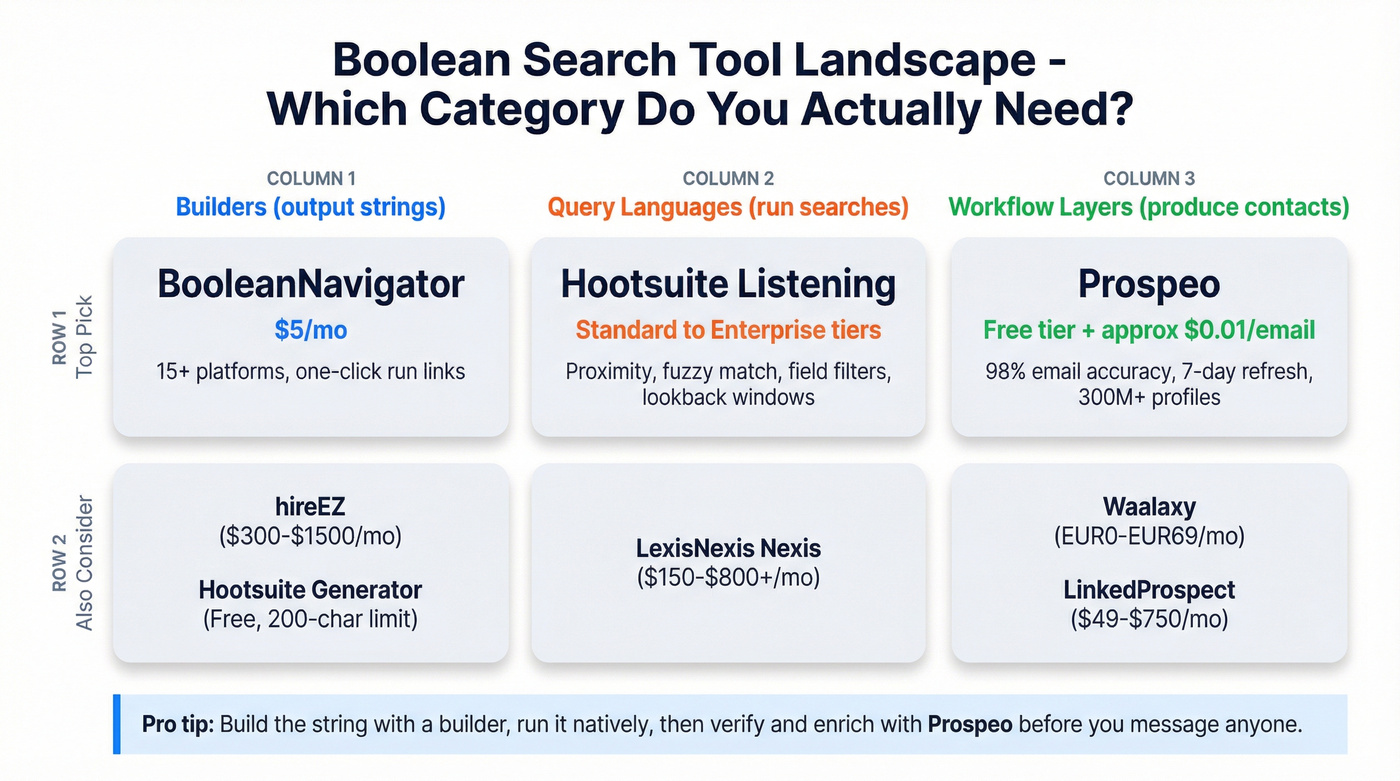
If you're recruiting or sourcing across multiple sites, BooleanNavigator is the default because it saves you from syntax whiplash. If you're doing brand or market monitoring, skip generators and go straight to a query language - Hootsuite Listening (Talkwalker-powered on Enterprise) is a clean example of why proximity plus field filters matter. And if outreach is the goal, don't ship a list until it's verified and enriched.
Look, free generators are fine for drafts. They're also where teams waste hours because of character caps and "helpful" rewrites that quietly change meaning.
| Tool | Best for | Type | Platforms | Pricing (range) |
|---|---|---|---|---|
| Prospeo | Verified contacts after search | Workflow | Web/CSV/CRM | Free + ~$0.01/email |
| BooleanNavigator | Cross-platform strings | Builder | 15+ platforms | $5/mo or $49/yr |
| Hootsuite Boolean Generator | Fast drafts | Builder | Any (copy/paste) | Free (200-char input) |
| hireEZ Boolean Builder | JD → Boolean | Builder | Recruiting sites | ~$300-$1,500/mo (typical category range) |
| Hootsuite Listening | Listening queries | Query language | Listening feeds | Standard/Advanced tier; Enterprise custom |
| Waalaxy | Outreach workflow | Workflow | Imports + CSV | EUR0-EUR69/user/mo |
| LinkedProspect | Outreach automation | Workflow | Sales Navigator | $49-$750/mo |
| LexisNexis Nexis | Research-grade search | Fielded search | News/legal/business | ~$150-$800+/user/mo (common range) |
| ResumeScreening.ai | Quick recruiter strings | Builder | X-Ray templates | Free-$19/mo |
| Leonar | Google X-Ray URLs | Builder | Free-$9/mo |
Two gotchas that matter more than features:
- Hootsuite's free generator has a hard 200-character input limit, so it's great for simple drafts and terrible for real-world queries with long OR lists.
- Hootsuite plan packaging matters: Standard = 7-day lookback, Advanced = 30-day lookback, and Enterprise unlocks Listening powered by Talkwalker.

Your Boolean string is only as good as the contacts it produces. Prospeo turns your search results into 98%-accurate emails and verified mobiles from 300M+ profiles - refreshed every 7 days, not 6 weeks.
Stop sending sequences to stale data. Verify before you hit send.
What a Boolean search tool actually is (and why strings break)
A "boolean search tool" can mean three totally different products:
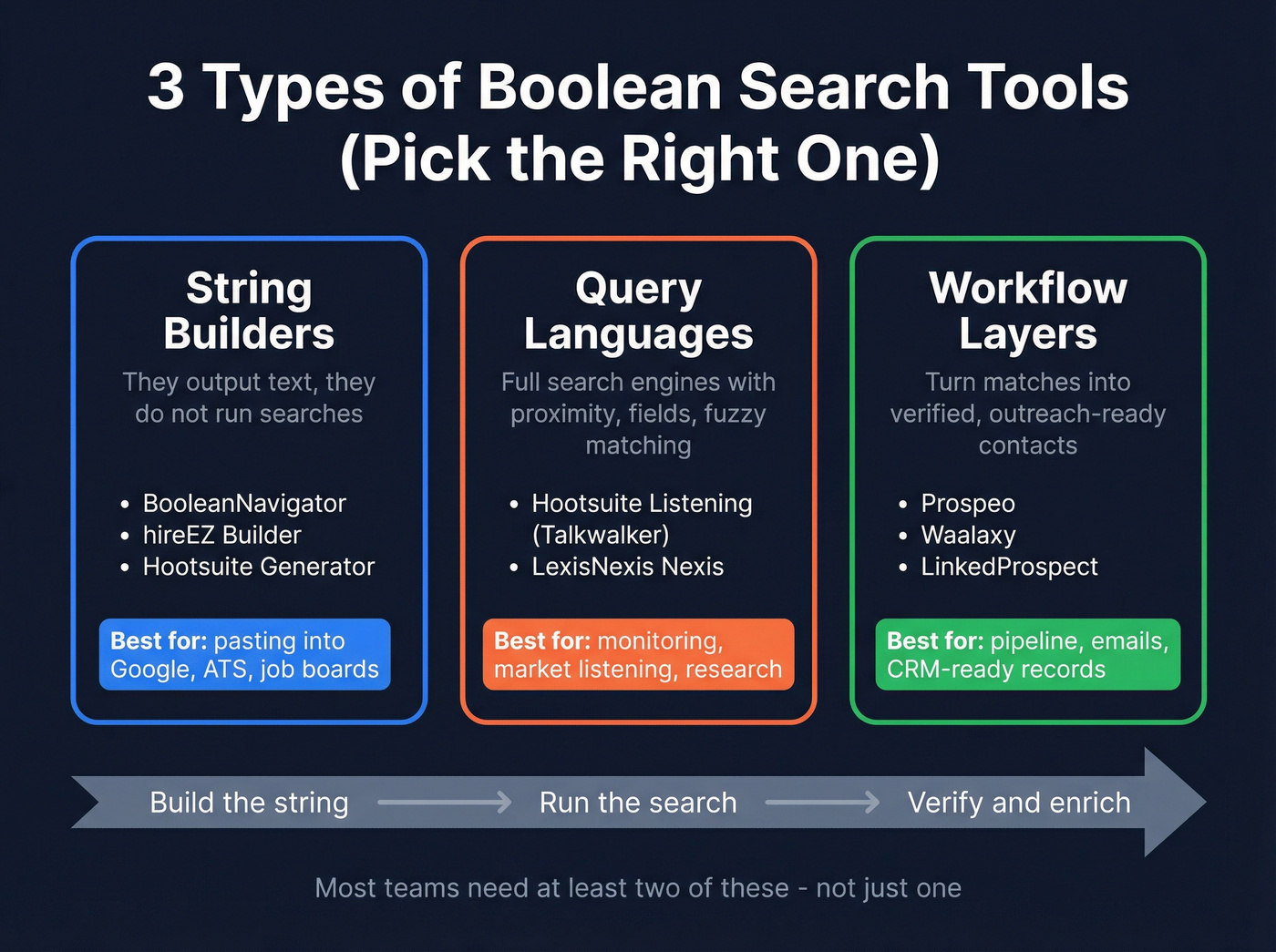
1) String builders (generators).
These help you assemble ("A" OR "B") AND ("C" OR "D") NOT "E" without losing your mind. They don't run the search - they output text.
2) Query languages (real search engines). Listening platforms treat Boolean as a full language: proximity, fuzzy matching, field filters, and metadata constraints. This is where you can say "term A within 5 words of term B" or "only in title" or "only German posts," and the engine actually respects it.
3) Fielded search inside a platform. Research tools embed Boolean into a bigger system: document types, jurisdictions, sources, authors, dates, and paywalled content. It's not a generator; it's a research environment.
Mini decision tree (pick in 10 seconds):
- Need a string to paste into Google, an ATS, or a recruiting site? → Use a builder (BooleanNavigator, hireEZ, Hootsuite Generator)
- Need proximity, fields, and lookback windows for monitoring? → Use a query language (Hootsuite Listening / Talkwalker syntax)
- Need emails/phones and CRM-ready records after you find matches? → Use a workflow + verification/enrichment layer (Prospeo)
Strings break because platforms implement different parsers. Quotes are strict in one place and loose in another. NOT behaves differently across engines. Some platforms silently cap OR terms or ignore nested parentheses, and a few will accept your query, then quietly reinterpret it in a way that looks like "the market's noisy" when the real issue is the parser.
I've watched teams spend an entire afternoon "improving" a query that was already fine, only to discover the platform was truncating it at a character limit and dropping half the OR list. That isn't a Boolean skill issue. It's a tooling issue.
Best picks: mini-reviews (what each tool's actually good at)
Prospeo - The B2B data platform built for accuracy (best "after Boolean")
Prospeo's the fastest way to turn a Boolean shortlist (names + companies) into verified, outreach-ready contacts. If your end goal is pipeline, this is the step you can't skip: Prospeo gives you 98% email accuracy on a 7-day data refresh cycle (the industry average is 6 weeks), so you're not blasting stale addresses and wondering why replies fell off a cliff.

In practice, the workflow looks like this: you run your Boolean search wherever you source, export or copy the shortlist, then use Prospeo to find and verify contact data and enrich records before they hit your CRM or sequencer. You get access to 300M+ professional profiles, 143M+ verified emails, and 125M+ verified mobile numbers, plus enrichment that returns 50+ data points per contact with an 83% enrichment match rate and a 92% API match rate. The Chrome extension (40,000+ users) makes it easy to pull verified details from any website or inside your CRM without turning the process into a spreadsheet marathon.
One scenario I see constantly: a team builds a beautiful Boolean string, exports 800 "matches," then sends a sequence and gets hammered by bounces and spam complaints because half the emails were guesses. That's the expensive part, not the search. Prospeo fixes the expensive part.
Pricing is straightforward: there's a free tier (75 emails + 100 extension credits/month), then credit-based pricing around ~$0.01/email; mobiles cost 10 credits per number. Useful links: https://prospeo.io/pricing and https://prospeo.io/contact-finder-extension.

BooleanNavigator - Best low-cost cross-platform Boolean builder
BooleanNavigator's the builder I recommend when you're sourcing across multiple platforms and you're tired of rewriting the same query five different ways. It supports 15+ platforms, generates one-click "run this search" links, and maps platform-specific fields (like current vs past title/company, skills, education) so you're not guessing which operators work where.
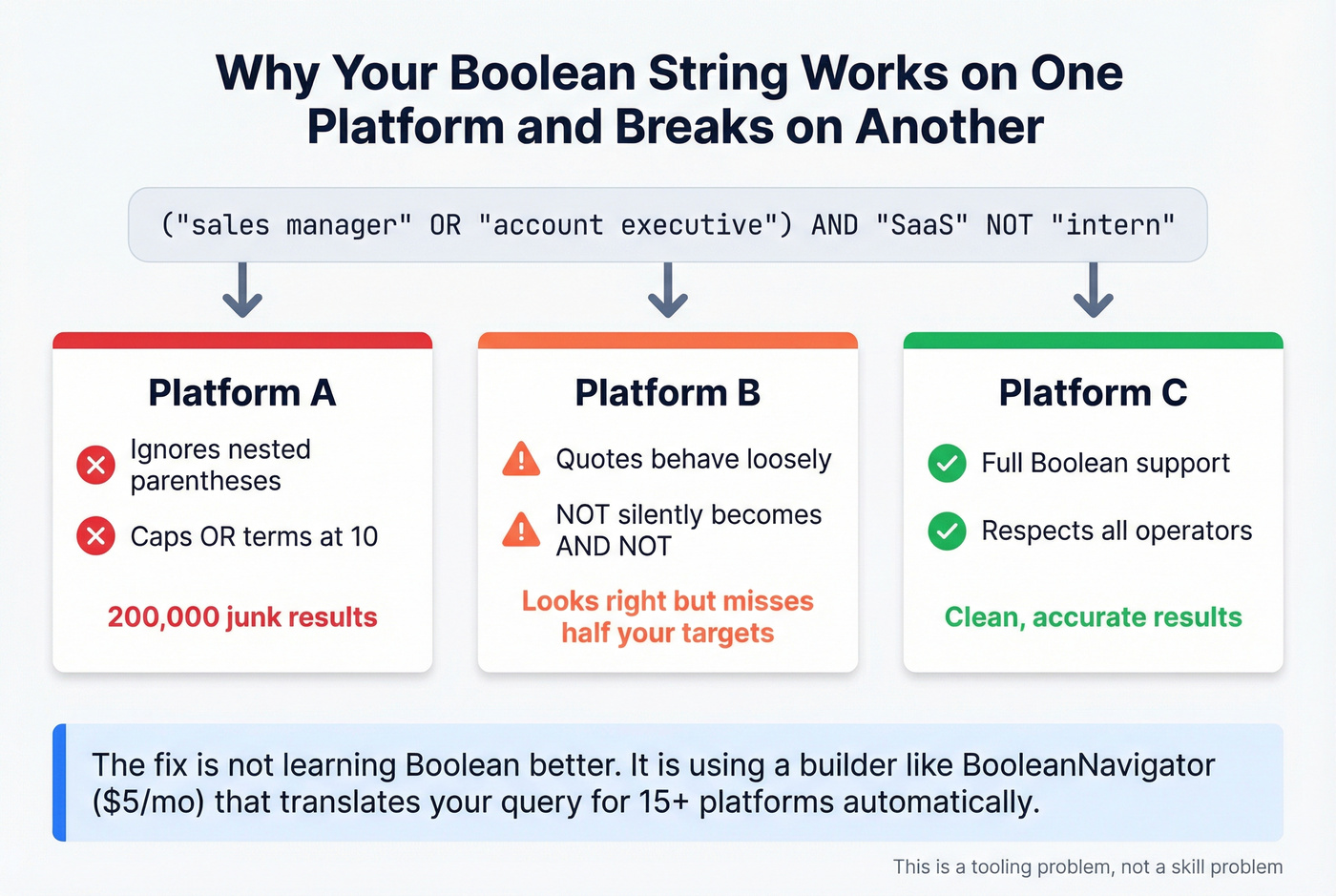
Here's the thing: teams waste time arguing about "the right Boolean" when the real problem is translation. BooleanNavigator fixes that.
Pricing: 30-day free trial, then $5/month or $49/year.
Hootsuite Boolean Search Generator - Best free quick drafts (with a hard limit)
What it's good at: killing the blank page. You type a plain-English prompt, it outputs a Boolean string, and you can toggle spelling variations and related words.
What breaks: the 200-character input limit. Recruiter-style mega OR lists hit the ceiling fast, and you'll end up trimming the exact terms you needed most.
Pricing: Free.
hireEZ Boolean Builder - Best JD-to-Boolean for recruiting teams
hireEZ's Boolean Builder is a clean "paste a JD, get a usable string" workflow. JD mode pulls keywords from a job description; Quick mode suggests keywords and lets you add constraints like mandatory skills, industries, and locations.
The underrated differentiator is ATS rediscovery. Searching past applicants who have since upskilled is often the cheapest "new" pipeline you'll find because you already paid to attract them once.
Skip this if you're not recruiting. It's overkill if all you need is a cross-platform string builder.
Pricing: sold via sales. A realistic budgeting range for this category is ~$300-$1,500/month depending on seats and modules.
Hootsuite Listening (Talkwalker-powered) - Best example of a real query language
Listening wins the moment you need monitoring over time, not a one-off search. A listening feed is a firehose, and basic AND/OR/NOT generators won't keep up because you need proximity, fuzzy matching, and field filters to separate "actual intent" from job-post spam, support complaints, and syndication noise.
Operators that matter: proximity (NEAR/ONEAR), fuzzy matching, and field filters (title/content/author/lang/sourcetype). That's how you isolate "pricing complaint in German on forums" instead of "random mention somewhere on the internet."
Packaging gotcha: Standard = 7-day lookback, Advanced = 30-day lookback, and Enterprise unlocks Listening powered by Talkwalker (the full syntax layer). Pricing sits in the mid-market listening suite world: Standard/Advanced are typical team SaaS tiers, and Enterprise is custom.
Waalaxy - Simple outreach execution once you've already got lists
Waalaxy is for execution: import a list, run sequences, keep the stack simple. It's popular with scrappy outbound teams because pricing is clear and you can move fast.
The predictable complaint: automation doesn't fix bad data. If your list is stale, you'll just scale the problem.
Pricing: EUR0, EUR19, EUR49, EUR69 per user/month, plus a EUR20/month inbox add-on.
LinkedProspect - Outreach automation with hard caps you must design around
LinkedProspect's useful because it forces discipline. Invite notes cap at 300 characters, and campaigns only reach the first 50 pages of results (about 500 connections); with Sales Navigator on their Standard plan, it can go up to 1500.
That means sloppy Boolean and loose filters cost you real money. You burn limited reach on mediocre matches.
Pricing: $49 / $99 / $250 / $750 per month.
LexisNexis Nexis - Research-grade fielded search (not a lightweight generator)
Nexis is what you buy when you need serious coverage: news, legal, company intel, and archives with fielding, source controls, and auditability. It's powerful, but it's procurement software, so expect setup, governance, and a learning curve.
The common frustration: cost scales fast once you add content packages and multiple seats.
Pricing varies by content bundles and seat count; a realistic budgeting range is ~$150-$800+/user/month for many configurations.
ResumeScreening.ai Boolean Search Generator (Tier 3)
ResumeScreening.ai is a recruiter-focused generator for common X-Ray templates and quick role strings. It's best when you want fast copy/paste patterns, not when you need deep platform-specific fielding or advanced operators.
Pricing usually lands around free to ~$9-$19/month.
Leonar Boolean X-Ray Search Generator (Tier 3)
Leonar generates a ready-to-use Google X-Ray URL with include/exclude keywords and a one-click open flow. It's great for simple X-Ray sourcing, but it's not built for complex nested logic or proximity operators.
Pricing is generally free with upgrades around ~$9/month.
Advanced Boolean operators basic generators don't support (with examples)
Basic generators stop at AND/OR/NOT and quotes. Real query languages go further, and that's where you get precision without turning your query into a 400-term monster.
Advanced operators (proximity, fuzzy, raw, sentence)
Wildcards
- End-only wildcard:
Luxemb*(matches Luxembourg, Luxembourger, etc.) - Single-character wildcard:
reali?ation(realisation/realization)
Proximity & ordering
- Tilde proximity:
"electric vehicle"~5(terms within 5 words) - NEAR with distance:
("electric" OR "EV") NEAR/10 ("fleet" OR "logistics") - Ordered proximity:
"price increase" ONEAR/5 ("subscription" OR "renewal")
Fuzzy matching
- Edit distance:
roam~1(catches close spellings) - Phrase fuzziness for separators:
"car sharing"~(carsharing, car-sharing, etc.)
Raw matching (punctuation-heavy terms)
- Exact string, case-insensitive:
+C++or+S/4HANA - Exact string, case-sensitive:
++iPhone
Sentence operators (great for "same sentence" intent)
- Same sentence:
("data breach" SENTENCE "class action") - Ordered same sentence:
("lawsuit" OSENTENCE "settlement")
If you want the canonical operator list, Talkwalker's docs are a clean reference: https://developer.talkwalker.com/docs/query-syntax/boolean-operators.
("fraud" OR "chargeback") NEAR/10 ("marketplace" OR "platform")
AND ("refund policy" ONEAR/5 update*)
NOT ("job" OR "hiring")
Fielded search: when Boolean becomes a query language
Fielded search is the line where "Boolean string" turns into "query language." Instead of hoping the engine interprets your keywords correctly, you tell it where to look and what kind of content counts.
Talkwalker-style fielding examples that actually change outcomes:
title:sixt(only matches in titles)content:sixt(only matches in body content)author:Franzlang:desourcetype:BLOGmention:@userhashtag:#bmwposttype:IMAGEcontains:videois:question
This is why listening platforms beat generic generators for monitoring: you can exclude job posts by sourcetype, focus on questions, or isolate image posts for brand misuse.
Keep Talkwalker's advanced options bookmarked: https://developer.talkwalker.com/docs/query-syntax/advanced-search-options.
Boolean templates library (copy/paste) + quality checklist
These are starting points. The trick is controlling false positives without nuking recall.
Recruiting (X-Ray / job boards)
("data engineer" OR "analytics engineer" OR "ETL developer")
AND (Snowflake OR Databricks OR "dbt")
AND (Python OR SQL)
NOT (intern OR internship OR "junior")
Parentheses strategy: keep titles in one OR group, core skills in another, and seniority exclusions in a small NOT group.
Sales prospecting (ICP + role)
("VP Sales" OR "Head of Sales" OR "Sales Director")
AND ("B2B SaaS" OR "software company")
AND (pipeline OR outbound OR "sales development")
NOT (recruiter OR "career coach")
False-positive control NOT block: exclude adjacent industries or irrelevant roles, not generic words like "sales" (you'll delete your own target).
Social listening (brand + intent)
("YourBrand" OR "Your Brand")
AND ("pricing" OR "alternatives" OR "switch" OR "recommend")
NOT ("job" OR "hiring" OR "careers")
Academic/legal research (concept + jurisdiction-ish terms)
("non-compete" OR "restrictive covenant")
AND (enforce* OR litigation OR injunction)
NOT ("template" OR "sample agreement")
Quality checklist (use this every time):
- Does every OR group contain the same "type" of term (titles vs skills vs products)?
- Are your NOT terms truly irrelevant, or are they just annoying?
- Did you quote multi-word phrases that must stay together?
- Did you keep parentheses shallow (2-3 levels max) to avoid parser weirdness?
Debug pattern that saves time: if you're getting junk results, add a false-positive control NOT block that targets the junk category (for example, NOT ("job" OR "hiring")) instead of piling on more AND constraints that accidentally exclude good matches.
Troubleshooting: zero results, too many results, broken syntax
When a string fails, don't rewrite it from scratch. Debug it like code.
Remove NOT blocks first. NOT is the #1 reason "I get zero results." Strip it, confirm you get results, then add exclusions back one at a time.
Test OR groups independently. Paste only the title OR group. Then only the skill OR group. If one group returns nothing, you've found the broken piece.
Check parentheses balance. One missing
)can change the whole meaning. If the platform doesn't error, it'll silently reinterpret.Simplify proximity. If you used
NEAR/xor"phrase"~x, replace with a plain phrase search and see if results come back. Then reintroduce proximity.Watch platform character limits. This is the sneaky failure mode. Hootsuite's generator is capped at 200 characters, and invite notes in outreach tools can be capped at 300 characters. Long OR lists get truncated or rejected.
Binary-search the logic: remove half the query, test, repeat. You'll isolate the culprit in minutes.
Pricing reality (free vs $5/mo vs enterprise) + what to do after you build the search
Boolean tooling pricing falls into three buckets:
- Free generators (Hootsuite generator, niche X-Ray builders): $0, but you pay in limitations (character caps, shallow syntax).
- Cheap dedicated builders (BooleanNavigator): $5/mo is absurd value if you're cross-platform.
- Enterprise query environments (Hootsuite Enterprise Listening, LexisNexis Nexis): you're paying for data access, governance, and depth - often $10k-$100k+/year org-wide once you add seats and content.
Budgeting ranges that won't surprise you later:
- hireEZ: plan for ~$300-$1,500/month depending on seats/modules.
- Hootsuite Listening: Standard/Advanced are team tiers; Enterprise is custom, and Talkwalker-powered Listening sits behind Enterprise.
- Nexis: expect ~$150-$800+/user/month depending on content packages and seat count.
One strong opinion: if your average deal size is modest and you're not doing regulated research, you don't need an "all-in-one" search universe. You need a builder that won't break, plus verification/enrichment so your outreach actually lands.
What to do next (the 2-tool stack that wins most often):
- Builder or query language to produce the shortlist (BooleanNavigator for recruiting/sourcing; Hootsuite Listening for monitoring).
- Verification + enrichment before outreach so you don't burn domains, time, and reputation.
That's the difference between "we found people" and "we booked meetings."
Teams build perfect Boolean queries, export 800 matches, then torch their domain on bounces. Prospeo's 5-step verification and 83% enrichment match rate turn raw lists into pipeline - at ~$0.01 per email.
The expensive mistake isn't the search. It's skipping verification.
FAQ
What's the difference between a Boolean string generator and a Boolean query language?
A Boolean string generator outputs text you paste elsewhere (AND/OR/NOT, quotes, parentheses). A Boolean query language is the search engine itself, with platform-specific operators like proximity, fuzzy matching, and field filters (title/content/lang). Generators help you write; query languages decide what matches.
Why does the same Boolean string work in Google X-Ray but fail in other tools?
Different platforms parse Boolean differently: some ignore nested parentheses, treat quotes loosely, cap OR terms, or enforce character limits. The fastest fix is to simplify (remove NOT blocks, test OR groups), then rebuild using the platform's preferred syntax and constraints.
What advanced operators matter most (proximity, wildcards, fuzzy, field filters)?
Proximity (NEAR/x, "phrase"~x) and field filters (title:, lang:, sourcetype:) create the biggest precision jump. Wildcards help with stemming, fuzzy helps with misspellings and separators, and raw matching (+keyword) helps with punctuation-heavy terms like product names and acronyms.
What's the best Boolean search tool for recruiters on a budget?
BooleanNavigator's the budget winner because it's $5/month ($49/year) and translates strings across 15+ platforms with one-click run links. Free generators are fine for tiny queries, but they fall apart the moment your string gets long or platform-specific.
After I find the right people, how do I get verified emails and mobile numbers?
Use a verification + enrichment platform so your outreach doesn't bounce and burn deliverability. Prospeo turns your shortlist into verified contact data with 98% email accuracy and a 7-day refresh, then exports to your CRM or sequencer for immediate outreach.