The Best Gmail Tracking Extensions - What Actually Works in 2026
You send 50 cold emails on Monday. By Wednesday, your Gmail tracking extension says 38 were opened. You feel great - until you realize maybe 13 of those were real humans. The rest? Apple's servers preloading pixels, corporate firewalls fetching images, bots doing bot things.
Open tracking in 2026 is a rigged game, and most extensions don't tell you the house always wins.
The tools below still have value - but only if you understand what they can and can't do, and only if you're emailing real people in the first place.
Our Picks
| Best For | Tool | Starting Price |
|---|---|---|
| Verifying your list before tracking | Prospeo | Free (75 emails/mo) |
| Simple, free open tracking | Mailsuite | Free ($0) |
| Tracking + CRM in Gmail | Streak | Free tracking; CRM from $49/mo |
| Sales teams on Salesforce/HubSpot | Yesware | Free; Pro from $15/mo (annual) |
How Gmail Tracking Extensions Work
Every email tracker for Gmail relies on the same trick: a tiny, invisible 1x1 pixel image embedded in your outgoing email. When the recipient opens the message and their email client loads images, that pixel fires a request back to the extension's server. The server logs the event - timestamp, IP address, sometimes device type and approximate location - and you get a notification.
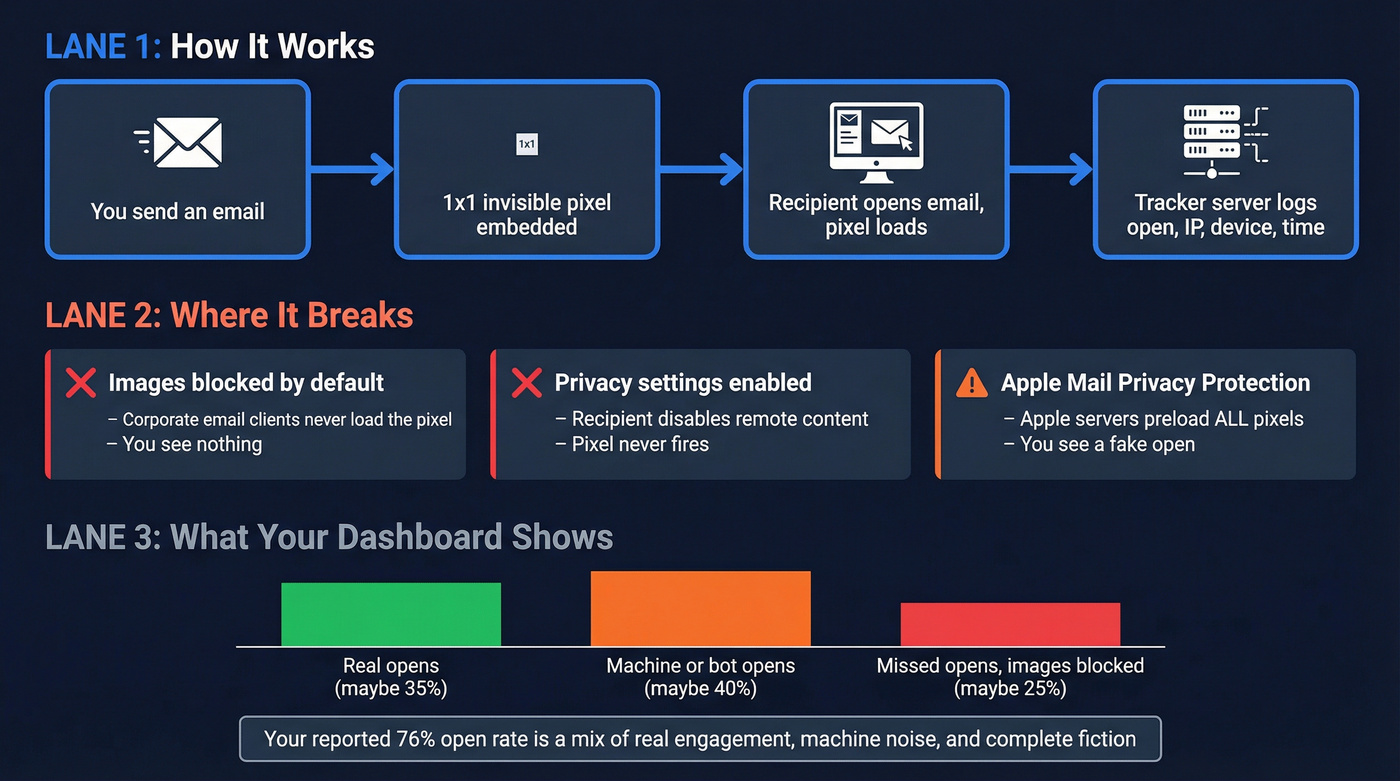
In practice, it breaks constantly. Corporate email clients that block images by default never fire the pixel. Privacy-focused recipients who disable remote content loading are invisible to you. And then there's Apple Mail Privacy Protection, which preloads tracking pixels on Apple's own servers regardless of whether the recipient actually reads your email. That single feature, rolled out in 2021, made open-rate data unreliable for a huge chunk of B2B inboxes.
Some extensions flip the script - they also detect when someone is tracking you. But most people install a tracker to measure outbound engagement, so that's where we'll focus.
The bottom line: your "open rate" is a blend of real engagement, machine noise, and complete fiction. That doesn't make tracking useless - it just means you need to pair it with better signals like clicks, replies, and verified contact data.
The 8 Best Email Trackers for Gmail
Prospeo - Verify Before You Track
Tracking opens on bounced or dead email addresses is like counting applause in an empty room. Prospeo fixes this at the source: it verifies that the people you're emailing actually exist. If you're comparing tools, start with an email checker tool or a dedicated email ID validator before you obsess over open rates.
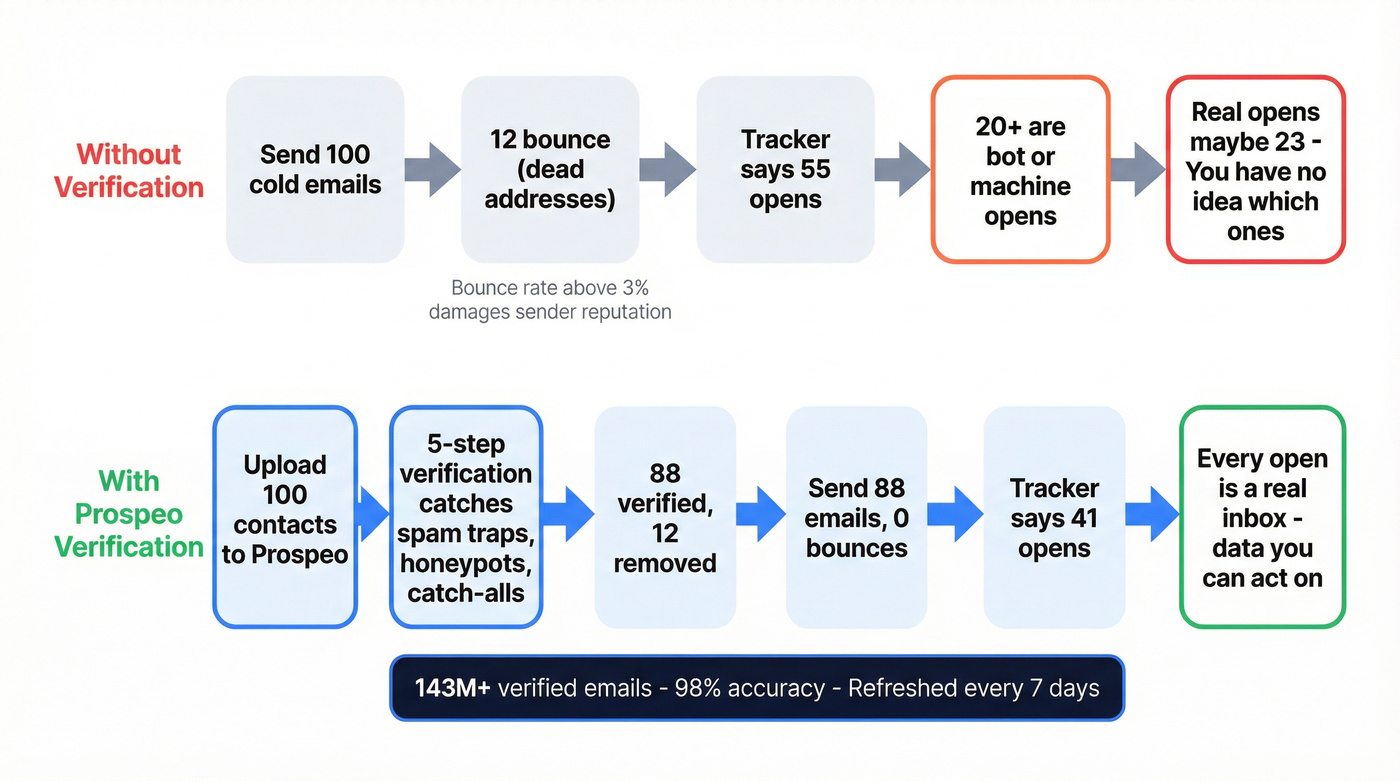
The platform covers 143M+ verified emails with 98% accuracy, powered by a proprietary 5-step verification process that catches spam traps, honeypots, and catch-all domains. All records refresh on a 7-day cycle - the industry average is 6 weeks - so you're never tracking opens against stale addresses. The Chrome extension, used by 40,000+ users, lets you find verified emails from any company website or professional profile in one click.
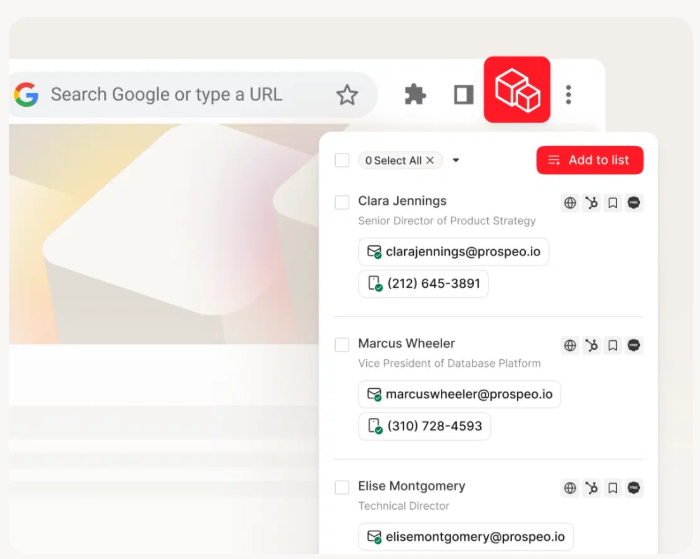
Use this if you're running outbound sequences and need every tracked open to represent a real person. The free tier gives you 75 email verifications and 100 Chrome credits per month. Paid plans run ~$0.01 per email with no contracts.
Also use this if your bounce rate is above 3% - that's a data quality problem, not a tracking problem. Pair Prospeo with any tracker on this list and your open data immediately gets more meaningful (and your email deliverability usually improves too).
Mailsuite - Best Free Option
Mailsuite (still known as Mailtrack to most people) is the most popular free Gmail tracker, and for good reason - it works out of the box with zero configuration. Install the Chrome extension, send an email, and you'll see double checkmarks when it's opened.
The free plan gives you open tracking on 10 emails, link click tracking on 10 emails, and 100 campaign sends per month. Most comparison articles call the free plan "unlimited." It's not. The Advanced plan at $11.99/user/mo unlocks unlimited tracking, 60,000 campaign emails per month, and removes the recipient-visible "Sent with Mailtrack" signature.

About that signature: on the free plan, every recipient sees you're tracking them. If you want to remove Mailtrack branding without going all the way to Advanced, Mailtrack Premium is $2.99/user/mo billed annually.
Mailtrack is CASA-compliant and offers a native mobile add-on for iOS and Android - one of the few trackers that works outside the desktop browser.
Use this if you're a solo user who wants basic open tracking without paying anything. Skip this if you need CRM integration or send more than a handful of tracked emails daily.
Streak - Best for Tracking + CRM
Streak's pitch is compelling: free email and link tracking forever, plus a full CRM that lives inside Gmail. No tab-switching, no separate app.
Over 750,000 professionals use it, and the tracking features - including device type and city-level location data on opens - are genuinely free with no time limit. Now let's correct a pricing myth that floats around comparison articles. Multiple third-party posts claim Streak Pro starts at $15/month. It doesn't. Streak's actual pricing: Pro is $49/user/mo (annual) or $59/user/mo (monthly). Pro+ runs $69/$89. Enterprise hits $129/$159. The free tier includes tracking, snippets, and mail merge at 50 sends per day - generous. But the moment you need pipeline management, shared pipelines, or reporting, you're looking at real money.

Pros: Free tracking is legitimately unlimited. The Gmail-native CRM eliminates context-switching. Location data on opens adds useful context for follow-up timing.
Cons: The interface gets overwhelming once you're managing 100+ threads - that's a common complaint we've seen across Reddit threads and tool reviews. Integrations outside Gmail are limited compared to standalone CRMs, and that $49/mo jump from free to Pro is steep if you only need basic pipeline views.
Yesware - Best for Sales Teams
Yesware is the tracker that sales managers buy because it plugs directly into Salesforce and HubSpot. The free plan includes basic open tracking and 10 campaign recipients per month. Pro at $15/seat/mo (annual) unlocks unlimited open and link tracking plus 20 campaign recipients. Premium is $35/seat/mo annual; Enterprise is $65/seat/mo annual. On monthly billing, the same tiers are $19, $45, and $85 per seat.
Here's the detail most reviews skip: Yesware's free and Pro plans have a 24-hour lookback limitation. If your prospect opens your email on day three, you won't see it. That's a significant blind spot for multi-touch sequences where replies often come days later. You need Premium at $35/mo to get unlimited lookback.
For teams already invested in Salesforce or HubSpot, Yesware's native sync is its strongest card. Activity logging happens automatically, and managers get team-level engagement dashboards.
Skip this if you're a solo founder or freelancer. The value only kicks in when you need CRM sync and team reporting.
Mixmax - Best for Sales Engagement
Mixmax bundles sequences, scheduling, and email tracking into one Gmail extension. The free starter plan covers basic tracking. Paid plans start around $12/user/mo and scale up for teams that need multi-step sequences and calendar booking.
It's a solid mid-market option for teams that want more than a tracker but less than a full Outreach or Salesloft deployment. Fair warning: the feature density can overwhelm users who just want to know if someone opened their email.
Snov.io - Prospecting + Tracking
Snov.io combines email finding, verification, and tracking in a single platform. There's a free tier, with paid plans starting around $39/mo. For outbound teams that want prospecting and tracking under one roof without juggling three Chrome extensions, it's a practical choice. The email finder and verifier are the real draw - tracking is a useful bonus rather than the core product.
Boomerang - Budget Scheduling + Tracking
Boomerang is a scheduling tool first, tracker second. The free plan covers 10 tracked emails per month. Paid plans start at ~$4.99/mo.
If your primary need is send-later and follow-up reminders with lightweight open tracking on top, it's a clean, affordable pick.
Right Inbox - Budget Pick
Right Inbox offers a free core plan with paid tiers from ~$5.95/mo. It handles open tracking, email templates, and recurring emails. Don't expect Yesware-level analytics - but for under $6/mo, it covers the essentials without clutter.

Tracking opens on dead addresses inflates every metric you care about. Prospeo's 5-step verification catches spam traps, honeypots, and catch-all domains - so every open notification represents a real person. 143M+ verified emails, 98% accuracy, refreshed every 7 days.
Stop tracking ghosts. Verify your list for $0.01 per email.
Feature & Pricing Comparison
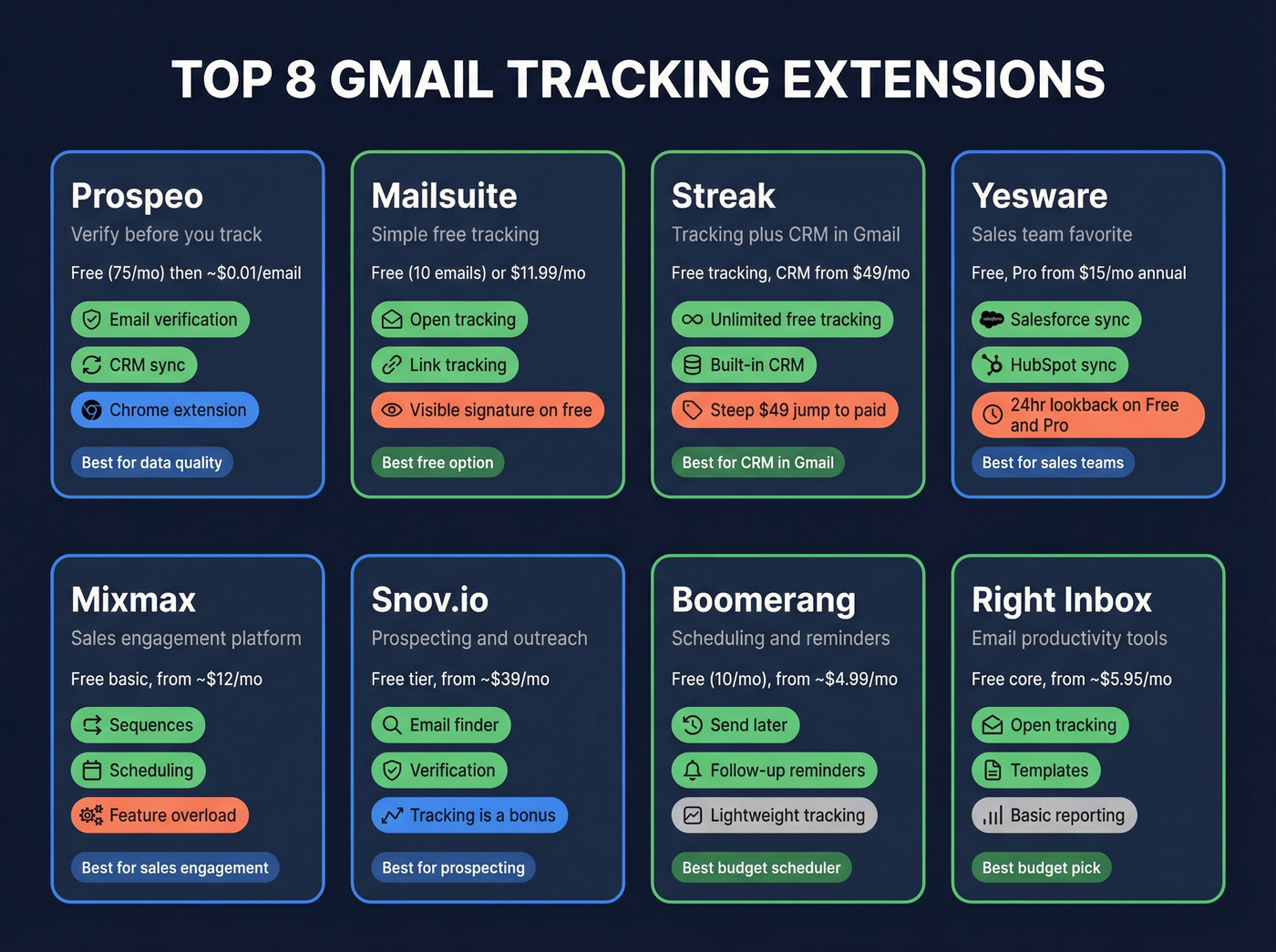
| Tool | Free Plan | Paid From | Open Track | Link Track | CRM Sync | Key Limitation |
|---|---|---|---|---|---|---|
| Prospeo | ✓ (75/mo) | ~$0.01/email | Email verify | - | Salesforce, HubSpot | Data quality layer, not a tracking tool |
| Mailsuite | ✓ (10 emails) | $11.99/user/mo | ✓ | ✓ | Limited | Free: 10 emails + visible signature |
| Streak | ✓ (unlimited) | $49/user/mo | ✓ | ✓ | Built-in CRM | $49 jump from free to paid CRM |
| Yesware | ✓ (10 recipients) | $15/seat/mo | ✓ (24hr limit) | ✓ (Pro+) | Salesforce, HubSpot | 24hr lookback on Free/Pro |
| Mixmax | ✓ (basic) | ~$12/user/mo | ✓ | ✓ | Salesforce | Feature overload for simple tracking |
| Snov.io | ✓ | ~$39/mo | ✓ | ✓ | HubSpot, Pipedrive | Tracking is secondary to prospecting |
| Boomerang | ✓ (10/mo) | ~$4.99/mo | ✓ | - | ✗ | Scheduling focus, lightweight tracking |
| Right Inbox | ✓ | ~$5.95/mo | ✓ | ✓ | ✗ | Basic reporting only |
Other tools worth a look: Mailbutler (from $4.95/mo) for lightweight tracking, and Cirrus Insight (from $14-$21/user/mo) for Salesforce-heavy teams.
Why Open Tracking Is Broken
Let's be honest about what these extensions are actually measuring in 2026.
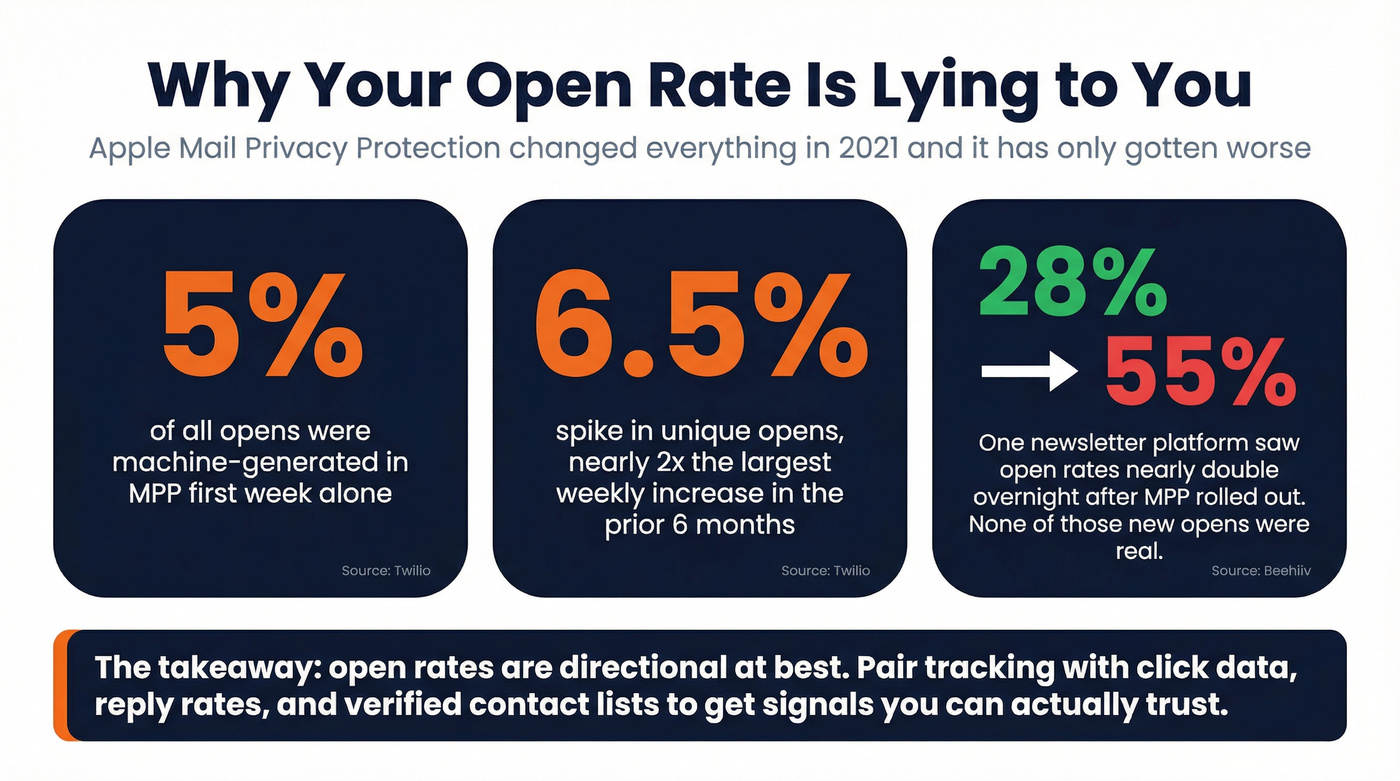
Twilio's data from Apple Mail Privacy Protection's first week tells the story in hard numbers: machine-generated opens accounted for 5% of all opens, and unique opens spiked 6.5% - nearly double the largest weekly increase in the prior six months. That was 2021. Adoption has only grown since.
To see what that looks like in practice: one newsletter platform saw open rates jump from 28% to 55% overnight after MPP rolled out. Those weren't real readers. Those were Apple's servers doing their job.
It gets worse. iOS 18's Link Tracking Protection strips tracking parameters - including UTMs - in Mail and Safari, breaking attribution even when someone does click. Your "Hey, saw you opened my email - wanted to follow up!" message? There's a good chance they never opened it. You're following up on a ghost signal, and the prospect knows it feels off.
Here's our take: if your average deal size is under five figures, you probably don't need pixel-level open tracking at all. Replies and booked meetings tell you everything that matters. Open tracking is most useful as a tiebreaker - when you're deciding which of two warm leads to call first, not as a primary engagement signal. (If you want a cleaner way to think about this, use an open rate vs click rate framework.)
The fix starts before you install a tracker. Verify your list so every open you do track is from a real person. Then shift your attention to metrics that require intentional action: link clicks, replies, meeting bookings. Open rates are a vanity metric dressed up as intelligence.
Privacy & Compliance
GDPR requires explicit consent for individual-level open tracking - no pre-checked boxes, no buried disclosures. Fines run up to EUR 20 million. France's CNIL reinforced this in a 2025 draft recommendation stating that open-rate tracking requires explicit prior consent for individual-level data.
In the US, enforcement is catching up. CPPA settlement amounts include $345,178, $632,500, and $1.35 million. These aren't theoretical risks anymore.
Practical steps worth taking: disclose tracking in your email footer or signature. Honor opt-out requests within 30 days. Check your tool's data retention policy - many delete tracking data after 12-24 months. And if you're sending into the EU, get consent before you track. Period. (If you need the operational version, see our GDPR for Sales and Marketing playbook.)
How to Choose the Right Extension
The decision is simpler than most articles make it.
Solo user, zero budget: Mailsuite's free plan. Accept the 10-email tracking limit and the visible signature.
Solo user or small team in Gmail: Streak. Free tracking forever, and the CRM is there when you need it.
Sales team on Salesforce or HubSpot: Yesware. But budget for Premium ($35/mo) to avoid the 24-hour lookback limitation.
Outbound at scale: Verify your list first, then track with whichever tool fits your stack. We've seen teams cut bounce rates from 30%+ down to under 4% after a proper verification step - and that alone makes every Gmail tracking extension's data more trustworthy. If you're scaling, follow an email verification for outreach workflow and keep an eye on hard bounce rates.
Budget under $5/mo: Boomerang or Right Inbox. Basic tracking, no frills.
No Gmail tracking extension can fix a 15% bounce rate. That's a data problem, not a tracking problem. Prospeo gives you 75 free email verifications per month - pair it with any tracker on this list and your open data actually means something.
Clean data in, reliable tracking out. Start with 75 free verifications.
FAQ
Do Gmail tracking extensions work on mobile?
Mailsuite supports mobile via an official Gmail add-on for iOS and Android. Most other trackers are Chrome-only, so mobile notifications and controls are limited. If mobile tracking matters, Mailsuite is currently the strongest option.
Can recipients tell I'm tracking their email?
Mailsuite's free plan adds a visible "Sent with Mailtrack" signature. Most paid tools hide the tracking pixel, but tech-savvy recipients can spot it by viewing the email source code or using privacy extensions that flag remote image loading.
Why does my open rate seem inflated?
Apple Mail Privacy Protection preloads tracking pixels on Apple's servers, creating fake "opens" even when the recipient never reads your email. Depending on your audience, 30-60% of your open data is machine-generated noise rather than real engagement.
Is email tracking legal under GDPR?
Individual-level open tracking requires explicit consent under GDPR - no pre-checked boxes allowed. France's CNIL reinforced this in a 2025 draft recommendation. Disclose tracking clearly, honor opt-outs within 30 days, and know that fines can reach EUR 20 million for violations.
What's a good free alternative to paid tracking tools?
Streak offers genuinely unlimited free open and link tracking with no time limit - the best free deal for Gmail users. Mailsuite's free plan works too, but caps you at 10 tracked emails.