

How to Check Your IP Reputation (and What to Do When It's Bad)
You just sent a 5,000-contact campaign. Open rates came back at 4%. Half your emails vanished into spam folders - or worse, never arrived at all. The culprit is almost always the same: your IP reputation tanked, and nobody thought to check it before hitting send.
One in six legitimate marketing emails never reaches the inbox, per Validity's benchmark data. And roughly 70% of senders don't use the free monitoring tools available to them. Only 25.5% of senders rate their understanding of sender reputation as "high," while 32% admit they barely understand it at all. That's not a knowledge gap. It's a blind spot that costs pipeline every single week.
What You Need (Quick Version)
Three tools cover 90% of what matters:
- Google Postmaster Tools - Gmail-specific reputation and spam rate data. The closest thing to a source of truth for Gmail delivery.
- Microsoft SNDS - Outlook/Hotmail reputation monitoring, covering a major share of consumer inboxes.
- MXToolbox - Multi-blacklist sweep across 100+ RBLs, and the fastest way to find out if you're listed somewhere that matters.
Add Sender Score if you want a single trackable benchmark number over time.
One contrarian note upfront: domain reputation now matters more than IP reputation for most senders. Check both.
What Is IP Reputation?
IP reputation is a trustworthiness score that mailbox providers assign to your sending IP address. Think of it as a credit score for email - every time you send, receiving servers evaluate that score to decide whether your message hits the inbox, lands in spam, or gets rejected outright.
Some tools express this as a 0-100 scale (Sender Score), while others use qualitative ratings (Google Postmaster's High/Med/Low/Bad) or different numeric ranges (Cisco Talos's -10 to +10). There's no single universal score. Gmail calculates its own. Microsoft calculates its own. They all use similar inputs - bounce rates, spam complaints, authentication - but the outputs don't align neatly.
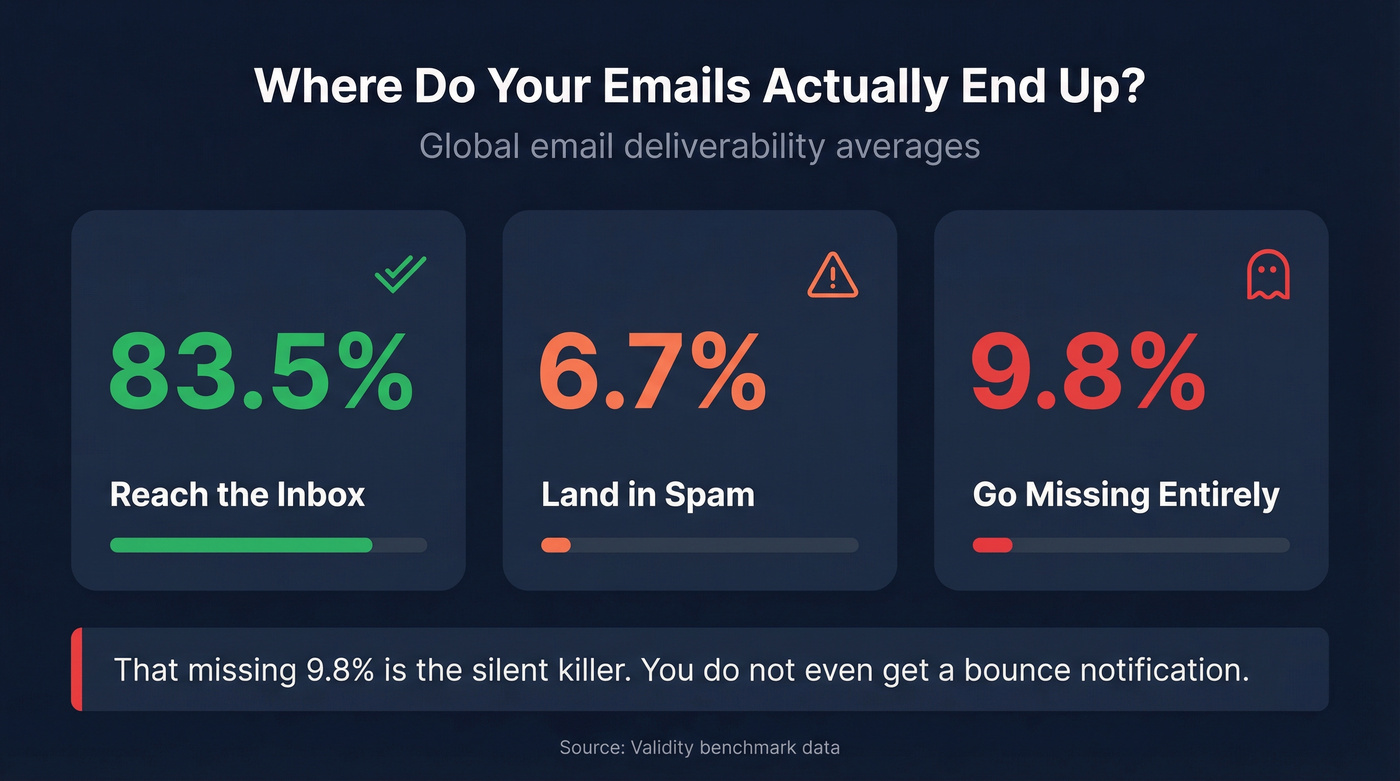
The global averages paint a sobering picture: roughly 83.5% of emails reach the inbox, 6.7% land in spam, and 9.8% simply go missing. That missing 9.8% is the silent killer. You don't even get a bounce notification.
IP vs. Domain Reputation
A decade ago, IP reputation was the dominant signal. Senders warmed up IPs carefully, and a clean IP was your golden ticket. That's shifted. Major providers like Gmail now prioritize domain reputation because senders frequently move between shared IPs and ESPs.
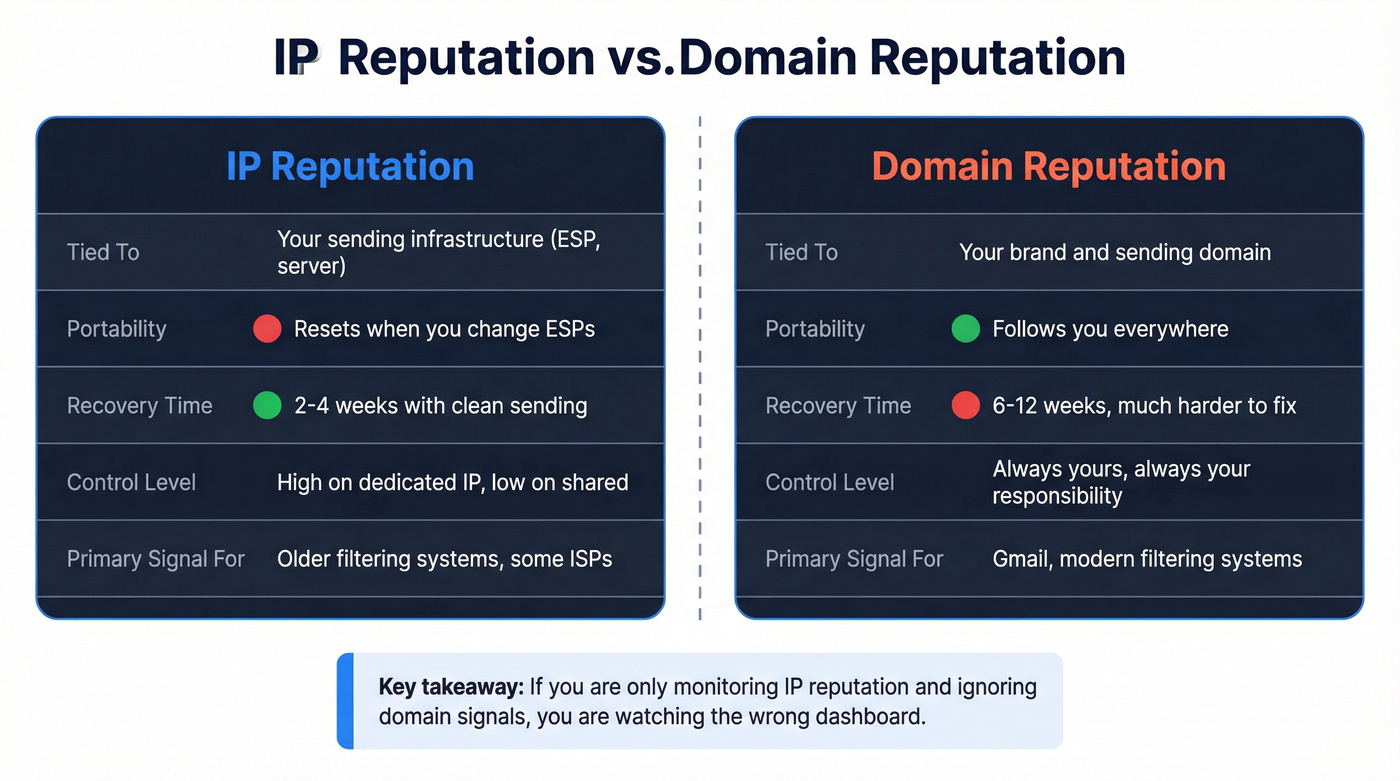
Here's the thing: IP reputation is tied to your sending infrastructure - change ESPs and you start over. Domain reputation follows your brand everywhere. It's portable. Google Postmaster Tools' newer Compliance Status (V2) view frames everything around compliance with bulk sender requirements, including SPF, DKIM, and DMARC pass rates.
Recovery timelines tell the story clearly. A damaged IP reputation typically recovers in 2-4 weeks with consistent clean sending. Domain reputation? That's a 6-12 week project. Domain damage is harder to undo precisely because it's more persistent. If you're only monitoring IP reputation and ignoring domain signals, you're watching the wrong dashboard.
What Affects Your IP Reputation
Six factors drive your IP reputation up or down, ranked by impact:
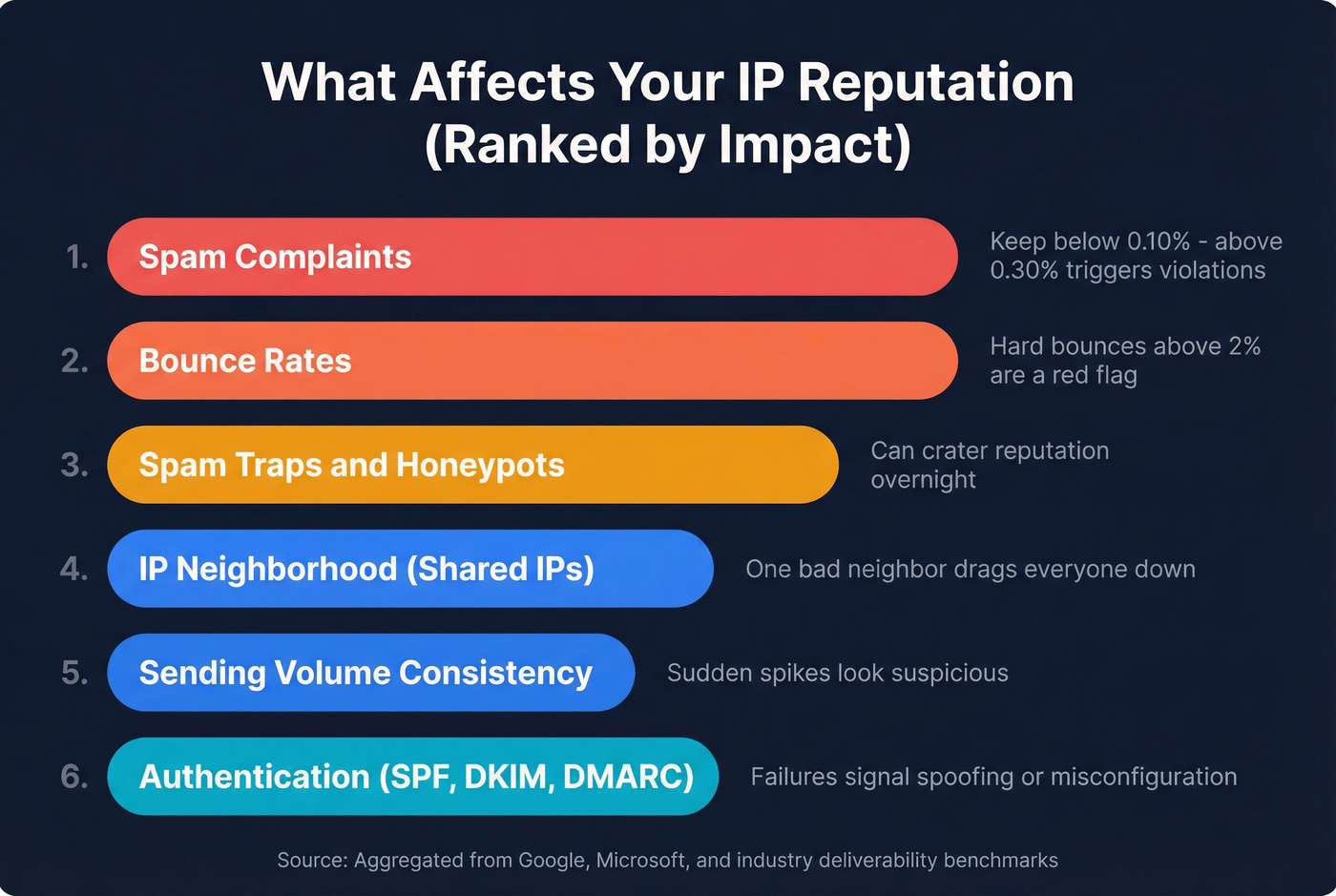
- Spam complaints - the single most damaging signal. Gmail's recommended spam rate is below 0.10%. Cross 0.30% consistently and you're looking at policy violations.
- Bounce rates - hard bounces from invalid addresses tell mailbox providers you aren't maintaining your lists. Above 2% is a red flag. (If you need a deeper breakdown, see hard bounces.)
- Spam traps and honeypots - email addresses that exist solely to catch senders with bad list hygiene. Hit enough of them and your reputation craters overnight.
- IP neighborhood - on shared infrastructure, your reputation is partially determined by other senders on the same IP range. One bad neighbor drags everyone down. (More context: dedicated IP vs shared IP.)
- Sending history and consistency - sudden volume spikes look suspicious. Consistent, predictable patterns build trust.
- Authentication pass rates - SPF, DKIM, and DMARC failures signal to receivers that your emails are spoofed or misconfigured. (Setup guide: SPF, DKIM, DMARC.)
If you're on a shared IP (most ESPs default to this), you inherit the reputation of everyone else on that pool. A useful rule of thumb: if you're sending more than 1,000 emails per day or 30,000 per month, you can typically sustain a dedicated IP so your reputation reflects only your behavior.
Let's be honest - most teams obsess over IP warm-up schedules and ignore the data flowing into their campaigns. Bad contact data is the #1 preventable cause of high bounce rates, and no amount of warm-up discipline fixes a list full of invalid addresses. (Related: invalid emails.)
How to Find Your Sending IP
You can't run a reputation lookup if you don't know which IP you're sending from.
Open a real sent message in the recipient's inbox. View the raw email headers and look for the SPF authentication result. It'll look something like: Authentication-Results: spf=pass (sender IP is 198.51.100.42). That IP is what you need.
If you're already using Google Postmaster Tools, the IP reputation dashboard shows your sending IPs directly - no header digging required. One important detail: if you're on a shared sending pool, check multiple messages from the past week. ESPs rotate customers across pools, so a message from Monday might show a different IP than one from Thursday.

High bounce rates are the #1 preventable cause of IP reputation damage - and they start with bad contact data. Prospeo's 5-step email verification delivers 98% accuracy, keeping your bounce rate well below the 2% danger zone that triggers blacklistings.
Stop fixing reputation problems. Prevent them with verified data.
Best Tools to Check IP Reputation
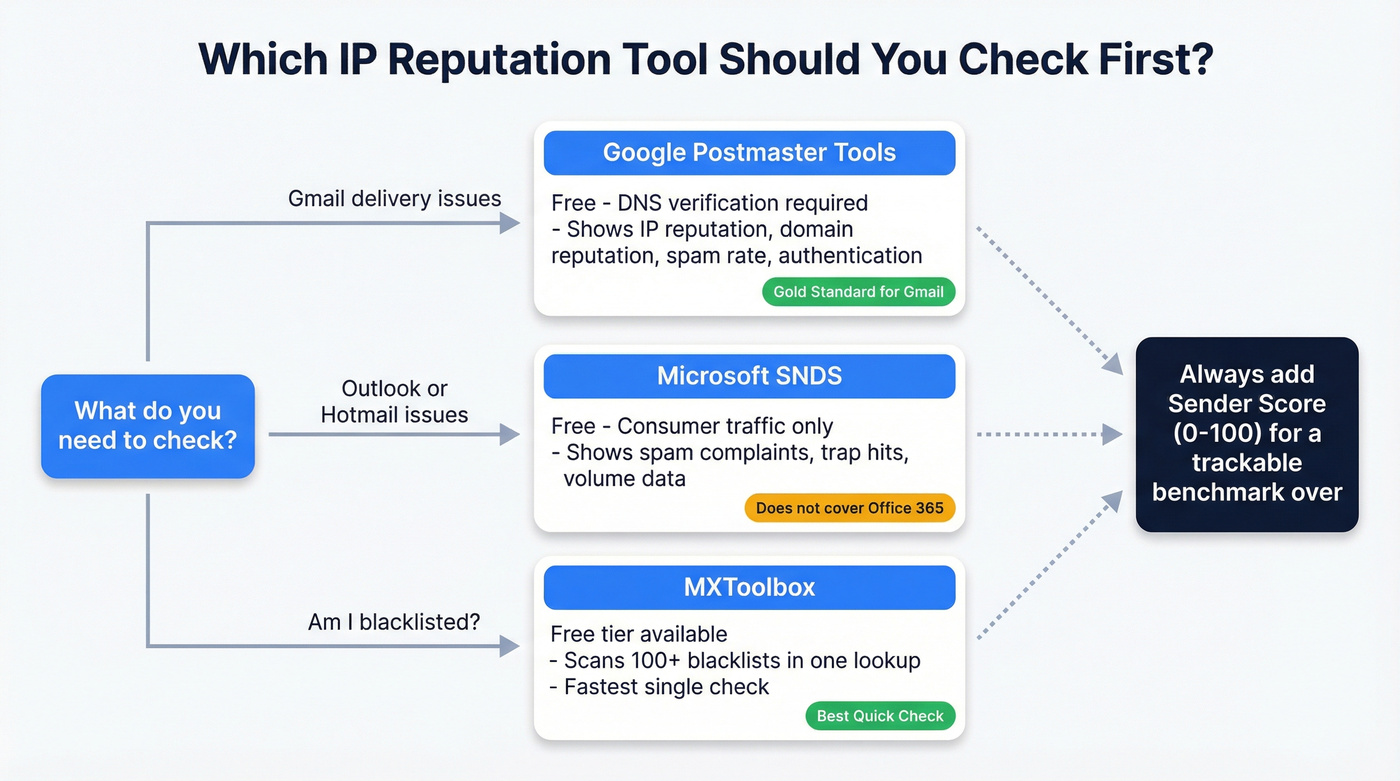
Checking one tool isn't enough. Each tool sees different data, uses different scoring, and covers different mailbox providers. We've tested most of these extensively, and you need at least two or three to get a real picture. (If you want a broader stack view, start with email deliverability tracking.)
| Tool | What It Checks | Scoring | Price | Best For |
|---|---|---|---|---|
| Google Postmaster | Gmail delivery | High/Med/Low/Bad | Free | Gmail-specific data |
| Microsoft SNDS | Outlook/Hotmail | Traffic light | Free | Microsoft ecosystem |
| Sender Score | Cross-provider | 0-100 scale | Free | Trackable benchmark |
| Cisco Talos | Multi-provider | -10 to +10 | Free | Frequently updated checks |
| MXToolbox | 100+ blacklists | Listed/Clean | Free-$399/mo | Quick blacklist sweep |
Google Postmaster Tools
The gold standard for Gmail deliverability data. Setup requires adding a DNS TXT record to verify your domain - propagation takes minutes to 24 hours. Once verified, you get dashboards for IP reputation, domain reputation, spam rate, authentication, and encryption.
Key thresholds: keep your spam rate below 0.10%. Cross 0.30% consistently and you'll trigger policy violations. Google has been rolling out a V2 "Compliance Status" view since 2024, shifting the framing from reputation to compliance with bulk sender requirements. Google planned to sunset the classic V1 interface on Sep 30, 2025 but postponed it - both views remain available. IP and domain reputation dashboards aren't in V2 yet, so you'll still need the classic view for those.
One troubleshooting tip that saves headaches: if you see 100% spam rate on a day you didn't send, don't panic. That's a delayed-complaint artifact - complaints from previous sends get attributed to a zero-send day, creating a division-by-zero effect.
Microsoft SNDS
SNDS covers Outlook and Hotmail consumer traffic. It shows IP activity, email volume, spam complaints, spam trap hits, and spam rate. Setup requires a Microsoft account and access to the WHOIS-listed email for your sending IP.
Important caveat: SNDS doesn't include emails sent to Office 365 or Exchange Online accounts. It's consumer-only. You also won't see data for any day where you sent fewer than 100 messages from a given IP. SNDS supports CSV export and an API for automated monitoring.
Sender Score
Sender Score from Validity gives you a single 0-100 number based on a rolling 30-day average. It ranks your IP against other sending IPs. Scores in the 90s are excellent. Below 80 means investigate immediately. Free with an account, and it's the easiest benchmark to track over time.
Cisco Talos Intelligence
Talos uses a -10 to +10 scoring range, updated every 3 hours. Look at the "Web Reputation" grade alongside the email reputation score for a fuller picture. Free, no account required. Particularly useful for checking whether a sudden deliverability drop correlates with a reputation change.
MXToolbox
The fastest way to run an IP blacklist check. MXToolbox scans 100+ RBLs in one lookup. The free tier handles basic checks; paid plans add continuous monitoring, alerts, and API access up to $399/month. If you only have time for one quick check, this is it.
Other Tools Worth Knowing
Spamhaus - The most influential blacklist in the industry. If you're listed here, fix it first.
AbuseIPDB - Community-driven abuse reporting database with a free API. More useful for security teams than email marketers, but worth checking if you suspect your IP has been compromised.
BarracudaCentral - Many corporate email security appliances reference Barracuda's lists, so a listing here directly impacts B2B delivery.
BrightCloud - Referenced by Comcast and other ISPs. Worth checking if you're seeing delivery issues with Comcast/Xfinity recipients specifically.
EasyDMARC - Free, unlimited checks, no account required. Scans popular blacklists and links directly to sources. Good as a quick spot-check.
How to Read Reputation Results
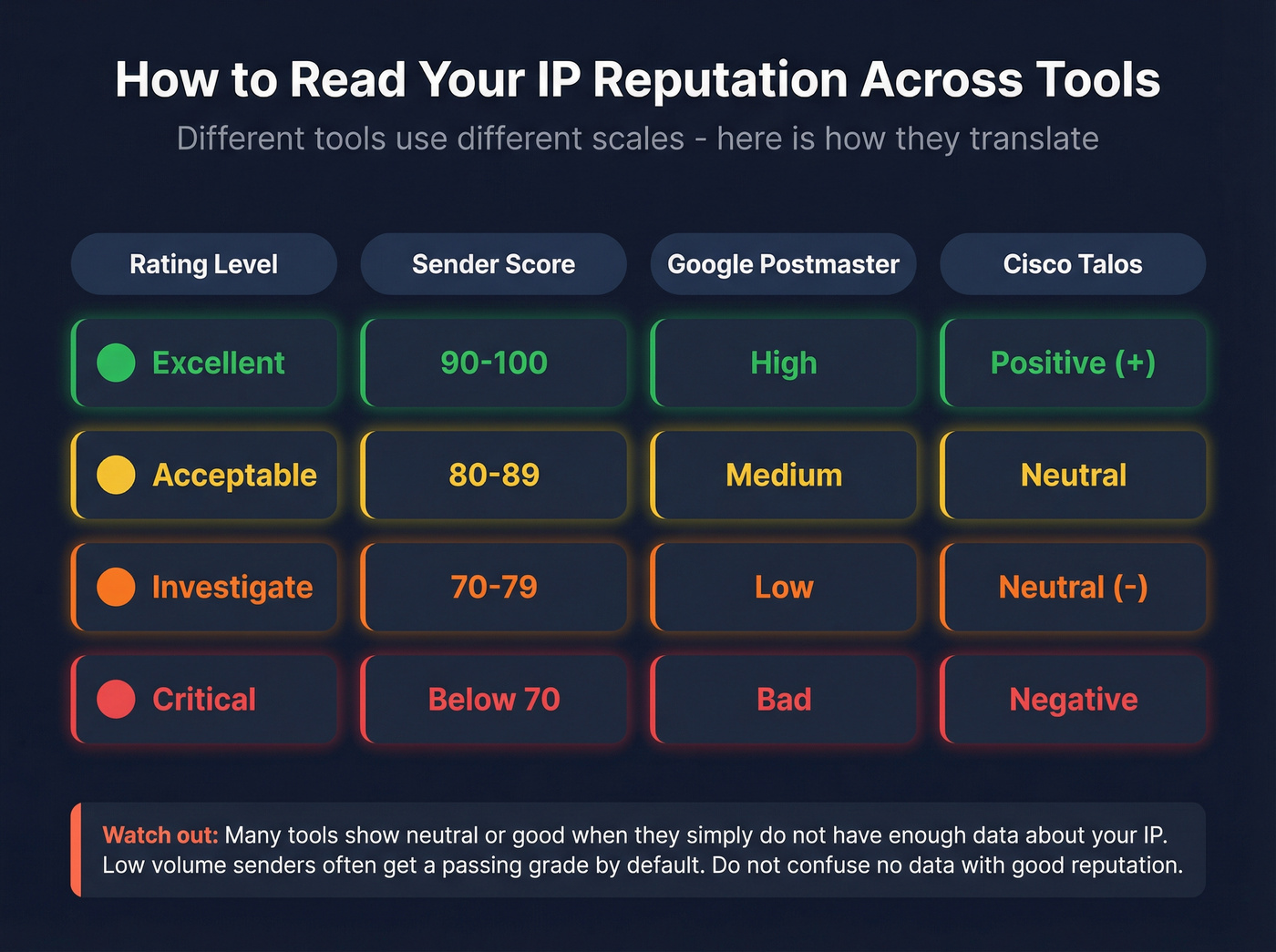
Different tools use different scales, which makes cross-referencing confusing. Here's a translation guide:
| Rating Level | Sender Score | Google Postmaster | Cisco Talos |
|---|---|---|---|
| Excellent | 90-100 | High | Positive (+) |
| Acceptable | 80-89 | Medium | Neutral |
| Investigate | 70-79 | Low | Neutral (-) |
| Critical | Below 70 | Bad | Negative |
A warning most guides skip: many public reputation tools skew neutral or "good" when they don't have enough data about your IP. Low-volume senders often get a passing grade by default - not because their reputation is strong, but because there isn't enough signal to flag them. Don't confuse "no data" with "good reputation."
Checking one tool and calling it done is like checking your credit score on one bureau. You need Google Postmaster for Gmail, SNDS for Microsoft, and at least one multi-RBL checker for the broader blacklist ecosystem. Three tools, five minutes, and you actually know where you stand.
Not All Blacklists Are Equal
MXToolbox might show you listed on six blacklists. Before you spiral, check which ones actually matter. (If you need a step-by-step triage flow, use this blacklist alert guide.)
Fix immediately: Spamhaus and Barracuda. These are widely referenced by corporate email security tools and many deliverability stacks. A listing on either one will materially impact your inbox placement, especially for B2B sends. If you see SMTP errors like 550 Rejected due to sender reputation or 554 IP blacklisted, these lists are usually the culprit.
Skip the panic: UCEPROTECTL2 and UCEPROTECTL3 are generally low-impact. They cast a wide net and list entire IP ranges, not just individual offenders. Most major mailbox providers don't weight them heavily. In our experience, we've seen teams lose sleep over UCEPROTECTL3 listings that had zero measurable impact on delivery. Don't make that mistake.
Aim to fix Spamhaus and Barracuda listings within 24 hours. Everything else can wait until you've addressed the root cause.
How to Fix Bad IP Reputation
Start with diagnosis, not delisting. Delisting without fixing the root cause just gets you re-listed in a week.
Identify the root cause. The usual suspects: sending to purchased or scraped lists with high invalid rates, sudden volume spikes without warm-up, weak or missing SPF/DKIM/DMARC authentication, or compromised accounts sending spam through your infrastructure.
Request delisting. Once you've fixed the underlying problem, submit delisting requests to the relevant blacklists. Straightforward cases clear in 1-3 days. Cases requiring deeper remediation - like cleaning an entire contact database or reconfiguring authentication - take 1-3 weeks.
Run an engagement-first recovery. This is where most teams stumble. After delisting, don't immediately resume full-volume sending. Isolate the problem ISP, suppress disengaged contacts, pause risky automations, and ramp volume gradually. Engagement signals - opens, clicks, replies, forwards - are among the strongest credibility signals you can send to mailbox providers.
Recovery timelines to set expectations: IP reputation typically recovers in 2-4 weeks with consistent clean sending and resolved root causes. Domain reputation takes 6-12 weeks. Plan accordingly.
How to Prevent Reputation Damage
Prevention is cheaper than recovery. Always.
Authentication is table stakes. SPF, DKIM, and DMARC should be configured and passing on every message. This isn't optional in 2026 - Gmail and Microsoft both enforce it for bulk senders. If you haven't set up DMARC with at least a p=none policy, start there. (Full walkthrough: SPF DKIM DMARC setup for cold email.)
List hygiene is the #1 preventable cause of reputation damage. Bad email data creates bounces. Bounces create blacklistings. Blacklistings kill your pipeline. If your bounce rate is above 2%, your data is the problem - full stop. Running a regular reputation check alongside your list cleaning ensures you catch problems before they compound. (Related: email deliverability checklist.)
This is where upstream verification pays for itself many times over. Prospeo's 5-step verification catches invalid addresses, spam traps, and honeypots before they ever touch your sending infrastructure, with 98% email accuracy and data refreshed every 7 days versus the 6-week industry average. Stack Optimize built their agency to $1M ARR running client campaigns through Prospeo - deliverability stayed above 94%, bounce rates under 3%, zero domain flags across all clients.
The remaining prevention habits are straightforward:
- Warm up new IPs gradually. Start with your most engaged segments and increase volume over 2-4 weeks. Sudden jumps from 0 to 10,000 emails per day look like spam to every mailbox provider. (More detail: automated email warmup.)
- Separate transactional and marketing streams. Your order confirmations shouldn't share an IP with your cold outreach. One bad campaign can take down your transactional delivery.
- Monitor on a schedule. Weekly checks for high-volume senders. Biweekly minimum for everyone else. Immediately after any deliverability drop. Five minutes with three tools is all it takes.
Stack Optimize built a $1M agency on Prospeo data: 94%+ deliverability, under 3% bounce rate, zero domain flags across every client. When your contact data is verified on a 7-day refresh cycle, IP reputation takes care of itself.
Clean data at $0.01 per email beats reputation repair every time.
FAQ
How often should I check IP reputation?
Weekly for high-volume senders (50,000+ emails/month). Immediately after any unexplained deliverability drop. Biweekly minimum for everyone else. The checks take five minutes across Google Postmaster Tools, SNDS, and a multi-RBL scanner like MXToolbox.
Can I check IP reputation for free?
Yes - Google Postmaster Tools, Microsoft SNDS, Sender Score, Cisco Talos, MXToolbox's basic tier, and EasyDMARC are all free. You can build a solid monitoring stack without spending a dollar. Paid plans like MXToolbox's monitoring tiers add alerts and automation but aren't required to start.
What's a good IP reputation score?
Sender Score 90+ is excellent. Google Postmaster "High" is the target. Cisco Talos positive range means you're clean. Below 80 on Sender Score means investigate immediately - review your bounce rates, spam complaints, and blacklist status before your next send.
How long does it take to fix bad IP reputation?
IP reputation typically recovers in 2-4 weeks with consistent clean sending and resolved root causes. Domain reputation takes 6-12 weeks. The timeline depends entirely on whether you've actually fixed the underlying problem - delisting without remediation just restarts the clock.
Does email verification prevent blacklisting?
High bounce rates from invalid addresses are a top cause of IP blacklisting. Pre-send verification catches bad addresses, spam traps, and honeypots, keeping bounce rates under 2%. This is one of the highest-ROI steps you can take to protect your sender reputation long-term.