

Free ABM Campaign Planning Template (Google Sheet) + How to Use It
An abm campaign planning template's only useful if it survives week 3.
That's the week new "priority" accounts show up, routing gets ignored, and your dashboard turns into a museum of clicks.
This one is built like an operating system: one target list, clear tiers, scoring with decay, routing that forces next actions, and KPIs you can defend in a leadership meeting.
Why this ABM campaign planning template works (and others fail)
Most ABM templates fail for three boring reasons:

- They're built like a one-time planning doc, not a weekly operating cadence.
- They don't force alignment, so sales runs "priority accounts" and marketing runs "target accounts."
- They measure the wrong things, so nobody trusts the program.
6sense found that nearly 80% of orgs run ABM, but only 29% measure success solely with ABM-aligned metrics, while almost half still report on MQLs. That's how you end up "doing ABM" while reporting like it's 2016.
What this sheet fixes is simple: it forces decisions instead of collecting opinions.
Concrete "this sheet forces it" examples (the part most templates skip):
- Tiering can't drift: Tier is a dropdown with allowed values (Tier 1/2/3). If someone adds an account, they've gotta pick a tier. No tier = it doesn't count.
- Routing can't be vague: every trigger has a numeric threshold cell (Score >= X, Engagement >= Y, Intent = Z) and an SLA column. If there's no SLA, it's not a trigger, it's a wish.
- Scoring can't stay "hot" forever: decay is a multiplier cell (30/60/90-day windows). Old activity automatically loses weight.
- KPIs can't be cherry-picked: the dashboard pulls from the TAL status fields (Engaged/Meeting/Opp/Won) so you can't swap definitions mid-quarter.
Look, if your average deal size is small, you probably don't need an ABM suite. You need a ruthless target list, tight routing, and a weekly review. Most "ABM tech stacks" are just expensive ways to avoid making those decisions.
The ABM planning sheet (tabs + what each produces)
ABM breaks when everything lives in one mega-tab. This template is multi-tab on purpose. Each tab has an owner and a concrete output.
| Tab | Purpose | Owner | Output |
|---|---|---|---|
| ICP | Define "good fit" + exclusions | RevOps | ICP rules |
| Unified Target List (TAL) | Single source of truth | RevOps | TAL v1 |
| Tiering | Effort by value | Sales + Marketing | Tier per account |
| Account Narrative | "Why now" + risks | AE/SDR | 1-page brief |
| Buying Committee Map | Roles + gaps | AE/SDR | Thread plan |
| Plays & Channels | Stage plays | Demand Gen | Play matrix |
| Asset Checklist | What exists + what's missing | Content | Build queue |
| Scoring (Fit/Eng/Intent) | Prioritize action | RevOps | Scores + decay |
| Routing | Turn signals into tasks | RevOps | Triggers + SLAs |
| Measurement Dashboard | ABM KPIs | RevOps | Weekly view |
| Governance/RACI | Who does what | RevOps | Cadence + rules |
ZenABM's tiering ranges are a solid sanity check if you want an external reference: ZenABM's ABM strategy template.

Your ABM template forces decisions - but bad contact data kills execution. That 12% bounce rate scenario? It happens when your TAL contacts aren't verified. Prospeo delivers 98% email accuracy and 125M+ verified mobiles at $0.01/email, so your Tier 1 accounts actually get touched.
Stop letting stale data turn your ABM program into calendar theater.
How to use an ABM campaign planning template in 60 minutes
You don't need an ABM platform to start. You need a sheet that forces decisions and a weekly loop that keeps it honest.

Salesmotion's guidance on list size is right: start with 50-200 accounts. Big enough to learn, small enough to manage.
10 minutes: Copy the sheet + lock definitions
- Create the tabs above in Google Sheets (or Excel).
- Add a Definitions block at the top of the TAL: what counts as "Engaged," what counts as an "MQA," what counts as "In TAL."
- Freeze row 1, turn on filters, protect formula columns.
20 minutes: Build TAL v1 (50-200 accounts)
- Pull accounts from CRM (open opps, closed-lost, best-fit customers).
- Add 10-30 new-logo accounts that match ICP.
- Assign an owner for every account. No owner = no ABM.
20 minutes: Tier + write "why this account, right now"
My rule is blunt: every Tier 1 account needs a one-sentence rationale. If you can't write it, it's not Tier 1.
If you've got dedicated SDR + AE capacity, Tier 1 can stretch toward 30-50, but only if you're using reusable asset skeletons and keeping routing tight, because the moment your Tier 1 list turns into a "nice-to-have" pile, the program turns into calendar theater.
10 minutes: Clean contacts + set routing
Before outreach, verify emails/mobiles and dedupe contacts. I've watched "hot account" dashboards kill ABM because nobody owned the next action, and half the contacts were wrong anyway. (If you need a workflow, use a simple email verification list SOP.)
Here's a real scenario I've seen: a team launched a Tier 1 sprint, hit a 12% bounce rate in week one, and the SDRs quietly stopped sending because they didn't want to burn their domains; the dashboard still looked "green" because page views kept coming in, but meetings flatlined until they rebuilt the contact list and added a hard SLA for follow-up.

What this costs (real talk):
- Template-first ABM: $0 (Google Sheet + your time).
- Enterprise ABM suites: often $30k-$100k+/year once you add intent + orchestration.
- Prospeo is credit-based and self-serve: ~$0.01 per verified email, 10 credits per verified mobile (only when found); free tier includes 75 emails + 100 Chrome extension credits/month: https://prospeo.io/pricing
Fill the tabs (plus pasteable headers you can drop into Sheets)
Below are the fields that matter, plus copy/paste header rows for the tabs people actually use day-to-day. This is the "free sheet" part. Paste these headers into row 1 and build from there.
1) ICP + exclusions (non-negotiables)
Goal: define what "good" and "bad" look like so you stop arguing later.
Columns (recommended)
- ICP Segment
- Industry (NAICS/SIC if you use it)
- Region / language requirements
- Employee range (min/max)
- Revenue range (min/max)
- Tech requirements (must-have / must-not-have)
- Buying motion (PLG, sales-led, channel-led)
- Trigger events (funding, hiring, compliance deadlines)
- Bad-fit exclusions (most important)
Common mistakes
- "Mid-market" + "tech-forward" isn't an ICP.
- No exclusions = your TAL becomes a dumping ground.
2) Unified Target List (TAL): spec + pasteable header row
This tab makes or breaks ABM. We've tested a bunch of "pretty" ABM planners, and the failure pattern's always the same: the plays look great, the dashboard looks great, and then the target list is duplicates, wrong domains, stale contacts, and ownerless accounts.
Required columns (minimum viable TAL)
- Account ID (CRM)
- Account name
- Domain (canonical)
- Tier (1/2/3)
- ICP segment
- Deal band / ARR potential
- Intent topic (optional)
- Last activity date
- Owner (AE/SDR)
- Status (Prospecting / Engaged / Meeting / Opp / Won / Nurture)
- Notes (short)
Pasteable header row (CSV-style)
Account_ID,Account_Name,Domain,Tier,ICP_Segment,Deal_Band,Intent_Topic,Last_Activity_Date,Owner,Status,Last_Touched_Date,Next_Action,Next_Action_Due,Notes
Refresh cadence
- Weekly: activity, engagement, routing outcomes
- Monthly: tier changes, new accounts, dropped accounts
- Quarterly: ICP review + TAL rebuild baseline
Governance rules
- One canonical domain per account (no duplicates across TLDs)
- One owner per account at a time
- Tier changes require a reason
- Every account has a "last touched" date
Data hygiene workflow (the columns you're trying to fill) When you turn the plan into outreach, you need verified contacts, not guesses. The hygiene workflow should populate fields like:
- Email (verified)
- Mobile (verified)
- Department / function
- Seniority
- Last verified date
- Source
- Enrichment match flag
Useful pages:

3) Tiering rules (1:1 / 1:few / 1:many)
Tiering is how you stop pretending you can personalize everything.

Default account-count ranges (good starting point)
- Tier 1 (1:1): 10-20 accounts
- Tier 2 (1:few): 50-100 accounts
- Tier 3 (1:many): 100-200+ accounts
What changes by tier
- Personalization depth (custom narrative vs segment narrative)
- Asset requirements (custom page vs modular page vs standard)
- Channel mix (direct mail/events vs ads/webinars vs nurture)
- SLA (Tier 1 same-day follow-up; Tier 3 batched)
- Buying committee coverage target (Tier 1 often needs 6-10 contacts mapped)
Common mistakes
- Calling it 1:1 because you added the company name to an email.
- Putting 60 accounts in Tier 1. That's not Tier 1. That's burnout.
4) Account Narrative (why now / why no / risks)
This is what makes personalization real. The best practitioner test I've heard is: if you swapped the logo and it still works, it isn't 1:1.
Fields
- What they sell / how they make money
- Who their customer is
- Recent launches / announcements
- Who feels the pain (function + role)
- Why yes now (2-3 hypotheses)
- Why no now (2-3 blockers)
- Risks (timing, politics, budget, competitor)
- Proof points to use (relevant case studies)
- One-sentence rationale: "Why this account, right now"
5) Buying Committee Map (make multi-threading unavoidable)
Buying groups are messy on purpose. Gartner's a good reality check: buying groups range from 5-16 people across up to 4 functions, and 74% of teams show unhealthy conflict during the decision process (Gartner survey of 632 B2B buyers, Aug-Sep 2024). If you want a system for this, use an ABM multi-threading workflow.
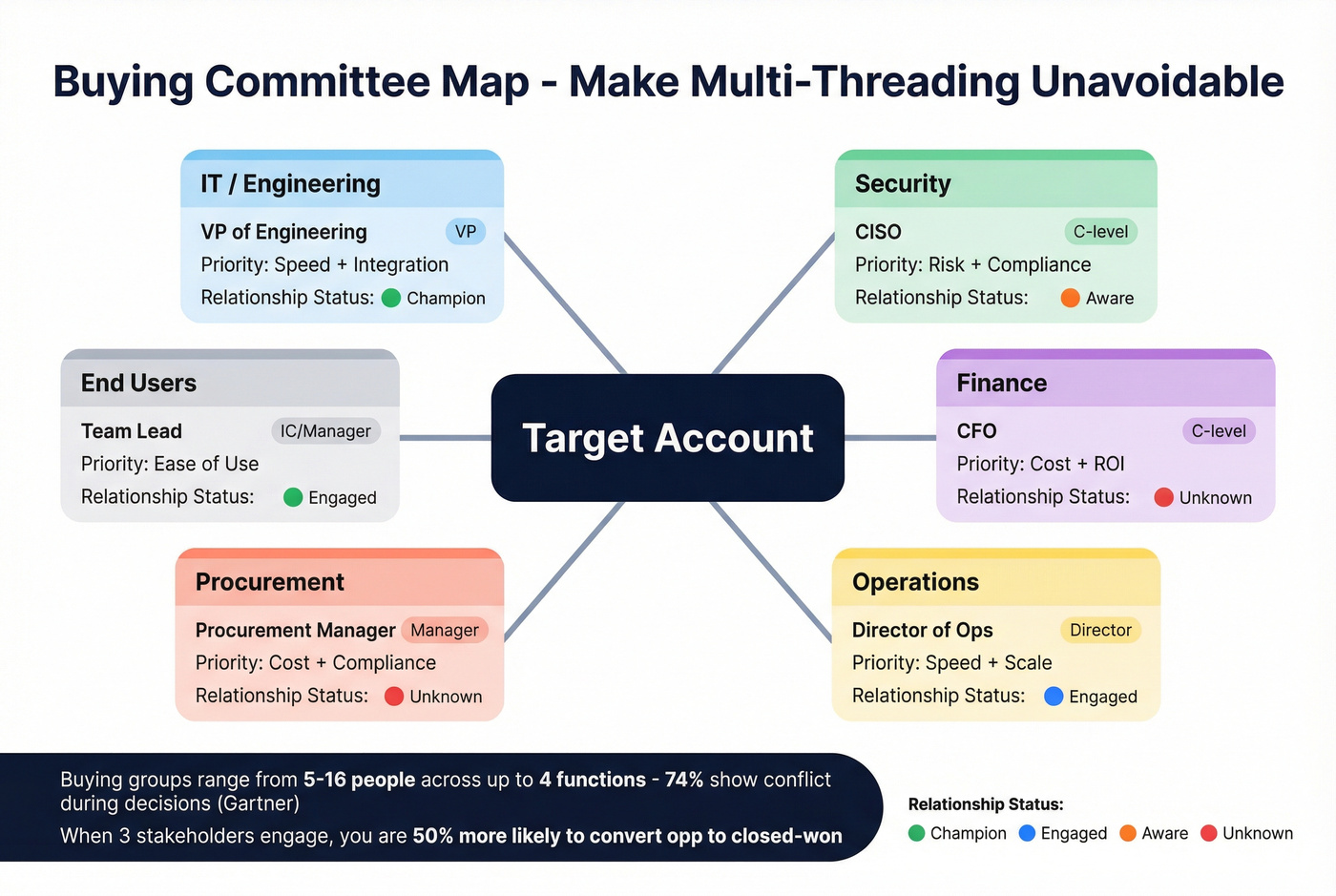
Madison Logic cites Forrester client feedback: when three stakeholders from the same company engage, you're 50% more likely to convert opportunity to closed won.
Columns
- Account
- Function (IT, Security, Finance, Ops, etc.)
- Role/title
- Seniority (IC/Manager/Director/VP/C-level)
- Likely priority (cost, risk, speed, compliance, growth)
- Objections
- Proof needed (case study, ROI model, security docs)
- Relationship status (unknown / aware / engaged / champion)
- Next best action
6) Plays & Channels + Asset Checklist (keep it executable)
Buyers punish inconsistency. Gartner's numbers are blunt:
- 61% prefer a rep-free buying experience
- 73% avoid suppliers who send irrelevant outreach
- 69% see inconsistency between the website and what sellers say

So your plays have to cover both: seller-led touches and rep-free paths.
Plays tab columns
- Tier
- Stage (Aware / Engaged / Meeting / Opp / Expansion)
- Primary channel (email, call, ads, event, partner, web)
- Offer/CTA (audit, benchmark, workshop, demo, trial)
- Asset used (case study, page, deck, calculator)
- Personalization rule (account-specific vs segment-specific)
- Owner (SDR/AE/Marketing)
- SLA (time to follow-up)
- Message consistency check (Yes/No + link to source-of-truth copy)
Asset checklist columns
- Asset type
- Stage supported
- Tier supported
- Exists? (Y/N)
- Link
- Owner
- Last updated
- Reuse rule
- QA checklist (tracking, proof, CTA, legal)
ABM scoring + routing (pasteable headers + a worked mini-example)
Account scoring works when it's simple enough to trust and strict enough to drive action. Use Fit + Engagement + (optional) Intent. (If you want a deeper model, see account scoring.)
Default weights (start here)
| Component | Weight | When it wins |
|---|---|---|
| Fit | 40% | Keeps you on-ICP |
| Engagement | 50% | Captures timing |
| Intent | 10% | Adds "in-market" signal (only if you route fast) |
Default point model (starter set)
- Meeting booked: 60
- Demo request: 50
- Pricing / high-intent page: 40
- Email reply: 35
- Webinar attendance: 20
- Whitepaper download: 15
- Case study view: 10
- Blog view: 3
Decay windows (use this, don't debate it for a week)
- 0-30 days: 100%
- 31-60 days: 50%
- 61-90 days: 25%
- 90+ days: 0 (archive)
Pasteable header rows (Scoring + Routing)
Scoring events (paste into a "Scoring_Events" tab)
Account_ID,Account_Name,Event_Date,Event_Type,Base_Points,Decay_Bucket,Decay_Multiplier,Net_Points,Source,Notes
Routing rules (paste into a "Routing" tab)
Trigger_Name,Trigger_Type,Trigger_Definition,Tier,Threshold,Action,Owner,SLA_Hours,Where_It_Creates_Work(CRM/Slack/Email),Notes
Worked mini-example (3 accounts -> score -> routing -> KPI)
Accounts (TAL snapshot)
| Account | Tier | Owner | Status |
|---|---|---|---|
| NorthPeak.io | Tier 1 | AE: Sam | Engaged |
| CedarWorks.com | Tier 2 | SDR: Lina | Prospecting |
| BrightLedger.co | Tier 3 | SDR: Lina | Nurture |
Events + decay (NorthPeak.io)
| Event | Days ago | Base points | Decay | Net |
|---|---|---|---|---|
| Pricing page view | 10 | 40 | 1.0 | 40 |
| Webinar attendance | 45 | 20 | 0.5 | 10 |
| Case study view | 70 | 10 | 0.25 | 2.5 |
Engagement subtotal: 52.5
If your routing rule is "Engagement >= 50 AND Tier in {1,2} -> create task within 24 hours", NorthPeak triggers immediately.
Routing trigger fired
- Trigger: Engagement >= 50 (Tier 1-2)
- Action: AE alert + SDR task
- SLA: 24 hours
- Next step: "Send Tier 1 narrative-based email + call within same day"
KPI impact (weekly dashboard)
- NorthPeak moves from "Prospecting" -> "Engaged"
- If a meeting's booked, it counts toward Meeting Rate and downstream opp creation
Salesforce Account Scoring ops note (use it like a control knob)
If you're using Salesforce Account Scoring, treat refresh frequency like a budget lever: more frequent refreshes make routing more responsive, but they also create more noise if your triggers are sloppy. Salesforce lets admins unschedule/reschedule scoring runs, so use that during launches, list rebuilds, or when you're fixing event tracking so you don't flood reps with junk.
Measurement dashboard + "what good looks like" in 90 days
If you're still reporting MQLs, you'll lose the room. Your dashboard should answer, weekly: Are we penetrating the list? Are buying groups engaging? Are we creating meetings and pipeline? Is velocity improving? (For more examples, see revenue dashboards.)
Core formulas (Google Sheets)
Account Penetration Rate (%)
=(Engaged_or_Won_Target_Accounts / Total_Target_Accounts) * 100
Meeting Rate (%)
=(Target_Accounts_with_Meeting / Total_Target_Accounts) * 100
Buying Group Coverage (%) (simple version)
=(Accounts_with_3plus_contacts_engaged / Total_Target_Accounts) * 100
Pipeline Velocity
=(Opportunities * Avg_Deal_Size * Win_Rate) / Sales_Cycle_Length_Days
Pasteable header row (Dashboard inputs)
Create a "Dashboard_Inputs" tab and paste:
Week_Start_Date,TAL_Total,TAL_Engaged,TAL_Meetings,TAL_MQAs,TAL_Opps_Created,TAL_Pipeline_Value,TAL_Won_Revenue,Avg_Deal_Size,Win_Rate,Sales_Cycle_Days,Notes
Weekly KPI table (keep it tight)
| KPI | Definition | Pick a target |
|---|---|---|
| Penetration | Engaged/Won ÷ TAL | +2-5 pts/week early |
| Buying-group coverage | 3+ stakeholders engaged ÷ TAL | steady increase |
| Meetings | Meetings from TAL | stable upward trend |
| MQAs | Score-qualified accounts | stable upward trend |
| Opps | Opps from TAL | stable upward trend |
| Velocity | formula above | improve quarter-over-quarter |
Callout: what "good" can look like in 90 days
A real ABM pilot rebuild (self-reported) hit these outcomes in 90 days:
- 100% reach of target accounts
- 56% engagement
- 63% meeting to opportunity conversion
- 17% of new opportunity goals closed-won
That's the bar to aim at: not "more leads," but measurable account movement.
Budgeting + governance (exec approval in 10 minutes)
ABM fails in week 3 when nobody knows who owns what, or when leadership can't see how the spend turns into pipeline. Fix both with one page of numbers and a boring RACI.
Budgeting + pipeline math (simple defaults)
Plan from revenue backward.
Worked example (edit these cells)
- Goal: $1,000,000 closed-won
- Win rate: 50%
- Pipeline needed: $2,000,000
Now allocate by tier using simple cost-per-opportunity assumptions:
| Tier | Cost per opp | Planned opps | Budget |
|---|---|---|---|
| Tier 1 | $3,500 | 10 | $35,000 |
| Tier 2 | $1,000 | 20 | $20,000 |
| Tier 3 | $300 | 30 | $9,000 |
Total: $64,000 to target 60 opportunities (illustrative).
Sanity-check it: if your win rate's 50%, 60 opps implies ~30 wins. If your average deal's $33k, that's roughly $990k closed-won, close enough to your $1M goal to justify the plan.
How to get exec approval in 10 minutes (use the sheet, not a deck)
Bring leadership five inputs and don't over-explain:
- Revenue goal + required pipeline
- ICP summary + exclusions
- TAL size + tier counts (e.g., 15/75/150)
- Budget by tier (table above)
- KPI definitions + weekly cadence (penetration, meetings, opps, velocity)
Then show the RACI and the routing SLA. Executives approve clarity.
RACI mini-matrix (keep it boring)
Rule: only one Accountable per task.
| Task | Responsible | Accountable | Consulted | Informed |
|---|---|---|---|---|
| TAL updates | RevOps | RevOps | Sales | Marketing |
| Tier changes | RevOps | Sales lead | Marketing | Team |
| Tier 1 narrative | SDR/AE | AE | Marketing | RevOps |
| Asset build | Content | Marketing lead | Sales | RevOps |
| Routing rules | RevOps | RevOps | Sales | Marketing |
| KPI reporting | RevOps | RevOps | Marketing | Sales |
Operating cadence (the only one that works)
In our experience, weekly tier reviews are the only cadence that prevents "random priority accounts" from hijacking the program. (If you need a meeting format, run it like a pipeline review cadence.)
- Weekly (30 minutes): penetration + MQAs, routing outcomes vs SLA, tier moves (with reasons), next week's asset queue
- Quarterly: ICP refresh + TAL rebuild baseline
Guardrails + FAQ (plus next steps)
Pre-flight guardrails (fix the classic failure modes)
- If targeting's reactive: freeze the TAL for the sprint and add change control.
- If personalization's generic: require an Account Narrative before Tier 1 outreach.
- If sales/marketing are misaligned: one owner per account + one SLA per trigger.
- If you're tracking vanity metrics: replace them with penetration, buying-group engagement, meetings, opps, velocity.
- If post-sale's neglected: add Expansion plays and a customer tier in the TAL.
Skip the fancy stuff if you can't keep the TAL clean and the SLA real.
ABM doesn't need more tools. It needs fewer loopholes. (If you're going lean, this is basically ABM without expensive tools.)
Next steps (do these in order)
- Paste the TAL + Routing + Dashboard headers into a new Sheet.
- Build a 50-200 account TAL and assign owners today.
- Run one weekly review for four weeks before you buy anything.
FAQ
What should an ABM campaign planning template include (at minimum)?
At minimum, an abm campaign planning template needs a unified target account list with owners, tiering rules, an account narrative field ("why now"), buying committee mapping, plays/channels by stage, scoring with decay, routing thresholds, and an ABM KPI dashboard with formulas. If any one of those is missing, execution and measurement usually break within 2-3 weeks.
How many accounts should I start with for an ABM pilot?
Start with 50-200 accounts so you can learn without drowning in complexity. Keep Tier 1 tight (around 10-20 accounts) and require a one-sentence "why this account, right now" rationale. If you can't explain timing in one line, it belongs in Tier 2/3 nurture.
What KPIs replace MQLs in ABM reporting?
ABM replaces MQLs with account-level KPIs: penetration rate, buying-group engagement, meetings from target accounts, MQAs (score-qualified accounts), opportunities created, pipeline value, win rate, and pipeline velocity. If you can't tie a metric to account movement or revenue, it's probably a distraction.
What's a good free tool for verifying ABM contacts before outreach?
Prospeo's a strong free starting point because the free tier includes 75 verified emails plus 100 Chrome extension credits per month, and you only pay for valid data. It also delivers 98% email accuracy and a 7-day refresh cycle, which prevents bounce spikes that quietly kill ABM execution.
Step 4 of your ABM setup says 'clean contacts + set routing' - Prospeo handles that in minutes. Enrich your entire target account list with 50+ data points per contact, dedupe automatically, and get verified emails and direct dials for every buying committee member.
Fill every buying committee gap with contacts that actually connect.