

BDR Contact Data in 2026: What It Is, What "Good" Looks Like, and How to Run It
You can spend $15k/year on "premium data" and still watch your first sequence bounce 12%.
Then BDRs stop trusting the list, start freelancing their own research, and pipeline dies in a thousand cuts. Buying a bigger database doesn't fix that.
The fix is treating bdr contact data like an operational system: benchmarks, QA, refresh, and one suppression layer that every tool respects.
What you need (quick version)
Use this as your minimum bar before any contact data touches a sequencer.
Benchmarks (manage with numbers, not vibes)
- Email bounce targets: Excellent <2%, Good 2-5%, Poor >10%
- Decay baseline: 22.5%/year ~= 2.1%/month (assume every list is rotting)
- Freshness target: >80% of records updated within 90 days
Weekly workflow (the one that holds up at scale)
- Source -> Verify -> Enrich -> Sync -> Refresh
- If bounce is >5%, stop outbound. Fix verification + suppression + freshness first.
RevOps non-negotiables
- One suppression list (opt-outs, bounces, DNC) that every tool respects
- Sampling-based QA before scaling volume
- One owner for "data health" (everyone's problem becomes nobody's job)
Look, if your team can't agree on what "verified" means, you're not running outbound. You're gambling with your domain.

BDR contact data: definition, fields, and "minimum viable record"
BDR contact data is the person-level and company-level info that lets a rep (or an automated sequence) reach the right human at the right company, with enough context to not sound clueless. It's the join between identity (who), reachability (how to contact them), and routing context (why them, why now).
It's not just "an email and a title." In practice, it's the difference between a cadence that creates conversations and a cadence that creates bounces, spam complaints, and awkward "sorry, wrong person" replies.
Here's the minimum viable dataset we've seen work across most outbound motions:
Minimum viable record (MVR)
Person identifiers
- First name, last name
- Job title + seniority
- Department / function (Sales, IT, Finance, Ops)
Reachability
- Work email (deliverable)
- Mobile or direct dial (callable)
- Location / region (for routing + compliance)
Firmographics (company context)
- Company name + website/domain
- HQ country (and sometimes state)
- Employee count band
- Industry
Ops fields (so it doesn't break your systems)
- Source + source date
- Last verified date (email + phone separately)
- CRM IDs (Account ID, Contact/Lead ID)
- Consent/opt-out flags + suppression key
Here's the operational line in the sand: if it can't route, dedupe, suppress, and re-verify, it's not contact data. It's a spreadsheet.
In our experience, the fastest way to spot a "spreadsheet org" is this: reps keep their own lists because the CRM's full of duplicates, stale titles, and phone numbers that go nowhere.
How contact data gets used in a modern BDR cadence (benchmarks)
Contact data isn't a static asset. It's fuel for a cadence that's longer, heavier, and more multi-channel than most RevOps dashboards admit.
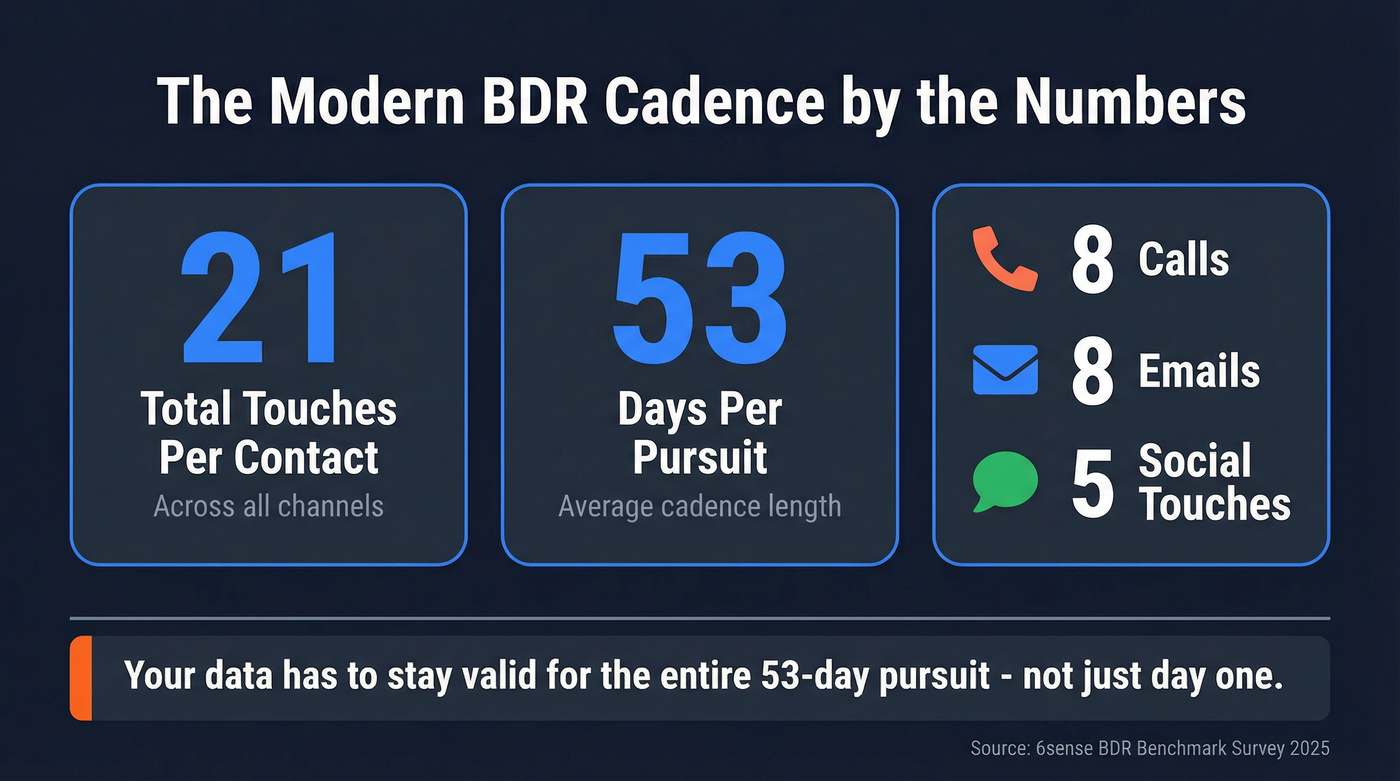
One widely cited benchmark (6sense's BDR benchmark survey) puts real numbers on it: 21 attempts per contact over about 53 days - roughly 8 calls, 8 emails, and 5 social touches per contact.
You're not "sending an email." You're running a 7-8 week pursuit, and your data has to stay valid the whole time.
So data gets used in three very specific ways:
Sequencing at scale Email deliverability and bounce rates decide whether your sequencer's an engine or a liability. Dirty lists don't just lose replies; they damage sender reputation and make every future campaign harder. (If you're auditing your stack, start with your cold email outreach tools.)
Call blocks and connect-rate math BDRs don't need "a phone number." They need a callable number that reaches the right person often enough to justify time. When connect rates drop, reps stop calling, and your "multichannel" motion quietly becomes email-only. (See answer rate benchmarks and fixes.)
Multithreading and routing If you're working 6-12 contacts per account, you need accurate titles, departments, and seniority to build a contact mix (economic buyer, champion, influencer, blocker). Bad titles create bad targeting, and bad targeting creates irrelevant outreach. (Related: ABM multi-threading.)
AI makes bad data worse faster. If your team uses AI to generate personalization at scale, dirty records don't create a few awkward emails - they scale mistakes instantly: wrong names, wrong roles, wrong regions, and higher spam-trap risk at volume. If you're scaling with AI, avoid these AI cold email personalization mistakes.
One more thing: contact data is the resource BDRs ask for first because intent without reachability is trivia.

You just read that bounce rates above 5% compound into domain damage and dying pipeline. Prospeo's 5-step verification and 7-day refresh cycle keep your BDR contact data under that 2% "excellent" benchmark - 98% email accuracy, 125M+ verified mobiles with 30% pickup rates, and zero reliance on third-party email providers.
Stop gambling with your domain. Start every cadence with data that holds up for 53 days.
What "good" bdr contact data looks like (benchmarks you can manage to)
Most teams manage contact data by vibes: "Reps are complaining less." That's not a metric. You need a small set of hygiene benchmarks you can track weekly.
Hygiene benchmarks you can actually run ops on
| Metric | Excellent | Good | Poor |
|---|---|---|---|
| Email bounce rate | <2% | 2-5% | >10% |
| Phone connect rate | >70% | 50-70% | <30% |
| Freshness (<=90 days) | >80% | 60-80% | <60% |
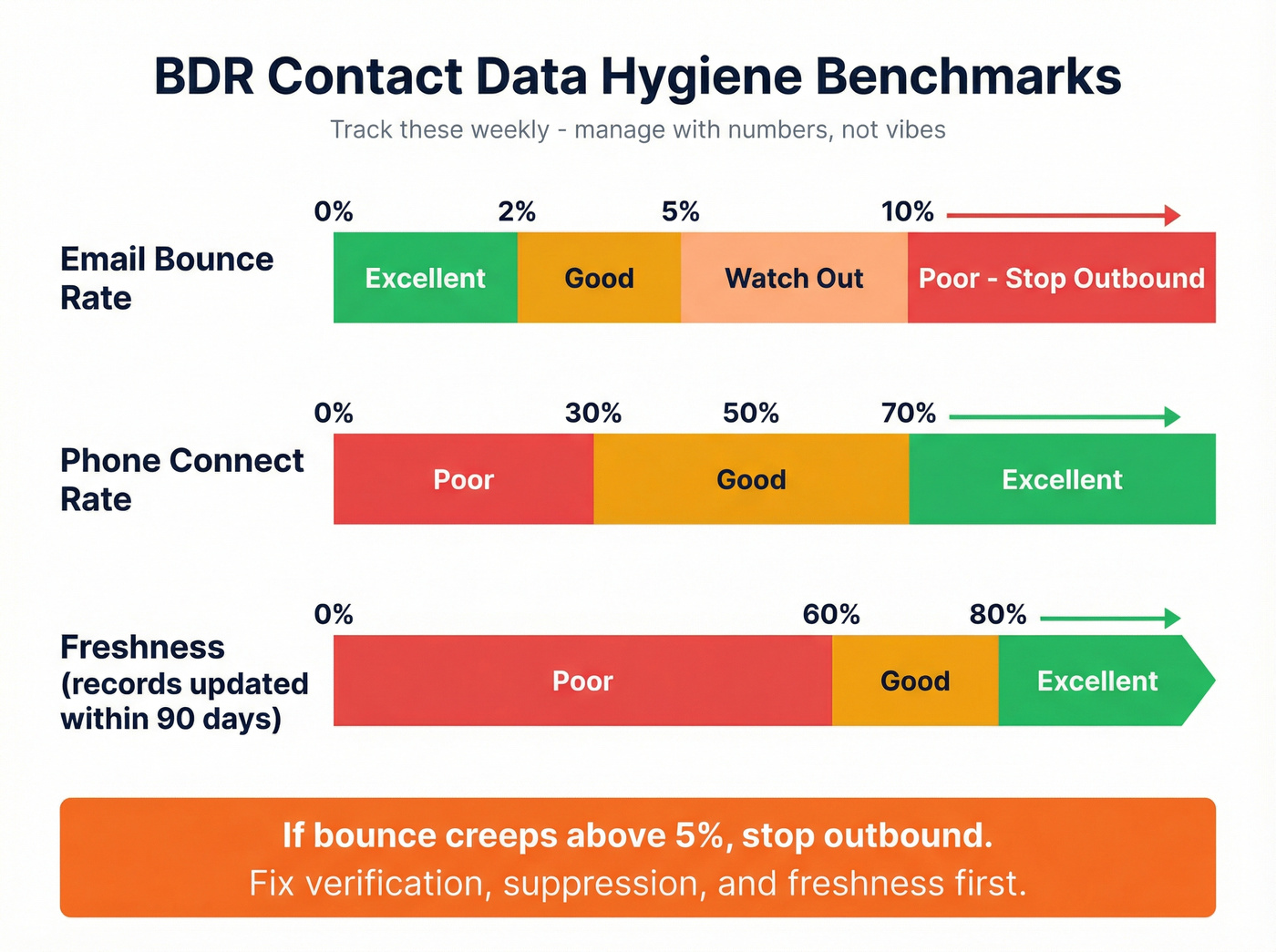
Connect-rate definition (so these numbers stay honest): this assumes phone-verified mobiles and measures "reached the intended person," not "any pickup." If you're using unverified direct dials, expect materially lower connect rates. (More on definitions in contact rate vs connect rate.)
Bounce rate's your canary. If bounce creeps above 5%, your outbound system starts compounding failure: reputation drops, spam placement rises, reply rates fall, and reps respond by sending more follow-ups to fewer real people. If you're diagnosing bounces, start with 550 Recipient Rejected.
What users complain about (even on top tools)
Vendor demos are clean. Real usage isn't.
- Apollo: "Inaccurate data" shows up a lot in user feedback. Treat Apollo as a workflow layer, then put verification in front of any export before you scale volume.
- ZoomInfo: "Outdated data" and "Inaccurate data" also show up frequently in user feedback. ZoomInfo can still be powerful, but it doesn't exempt you from QA and refresh.
Here's the thing: most teams don't have a "data provider problem." They have a "data operations problem." (If you're comparing vendors, use a broader shortlist from best B2B data providers.)
Use/skip guidance (so you don't buy the wrong thing)
- Use a verification-first setup if you run high-volume outbound or you've ever had a domain get flagged. You want verification before every campaign and a refresh cadence that matches active account work.
- Use a human-verified provider if your motion is phone-heavy and you need confidence in mobiles, especially in regulated regions. You trade speed for certainty.
- Skip "big database" thinking if your real problem is ops. I've run bake-offs where the "best database" lost because it created a mess in Salesforce: duplicates, conflicting titles, and stale phones within the first week.
- Disqualify any provider that can't tell you how often they refresh, what "verified" means, and how they handle suppression/DNC.
If they dodge those, the numbers in the demo don't matter.
Data decay is the real enemy: the math, the failure mode, and the refresh cadence
Everyone obsesses over "coverage." Decay is what kills you. (Deep dive: B2B contact data decay.)
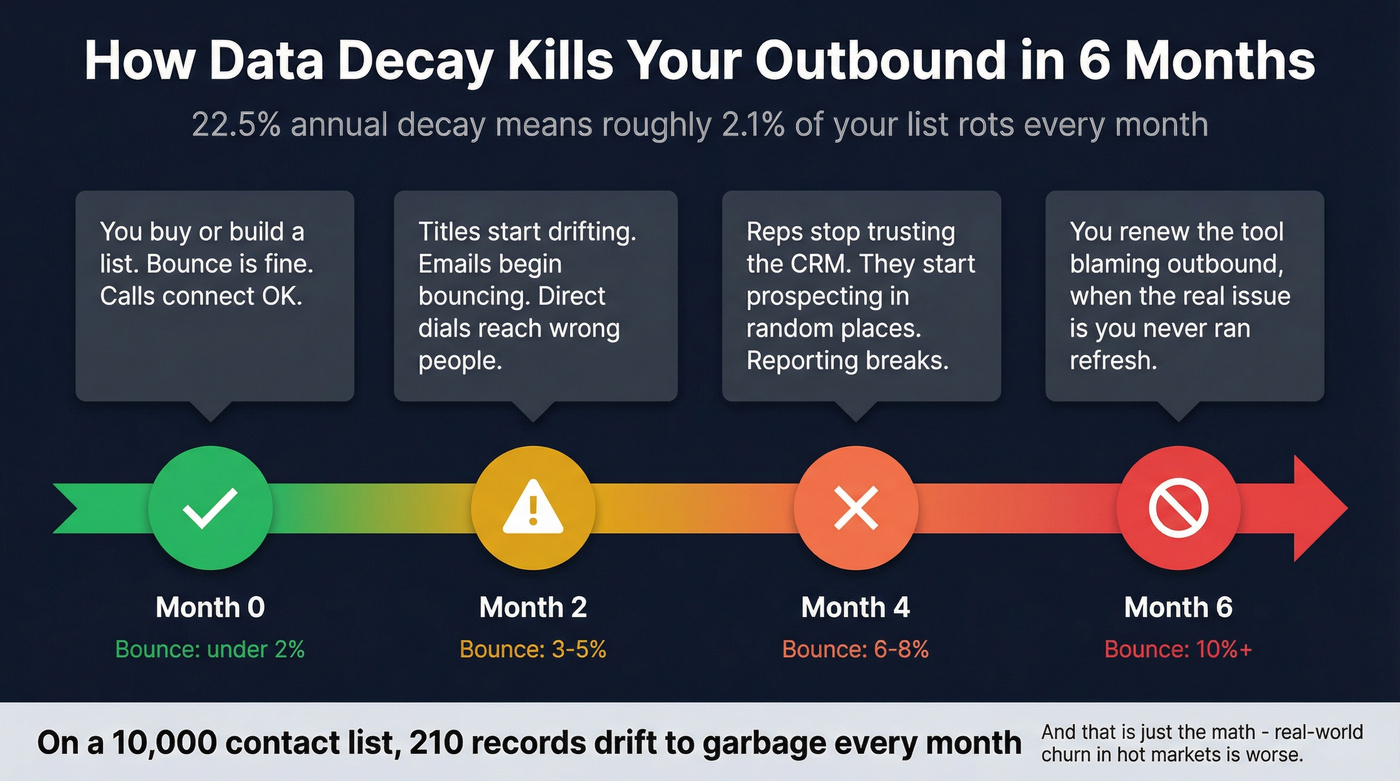
A practical baseline is 22.5% per year, about 2.1% per month. On a list of 10,000 contacts, that's roughly 210 records drifting into "maybe deliverable, probably wrong" every month even if your ICP never changes.
The failure mode's predictable:
- Month 0: You buy/build a list. Bounce is fine. Calls connect OK.
- Month 2: Titles drift. A chunk of emails start bouncing. Direct dials route to the wrong people.
- Month 4: Reps stop trusting the CRM and start prospecting in random places. Reporting breaks.
- Month 6: You renew the tool because "outbound isn't working," when the real issue is you never ran refresh as a process.
Field-level decay makes it worse because not all fields rot at the same rate: work emails decay faster than you'd like, titles drift constantly, and phone numbers get reassigned or routed through switchboards that waste call blocks.
The refresh cadence that actually works
- Real-time verification for net-new contacts (before they enter sequences)
- Weekly refresh for active target accounts (the ones you're working right now)
- Monthly refresh for Tier 1 segments (high-value verticals, high-turnover roles)
- Quarterly full re-verification for your broader database

A simple sanity check: if your CRM has 50,000 contacts, 2.1% monthly decay means about 1,050 records/month sliding toward partial garbage. If you don't have a refresh loop, you're not "maintaining data." You're accumulating debt.
Verification explained: email verification vs phone verification (and what "verified" must mean)
"Verified" is one of the most abused words in this category. Email verification and phone verification are different jobs, with different failure modes, and you should treat them as separate gates in your workflow.
Email verification: what it is (and what it isn't)
Email verification answers: will this email likely accept mail without bouncing or trapping us? Common checks include syntax and domain validation, mail server checks, catch-all detection, and risk filtering for role accounts and disposable domains. (If you’re choosing a tool, see email verifier websites.)

A deliverability benchmark from SalesHive found 17% of cold emails miss the primary inbox. Dirty lists make that worse fast, because bounces and complaints teach mailbox providers to distrust you.
Verification checks vs what they catch
| Check | Catches | Why you care |
|---|---|---|
| Syntax + domain validation | Typos, dead domains | Prevents instant bounces |
| MX/mail server checks | Non-receiving domains | Stops "looks real" failures |
| Catch-all detection | Domains that accept anything | Avoids false "valid" confidence |
| Role/disposable filters | info@, admin@, temp inboxes | Reduces complaints + junk replies |
| Spam-trap/honeypot filtering | Trap addresses | Protects sender reputation |
Phone verification: the only definition that counts
A "phone-verified mobile" should mean: the number was called and confirmed as belonging to the right person.
Anything else (pattern matching, carrier lookup, "likely valid") isn't phone verification. It's inference. (More: B2B phone number.)
This matters because call blocks are expensive. If your BDR spends 45 minutes dialing "direct dials" that route to the wrong person, you don't just lose connects - you lose belief in the channel, and then your whole motion collapses into email-only.
Common pitfalls that wreck outbound
Catch-all domains treated as "valid" Catch-all means the domain accepts mail for anything. It doesn't mean the inbox exists.
Verification done once, then forgotten Verification is time-bound. If your cadence runs 53 days, verifying a list once per quarter is asking for bounce creep.
Credits that charge you for junk Charging for "unknown" results is a tax on RevOps. You want clear statuses and export controls so only the right records enter your sequencer.
We've tested this in real workflows: the teams that win aren't the ones with the biggest database. They're the ones with the strictest gates.
UK + EU compliance for using B2B contact data (plain-English rules)
If you're prospecting in the UK/EU, compliance isn't a legal footnote. It changes what data you can use, who you can email, and how you can call. (Practical playbook: GDPR for Sales and Marketing.)
UK: the two-rule framework
- PECR covers direct marketing by calls and electronic mail (plus texts/faxes).
- UK GDPR applies when you're processing personal data for direct marketing, even in B2B.
The ICO's B2B marketing guidance has been under review following the Data (Use and Access) Act effective 19 June 2025, so don't run on "we've always done it this way." Build a process you can defend.
UK: corporate vs individual subscribers (this trips teams up)
- Corporate subscribers (companies and many incorporated entities): PECR rules for electronic mail marketing apply differently than for consumers.
- Individual subscribers: sole traders and some partnerships are treated like individuals, and stricter rules apply.
You can't just say "it's B2B, we're fine." You need to know what the recipient is.
UK calls: TPS/CTPS screening is non-negotiable
If you're making live marketing calls in the UK:
- Screen against TPS and CTPS
- Identify yourself and provide contact details
- Display your number
- Respect objections immediately (and keep a suppression list)
EU: same GDPR backbone, different ePrivacy edges
Across the EU, you're still operating under GDPR, but the "direct marketing by email/phone" details vary by country due to local ePrivacy implementation and enforcement norms. Operationally, that means you build one baseline that travels (suppression everywhere, documented lawful basis, an Article 14 process for sourced data, retention rules), then tighten per country as you scale.
I've seen teams do compliance theater (a checkbox in a spreadsheet) and still get burned because suppression wasn't enforced across tools. Policy doesn't save you. Systems do.
How to evaluate contact data providers in 7 days (QA checklist + sampling plan)
Most teams evaluate contact data providers the wrong way: a rep searches for 10 contacts they already know, sees a few hits, and declares victory.
You need a QA plan that looks like production, because production is where duplicates, stale titles, and "verified" emails that still bounce show up.
Day 1: Define acceptance criteria (before the demo glow)
Pick pass/fail thresholds:
- Bounce rate on verified exports: target <2% (hard fail at >5%)
- Phone connect rate: target 50-70% baseline, with a path to >70% for phone-verified mobile products
- Freshness: >80% updated within 90 days for your active segments
- Match rate on enrichment: set a minimum (example: >=75% for your ICP)
Day 2: Build a stratified sample (200 contacts)
Sampling plan that works:
- 200 contacts total
- Split across 4 segments (50 each), for example:
- NA SaaS, director+
- UK/EU, IT/security
- Mid-market ops roles (high turnover)
- Enterprise finance/procurement (harder to reach)
- Include both net-new accounts and accounts already in your CRM (to test dedupe + enrichment)
Day 3-4: Run the same workflow you'll run in production
- Export contacts
- Verify emails (or use their "verified" flag, but track outcomes)
- Enrich missing fields (mobiles, titles, firmographics)
- Push into CRM + sequencer
- Enforce suppression (opt-outs, bounces, DNC)
Day 5: Measure outcomes (not vendor screenshots)
Track:
- Bounce rate by segment
- % of contacts with a mobile/direct dial
- Connect rate on the first call block (to intended person)
- Duplicate creation rate in CRM
- Title accuracy spot-check (20 random records)
A quick scenario we've seen: a team tests one vendor on NA SaaS and it looks great, then rolls it out to UK IT and the connect rate falls off a cliff because the "direct dials" aren't really direct and the compliance workflow isn't set up. Segment-level QA prevents that faceplant.
Day 6: Compliance and ops due diligence (ask for receipts)
Demand capabilities that map to real requirements:
- DNC scrubbing (including UK TPS/CTPS if you call the UK)
- Article 14 notice process (for sourced data)
- DSAR handling
- Security posture (ISO 27001 and SOC 2 Type II are common baselines)
- Suppression and opt-out enforcement
Day 7: Decide with a simple scorecard
Use a scorecard that forces a decision.
| Category | Weight | Score (1-5) | Notes |
|---|---|---|---|
| Deliverability outcomes (bounce + inboxing) | 30% | ||
| Phone outcomes (connect to intended person) | 25% | ||
| Freshness + refresh cadence | 15% | ||
| Compliance ops (DNC, Art.14, DSAR, security) | 15% | ||
| Workflow fit (CRM write rules, API, dedupe) | 15% |
Also ask every vendor their re-verification cadence. If your cadence runs 53 days and your market has high turnover, "we refresh every 90 days" won't feel like a promise. It'll feel like lag.
Buying models & pricing reality (so you don't get surprised)
Pricing is where good intentions go to die. The demo is all "coverage." The contract is all credits, overages, and modules.
Pricing models at a glance
| Model | Best for | Typical cost | Gotcha |
|---|---|---|---|
| Self-serve credits | SMB + ops | $50-$200/user/mo | Credit burn + inconsistent usage |
| Data suites | Mid/ent | $15k-$60k/yr | Annual lock-in + modules |
| ABM/intent suites | Enterprise | $30k-$120k+/yr | Paying for bloat you don't activate |
| Unlimited/user | Big teams | $20k-$80k/yr | "Unlimited" still has fair-use limits |
Concrete examples (so you can do the math)
Prospeo (credits, transparent, no contracts) Prospeo ("The B2B data platform built for accuracy") is one of the cleanest fits for a verification-first workflow because it combines real-time verification (98% email accuracy), enrichment, and a 7-day refresh cycle in a self-serve model that doesn't punish you for doing weekly hygiene.
- Unit economics: ~$0.01/email, 10 credits per mobile
- Free tier: 75 emails + 100 extension credits/month
- Data + workflow: 300M+ professional profiles, 143M+ verified emails, 125M+ verified mobile numbers
- Enrichment: 92% API match rate, 83% enrichment match rate, 50+ data points per enrichment
Derrick (Sheets-native credits)
- Email finder: 5 credits
- Phone finder: 150 credits
- Email verifier: 1 credit
- Pricing signal: free plan (about 200 credits), then roughly EUR9-EUR175/month depending on volume Great for lightweight enrichment experiments. If you're phone-heavy, the phone credits disappear fast.
SalesIntel (suite pricing) Pricing often lands in the $15k-$50k/year range depending on seats and scope. It's a fit for teams that want a suite buying model and value human verification, but you still need strict CRM write rules (dedupe, field precedence, and re-verification gates).
Cognism (EMEA-friendly suite pricing) Often $20k-$80k/year depending on regions, seats, and phone scope. It's a fit for call-heavy teams, especially in EMEA, that want phone-verified mobiles plus compliance operations like TPS/CTPS scrubbing and an Article 14 process.
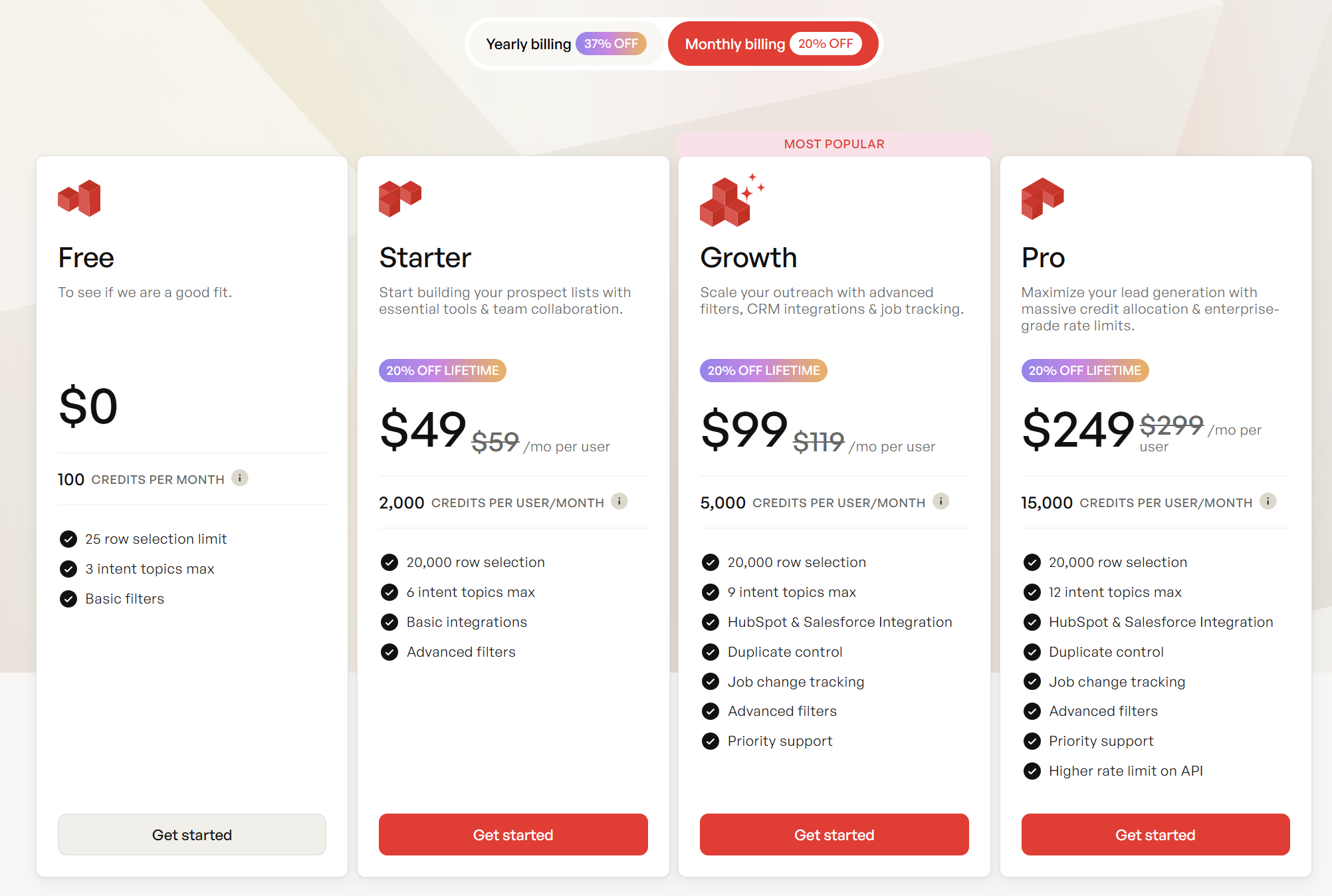
Apollo (per-seat pricing) Commonly $49-$119/user/month for paid tiers, with higher plans moving into a few hundred per user per month. It's easy for reps to adopt, but quality variance means you should still run verification + suppression before sequencing.
People Data Labs (API usage-based pricing) Often $500-$5,000+/month depending on API volume and endpoints. It's a fit for data pipelines and enrichment at scale (warehouse backfills, product-led enrichment), less for rep-driven prospecting.
Tier 3 "where it fits / where it doesn't" notes (fast, honest)
- ZoomInfo (suite): often $15k-$60k/year for many mid-market setups, higher with modules. Fits teams that will use the breadth. Doesn't fit teams that only need clean emails + a few mobiles.
- 6sense (ABM/intent): often $60k-$200k+/year. Fits account-based orchestration. Doesn't fit "we just need better reachability."
- Lusha (quick enrichment): often $39-$99/user/month plus higher tiers. Fits ad-hoc lookups. Doesn't fit systematic QA + refresh operations.
- Anteriad (data + managed activation/services): often $25k-$150k/year depending on scope. Fits global expansion and teams that want managed activation. Doesn't fit teams that want pure self-serve ops control.
Rule of thumb: operators who care about deliverability run a verification-first layer and treat every database as raw material, not truth. That mindset beats brand names.
If you refresh weekly, don't buy a model that punishes refresh. You'll either stop refreshing (and decay wins) or you'll blow your budget (and finance kills the program).
Your MVR needs verified emails, callable mobiles, fresh titles, and suppression-ready ops fields. Prospeo returns 50+ data points per contact at a 92% match rate - enriching your CRM with records refreshed weekly, not monthly. At $0.01/email, cleaning up your BDR data costs less than one bounced sequence.
Replace your spreadsheet org with contact data that routes, dedupes, and actually connects.
FAQ: BDR contact data
What's the difference between BDR contact data and lead enrichment?
BDR contact data is the person + company record used for outreach (deliverable email, callable phone, title, firmographics, and ops fields). Lead enrichment is the process of updating or filling missing fields on an existing record.
What bounce rate is "too high" for cold outbound?
Anything above 10% bounce is operationally broken and will damage deliverability fast. 2-5% is workable for many teams, and <2% is the standard for verified exports. If you're consistently above 5%, stop scaling volume and fix verification, suppression, and freshness first.
How often should you refresh B2B contact data?
Weekly refresh for active target accounts, monthly refresh for your highest-value segments, and quarterly re-verification for the broader database is a practical cadence. With decay running ~2.1% per month, a "set it and forget it" list becomes unreliable within a quarter.
What does UK TPS/CTPS screening apply to?
TPS/CTPS screening applies to live marketing calls in the UK. Screen numbers before dialing, identify your business, display your number, and log objections immediately into suppression.
What's a good free tool to verify emails before outbound (and avoid bounces)?
Start with a verifier that gives clear statuses and lets you export only "valid" results. Prospeo's free tier includes 75 email credits/month plus 100 extension credits and runs real-time verification with 98% accuracy.
Summary: run bdr contact data like a system, not a purchase
If you want bdr contact data that holds up in a 53-day, multi-touch cadence, stop treating it like a one-time import. Set bounce/connect/freshness benchmarks, verify before every campaign, enforce one suppression list across tools, and refresh weekly for active accounts.
That's how you keep trust high, protect deliverability, and turn "coverage" into conversations.