The Trial-to-Paid Email Sequence That Actually Converts (2026 Templates)
Two hundred people sign up for your trial this month. Sixteen convert. That's the median 8% free-to-paid conversion rate across 200 B2B software products, per ChartMogul's January 2026 study. The other 184 signups? They got your welcome email, poked around for a day, and ghosted. Your trial-to-paid email sequence didn't fail because you wrote bad copy - it failed because it read like a notification log instead of a conversion engine.
Most trial email sequences are product updates on a timer. "Day 1: Welcome! Day 3: Did you know about Feature X? Day 7: Still there?" That's not a sequence. That's a changelog with a mail merge. The sequences that actually convert treat every email like a sales conversation - one that responds to what the user did or didn't do, builds toward a single activation moment, and saves the hardest pitch for when it matters most.
What You Need (Quick Version)
- Your benchmark: median trial-to-paid is 8%. Credit-card-required trials hit ~30%. If you're below 4%, the sequence matters, but onboarding and activation likely matter more.
- A strong default: 7 emails across a 14-day trial. One team saw a 60% engagement lift just by trimming from a 15-email onboarding sequence to a focused flow.
- The money email: your trial-ending pitch (Email 6) is the closest point to revenue in your entire sequence. Spend your best copy there.
- Behavior beats drip: trigger emails based on what users do, not just what day it is. A well-designed problem-solution email drip sequence responds to user pain points in real time rather than firing on a fixed calendar.
- Verify before you send: bad addresses and bounces hurt sender reputation across your entire domain. Run your list through an email verification tool before activating any sequence.
2026 Conversion Benchmarks
Let's ground this in real numbers. The 2026 ChartMogul conversion report analyzed 200 B2B software products and found massive variance depending on trial model.
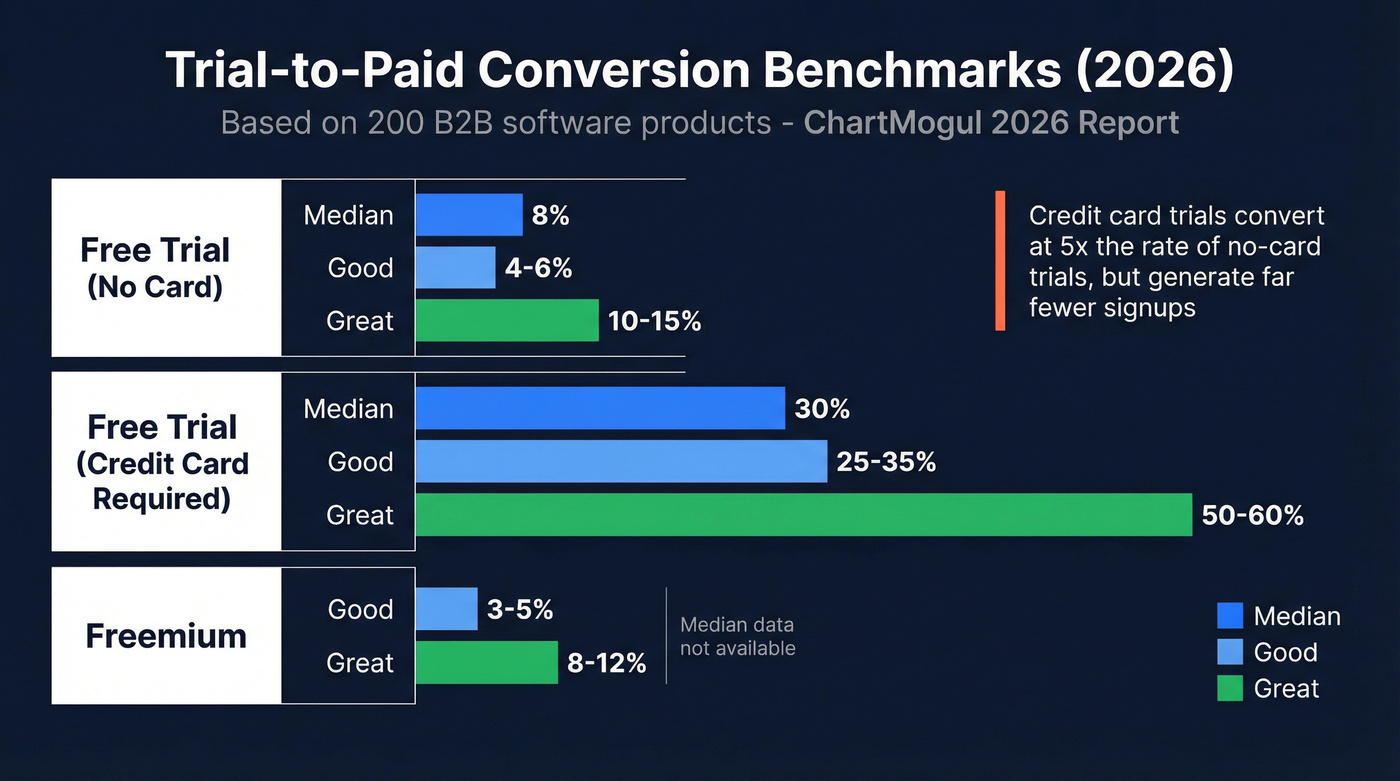
| Model | Good | Great | Median |
|---|---|---|---|
| Free trial (no card) | 4-6% | 10-15% | ~8% |
| Free trial (credit card) | 25-35% | 50-60% | ~30% |
| Freemium | 3-5% | 8-12% | - |
The credit card gap is staggering. Requiring a card upfront filters out tire-kickers, which is why those trials convert at 5x+ the rate of no-card trials. But you get far fewer signups, so the math isn't as simple as "just require a card."
Where do you fall? The same study found 20% of products convert below 2.5%, 30% sit between 2.5-7.5%, and only 23% break 25%. If you're in that bottom fifth, your email sequence isn't the bottleneck - your product-market fit or onboarding flow is.
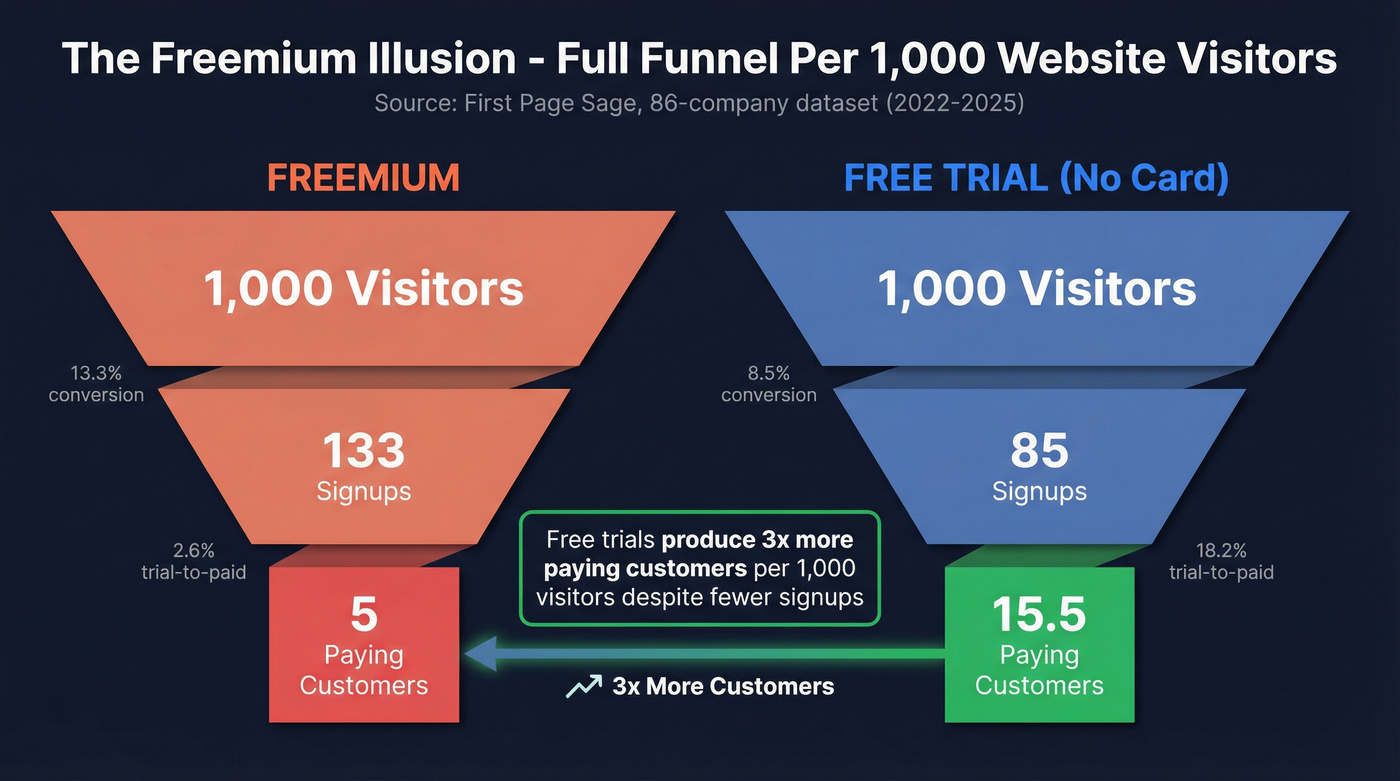
First Page Sage's 86-company dataset (2022-2025) breaks this down further by looking at the full funnel:
| Trial Type | Visitor to Trial | Trial to Paid |
|---|---|---|
| Opt-in (no card) | 8.5% | 18.2% |
| Opt-out (card required) | 2.5% | 48.8% |
| Freemium | 13.3% | 2.6% |
Here's the number that should change how you think about freemium: per 1,000 website visitors, freemium generates 90 signups but only 5 paying customers. Free trials generate 45 signups and 3.6 customers. The signup volume advantage of freemium nearly disappears when you look at the full funnel - and the email sequence burden is dramatically higher because you're nurturing 2x the users for fewer conversions.
Industry matters too. CRM products average 29% trial-to-paid. HR software sits at 22.7%. AdTech lands at 24.3%. If you're in a category where the product's value is immediately obvious - a CRM that shows you your own pipeline, a dashboard that lights up with your data - conversion rates run higher regardless of email quality.
Before You Write a Single Email
Here's the thing: your email sequence is downstream of four decisions that matter more than any subject line. Get these wrong and no amount of copywriting saves you.
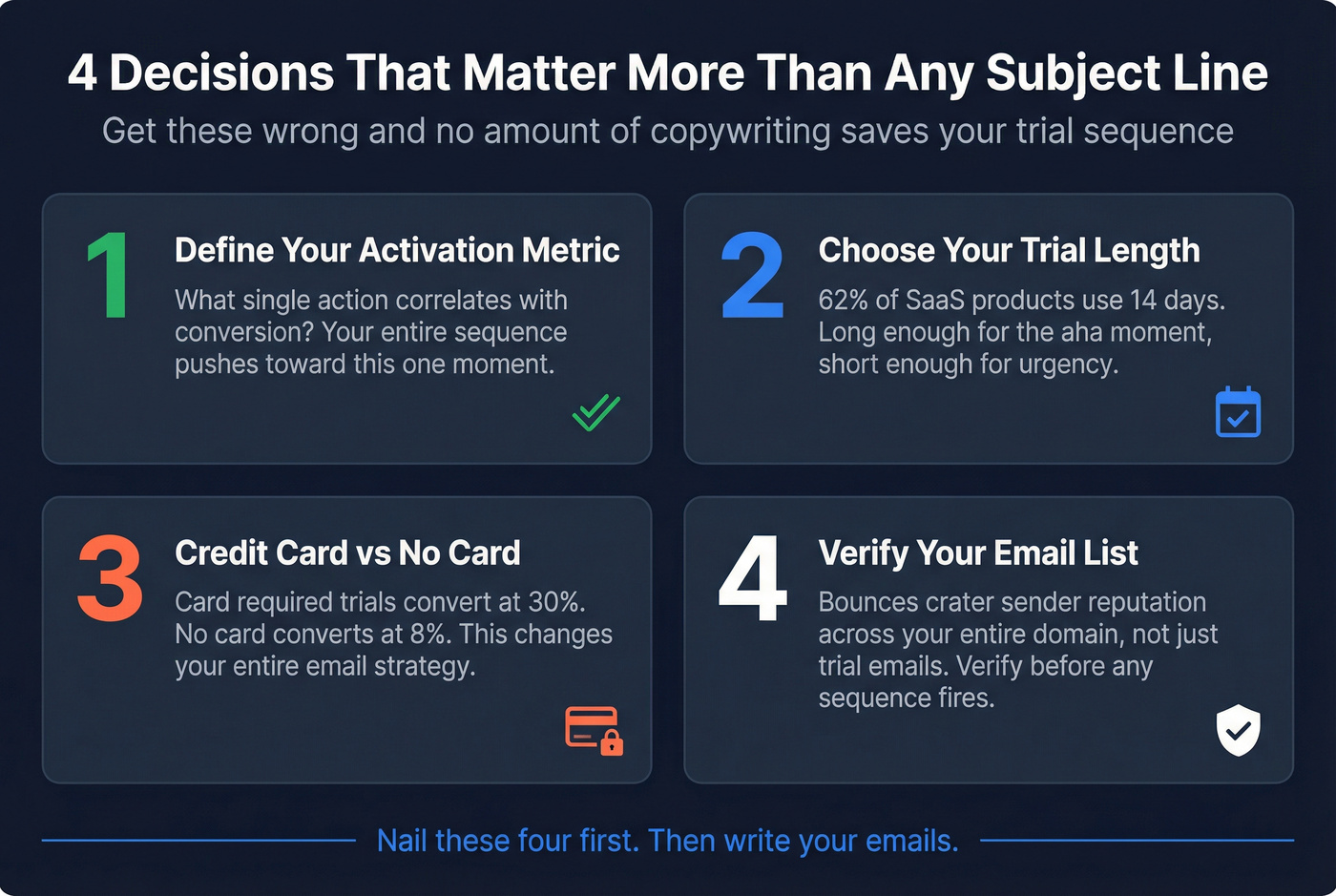
Define your activation metric. What's the single action that correlates with conversion? Your entire sequence should push users toward this one moment - not tour them through every feature. If you don't know your activation metric, stop reading this article and go find it. The sequence can wait.
Choose your trial length. 62% of SaaS products use 14 days. That's the default for a reason - long enough to reach the aha moment but short enough to create urgency. Seven-day trials work for simple products. Thirty-day trials work for complex enterprise tools. Everything else should default to 14.
Decide on credit card vs. no card. This changes your entire sequence strategy. Credit card trials convert at ~30%, so your emails are mostly about activation and reducing churn. No-card trials convert at ~6-8%, meaning your emails need to sell harder, especially in the final days. The templates below assume a no-card, 14-day trial. Adjust aggressiveness accordingly.
Verify your email list before activating any sequence. Your trial sequence is only as good as your data. Bounces spike and sender reputation craters across your entire domain - not just for trial emails, but for every email you send. Run your signup list through a verification tool that catches invalid addresses, spam traps, and catch-all domains before a single sequence email fires.


You just read it: bounces crater sender reputation across your entire domain - not just trial emails. Prospeo's 5-step verification catches invalid addresses, spam traps, and catch-all domains before your sequence fires. At 98% email accuracy and $0.01 per verified address, one bad batch costs more than a year of verification.
Protect every email in your trial sequence - verify before you send.
The 7-Email Sequence Framework
Here's the complete framework. Each email has one job, one CTA, and a specific trigger for when it sends. We've built this around a 14-day no-card trial - adapt the timing for your trial length using the cadence table later in this piece.
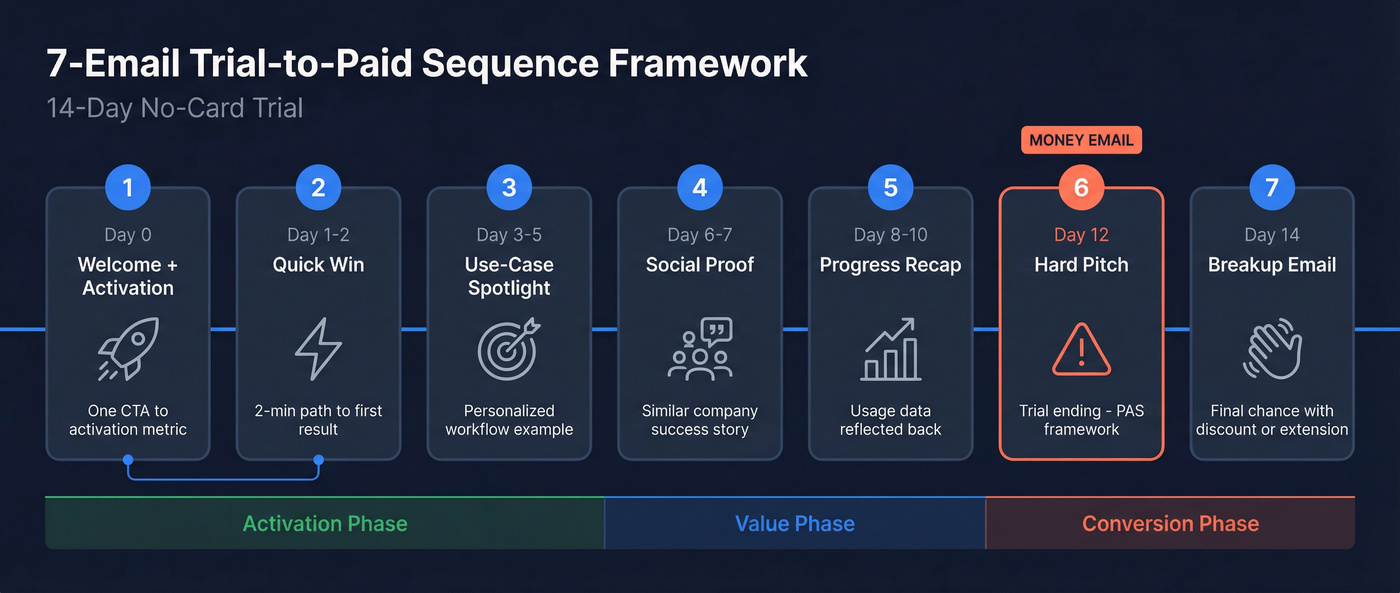
Email 1: Welcome + Activation (Day 0)
Subject line: Welcome to [Product]! Here's your first step (1/7)
Clay does this well. Their onboarding sequence uses explicit numbering ("Welcome to Clay! 1/6") so users know what to expect and don't feel ambushed by random emails later. Steal this pattern.
Body framework: Two sentences of genuine welcome. Then one sentence naming the activation metric. Then one button.
Hey [Name],
You're in. [Product] is ready for you.
The teams that get the most value do one thing first: [specific activation action]. It takes about 3 minutes.
[Button: Do [activation action] now]
You'll get 6 more emails from me over the next 14 days - each one focused on helping you get results, not selling you stuff. Talk soon.
One CTA. Not "explore the dashboard" AND "join our community" AND "book a demo." One action - the action that correlates with conversion.
Email 2: Quick Win (Day 1-2)
Subject line: Try this in [Product] - takes 2 minutes (2/7)
This email exists to deliver value before the user forgets you exist. Pick the single fastest path to a tangible result.
Body framework: Name a specific outcome. Show the 3-step path to get there. Include a screenshot or GIF if possible.
Most [role] teams start by [specific quick action]. Here's how:
- Go to [specific screen]
- Click [specific button]
- You'll see [specific result]
That's it. You just [outcome that matters to them].
[Button: Try it now]
Don't explain the feature. Show the outcome. "You just saved 2 hours of manual research" beats "Our enrichment engine uses 50+ data sources" every single time.
Email 3: Use-Case Spotlight (Day 3-5)
Subject line: [Specific use case] teams use [Product] for this (3/7)
This is where personalization earns its keep. One company changed a single welcome-email line to reference the user's specific use case and saw response rates jump from 8% to 31%. That's not "Hi {first_name}" personalization - that's use-case personalization.
If you captured the user's role or use case during signup, reference it directly. If not, pick your most common use case.
[Name], since you're in [role/industry], here's what similar teams do with [Product]:
[One specific workflow, described in 2-3 sentences with concrete numbers]
[Button: Set up [feature]]
The goal isn't to show off features. It's to help the user see themselves succeeding with your product. You name the pain the user walked in with and show them the path through it.
Email 4: Social Proof (Day 6-7)
Generic testimonials don't convert. "Great product! - John D." is worthless. What works is "similar companies" framing - proof from someone the reader identifies with.
Subject line: How [similar company type] got [specific result] (4/7)
Teams like yours - [industry, size, or use case] - typically hit [specific result] within the first month.
[Company name], a [brief descriptor], [specific result with numbers]. They started by [specific action the reader can also take].
You're on day 7 of your trial. Here's how to get the same result:
[Button: [Specific action]]
Email 5: Progress Recap (Day 8-10)
Subject line: Here's what you've built so far (5/7)
This email works best when it's data-driven. Pull actual usage data from the trial and reflect it back. ActiveCampaign does this by showing integration counts and estimated ROI - "You've connected 4 apps and automated 12 workflows. That's roughly 6 hours saved this week."
If you can pull usage data, lead with it. If you can't, reference the actions you know they've taken based on behavioral triggers.
[Name], quick snapshot of your trial so far:
- [Estimated value]: [time/money saved]
You're [ahead of / on track with] most teams at this point. The next step that drives the biggest impact: [specific action].
[Button: [Action]]
Email 6: Trial Ending - Hard Pitch (Day 12)
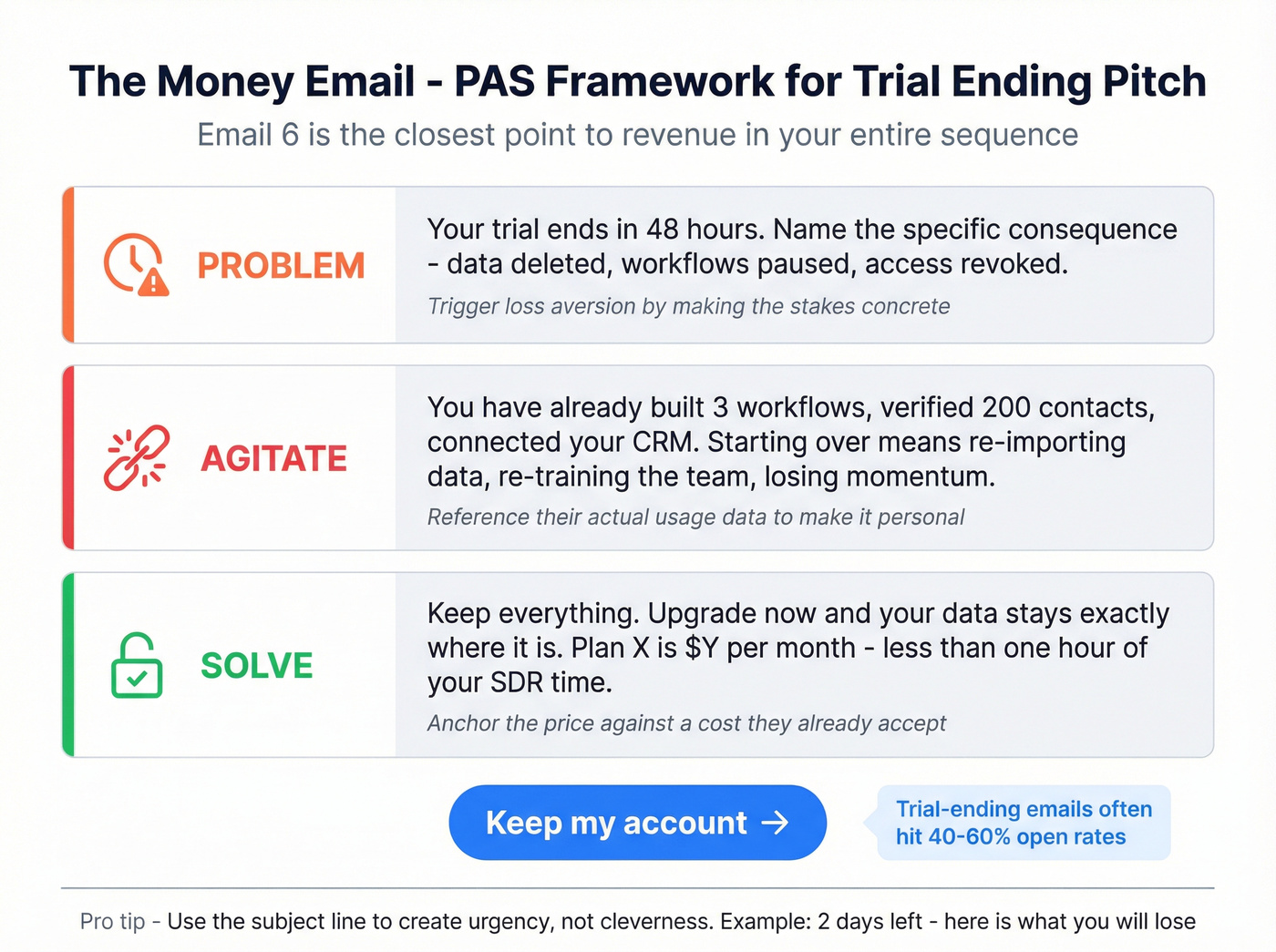
This is the money email. Sophia Le at Copyhackers calls it the "closest point to revenue" in your entire trial sequence. Everything before this was nurture. This is the sell.
Subject line: 2 days left - here's what you'll lose
Use the PAS (Problem-Agitate-Solve) framework. It works because it mirrors the user's actual mental state: they know the trial is ending, they feel the tension, and they need a reason to act now.
Problem: Your trial ends in 48 hours. After that, [specific consequence - data deleted, workflows paused, access revoked].
Agitate: You've already [reference their usage - "built 3 workflows," "verified 200 contacts," "connected your CRM"]. Starting over with another tool means [specific pain - re-importing data, re-training the team, losing momentum].
Solve: Keep everything. Upgrade now and your [data/workflows/settings] stay exactly where they are.
[Plan name] is [$X/mo] - that's [contrast: "less than one hour of your SDR's time" or "the cost of two bad leads"].
[Button: Keep my account]
ActiveCampaign's version uses "Don't lose access to your free trial account" as the subject line - direct, loss-averse, no cleverness. Trial-ending emails often land in the 40-60% open-rate range for engaged cohorts because the urgency is real, not manufactured.
Real talk: if your no-card conversion rate is under 5%, this email isn't your problem. Your activation metric is. No amount of PAS copywriting converts a user who never experienced the product's core value. Fix the aha moment first, then optimize the pitch.
Email 7: Last Day - Final Push (Day 14)
Subject line: Your trial ends tonight
Short. Urgent. No new information. Just the deadline and the button.
[Name],
Your [Product] trial expires at midnight tonight. After that:
- [Consequence 1: data deleted / features locked]
- [Consequence 2: team access revoked]
- [Consequence 3: integrations disconnected]
[Button: Upgrade now - keep everything]
If you're not ready, no hard feelings. But if you've been meaning to upgrade, this is the moment.
Don't add a discount here unless it's your deliberate strategy. Discounting on the last day trains users to wait for the discount. If you do offer one, make it time-bound ("this link expires in 12 hours") and don't repeat it.
Adapting Cadence by Trial Length
Not every product runs a 14-day trial. Here's how to compress or expand the framework:
| 7-Day Trial | 14-Day Trial | 30-Day Trial | |
|---|---|---|---|
| 1: Welcome | Day 0 | Day 0 | Day 0 |
| 2: Quick Win | Day 1 | Day 1-2 | Day 2-3 |
| 3: Feature | Day 2 (merge w/ #2) | Day 3-5 | Day 5-7 |
| 4: Social Proof | Day 3 | Day 6-7 | Day 10-12 |
| 5: Progress | Skip | Day 8-10 | Day 15-18 |
| 6: Hard Pitch | Day 5 | Day 12 | Day 27 |
| 7: Last Day | Day 7 | Day 14 | Day 30 |
For 7-day trials, combine the quick win and feature spotlight into one email and skip the progress recap entirely. There's no time for a mid-trial check-in when the trial is already half over by day 3.
For 30-day trials, add a re-engagement touchpoint around day 15-20. Users who haven't logged in for a week by that point are ghosts - send a "we noticed you haven't been back" email with a fresh angle or a direct offer to hop on a call. 62% of SaaS products use 14-day trials for good reason: longer trials don't automatically mean higher conversion. They often mean more disengagement.
Behavior-Based Branching
Time-based sequences are the floor. Behavior-based sequences are where conversion rates actually move. Instead of "send Email 3 on Day 4," you send Email 3 when the user completes their first workflow - or send a different email entirely if they haven't logged in at all.
Here are the triggers that matter most:
No login after 24 hours. Send a "need help getting started?" email with a direct link to the activation action. Skip the feature tour.
Completed onboarding but hasn't used core feature. Send the feature spotlight (Email 3) immediately, regardless of what day it is. The calendar doesn't matter; the user's behavior does.
Power user who hasn't seen pricing. Send the social proof email (Email 4) early, then accelerate to the hard pitch. These users don't need nurturing - they need a reason to buy. Delaying the ask for a power user is leaving money on the table.
Ghost - no activity after 7 days. Pull them out of the main sequence entirely. Send one re-engagement email. If no response, stop emailing. You're burning sender reputation on dead addresses.
For analytics, Mixpanel and Amplitude track the in-product behavior. For automation, Customer.io and HubSpot handle the branching logic. The key is connecting the two - your email tool needs to know what happened inside the product, not just whether the user opened the last email.
A clean way to start: split users into "Behavioral Segmentation" segments and send different sequences to each. The inactive sequence is shorter, more direct, and focused entirely on getting one login. The active sequence is the full 7-email framework above.
We've seen this play out with our own users. Teams that segment by engagement before sending any sequence consistently report lower unsubscribe rates and higher reply rates than teams blasting the same cadence to everyone.
And yes - founders love sharing outlier wins. There's an r/indiehackers thread about a 7-email sequence that converts 31% of trials to paid. Treat that as what it is: a high-performing example in the wild, not a universal benchmark.
A note on AI-generated personalization: tools like GPT-powered email writers can help you draft variants for different segments faster, but don't let them write your trial-ending pitch. Email 6 needs to sound like a human who understands the user's specific situation. Use AI for the first draft of segment-specific quick wins; write the money email yourself. If you're exploring this, start with AI Personalized Email Sequences and AI Drip Campaigns.
5 Mistakes That Kill Conversions
1. Too many emails. One team ran a 15-email onboarding sequence. They cut it to a focused two-step process and saw 60% higher engagement. Seven emails is a strong default for a 14-day trial. If you're sending more, you're training users to ignore you.
2. "Hi {first_name}" isn't personalization. Use-case personalization - referencing the user's industry, role, or specific workflow - is what moves numbers. One team changed a single line to reference the user's use case and saw response rates jump from 8% to 31%. That's the kind of personalization worth investing in. (More on the mechanics: Personalization in Outbound Sales.)
3. Multiple CTAs per email. Every email gets one button. One action. The moment you add "also check out our webinar" or "join our Slack community," you've split attention and killed conversion.
4. Sending to disengaged users. If someone hasn't logged in for 10 days, sending them Email 6 is a waste. Worse, it trains spam filters. Segment your sequence so disengaged users get a re-engagement branch, not the same emails as power users. If you need copy ideas, use these re-engagement email subject lines.
5. Ignoring bounce rates. If your bounce rate is above 3%, stop optimizing copy and fix your data. Verify your entire trial signup list before activating any sequence - Prospeo's 5-step verification catches invalid addresses, spam traps, and catch-all domains at 98% accuracy, with data refreshed every 7 days. One bad bounce-rate spike can crater deliverability for every email your company sends, not just trial sequences. If you want a deeper deliverability playbook, use this Email Deliverability Checklist and the guide on Hard Bounce.
FAQ
How many emails should a trial-to-paid sequence include?
Five to seven emails for a 14-day trial is the proven default. Data shows trimming a 15-email sequence to fewer focused emails increased engagement by 60%. Each email needs one clear CTA and one specific job - welcome, activate, prove value, pitch. More emails means more unsubscribes, not more conversions.
What's a good conversion rate in 2026?
For opt-in trials without a credit card, 10-15% is great and 4-6% is good per ChartMogul's 200-product study. Credit card trials should target 25-35%. The median across all products is 8%. CRM products average 29%, while freemium models convert at just 2.6%.
Should I require a credit card for my free trial?
Credit card trials convert at ~30% vs ~6-8% for no-card trials, but they get dramatically fewer signups. If your product's value is obvious within minutes - a tool that shows you your own data immediately - require a card. If the aha moment takes a few sessions, go opt-in and invest in the email sequence to do the selling.
How do I keep trial emails out of spam?
Verify your signup list before activating any sequence. Invalid emails spike bounce rates, which damages sender reputation across your entire domain. Use a tool with catch-all domain verification and spam-trap removal - and re-verify regularly, especially if signups come from ungated forms.
Building a trial-to-paid sequence that converts above 8%? It starts with reaching real inboxes. Prospeo verifies 143M+ emails on a 7-day refresh cycle, removes spam traps and honeypots, and handles catch-all domains - so your carefully crafted activation emails actually land.
Stop losing conversions to bounced emails. Start with clean data.